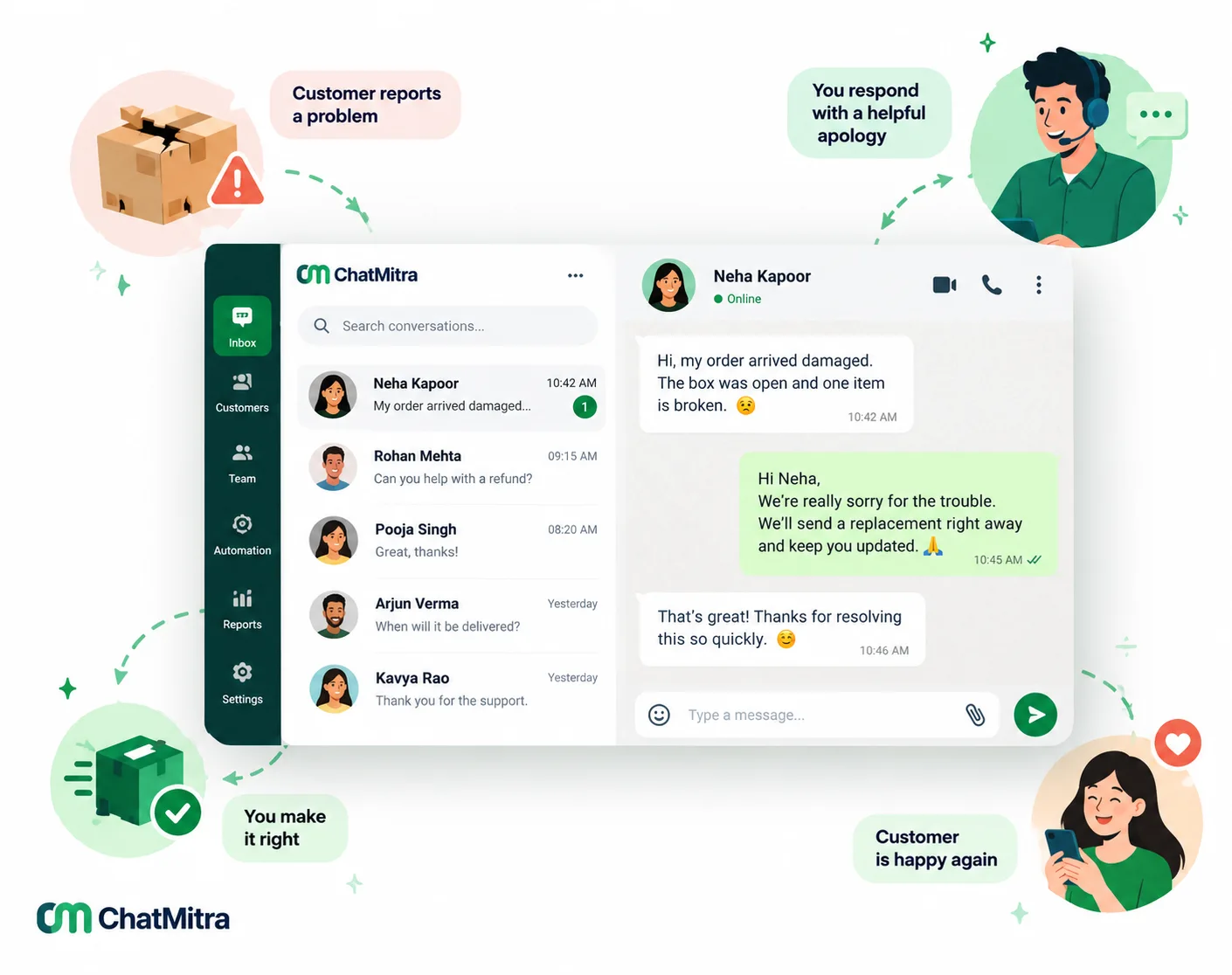
An apology message to a customer should do four things in a few lines: name the specific problem, take responsibility without excuses, say what you have already done to fix it, and tell the customer what happens next. Send it quickly, on the channel where the problem happened, signed by a real person.
Below are 40 apology messages you can adapt, grouped by what went wrong, from late deliveries to your own messaging mistakes. After them come email versions, review replies and the rules for sending apologies on WhatsApp.
Key takeaways
- Specific beats sincere-sounding. "Your order 4821 left two days late" says more than "sorry for any inconvenience".
- Fix first, then apologise, and say what you fixed. An apology with no action is only half an answer.
- Get your WhatsApp apology templates approved before you need them. Review can take up to 24 hours.
Facts checked against Meta's WhatsApp Business Platform documentation and rate card, the WhatsApp Business Messaging Policy, Google Business Profile Help and India's Consumer Protection (E-Commerce) Rules on 27 September 2026. Rupee figures are Meta's India rates and exclude tax.
What makes an apology message to a customer work?
Customers remember whether the problem was fixed and whether they had to chase you, not the wording. A message that works has five parts:
| Part | What it sounds like | What to avoid |
|---|---|---|
| 1. Name the problem | "Your order arrived without the charger." | "Any inconvenience", "the issue", "your recent experience" |
| 2. Take responsibility | "That's our mistake." / "I'm sorry we got this wrong." | "Sorry if you feel…", "mistakes were made", blaming the courier |
| 3. Say what you've done | "The charger was dispatched this morning." | "We're looking into it" with no date |
| 4. Say what happens next | "It reaches you by Thursday; I'll message you the tracking link." | Promises you can't keep |
| 5. Keep the door open | "Reply here and I'll handle it myself. – Arjun" | "Do not reply to this message", no named sender |
Keep any explanation to one sentence. Write as you’d speak across a counter, “I’m sorry” rather than “We regret to inform you”, and sign it. “I’m sorry” from Arjun lands better than “The management apologises”.
How to apologise to a customer, step by step
- Check the facts. Open the order, chat or booking first. Apologising for the wrong thing is worse than a short delay.
- Decide the fix. Replacement, refund, new slot or corrected invoice. The message should report a decision, not ask the customer to wait for one.
- Pick the channel and the sender. Answer where the customer complained, from a named person; escalate to a manager or a call for serious harm.
- Send it quickly. If the fix will take time, send a holding message now (“I’m on it; I’ll update you by 4 pm”).
- Record the promise on the customer’s record, so the next person who replies knows what you committed to.
- Follow up once after the fix lands (examples 39 and 40).
Which channel suits which apology?
| Channel | Best for | Watch out for |
|---|---|---|
| WhatsApp or chat | Delivery delays, order errors, booking changes, quick fixes; customers who contacted you there | Outside the 24-hour window you need an approved template |
| Longer explanations, refunds with details, B2B clients, incidents affecting many accounts | Slow to be read; subject line must say what it's about | |
| Phone call | Serious harm, very upset customers, money or safety, a repeat failure | Follow up in writing with what you agreed |
| Public reply (reviews, social) | Showing other customers you respond | Keep it short; move details to private channels |
40 apology messages to customers, by situation
Replace the words in square brackets. Each works in chat or as a short email. Keep the name and one specific detail; that detail makes it an apology, not a form letter. As WhatsApp templates, end each with a sentence after the last bracket, and expect credit offers (16, 33) to count as marketing.
Late delivery or shipping delay
- Hi [Name], your order [number] was due today and it hasn’t left our warehouse yet. I’m sorry. The delay is ours, not the courier’s. It ships tomorrow morning by express at no extra cost, and I’ll send the tracking link as soon as it’s scanned.
- Hi [Name], a quick update before you have to ask: heavy rain has closed the courier hub for your area, so your parcel [number] is running about two days late. I’m sorry for the wait. It’s safe and packed, and I’ll message you the moment it moves.
- Hi [Name], I’m sorry. We promised delivery before [date] and we won’t make it. If you still want it, it arrives on [new date]. If that’s too late for you, reply CANCEL and we’ll refund the full amount today.
- Hello [Name], your gift for [occasion] arrived a day after the date you chose. I’m genuinely sorry; the timing was the whole point. We’ve refunded the delivery charge.
Wrong, damaged or missing item
- Hi [Name], I’m sorry you received the [wrong size/colour]; that’s our packing error. The right one ships today, and the courier will collect the other when they deliver, at no cost to you.
- Hi [Name], thank you for the photos. The [item] was clearly damaged before it reached you, and I’m sorry. A replacement leaves today. Please keep or discard the damaged one; we don’t need it back.
- Hi [Name], you’re right: the [accessory] should have been in the box. I’m sorry we missed it. It’s been dispatched separately and should reach you by [date]. Here’s the tracking link: [link].
- Hi [Name], I’m sorry the [product] stopped working after [period]. That’s not the quality we promise. You can choose a replacement or a full refund. Just reply 1 for replacement or 2 for refund, and I’ll arrange it today.
Order cancelled or out of stock
- Hi [Name], I’m sorry. The [item] sold out before we could pack it; our stock count was wrong when you paid. We’ve refunded [amount] to your original payment method. Want me to hold the next unit, due on [date]?
- Hi [Name], one item from order [number] is on backorder, and I’m sorry we didn’t flag it at checkout. The rest ships today. The [item] follows by [date], or reply CANCEL ITEM for a refund.
Billing and payment mistakes
- Hi [Name], you were charged twice for order [number]. I’m sorry. The second charge was our system’s error. We’ve refunded [amount] today, and you’ll see it in [timeframe]. You don’t need to do anything else.
- Hi [Name], the invoice we sent on [date] had the wrong [rate/quantity]. I’m sorry for the confusion. A corrected invoice is attached. Please ignore the earlier one; the amount due is now [amount].
- Hi [Name], I’m sorry your refund for order [number] took longer than the [days] we promised. It was processed today, reference [ref].
Service outage or downtime
- Hi [Name], [service] was unavailable today from [time] to [time], and I’m sorry. The cause was [one-line cause], and it’s been fixed. [Only if confirmed: Your data is safe, and nothing you entered was lost.]
- Hello, a quick note for customers in [area]: our service there is down because of [cause]. We expect to restore it by [time]. We’re sorry for the disruption and will update you here as soon as it’s back.
- Hi [Name], I’m sorry about yesterday’s outage, the second this month. We’ve credited [amount/days] to your account and will share what we’re changing by [date].
Slow replies and long waits
- Hi [Name], I’m sorry it took us [time] to reply. Your message deserved an answer the same day. To your question: [answer].
- Hi [Name], I’m sorry you had to follow up twice; you should have heard from us the first time. [Answer or next step], and I’ll stay on this chat until it’s resolved.
- Hi [Name], we missed your message over the weekend. I’m sorry. Our team is back now and I’m looking into your [request]. You’ll have an answer by [time] today.
Poor service or rude staff
- Hi [Name], thank you for telling us about your visit on [date]. I’m sorry you were spoken to that way. It isn’t how we treat anyone. I’ve spoken to the team member involved, and I’d like to make it right. Could I call you today?
- Hi [Name], you’re right. We made you repeat the problem to three people, and I’m sorry. I’m now your single point of contact: [number].
- Hello [Name], I’m sorry our technician left without finishing the job or explaining why. A senior technician will come on [date] at [time], free of charge.
Missed appointments, bookings and delivery slots
- Hi [Name], I’m sorry we missed your [appointment/slot] today. The mistake was in our schedule, not yours. I’ve kept [two slots] free for you tomorrow: [time 1] or [time 2]. Reply with the one that suits you.
- Hi [Name], our delivery came outside your chosen slot, and you waited in all day. I’m sorry. We’ve refunded the delivery fee and rebooked your slot with priority.
Restaurant and food orders
- Hi [Name], I’m sorry your order arrived cold and [time] late. We’ve refunded it in full. If you try us again, we’ll cook it fresh and send it with priority.
- Hi [Name], you asked for no [ingredient], and your meal came with it. That’s a serious mistake, and I’m sorry. We’ve refunded the dish, and the kitchen now double-checks special instructions before packing.
Mistakes in your own messages
Businesses messaging at scale need these often.
- Hi [Name], you may have received a message from us earlier that wasn’t meant for you. I’m sorry about that. Please ignore it. We’ve fixed the list it was sent from.
- Hi [Name], our last message used the wrong name. I’m sorry, [Name]. That was a data error on our side, and we’ve corrected your details.
- Hi [Name], our message this morning showed the wrong price for [product]. I’m sorry for the confusion. The correct price is [price]. If you ordered at the price we showed, we’ll honour it.
- Hi [Name], I’m sorry. The link in our last message didn’t work. Here is the correct one: [link]. Everything else in the message still applies.
Build your apology templates before the bad day
Delays, outages and wrong-price messages hit many customers at once. Get four apology templates approved now (delay, outage, correction, missed appointment); our template library has other ready formats.
Apology email to a customer: three full templates
Email lets you explain more, so the risk is saying too much. Keep the five parts, put the fix near the top, and use a subject line that says what it’s about. A formal apology letter follows the same structure.
31. Delayed order
Subject: Your order [number] is late – here’s what we’ve done
Hi [Name],
Your order [number] was due on [date], and it hasn’t reached you. I’m sorry. The delay happened in our warehouse, not with the courier.
We shipped it by express this morning at no extra cost. It should reach you by [date], and you can track it here: [link]. We’ve also refunded your delivery charge of [amount].
If it hasn’t arrived by [date], reply to this email and I’ll handle it personally.
[Name], [Role], [Company]
32. Billing error for a business client
Subject: Correction to invoice [number] and our apology
Dear [Name],
The invoice we sent on [date] billed [quantity] units instead of [quantity]. I’m sorry for the error and for the time your team spent checking it.
A corrected invoice is attached. Please treat the earlier one as cancelled. We’ve added a second check to our billing so this doesn’t repeat.
Happy to walk through it on a call if that helps.
[Name], [Role], [Company], [Phone]
33. Service outage
Subject: Yesterday’s outage: what happened and what we’re changing
Hi [Name],
[Service] was unavailable yesterday from [time] to [time]. I’m sorry for the disruption to your work.
What happened: [one or two sentences]. [Only if confirmed: Your data was not affected.] What we’ve changed: [one or two concrete changes]. For the downtime, we’ve credited [amount/days] to your account. There’s nothing you need to do.
If anything still isn’t working, reply here.
[Name], [Role], [Company]
Replying to a negative review with an apology
A public reply is written for the reviewer and every later reader. Google’s guidance for business owners (Google Business Profile Help, tips for reviews) boils down to four points:
- “Apologize when appropriate”, and acknowledge any mistakes. But “don’t take responsibility for things outside your control”.
- Keep it short and simple, and personalise it with the reviewer’s name.
- Take complex cases private. “politely request that the reviewer contact you via phone or email to resolve the issue privately”, and never share their private information.
- Don’t offer deals in the reply. Google’s guidance is to be “conversational, not promotional”. Offering incentives to post, change or remove reviews “is considered fake & misleading content and is strictly prohibited”.
- Thank you for telling us, [Name]. I’m sorry your order arrived late and that nobody updated you. We should have told you first. We’ve changed how we send delivery updates. Please message us at [contact] so I can put this right for you.
- [Name], I’m sorry about the wait on [day]. We were short-staffed, and we handled it badly. We’ve since added a second person at the counter at peak times. I’d like to hear more: please call [number] and ask for [name].
- Thank you for the feedback, [Name]. We’re sorry the [product] didn’t meet your expectations. We’d like to understand what went wrong and offer a replacement or refund. Please contact us at [contact] with your order number.
Customer service apology statements for live chat
Short lines agents can adapt in seconds:
- Acknowledging the problem: “I’m sorry. I can see your order was marked delivered but never reached you. Let me fix that now.”
- When you need time: “I’m sorry for the wait. I’m checking with our warehouse and will reply here within 30 minutes.”
- Following up after a fix: “Hi [Name], checking in: did the replacement reach you, and is everything working? I’m sorry again for the trouble.”
- Closing the loop: “Thank you for your patience with this, [Name]. I’ve noted what happened on your account, so if you ever contact us again, whoever replies will already know.”
Better alternatives to “sorry for the inconvenience”
“Sorry for the inconvenience” isn’t wrong, just vague, and customers read vague as automatic. Name the specific thing instead:
| Instead of | Try |
|---|---|
| Sorry for the inconvenience | I'm sorry you had to wait three days for your refund. |
| We apologise for any inconvenience caused | I'm sorry this made you late for your meeting. |
| Sorry for the trouble | I'm sorry you had to call us twice about this. |
| We regret the error | We got your address wrong, and I'm sorry. |
| Sorry if you were upset | You're right to be frustrated. |
| Thank you for your understanding | Thank you for your patience while we fixed this. |
Sending apology messages on WhatsApp: timing, templates and cost
Inside the 24-hour window you can reply freely. The WhatsApp Business Messaging Policy says you “may reply to a user message without use of a Message Template as long as it’s within the 24-hour customer service window, which opens and resets with each user message” (WhatsApp Business Messaging Policy).
Outside the window you need an approved template. Under the same policy, “Outside the 24-hour customer service window, you may only send messages via approved Message Templates.” That covers proactive apologies, such as warning customers about a delay before they notice.
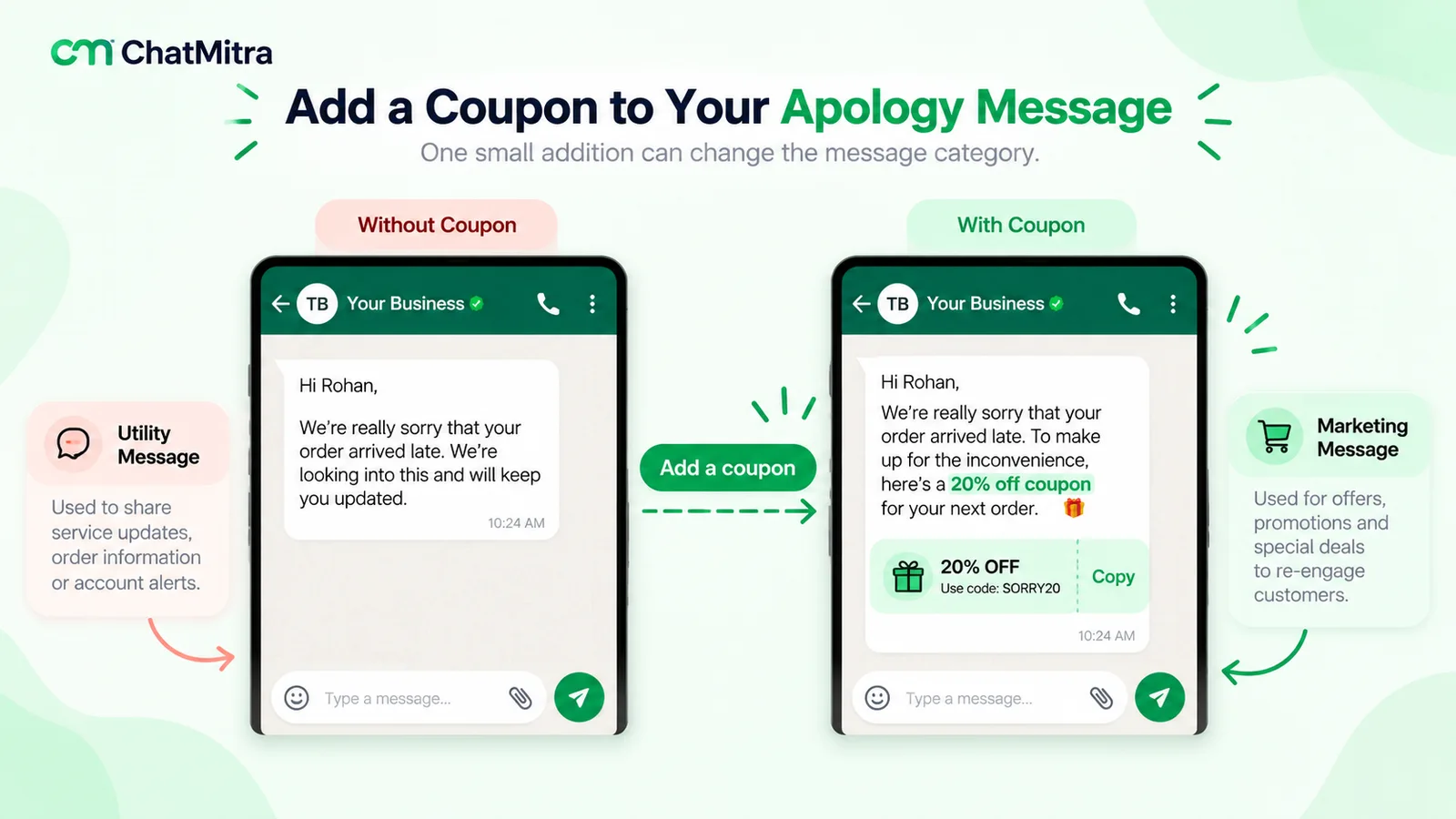
Is an apology template utility or marketing?
This decides the price. Meta’s template categorization guidelines use apologies in two of their own examples (Meta, template categorization, updated 15 September 2026):
- As utility: under system outages, “We have detected a system outage that impacts zip code {{code}}. We expect to restore service by {{time_and_date}}. We apologize for the inconvenience.” Order-management examples, such as a backordered item with a refund option, are utility too.
- As marketing: under retargeting, “We apologize for the delay in your {{package}} delivery. We have deposited a {{credit}} to your account, available immediately.”
The line is the offer. Utility templates “must be non-promotional”, and order and account updates “should not promote, recommend, upsell, or cross-sell products; include offers; or attempt to secure renewals”. Meta also treats “templates with mixed content”, such as “an order update with a promo”, as marketing. A plain apology tied to the customer’s order, booking or account is normally utility; add a discount, credit or “shop now” and expect marketing.
What it costs in India
Meta charges per delivered message. From its rate card effective 1 October 2026 (Meta pricing):
| Apology sent as | When | Meta's India rate |
|---|---|---|
| Free-form reply | Inside the 24-hour window | Service message: 1,000 free per business number each month, then ₹0.1150 |
| Utility template | Order, booking, account or outage update with an apology | ₹0.1150 |
| Marketing template | Apology with a credit, discount or promotion | ₹0.8631 |
A worked example. A courier strike delays 400 orders, and you tell every affected customer before they ask:
- Utility apology: 400 × ₹0.1150 = ₹46.00.
- Marketing apology with a coupon: 400 × ₹0.8631 = ₹345.24.
The coupon costs more to send before counting the discount itself. Often it’s better to send everyone a plain utility apology and compensate only those actually harmed. Your provider may add a fee; more worked examples are in our cost per message guide.
Two more rules to plan for:
- US numbers: “WhatsApp does not currently deliver marketing template messages to WhatsApp users with United States phone numbers” (Meta, per-user marketing limits). For US customers, send the offer inside the 24-hour window or by email, or drop it from the template.
- Review time and format: Meta says approval “can take up to 24 hours”, and a template “cannot start or end with a parameter” (Meta, template review). So “Hi [Name], … [date].” needs a closing sentence after the last variable, such as “Reply here if you need help.”
For what you can send and when, see WhatsApp for customer service; for the order updates these apologies sit next to, see order confirmation messages.
Apologies and complaints in India: the 48-hour rule for online sellers
For online sellers in India, timing is also a legal duty. The Consumer Protection (E-Commerce) Rules, 2020 require every e-commerce entity to appoint a grievance officer and ensure that the officer “acknowledges the receipt of any consumer complaint within forty-eight hours and redresses the complaint within one month from the date of receipt of the complaint” (Consumer Protection (E-Commerce) Rules, 2020, rule 4(5)).
An amendment notified on 9 September 2026 (G.S.R. 789(E)) keeps both deadlines. It adds that the officer “provides the complainant with a copy of the complaint as recorded”, and it takes effect on 1 January 2027 (Consumer Protection (E-Commerce) (Amendment) Rules, 2026).
A same-day holding message with a complaint reference is well inside the 48-hour window; from 2027, also give the customer a copy of the complaint as you recorded it. This is a summary, not legal advice.
When should an apology include compensation?
Compensation works when it matches the harm, and fails when it replaces the fix or looks like a bribe.
| What happened | Usually enough | Consider adding |
|---|---|---|
| Small delay, fixed quickly | A prompt, specific apology | Nothing |
| Delay that spoiled an occasion | Apology plus faster delivery | Refund of delivery charges |
| Wrong, damaged or missing item | Replacement at your cost, no return hassle | Refund of shipping; a small credit if they chased you |
| Billing error | Immediate correction and refund | Nothing, unless it caused charges on their side |
| Service downtime | Explanation and changes | Credit proportional to the downtime |
| Rude or careless treatment | Personal apology from a manager | A goodwill gesture, only if it feels natural |
Three rules: fix first (a voucher on an unsolved problem reads as “please go away”); never link it to a review, which Google prohibits; and on WhatsApp, send compensation separately to those who qualify, because a credit changes the template category.
Mistakes that make an apology worse
- The non-apology. “Sorry if you feel let down” blames the customer’s feelings. Apologise for what you did.
- Blaming someone else. Customers bought from you, not your courier. Explain once if it helps, then own it.
- Over-explaining. Long explanations read as excuses. One sentence of cause is plenty.
- The same line for everyone. Mass apologies suit mass problems, but add the order number, date or product.
- Promising “never again”. Say what you changed instead.
- Going silent afterwards. If you said Friday, update them on Friday, even if the news is “still waiting”.
- Over-apologising for normal things. Being closed on a holiday isn’t a failure; a clear notice beats an apology (see our away message examples).
After the apology: follow up and learn
- Check back once after the fix lands (examples 39 and 40), then leave the customer alone.
- Ask for feedback only when it’s resolved, not while they wait for a refund. Our guide on how to ask customers for feedback covers timing.
- Tag the cause (dispatch, courier, packing, billing, staff); a monthly count shows the real fix.
- Thank the customer who told you once it’s resolved (see our thank-you message examples).
Where ChatMitra fits, and where it doesn’t
ChatMitra runs on the WhatsApp Business Platform, so it covers the WhatsApp side of apologies:
| Need | ChatMitra |
|---|---|
| Answer complaints as a team on one number | Yes. Shared inbox with separate logins and role permissions |
| Consistent apology wording | Yes. Team-shared saved replies inserted with "/" (text only) |
| Remember what you promised | Yes. One internal note per contact, plus tags such as "delayed-order" |
| Apologise to everyone affected by a delay | Yes. Broadcast an approved template to contacts with a tag, excluding others; reports show sent, delivered, read and failed |
| Message automatically when an order is cancelled | Yes, for Shopify stores: a cancellation message you write, sent when the order is cancelled |
| Send an apology when a sheet row changes (for example, a status set to "Delayed") | Yes. Google Sheets automation can send a template on a row or column change |
| Reply after 24 hours | The inbox blocks free-form messages after 24 hours and offers a template instead |
| Ticketing, SLAs, CSAT scores, assigning a complaint to one agent | No. Use a helpdesk if you need these |
| Email or SMS apologies | No. WhatsApp only |
On the free Starter plan, ChatMitra adds ₹0.20 per 24-hour conversation to Meta’s charges: up to ₹80 more in the 400-order example, or up to ₹126 in total with the utility apology. If apologies are becoming part of your weekly work, compare ChatMitra’s plans.
Where to start
Pick your three most common problems, adapt the matching messages, and save them where your team can reach them. On WhatsApp, get the templates approved before the next delay, not during it.
Sources: Meta’s WhatsApp Business Platform documentation and rate card, the WhatsApp Business Messaging Policy, Google Business Profile Help and India’s Consumer Protection (E-Commerce) Rules, 2020 and 2026 amendment, each linked where it is used. Facts checked on 27 September 2026.