The best WhatsApp chatbot platform depends on who runs it and where your customers are. For Indian small businesses, WhatsApp-first platforms such as Wati, Gallabox, Interakt and AiSensy offer visual flow builders with rupee pricing. respond.io suits multichannel teams, ManyChat suits Instagram-first brands, Botpress suits AI-first support, Tidio suits website-plus-WhatsApp shops and Twilio suits developers. Compare the builder, the AI, the route to a person and what each charges on WhatsApp messages, not just the plan price.
We compared 11 platforms on those four points. Every price and feature below was checked on the vendor’s own pricing page, help centre or documentation on 30 September 2026. Where two of a vendor’s pages disagreed, we say so. We’re ChatMitra, a WhatsApp Business Platform provider, and we’ve included ourselves with the same scrutiny, including what we don’t have.
Key takeaways
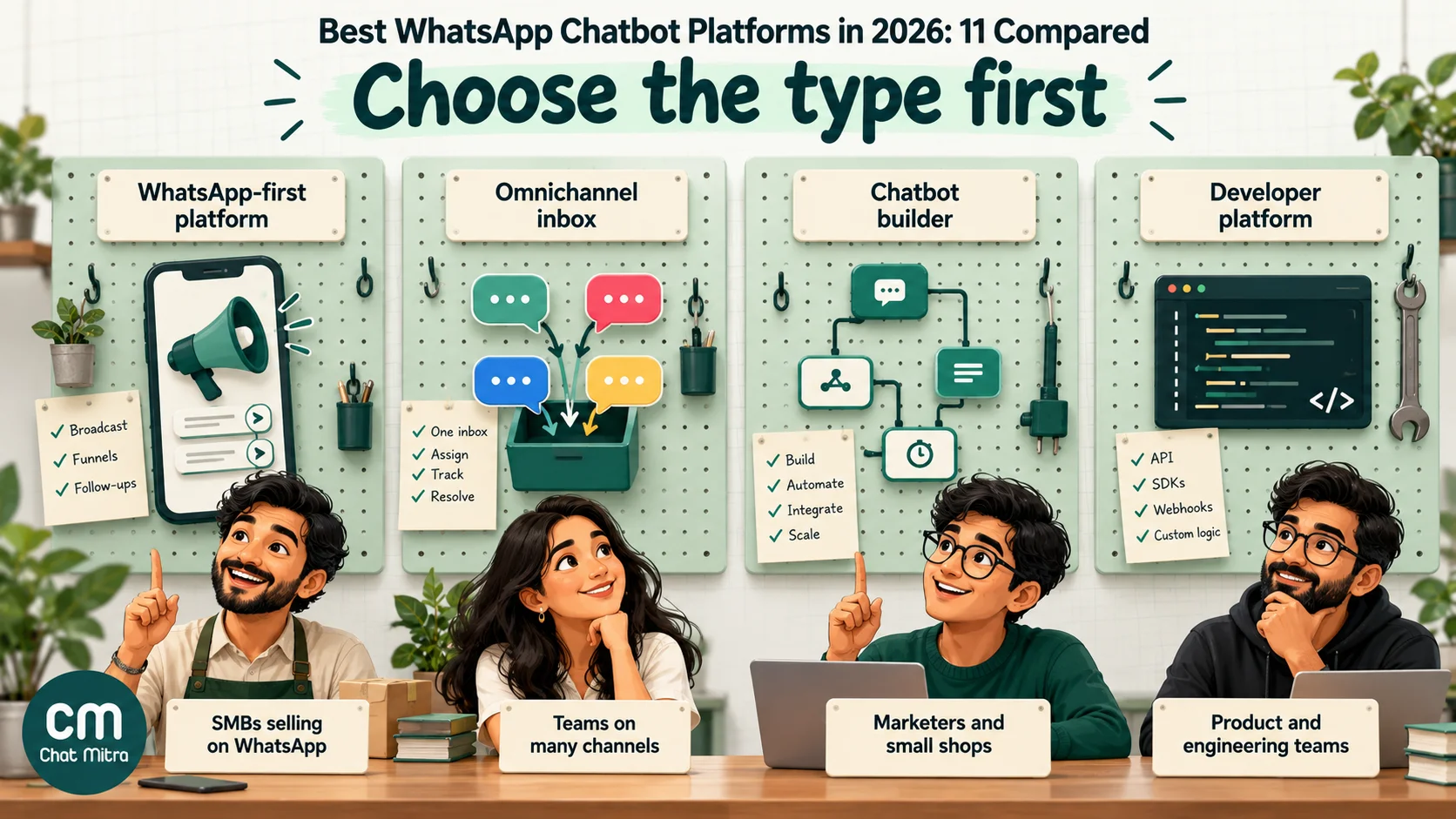
- Pick the type before the brand. WhatsApp-first platforms, omnichannel inboxes, chatbot builders and developer APIs solve different problems.
- The builder varies most. Most platforms here have a visual flow builder. Some sell it as an add-on or reserve it for higher plans, and ChatMitra has none.
- AI is priced in four ways: included in the plan, credits, a monthly add-on, or your own model key.
- Message markups add up. Some pass Meta's rates through; others add a fixed fee per message or publish higher rates.
- A human route is required. Meta's policy requires escalation paths wherever you automate, so check how handover works on your plan.
Quick answer: the best WhatsApp chatbot by need
- Visual flow builder, rupee pricing, one team: Wati, Gallabox, Interakt or AiSensy.
- Lowest subscription for rules plus AI among the India-priced platforms: ChatMitra Pro, if you can live without a visual builder.
- Several channels in one inbox, with AI agents: respond.io.
- Instagram or TikTok first, WhatsApp second: ManyChat.
- Website chat and WhatsApp for a small online shop: Tidio.
- AI-agent-first support, with a free plan to test: Botpress.
- No-code visual bots for lead generation: Landbot.
- A custom build by developers: Twilio.
What makes a good WhatsApp chatbot platform
A chatbot platform has to do more on WhatsApp than on a website, because Meta sets the rules on what you can send and when. These are the six criteria we used.
- Official access to WhatsApp. The platform must use Meta’s WhatsApp Business Platform, directly or through a partner. Tools that automate an ordinary WhatsApp account break WhatsApp’s terms and get numbers banned.
- The builder. A visual drag-and-drop flow builder is easiest for non-technical teams. Rule lists and code are cheaper or more flexible, but harder to map. Check which plan includes it, how many flows you get, and whether branching and API calls cost extra.
- AI that stays on your business. Look at what the AI is trained on (your website, documents, past chats), how it’s charged, and whether you can limit what it says. Clause 4.7 of Meta’s WhatsApp Business Platform terms restricts general-purpose AI assistants, so the AI should serve your own customers.
- Human handover and a team inbox. WhatsApp’s Business Messaging Policy requires “prompt, clear, and direct escalation paths” whenever you automate. The platform should let the bot pass a chat to a person, and ideally assign it to the right one.
- Integrations. Stores need Shopify or WooCommerce and payments; sales teams need a CRM; everyone benefits from Google Sheets, webhooks or Zapier.
- Honest pricing. That means the plan price, what’s an add-on, how contacts or conversations are counted, and whether the platform adds a markup to Meta’s per-message rates.
How we evaluated
We read each vendor’s pricing page, with the monthly and annual toggles checked separately, and its help centre or developer documentation for the WhatsApp details. We didn’t use review sites for facts. Prices are what the vendor displayed on 30 September 2026. Indian vendors’ prices are in rupees and exclude GST where the vendor says so. Global vendors’ prices are in US dollars. We didn’t score platforms on support quality or uptime, because we couldn’t measure those fairly. Features change monthly, so treat this as a shortlist and run a trial with your own questions.
WhatsApp chatbot platforms compared (September 2026)
| Platform | Type | Chatbot builder | AI | Entry price with a WhatsApp chatbot | Free plan / trial |
|---|---|---|---|---|---|
| Wati | WhatsApp-first | Drag-and-drop, all plans | AI credits by plan; AI agents add-on; bring your own model | Growth ₹2,999/mo (₹2,199/mo yearly) | 7-day trial |
| Interakt | WhatsApp-first | Drag-and-drop; linear flows on Growth, branching on Advanced | AI Agents add-on ₹3,000/mo + GST | Growth ₹2,799/mo + taxes | 14-day trial |
| AiSensy | WhatsApp-first | Drag-and-drop "Chatbot Flows" add-on, ₹2,500/mo | AI Chat Agent add-on ₹1,350/mo | Basic ₹1,500 + flows ₹2,500 = ₹4,000/mo | Free Forever plan (no broadcasting) |
| Gallabox | WhatsApp-first | Drag-and-drop, all plans (5–100 active flows) | AI credits by plan; WhatsApp AI agent from Essential | Basic ₹2,999/mo billed quarterly (₹2,399 yearly) | 7-day trial |
| ChatMitra | WhatsApp-first | No visual builder: welcome message + keyword rules with buttons and lists | AI chatbot on your own model key | Pro ₹999/mo | Free Starter plan (no automation); 15-day Pro trial |
| respond.io | Omnichannel inbox | Visual Workflows, Growth and above | AI Agents on Growth and above; AI usage included (fair use) | Growth $199/mo ($159 yearly) | 7-day trial |
| ManyChat | Chatbot builder | Visual Flow Builder | AI automation on Pro+; AI Replies Instagram-only | Pro $39/mo ($29 yearly), 2,500 contacts | Free plan has no WhatsApp; 14-day Pro trial |
| Landbot | Chatbot builder | Visual builder, templates, A/B tests | AI Agents with AI chats included by plan | Professional WA $220/mo ($176 yearly) | Free plan (test number only); 14-day trial |
| Tidio | Chatbot builder + live chat | Visual Flows | Lyro AI Agent add-on from $39/mo | WhatsApp on all plans, including Free | Free plan; 7-day trial |
| Botpress | AI agent builder | Botpress Studio (visual) plus a developer kit | AI spend included up to a limit per plan | Free plan with WhatsApp; Plus $189/mo ($150 yearly) for human handoff | Free plan |
| Twilio | Developer platform | Twilio Studio (visual) plus APIs | Usage-based AI products | Pay as you go: Meta rate + $0.005 per message | Free trial |
The 11 best WhatsApp chatbot platforms, reviewed
WhatsApp-first platforms (strongest for India)
These platforms give you the WhatsApp Business Platform, an inbox, broadcasts and a chatbot builder in one subscription, priced in rupees. For a price-only comparison of Indian providers, including message rates, see our best WhatsApp API provider in India guide.
1. Wati
Wati’s “No Code Chatbots” builder is drag-and-drop, and its help centre walks through building a first bot. The builder appears on every plan, with more advanced chatbots from Pro. AI comes in three forms. AI Co-pilot credits are included (250 a month on Growth, 500 on Pro, 1,500 on Business). “Astra” AI agents are an add-on priced separately. Wati also lets you bring your own model, naming OpenAI, Claude and Gemini. Chat assignment starts on Growth, with teams and auto-routing on Pro.
Pricing: Growth ₹2,999 a month billed monthly (₹2,199 billed yearly), Pro ₹6,499 (₹4,899), Business ₹18,499 (₹14,799). The Shopify integration is $4.99 a month extra, and messages are charged from a per-plan rate card. The pricing page says the trial is 7 days, while its AI page says 14.
Best for: SMB and mid-market teams that want a mature visual builder, many integrations and AI lead qualification.
2. Interakt
Interakt, part of Jio Haptik, builds bots with drag-and-drop elements. Plan choice matters here. Growth includes “FAQ automations & linear chatbot flows”. Branching with conditions and API calls needs Advanced. Starter has no chatbot flows, and its monthly option is Instagram-only. The WhatsApp AI Agents (sales, lead qualification and support), which Interakt says are trained on your website and documents, are an add-on at ₹3,000 a month plus GST for 100 AI messages, then ₹0.50 per message, on Growth or Advanced. Agent handoff and a shared inbox are standard, and auto-assignment comes with Advanced.
Pricing: Growth ₹2,799 a month and Advanced ₹3,799 a month, plus taxes. There’s a 14-day free trial. Interakt publishes its own per-message rates above Meta’s, and only Enterprise lists “no markup”.
Best for: D2C brands selling on WhatsApp and Instagram that want commerce and payment integrations (Shopify, WooCommerce, Razorpay, PayU, Stripe) at a low entry price.
3. AiSensy
AiSensy sells its drag-and-drop builder, “Chatbot Flows”, as an add-on on any plan: ₹2,500 a month (₹2,250 billed yearly) for five chatbots. Its AI Chat Agent is a second add-on at ₹1,350 a month, including 1,000 AI messages, a knowledge-base Q&A and tool calling. Live chat with agent transfer is included from Basic, and smart routing from Pro.
Pricing: a Free Forever plan (no broadcasting), Basic ₹1,500 a month, Pro ₹3,200, Premium ₹9,100. A menu chatbot on Basic therefore costs about ₹4,000 a month before messages. AiSensy’s published India rates are ₹1.09 per marketing message and ₹0.145 per utility message.
Best for: marketing-led SMBs focused on broadcasts and click-to-WhatsApp ads that also want a chatbot.
4. Gallabox
Gallabox includes its drag-and-drop chatbot builder on every plan, with 5 active flows on Basic, 20 on Essential and up to 100 on Advanced. AI is credit-based: 500, 2,000 or 8,000 credits a month by plan, with top-ups at ₹1,000 per 5,000 credits that roll over. The AI agent works on the web from Basic and on WhatsApp from Essential, with a knowledge base of 10 MB to 1 GB. Round-robin assignment and basic escalation are on every plan.
Pricing: billed quarterly or yearly only. Basic is ₹2,999 a month quarterly (₹2,399 yearly), and Essential ₹6,999 (₹5,599). There’s a 7-day trial. Gallabox states that Meta’s fees appear on your invoice “with our markup”. That was 15% when we checked in September 2026.
Best for: sales teams that want AI lead qualification feeding a CRM pipeline.
5. ChatMitra
We’ll be direct about our own product. ChatMitra has no drag-and-drop chatbot builder. You build a menu bot with a Welcome Message (up to 20 messages to a new contact) and keyword Auto Reply rules. The rules match exactly, by “starts with” or by regex, and send text, templates, media, 1–3 reply buttons, lists of up to 10 rows or catalog messages. A button tap triggers the next rule by its title. The AI chatbot uses a model provider you choose with your own API key, so model charges go to your own account. There’s no automatic handover. An agent pauses the bot for a customer from Live Chat, and there’s no chat assignment yet. We explain the setup in how to build a WhatsApp chatbot.
Pricing: Pro ₹999 a month, with a 15-day free trial, includes Auto Reply and the AI chatbot. The free Starter plan excludes automation. Meta’s rates are passed through at cost, plus a ₹0.20 platform fee per conversation on Starter and Pro (Enterprise, at ₹2,499 a month, removes it).
Best for: small Indian businesses that want keyword menus plus an AI chatbot for the lowest subscription, and don’t need a visual flow canvas.
Omnichannel inbox
6. respond.io
respond.io is a Meta Business Solution Provider that puts WhatsApp and your other messaging channels in one inbox. Its visual Workflows and AI Agents both start on the Growth plan. Starter includes neither, only AI prompts, assist and summaries. AI usage is included on Growth and above, subject to fair use, and people can take over an AI agent’s conversation. respond.io states “no setup fees or markups” on WhatsApp. You top up Meta’s fees on the platform.
Pricing: Growth $199 a month ($159 billed yearly), Advanced $349 ($279). Plans are sized by monthly active contacts, from 1,000. There’s a 7-day trial and no free plan.
Best for: multichannel support and sales teams that want AI agents and one shared inbox across channels.
Chatbot builders that connect to WhatsApp
These tools started as chatbot builders for websites or social channels and connect to WhatsApp through Meta’s platform. Check which plan includes WhatsApp, because it’s often not the cheapest one.
7. ManyChat
ManyChat’s visual Flow Builder is popular with creators, but WhatsApp starts on Pro, and the Free and Essential plans exclude it. You can connect your own number or buy one through ManyChat. WhatsApp messages are paid from a ManyChat wallet at its own rate table (for India: $0.0136 per marketing message and $0.0014 per service message from 1 October 2026). Its AI Replies and AI Knowledge features were Instagram-only and in beta at the time of writing.
Pricing: Pro $39 a month ($29 billed yearly) for 2,500 active contacts, then $0.05 per extra contact. Business is $99 ($69). Pro has a 14-day trial.
Best for: Instagram- and TikTok-first brands moving leads into WhatsApp.
8. Landbot
Landbot offers a polished visual builder with templates and A/B testing, AI Agents on paid plans (with AI chats included, then $0.10 each), and human takeover through a shared inbox on every plan. WhatsApp on your own number needs the Professional WA plan; the free plan only uses a test number. Landbot is unusually transparent about markups: Meta’s cost plus €0.05 per marketing, utility or authentication message, while service messages carry no Landbot fee up to 10,000 a month (the first 1,000 are free), then €0.003 each.
Pricing: Professional WA $220 a month ($176 billed yearly), including one number (+$100 a month per extra number). There’s a 14-day trial.
Best for: marketers building lead-generation and qualification bots who value design and testing.
9. Tidio
Tidio is a live-chat and helpdesk tool for small online shops that lists the WhatsApp integration on every plan, including Free. You connect your own WhatsApp account through Meta’s signup flow. Tidio’s help centre says it adds no markup to message fees, and the free and trial plans are capped at 1,000 WhatsApp messages a month. Automation uses its visual Flows (an add-on from $29 a month raises the limits). The Lyro AI Agent, which can answer on WhatsApp, is an add-on from $39 a month, after 50 free lifetime conversations.
Pricing: Free, Starter $29 a month ($24.17 yearly) and Growth from $59. There’s a 7-day trial.
Best for: small e-commerce stores that want website chat, WhatsApp and AI support in one inexpensive tool.
10. Botpress
Botpress is built for AI agents. Botpress Studio is its visual builder, with a developer kit for code. WhatsApp is included on every plan, including Free (25 conversations a month). You connect through Botpress’s authorisation flow or your own Meta app, and Meta bills your own WhatsApp account directly. Paid plans include AI spend ($25 on Plus, $150 on Team), with further credit “sold at cost”. Human handoff requires Plus or higher.
Pricing: Plus $189 a month ($150 billed yearly) for 250 conversations. Extra packs cost $65 per 100, and Botpress says the auto-recharge can’t be turned off. Team is $939 ($750).
Best for: support teams that want an AI agent first and rules second, and have someone to configure it.
Developer platform
11. Twilio
Twilio suits businesses with developers. Its Studio visual builder handles flows (1,000 executions a month free, then $0.0025 each), and its APIs cover everything else. Twilio handles WhatsApp account creation, business verification and template approvals. Human handover needs a separate product, Twilio Flex. AI products are charged by usage.
Pricing: pay as you go. Twilio charges $0.005 per message, inbound or outbound, on top of Meta’s fees, and $0.001 per failed message. There’s a free trial with no credit card.
Best for: product and engineering teams building WhatsApp into their own apps.
Also worth knowing
- Gupshup offers a drag-and-drop Bot Studio, its own ACE LLM models and an agent-transfer node, but chatbot plans are sold through sales. Its published WhatsApp fee is $0.001 per message on top of Meta’s rate.
- Meta Business Agent is Meta’s own AI for businesses. It’s free to start in the WhatsApp Business app where it’s offered. On the API, Meta has charged it at $2.00 per million tokens since 1 August 2026, which Meta estimates at 4–5 US cents per message. It answers questions but doesn’t give you menus, broadcasts or a team inbox. Our WhatsApp AI agent guide covers it.
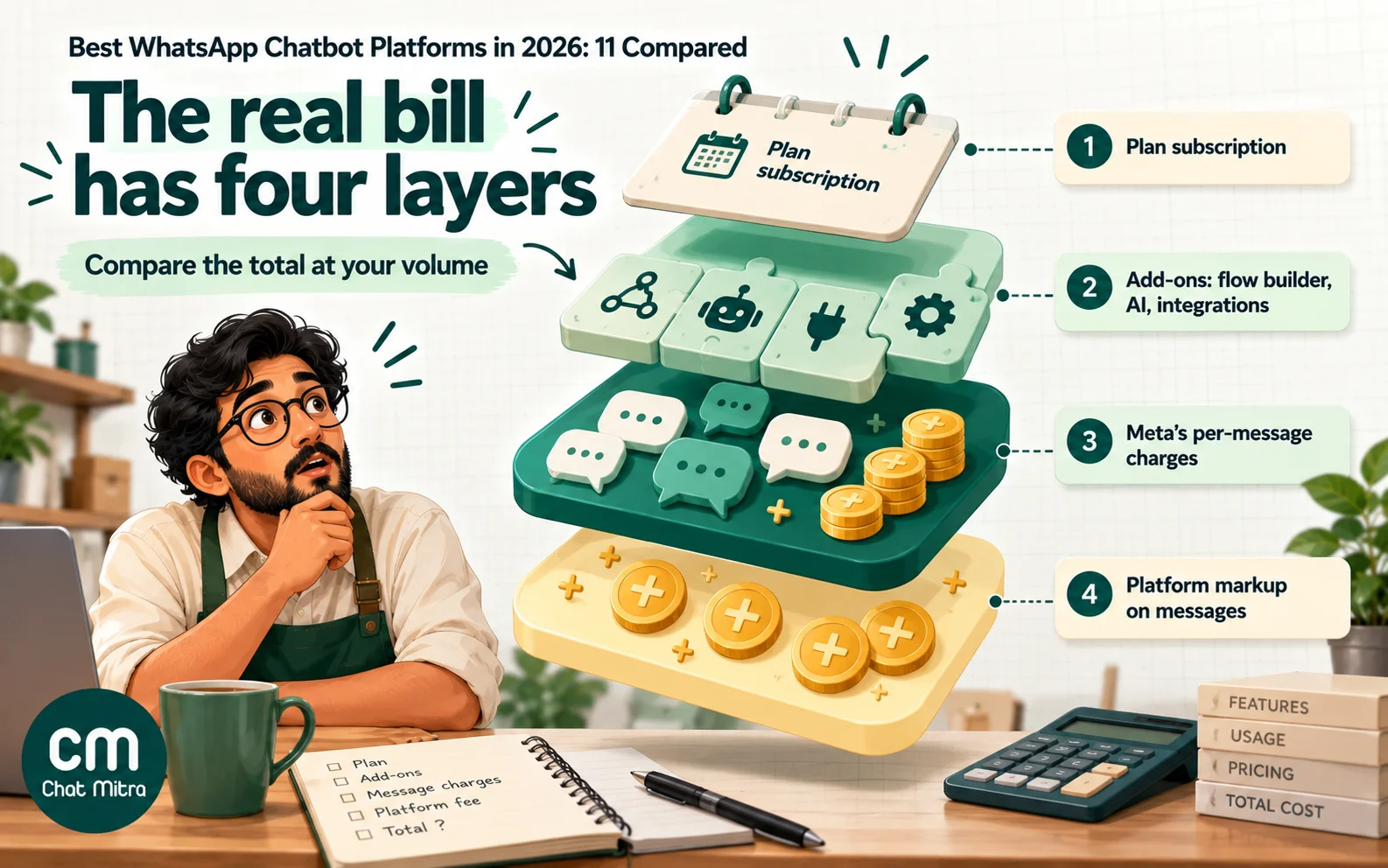
What you’ll really pay: plans, add-ons and message markups
The plan price is only one of four costs. Meta also charges for messages, and from 1 October 2026 each number gets 1,000 free service messages a month, then pays the utility rate (₹0.115 in India) for each reply in the 24-hour window. Our guide to WhatsApp Business cost per message covers the rates. On top of that, platforms differ in how they pass those charges on.
| Platform | How WhatsApp messages are charged (as published) | Watch for |
|---|---|---|
| respond.io | Meta's fees, "no markups" | Monthly active contact limits |
| Tidio | Charged by Tidio, "no markup" | AI and Flows are add-ons |
| Botpress | Meta bills your own WhatsApp account | Conversation packs that auto-recharge |
| ChatMitra | Meta's rates at cost + ₹0.20 per conversation (Starter, Pro) | No visual builder |
| Twilio | Meta's fee + $0.005 per message, in or out | Flex and AI are separate products |
| Landbot | Meta's cost + €0.05 per marketing, utility or authentication message | WhatsApp needs the Professional WA plan |
| Gallabox | Meta's fees "with our markup" | Quarterly or yearly billing only |
| Interakt | Own rates (e.g. ₹0.949–₹0.970 per marketing message) | AI agents are an add-on |
| AiSensy | Own rates (₹1.09 marketing, ₹0.145 utility) | Flow builder and AI are add-ons |
| ManyChat | Wallet at ManyChat's own rate table | WhatsApp only from Pro |
| Wati | Per-plan rate card | Integration and user limits by plan |
For scale, Meta’s own India marketing rate is ₹0.8631 per message. A business sending 10,000 marketing messages a month pays about ₹8,631 at Meta’s rate. At ₹1.09 per message the same volume costs ₹10,900, a difference of about ₹2,269 a month. That can exceed the gap between two subscriptions, so compare total cost at your volume, not the headline plan.
How to choose the right WhatsApp chatbot platform
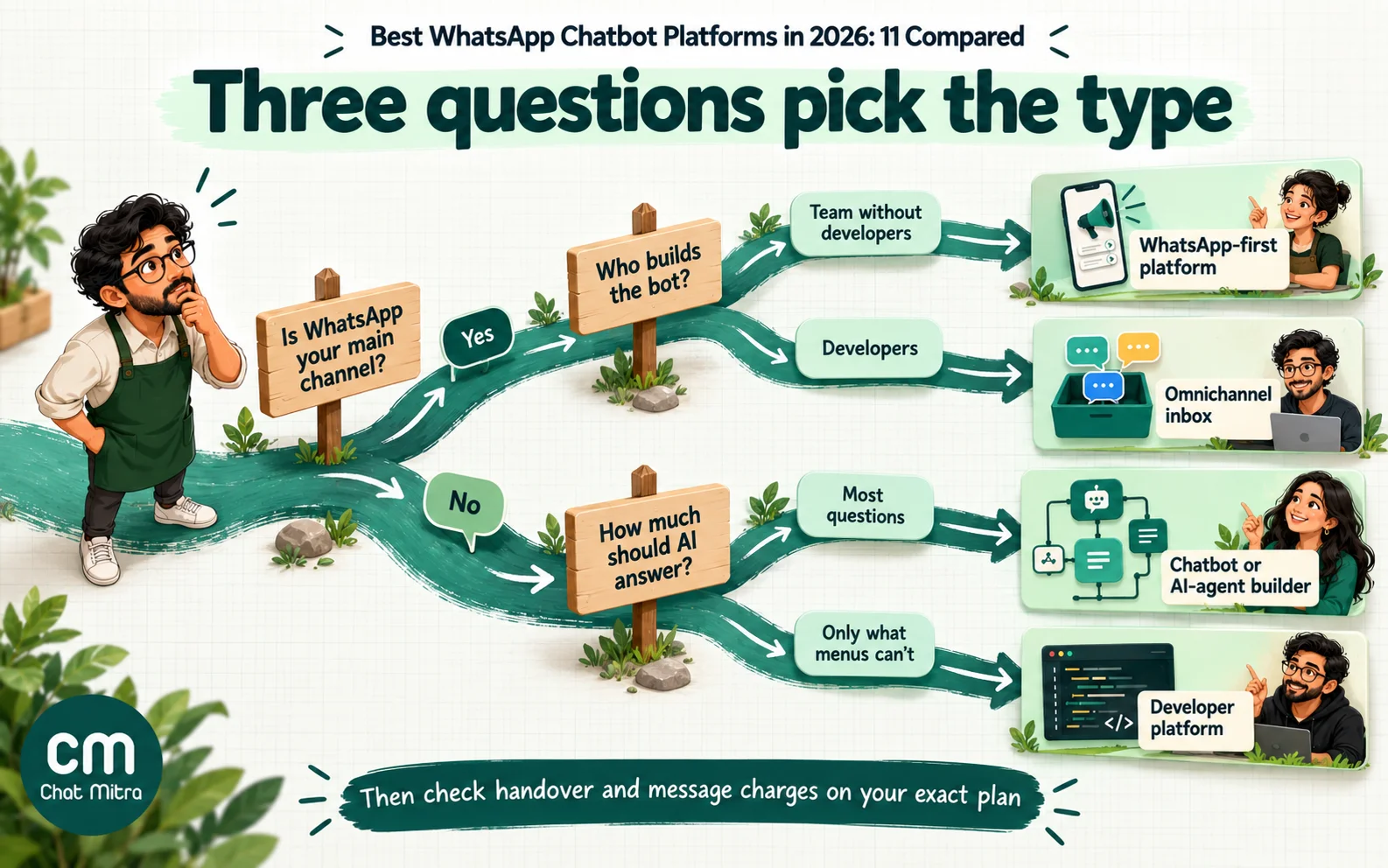
Answer these five questions in order. Most teams can narrow 11 options to two by the third.
| Question | If your answer is… | Look at |
|---|---|---|
| 1. Is WhatsApp your main channel? | Yes, with broadcasts and a sales team | Wati, Interakt, AiSensy, Gallabox, ChatMitra |
| No, it's one of several channels | respond.io, Tidio, Landbot | |
| 2. Who will build the bot? | A marketer or owner, no developers | Any visual builder; ChatMitra only for simple keyword menus |
| Developers | Twilio, Botpress | |
| 3. How much should AI do? | Answer most questions | Botpress, respond.io, Gallabox, Wati |
| Only the questions menus can't handle | Most platforms; compare the add-on cost | |
| 4. What's your message volume? | High (tens of thousands a month) | Pass-through pricing matters more than the plan |
| 5. How do chats reach a person? | Several agents, need routing | Check assignment and routing on your exact plan |
Questions to ask before you sign
Put these to every shortlisted vendor, in writing:
- Which plan includes the chatbot builder, and how many active flows or bots does it allow?
- Are branching, API calls and integrations on my plan, or on a higher one?
- How is AI charged: included, credits, an add-on or my own key? What happens when the credits run out?
- What do you charge per WhatsApp message, by category, compared with Meta’s rate card?
- How does the bot hand a chat to a person, and can it assign the chat to a specific agent?
- Can I export my contacts and chat history if I leave?
- Can I bring my existing number, and do you support coexistence with the WhatsApp Business app?
A 30-minute test for any free trial
Demos show the vendor’s best flow. A short test of your own shows how the platform handles your customers. Run the same script on each shortlisted trial:
- Connect a test number and note how long it takes, and whether you needed the vendor’s help.
- Build one real path, such as “track my order” or “book a demo”, with a list menu, one set of reply buttons and a final answer. Time how long it takes someone non-technical.
- Send ten real first messages copied from your own chats, including a typo, a message in Hindi or another language, and two questions in one. Count how many get a sensible reply.
- Type instead of tapping at every step. Many bots break when customers ignore the buttons.
- Ask for a person. Check that the chat reaches the inbox, that the agent can see what the bot already said, and that the bot stays quiet while the agent replies.
- Turn on the AI, if the plan includes it, and ask three questions your website answers and one it doesn’t. The right answer to the last is a hand-over, not a guess.
- Open the billing page and find where message charges and AI usage appear. If you can’t find them in a trial, you won’t find them later either.
Score each step pass or fail. The platform with the fewest failures on your script is usually a better choice than the one with the longest feature list.
Three buying scenarios
A clinic with one receptionist. It gets about 40 chats a day, mostly timings, fees and appointment requests. It needs a short menu, a booking path and a quick route to the receptionist. There’s no need for AI or several channels. Any WhatsApp-first platform works, and the cheapest plan with a builder and handover is the right one. Keyword menus on ChatMitra Pro also cover this.
A D2C brand on Shopify. It runs sales on Instagram and WhatsApp, sends broadcasts and gets order-status questions all day. The Shopify integration, broadcast pricing and message rates matter more than the builder. Wati, Interakt and Gallabox are natural candidates, and ManyChat if Instagram drives most leads. Compare the total at its marketing volume, not the plan price.
A software company with global customers. Support runs across web chat, email and WhatsApp in several languages. It needs AI answers from documentation, routing to the right team and reporting. respond.io or Botpress fits better than a WhatsApp-first tool, with Twilio if the product team wants WhatsApp inside its own app.
Mistakes to avoid when choosing
- Comparing plan prices only. A cheaper plan with a flow-builder add-on, per-contact overage or a message markup can cost more than a pricier plan without them.
- Trusting “free”. A free plan may exclude WhatsApp, use a test number or cap messages at a level a real business passes in a week.
- Letting the demo bot decide. Vendors demo their best flow. Test yours: take ten real customer messages and see what each platform’s trial does with them.
- Ignoring the human side. A bot without clean handover breaks Meta’s policy and frustrates customers. Check it on your plan, not the top one.
- Choosing AI before deciding its job. Start with the questions menus can’t handle, and grow from there.
Where ChatMitra fits
If you need a visual flow builder, choose one of the platforms above that has it. ChatMitra doesn’t. ChatMitra fits Indian businesses that want official WhatsApp access, broadcasts and a team inbox free on Starter. For ₹999 a month, Pro adds keyword menus with buttons and lists, a welcome sequence and an AI chatbot on your own model key, with Meta’s rates passed through at cost. See the AI chatbot and auto reply features, or compare plans on our pricing page.
Summary
There’s no universal best WhatsApp chatbot, only the best fit for your team, channels and volume. For WhatsApp-first Indian SMBs, Wati, Gallabox, Interakt and AiSensy offer visual builders in rupees, while ChatMitra is the lowest-cost option if keyword menus and an AI chatbot are enough. respond.io leads for multichannel teams, ManyChat for Instagram-first brands, Tidio for small shops, Botpress for AI-first support, Landbot for lead-generation bots and Twilio for developers. Before you choose, check four things on the exact plan you’ll buy: the builder, the AI, human handover and how WhatsApp messages are charged. Then test with your own customers’ questions.