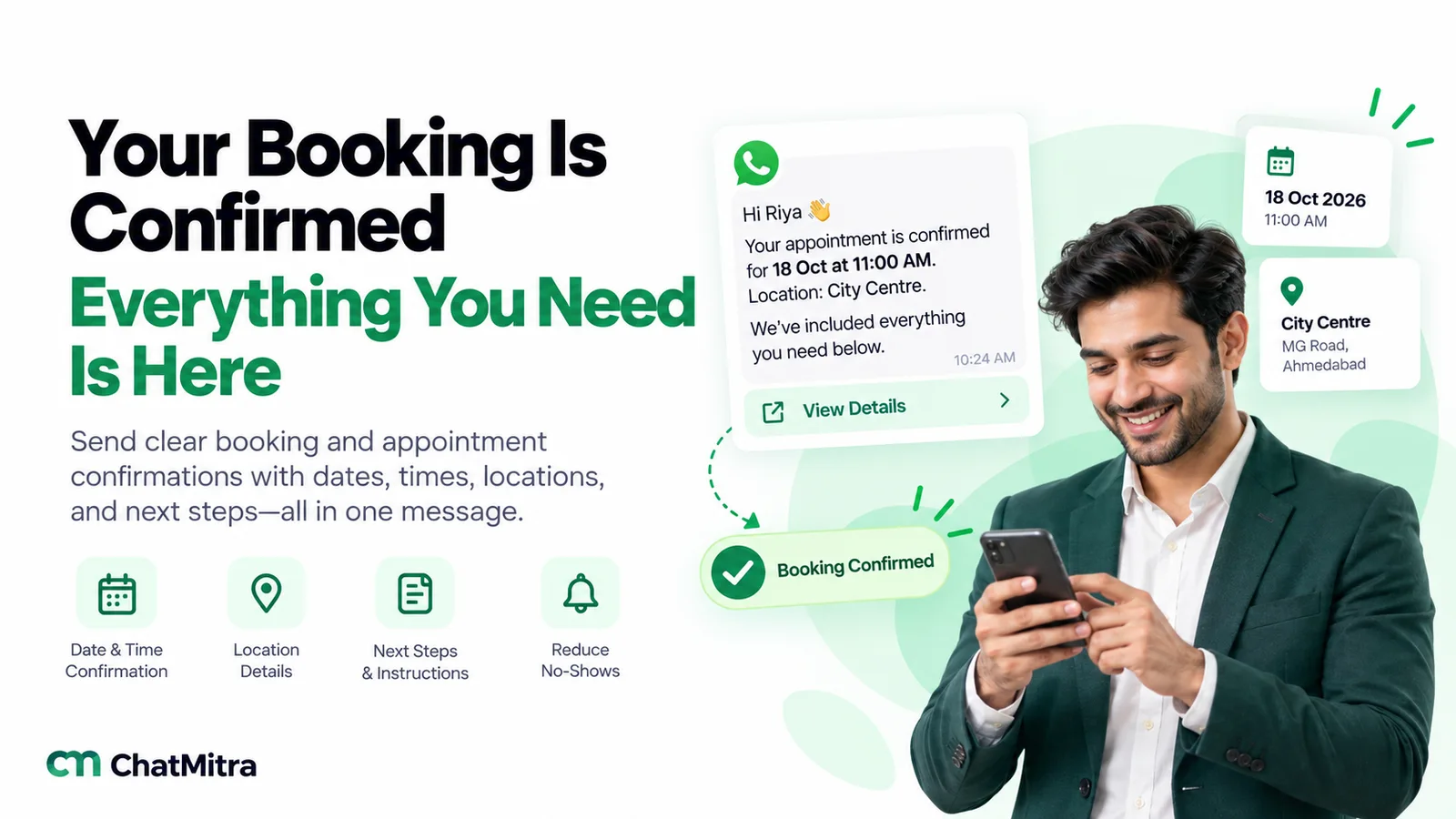
A booking confirmation message tells a customer their booking is fixed and gives them everything they need to arrive: what they booked, the date and time, the place or link, a booking reference, anything to bring, and how to change or cancel. Send it within minutes of the booking, on the channel the customer uses most.
Below are 36 examples to adapt, grouped by business, plus messages for changes and cancellations, SMS and email versions, and replies for customers. After them come the channel rules and a simple way to automate the whole thing.
Key takeaways
- The first line should say "confirmed", so the customer knows at a glance.
- Include the details someone needs at the door: address, reference, preparation, what to bring.
- Offer a change or cancel route that won't unsubscribe the customer by accident.
Channel rules were checked on 27 September 2026 against Meta's WhatsApp Business Platform documentation (template categories, pricing and the INR rate card), the WhatsApp Business Messaging Policy, TRAI's guidance for message senders and Twilio's SMS documentation. WhatsApp rates are Meta's charges for India, before tax.
What is a booking confirmation message?
A booking confirmation message is the note a business sends right after someone books a room, a table, an appointment, a class, a ticket or a service visit. It proves the slot is held and puts the details in one place the customer can find again.
It’s easy to confuse with the messages around it:
| Message | When it's sent | Its job |
|---|---|---|
| Booking received | Instantly, if the booking needs approval | "We've got your request; we'll confirm by [time]" |
| Booking confirmation | Within minutes of the booking being fixed | Proves the slot is held; gives all the details |
| Reminder | A day or a few hours before | Prevents no-shows; may ask "still coming?" |
| Change or cancellation | Whenever the booking changes | Replaces the old details, clearly |
This guide covers the confirmation and the changes. For timing and wording of reminders, see our WhatsApp reminder messages guide. If you sell products rather than time slots, our order confirmation message examples fit better.
What to include in a booking confirmation
Not every booking needs every part, but the customer should never have to message you to find something out.
| Part | Example | Why it matters |
|---|---|---|
| "Confirmed" and the name | "Hi Anita, your booking is confirmed" | Reassures in one glance |
| What was booked | "Deluxe room, 2 adults" / "Haircut with Ravi" | Catches mistakes early |
| Date and time | "Mon 14 Dec, 11:30 am IST" | Weekday plus date avoids mix-ups; add the time zone for online meetings |
| Place or link | Address and a map link, or the meeting link | Saves a "where are you?" call |
| Booking reference | "Ref BK-4821" | Makes changes quick |
| Payment status | "₹500 advance paid; ₹1,500 due at the visit" | Prevents disputes at the counter |
| Preparation | "Fast for 10 hours" / "Bring your ID" | Saves a wasted visit |
| Change or cancel route | "Reply 2 to change" / a link | Frees the slot instead of a no-show |
Some details matter more in some businesses than others:
| Business | Details customers often ask about |
|---|---|
| Hotels and homestays | Check-in time, ID rules, parking, early check-in, who to call on arrival |
| Clinics and labs | Fasting or preparation, reports to bring, which doctor, fee |
| Restaurants | How long the table is held, dress code, large-group deposits |
| Salons and spas | Duration, stylist or therapist name, late-arrival rule |
| Events and webinars | Entry time, ticket or QR, joining link, recording |
| Home and vehicle services | Arrival window, visit charge, documents, who will come |
Words in [brackets] below are placeholders. If you submit an example as a WhatsApp template, each placeholder becomes a numbered variable. Meta doesn’t allow a template to start or end with one, so every WhatsApp-ready example here ends with fixed text.
Booking confirmation messages by business type
Hotels, homestays and resorts
- Hotel reservation: “Hi [Name], your stay at [Hotel] is confirmed. Booking ref [ref]: [room type] for [guests], check-in [date] from [time], check-out [date] by [time]. Paid: [amount]. Please carry a government photo ID for each adult. Directions and parking details are below.”
- Homestay or villa: “Hi [Name], you’re booked at [Property] from [date] to [date]. Your host [host name] will meet you at the gate; share your arrival time here the day before. The location pin is below, and the last stretch of road is narrow, so drive slowly.”
- Group or corporate booking: “Dear [Name], [number] rooms are confirmed for [company] from [date] to [date] under ref [ref]. Please send the guest list by [date] so we can pre-fill check-in. Billing is to [company], as agreed.”
Restaurants and cafés
- Table booking: “Hi [Name], your table for [number] at [Restaurant] is confirmed for [day, date] at [time]. We’ll hold it for 15 minutes. If your plans change, just reply here.”
- Private dining with a deposit: “Hi [Name], thank you for the ₹[amount] deposit. Your private dining for [number] guests is confirmed for [date] at [time]. The set menu is attached; please share any allergies by [date] so the chef can plan.”
- From the waitlist: “Good news, [Name]: a table for [number] has opened at [time] tonight. It’s yours if you reply YES within 20 minutes. After that we’ll offer it to the next guest.”
Clinics, labs and therapists
- Doctor appointment: “Hello [Name], your appointment with Dr [name] is confirmed for [day, date] at [time] at [clinic address]. Please arrive 10 minutes early and bring earlier reports and a list of your current medicines.”
- Diagnostic test: “Hello [Name], your [test] is booked for [date] at [time] at [centre]. Please don’t eat for [hours] hours before the test; water is fine. Reports are usually ready within [time] of the test.”
- Series of sessions: “Hi [Name], your [number] physiotherapy sessions are booked: [dates and times]. Each session is 45 minutes. Wear loose clothing, and reply here if you need to move any of them.”
Keep medical detail out of the message beyond what the patient needs to prepare. A message can be read by anyone who picks up the phone.
Salons and spas
- Salon appointment: “Hi [Name], you’re booked with [stylist] for [service] on [day] at [time]. It takes about [duration]. Address: [salon], [area]. Reply here if you’re running late.”
- Spa: “Hi [Name], your [treatment] at [Spa] is confirmed for [date] at [time]. Please arrive 15 minutes early to change and relax. Tell us here about any allergies or injuries before your visit.”
Coaching and education
- Demo class: “Hi [Name], [student]‘s free demo class for [course] is confirmed for [day] at [time] at [centre/online link]. The class lasts [duration], so please bring a notebook.”
- Parent-teacher meeting: “Dear Parent, your meeting with [teacher] is confirmed for [date] at [time] in [room]. Each slot is 10 minutes, so please be on time.”
Travel and transport
- Tour package: “Hi [Name], your [tour] for [number] travellers from [date] to [date] is confirmed. Ref [ref]. Paid: [amount]; balance of [amount] due by [date]. Your itinerary and packing list are attached.”
- Airport pickup or cab: “Hi [Name], your pickup is confirmed: [date] at [time] from [place] to [place]. Driver details will be sent 2 hours before. Your ref is [ref]; show it to the driver.”
Events, tickets and webinars
- Event ticket: “Hi [Name], you’re in! [number] tickets for [event] on [date], gates open at [time], [venue]. Your QR ticket is attached; show it at the entry.”
- Webinar registration: “Hi [Name], you’re registered for [webinar] on [date] at [time] IST. The joining link is below, and it opens 10 minutes before the start.”
Home and vehicle services
- Home service visit: “Hi [Name], your [AC service] is booked for [date] between [time window]. Our technician will call 30 minutes before arriving. Visit charge: ₹[amount], payable after the job.”
- Car service: “Hi [Name], your [car model] is booked for service at [workshop] on [date] at [time]. Please bring the service book and the RC. We’ll send an estimate before starting any extra work.”
- Professional consultation: “Dear [Name], your consultation with [professional] is confirmed for [date] at [time]. It’s online; the meeting link is below. Please keep [documents] ready to share.”
Venues and rentals
- Sports turf or court: “Hi [Name], [court/turf] is booked for [date], [start]–[end]. Please arrive 10 minutes early; the next group starts on time.”
- Meeting room or co-working: “Hi [Name], [room] is booked for [date], [start]–[end], for up to [number] people. Wi-Fi details will be at the desk.”
- Equipment or vehicle rental: “Hi [Name], your [item] rental is confirmed from [date/time] to [date/time]. Please bring the original ID used at booking. Deposit: ₹[amount], refunded at return.”
Messages for changes, deposits and cancellations
A booking that changes needs a new confirmation that clearly replaces the old one. Always repeat the full new details rather than “moved to Friday”.
- Request received, not yet confirmed: “Hi [Name], we’ve received your request for [service] on [date] at [time]. We’ll confirm availability within [time]. Your slot isn’t fixed until then.”
- Deposit received: “Hi [Name], we’ve received your ₹[amount] advance. Your booking for [date] at [time] is now confirmed. ₹[amount] is due at the visit.”
- Rescheduled: “Hi [Name], your booking has moved. New time: [day, date] at [time], at [place]. Your old slot on [old date] is cancelled. Reply here if this doesn’t work.”
- Cancelled by the customer: “Hi [Name], your booking for [date] is cancelled as requested. Your refund of ₹[amount] will reach your original payment method in [days] working days. We hope to see you another time.”
- Cancelled by the business: “Hi [Name], we’re sorry: we have to cancel your [service] on [date] because [reason]. Your full payment will be refunded. We can offer [date/time] or [date/time] instead. Reply with the one that suits you.”
- Slot opened from a waitlist: “Hi [Name], a slot has opened with [professional] on [date] at [time]. Reply 1 to take it, or 2 to stay on the waitlist.”
When you’re the one cancelling, apologise once and plainly. Our apology message examples include messages for missed appointments and bookings.
Writing your policies into the confirmation
Deposits, late arrivals and cancellation charges often cause arguments, so state them in the confirmation, not only on your website. One line each is enough:
- Cancellation: “Free cancellation until [time] on [date]; after that, the ₹[amount] advance is not refundable.”
- Late arrival: “We can hold your slot for 15 minutes. After that we may need to shorten or move your appointment.”
- No-show: “If you can’t make it, a quick message helps us offer the slot to someone else.”
Keep the tone factual. A policy written as a threat (“strictly no refunds!!”) reads badly next to “we look forward to seeing you”. Whatever you write, apply it consistently, and make sure it matches the terms the customer agreed to when booking.
SMS booking confirmations
SMS has to be short: one SMS segment holds 160 standard (GSM-7) characters, or 70 if the text includes Hindi or an emoji, according to Twilio’s guide to SMS character limits. Put a link where the details won’t fit.
- Short SMS: “[Business]: Confirmed for [Name], [day] [date] [time], [place]. Ref [ref]. Call [number] to change.”
- SMS with a link: “[Business]: Your booking on [date] at [time] is confirmed. Details and directions: [short link]”
Two SMS rules catch businesses out:
- Don’t ask customers to reply CANCEL. SMS platforms can treat certain single-word replies as opt-outs. Twilio, for example, handles “STOP, STOPALL, UNSUBSCRIBE, CANCEL, END, REVOKE, OPTOUT or QUIT” as opt-out keywords by default on long code and toll-free numbers, according to its help article on opt-out keywords. A customer who replies CANCEL may unsubscribe from your messages without cancelling the booking. Use “Reply 2 to change” or a link instead. Replies only work if your sender can receive them: Twilio notes that alphanumeric sender IDs are “for one-way messaging only”, so with one of those, give a phone number or a link.
- In India, register first. TRAI’s advice to senders says any sender of “OTP, Transactional messages, Service messages or commercial messages” in bulk must complete entity registration, get a header, and register a content template, the “structure of the message content which has fixed and variable part”. Registration is done on the telecom operators’ websites.
Booking and appointment confirmation emails
Email suits bookings with a lot of detail, attachments or a calendar invite. Keep the subject line specific so the customer can search for it later.
32. Hotel reservation confirmation email
Subject: Booking confirmed: [Hotel], [check-in date] to [check-out date] (ref [ref])
Dear [Name],
Thank you for booking with us. Your reservation is confirmed.
- Booking reference: [ref]
- Room: [room type], [number] guests
- Check-in: [date], from [time]
- Check-out: [date], by [time]
- Amount paid: [amount]; balance due: [amount]
Please bring a government photo ID for each adult guest. The address, a map link and parking details are below. To change or cancel, reply to this email or call [number]; our cancellation policy is attached.
We look forward to welcoming you.
[Name], Front Office, [Hotel]
33. Appointment confirmation email
Subject: Your appointment on [day, date] at [time] is confirmed
Hi [Name],
You’re booked for [service] with [person] on [day, date] at [time] ([time zone]).
Where: [address and map link / online meeting link] Please bring: [items] Duration: about [duration]
Need to change it? Use [link] or reply to this email at least [notice period] before your appointment. We’ve attached a calendar invite so it’s in your diary.
See you then, [Business]
How to reply to a booking confirmation
People also search for what to write back. A short, clear reply is enough.
- Confirming a booking: “Thank you, confirmed. See you on Thursday at 4 pm.”
- Confirming attendance when asked: “Yes, I’ll be there on 14 December at 11:30. Thanks for the reminder.”
- Asking to change: “Thank you. Could we move this to Friday at the same time? If not, Monday afternoon also works for me.”
Replying with a full sentence rather than one word also avoids the SMS opt-out problem above: Twilio’s filter only reacts to single-word replies.
When to send, and on which channel
Send the confirmation within minutes of the booking being fixed, while the customer still has it in mind. If a person has to approve bookings, send example 24 instantly and the confirmation when it’s approved.
| Channel | Best for | Watch out for |
|---|---|---|
| Customers who chat with you; buttons, location pins and replies in one thread | Needs opt-in and an approved template when the chat is closed | |
| SMS | Customers without WhatsApp; very short confirmations | Opt-out keywords; DLT registration in India |
| Long details, attachments, calendar invites, receipts | Easy to miss on the day |
You can send the email as the record and a short WhatsApp or SMS message for the customer to check on the day. Our WhatsApp vs SMS comparison goes deeper.
Sending booking confirmations on WhatsApp
Utility, not marketing
Meta’s template categorisation guidelines don’t name bookings, but a confirmation of a booking the customer made fits the utility objective “Order Management”, whose job is to “Confirm, update, or cancel an order or transaction” using the customer’s specific details. Those messages “should not promote, recommend, upsell, or cross-sell products; include offers”, and Meta classifies “templates with mixed content” as marketing.
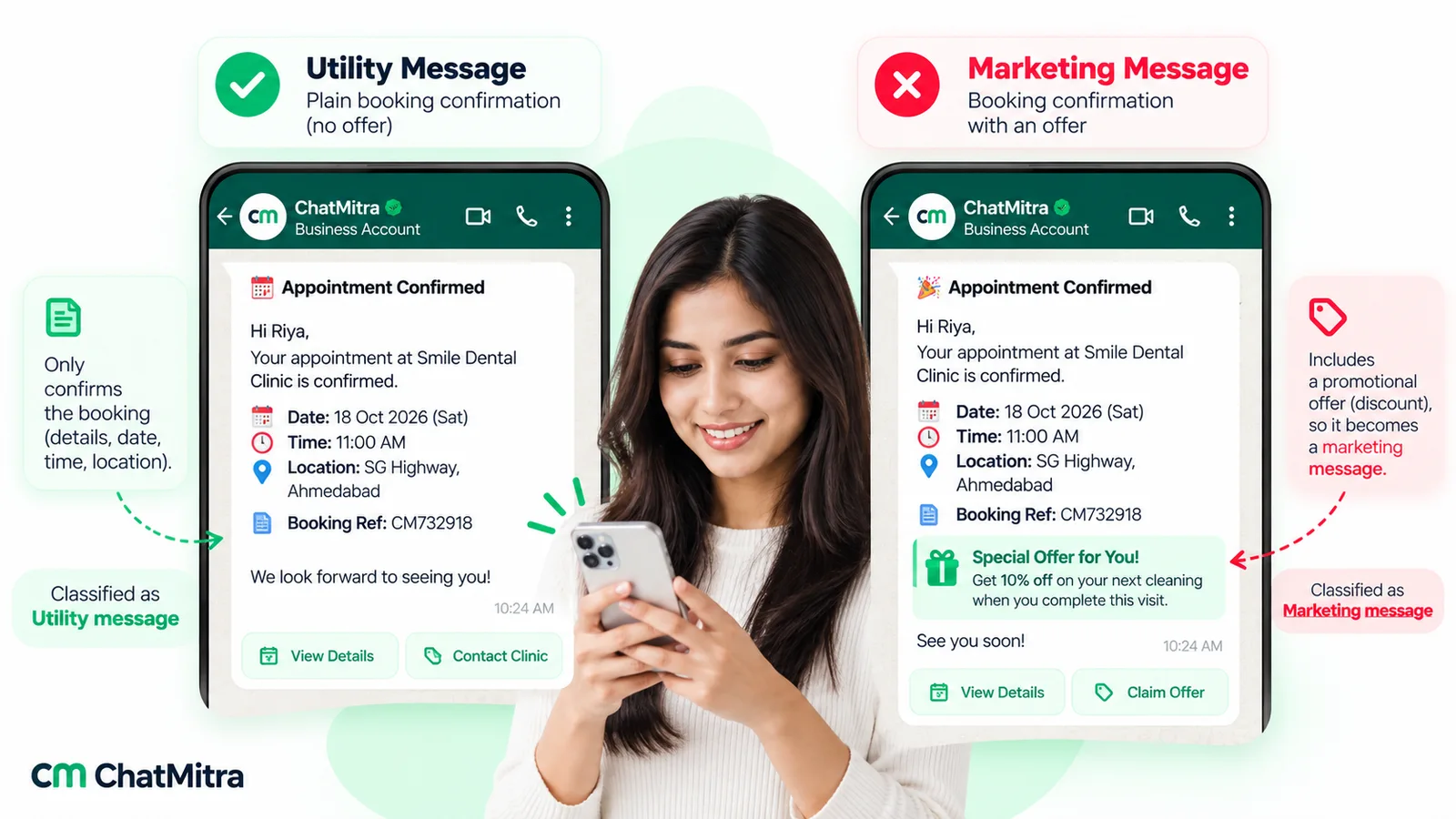
So keep the confirmation clean. If you want to suggest an upgrade, send it later as its own marketing template, to customers who agreed to receive offers.
What it costs
Meta’s pricing page says that from 1 October 2026 it charges “for utility messages sent in an open 24-hour customer service window”, which used to be free. The India rate card lists ₹0.1150 per utility message.
| Monthly volume | Confirmations (₹0.1150 each) | Confirmation + one reminder |
|---|---|---|
| 100 bookings | ₹11.50 | ₹23.00 |
| 300 bookings | ₹34.50 | ₹69.00 |
| 1,000 bookings | ₹115.00 | ₹230.00 |
These are Meta’s charges only. A platform may add its own fee; on ChatMitra’s Starter plan that’s up to ₹0.20 per contact per 24-hour conversation. Replies you type to customers’ questions are service messages, with 1,000 free per business phone number each month and ₹0.1150 each after that. More examples: how much each WhatsApp message costs.
Template tips
- Opt-in first. WhatsApp’s messaging policy only lets you contact people who have given you their number and agreed to hear from you. A WhatsApp consent tick box on the booking form is a simple way to collect that; the policy leaves the method to you, as long as it meets the law.
- Approve before launch. Meta’s template review “can take up to 24 hours”, and the text “cannot start or end with a parameter”.
- Add buttons. Quick-reply buttons such as “Get directions” or “Change booking” save typing; a URL button can open each customer’s own booking page. For button types and limits, see interactive messages and template buttons.
- US customers. Meta’s block on marketing templates to US numbers doesn’t cover utility confirmations, but keep the message free of offers so it stays utility.
How to automate booking confirmations
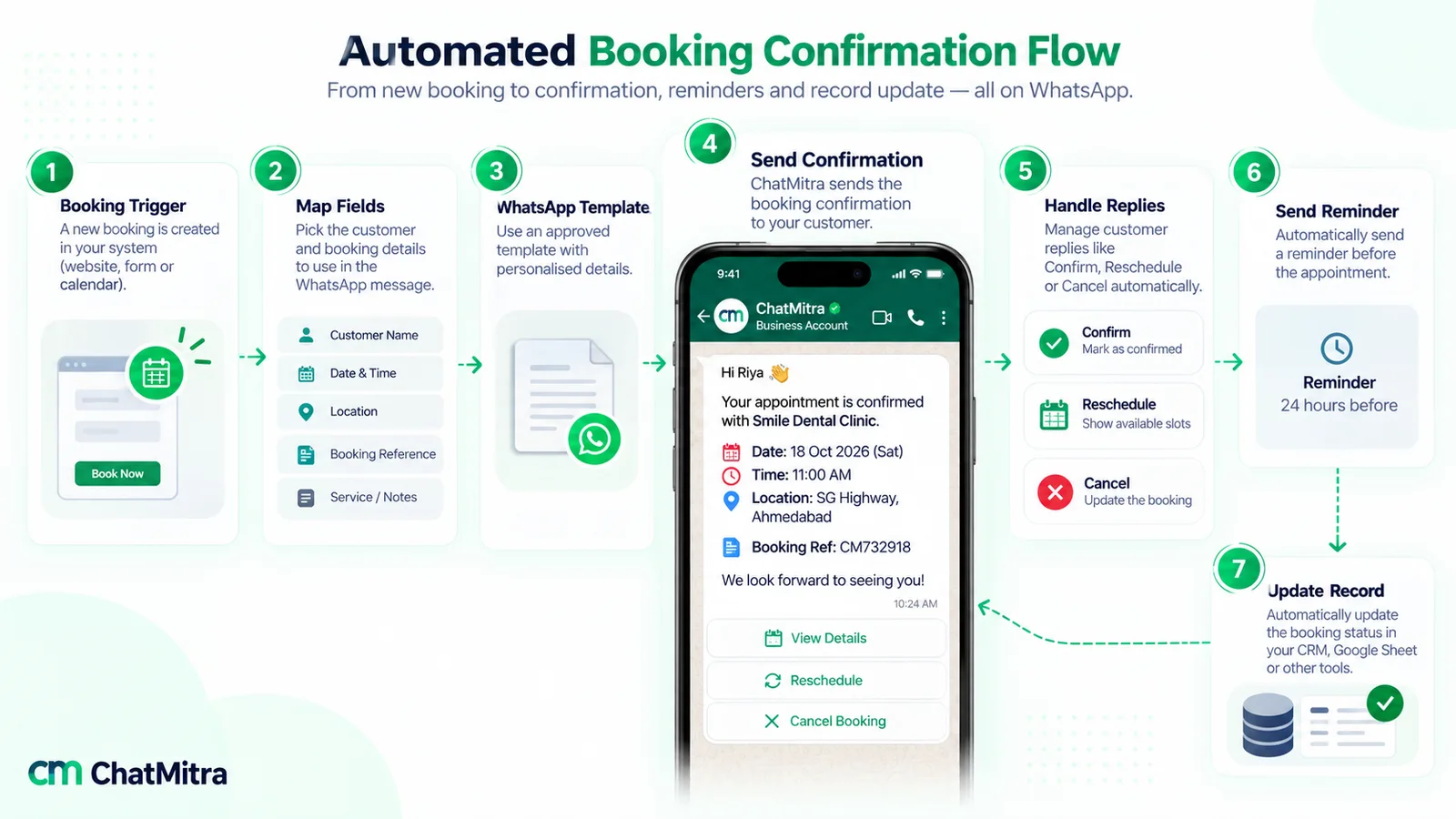
- Pick the trigger. A new row in your booking sheet, a form submission, or a “booking created” event in your booking software.
- Map the fields. Name, phone number with country code, service, date, time, place, reference and payment status.
- Write one template per booking type, using the examples above, and get them approved.
- Send on the trigger, within minutes.
- Handle replies. Route “change” and “cancel” replies to a person or an automatic reply with your booking link.
- Schedule the reminder for the day before, using the reminder guide’s timing.
- Update the record. When a booking changes, send the new confirmation (example 26) and update the sheet so the reminder doesn’t use old details.
For more on connecting sheets, forms and triggers, see our WhatsApp automation guide.
”I didn’t get a confirmation”: what to check
When a customer says the message never arrived, work through these in order:
- The number. A missing country code or a mistyped digit is a common cause. Store numbers with the country code (+91 for India) from the start.
- The channel. Not everyone uses WhatsApp on the number they gave you. Keep email or SMS as a backup for important bookings.
- The delivery status. Meta reports a sent, delivered, read or failed status for each message to your WhatsApp platform, and a failed status comes with an error code and a reason.
- The template. A paused or disabled template stops sending, and a rejected one never starts. Check its status in your WhatsApp account.
- The trigger. If the confirmation is automated, check that the booking actually reached the sheet or system that triggers it.
Once found, resend the full confirmation, not “sorry, here it is”: the customer should have one complete message they can keep.
Mistakes that cause no-shows and complaints
- No weekday. “14/12” is misread; “Mon 14 Dec” isn’t.
- Missing time zone for online meetings with people in other cities or countries.
- An address without a map pin for places that are hard to find.
- “Reply CANCEL” on SMS, which can unsubscribe instead of cancel.
- Old details after a change. Send a full new confirmation and say the old slot is cancelled.
- Offers inside the confirmation, which confuse the message and, on WhatsApp, make it marketing.
- No human route. A customer with a question at 8 am needs a reply, not a no-reply address.
Where ChatMitra fits, and where it doesn’t
ChatMitra sends and manages WhatsApp confirmations from the booking data you already have. It doesn’t take bookings or manage your calendar.
| Job | ChatMitra? | How |
|---|---|---|
| Confirm bookings recorded in a Google Sheet | Yes | An automation with the "Google Sheet — Row Added" trigger sends an approved template |
| Confirm bookings from your booking software | Yes | The "Incoming Webhook" trigger accepts a call from your system, protected by a secret; developers can also use the REST API, available on the Pro and Enterprise plans according to ChatMitra's pricing page |
| Send the reminder from the same sheet | Yes | "N Days Before a Date" trigger at a time you set (IST). It matches dates by day and month, so clear past bookings from the sheet |
| Answer a "Change booking" button automatically | Yes | Keyword auto-replies also match the text of template quick-reply buttons (Auto Reply comes with the Pro and Enterprise plans) |
| Let staff answer questions about a booking | Yes | Everyone works from one shared inbox for the number and can insert saved replies |
| Take bookings or show available slots | No | No built-in booking calendar. The AI chatbot (Pro and Enterprise plans) can call your own booking system's API if you connect it |
| SMS or email confirmations | No | Use your SMS or email provider alongside |
Plan contents are listed on ChatMitra’s pricing page.
Where to start
Choose the example nearest to your business, add your address, map link and cancellation route, and submit it as a utility template today. Then write example 26, the rescheduled version, before you need it: it’s an easy message to get wrong in a hurry.