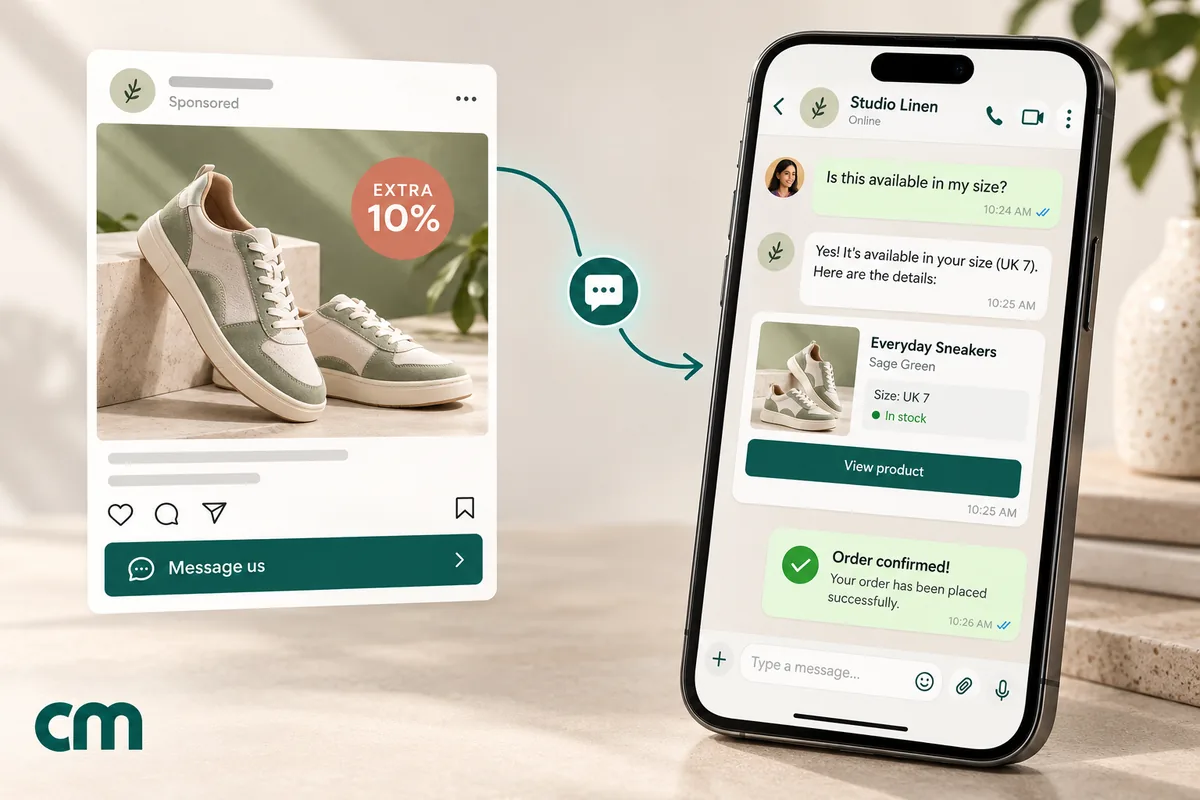
Click-to-WhatsApp ads for Black Friday are Facebook and Instagram ads whose button opens a WhatsApp chat with your store instead of a product page. In the most expensive week of the advertising year, they turn a click into a conversation you can answer, qualify and close. They also come with a pricing advantage: reply within 24 hours to a shopper who messaged from the ad, and Meta opens a window in which every message you send is free of Meta charges for up to 7 days.
This playbook is for stores planning Black Friday and Cyber Monday 2026. It covers when CTWA beats sending traffic to your site, the Meta rules that shape a sale-week campaign (including the US limit on marketing templates), a dated timeline, seven campaign ideas, first-reply scripts, how much inbox capacity you’ll need and how to prove the ads made money. The basics of the ad format itself are on our Click-to-WhatsApp ads learn page.
Key takeaways
- Black Friday is Friday 27 November 2026, after Thanksgiving on 26 November. Cyber Monday is 30 November. Work backwards from those dates.
- Answer ad chats within 24 hours and Meta's free entry point window opens. Meta's pricing page now says it may stay open for up to 7 days, long enough to cover the whole sale weekend.
- Marketing templates aren't delivered to US numbers at present, so for US shoppers the chat has to start with them.
- A CTWA campaign is only as good as its first reply. Set up instant, useful answers before you spend a rupee or a dollar.
- Measure cost and revenue per conversation, and keep the ad's click data if you want Meta to optimise for purchases.
What Click-to-WhatsApp ads are, in sale-week terms
A Click-to-WhatsApp ad looks like any other Facebook or Instagram ad. The difference is the button. Instead of opening a website, it opens WhatsApp with a chat to your business and a message already typed, which the shopper sends with one tap. From then on, you’re in a conversation on the app they use to talk to friends and family.
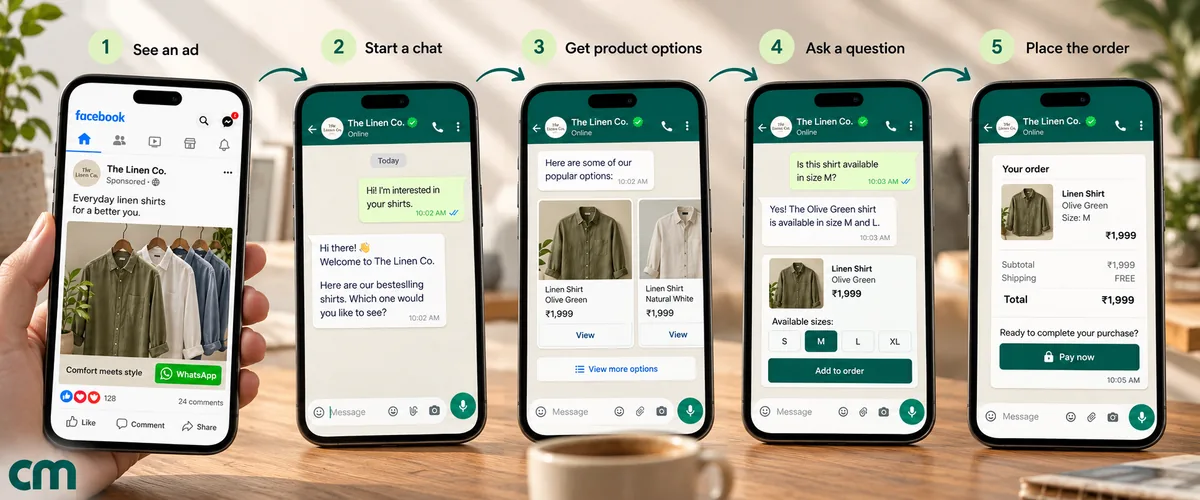
On an ordinary week, that’s a convenience. In Black Friday week, three things make it matter more:
- Clicks cost more. Every retailer bids for the same shoppers in the same few days, so each click has to work harder. A chat gives you a second chance to convert a shopper who would have bounced from a product page.
- Shoppers have questions. Will it arrive before the weekend? Is the deal on the blue one too? Can I combine two offers? A question answered in the chat is a sale that doesn’t die in a support inbox.
- Other channels are crowded. Email inboxes and SMS threads fill up with sale announcements. A chat the shopper started is one they’re watching.
The scale is real. Adobe reported that US shoppers spent $11.8 billion online on Black Friday 2025, up 9.1% year on year, and $44.2 billion across Cyber Week. Salesforce found mobile devices drove 70% of online orders in Cyber Week 2025. On Meta’s side, the company told investors in January 2026 that click-to-message ad revenue in the US grew more than 50% year on year in Q4 2025, and that paid messaging on WhatsApp had crossed a $2 billion annual run-rate.
CTWA or website ads for Black Friday?
CTWA isn’t automatically better than sending traffic to your site. It wins for some products and loses for others, and many stores should run both. Here’s how to decide by product line.
| Situation | Better choice | Why |
|---|---|---|
| Low-price impulse item, one obvious variant | Website ads | The shopper wants to buy, not talk. A chat adds a step |
| Higher-value item where shoppers compare and ask | CTWA | Questions answered in minutes close sales that a product page loses |
| Sizes, fit, shades or compatibility matter | CTWA | A short conversation replaces a size chart and cuts returns |
| Bundles, gift sets, “build your own” offers | CTWA | Easier to assemble in a chat than on a product page |
| Very large catalogue, shopper knows what they want | Website ads | Search and filters do this better than a conversation |
| Cash-on-delivery-heavy markets | CTWA | You can confirm details and nudge to prepaid in the same thread |
| Shoppers in the US | CTWA, if you want WhatsApp at all | Marketing templates can’t reach US numbers, so the shopper must start the chat |
| No one available to answer chats quickly | Website ads | An unanswered chat is worse than a landing page |
The last row is the one that decides most campaigns. CTWA turns ad spend into conversations, and conversations need answers. If you can’t answer within minutes on your busiest weekend of the year, put that money behind your website instead.
The WhatsApp rules that shape a sale-week CTWA campaign
The free entry point window
This is the pricing rule that makes CTWA attractive in a high-volume week. According to Meta’s pricing page (updated 28 September 2026), when someone messages you from a Click-to-WhatsApp ad on a phone running the WhatsApp Android or iOS app:
- A 24-hour customer service window opens.
- If you reply within that window, your reply is free, and a free entry point (FEP) window opens from the moment you replied.
- “FEP windows may remain open for up to 7 days. While open, you can send any type of message to the user at no charge.” That includes templates.
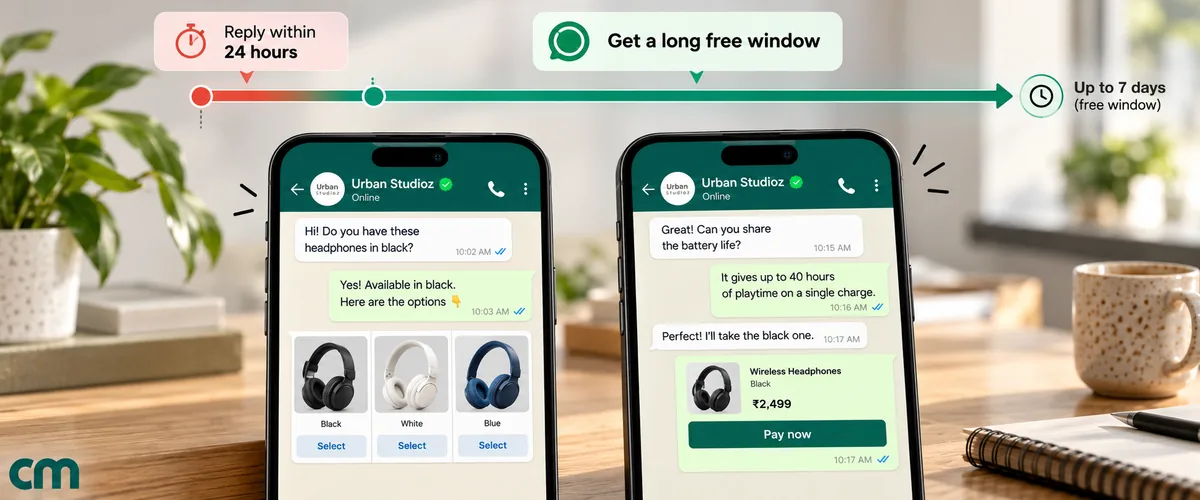
Three details are easy to miss:
- Mobile only. Meta says its “desktop and web apps are not supported”. A shopper who taps the ad on WhatsApp Web doesn’t open an FEP window.
- You must reply in time. No reply within the first 24 hours, no free window.
- It belongs to the conversation, not the ad account. The window is tracked for your business and that user. Meta says the account that funded the ad “does not get exclusive use of the window”.
Older guides, including earlier versions of Meta’s own page, describe this as a 72-hour window. Meta’s pricing page now says “up to 7 days”. The phrase “up to” matters: plan follow-ups for the first days of the conversation, and don’t rely on day seven.
What it doesn’t cover: your messaging provider’s own fees, which may still apply, and your ad spend. The ad is paid for in the auction like any other.
What happens outside the window
Outside the window, normal pricing applies, and it changed on 1 October 2026. Service replies (free-form messages inside a 24-hour window) get a monthly free tier of 1,000 per business phone number, then cost the same as utility messages in that market. Utility templates sent inside a customer service window are charged again. For a sale that brings thousands of organic chats, the FEP window is a real saving on top of the conversion benefit.
The US limit on marketing templates
Meta’s per-user limits page is blunt: “WhatsApp does not currently deliver marketing template messages to WhatsApp users with United States phone numbers.” For a Black Friday campaign, that means you can’t broadcast your sale to US customers on WhatsApp. You can talk to US shoppers who message you first, and replying inside a customer service or free entry point window works normally. If your Black Friday audience is in the US, CTWA isn’t one option among several. It’s how you get onto WhatsApp at all.
Elsewhere, marketing templates are subject to per-user limits: WhatsApp may cap how many marketing templates a person receives from all businesses, and a blocked send returns error 131049. Meta says marketing messages sent within a customer service window that a user opened by replying to a marketing message “do not count towards the limit”. A shopper who is already chatting with you is easier to reach than one on a broadcast list.
Opt-in for what comes after
A chat from an ad lets you reply. Don’t treat it as permission to add the person to every future broadcast. Meta’s opt-in guidance requires that you “clearly state that a person is opting in to receive communication from the business” and name the business. Ask during the conversation, for example with a button to join your offers list, and record the answer. Our WhatsApp opt-in guide has the wording.
Template pacing
If you plan to send a new marketing template to a large list in sale week, Meta may pace it. New templates, unpaused templates and templates without a green quality rating “are potentially subject to pacing”. Messages are held after an unspecified threshold, and dropped if the early recipients react badly. Create and send your sale templates to small audiences well before the big day.
Your Black Friday 2026 CTWA timeline
Work backwards from the sale. If you’re reading this in late October, fold the first two rows into one busy week and skip anything that needs new templates you can’t warm up in time. The dates below use Thanksgiving on Thursday 26 November 2026 (from the US Office of Personnel Management’s holiday schedule) and Diwali on Sunday 8 November 2026 (from India’s central government holiday list).
| When | Dates (2026) | What to do |
|---|---|---|
| 8 weeks out | Early October | Decide which products get CTWA and which get website ads. Connect your Facebook Page to your WhatsApp number. Check your number’s quality rating |
| 6 weeks out | Mid October | Write and submit templates (order confirmation, early-access announcement, restock). Build keyword replies for each ad’s prefilled message. Test the whole flow on a phone |
| 4–5 weeks out | Late October | Start early-access or waitlist ads to build a list of people who want the sale. Ask for opt-in in the chat |
| Diwali and 11.11 | 8 and 11 November | For Indian and Asian audiences, these sales come first. Keep your Black Friday creative separate so the offers don’t blur |
| 2 weeks out | Mid November | Load creatives. Warm up new templates with small sends. Brief the team on replies and escalation |
| Thanksgiving to Cyber Monday | 26–30 November | Shift budget to conversion ads. Staff the inbox for peak hours. Watch reply time hourly |
| Week after | 1–7 December | Follow up inside open free entry point windows: order updates, delivery questions, a “missed it?” note for undecided chats. Ask for opt-in if you haven’t |
Setting up a Black Friday CTWA campaign
The ad is built in Meta Ads Manager (or through Meta’s Marketing API). The steps below cover the decisions that matter for a sale; menu names in Ads Manager change often, so follow the current screens.
- Link your Facebook Page to your WhatsApp Business number. Meta’s API documentation lists “a Facebook page with WhatsApp number linked” as a requirement.
- Choose the objective. Meta supports WhatsApp as the destination for Engagement, Leads, Sales and Traffic objectives. Engagement and Leads campaigns can optimise for conversations. Sales campaigns can also optimise for conversions, which only works well if you send purchase events back (see measuring).
- Set the destination to WhatsApp at the ad-set level.
- Pick audiences and placements. Past buyers, site visitors and lookalikes are the usual sale-week mix. Note that chats from WhatsApp Status ads don’t carry a click ID, so they can’t feed purchase optimisation.
- Write the prefilled message. Meta’s default is “Hello! Can I get more info on this?”. Replace it with something that tells your reply system which ad the chat came from, such as “Hi! I’d like the Black Friday gift guide.”
- Add a welcome message sequence (optional). Meta lets you connect a welcome message sequence to a CTWA ad, with “text, prefilled message, and FAQs”. Use the FAQs for your three most common sale questions: delivery dates, returns and payment options.
- Test before launch. Tap your own ad preview on a phone, send the prefilled message and check that the right reply arrives in seconds.
Structure the week in three campaigns
Most sale-week CTWA spend falls into three jobs, and mixing them in one campaign makes every number hard to read. Keep them separate.
| Campaign | Audience | Goal | Offer in the ad |
|---|---|---|---|
| Warm-up (list building) | Past buyers, engaged followers, site visitors | Chats that end in an opt-in before the sale | Early access, restock alerts, a sneak peek |
| Sale-week conversion | Warm audiences first, then lookalikes and broad interest audiences | Chats that end in an order | The actual Black Friday offer, one product line per ad |
| Recovery (Saturday to Cyber Monday) | People who chatted but didn’t buy, site visitors who didn’t check out | Second-chance orders | ”Still deciding? Ask us anything before Monday night” |
Two budget rules keep the week under control. First, set daily budgets from your inbox capacity (see how much inbox capacity you’ll need), not from last year’s spend. Second, move money between the three campaigns by revenue per conversation, which you can only see if each campaign and ad has its own prefilled message or code.
Creative that sells a conversation
A CTWA ad has a different job from a website ad. It isn’t trying to get the shopper to buy from the ad; it’s trying to get them to start a chat. That changes the creative.
- Make the chat the benefit. “Tell us your budget and we’ll pick three gifts” gives a reason to tap. “Shop now” on a WhatsApp button confuses people.
- Show a person or a conversation. A short video of a team member answering a question, or a clean image of a chat with a helpful answer, tells the shopper what happens after the tap.
- Put the deal in the first line. Sale-week feeds are crowded. The offer and the deadline belong in the first line of the text and on the image.
- Say who will answer, and when. “Our team replies in minutes, 9 AM to 11 PM” sets expectations and lowers the risk of a chat that feels ignored.
- One promise per ad. An ad that offers gift help, bundles and early access in one breath can’t be routed to one clear first reply.
Meta passes the ad’s headline, body and media type in the chat’s referral data, so the tool answering the chat can know which creative started it, if it stores that data.
Seven Black Friday CTWA ideas
Each idea below pairs an ad with a prefilled message and a first reply. The prefilled text is what lets you route each chat automatically.
| Idea | Ad promise | Prefilled message | First reply |
|---|---|---|---|
| 1. Early access | ”Get the sale 24 hours early" | "Add me to early access” | Confirm, ask for opt-in with a button, say when access opens |
| 2. Fit or shade finder | ”Not sure of your size? Ask us" | "Help me find my size” | Two quick questions, then the right product and the sale price |
| 3. Gift finder | ”Gifts under a set budget, picked for you" | "Show me gift ideas” | Buttons for budget and recipient, then three options |
| 4. Bundle builder | ”Build a 3-for-2 set" | "I want to build a bundle” | A product list to pick from, then the total with the discount |
| 5. Limited drop reservation | ”Only a few of these: reserve yours" | "Reserve the Black Friday drop” | Explain how reservation works, take the order or join the waitlist |
| 6. Back-in-stock alert | ”Sold out last year. Get told first" | "Notify me when it’s back” | Confirm the alert, ask for opt-in for the restock message |
| 7. Order help for the sale | ”Questions about delivery before the weekend? Chat now" | "When will my order arrive?” | Delivery cut-off dates, then an offer to help pick a product |
A few notes on using them:
- Ideas 1, 5 and 6 build a list before the sale. They depend on opt-in, because the message that follows (early access opening, restock) is marketing. In the US, where marketing templates aren’t delivered, they only work inside an open window.
- Ideas 2, 3 and 4 convert during the sale. They work best with product messages that show items inside the chat. Our WhatsApp catalog guide covers how catalogs and product lists work.
- Idea 7 protects conversion. Delivery anxiety kills late-November sales. An ad that answers it, pointing to your real cut-off dates, catches shoppers who were about to give up.
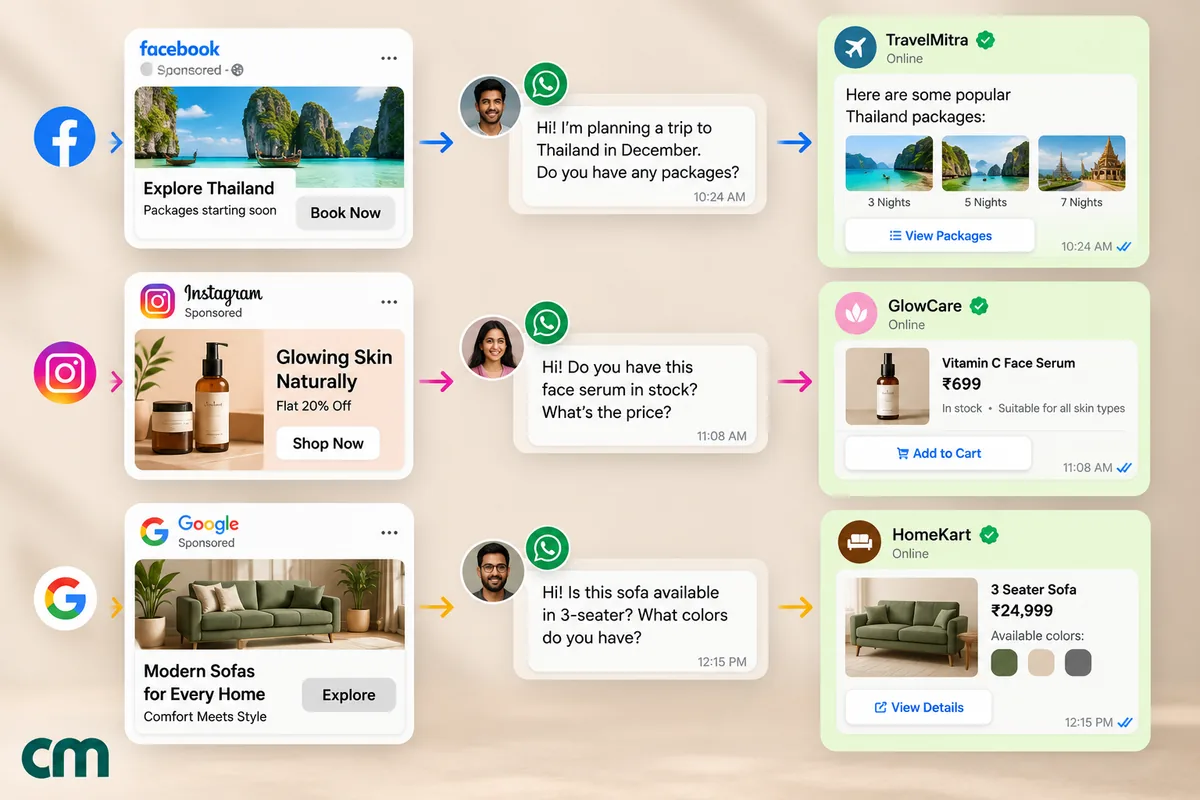
The first reply decides the campaign
A shopper who taps a Black Friday ad is comparing you with three other tabs. If your reply takes an hour, they’ve bought elsewhere. Two rules follow: the first reply is automatic and instant, and it’s useful, not a “thanks for reaching out”.
What a good first reply does:
- confirms the offer the ad promised, in one line;
- asks one easy question or offers two or three buttons;
- tells the shopper a person is available, and when.
Example first replies (sent automatically when the prefilled message matches):
Gift finder: Hi! Happy to help you find a gift. Who’s it for? Tap one below and we’ll send three ideas that are on offer this weekend.
Buttons: Partner · Parent · Friend
Size help: Hi! Our Black Friday prices are live until Monday night. To find your size, tell us your usual size in another brand (for example “M in Brand X”) and we’ll match it. A stylist is online until 10 PM.
Early access: You’re in. Early access opens on Thursday 26 November at 8 PM. Want us to message you on WhatsApp when it opens? Tap Yes, message me and we’ll send one reminder. You can stop anytime.
Buttons: Yes, message me · No thanks
After hours. Many sale-week chats arrive at night. An away message with honest hours (“Our team is back at 9 AM; your chat is saved and we’ll reply first thing”) keeps the shopper from giving up. Replying within 24 hours still opens the free entry point window. More wording ideas are in our WhatsApp greeting message guide.
How much inbox capacity will you need?
CTWA budgets are usually set in rupees or dollars. They should be set in conversations your team can handle. Here’s a simple way to estimate it; the numbers are assumptions to replace with your own.
| Input | Assumed value |
|---|---|
| Ad budget for the peak day | ₹60,000 |
| Cost per conversation | ₹40 |
| Conversations started | 1,500 |
| Chats fully handled by automation (FAQs, size help, links) | 60% |
| Chats needing a person | 600 |
| Average agent time per chat | 5 minutes |
| Agent hours needed | 50 hours |
Fifty agent-hours on one day is six or seven people working full shifts, and the chats won’t arrive evenly. Most will cluster in the evening, right after ads spend their daily budget. If that’s more than your team can cover, you have three levers: automate more of the common questions, spread the budget across more days, or cap daily spend so the chat volume matches your staff. Scaling ads beyond your answer capacity just buys unanswered chats.
Four inbox habits help on the day:
- Saved replies for delivery dates, returns, payment options and the current offers. See quick replies.
- Tags for the ad or offer (from the prefilled message) and for status: “needs size”, “ready to pay”, “follow up”.
- An escalation rule for order problems, so sales chats aren’t blocked behind a complaint.
- A reply-time target checked every hour, such as 80% of chats answered within five minutes during business hours.
Troubleshooting sale-week CTWA problems
Problems in Black Friday week cost money by the hour. These are the ones to check first.
| Symptom | Likely cause | Fix |
|---|---|---|
| Chats arrive but the automatic reply doesn’t fire | The shopper edited the prefilled message, so an exact-match rule missed it | Match on a distinctive word (“gift”, “bundle”) rather than the whole sentence |
| Messages you expected to be free were charged | The shopper tapped the ad on WhatsApp Web or desktop, or your first reply came after 24 hours | Free entry point windows only open for chats from the mobile apps with a reply inside the first 24 hours |
| The ad won’t publish with WhatsApp as the destination | The Facebook Page isn’t linked to the WhatsApp number | Link them in the Page’s settings or Meta Business Suite, then rebuild the ad |
| A new sale template is delivered slowly or not at all | Template pacing, or per-user marketing limits (error 131049) | Warm templates up with small sends before the sale; reach engaged shoppers inside open windows |
| Marketing templates to US customers fail | WhatsApp doesn’t deliver marketing templates to US numbers at present | Reach US shoppers only inside windows they opened |
| Chats from Status ads have no click ID | Meta omits ctwa_clid for WhatsApp Status ads | Count Status ad results by prefilled message or coupon code |
| The team is overwhelmed on Friday evening | Budget outran reply capacity | Lower the daily budget, add saved replies, route FAQs to automation |
Measuring what the ads actually sold
Cost per click is the wrong measure for CTWA. You’re paying for conversations, so measure those, and then measure what the conversations sold.
| Metric | Definition | Why it matters |
|---|---|---|
| Cost per conversation | Ad spend ÷ chats started | What each chat costs you |
| Reply time | Time to the first human (or useful automated) reply | The strongest predictor of whether the chat converts |
| Conversation-to-order rate | Orders ÷ chats | How well the chat sells |
| Revenue per conversation | Order value from chats ÷ chats | Compare with cost per conversation for true return |
| Opt-in rate | Chats that joined your offers list ÷ chats | The value that outlasts the sale |
| Orders inside the free window | Orders closed in the FEP window | How much of the selling happened at no Meta messaging cost |
A worked example. Continue the capacity example above, and treat every figure as an assumption. ₹60,000 of spend starts 1,500 chats at ₹40 each. If 6% of chats end in an order at an average of ₹2,000, that’s 90 orders and ₹1,80,000 in revenue: ₹120 of revenue per conversation against ₹40 of cost, a 3× return on ad spend before product costs. Now compare two changes. Halving reply time might lift the order rate from 6% to 8%, which adds 30 orders without spending more. Doubling the budget without adding staff might double the chats but leave half of them unanswered for an hour, and the order rate on those falls away. In sale week, the inbox is usually a better investment than the next ₹10,000 of ads.
Attribution, the reliable way. When a chat starts from an ad, Meta’s webhook includes a referral object with the ad’s ID, headline and source URL, plus a ctwa_clid click ID for most placements (Meta says the click ID is omitted for WhatsApp Status ads). If your system stores it, you can tie every order to an ad. You can also send conversion events back through Meta’s Conversions API for Business Messaging, which supports events such as Purchase, OrderCreated and LeadSubmitted and requires the click ID. Meta says this “enables access to purchase optimization” for click-to-WhatsApp ads. Two limits apply: the events should represent things that happened in the chat, not on your website, and the integration needs developer work.
Attribution, the simple way. If your tool doesn’t keep referral data, give each ad its own prefilled message and its own coupon code. Count orders by code. It’s less precise, but it’s honest and it works on sale day. Our WhatsApp lead generation guide explains how ad data reaches your software and what to ask your provider.
After the sale: using the window well
The days after Cyber Monday are where CTWA quietly earns back its cost. Every shopper whose chat opened a free entry point window can be messaged free of Meta charges while it’s open. Use that time for things they’ll welcome:
- Order updates for buyers: confirmation, shipping and delivery, in the same thread.
- Answers to open questions for shoppers who didn’t buy, with one clear reminder of what’s still on offer.
- An opt-in ask for anyone who hasn’t joined your list, so you can reach them at the next sale.
Don’t send the undecided shoppers four more offers. The window is free for you, but the shopper’s patience isn’t, and a block or report hurts your number’s quality rating going into December.
Setting it up with ChatMitra
ChatMitra doesn’t create or manage your ads; those stay in Meta Ads Manager. What it handles is the WhatsApp side: the chats your ads start. Here’s what’s available today, checked against the product.
| Need | In ChatMitra | Notes |
|---|---|---|
| Instant reply to the ad’s prefilled message | Yes | Auto-reply keyword rules (exact, starts-with or pattern match) can send a different reply for each ad’s prefilled text |
| Welcome for first-time contacts | Yes | ChatMitra’s own welcome message for new contacts, which can also tag them. Meta’s welcome message sequence is set in Ads Manager instead |
| Answers outside business hours | Yes | Away replies with business hours, or the AI chatbot trained on your FAQs |
| Product lists inside the chat | Through the chatbot | Multi-product lists from your connected catalog |
| Saved replies and tags | Yes | Quick replies and tags in the shared inbox |
| Ad attribution (which ad started the chat) | No | ChatMitra doesn’t store Meta’s referral data today. Use a prefilled message and coupon code per ad |
| Conversions API events back to Meta | No | Needs a separate integration |
| Automatic chat assignment | No | Agents pick chats from the shared inbox; use tags to split the work |
| Meta’s free entry point window | Meta’s charges are waived | ChatMitra’s ₹0.20 per-conversation fee (once per customer per 24 hours) still applies on Starter and Pro; see pricing |
For the broader picture of how an online store uses WhatsApp from ad to reorder, see WhatsApp for ecommerce.
Mistakes that waste Black Friday ad spend
- Launching ads before the replies work. Test every ad’s prefilled message on a phone. A chat that gets no reply for an hour is a paid click thrown away.
- Using Meta’s default prefilled text for every ad. You lose the ability to route chats and to count results by ad.
- Buying more chats than you can answer. Cap spend to your inbox capacity, especially on Friday evening.
- Assuming the free window is 72 hours, or 7 days. It’s “up to 7 days” and only for chats from the mobile apps. Do the important follow-ups early.
- Treating every chat as a marketing opt-in. Ask, record the answer, and message accordingly.
- Planning US WhatsApp broadcasts. Marketing templates aren’t delivered to US numbers. Plan CTWA and in-window replies instead.
- Judging the campaign by cost per click. Measure revenue per conversation against cost per conversation.
- Brand-new templates on sale day. Pacing can hold them. Warm them up in the weeks before.
A note for Indian stores
Black Friday has become a sale date for many Indian D2C brands, but it lands after Diwali (8 November 2026) and the 11.11 sales, when shoppers have already spent. Two things follow. Keep Black Friday creative clearly different from your Diwali offers, and expect a smaller, more deal-driven audience. For wording ideas that suit the festive season before it, see our Diwali and Navratri wishes for customers. The same CTWA mechanics apply, and in cash-on-delivery-heavy categories the chat is also the natural place to confirm the order and offer online payment.
Summary
Click-to-WhatsApp ads turn Black Friday’s expensive clicks into conversations, and conversations close the sales that product pages lose: the size question, the delivery worry, the gift nobody could decide on. Reply within 24 hours to chats from the mobile apps and Meta’s free entry point window lets you keep talking free of Meta charges for up to 7 days. Plan backwards from 27 November, set up instant first replies per ad, size the budget to your inbox, and measure revenue per conversation. For US shoppers, where marketing templates aren’t delivered, the chat that starts from an ad is how you reach them on WhatsApp.
Sources: Meta for Developers: pricing and free entry point windows (updated 28 September 2026), per-user marketing limits, template pacing, getting opt-in, messages webhook (referral object), welcome message sequences, Marketing API: Click to WhatsApp, Conversions API for Business Messaging. Adobe, Cyber Monday 2025 (2 December 2025). Salesforce, Cyber Week 2025 (5 December 2025). Meta Q4 2025 earnings call transcript (28 January 2026). US Office of Personnel Management, federal holidays 2026. Department of Personnel and Training, holidays for central government offices in 2026 (O.M. dated 3 July 2025). Facts checked 29 September 2026.