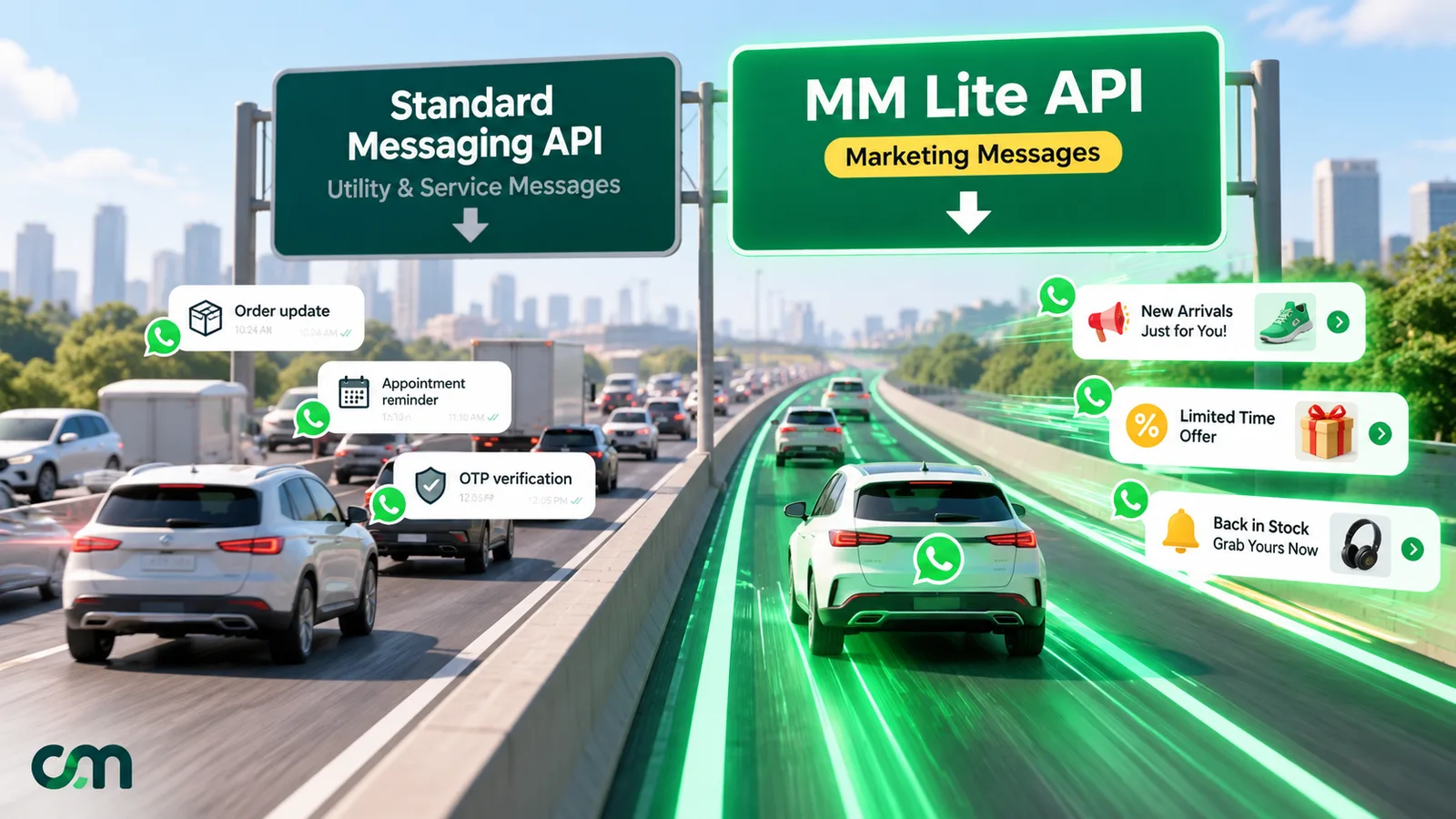
The MM Lite API is Meta’s separate send path for WhatsApp marketing templates. On 19 November 2025 it became generally available and was renamed the Marketing Messages API for WhatsApp. It uses your existing number and templates and adds engagement-based delivery, message expiry, GIF headers and conversion reporting. It works alongside the Cloud API rather than replacing it.
If your provider has asked you to “upgrade to MM Lite”, or you’ve seen marketing_lite on a webhook or an invoice, this guide is for you. It covers what the API does, what it leaves unchanged, what it costs now that max price exists, and whether switching it on is worth it for your mix of customers.
Key takeaways
- MM Lite only sends marketing templates. Everything else, and every reply, stays on the Cloud API.
- The delivery gain Meta quotes comes from one test in India of high-engagement messages. Read it as a ceiling, not a forecast.
- From Q2 2027 Meta plans to make max price required in eligible countries, so plan your budgeting now.
What is the MM Lite API?
MM Lite is Meta’s name, from its beta period, for an API built only for marketing templates on WhatsApp. Meta’s overview says it “optimizes delivery to reach more of the people most likely to find your messages relevant”. The same page says it has “a similar technical schema and same billing model as Cloud API”, and that businesses can use their existing phone numbers and templates.
The name changed along the way:
- Open beta, 1 April 2025. Meta’s MM API changelog records self-signup for all partners and businesses, available wherever the Cloud API is.
- General availability, 19 November 2025. The changelog entry reads: “Marketing Messages API for WhatsApp (formerly known as Marketing Messages Lite API) is now generally available.”
- Today. Meta’s documentation shortens it to “MM API for WhatsApp”. The word “lite” survives in technical names: the webhook pricing category
marketing_lite, the analytics product typeMARKETING_MESSAGES_LITE_APIand the onboarding eventMM_LITE_TERMS_SIGNED.
So “MM Lite API”, “Marketing Messages Lite API” and “Marketing Messages API for WhatsApp” all mean the same product. This article uses MM API from here on, except when quoting.
Two limits define it. It is send-only: Meta’s sending guide says it “does not receive incoming messages from consumers”. And it carries marketing templates only. Anything else has to go through the Cloud API.
One detail explains where its reporting comes from. According to Meta’s onboarding page, when a business registers, “Meta creates linked read-only ad accounts and links each to the marketing templates under the business portfolio”. That link to Meta’s ads systems is why MM API metrics can also be pulled through Meta’s Insights API, and why conversion reporting uses the same Meta Pixel and Conversions API events as ads.
MM Lite API vs Cloud API: what actually differs?
The quickest way to see the difference is Meta’s own feature comparison. Here are the rows that matter to a marketing team:
| What you compare | Marketing Messages API (MM Lite) | Cloud API |
|---|---|---|
| Message types | Marketing templates only | Marketing, utility, authentication and service |
| Receives customer messages | No | Yes (webhooks) |
| Send endpoint | /PHONE_NUMBER_ID/marketing_messages | /PHONE_NUMBER_ID/messages |
| Delivery that weighs engagement | Yes: "up to 9% more messages" in Meta's test | No |
| Message expiry (time-to-live) | 12 hours to 30 days for marketing | Utility and authentication only |
| Animated GIF header | Yes | No |
| Android app deep links | Yes | No |
| Benchmarks and recommendations | Yes | No |
| Web and app conversion metrics | Yes | No |
| Automated creative optimisations | Pilot | No |
| Sent, delivered, read, clicked; spend and cost per click | Yes | Yes |
| Carousel, catalogue, flow, list and reply formats | Yes | Yes |
| Billing | Per delivered message, billed as marketing_lite | Per delivered message, billed as marketing |
The table hides the most important point: this isn’t a choice between two products. Meta’s onboarding page says the two are “used together on the same phone number”. It also says a WhatsApp number “not registered on Cloud API” can’t use the MM API. You add a second outbound lane for promotions and keep the first lane for everything else.
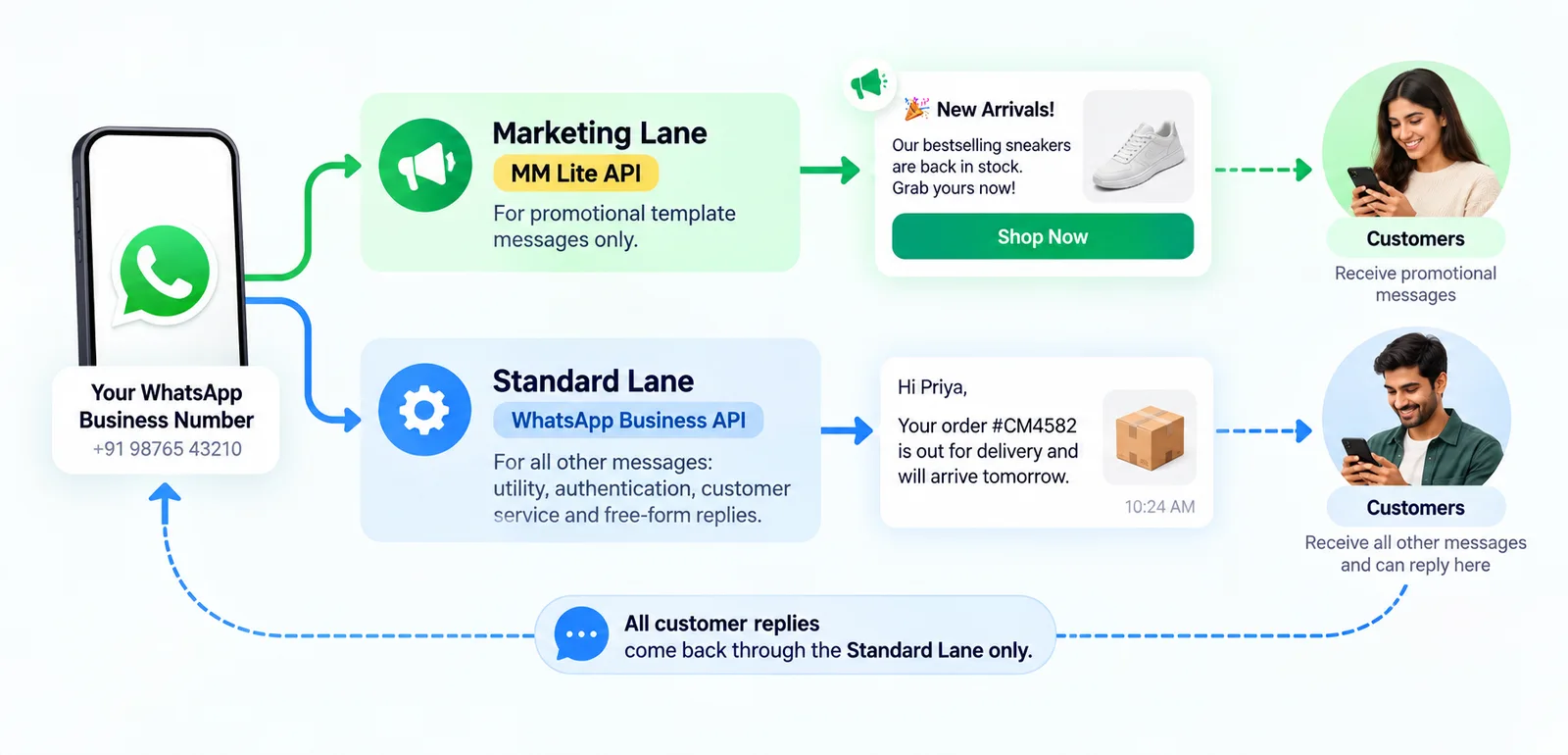
What does the MM API add, feature by feature?
Delivery that takes engagement into account
On the Cloud API, Meta says message quality “does not factor into per-user marketing message limits”. On the MM API, it does. Meta’s features page claims the MM API delivers “up to 9% more messages versus Cloud API”, and the footnote matters:
- The test covered about 12 million delivered marketing messages.
- The advertisers were all in India.
- It ran for one month, January 2025.
- It compared “high engagement messages only (specifically, more reads and clicks)”.
Our reading is plain: the 9% applies to messages people already like. If your broadcasts are rarely opened, the optimisation has little to reward. Budget for no uplift and treat any gain as a bonus you then measure (there’s a method later in this guide).
Message expiry (time-to-live)
A time-to-live (TTL) is how long WhatsApp keeps trying to deliver a message before dropping it. Meta’s TTL page gives marketing templates on the MM API:
- a default of 30 days;
- a custom range from 12 hours to 30 days, set in the
message_send_ttl_secondsfield.
It adds: “The system drops messages that cannot be delivered within the default or customized TTL.” On the Cloud API, TTL is limited to authentication and utility templates.
This matters more than it sounds. Think of a “sale ends tonight” template sent to someone whose phone is off until tomorrow. Without a short TTL, it arrives after the sale has closed and invites a complaint or a block. With a 12-hour TTL, the shortest Meta allows for marketing, WhatsApp stops trying after 12 hours, and because Meta charges only for delivered templates, you don’t pay for a message it drops. For offers that end within a few hours, even 12 hours can be too long, so time the send accordingly.
Animated GIF headers
GIF headers work only on the MM API. Meta’s template components page says “Gifs are mp4 files with a max size of 3.5MB, and WhatsApp displays larger files as video messages.” Keep them short and light: a loop that shows the product in use beats a slideshow.
Benchmarks and recommendations
Meta’s metrics page describes benchmarks as the “75th percentile of read rates across similar businesses”, and the same for clicks, “based on data from the past 30 days”. They are calculated daily, with a delay of up to 2 days.
That gives a small business something it never had on WhatsApp: a peer comparison. If your read rate sits well below the benchmark, look at your list quality and timing before you look at copy.
Conversion reporting
This is the feature marketing teams ask about most. According to Meta’s conversion measurement guide:
- Websites report conversions through the Meta Pixel or the Conversions API. Meta adds a click ID (
fbclid) to call-to-action URLs so the visit can be matched. - Android apps report through the Meta SDK (v17.0.2 or later), the Conversions API for App Events, or a mobile measurement partner.
- iOS apps: “iOS app measurement is currently not supported.”
- Attribution goes to “the last Meta touch (either Marketing Messages API for WhatsApp click or Ad click)”.
The metrics page lists purchases, purchase value, add to cart, checkout, leads, registrations, app activations and more. Two limits:
- “Existing templates prior to initial onboarding will not have conversion metrics enabled.”
- “In-thread conversion optimizations and reporting are not yet available.” A sale that happens inside the chat itself isn’t reported.
Automated creative optimisations
Meta has been piloting automatic changes to your template’s look. Its sending guide reports that text extraction and highlighting “have driven an average increase of 13.9%* in click-through rates”. The footnote puts that at over 50 million delivered messages from about 200 advertisers, sent between 1 December 2025 and 7 January 2026.
The catch is control. Meta warns that “the output may vary between messages even with the same input”. Its changelog shows these optimisations have been off by default at account level since 21 April 2026. Image cropping, text overlays, image animation and background generation are listed as paused. For regulated products or strict brand rules, leave them off until you have reviewed sample output.
What the MM API does not change
Switching lanes doesn’t loosen any rule. These apply exactly as before:
- Opt-in and policy. You still need the customer’s opt-in to marketing on WhatsApp. The WhatsApp Business Messaging Policy applies unchanged.
- Template approval. The MM API sends only templates Meta has approved in the marketing category. Meta’s marketing templates page calls them “the only type of template that can be used with both Cloud API and Marketing Messages API for WhatsApp”.
- Per-user marketing limits. Meta’s per-user limits page says WhatsApp may cap how many marketing templates a person receives “when they are less likely to be receptive”. Blocked sends return error 131049, and Meta advises waiting at least 24 hours before resending. Our marketing errors guide explains the codes.
- The US block. Meta’s get-started page says Meta has not delivered marketing messages to WhatsApp users in the United States since 1 April 2025 (error 131049). It notes the restriction “is not specific to MM API”. A US business can still use the MM API to reach customers outside the US.
- Your quality rating and messaging limit. Both still apply to your number, whichever lane a message takes.
Some countries lose the main benefits. The same get-started page lists the European Economic Area, the United Kingdom, Japan, South Korea, Nigeria, South Africa and Thailand. Messages sent from a business number in these countries, or to users there, get no delivery optimisation and no click or conversion reporting. Per-user marketing limits aren’t active there either. Thailand joined the list on 17 September 2026.
Russia and Belarus have limited features. Businesses in Cuba, Iran, North Korea, Syria, Venezuela and the Crimea, Donetsk and Luhansk regions can’t onboard at all.
How much does the MM Lite API cost?
Meta’s pricing page covers the Cloud API and the MM API under one heading. Since 1 July 2025, Meta has charged per delivered message rather than per conversation, so on the MM API you pay for each marketing template that is delivered.
Three details change what you see on an invoice:
- A separate category. MM API messages are billed as
marketing_lite, notmarketing. Your spend shows up in its own line, but the charging rule is the same. - The rate. Meta’s India rate card, linked from the pricing page, lists one marketing rate: ₹0.8631 per delivered message. A campaign that reaches 10,000 people in India costs ₹8,631 in Meta charges, before any provider fee.
- Undelivered messages cost nothing. Messages that expire under a TTL are never delivered, so they’re never charged.
Providers can charge on top of Meta. ChatMitra’s Starter plan, for example, adds ₹0.20 per contact for each 24-hour conversation.
What is max price?
Max price is the biggest pricing change for WhatsApp marketing since per-message billing. Meta’s MM API pricing page describes it as the option to “set a maximum price (max price) per marketing message delivery”. It adds: “when a max price is set, Meta will charge that max price or lower for delivery”.
How it works, as Meta documents it:
- Your choice of level. You can set a max price “the same as, lower than, or higher than the published rate”.
- Expressed per 1,000. It’s set as an amount per 1,000 deliveries. The only strategy offered is called “lowest cost with bid cap”.
- Per-country overrides. Multipliers let you raise or lower your cap for particular destination countries.
- Higher caps help with busy customers. On its duplicate-templates page, Meta says in-demand customers are reached by many businesses, so “messaging caps more likely to be hit”. There, “setting a higher max price signals your priority to reach the customer and can increase your delivery rate”.
- Reach estimates. Meta offers them, but says they “do not guarantee future delivery outcomes”.
- Webhook costs are estimates. When max price is enabled, delivered and read webhooks carry an estimated cost. Meta says “Your billing invoice is the source of truth for final pricing.”
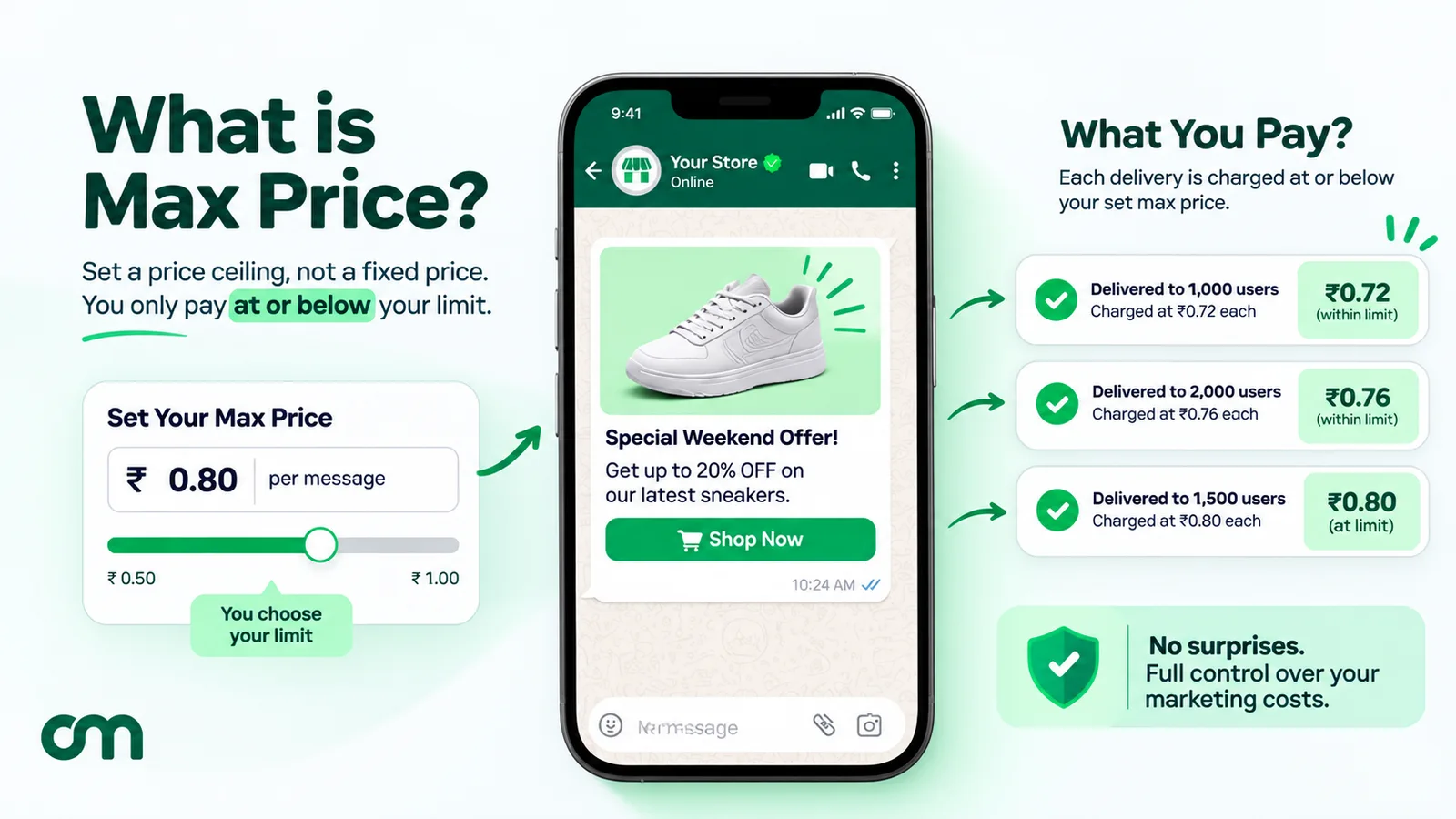
The timeline matters for anyone planning 2027 budgets:
| Phase | Date (per Meta) | What it means |
|---|---|---|
| Limited beta | From 15 May 2026 | Partners and direct integrators that sign Meta's beta agreement; each partner can enable a limited number of clients |
| Open beta | 1 October 2026 | Any partner can enable it for all their clients |
| General availability | Q2 2027 | Max price becomes "required in eligible geographies"; fixed published marketing rates "will only apply on the Cloud API" |
Meta’s developer documentation doesn’t yet list which countries count as “eligible geographies”, and recipients in Russia and Belarus are excluded from max pricing. Until a list appears, don’t assume India is in or out.
In practical terms: if you plan a large marketing volume on the MM API for 2027, expect to choose a price per delivery rather than simply accept the published one.
Who should use the MM Lite API?
Use this table to decide quickly.
| Your situation | Recommendation | Why |
|---|---|---|
| Regular promotions to opted-in customers in India or other unrestricted markets | Switch it on | You gain engagement-based delivery, TTL and benchmarks at the same billing model |
| Time-limited offers, flash sales, event reminders sent as marketing | Switch it on | A short TTL stops stale offers arriving late |
| You sell on a website and run Meta ads | Switch it on and connect the Pixel or Conversions API | WhatsApp sales finally show up next to your ad results |
| You mostly send order updates, OTPs and support replies | Little to gain | Those messages can't use the MM API |
| Most customers are in the EEA, UK, Japan, South Korea, Nigeria, South Africa or Thailand | Optional | No delivery optimisation or conversion metrics there; only TTL and GIFs help |
| Most customers are in the United States | Not useful for them | Marketing templates aren't delivered to US users on any API |
| You need iOS app conversion tracking | Don't rely on it | Meta doesn't support iOS app measurement yet |
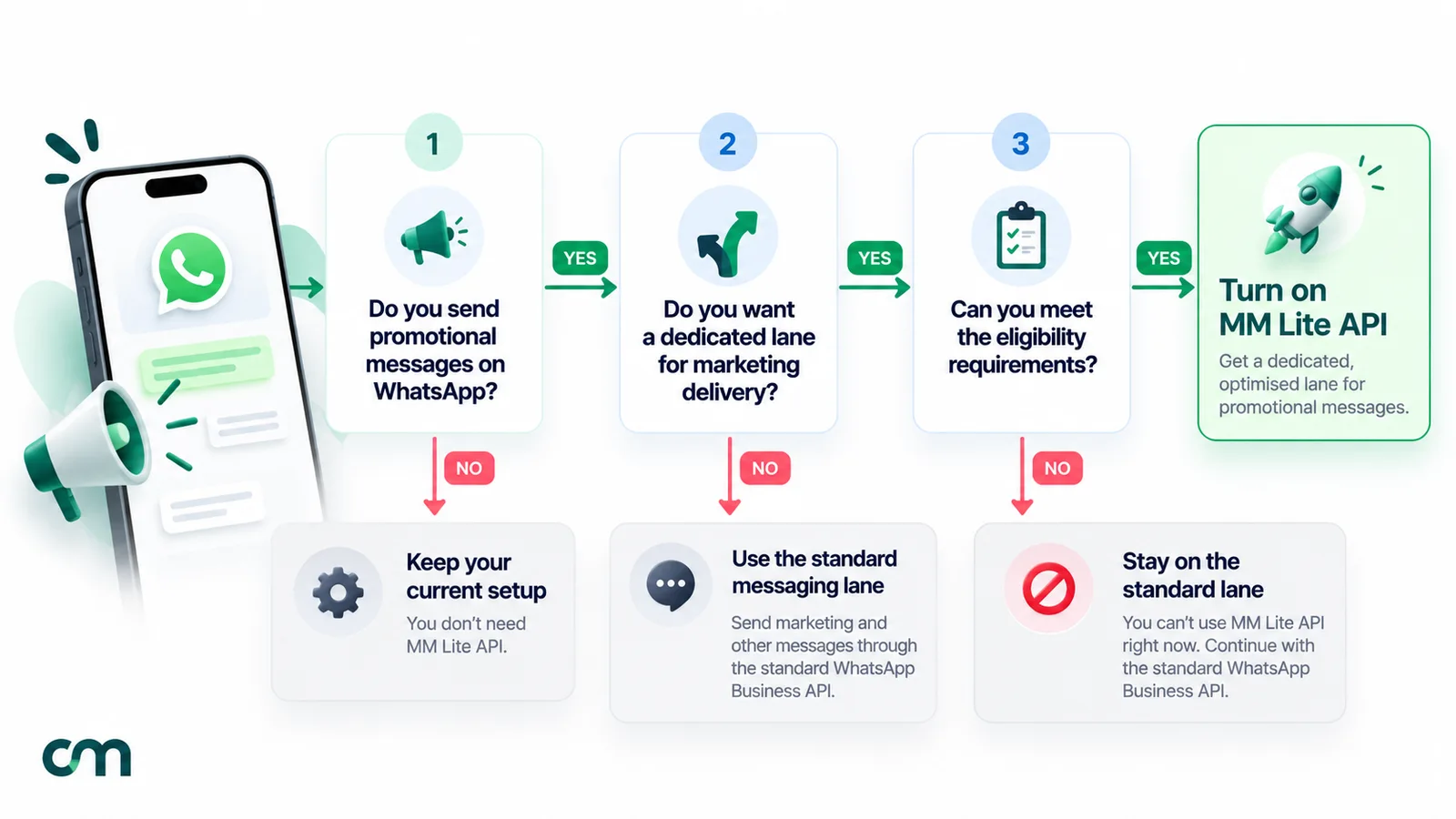
How to switch on the MM Lite API
Check eligibility first
Meta’s onboarding page lists three requirements:
- your WhatsApp account is active and not restricted for violations;
- the messaging account’s tax country is not in a sanctioned region;
- the owner business’s country is not in a sanctioned region.
It also warns that “these requirements may change”. The phone number must be registered on the Cloud API. Numbers that also use the WhatsApp Business app (coexistence) can be onboarded, according to Meta’s changelog for 29 September 2025.
Pick your route
- Through your provider. Many providers use Meta’s Embedded Signup: you log in with Facebook, pick the business portfolio and accept Meta’s terms. Providers can also send an invitation through Meta’s Intent API, which emails your portfolio admins.
- In WhatsApp Manager. Meta tells partner-managed businesses to “have someone with full control to the business portfolio to accept the Terms of Service” through WhatsApp Manager. Look for the Marketing Messages alert on the overview page. Our WhatsApp Manager guide covers roles and access.
- Direct integration. If you built on the Cloud API yourself, Meta’s get-started page says to accept the terms from the app dashboard’s integration guide.
Confirm it worked
Onboarding status lives in the marketing_messages_onboarding_status field on your WhatsApp Business Account, which reports values such as ELIGIBLE and ONBOARDED. Meta’s onboarding page says the older field, marketing_messages_lite_api_status, “will be deprecated in version 24.0”, a version Meta has already released, so integrations that still read it should move to the new field now.
Meta’s sending guide says a new marketing template takes “up to 10 minutes to sync with the corresponding Ad account”. Templates inactive for more than 7 days need the same 10-minute sync after their first use, so wait 10 minutes after creating a template or reusing a dormant one before a big send.
ChatMitra customers can follow our step-by-step marketing messages guide.
What changes for developers
If you send through your own code, the change is small. Meta’s sending guide says the MM API “follows the same API payload syntax as Sending Messages on Cloud API, and requires the same permissions”. A minimal send looks like this:
POST https://graph.facebook.com/v24.0/<PHONE_NUMBER_ID>/marketing_messages
{
  "messaging_product": "whatsapp",
  "to": "<CUSTOMER_NUMBER>",
  "type": "template",
  "template": { "name": "winter_offer", "language": { "code": "en" } }
}
What to build around it:
- Route by category. Meta’s routing guide says to send templates whose latest category is MARKETING to
/marketing_messagesand everything else to/messages. If an appeal changes a template from marketing to utility,/marketing_messagesrejects it. Refresh the category and retry through/messages. - Decide what happens before onboarding. Meta says that if onboarding requirements aren’t met, marketing messages “will still be routed via Cloud API”. The optional
product_policyfield defaults to falling back. Set it toSTRICTif you’d rather fail than fall back. - Optionally close the old lane. The
disable_marketing_messages_on_cloud_apisetting, added on 6 April 2026, makes/messagesreject marketing templates with error 131063. It stops a stray integration from bypassing the MM API. - Keep your Cloud API webhook. Replies, status updates and every non-marketing message still flow through it.
- Read the pricing category. Status webhooks for MM API sends carry
marketing_lite. A message routed through the Cloud API showsmarketing, which is the fastest way to spot a fallback. - Add TTL deliberately. TTL is a template setting: set
message_send_ttl_secondswhen you create or edit the template, between 43,200 (12 hours) and 2,592,000 (30 days). Meta clears it if a template’s category is changed automatically, so check it after any recategorisation.
Meta’s click-event webhook is still in limited availability, and “Click events are only available for messages sent in the last 7 days.” Our WhatsApp Cloud API explainer covers the rest of the webhook set.
How to test whether the MM API helps you
The only uplift figure that matters is yours. Since /messages still accepts marketing templates unless you disable it, a business with developer help can run a fair test:
- Pick one campaign you’d send anyway, to a list of at least a few thousand opted-in contacts in one country.
- Split the list at random into two halves. Don’t split by city, signup date or anything else that changes behaviour.
- Send the same template at the same time, one half through
/marketing_messages, the other through/messages. - Compare delivered ÷ sent, read ÷ delivered and clicks ÷ delivered from your status webhooks. Add sales if your checkout records the click ID.
- Repeat for two or three campaigns before deciding. One send can mislead, especially if per-user limits hit one half harder by chance.
If you use a provider without this control, compare similar campaigns before and after switching. Keep the audience, the day of the week and the offer type as close as you can. It’s weaker evidence, but better than a banner’s promise.
Troubleshooting common MM Lite API problems
| What you see | Likely cause | What to do |
|---|---|---|
| Error 131049 | Per-user marketing limit, or a US recipient | Wait at least 24 hours before resending; remove US numbers from marketing lists |
Error on /marketing_messages for an order update | The template isn't in the marketing category | Send it through /messages |
| Template that worked last week is rejected | An appeal or review changed its category | Refresh the category and route it again |
| Error 131061 | A template with a max price was sent through the Cloud API | Send it through /marketing_messages |
| Error 131063 | Marketing is disabled on the Cloud API for this account, or the account hasn't finished MM API onboarding and the fallback was blocked | Use the MM API and finish onboarding, or switch the setting back |
Webhooks show marketing, not marketing_lite | The send fell back to the Cloud API | Check marketing_messages_onboarding_status; finish accepting the terms |
| No conversions reported | Template predates onboarding, iOS app, restricted country, or no Pixel/Conversions API events | Create a fresh template and confirm the Pixel fires on the landing page |
| Some customers never received a flash-sale message | It expired under your TTL | Expected; widen the TTL only if the offer still makes sense later |
Mistakes to avoid
- Counting on the headline uplift. Meta measured high-engagement messages from advertisers in India in one month. Your average campaign may see less.
- Leaving TTL at the default for dated offers. Thirty days is the default. A weekend sale needs hours, not weeks.
- Sending utility content as marketing to reach the MM API. It pushes up your cost per message and still counts towards per-user limits.
- Reusing old templates for measured campaigns. Templates created before onboarding don’t get conversion metrics.
- Turning on creative optimisations without a review. Meta warns the output can vary from one message to the next.
- Ignoring where your customers are. A list dominated by UK or EU numbers gets none of the delivery optimisation.
- Forgetting 2027. If max price becomes required where you send, your cost per message becomes a decision you make, not a figure you read off a rate card.
Where ChatMitra fits
ChatMitra’s code routes broadcasts that use a marketing-category template to Meta’s /marketing_messages endpoint. Everything else goes to /messages, and failed-message retries follow the same route as the first send. Single sends of a marketing template use the MM API once your account reports ONBOARDED. If your account uses Meta’s Embedded Signup and Meta reports it as eligible but not yet onboarded, the dashboard shows an upgrade banner that opens Meta’s login so an admin can accept the terms. Accounts set up for manual connection, ChatMitra’s default, don’t see the banner; accept the terms in WhatsApp Manager instead.
Where you’ll need Meta’s own tools instead:
- ChatMitra doesn’t set a TTL or a max price on sends today.
- Benchmarks and conversion metrics don’t appear inside ChatMitra. You’ll find them in WhatsApp Manager, and our template analytics guide shows what’s available.
- If you need per-message price control in 2027, check with us before max price becomes required in your market.
If promotions are a regular part of how you sell, you can compare ChatMitra’s plans and, once your account has accepted Meta’s terms, run your next broadcast through the MM API. For planning what to send, our WhatsApp marketing strategy guide and 18 campaign ideas are good next reads. For the cost side, see WhatsApp Cloud API pricing.
Where to start
Check your account’s onboarding status. Then send one short-TTL marketing template to a small opted-in list and confirm the webhook says marketing_lite. Run the split test above before changing your whole calendar. Knowing what the API does for your own customers is worth more than any headline percentage.
Sources: Meta for Developers documentation for the Marketing Messages API for WhatsApp (overview, features, get-started, onboarding, sending, routing, pricing and max price, metrics, conversion measurement, click events, changelog), Meta's WhatsApp pricing, time-to-live, template components, marketing templates and per-user limits pages, and the WhatsApp Business Messaging Policy, all linked above. The India rate is from Meta's INR rate card. Facts checked against Meta's and WhatsApp's documentation on 27 September 2026.