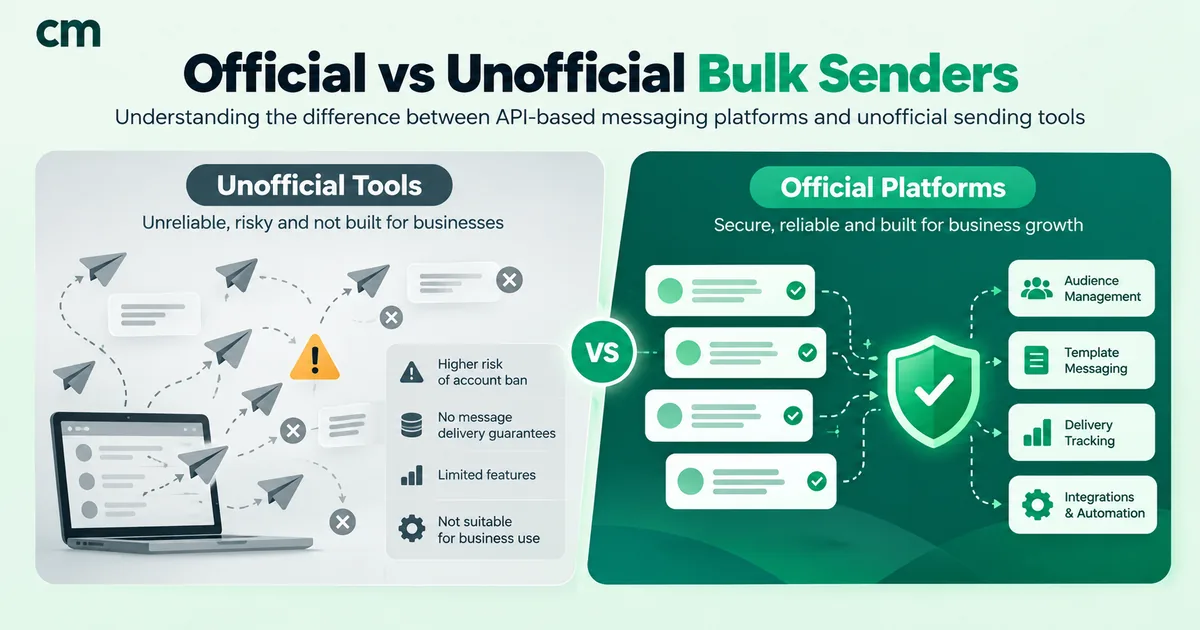
The best WhatsApp bulk message sender for a business is one built on the official WhatsApp Business API. It sends Meta-approved templates to customers who agreed to hear from you, reaches them whether or not they saved your number, and scales safely to unlimited daily reach. Unofficial senders include Chrome extensions, “bulk sender” apps, modified WhatsApp clients and so-called unofficial APIs. They automate an ordinary WhatsApp account, which WhatsApp’s terms prohibit, and they put the number your business depends on at risk.
That’s the short answer; for named providers and prices, see our comparison of WhatsApp API providers in India. The rest of this guide compares the two approaches on reach, risk, features and real cost in rupees, quotes what WhatsApp’s own rules say, and walks you through how to send bulk messages safely.
Key takeaways
- Unofficial senders automate WhatsApp Web or a phone app. WhatsApp's Terms of Service ban "bulk messaging, auto-messaging, auto-dialing, and the like".
- Official senders use the WhatsApp Business API: templates, opt-in, daily limits from 250 up to unlimited, and low risk when you follow the policy.
- Cost in India: ₹0.8631 per delivered marketing message in Meta fees, about ₹1.06 all-in on ChatMitra Starter or Pro.
- Unofficial tools only look cheaper. Their hidden cost is the number, the contacts and the chat history you can lose overnight.
What is a WhatsApp bulk message sender?
A WhatsApp bulk message sender is software that sends one message, usually personalised, to many WhatsApp users at once. There are three kinds, and they work very differently:
| Type | How it sends | Allowed by WhatsApp? |
|---|---|---|
| Official API platform | Sends approved templates through Meta's WhatsApp Business Platform (Cloud API) | Yes. This is the channel WhatsApp built for businesses |
| WhatsApp Business app broadcast lists | You send manually from the free app to a list of contacts | Yes, within the app's limits; only contacts who saved your number receive it |
| Unofficial sender (extensions, bulk apps, modified clients, "unofficial APIs") | Automates WhatsApp Web or a phone app to mimic a person sending messages | No. WhatsApp's terms prohibit bulk and automated messaging on its apps |
When we checked Google India results for “best whatsapp bulk message sender” in September 2026, half of the top 10 were free extensions and apps. They’re easy to install, and that’s exactly the problem: nothing about them is designed around WhatsApp’s rules.
Official vs unofficial bulk senders: side-by-side
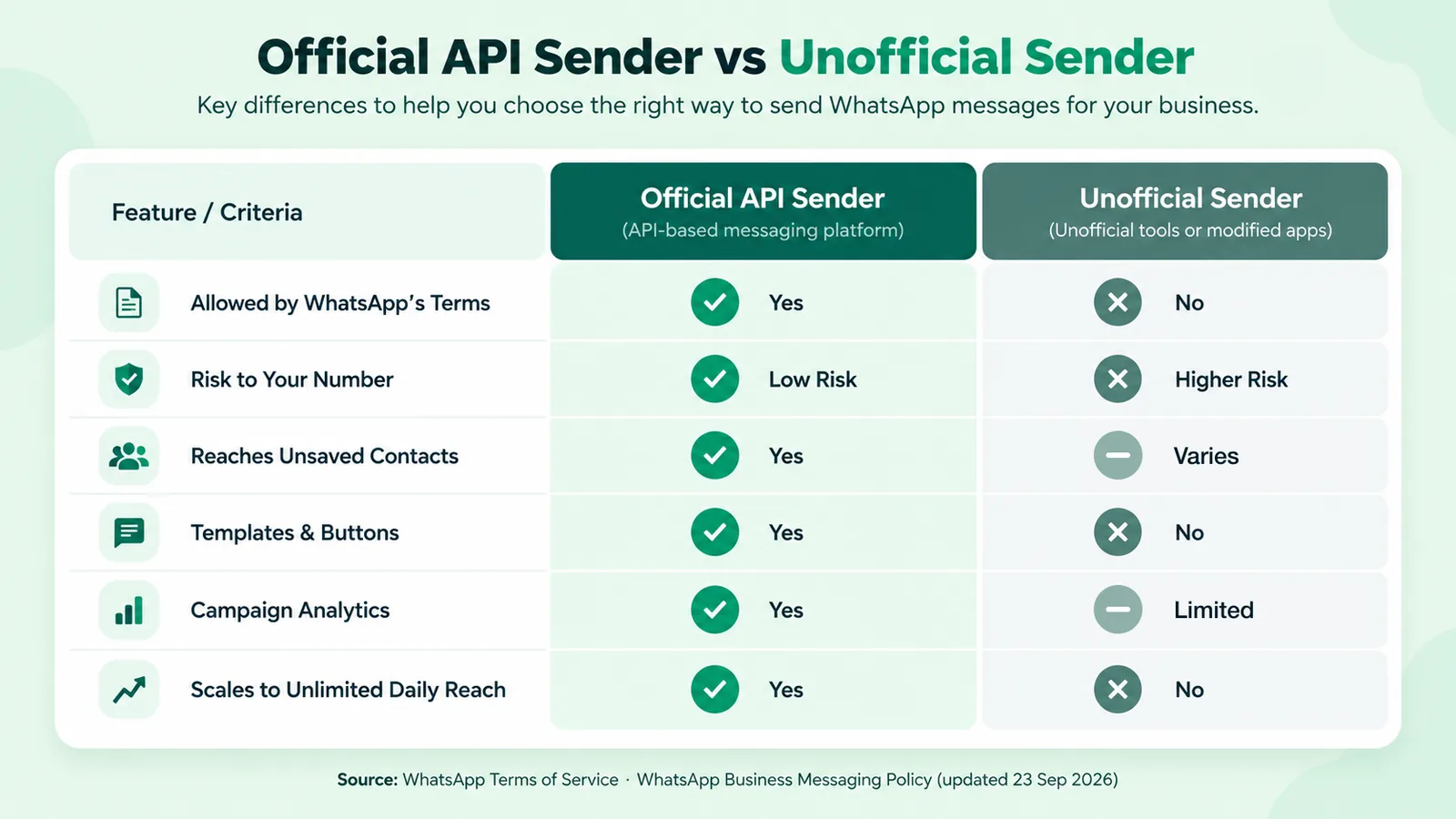
| Official API sender | Unofficial sender | |
|---|---|---|
| Status under WhatsApp's rules | The approved business channel | Breaches the Terms of Service (bulk and automated messaging) |
| Risk to your number | Low if you follow the messaging policy; limits tighten if quality drops | High: restriction or permanent ban |
| Who receives messages | Any opted-in customer, saved or not | Varies; relies on a personal-style account |
| Daily reach | 250 → 2,000 → 10,000 → 1,00,000 → unlimited, based on verification and quality | No official limit, but the more you send, the faster you get flagged |
| Message format | Approved templates with variables, images, PDFs, video and buttons | Plain text and media; no approved buttons |
| Verified business identity | Display name reviewed by Meta; business verification available | None |
| Analytics | Sent, delivered, read, failed and replies per campaign | Limited or self-reported by the tool |
| Team replies | Shared inbox, multiple agents, assignment | One phone or one browser session |
| Integrations | Shopify, WooCommerce, payments and webhooks (varies by provider) | Rare |
| Cost model | Meta's per-message rate plus the provider's fee | Subscription or one-time licence; no Meta charges |
| Consent and opt-out | Required by the policy, and tools support it | Up to you, and often skipped |
What WhatsApp’s own rules say
WhatsApp’s terms say this directly.
- WhatsApp Terms of Service: you must not use WhatsApp in ways that “involve sending illegal or impermissible communications such as bulk messaging, auto-messaging, auto-dialing, and the like”, and you must not, “directly or through automated means”, reverse engineer, alter or modify its services.
- WhatsApp Business Messaging Policy (last updated 23 September 2026): businesses may only contact people who gave their number and “opt-in permission … confirming that they wish to receive subsequent messages or calls from you”. It adds: “If you use or operate a service which utilizes WhatsApp in violation of our terms or policies, such as messaging people at scale in an unauthorized manner, we have the right to limit or remove your access to WhatsApp for Business.”
- On permanent consequences, the same policy says that if WhatsApp terminates an account for violations, “we may prohibit you and your organization from all future use of WhatsApp products and services.”
- On user feedback: “Users can block or report businesses. Our systems may limit the amount of messages a business can send … based on this user feedback.”
The last point applies to official senders too. The API isn’t a licence to spam; it’s a channel with rules and a quality score. The difference is that on the API, the rules are clear and you can see your quality rating before anything goes wrong.
Why unofficial senders look cheaper, and what they really cost
An unofficial extension might charge a small monthly fee and no per-message cost, because it never pays Meta. That comparison leaves out:
- The number itself. If it’s restricted or banned, you lose the number your customers know, your chat history with them and every conversation in progress.
- Reach you think you have. Messages from an account that is being rate-limited or flagged may simply not arrive, and the tool may still count them as “sent”.
- Your brand. Messages from an unverified, unnamed number are easy to mistake for spam.
- Consent and compliance. Mass messaging people who never opted in invites reports. It can also create exposure under India’s Digital Personal Data Protection Act, 2023. Take legal advice if you process customer data at scale.
- Team time. One browser session or phone means one person sending and replying, with no shared inbox, no assignment and no audit trail.
A realistic comparison is “₹0.86 per message plus a fee, on a channel you keep” against “a low fee, on a channel you can lose any day”.
How official bulk sending works
Official bulk messaging on the WhatsApp Business API rests on four mechanics.
- Templates. Any message you start (outside the 24-hour window after a customer writes to you) must use a template Meta has approved. Templates are categorised as marketing, utility or authentication, and priced by category.
- Opt-in. You message only customers who agreed to hear from you: at checkout, on a form, by messaging you first, or on a QR code at your counter.
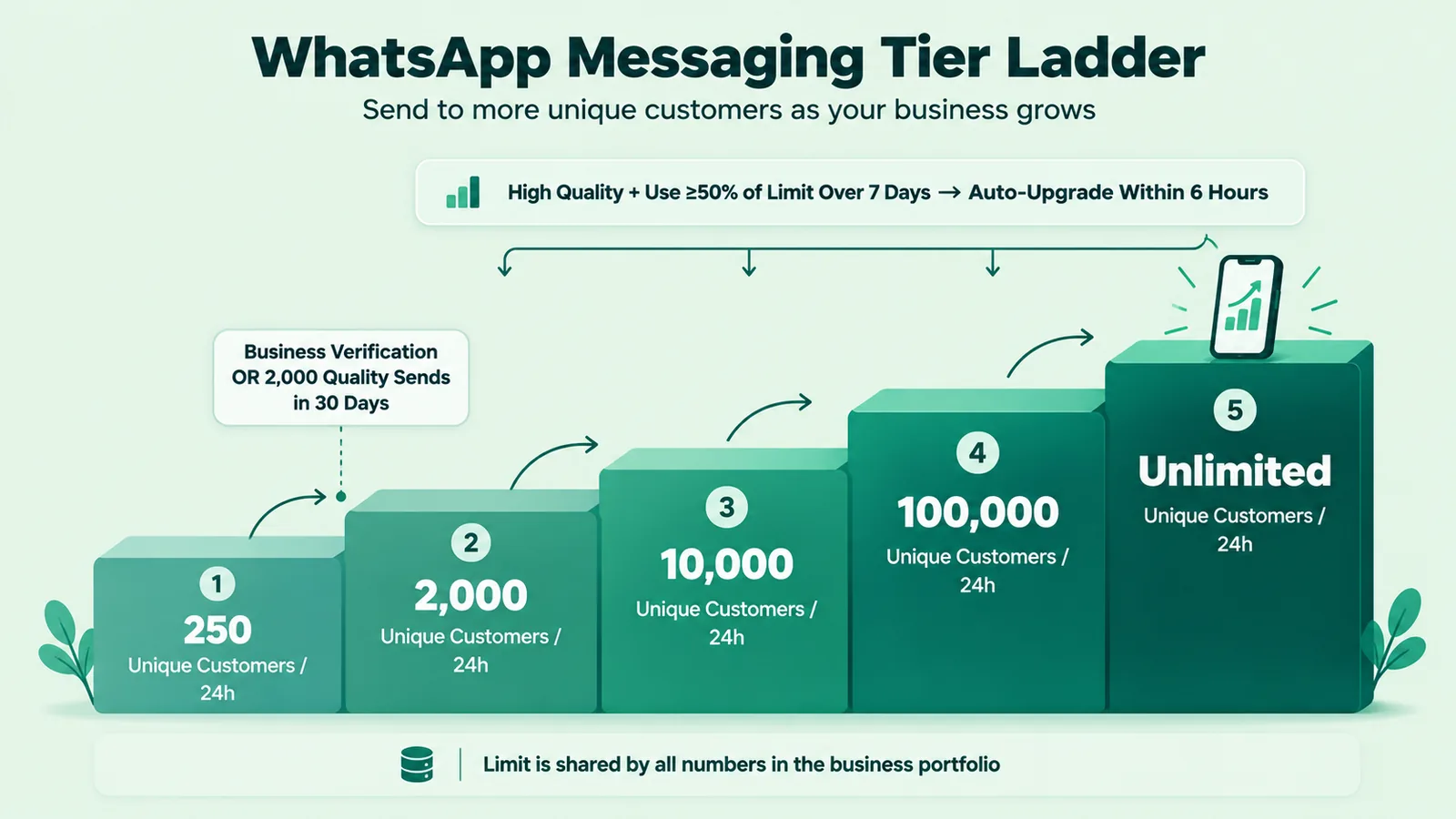
- Messaging limits. Meta limits how many unique customers your business portfolio can message outside the service window in a rolling 24 hours. You start at 250, reach 2,000 after business verification (or enough high-quality sends), then scale automatically to 10,000, 1,00,000 and unlimited when quality stays high and you use at least half your limit over 7 days. The limit is shared by every phone number in the portfolio.
- Quality rating. Blocks and reports lower your quality. Low quality stops your limit from growing and can restrict sending. Good targeting and a clear opt-out keep it high.
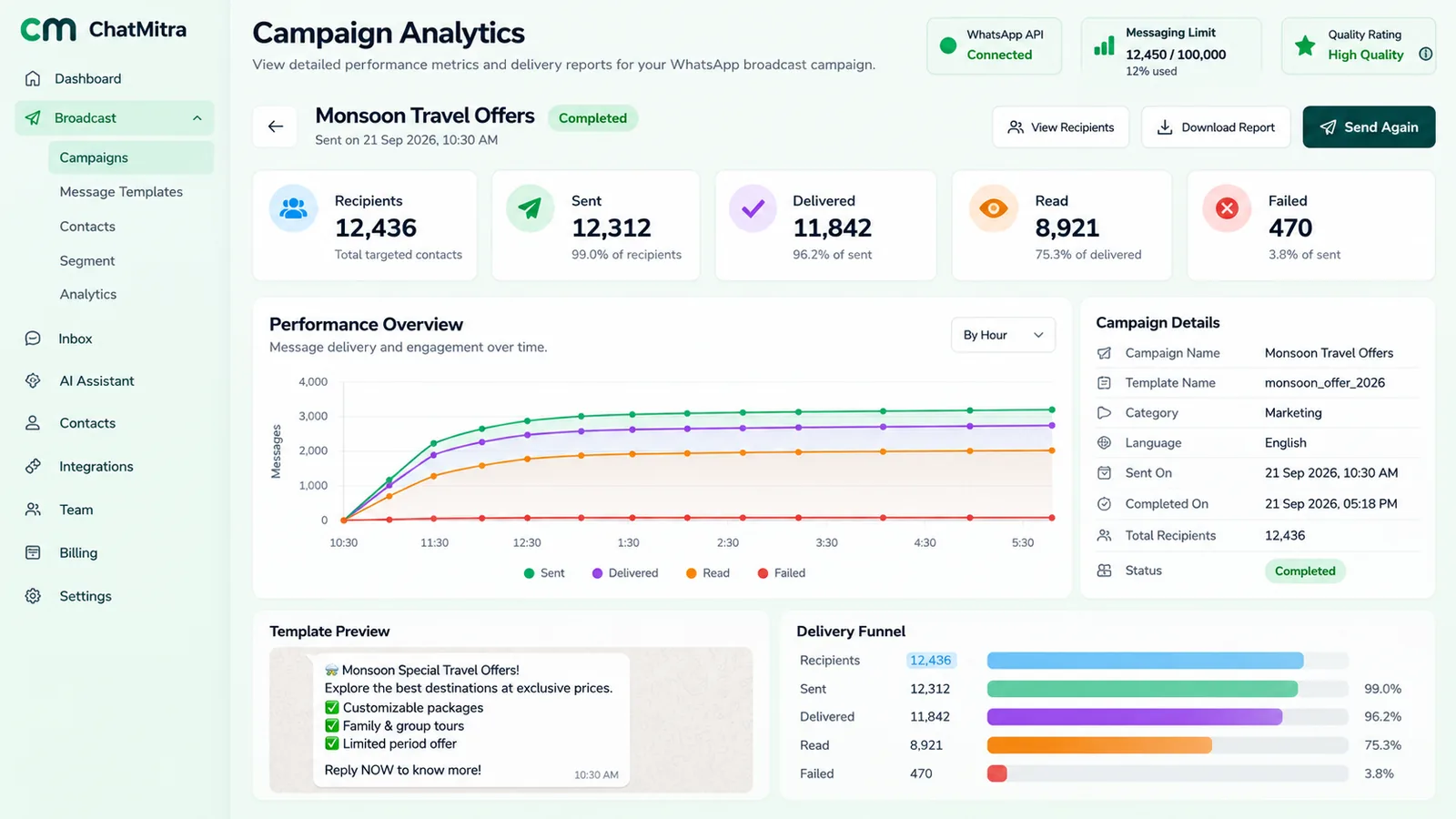
On the official API, a campaign dashboard shows who received, read and ignored each broadcast, along with your current quality rating and messaging limit. The illustration below shows the kind of view to expect:
How to choose the best official bulk sender
Every official provider uses the same Meta API, so they differ in price structure, tools and support. Check these before you commit:
- Meta partnership. The provider should work on the official WhatsApp Business Platform as a Meta partner and help with onboarding and verification.
- Transparent pricing. Meta’s rate shown separately from the provider’s fee, with no hidden markup on Meta’s per-message rate.
- Broadcast tools. Personalised templates, CSV or Google Sheets import, tags and segments, scheduling and retargeting of non-readers.
- Analytics. Delivered, read, failed and replies per campaign, plus your quality rating in view.
- A shared inbox. Replies to a broadcast need people to answer them, with roles and assignment.
- Integrations. Shopify, WooCommerce, payment links and webhooks if your orders live elsewhere.
- Local billing and support. INR invoices, and support in your time zone.
We compare the main providers in India, with dated prices and our scoring method, in best WhatsApp API provider in India.
How to send bulk WhatsApp messages safely: step by step
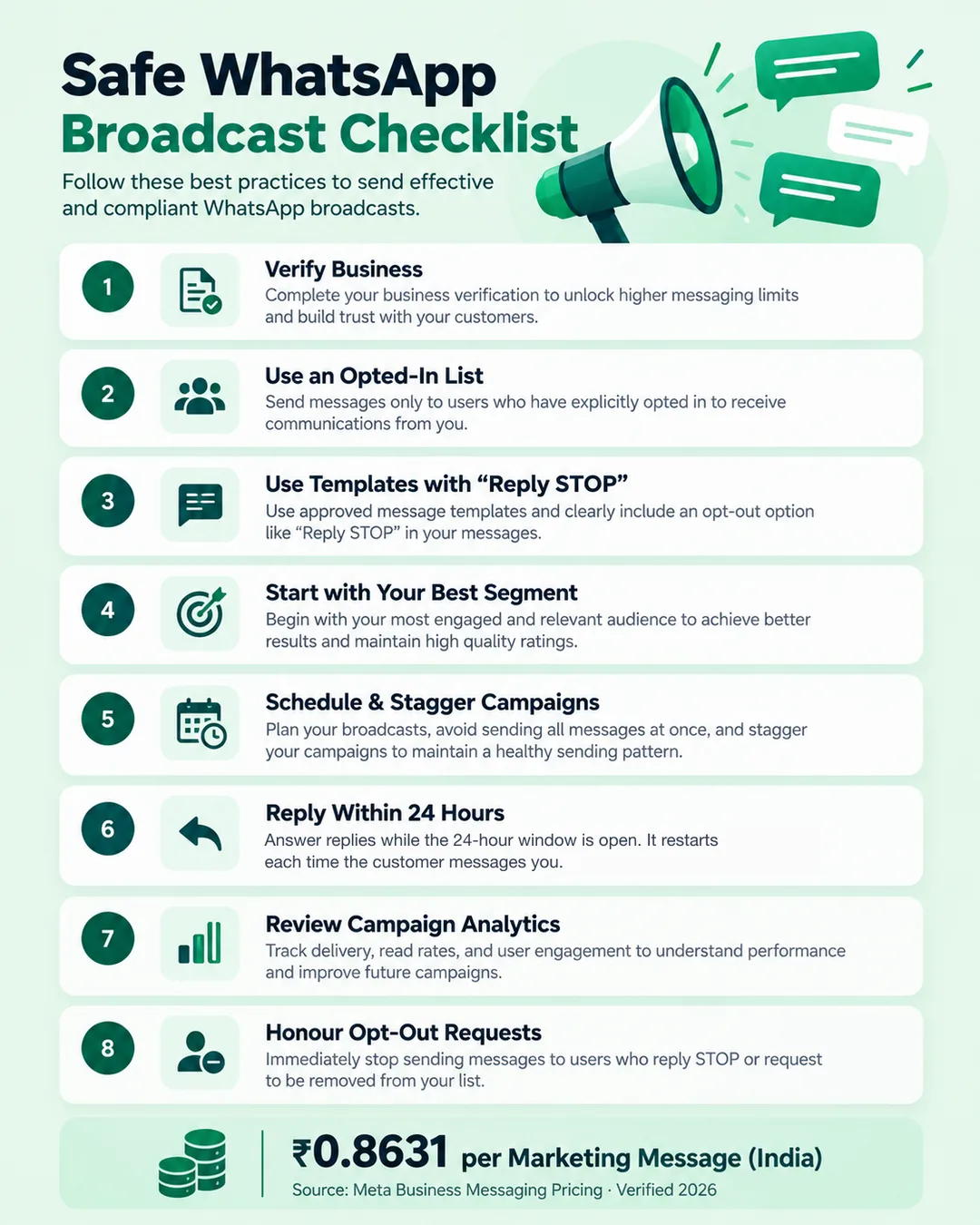
- Get on the official API through a provider, and complete business verification so your limit can grow past 250.
- Build an opted-in list. Import only customers who agreed to receive messages. Tag them by interest, city and language.
- Write and submit templates with a clear purpose, the customer’s name as a variable, one call-to-action button and an opt-out line such as “Reply STOP to unsubscribe”.
- Start small. Send to your most engaged segment first. Good early results protect your quality rating as volume grows.
- Schedule and stagger larger sends rather than blasting everyone at once.
- Answer replies fast. Replies inside the 24-hour window are free until 30 September 2026. From 1 October 2026, the first 1,000 per business phone number each month stay free, then each costs ₹0.1150.
- Review the analytics. Look at read rate, replies and failures. Retarget readers who didn’t act, and drop contacts who never read.
- Honour every opt-out immediately, whether it comes on WhatsApp or anywhere else. The policy requires it.
What bulk WhatsApp messages cost on the official API
Marketing messages in India, using Meta’s rate card (₹0.8631 per delivered message) and ChatMitra’s published pricing:
| Messages | Meta charge | All-in on ChatMitra Starter (+ ₹0.20 fee) | All-in on Enterprise (no fee)* |
|---|---|---|---|
| 1,000 | ₹863.10 | ₹1,063.10 | ₹863.10 |
| 10,000 | ₹8,631.00 | ₹10,631.00 | ₹8,631.00 |
| 1,00,000 | ₹86,310.00 | ₹1,06,310.00 | ₹86,310.00 |
*Enterprise costs ₹2,499/month (regularly ₹2,999) and removes the ₹0.20 per-conversation fee. Meta charges only for delivered messages. Utility messages such as order updates cost ₹0.1150 each in Meta fees. Rates verified 24 September 2026. For the full breakdown see WhatsApp Business cost per message.
Switching from an unofficial sender to the official API
If you’ve been using an extension or bulk app and want to move:
- Stop the unofficial tool first. Don’t run both on the same number.
- Decide on the number. If it’s still active and not banned, you can register it on the API, or keep using it in the WhatsApp Business app alongside the API through coexistence. If it’s banned, start with a new number.
- Re-permission your list. Contacts collected without clear consent should be asked again, for example with a QR code or a click-to-chat link on your receipts. Try the WhatsApp link generator.
- Recreate your messages as templates and get them approved before your first campaign.
- Ramp up. Your limit starts at 250 unique customers a day and grows with verification and quality.
Common mistakes with bulk WhatsApp messaging
- Buying number lists or scraping groups, then broadcasting to people who never heard of you.
- Running an unofficial extension “just for this one campaign” on your main business number.
- Sending the same promotional message to your whole list every few days.
- Hiding or omitting the opt-out, so unhappy recipients block and report instead.
- Judging a campaign by “sent” counts instead of delivered, read and replied.
- Assuming the official API is a licence to spam. Quality ratings and limits still apply.
Best practices
- Consent first, always. It protects your number, your brand and your legal position.
- Segment by intent. Send fewer, more relevant messages.
- One message, one purpose, one button.
- Use utility templates for genuine updates (orders, bookings, payments) and marketing templates for promotions. Honest categories avoid rejections.
- Keep a human in the loop. A broadcast that gets replies is a sales conversation. Staff it.
- Measure and prune. Remove long-term non-readers to protect your quality rating.
Summary
For a business, the best WhatsApp bulk message sender is an official API platform. It’s the route WhatsApp built for business messaging at scale, it lets you reach opted-in customers whether or not they saved your number, and it scales from 250 to unlimited daily reach as your quality holds. Unofficial extensions and apps look cheaper because they skip Meta’s per-message charge, but they breach WhatsApp’s terms and can cost you your number overnight. On the official API in India, plan for ₹0.8631 per marketing message in Meta fees, about ₹1.06 all-in on ChatMitra Starter or Pro.
Send bulk WhatsApp messages the official way
With ChatMitra, a Meta Business Partner platform on the official API, you can import contacts from CSV or Google Sheets, personalise approved templates, broadcast to segments, schedule campaigns, retarget non-readers and answer replies from a shared inbox, while Meta's rates are passed through at cost. See pricing.