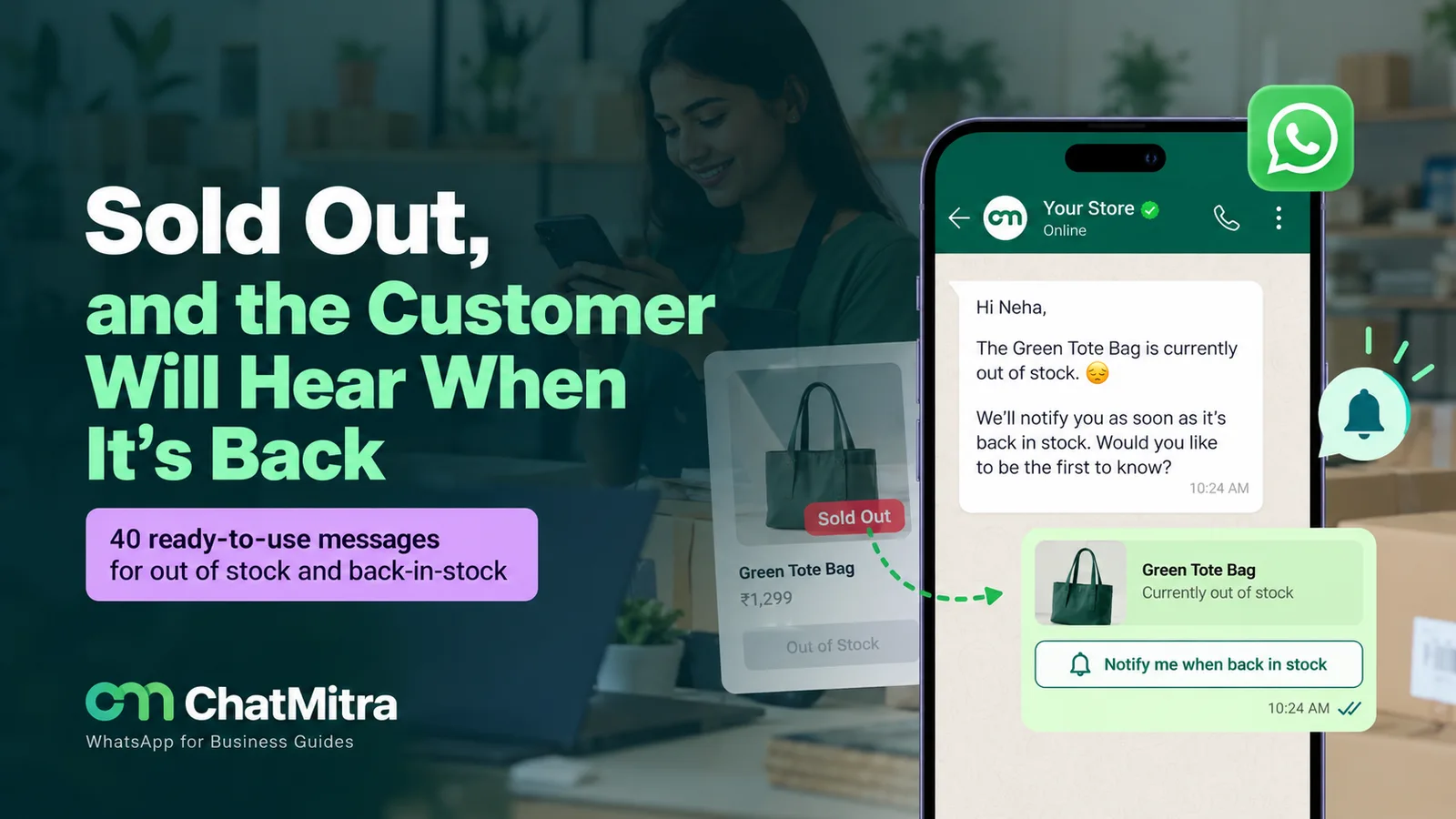
An out of stock message tells a customer, in one or two lines, that an item isn’t available, when it may be back (or honestly that you don’t know), and what they can do instead: get a restock alert, backorder it, or pick a close alternative. If they’ve already paid, it also offers the choice to wait or cancel for a full refund.
Below are 40 messages to adapt, from product-page labels to restock alerts, followed by the WhatsApp rules, a waitlist process, and the laws on scarcity claims and late shipments.
Key takeaways
- Every out of stock message needs a next step. "Currently unavailable" on its own loses the sale.
- Sold out before checkout is a product-page problem. Sold out after payment is an order problem, with refund rights attached.
- Only promise a date, quantity or hold you can keep. A missed date does more damage than none.
Facts checked against Meta's WhatsApp Business Platform documentation and India rate card, the WhatsApp Business Messaging Policy, Google Search Central, the US Code of Federal Regulations and India's Central Consumer Protection Authority on 27 September 2026. Rupee figures are Meta's India rates and exclude tax.
What is an out of stock message?
An out of stock message is any notice that tells a shopper a product can’t be bought or shipped right now. It turns up on product pages, in chat replies, in updates about orders already placed, and in email. All four answer the same questions: is it coming back, when, and what can I do now?
Be precise about the status, because each one promises something different, and Google’s merchant listing documentation treats them as separate availability values in Product structured data.
| Status | What it means | Can the customer order? | What your message must add |
|---|---|---|---|
| Out of stock (temporarily) | None on hand; more expected | No | Expected date or "no date yet", and a restock alert |
| Backorder | None on hand, but you accept orders | Yes | Ship-by date, when you charge, how to cancel |
| Pre-order | Not released yet | Yes | Release or dispatch date |
| Limited availability / low stock | A few left | Yes | Only a real, current count |
| Discontinued | Won't be restocked | No | Say it's gone for good; point to a replacement |
| Sold out online / in store only | Available through one channel only | Depends on channel | Where it can still be bought |
Never label a discontinued product “temporarily out of stock”. People sign up for alerts that will never come, and they remember.
What a good out of stock message says
Good messages are short and built from the same five parts. A product-page label might use two; a message about a paid order needs all five.
| Part | What it sounds like | What to avoid |
|---|---|---|
| 1. The exact item | "The navy hoodie in size L" | "This item" when only one size or colour is gone |
| 2. The honest timing | "Due back around 12 December" or "We don't have a date yet" | "Coming soon" when you have no idea |
| 3. A next step | "Tap Notify me", "Backorder it", "Size M is in stock" | Leaving the shopper at a dead end |
| 4. How they'll hear | "One WhatsApp message when it lands" | Signing people up for your whole newsletter |
| 5. A human route | "Reply here and our team will help" | A no-reply address on an order problem |
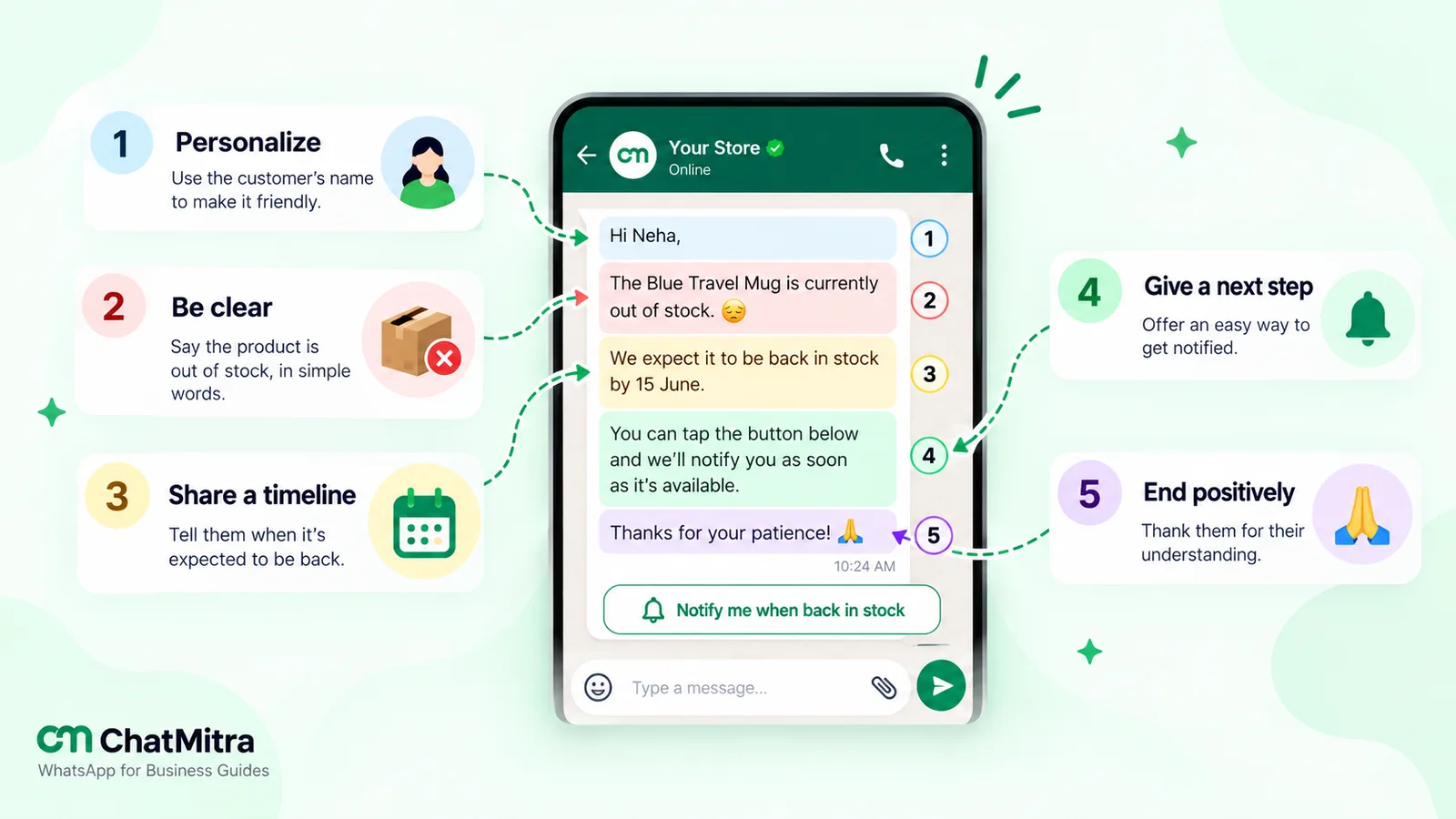
In the examples, words in [brackets] are placeholders. If you submit any of them as a WhatsApp template, the brackets become numbered variables, and the text can’t start or end with one, because Meta’s template review rules don’t allow dangling parameters.
Out of stock messages for product pages
These sit beside the buy button and redirect the visit.
- Temporarily out of stock, date known: “Temporarily out of stock. New stock is due around [date]. Tap Notify me and we’ll send you one message when it’s back.”
- Out of stock, no date: “Sold out for now. We don’t have a restock date yet, so we won’t guess. Leave your number and we’ll tell you as soon as we do.”
- One variant gone: “Size M is sold out in Indigo. It’s still available in Olive and Charcoal, or tap Notify me for Indigo.”
- Backorder: “Out of stock, but you can order it now. We’ll ship by [date], and you can cancel for a full refund any time before it ships.”
- Pre-order: “Available to pre-order. Orders placed now are dispatched from [date], in the order they were received.”
- Discontinued: “This product has been discontinued and won’t be restocked. The closest match we make now is [product], shown below.”
- Sold out online only: “Sold out online. Some of our stores may still have it, so call your nearest store before you travel.”
Out of stock replies in chat
Many shoppers just ask in chat: “Is this available?” A reply that ends at “No, sorry” loses the conversation, so each example below answers, then offers one clear choice.
- The direct question: “Hi [Name], the [product] is sold out right now. We expect more around [date]. Shall I message you here when it arrives?”
- With a close alternative: “That one’s sold out, I’m afraid. The nearest thing we have in stock is [product]: same fabric, slightly longer cut. Want a photo?”
- Size-specific request: “Thanks for checking, [Name]. The cotton kurta is out in size M, but we have it in S and L, and M is due back next week. Which would you prefer?”
- When you honestly don’t know: “I’d rather not give you a date I can’t keep. Our supplier hasn’t confirmed the next batch yet. I can message you the day it’s confirmed, if that helps.”
- Wholesale or B2B order: “We’re short on [item code] until [date]. I can dispatch the other lines on your order today and send this one when it arrives, or hold the full order. What works better for you?”
- Restaurant or cloud kitchen: “Sorry, [dish] has sold out for tonight. [Dish] is the closest on today’s menu, or we can take your order for tomorrow.”
- Pharmacy or health product: “We don’t have [medicine] in stock today. We can have it ready for pickup by [day], but if you need it sooner, please check with another pharmacy.”
Example 14 is deliberate: when health is involved, an honest “go elsewhere” beats holding someone for a sale.
On WhatsApp, all of these are ordinary replies inside the 24-hour customer service window, which the WhatsApp Business Messaging Policy says “opens and resets with each user message”. No template is needed while the window is open.
When the item sells out after the customer has ordered
Here the customer has already paid or committed, so the message is an order update, and it must give them control.
- Backorder on part of an order: “Update on order [number]: [product] is out of stock. We expect to ship it by [date], and the rest of your order is on its way today. If you’d rather not wait, reply CANCEL ITEM and we’ll refund that item in full.”
- No reliable date: “We’re sorry, [product] from order [number] is out of stock and we can’t yet give a reliable date. You can wait and cancel any time before it ships, or cancel now for a full refund.”
- Whole order cancelled: “We’ve had to cancel order [number] because [product] sold out before we could pack it. We’ve refunded [amount] to your original payment method. We’re sorry for the trouble.”
- Cash on delivery order: “Your cash on delivery order [number] includes [product], which has sold out. You haven’t been charged. Reply 1 to receive the other items, or 2 to cancel the whole order.”
- Grocery substitution: “We’re out of [item] for your delivery. Reply with a substitute you’d like, or we’ll leave it out and reduce your bill.”
- Partial shipment sent: “Part of order [number] has shipped. [Product] is still on backorder and will follow by [date] at no extra delivery charge.”
- Revised date: “Our supplier has moved the delivery of [product], so the new ship date for order [number] is [date]. If that no longer suits you, reply CANCEL and we’ll refund you in full.”
In the United States, the Federal Trade Commission’s Mail, Internet, or Telephone Order Merchandise Rule (16 CFR 435.2) requires sellers to have a reasonable basis to ship within the time they state or, if they state none, “within thirty (30) days”. When they can’t ship on time, they must offer the buyer “an option either to consent to a delay in shipping or to cancel the buyer’s order and receive a prompt refund”, before the original deadline passes. Examples 15 and 21 fit that pattern for delays of up to 30 days; for open-ended delays (example 16), the notice must also say the order will be cancelled automatically unless the buyer agrees to wait, so read the rule if you sell into the US. This is a summary, not legal advice.
If you oversold, open with a proper apology; our apology message examples show how. For confirmation, shipping and delivery updates, see the order confirmation message guide.
Out of stock emails: three templates
Email suits refunds, longer delays and B2B buyers. Keep the subject line specific.
22. Backorder email
Subject: Your order [number]: one item ships later
Hi [Name],
Thanks for your order. One item, [product], is out of stock, and we now expect to ship it by [date]. Everything else is packed and leaves today.
If you’d rather not wait, reply to this email or use the link below to cancel that item. We’ll refund [amount] to your original payment method.
[Cancel this item]
[Your name], [Store] customer care
23. Item cancelled email
Subject: We’ve refunded [product] from order [number]
Hi [Name],
We’re sorry: [product] sold out before we could pack your order, and our supplier can’t confirm the next batch. Rather than keep you waiting, we’ve cancelled that item and refunded [amount] to your original payment method. The rest of your order is on its way.
If you’d like a message when it’s back, reply “notify me” and we’ll add you to the list.
[Your name], [Store]
24. Reply to an enquiry by email
Subject: Re: Is [product] available?
Hi [Name],
Thanks for asking. [Product] is out of stock right now, and our next delivery is due around [date]. If it helps, [alternative] is in stock and uses the same [material or feature].
Would you like me to email you the day it’s back? One message, nothing else.
[Your name]
“Notify me” sign-up confirmations
Confirm every restock request immediately, and say exactly what you’ll send.
- On WhatsApp: “You’re on the list for [product] in [size]. We’ll send one message here when it’s back in stock. Reply STOP any time to be removed.”
- By email: “Done, you’ll hear from us once when [product] is back. We won’t add you to our newsletter unless you ask.”
- When stock will be tight: “You’re number [position] on the waitlist for [product]. The next batch is small, so we’ll alert people in the order they signed up.”
Say “in the order they signed up” only if you really alert that way. If you offer “Reply STOP”, honour it, and check whether your tool does that automatically.
Back in stock notification examples
This is the message people asked for, so keep it short: the item, the link, one honest line about quantity or timing.
- Standard alert: “Good news, [Name]: the [product] you asked about is back in stock. Order here: [link]. We restocked a small batch, so it may sell out again.”
- With a hold (only if you really hold it): “Good news: [product] is back, and we’ve set one aside in your size until [time] on [day]. Tap below to order it.”
- Variant-specific: “The [colour] [product] in size [size] you asked about on [date] is back. Tap below to order it.”
- Last batch before discontinuing: “Back for one final batch: [product]. We won’t be making it again, so this is the last chance to order.”
- SMS or email for US customers: “[Brand]: [product] is back in stock. Shop: [link]. Reply STOP to opt out.”
- Email subject line and first line: Subject: “It’s back: [product] in [size]”. First line: “You asked us to tell you, so here it is, with a direct link to your size.”
- Restock for trade buyers: “Stock of [item code] has arrived at our [city] warehouse. Orders confirmed by [day] ship this week.”
Use “may sell out again” only when the batch really is small. Examples 28–31 and 34 promote a product, so on WhatsApp they are marketing templates; example 32 exists because WhatsApp can’t currently deliver those to US numbers.
New stock arrival messages to customers
In India, “new stock arrival messages to customers” is a common search: the note a store or wholesaler sends when fresh stock lands. It goes to opted-in customers generally, not a waitlist, so it’s a promotional marketing campaign.
- Clothing store, festive stock: “Our new [festival] collection has arrived at the [area] store: [short detail, such as silk sarees and kurta sets]. Visit us, or reply to this message and we’ll send you photos.”
- New season: “The winter range is in. Jackets, knitwear and thermals in all sizes. Reply WINTER for the catalogue.”
- Books and stationery: “School books and notebooks for the new term are in stock. Send us your child’s class and school, and we’ll keep a set ready.”
- Seasonal produce: “This season’s Alphonso mangoes have arrived. Order by message and we’ll deliver in [area] the same day.”
- Electronics launch: “The [model] is now in stock at our store. Walk in for a demo, or reply to reserve one.”
- Wholesale price list: “Fresh stock has arrived. Our updated price list is attached. Reply with item codes and quantities to place an order.”
Send new-arrival messages to people who agreed to hear about offers and new stock, not to everyone who ever bought from you. The WhatsApp Business Messaging Policy requires opt-in “confirming that they wish to receive subsequent messages or calls from you”, and suggests getting opt-in by message category, such as order updates versus offers. Our WhatsApp opt-in guide has wording you can use.
Back-in-stock alerts on WhatsApp: category, opt-in and cost
WhatsApp suits restock alerts because people see them quickly, but its rules change what you can send and what it costs.
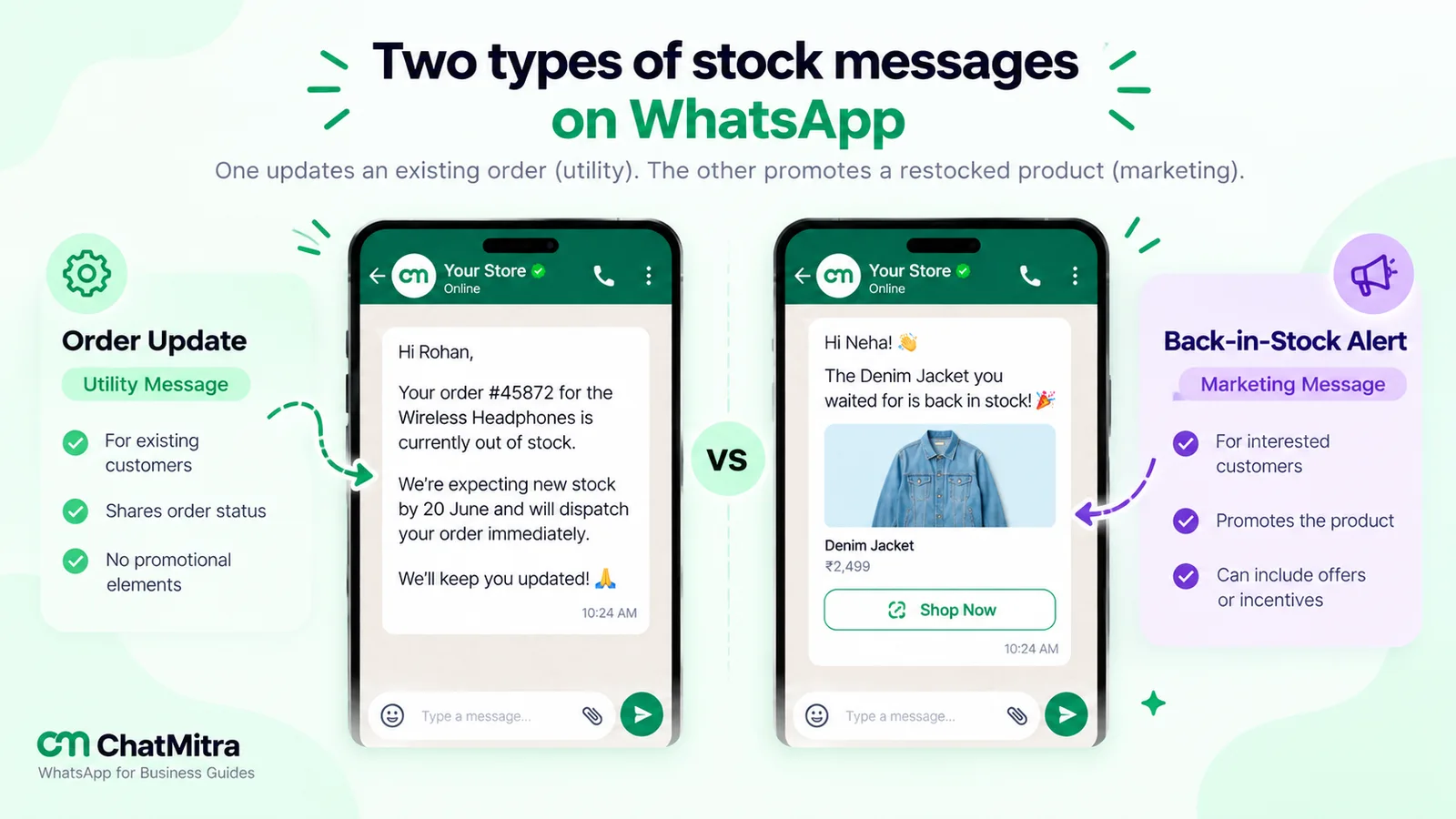
Utility or marketing?
Meta sorts every template into a category, and the category sets the price. Its template categorization guidelines (updated 15 September 2026) settle the stock question fairly clearly:
- Utility templates must be “non-promotional” and, for order messages, “specific to or requested by the user (clearly related to their order, account, services, or transactions)”. Meta’s own utility example for order management reads: “Unfortunately, one item from your order {{number}} is backordered.” That’s examples 15–21 above, as long as they don’t also recommend or promote another product.
- Marketing includes templates that “Promote or recommend offers, products, or services” to people who have visited your site or engaged with you, and Meta adds: “These are marketing even if requested by users.” Its example, “We found a {{car}} that meets your saved search”, is the same shape as a restock alert.
| Message | How it's sent on WhatsApp | Category |
|---|---|---|
| Reply to "Is this in stock?" within 24 hours of their message | Free-form reply, no template | Service message |
| Backorder, cancellation or revised date for an existing order | Template (or free-form if the window is open) | Utility, if it contains no promotion |
| Same update plus "you might also like…" | Template | Marketing (mixed content) |
| Back-in-stock alert to a waitlist | Template | Marketing |
| New stock arrival broadcast | Template | Marketing |
That’s why example 19 asks the customer to name a substitute. Recommend replacements in chat once they reply.
Two limits that affect restock alerts
- US numbers. Meta’s per-user marketing limits page says WhatsApp “does not currently deliver marketing template messages to WhatsApp users with United States phone numbers”. Keep US waitlists on email or opted-in SMS.
- Per-user marketing limits. WhatsApp may cap how many marketing templates a person receives from all businesses, based on their engagement. Blocked messages fail with error 131049; wait at least 24 hours before retrying. If someone replies to a marketing message, marketing messages sent in the 24-hour window that opens don’t count towards the limit.
What it costs in India
Meta charges per delivered template. According to Meta’s pricing page and its India rate card, the India rates from 1 October 2026 are ₹0.8631 for marketing and ₹0.1150 for utility, and service messages cost ₹0.1150 after a free tier of 1,000 per business phone number each month.
| Scenario | Messages | Meta rate | Meta cost |
|---|---|---|---|
| Restock alert to a waitlist | 300 marketing templates | ₹0.8631 | ₹258.93 |
| Backorder updates to affected orders | 50 utility templates | ₹0.1150 | ₹5.75 |
| Replies to "is it back?" questions in chat | Service messages | Free within the monthly 1,000, then ₹0.1150 | Usually ₹0 |
A restock alert costs about seven and a half times as much as a backorder update, so send it once, and only to people who asked. Platforms add their own fees: on ChatMitra’s Starter plan that’s ₹0.20 per contact per 24-hour conversation, so the 300 alerts above cost up to ₹60 more, or up to ₹318.93 in total. For more worked examples, see our WhatsApp cost per message guide.
Meta says a template approval decision “can take up to 24 hours”, so get restock and backorder templates approved before your next sell-out.
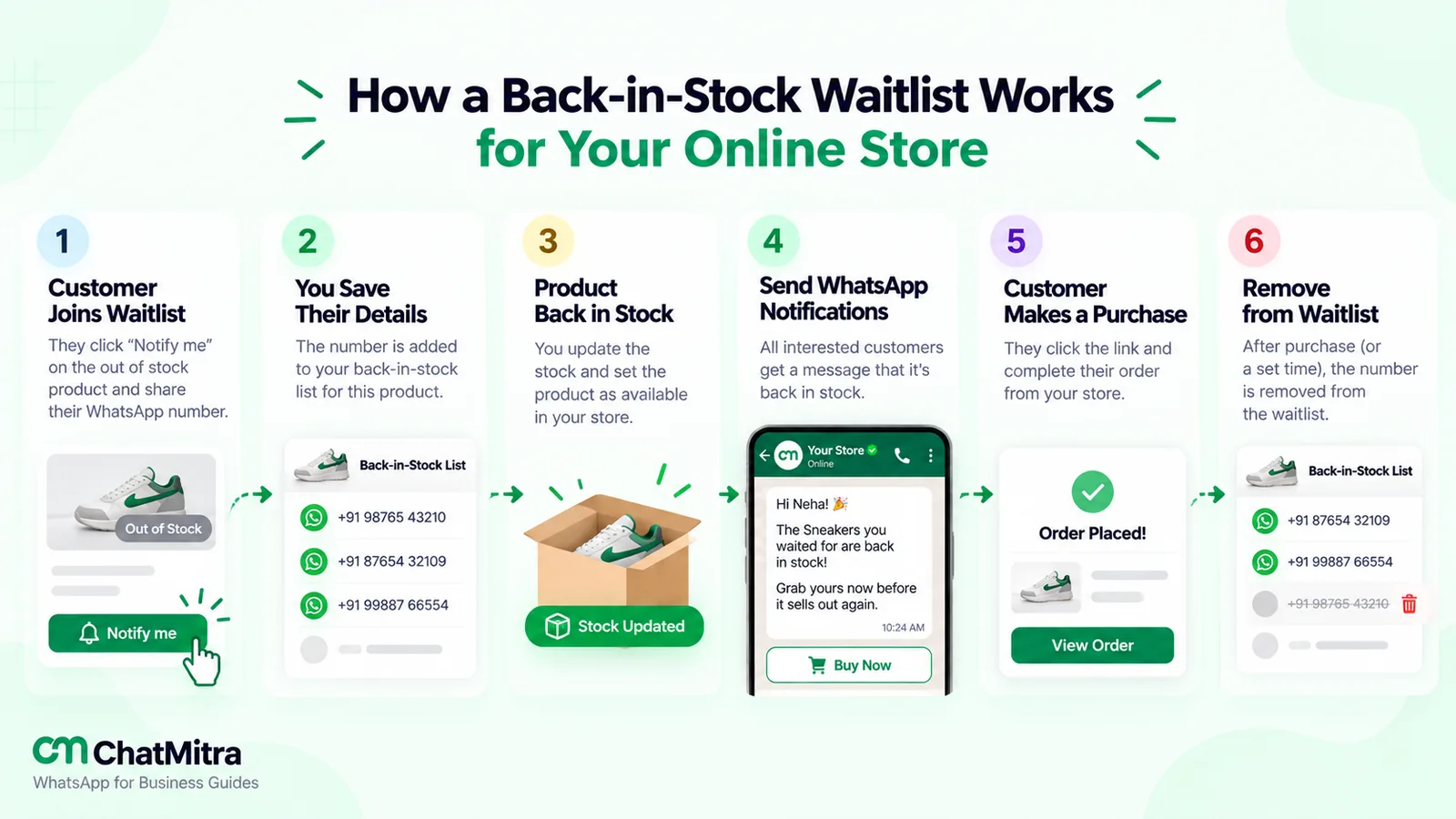
How to run a back-in-stock waitlist, step by step
This process works with any tool, even a spreadsheet.
- Capture the request where it happens: a Notify me button on the product page, and “Want me to message you when it’s back?” in chat. Record the variant: a waitlist for “the kurta” is useless if only size M ran out.
- Ask for specific consent: “one WhatsApp message when this is back” is clearer than a tick box for “marketing”.
- Confirm straight away with one of examples 25–27.
- Count before you send. If 40 units arrive for 400 people, alerting everyone at once creates 360 disappointed customers in ten minutes.
- Send in batches if stock is short, in sign-up order, and check what’s left between batches.
- Update the product page first, then send. An alert that lands on a page still saying “out of stock” wastes the click.
- Stop when it sells out, and tell the people you didn’t reach that they’re still on the list.
- Clean the list. Remove people once they’ve bought or been alerted, unless they asked to stay on.
- Measure alert-to-order conversion for each restock. A waitlist that rarely converts isn’t a reason to reorder.
Honest scarcity: “only 2 left” and the law
Low-stock labels work only while they’re believed. In India, fake scarcity is also a legal risk. The Central Consumer Protection Authority’s Guidelines for Prevention and Regulation of Dark Patterns, 2023, issued on 30 November 2023, apply to platforms, advertisers and sellers. Two of the 13 patterns they list touch stock messages directly:
- False urgency, which includes “stating that quantities of a particular product or service are more limited than they actually are”. The guidelines illustrate it with “Only 2 rooms left! 30 others are looking at this right now”.
- Bait and switch. One illustration is a product “falsely shown as available to lure the consumer to move it to the shopping cart”, after which it is revealed to be “out of stock” and a higher-priced product is offered instead.
So show a low-stock count only if it comes from live inventory, never show an unavailable item as available, and when you suggest an alternative, make sure the original really is sold out. This is a summary, not legal advice.
Out-of-stock product pages and search
If the product is coming back, keep its page live. Delete it, and anyone arriving from an old link or a search result lands on an error instead of a restock sign-up. Google’s ecommerce launch guide even suggests marking products out of stock as a way to keep a new store’s pages indexable before it takes orders.
- Match the structured data to the page. Google’s merchant listing documentation lists availability values including InStock, OutOfStock, BackOrder, PreOrder, SoldOut and Discontinued, and says “Don’t specify more than one value.”
- Keep it in the initial HTML if you can. Google notes that JavaScript-generated Product markup can make Shopping crawls “less frequent and less reliable” for “fast-changing content like product availability and price”.
- For discontinued items, say plainly that they won’t return and link to the closest replacement.
In a WhatsApp catalogue, hide sold-out items rather than deleting them; our WhatsApp Business catalogue guide shows where that setting is.
Mistakes that make out of stock messages worse
- A restock date you miss. If a date slips, tell the waitlist before it passes.
- Signing people up for everything. A restock request isn’t consent to your weekly promotions.
- Charging for backorders without saying so, or making cancellation hard.
- Hiding a sold-out variant. If size M is gone, show it greyed out; removing it makes people think you never had it.
- Recommending replacements in a utility template. It turns the message into marketing, and Meta can recategorise the template.
Where ChatMitra fits, and where it doesn’t
ChatMitra runs the WhatsApp side: chat replies, the waitlist and the alerts. It doesn’t track your store’s stock, so the “it’s back” moment comes from you or your spreadsheet.
| Job | ChatMitra? | How |
|---|---|---|
| Answer "is it in stock?" from a shared team inbox | Yes | Team inbox on one number, with saved replies typed with "/" |
| Capture a restock request by keyword | Yes | An automation with the "WhatsApp Message Received" trigger (for example, the keyword NOTIFY) can reply, add a tag and add a row to a Google Sheet |
| Alert the waitlist | Yes | Broadcast an approved template to contacts with the waitlist tag, or send it when a status column in your Google Sheet changes |
| See delivery and read counts for the alert | Yes | Campaign reports show sent, delivered, read and failed |
| Trigger alerts automatically from Shopify inventory | No | The Shopify integration handles order events (such as COD and prepaid confirmation, fulfilment and cancellation), not stock levels |
| A Notify me button on your website | No | Use your store platform or a restock app, and pass sign-ups to a sheet |
| Email or SMS alerts (for example, US customers) | No | Use an email or SMS provider alongside |
A simple setup: customers send a keyword such as NOTIFY KURTA; its automation adds a “waitlist-kurta” tag and a sheet row; when stock lands, you broadcast your approved restock template to that tag, then remove the tag. Broadcasts don’t automatically skip people who have opted out, so filter them out with a tag. See ChatMitra’s plans and pricing for what each plan includes, and our WhatsApp for ecommerce guide for the rest of the store journey.
Where to start
Write three messages today: a product-page line (example 2), a backorder update (example 15) and a restock alert (example 28). Submit the last two as templates now. Then add a Notify me option to your five most-requested products and let the waitlist tell you what to reorder.