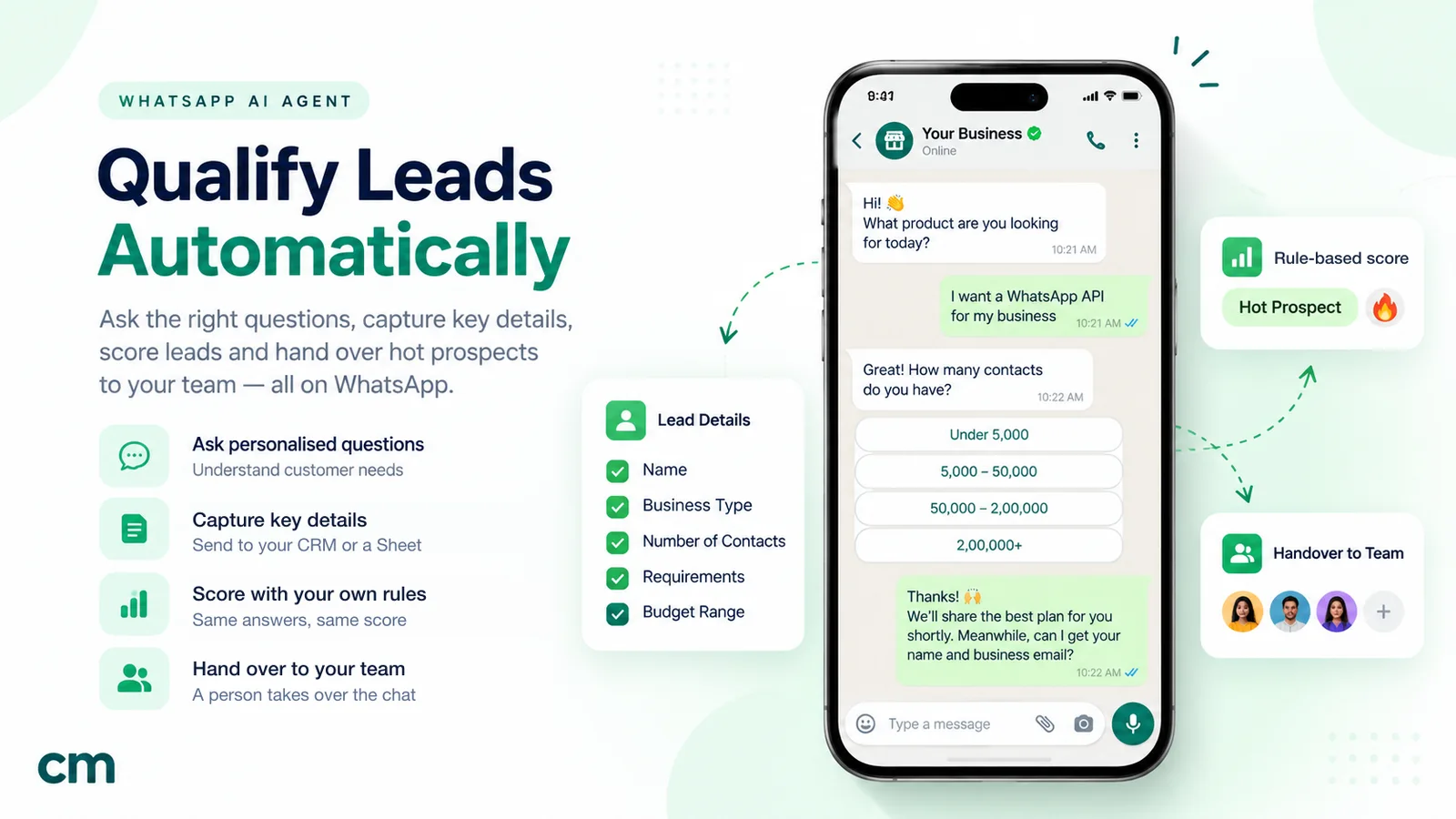
To qualify WhatsApp leads with an AI agent, first write down what a qualified lead is for your business: two or three must-have conditions and a few signals worth points. Then give the agent a short question script, one question per message, and instructions on what it may and may not say. Have it save each answer to a fixed field, score the fields with simple rules, and hand hot leads to a salesperson with a one-screen summary. Keep a clear route to a person at every step, because Meta requires it.
Most WhatsApp enquiries arrive with almost no information. “Hi.” “Price?” “Details please.” A person has to spend the next five messages finding out whether this is a serious buyer, a student doing research or someone outside your delivery area. An AI agent can do that part in seconds, at any hour, in the customer’s own words. Done badly, it annoys people, invents prices and sends your sales team a pile of “hot” leads that aren’t.
This guide explains how to set up AI lead qualification properly: the criteria, the question script, the instructions, the scoring, the handover, what it costs on WhatsApp in 2026, and what to measure. For the wider picture of getting leads into WhatsApp in the first place, start with our WhatsApp lead generation guide.
Key takeaways
- Define "qualified" in writing before you build anything: must-haves, scored signals and disqualifiers.
- Ask three to five questions, one per message. Each extra question loses some leads.
- The model runs the conversation and fills in fields. Rules, not the model, turn those fields into a score.
- Hand hot leads to a person quickly, with a summary they can read in ten seconds.
- Every agent reply inside the 24-hour window is a paid service message after the first 1,000 each month, so shorter scripts cost less.
What is AI lead qualification?
Lead qualification is deciding which enquiries deserve a salesperson’s time, and in what order. A qualified lead is one that fits what you sell, has a real need, and is likely to buy within a time frame you care about.
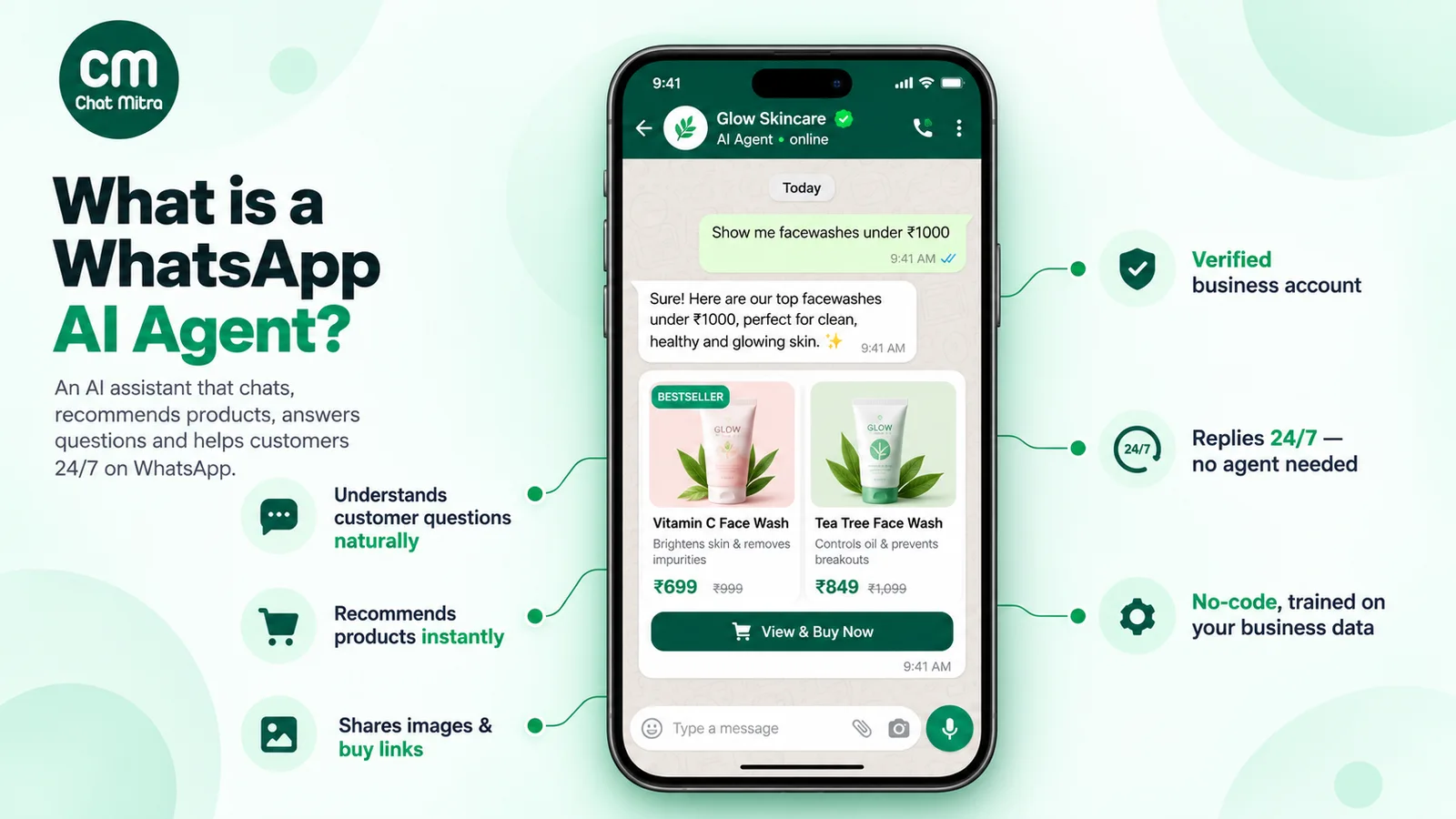
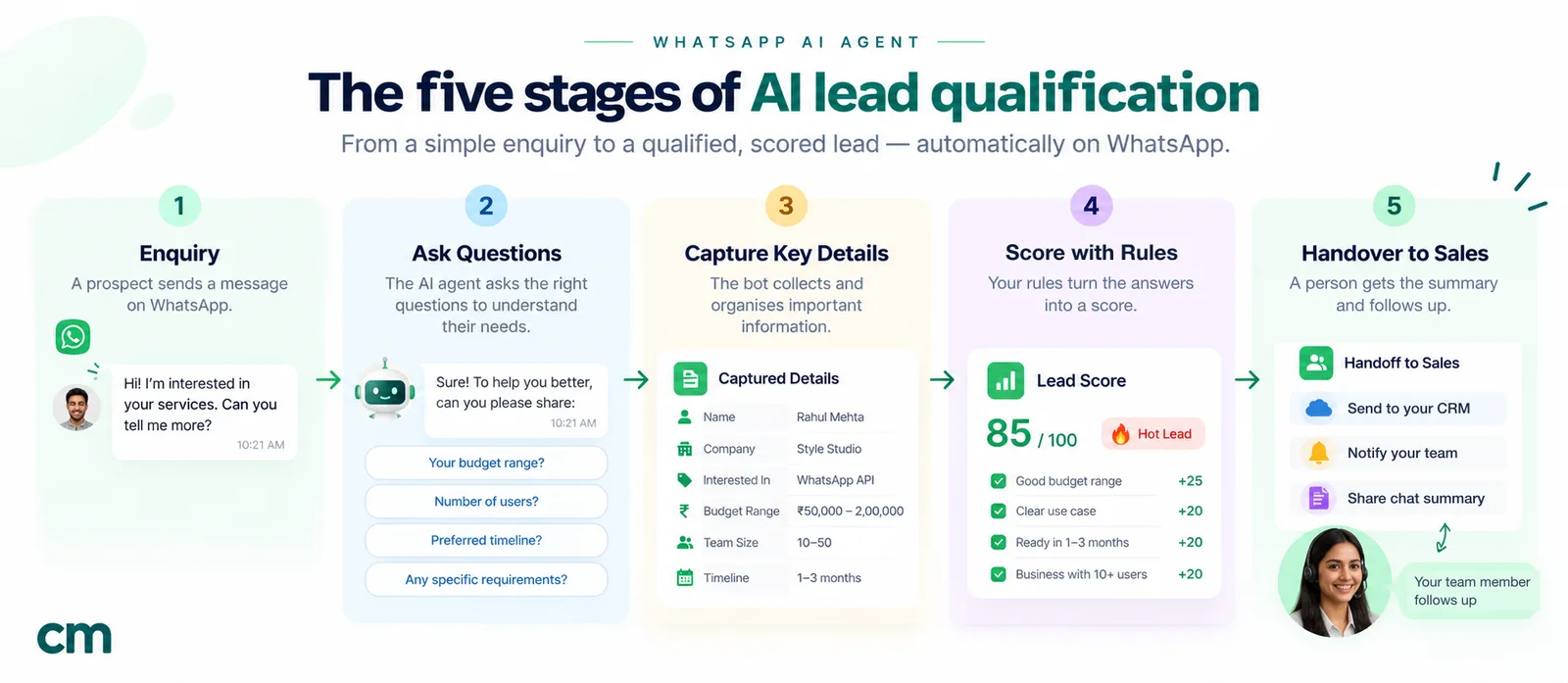
AI lead qualification hands the first part of that job to a language model. On WhatsApp, the AI agent replies to a new chat, asks the questions that decide fit and readiness, understands answers written however the customer likes to write, stores the answers in structured fields, and routes the lead. A salesperson still does the selling. The agent makes sure they start with the right people and already know the basics.
It helps to separate three things that often get called “qualification”:
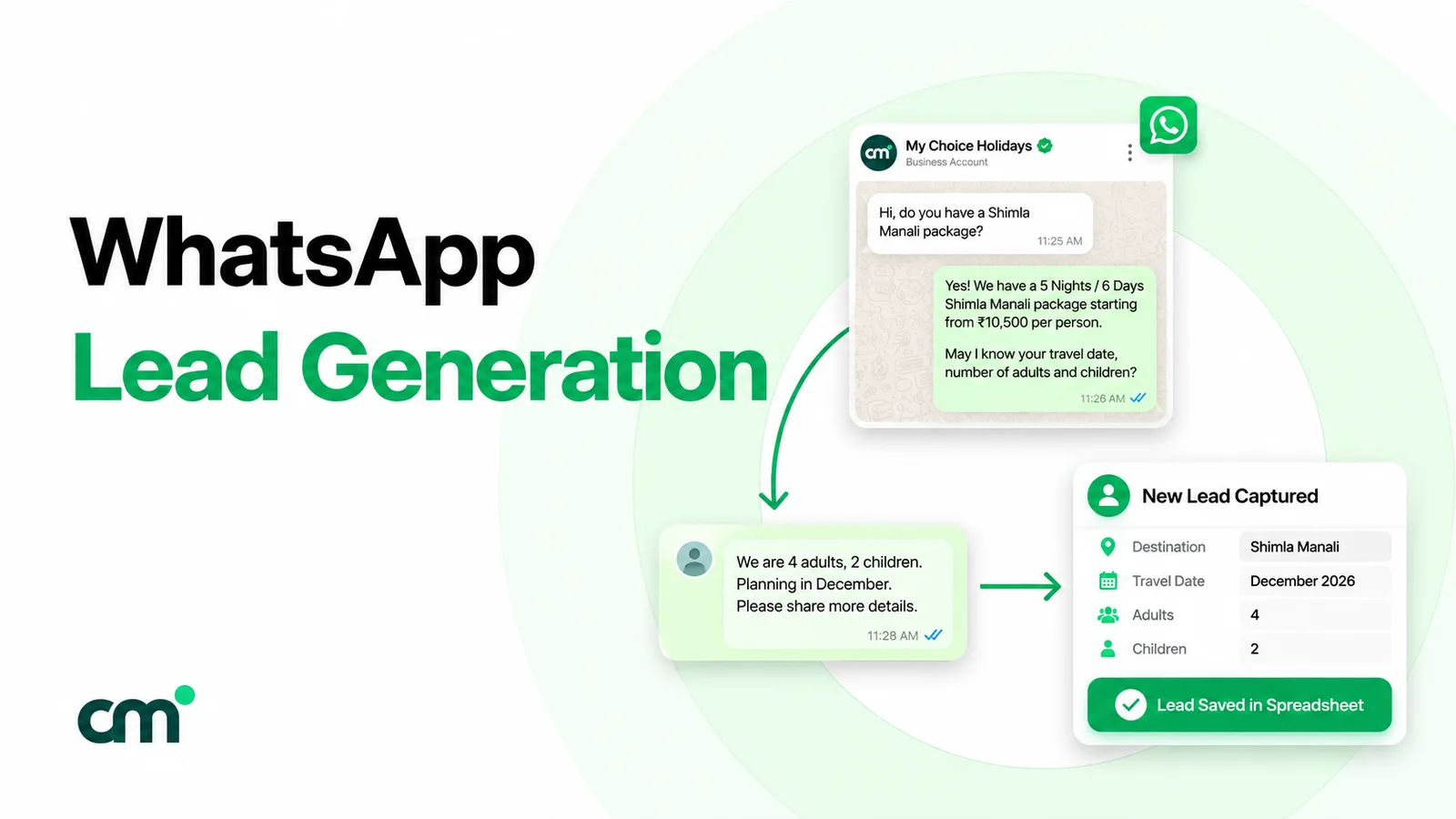
- Capture: getting a name, number and interest. A click-to-chat ad or a website button already does this on WhatsApp, because the customer’s number comes with the chat.
- Qualification: finding out whether and when this person is likely to buy. This is the part the AI agent does.
- Scoring and routing: turning the answers into a priority and sending the lead to the right place. This should follow rules you can read and change.
Sales teams often label leads as marketing qualified (showed interest) or sales qualified (ready for a sales conversation). You don’t need that vocabulary to start. On WhatsApp, a practical version is three labels: hot (talk to a person now), warm (not ready yet, keep in touch) and not a fit (answer politely, don’t chase).
Why WhatsApp suits conversational qualification
Forms and WhatsApp qualify leads in opposite ways. A form asks everything up front, before the customer gets any value. A chat lets the customer ask their own question first, gets an answer, and only then asks something back. That exchange feels like service rather than an interrogation.
Speed is the other reason. In a study published in Harvard Business Review, researchers analysed 1.25 million sales leads and found that firms that tried to contact a lead within an hour were nearly seven times as likely to qualify it as firms that waited even an hour longer, and more than 60 times as likely as firms that waited a day or more (HBR, 2011). The study is old and US-based, and it measured sales teams reaching out, not chat replies. But its direction matches what any business with a WhatsApp number sees: an enquiry left unanswered overnight has usually gone to a competitor by morning.
An AI agent closes the first gap. It answers in seconds, qualifies while the customer is still interested, and leaves the salesperson with a warm conversation rather than a cold number.
WhatsApp also adds some rules that shape the design:
- The 24-hour customer service window. When a customer messages you, you can reply freely for 24 hours. After that, you can only send pre-approved templates. Qualification has to happen, or a next step has to be agreed, inside that window.
- Ads can extend the free period. When someone starts the chat from a Click-to-WhatsApp ad, Meta opens a free entry point window that, according to Meta’s pricing page, “may extend up to 7 days”. In that window, messages aren’t charged.
- Escalation is mandatory. More on that below.
Form, keyword bot or AI agent?
You can qualify on WhatsApp without AI. Here’s how the three common methods compare.
| Web form, then WhatsApp | Keyword or button bot | AI agent | |
|---|---|---|---|
| How it asks | All questions at once, before any answer | Fixed path of buttons or keyword triggers | One question at a time, in natural language |
| Handles "2BHK, Baner side, possession in March" | Only if the fields match | No, unless you built that exact path | Yes: reads all three answers from one message |
| Answers the customer's own questions | No | Only the ones you pre-wrote | Yes, from the knowledge you give it |
| Consistency | High | High | Depends on instructions and testing |
| Risk | Drop-off before submit | Customer gets stuck | Invented facts if not constrained |
| Best for | Long, regulated intakes | A few predictable paths | Varied questions, mixed languages, high volume |
Most businesses end up with a mix: buttons for the answers that have fixed options (budget band, preferred day), and AI for the free-text parts. If you’re weighing the two approaches more broadly, our AI agent vs chatbot comparison goes deeper.
Step 1: Define what “qualified” means
This is the step most teams skip, and it’s why their AI “qualifies” everyone. The agent can only apply the criteria you give it. Write them in three groups.
- Must-haves (gates). Conditions that, if missing, make the lead not a fit regardless of anything else. Examples: inside your service area, the course is running for their exam year, the order meets your wholesale minimum.
- Scored signals. Things that make a lead more or less urgent: timeline, budget band, clarity of need, whether they’re the decision maker, whether they’ve bought before.
- Disqualifiers. Clear signs to stop: a job seeker, a supplier pitching you, a student doing a project, a request for something you don’t sell.
The classic starting point is BANT: budget, authority, need and timeline. It was designed for sales teams working large deals, so adapt it for WhatsApp:
- Budget works better as a range with options than as an open question. People answer “which of these ranges fits?” far more readily than “what is your budget?”.
- Authority matters in B2B sales, where several people approve a purchase. For most consumer and small-business enquiries, the person chatting is the buyer, so drop it or fold it into one question (“Will anyone else be involved in the decision?”).
- Need is usually clear from the customer’s first message. The agent should confirm it, not ask for it again.
- Timeline is often the single best predictor of whether a lead is hot.
- Fit, such as location, size or eligibility, isn’t in BANT but belongs in almost every WhatsApp script as a gate.
Write your definition in a sentence your sales team agrees with. For example: “A hot lead is inside our service area, wants to start within 90 days, and picks a budget band we serve.” If sales and marketing can’t agree on that sentence, no AI will fix it.
Step 2: Turn the criteria into a question script
Every question you ask costs you a few leads, so ask only what changes your next step. Three to five questions is usually enough. Order them from easiest to most sensitive: need and fit first, timeline next, budget last.
Rules that make scripts work on WhatsApp:
- One question per message. A message with three questions gets one answered.
- Offer options where answers are fixed. “Within a month / 1–3 months / Just exploring” is faster to answer and easier to score than an open question.
- Accept answers in any order. If the customer’s first message says “3BHK in Wakad, want to start after Diwali”, the agent should skip the questions already answered.
- Explain why you’re asking, once, briefly: “So the right designer calls you, can I ask three quick questions?”
- Never ask for sensitive data in the first chat. Qualification doesn’t need identity documents, bank details or health records. Collect those later through a proper channel, if at all.
Here are example scripts for businesses whose buying signals differ. They’re starting points, not templates to copy word for word.
| Business | Gate | Scored questions | Hot means |
|---|---|---|---|
| Modular kitchens and interiors | City and area we serve | New home or renovation? When do you get possession or want to start? Budget band? | Start within 3 months, budget band we serve |
| B2B SaaS | Company type we serve | Team size? What are you using today? When do you need it live? Who else decides? | Team size in range, live within a quarter, decision maker involved |
| Study-abroad consultancy | Intake and countries we cover | Which intake? Current qualification? Test scores taken or planned? Funding plan? | Intake within a year, test taken or booked |
| Wholesale supplier | Minimum order quantity | Products and quantity? Delivery city? One-time or repeat? Business buyer or individual? | Above minimum, repeat buyer, delivery to a served city |
| Travel agency | Destinations we sell | Where and when? How many travellers? Rough budget per person? | Dates within 60 days, group size fits packages |
Step 3: Write the agent’s instructions
The instructions, often called the system prompt, tell the model who it is, what it’s for, what it knows, what it must never do, and when to stop and hand over. For lead qualification, keep the role narrow. An agent that tries to answer everything will also improvise prices, discounts and promises.
Here’s an example for a fictional interiors studio, written so you can adapt it:
You are the WhatsApp assistant for Nalanda Interiors, a modular kitchen
and wardrobe studio in Pune. Your job is to help people who enquire,
answer their questions from the business information below, and find out
whether a designer should call them.

Ask these, one per message, skipping any the customer already answered:
1. Is this for a new home or a renovation?
2. Which area of Pune is the property in?
3. When do you get possession, or when do you want work to start?
4. Which budget range is closest: under 3 lakh, 3 to 6 lakh, above 6 lakh?

Rules:
- Ask only one question per message. Keep replies under 60 words.
- Only give facts from BUSINESS INFORMATION. If you don't know, say a
  designer will confirm, and continue.
- Never quote a final price, discount or delivery date.
- If the property is outside Pune, say we don't serve that area yet and
  thank them. Do not continue qualifying.
- If the customer asks for a person, is upset, or asks something outside
  interiors, say a team member will reply and stop answering.
- Reply in the language the customer uses.
- When all questions are answered, offer two call slots from AVAILABLE
  SLOTS and confirm the one they pick.

BUSINESS INFORMATION: ...
AVAILABLE SLOTS: ...
Three details in that prompt do a lot of work. The skip rule stops the agent asking what the customer already said. The out-of-area rule ends qualification politely instead of wasting everyone’s time. And the handover triggers are written as specific conditions, not “if needed”. For more on structuring instructions, including a library of prompts for other jobs, see our guide to AI prompts for WhatsApp chatbots.
Step 4: Give it the knowledge customers will ask about
Customers rarely answer questions without asking some of their own. “Do you do L-shaped kitchens?” “What brands of hardware?” “Is there EMI?” If the agent can’t answer, the chat stalls or, worse, the model guesses.
Put the answers to your 20 most common questions into the business information the agent receives. Useful items:
- What you sell and don’t sell, in plain words
- Service areas, delivery zones or eligibility rules
- Price ranges you’re willing to share, labelled as ranges (“starting from”)
- Process and typical timelines (“design in about a week after measurement”)
- Policies: payment options, cancellations, warranty
- Working hours and what happens outside them
Read through a month of your team’s real WhatsApp chats to find these questions. The list is usually shorter and more repetitive than people expect.
Step 5: Let the model extract, and let rules score
This is the design decision that separates a demo from something your sales team trusts.
Language models are good at reading “we’re 5 people now but hiring 10 more by June” and writing team_size: 5, growing: yes, timeline: June. They’re poor at producing a stable number from 1 to 100 for “how hot is this lead”: ask twice and you can get two different scores for the same chat. So split the job:
- The model fills fixed fields from the conversation: need, area, timeline, budget band, decision maker. Where a field is unknown, it stays empty rather than guessed.
- A rule table scores the fields. Anyone on the team can read it, and the same answers always get the same score.
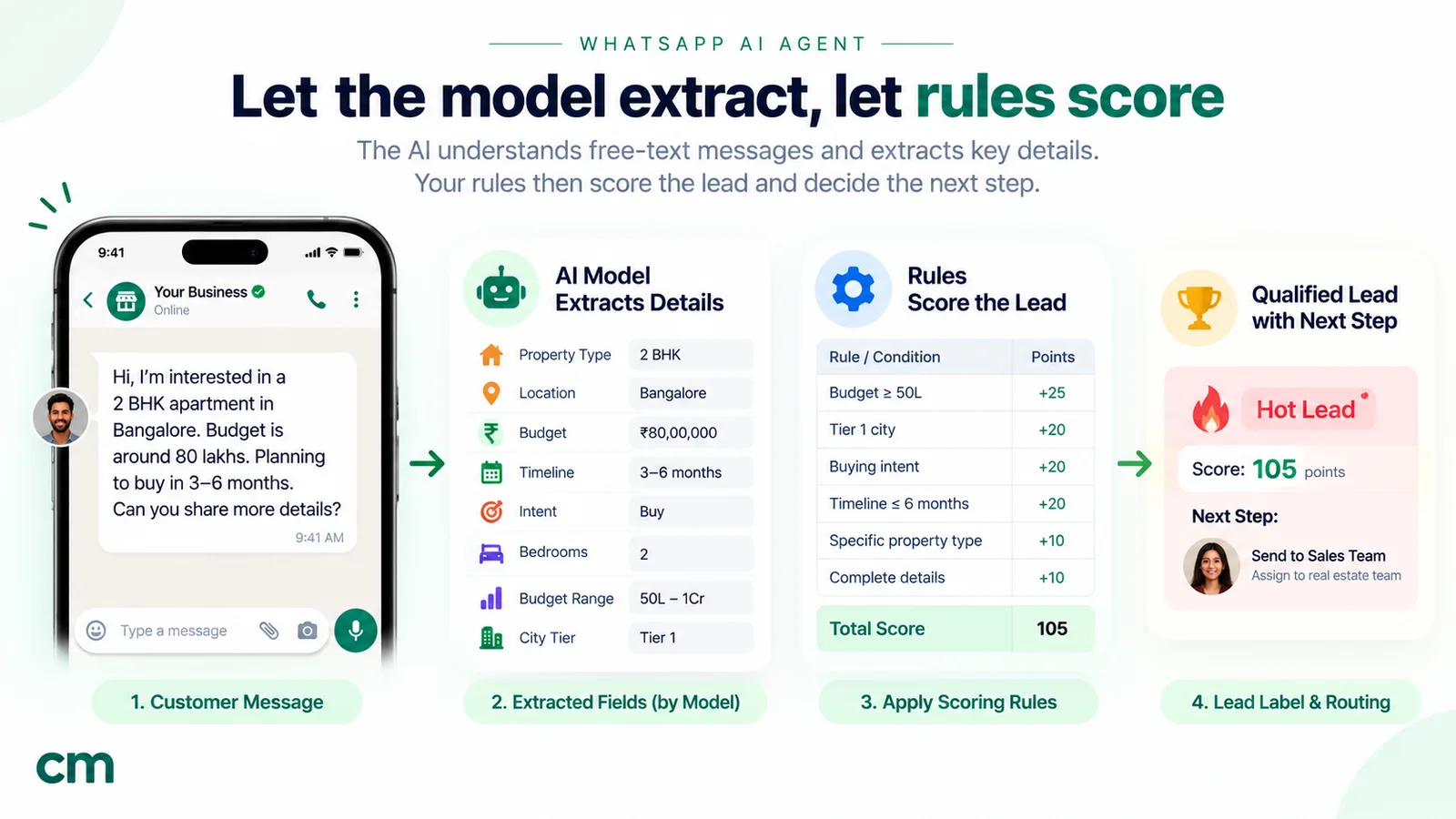
Here’s a simple rubric for the interiors example:
| Field | Answer | Points |
|---|---|---|
| Area (gate) | Outside Pune | Not a fit, stop |
| Timeline | Within 3 months | 3 |
| Timeline | 3 to 6 months | 2 |
| Timeline | Later or not sure | 0 |
| Budget band | 3 to 6 lakh or above | 3 |
| Budget band | Under 3 lakh | 1 |
| Project type | New home | 2 |
| Project type | Renovation | 1 |
| Call slot | Booked in the chat | 2 |
With that table, 8 points or more is hot, 4 to 7 is warm, and below 4 is cold. The thresholds are a starting guess. After a month, compare the scores with what actually closed and adjust. Store the reason next to the score (“hot: new home, possession in 6 weeks, 3–6 lakh, call booked”) so a salesperson can check it at a glance.
Step 6: Plan the handover
Qualification is worthless if the hot lead then waits two days for a call. Decide, in advance, what happens to each label.
- Hot: notify the right salesperson immediately, with the summary. Aim to call or message within minutes during working hours. If a slot was booked in the chat, confirm it.
- Warm: thank them, share something useful (a brochure, a price guide, a sample plan), and ask permission to follow up. Follow-ups outside the 24-hour window need approved templates and, for marketing messages, the customer’s opt-in.
- Not a fit: answer the question they came with, point them somewhere useful if you can, and stop.
- Needs a person now: complaints, confusion, angry customers and anything outside scope go straight to a human, whatever the score.
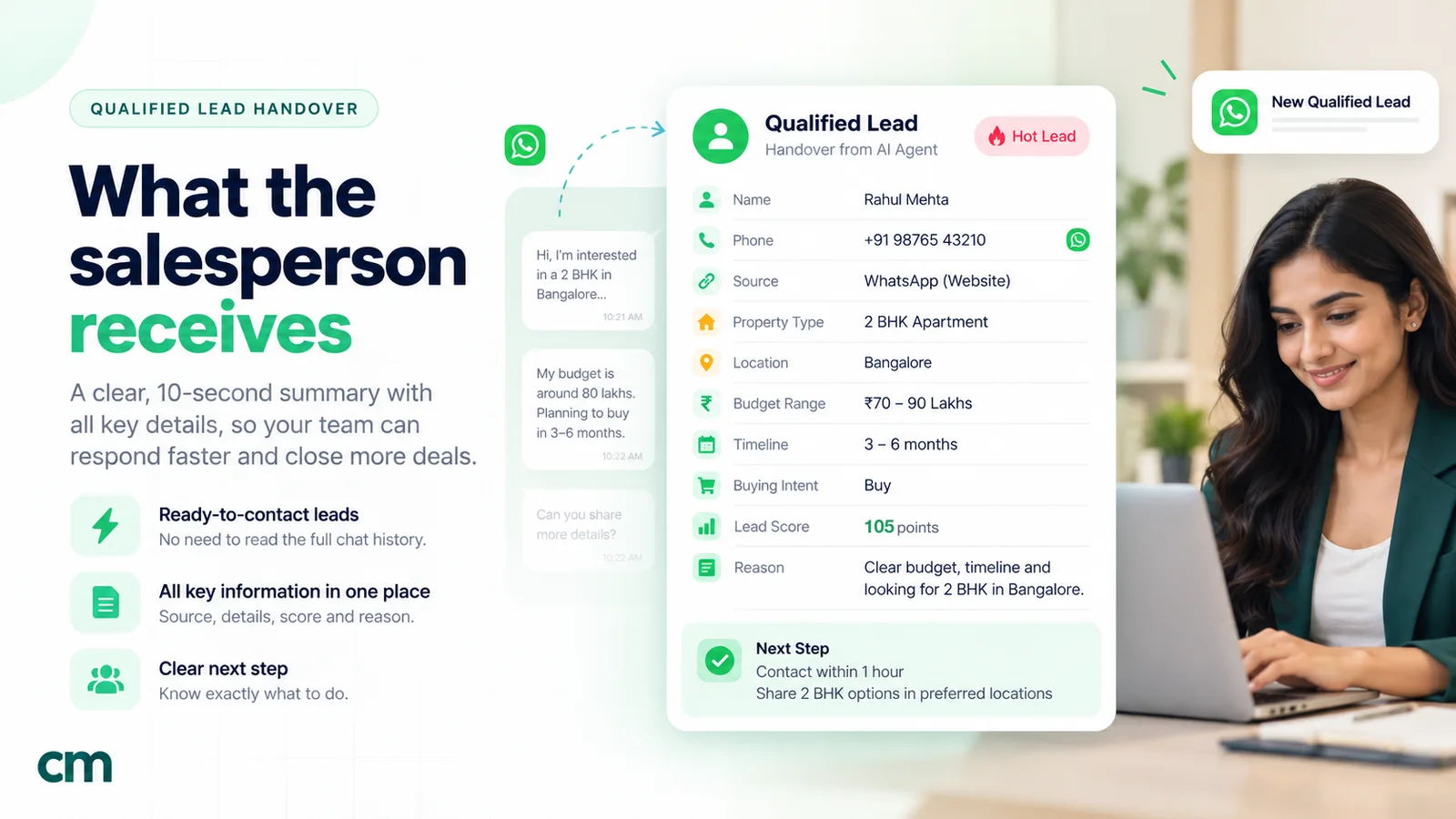
The handover note should be readable in ten seconds:
HOT · Meta ad "Kitchen Diwali" · 2 Oct, 9:40 pm
Priya S. · +91 9xxxx xxxxx
New home · Wakad · possession mid-Nov · 3–6 lakh
Asked about: soft-close hardware, EMI
Call booked: Thu 11:00
Reason: new home, starts < 3 months, served budget, slot booked
Keep the full chat one tap away rather than pasted into the note.
Step 7: Build the escalation path
WhatsApp’s Business Messaging Policy says: “You may use automation when responding during the 24-hour window, but must also have available prompt, clear, and direct escalation paths.” The examples Meta lists include transferring the chat to a human agent, a phone number, email, web support or a support form.
For a qualification agent, that means:
- The customer can ask for a person at any point, in any words, and the agent stops.
- The agent hands over on its own when it detects frustration, a complaint, or a question it has no information for.
- Someone actually picks up. Outside working hours, the agent says when a person will reply, and a human follows up first thing.
An agent that keeps asking qualification questions to a customer who has twice typed “call me” isn’t just annoying. It breaks the policy.
Step 8: Test with a script before real leads see it
Write 20 to 30 test conversations and run all of them before launch. Include:
- The ideal lead, who answers everything in order.
- The one-message lead, who gives all the answers at once (“3BHK Hinjewadi, possession Jan, around 5L”).
- The vague lead (“just checking”, “send details”).
- The price-first lead who refuses to answer until they get a number.
- The out-of-area lead, to confirm the gate works.
- The person who wants a human and says so indirectly (“can someone just call me”).
- The off-topic chat: a job applicant, a vendor pitch, a wrong number.
- The trap: “Your competitor offered 20% off, can you match it?” The agent must not agree to a discount.
- Mixed language, if your customers write in Hinglish or regional languages.
Check three things for each: did it ask only what was needed, did it fill the fields correctly, and did it hand over at the right moment. Fix the instructions and re-run the full set after every change, because fixing one case often breaks another.
Step 9: Launch on one source, then review weekly
Start with one entry point, say one Click-to-WhatsApp ad or your website button, so you can compare results against the old process. For the first two weeks, have someone read every AI conversation. After that, read a sample each week and look for:
- Questions where customers drop off
- Fields the agent often leaves empty or fills wrongly
- Customer questions the knowledge doesn’t cover
- Leads scored hot that sales rejected, and cold leads that later bought
Each finding becomes one change: a new line in the knowledge, a reworded question, a new handover trigger or a new rule in the score table.
A worked example, start to finish
Here’s how the interiors studio’s agent handles a real-looking enquiry that arrives from an ad at 9:40 at night.
Customer: Hi saw ur ad. kitchen price?
Agent: Hi! Thanks for reaching out to Nalanda Interiors. Kitchen prices depend on size, layout and finish, so a designer gives the exact quote after measuring. So the right designer calls you, can I ask three quick questions?
Customer: ok
Agent: Is this for a new home or a renovation?
Customer: new flat in wakad, possession in nov
Agent: Congratulations on the new flat! Which budget range is closest: under 3 lakh, 3 to 6 lakh, or above 6 lakh?
Customer: 3-6. do u have soft close drawers
Agent: Yes, soft-close drawers and hinges are standard in our kitchens. A designer can call you to plan the layout. Would Thursday 11 am or Friday 5 pm work better?
Customer: thursday
Agent: Done: Thursday at 11 am. You’ll get a call from our designer. Anything you’d like them to prepare?
Notice what happened. The customer’s one reply covered project type, area and timeline, so the agent skipped two questions and went straight to budget. It needed two questions to fill four fields. It answered the hardware question from its knowledge, and it never quoted a price. The lead scores 10 (timeline 3, budget 3, new home 2, slot booked 2), so it’s hot, and the designer’s handover note is ready before they arrive at work.
What AI lead qualification costs on WhatsApp in 2026
There are up to three separate costs.
1. Meta’s message charges. Messages customers send you are free. Every reply the agent sends inside the 24-hour window is a service message. Since 1 October 2026, according to Meta’s pricing page, “Each business phone number has one shared free tier of 1,000 delivered service messages per month”. After the free tier, service messages are charged at the market’s utility rate, which is ₹0.1150 in India. Messages inside a free entry point window from a Click-to-WhatsApp ad aren’t charged.
A worked example, with assumed volumes: 600 WhatsApp enquiries a month, with the agent sending 5 messages per qualification chat, gives 3,000 service messages. After the 1,000 free ones, 2,000 × ₹0.1150 = ₹230 a month in Meta charges. If a third of those enquiries came from an ad and were answered in the free entry point window, the charged count drops further. Follow-ups sent later as templates are separate: a marketing template costs ₹0.8631 in India, and a utility template ₹0.1150.
2. Your platform. The subscription and any per-message or AI fees charged by your WhatsApp provider. Compare the total at your volume, not the headline price.
3. The model, if you bring your own AI key. Model providers charge per token for input and output. Your instructions, business knowledge and the conversation so far are sent again with every reply, so a long prompt costs more on every message. That’s another reason to keep scripts short and knowledge focused. Check current rates on your model provider’s pricing page.
For the full rate card, see WhatsApp Business cost per message in India, or try your own numbers in the pricing calculator.
Rules, privacy and consent
AI on WhatsApp is allowed for your own business. Clause 4.7 of the Meta Terms for WhatsApp Business Platform restricts AI providers from using the platform when AI is “the primary (rather than incidental or ancillary) functionality” being offered. A qualification agent for your own kitchens, courses or software is ancillary to your business. Our WhatsApp AI agent guide covers the clause in detail.
Say it’s automated. We found no line in Meta’s Business Messaging Policy that specifically requires AI disclosure, but some laws may, and customers trust an agent more when it’s upfront. A short “I’m the studio’s automated assistant; a person can take over any time” costs nothing.
Opt-in for follow-ups. Replying to a customer who messaged you is fine. Sending them marketing templates later needs their opt-in. Ask for it in the chat, in plain words, and record it. Our WhatsApp opt-in guide covers valid wording and proof.
Collect the minimum. Qualification data is personal data. In India it falls under the Digital Personal Data Protection Act, 2023; elsewhere, laws such as the GDPR apply. Ask only what you need, don’t collect sensitive documents in the chat, and set how long you keep leads that never convert.
How to tell if it’s working
Track these every week, compared with your process before AI:
| Metric | What it tells you | Watch for |
|---|---|---|
| Time to first reply | Whether speed improved | Should be seconds, at any hour |
| Completion rate | Share of chats that answer all questions | A drop at one question means reword or remove it |
| Hot lead acceptance | Share of "hot" leads sales agrees are hot | Low means your gates or points are too loose |
| Hot lead to meeting or sale | Whether qualification predicts buying | Compare with the old rate |
| Time from hot to human contact | Whether the handover works | Minutes during working hours, not hours |
| Handover rate | How often the agent passes to a person | Very high means missing knowledge; near zero may mean it isn't handing over when it should |
Common mistakes and how to fix them
| Symptom | Likely cause | Fix |
|---|---|---|
| Agent asks all questions in one message | Instructions list the questions without a one-per-message rule | Add "ask only one question per message" and test again |
| Agent asks something the customer already answered | No skip rule | Tell it to skip answered questions and confirm instead |
| Agent quotes prices or discounts | No price rule, or prices mixed into knowledge without labels | Forbid final prices; label ranges as "starting from" |
| Everyone is "hot" | Model is scoring, or gates are missing | Move scoring to a rule table; add must-have gates |
| Customers go quiet at the budget question | Open question, or asked too early | Offer ranges as options; ask last |
| Hot leads wait hours for a call | No alert or owner | Route each hot lead to a named person with a notification |
| Agent keeps talking after "call me" | Handover triggers too vague | List explicit phrases and situations that end the AI's turn |
Doing this in ChatMitra
ChatMitra’s AI chatbot runs on your own model key, from any of 18 providers including OpenAI, Anthropic, Google Gemini, Groq and Mistral. When you create a chatbot, one of the roles you can pick is Lead Qualifier, described in the product as “Collect customer details and qualify leads”. The instructions live in the Personality field. A “Generate AI Personality” button drafts them from your business details and website; treat that as a first draft and add your question script, gates and handover rules from the steps above.
What to know before you build, checked against the product in October 2026:
- The AI reads typed messages only. Taps on buttons and list options aren’t passed to it, and its replies are text. So offer choices the customer can type: “Reply 1 for under 3 lakh, 2 for 3 to 6 lakh, 3 for above 6 lakh.”
- There’s no separate language setting. Put “reply in the language the customer uses” in the Personality.
- Memory is adjustable. By default the chatbot sees the last 20 messages of the conversation, and you can keep that memory for 30 minutes up to 24 hours. A qualification chat fits easily.
- There’s no built-in lead score. Instead, use an API action: an HTTP call the AI makes to a system you choose. For example, a
save_leadaction whose parameters are set to “Ask the customer” (area, timeline, budget) and “Customer phone” can post each qualified lead to your CRM, or to a Google Sheet through a small web endpoint, where a formula applies your rule table. That’s the “model extracts, rules score” split in practice. - Outgoing webhooks are another route. ChatMitra can send every received and sent message to your own system, if you’d rather score from the full transcript.
- Handover is manual. The AI doesn’t hand over on its own. Your team sees the chats in ChatMitra’s live chat and can pause AI replies for one customer, from 30 minutes to permanently, before replying themselves. So put a real escalation route in the Personality, such as your phone number, and make sure someone watches new chats during working hours.
- Check your keyword rules. If an Auto Reply keyword rule also matches a message, the customer can get two replies: one from the rule and one from the AI. Turn off overlapping rules on the number that runs the agent.
Our WhatsApp CRM guide explains how tags and custom fields work for following up once a lead is qualified. ChatMitra’s automations can add tags and update a lead-stage field, but they’re triggered by events such as a keyword match, not by the AI’s judgement, so use them for simple, predictable paths.
Summary
AI lead qualification on WhatsApp works when the thinking is done before the AI is switched on. Decide what a qualified lead is, in a sentence sales agrees with. Turn it into three to five questions, one per message. Give the agent narrow instructions, the knowledge customers ask about, and specific reasons to hand over. Let the model gather answers into fields, and let a rule table you can read decide who is hot. Then make sure a person actually calls hot leads quickly, measure each week, and change one thing at a time.
Sources: Meta: WhatsApp Business Platform pricing and Meta Terms for WhatsApp Business Platform. WhatsApp: Business Messaging Policy. James B. Oldroyd, Kristina McElheran and David Elkington, "The Short Life of Online Sales Leads", Harvard Business Review, March 2011. Facts checked 1 October 2026.