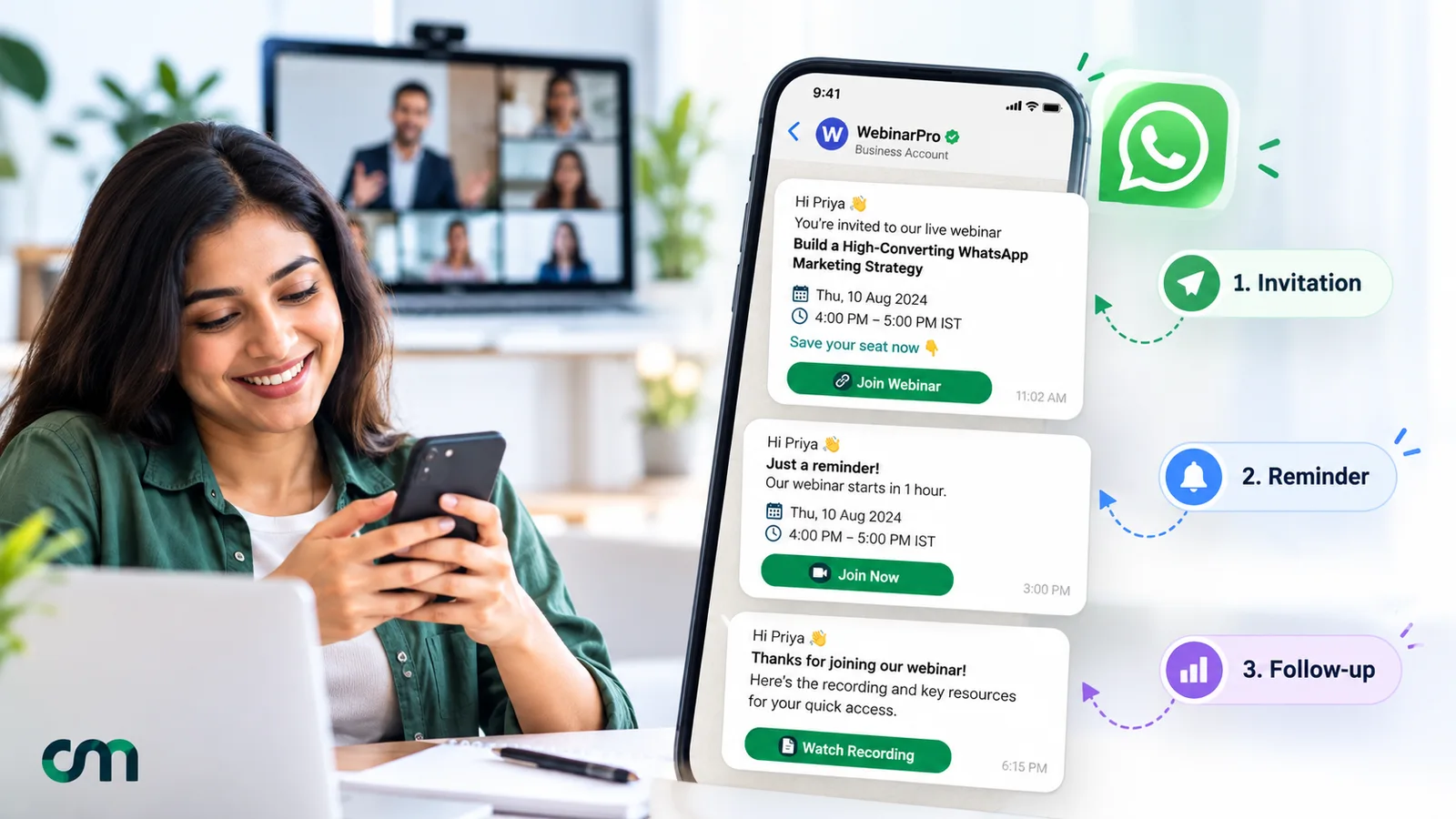
A webinar invitation message tells people what they’ll learn, when the session starts in their time zone, who is presenting and how to register. The best ones fit on a phone screen: one benefit, one date and time, one link. Send it as part of a short sequence: the invite, a confirmation, two reminders and a follow-up.
Below are 30 messages to adapt for WhatsApp, email and SMS. They cover every step from the first invitation to the replay for people who didn’t show up. After them you’ll find when to send each one, what WhatsApp, email and SMS each require, and how to put the sequence on autopilot.
Key takeaways
- Sell the outcome, not the event: "leave with a working budget sheet" beats "join our webinar".
- Always write the time zone. "4 pm" means nothing to half your list.
- Treat attendees and no-shows as two audiences after the session.
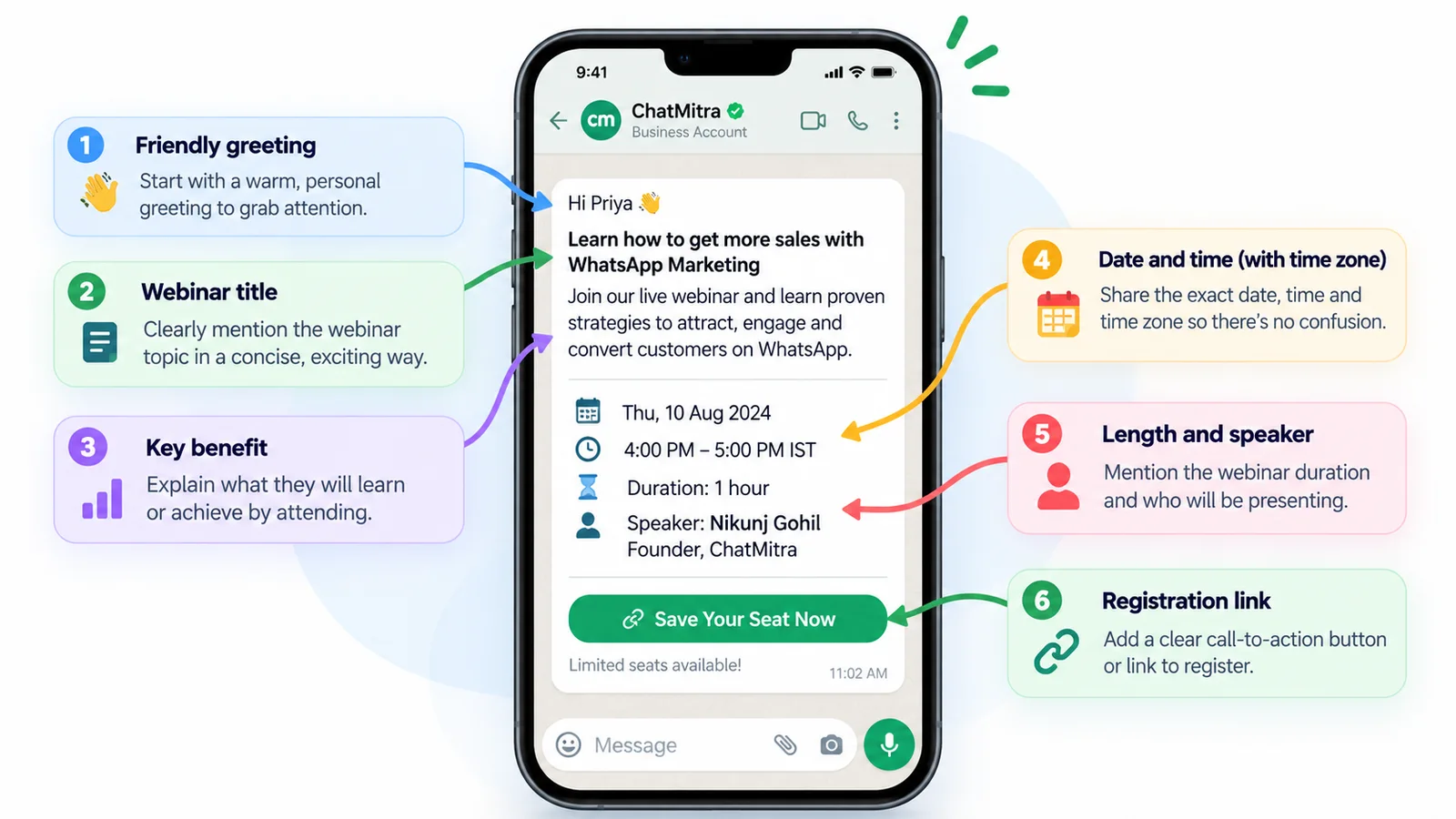
What to include in a webinar invitation
Every invite, on any channel, answers the same six questions. Put them in this order, because people stop reading early.
| Element | Why it matters | Example line |
|---|---|---|
| The benefit | It's the only reason anyone registers | "Leave with a 12-month content calendar you can use on Monday" |
| Title | Helps people find it in their inbox later | "Content Calendar Clinic" |
| Date and start time, with time zone | Prevents a common no-show reason: turning up at the wrong hour | "Thursday 14 January, 4:00 pm IST (10:30 am GMT)" |
| Length | People book time they can see the end of | "45 minutes, including 15 minutes of Q&A" |
| Speaker | Signals whether it's worth the time | "Hosted by [Speaker], who [one-line credential]" |
| How to register | One link, one action | "Save your seat: [link]" |
Two optional lines often lift registrations: whether a recording will be sent (“Can’t make it live? Register anyway and we’ll send the recording”), and that the session is free. If seats are genuinely limited, say how many. Don’t invent scarcity.
The webinar message sequence at a glance
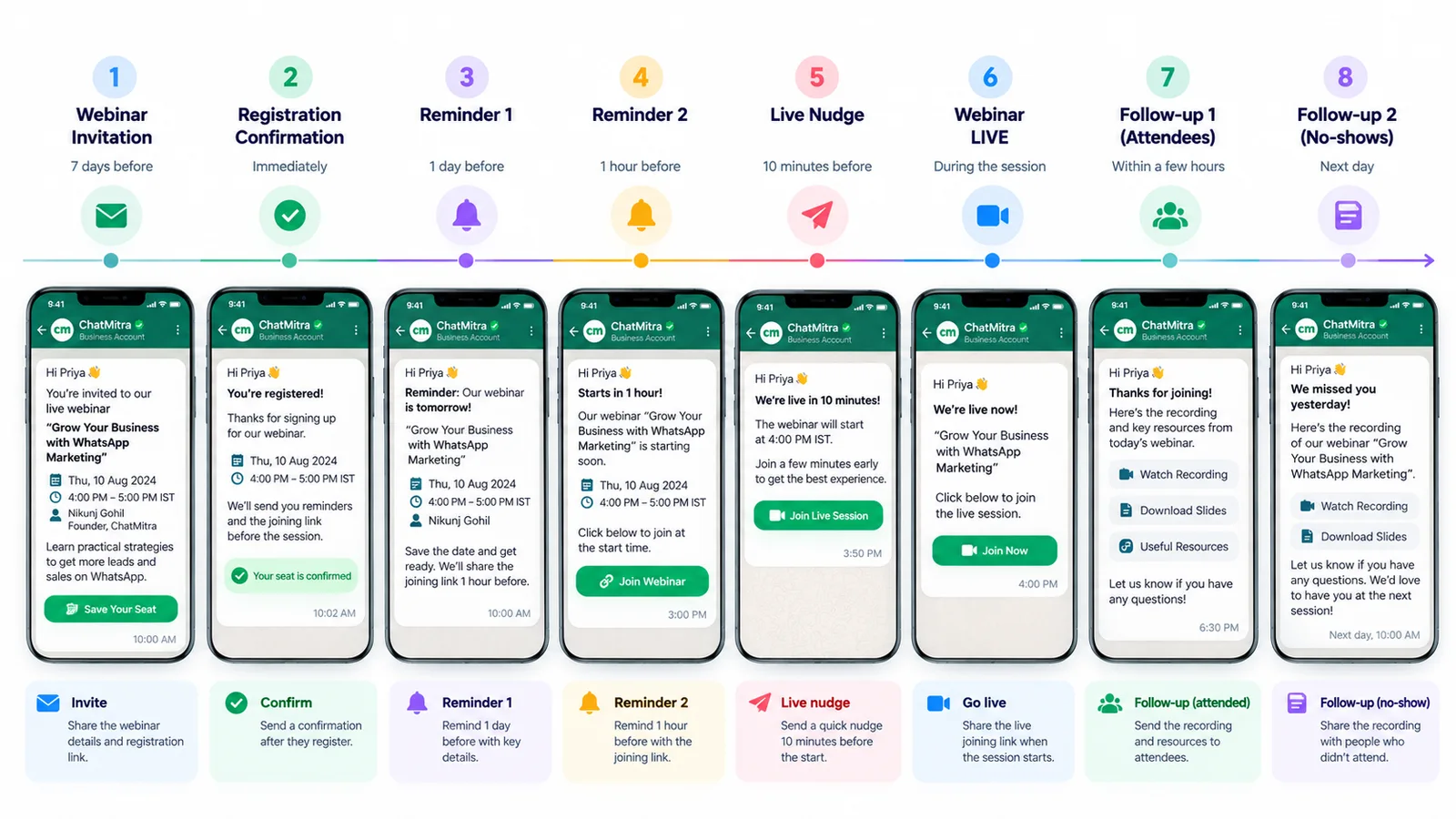
One invitation rarely fills a session. The sequence below gives each message one job.
| When | Message | Best channel | Goal |
|---|---|---|---|
| About 2 weeks before | First invitation | Email, plus WhatsApp to opted-in contacts | Registrations |
| Right after sign-up | Registration confirmation with calendar link | Email and WhatsApp | Put it in their calendar |
| About 1 week before | Second invite to non-registrants | Late registrations | |
| 1 day before | Reminder with the agenda | Email or WhatsApp | Protect the time slot |
| 1 hour before | Short reminder with the join link | WhatsApp or SMS | Show-up |
| At start time | "We're live" nudge | Catch late joiners | |
| Within 24 hours after | Recording and next step | Email and WhatsApp | Value and conversion |
The rhythm is a starting point. A free 30-minute class for existing customers needs a week of promotion, not two. A paid workshop may need three.
Webinar invitation messages for WhatsApp and text
These are short enough for WhatsApp or a single SMS. Replace the brackets, keep the time zone and trim to one link.
For customers and prospects
- Software demo: “Hi [Name], we’re running a 30-minute live walkthrough of [feature] on [day, date] at [time] IST. You’ll see how teams cut [task] from [before] to [after]. Register here: [link]. Recording sent to everyone who signs up.”
- Accountant or tax adviser: “Hello [Name], new filing rules take effect on [date]. On [day] at [time] IST, [adviser] will explain what changes for small businesses like yours, in 40 minutes with open Q&A. Free for our clients: [link]”
- Coaching or online course: “Hi [Name]! Free live class on [topic] this [day], [time] IST. We’ll solve three real questions from last year’s paper, step by step. 60 minutes. Join here: [link]”
- Clinic or health awareness: “Hello [Name], Dr [Surname] is hosting a free online talk on [condition] on [date], [time] IST: what the early signs are and when to see a doctor. Questions are welcome. Register: [link]”
- Property or investment session: “Hi [Name], thinking about [type of property] in [city]? Join our 45-minute online session on [date] at [time] IST, covering prices, loan eligibility and the paperwork. No sales pressure. [link]”
- Product launch: “Hi [Name], we’re unveiling [product] live on [date] at [time] IST. See it in action, ask the team anything, and hear launch pricing first. Save your spot: [link]”
- Partners or resellers: “Hi [Name], a quick session for our partners on [date], [time] IST: what’s new this quarter, updated margins and the new sales kit. 30 minutes. Link: [link]”
- Hinglish invite: “Namaste [Name] ji! [Date] ko [time] baje ek free online session hai: [topic]. Sirf 45 minute, aur aapke sawaalon ke jawab bhi. Register karein: [link]“
Confirmation, reminders and changes
- Registration confirmation (our booking confirmation message guide has more formats): “You’re registered, [Name]. [Webinar title] starts [day, date] at [time] IST. Add it to your calendar: [link]. Your join link will come by email from [sender].”
- One day before: “Reminder: [Webinar title] is tomorrow at [time] IST. Bring one question you’d like answered; we’ll take as many as we can. Join link: [link]”
- One hour before: “Hi [Name], we start in 1 hour, at [time] IST. Your join link: [link]”
- We’re live: “We’ve just started [Webinar title]. Join now: [link]”
- Postponed: “Hi [Name], we’ve had to move [Webinar title] to [new date] at [time] IST. Your registration carries over. Your join link: [link]. Sorry for the change.”
- Cancelled: “Hi [Name], we’ve cancelled [Webinar title], planned for [date]. We’ll send the session material to everyone who registered by [date]. Apologies for the inconvenience.”
Webinar invitation emails
Email carries more detail: an agenda, a speaker bio, calendar buttons. Here are subject lines, then three full emails.
Subject lines that state the outcome and the date
- “Live on 14 Jan: build next year’s content calendar in 45 minutes”
- “Thursday, 4 pm IST: what the new filing rules mean for you”
- “[First name], your seat for Friday’s product walkthrough”
- “Free class: three hard questions from last year’s paper, solved live”
19. First invitation email
Subject: Live on [date]: [outcome in under eight words]
Hi [First name],
Most [role]s we speak to spend [pain in one line]. On [day, date] at [time] IST ([time] GMT), [speaker, one-line credential] will show you [the method] in 45 minutes.
You’ll leave with:
- [Takeaway 1]
- [Takeaway 2]
- [A template, checklist or file they keep]
[Register button]
Can’t join live? Register anyway and we’ll send the recording.
[Your name], [Company] [Postal address] · [Unsubscribe]
20. Second-chance invite to people who didn’t register
Subject: Still time to join [short title] on [day]
Hi [First name], a quick follow-up in case last week’s email got buried. [Title] is on [day] at [time] IST. The one thing people have asked about most since we announced it is [topic]; [speaker] will cover it in the first 15 minutes. [Register link]
21. Registration confirmation email
Subject: You’re in: [title], [date]
Thanks for registering, [First name]. Here’s everything in one place:
- When: [day, date], [time] IST ([time] in [other zone])
- Length: 45 minutes
- Join link: [unique link]
- Add to calendar: [Google] · [Outlook] · [Apple/.ics]
If something comes up, you can [cancel your registration] so someone else can have the seat.
Webinar reminder email samples
- One week before: “Hi [First name], [title] is a week away: [day] at [time] IST. Here’s the agenda so you can block the right time: [three bullet points]. Your join link is in your confirmation email, or here: [link].”
- One day before: “Tomorrow at [time] IST: [title]. Tip: join two minutes early to test your audio. If you’d like a question answered, reply to this email and we’ll try to cover it.”
- One hour before (email version): “We start in one hour. Join here: [link]. The session will be recorded, so if you’re running late, join anyway.”
If you host on Zoom Webinars, note what it already sends. According to Zoom’s support article on webinar emails, hosts can send reminder emails “1 hour, 1 day, or one week before the webinar start time”. Follow-up emails to attendees and absentees can go “1 to 7 days after the webinar start time”. The confirmation email can include an ICS calendar file. These emails are sent only when registration is required. Don’t duplicate them. Add the channel email misses, usually WhatsApp for the last hour.
Webinar follow-up messages
After the session your list splits in two. Write to each group separately, and keep the thank-you warm but short; our thank-you message guide has more wording ideas.
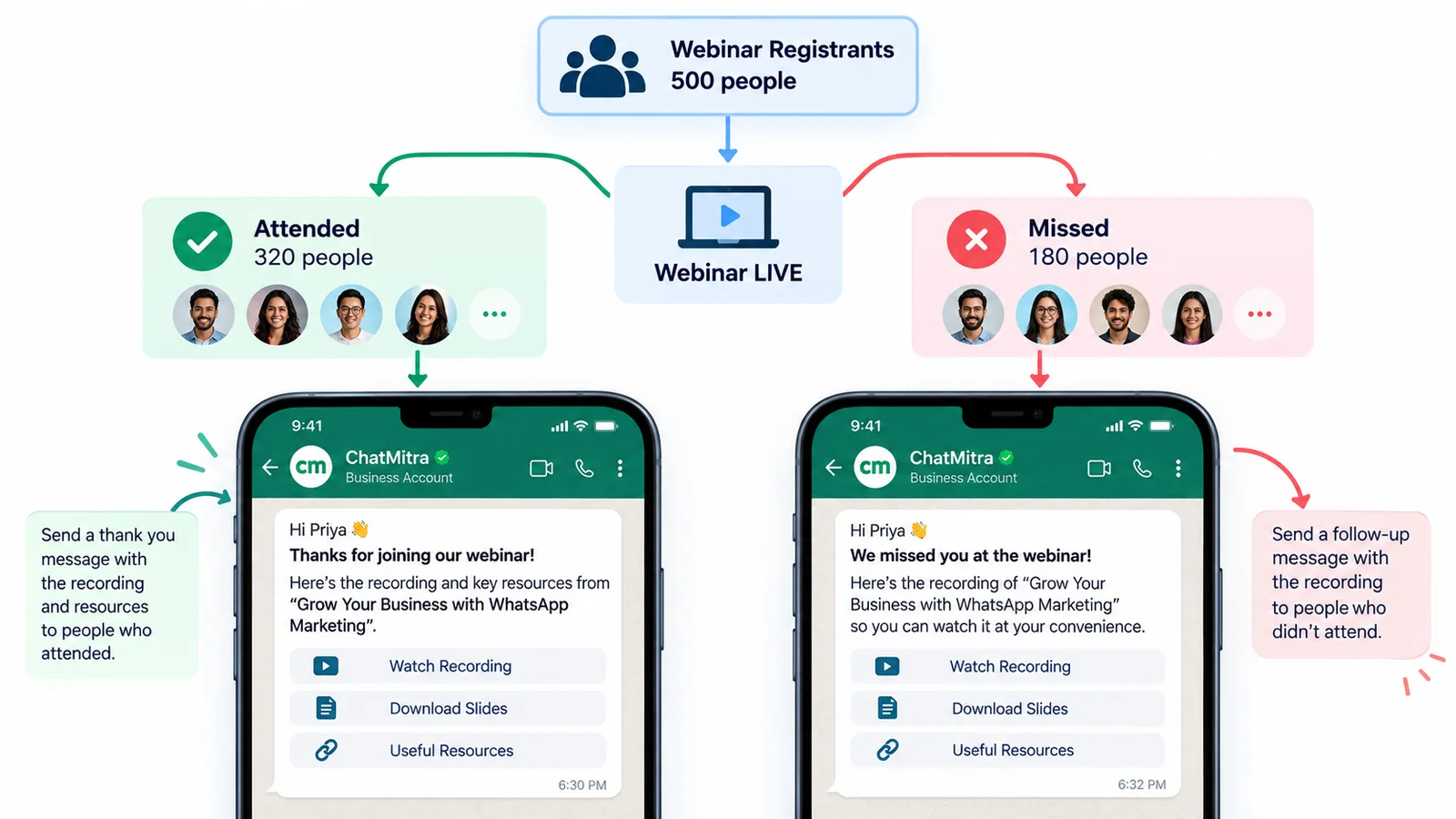
- Attendees (WhatsApp): “Thanks for joining today, [Name]! Here’s the recording and the slides: [link]. The template we used is on slide 14.”
- Attendees (email with a next step): “Thanks for spending 45 minutes with us. As promised: the recording [link], the checklist [link] and answers to the six questions we didn’t reach [link]. If you’d like help applying this to your own [account/business], book 20 minutes with [name] here: [link].”
- No-shows (WhatsApp): “Hi [Name], sorry we missed you today. Here’s the full recording: [link]. If you only have ten minutes, start at [timestamp], where [speaker] covers [topic].”
- No-shows (email): “The recording of [title] is ready. Watch it here: [link]. The most useful part for most people was [topic] at [timestamp].”
- Feedback request (see how to ask customers for feedback): “Thanks for attending [title] on [date]. Two quick questions: what was most useful, and what should we cover next? Reply here; it takes under a minute.”
- Invite to the next session: “Hi [Name], you joined our session on [topic] last month. Part two is on [date] at [time] IST: [what’s new]. Here’s your link to register: [link]“
Which channel suits each step?
| Channel | Best for | Watch out for |
|---|---|---|
| First invite, agenda, calendar files, recordings, B2B lists | Promotions tab, spam filters, bulk-sender rules | |
| Confirmation, the last reminder, the live nudge, replays for mobile-first audiences | Opt-in required, approved templates, per-message cost | |
| SMS | A backup one-hour reminder, audiences without WhatsApp | Short length, link trust, local sender registration |
| LinkedIn and social posts | Reaching people who aren't on your list yet | No personal reminders; people must register to hear from you |
A simple rule works for most teams: invite by email and social, confirm on both email and WhatsApp, and remind on WhatsApp in the final hour. If your customers read WhatsApp more than email, also send the first invite on WhatsApp to those who’ve opted in.
Sending webinar messages on WhatsApp
Opt-in and templates
Business messages on WhatsApp need permission first. The WhatsApp Business Messaging Policy requires opt-in before you contact someone. Outside a 24-hour customer service window, you can only send approved templates, so each message in your sequence needs its own template. Registration forms are the natural place to collect opt-in: add a clearly worded, unticked checkbox for WhatsApp updates about the session. For checkbox wording that holds up, read our guide to WhatsApp opt-in.
Marketing or utility: how each message is categorised
Each WhatsApp template is filed under a category by Meta, and that label decides what you pay. Meta’s template categorisation guide sets a two-part test for utility: the message “Must be non-promotional”, and must also be “specific to or requested by the user (clearly related to their order, account, services, or transactions)”. Meta gives no webinar examples, so here is how the rules apply:
| Message | Likely category | Why |
|---|---|---|
| Invitation to people who haven't registered | Marketing | Meta's own marketing "awareness" example is an event invitation |
| Registration confirmation | Utility, if it has no pitch | Confirms something the person signed up for |
| Reminders to registrants | Utility, if they have no pitch | Time-sensitive information about something they registered for |
| Postponed or cancelled notice | Utility, if it has no pitch | An update to their registration |
| Recording to registrants | Utility only if it just delivers the recording | Adding "book a demo" makes it mixed content |
| Invitation to a future session or a paid product | Marketing | Meta treats retargeting as marketing "even if requested by users" |
Three rules from the same guide matter here:
- Mixed content is marketing. Meta says “Templates with mixed content (for example, both utility and marketing…)” are marketing. A reminder that mentions launch pricing is a marketing template.
- Meta has the final say. From 9 April 2025, if you pick utility and WhatsApp decides the content is promotional, the template goes live as marketing instead.
- Approved templates are re-checked. Meta normally gives one day’s notice before moving an approved utility template to marketing, but none once a business has been warned for misuse, and businesses that consistently mislabel marketing as utility face escalating restrictions.
What the sequence costs
Meta charges for each delivered template message (and, from 1 October 2026, for free-form service replies beyond a free 1,000 a month per business number). According to its pricing page, rates depend on the category and the recipient’s country code. For recipients in India, the INR rate card puts a marketing delivery at ₹0.8631 and a utility delivery at ₹0.1150. Utility templates no longer ride free inside an open 24-hour window; that changed on 1 October 2026.
Suppose you invite 2,000 opted-in contacts in India and 400 register:
| Messages | Category | Count | Meta charge |
|---|---|---|---|
| Invitations | Marketing | 2,000 | ₹1,726.20 |
| Confirmation, day-before and hour-before reminders, recording | Utility | 1,600 (400 × 4) | ₹184.00 |
| Total | 3,600 | ₹1,910.20 |
These figures are Meta’s charges only. If Meta categorises your reminders as marketing, those 1,600 messages would cost ₹1,380.96 instead of ₹184. That’s why reminder templates should stay free of offers. Your provider’s fee comes on top; on ChatMitra’s Starter plan it is ₹0.20 per contact, once in any 24-hour conversation.
Limits worth knowing
- Per-user marketing limits. WhatsApp may limit how many marketing templates one person receives from businesses in a period, depending on how engaged that person has recently been, as Meta’s per-user limits page explains. Blocked sends return error 131049, so a second invitation may not arrive at all.
- US recipients. Meta’s marketing messages guide explains that marketing templates addressed to WhatsApp users in the United States have gone undelivered since 1 April 2025. Invite US contacts by email instead; a registration confirmation can still go as utility.
Email and SMS rules for webinar invites
Email. In the US, the FTC’s CAN-SPAM compliance guide applies to any message whose “primary purpose” is commercial, and it “makes no exception for business-to-business email”. A promotional webinar invite must, among other things, be clearly identified as an ad, use honest sender details and subject lines, and include:
- an unsubscribe route that works, with requests acted on “within 10 business days”;
- your “valid physical postal address”.
A confirmation that only delivers the joining details for something the person signed up for is likely a transactional message, which is exempt from most of the Act, though the FTC reads those categories narrowly.
Large senders have a second set of rules. Google’s email sender guidelines apply to everyone who emails personal Gmail accounts, and senders of more than 5,000 messages a day to Gmail accounts must also meet stricter ones, including:
- SPF, DKIM and DMARC authentication;
- one-click unsubscribe on marketing messages;
- a spam rate kept “below 0.30%”.
SMS in India. TRAI’s commercial communication regulations require every commercial SMS to use a registered header and a registered content template. The time bands from 9 pm to 10 am are “default OFF for all customers” for promotional messages unless a customer opts in to them. In practice, schedule promotional invites between 10 am and 9 pm. When one channel beats the other is laid out in WhatsApp vs SMS.
How to promote a webinar beyond your own list
Invitations only reach people who already know you. To fill a session with new faces, add a few low-effort channels in the two weeks before:
- A registration page that works on a phone. Many people open invitation links on their phone. Keep the form to name, email, mobile number and one consent checkbox for WhatsApp updates.
- A post from the speaker, not only the company. People follow people. Ask the presenter to share a short post on LinkedIn with the benefit line and the link, and to reply to comments.
- A co-host with an audience. Partner with a supplier, association or complementary business and send one invite each to your own lists. Agree beforehand who follows up with whom, so nobody receives two pitches.
- Your website and email signature. A slim banner on the pages your customers already visit, and one line in every team member’s signature, cost nothing.
- Customer-facing staff. Sales and support teams talk to the right people every day. Give them a two-line version of message 1 to paste into conversations where the topic fits.
- Your WhatsApp Business profile and Status, if you use the WhatsApp Business app, for the contacts who have saved your number.
Track registrations by source with a separate link, or a UTM tag, for each channel. After two or three webinars you’ll know which ones bring people who actually attend, not just people who sign up.
Time zones and timing
Write the time zone every time, and add a second zone if a real share of your list lives elsewhere: “4:00 pm IST (10:30 am GMT, 5:30 am ET)”. Calendar files handle the conversion for people who add them, so push the calendar link hard in the confirmation.
Send each message in the reader’s working hours, not yours. If your list spans India and the US, split it by country and schedule two sends. A 10 am IST invite lands at 11:30 pm the previous night in New York (12:30 am during US daylight saving time).
How to automate the webinar sequence
You don’t need to send any of these by hand. A typical setup in ChatMitra uses tools that already exist:
- Collect registrations in a Google Sheet (from your form or webinar tool’s export), with columns for name, mobile number, webinar date and WhatsApp consent.
- Confirmation: a “Google Sheet — Row Added” automation sends your confirmation template within minutes of a registration landing, and an “Add Tag” step labels the contact with the session name.
- Day-before reminder: an “N Days Before a Date” automation on the webinar-date column sends the reminder at a time you choose. It matches the day and month, not the year, so clear or archive each session’s rows after the webinar.
- Final-hour reminder: schedule a broadcast of the one-hour template to everyone tagged for that session.
- Replays: after the session, look at the campaign report. You can start a new broadcast to a past campaign’s recipients filtered by status (sent, delivered, read or failed). For attended versus absent, update an “Attended” column in the sheet from your webinar tool’s report, and trigger on that column changing.
Our WhatsApp automation guide covers what ChatMitra automates, and scheduling WhatsApp messages covers broadcast timing.
Webinar invitations not working? What to check
| Problem | Likely cause | What to change |
|---|---|---|
| Few registrations | The invite sells the event, not the outcome, or it went to the wrong segment | Rewrite the first line as a result the reader wants; invite only people for whom the topic is relevant |
| Plenty of registrations, few attendees | No calendar entry, no final-hour reminder, or a time that suits you rather than them | Push the calendar link in the confirmation; add a one-hour WhatsApp reminder; test a different slot |
| People join at the wrong time | Missing or unclear time zone | Write the zone every time and add a second zone for big overseas segments |
| WhatsApp invites not delivered to some contacts | Per-user marketing limits (error 131049), US numbers, or no opt-in | Don't resend within 24 hours; invite US contacts by email; clean the list |
| Reminder template approved as marketing | An offer, discount or "book a demo" line in the reminder | Remove the pitch and submit a plain reminder; send the offer separately |
| Invite emails land in spam or promotions | Missing authentication, no unsubscribe, or a cold list | Set up SPF, DKIM and DMARC; add one-click unsubscribe; send to people who asked to hear from you |
Mistakes that empty a webinar
- Leading with the event instead of the outcome. “Join our webinar” gives no reason to join.
- Leaving out the time zone, or giving a time with no date.
- Burying the join link. It belongs in the confirmation and in the last reminder, both times.
- Sending the same follow-up to everyone. An attendee who stayed for 45 minutes and a no-show need different messages.
- Putting a pitch in the reminder. On WhatsApp it makes the template marketing, and a reminder that reads like an advert gets ignored.
- Faking scarcity. “Only 3 seats left” on an unlimited Zoom webinar damages trust once people notice.
- Sending past 9 pm. It’s inconsiderate on any channel, and for Indian promotional SMS it’s off by default.
Where ChatMitra fits
ChatMitra sends the WhatsApp side of this sequence:
- scheduled template broadcasts to tagged contacts;
- Google Sheet and date-based automations for confirmations and reminders;
- campaign reports showing sent, delivered, read and failed, with retargeting from those lists.
It doesn’t host webinars, send email or send SMS. Keep your webinar platform and email tool for those, and use ChatMitra for the messages people need to see on their phone.
If WhatsApp is where your audience actually reads, you can compare plans and set up your first reminder sequence. For more ideas, see our 18 WhatsApp campaign ideas and the reminder message guide.
Sources: Meta's WhatsApp template categorisation guide, pricing page and India INR rate card, per-user marketing limits and marketing messages guide; the WhatsApp Business Messaging Policy; Zoom's support article on webinar emails; the US FTC's CAN-SPAM compliance guide; Google's email sender guidelines; and TRAI's Telecom Commercial Communications Customer Preference Regulations, 2018. All are linked above. Facts checked against Meta's and WhatsApp's documentation on 27 September 2026.