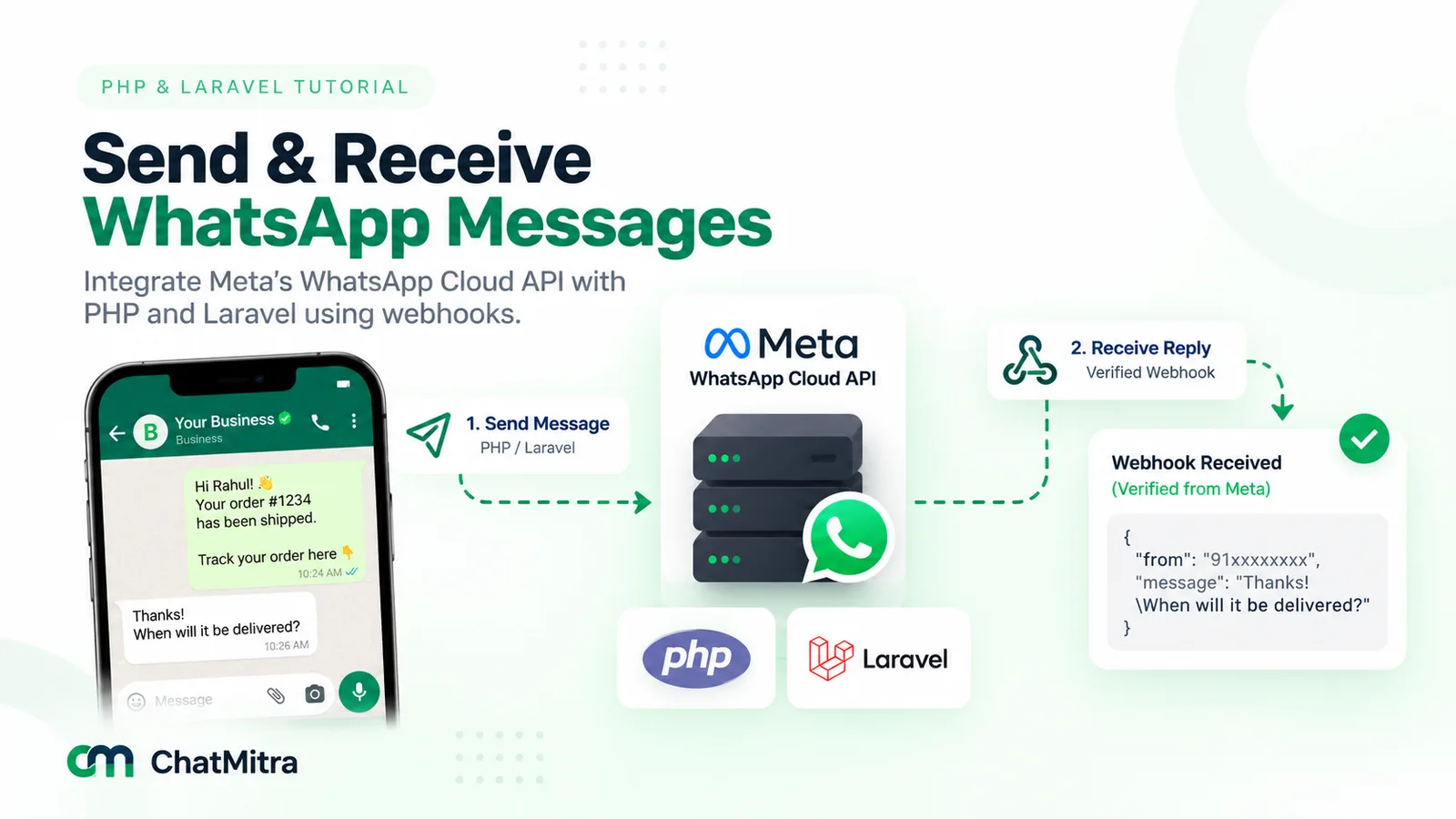
To use the WhatsApp API with PHP, send a JSON POST to Meta’s Cloud API at /<PHONE_NUMBER_ID>/messages with the cURL extension or Laravel’s HTTP client, with a system user token as the Bearer header. Approved templates reach anyone who opted in. Free-form replies work only for 24 hours after the customer last wrote to you. A signed webhook receives replies.
That’s the whole contract. The rest of this guide is the PHP around it: a cURL version with no dependencies for plain PHP and shared hosting, then a Laravel 13 version with a service class, a queued job and webhook middleware. It also covers the three PHP quirks that break most first attempts, cron-driven queues, and ChatMitra’s REST API.
Key takeaways
- Send JSON as a string. An array in
CURLOPT_POSTFIELDSis posted as multipart form data. - Retry only what Meta says is temporary, from a queue or cron, never with
sleep()inside a page request. - Check the webhook's signature against the untouched request body before parsing anything, then answer 200 fast.
Every snippet was run on PHP 8.5.8 and Laravel 13.33.0 against a local stand-in for Meta's API; no real message was sent. Facts checked against Meta for Developers, php.net and the Laravel documentation on 26 September 2026. Rupee figures are Meta's India rates and exclude tax.
What do you need before the first PHP request?
Five values, all of which belong in environment variables rather than in code:
| Value | Where it comes from | Used for |
|---|---|---|
| Phone number ID | App Dashboard, WhatsApp API Setup (not the phone number itself) | The path of every send request |
| System user access token | Meta Business settings: create a system user, then generate a token for it | The Authorization: Bearer header |
| App secret | Your Meta app's basic settings | Checking webhook signatures |
| Verify token | A string you make up | The one-time webhook handshake |
| Approved template name and language | WhatsApp Manager, or your provider's template screen | Messaging anyone outside the 24-hour window |
Meta’s get-started guide creates the app and hands you a test number. The temporary token it generates “expires quickly and is not suitable for development purposes”, so switch early to a system user token. Meta’s access token guide has you choose an expiration preference and grant three permissions: business_management, whatsapp_business_management and whatsapp_business_messaging. Our Python tutorial walks through the dashboard screens in more detail, and none of that part depends on the language.
One recent change matters if you read older tutorials. Meta’s account model update splits the old WhatsApp Business Account into a WhatsApp account and a Messaging account. It became generally available on 23 September 2026, with every business due to move by mid-October 2026. For your PHP code, the send endpoint “continues to work the same way”. An optional messaging_account_id matters only when a single token can send through several Messaging accounts attached to one number. Meta’s timeline also says that from the first half of 2028, URL paths take a new WhatsApp account ID instead of the phone number ID, so keep that ID in configuration.
If you’re still deciding whether to go to Meta directly or through a provider, read how to get the WhatsApp API first. For what the Cloud API is and isn’t, see the WhatsApp Cloud API guide.
Which PHP setup fits your hosting?
Most PHP tutorials assume a VPS. Plenty of PHP runs on cPanel-style shared hosting, where nothing runs in the background, and that changes how you retry sends and process webhooks.
| Your setup | Send with | Retries and heavy work | Receive with |
|---|---|---|---|
| Plain PHP on shared hosting | cURL function below | A database outbox and a cron script | webhook.php that stores the payload |
| Laravel on shared hosting | Service class on Laravel's HTTP client | Queued jobs, worked by schedule:run from cron | Controller plus signature middleware |
| Laravel on a VPS or container | Same service class | Queued jobs with a permanent worker under Supervisor | Same controller |
| Any PHP, provider handles Meta | The provider's REST API | The provider's queue, plus your idempotency key | The provider's webhooks |
A word on the other kind of “WhatsApp PHP library”. Packages that log in to WhatsApp Web as a personal account are not the Business Platform. WhatsApp’s help centre says linking an account to unofficial versions breaks its Terms of Service, and the account “might also be temporarily or permanently banned”. Community Composer packages that wrap the official Cloud API are a different thing, since they never touch WhatsApp Web, but they are still third-party code. This guide uses none, so you can see every byte that goes to Meta. The official vs unofficial sender comparison covers the business side.
How do you send a WhatsApp message with plain PHP and cURL?
The cURL extension is enough, with no Composer and no framework. Keep the credentials in the server’s environment (your host’s panel, or SetEnv in Apache), or in a config file outside the public web folder. If the project already uses Composer, vlucas/phpdotenv can load a .env file. Note that it fills $_ENV and $_SERVER, and getenv() only if you ask it to, so switch the getenv() calls below to $_ENV if you use it. Wherever the file lives, keep it out of public_html.
A send function you can reuse
<?php
// whatsapp.php: Cloud API helpers for plain PHP (no Composer needed)

final class WhatsAppException extends RuntimeException
{
    public function __construct(
        public readonly int $status,       // HTTP status, 0 if Meta was never reached
        public readonly ?int $metaCode,    // Meta's numeric error code
        string $details,
        public readonly int $curlErrno = 0,
    ) {
        parent::__construct("HTTP $status, code " . ($metaCode ?? 'none') . ": $details");
    }
}

function wa_send(array $message): array
{
    $graph = getenv('WA_GRAPH_BASE') ?: 'https://graph.facebook.com/v26.0';
    $body  = ['messaging_product' => 'whatsapp', 'recipient_type' => 'individual'] + $message;

    $ch = curl_init($graph . '/' . getenv('WA_PHONE_NUMBER_ID') . '/messages');
    curl_setopt_array($ch, [
        CURLOPT_POST           => true,
        CURLOPT_POSTFIELDS     => json_encode($body, JSON_THROW_ON_ERROR), // a string, never an array
        CURLOPT_HTTPHEADER     => [
            'Authorization: Bearer ' . getenv('WA_TOKEN'),
            'Content-Type: application/json',
        ],
        CURLOPT_RETURNTRANSFER => true,
        CURLOPT_CONNECTTIMEOUT => 5,
        CURLOPT_TIMEOUT        => 20,
    ]);
    $raw    = curl_exec($ch);
    $errno  = curl_errno($ch);
    $status = curl_getinfo($ch, CURLINFO_RESPONSE_CODE);

    if ($errno !== 0) {
        throw new WhatsAppException(0, null, curl_strerror($errno), $errno);
    }
    $data = json_decode((string) $raw, true) ?? [];
    if ($status >= 400) {
        $error = $data['error'] ?? [];
        throw new WhatsAppException(
            $status,
            $error['code'] ?? null,
            $error['error_data']['details'] ?? $error['message'] ?? 'no error body',
        );
    }
    return $data;
}
It needs PHP 8.1 or later for the readonly properties. Four details are deliberate:
- The body is a JSON string. The curl_setopt manual says passing an array to
CURLOPT_POSTFIELDS“will encode the data as multipart/form-data”. In our test, the array version reached the server as multipart, not the JSON body Meta’s reference describes. - The token travels in a header. A token in a URL query string can end up in proxy and server logs.
- The Graph version lives in one place. Meta’s changelog named v26.0 the latest version; it arrived on 29 July 2026. v20.0 was available only until 24 September 2026, so hard-coded versions scattered across files do age out.
- There’s no
curl_close(). Many older snippets end with it. The PHP manual says it has had no effect since PHP 8.0 and is deprecated as of PHP 8.5.
Send an approved template
A template is the only way to message someone who hasn’t written to you in the last 24 hours. This one uses named variables ({{customer_name}}, {{tracking_id}}), so each value carries a parameter_name, as Meta’s template overview shows:
$result = wa_send([
    'to'       => '+919812345678', // plus sign and country code
    'type'     => 'template',
    'template' => [
        'name'       => 'order_shipped',
        'language'   => ['code' => 'en'],
        'components' => [[
            'type'       => 'body',
            'parameters' => [
                ['type' => 'text', 'parameter_name' => 'customer_name', 'text' => 'Asha'],
                ['type' => 'text', 'parameter_name' => 'tracking_id', 'text' => 'DL48213'],
            ],
        ]],
    ],
]);
$wamid = $result['messages'][0]['id']; // save it: status webhooks quote this ID
Keep the plus sign. Meta’s send-messages guide warns that without it, “your business phone number’s country calling code is prepended”, which can misdeliver the message. Use the exact language code the template was approved under, or you get error 132001. What the template should say is covered in the order confirmation message guide.
A 200 at this point means Meta accepted the request, not that the customer has it. Delivery news arrives later on your webhook.
Free-form replies while the window is open
Once a customer writes to you, a 24-hour customer service window starts, and every further message from them restarts the clock. While it’s open, text, media and interactive buttons are all allowed:
wa_send(['to' => $customerNumber, 'type' => 'text', 'text' => ['body' => 'Got it, your photo is with our team.']]);A text body tops out at 4,096 characters. Once the window has closed, the same call fails with error 131047, and only a template will get through. For buttons and lists, see the guide to WhatsApp interactive messages.
How should PHP code retry failed sends?
Meta’s error codes page says to build error handling “around error codes instead of subcodes or HTTP response status codes”. In practice the codes fall into three buckets:
| Bucket | Codes | What your code does |
|---|---|---|
| Temporary: wait and retry | 4 and 80007 (app or account rate limit), 130429 (throughput reached), 131056 (too many messages to one user), 131000 (unknown error), HTTP 5xx | Back off with jitter, then retry |
| Fix the request: never retry | 131047 (window closed), 132000 (parameter count mismatch), 132001 (template missing or unapproved in that language), 131026 (undeliverable) | Log it, change the message or the template, flag the number |
| Stop and alert | 190 (token expired), 131048 (spam-rate restriction on the number) | Alert someone: renew the token, or look at the number's quality rating in WhatsApp Manager |
Two more are worth knowing. Error 131049 means Meta held back a marketing template “to maintain healthy ecosystem engagement”; Meta says to wait at least 24 hours before resending. And statuses can fail later, on the webhook, even after a successful API call.
The table becomes a short wrapper. Call it wherever you called wa_send():
const WA_RETRY_CODES = [4, 80007, 130429, 131000, 131056];
// Failures before any byte reached Meta, so a resend can't duplicate a message
const WA_SAFE_CURL_ERRORS = [CURLE_COULDNT_RESOLVE_HOST, CURLE_COULDNT_CONNECT];

function wa_send_with_retry(array $message, int $attempts = 4): array
{
    for ($n = 1; ; $n++) {
        try {
            return wa_send($message);
        } catch (WhatsAppException $e) {
            $retry = in_array($e->metaCode, WA_RETRY_CODES, true)
                || $e->status >= 500
                || in_array($e->curlErrno, WA_SAFE_CURL_ERRORS, true);
            if (!$retry || $n === $attempts) {
                throw $e;
            }
            usleep(2 ** ($n - 1) * 1_000_000 + random_int(0, 500_000)); // 1 s, 2 s, 4 s + jitter
        }
    }
}
It deliberately doesn’t retry a cURL timeout. A timeout can happen after Meta has accepted the message, and a blind resend can deliver an OTP twice. Check for a status webhook on the first attempt instead.
Our tests confirmed the behaviour. Two 130429 responses were followed by a success after 3 to 4 seconds. An HTML 502 from a proxy was retried. A 131047, a 132001 and a 190 each stopped after one request. A refused connection was tried four times over about 8 seconds.
That’s also the wrapper’s limit: it sleeps, and on a web request your visitor waits for every retry. Whether that waiting counts toward PHP’s max_execution_time (30 seconds by default) depends on the platform, so don’t design around it either way. Call wa_send_with_retry() from a cron script or a queue, and have page requests only record what should be sent.
How do you receive WhatsApp webhooks in plain PHP?
Meta’s webhook endpoint guide asks for a public URL served over HTTPS with a proper certificate; self-signed ones are rejected. It must do two things: answer a GET handshake, and accept signed POSTs.
<?php
// webhook.php: the callback URL you save in the App Dashboard

if ($_SERVER['REQUEST_METHOD'] === 'GET') {
    // PHP turns "hub.mode" into "hub_mode" before your code sees it
    $ok = ($_GET['hub_mode'] ?? '') === 'subscribe'
        && hash_equals((string) getenv('WA_VERIFY_TOKEN'), (string) ($_GET['hub_verify_token'] ?? ''));
    http_response_code($ok ? 200 : 403);
    header('Content-Type: text/plain');
    echo $ok ? ($_GET['hub_challenge'] ?? '') : '';
    exit;
}

$raw      = file_get_contents('php://input');   // the exact bytes Meta signed
$expected = 'sha256=' . hash_hmac('sha256', $raw, (string) getenv('META_APP_SECRET'));

if (!hash_equals($expected, $_SERVER['HTTP_X_HUB_SIGNATURE_256'] ?? '')) {
    http_response_code(401);
    exit;
}

// Store now, process from cron: Meta wants a fast 200 and resends failures
$pdo = new PDO(getenv('DB_DSN'), getenv('DB_USER') ?: null, getenv('DB_PASS') ?: null);
$pdo->prepare('INSERT INTO wa_inbox (payload) VALUES (?)')->execute([$raw]);
http_response_code(200);
The three PHP traps are all in this file:
- The dots disappear. Meta sends
hub.mode,hub.verify_tokenandhub.challenge. PHP’s manual on variables from external sources is blunt: “Dots and spaces in variable names are converted to underscores.” Reading$_GET[‘hub.mode’]returns nothing, the handshake fails, and Meta won’t send webhooks. - Re-encoded JSON has different bytes. Meta computes the HMAC-SHA256 “using the post body payload and your app secret”. If you
json_decode()the body andjson_encode()it again, PHP escapes slashes and non-ASCII characters by default. In our test a message containing “नमस्ते” and a URL came back as\u0928…andhttps:\/\/, and the signature no longer matched. Hash whatphp://inputgives you. ==leaks timing. hash_equals() is PHP’s “timing attack safe string comparison”. Cast both sides to strings, because it throws a TypeError on null, and a missing header would then return a 500 instead of a 401.
Why store the payload and stop? Meta retries failed deliveries “over the next 7 days”, batches up to 1,000 updates in one POST, and its throughput page asks webhook servers for a “median latency not to exceed 250ms”. Replying to the customer inside this request would blow that budget. On PHP-FPM, fastcgi_finish_request() can flush the 200 and keep working, but a table plus cron works on every host. Meta also notes there are “no APIs for fetching historical webhook data”, so the stored row is your only copy.
The processor runs from cron:
<?php
// process_inbox.php: cron runs it every minute
$lock = fopen(__FILE__, 'r');
if (!flock($lock, LOCK_EX | LOCK_NB)) {
    exit; // the previous run is still working
}
$pdo  = new PDO(getenv('DB_DSN'), getenv('DB_USER') ?: null, getenv('DB_PASS') ?: null);
$rows = $pdo->query('SELECT id, payload FROM wa_inbox WHERE processed_at IS NULL ORDER BY id LIMIT 200');

foreach ($rows->fetchAll(PDO::FETCH_ASSOC) as $row) {
    foreach (json_decode($row['payload'], true)['entry'] ?? [] as $entry) {
        foreach ($entry['changes'] ?? [] as $change) {
            foreach ($change['value']['messages'] ?? [] as $msg) {
                handle_message($pdo, $msg);     // skip IDs you've already stored
            }
            foreach ($change['value']['statuses'] ?? [] as $status) {
                handle_status($pdo, $status);   // sent, delivered, read, failed
            }
        }
    }
    $pdo->prepare('UPDATE wa_inbox SET processed_at = CURRENT_TIMESTAMP WHERE id = ?')->execute([$row['id']]);
}
The flock() guard matters on shared hosting: if one run is slow, the next minute’s run exits instead of processing the same rows twice. Deduplicate messages on their id, because retried webhooks repeat them. The webhooks and message status explainer covers what each status means for non-developers.
How do you build it in Laravel?
Laravel 13 requires PHP 8.3 or later, per its release notes, and it spreads the same logic across four small files.
Config first
Add an entry to config/services.php and keep the values in .env:
'whatsapp' => [
    'graph'           => env('WA_GRAPH_BASE', 'https://graph.facebook.com/v26.0'),
    'phone_number_id' => env('WA_PHONE_NUMBER_ID'),
    'token'           => env('WA_TOKEN'),
    'app_secret'      => env('META_APP_SECRET'),
    'verify_token'    => env('WA_VERIFY_TOKEN'),
],
Call env() only in config files. Laravel’s configuration docs explain that once you run config:cache in production, “.env file will not be loaded”, so an env() call elsewhere usually returns null and every send fails with an empty token.
A service class on the HTTP client
namespace App\Services;

use App\Exceptions\WhatsAppException;
use Illuminate\Support\Facades\Http;

class WhatsApp
{
    public function send(array $message): string
    {
        $cfg = config('services.whatsapp');

        $response = Http::withToken($cfg['token'])
            ->acceptJson()
            ->connectTimeout(5)
            ->timeout(20)
            ->post("{$cfg['graph']}/{$cfg['phone_number_id']}/messages",
                ['messaging_product' => 'whatsapp', 'recipient_type' => 'individual'] + $message);

        if ($response->failed()) {
            throw new WhatsAppException(
                $response->status(),
                $response->json('error.code'),
                $response->json('error.error_data.details') ?? $response->json('error.message') ?? 'no error body',
            );
        }

        return $response->json('messages.0.id'); // the wamid your status webhooks will quote
    }
}
WhatsAppException is a trimmed copy of the plain-PHP class in App\Exceptions, plus a retryable() method that returns true for HTTP 5xx and for the five temporary codes in the table. The service doesn’t retry: Http::retry() would block the caller, and the queue does it better.
A queued job with tries and backoff
namespace App\Jobs;

use App\Exceptions\WhatsAppException;
use App\Services\WhatsApp;
use Illuminate\Contracts\Queue\ShouldQueue;
use Illuminate\Foundation\Queue\Queueable;
use Illuminate\Queue\Attributes\Backoff;
use Illuminate\Queue\Attributes\Tries;

#[Tries(5)]
#[Backoff([10, 30, 90, 300])]
class SendWhatsAppMessage implements ShouldQueue
{
    use Queueable;

    public function __construct(public array $message) {}

    public function handle(WhatsApp $whatsapp): void
    {
        try {
            $wamid = $whatsapp->send($this->message);
            // save $wamid against the order so status webhooks can be matched
        } catch (WhatsAppException $e) {
            if (! $e->retryable()) {
                $this->fail($e); // 131047, 132001, 190: a retry can't fix these
                return;
            }
            throw $e; // released back to the queue, retried after the backoff
        }
    }
}
Dispatch it with SendWhatsAppMessage::dispatch($message). #[Tries] and #[Backoff] are Laravel 13’s queue attributes; an array of backoff values gives the increasing delays. A connection error from the HTTP client isn’t caught here, so Laravel retries it too. That can duplicate a send if the connection dropped after Meta accepted the message, so make order-critical messages check your stored wamid first.
In our run on the database queue driver, a 132001 went straight to failed_jobs after one attempt. A 130429 was released with a delay and sent on the next pass.
Webhook middleware and controller
The signature check lives in middleware, so no controller code runs for an unsigned request:
namespace App\Http\Middleware;

use Closure;
use Illuminate\Http\Request;

class VerifyMetaSignature
{
    public function handle(Request $request, Closure $next)
    {
        $expected = 'sha256=' . hash_hmac('sha256', $request->getContent(), config('services.whatsapp.app_secret'));

        abort_unless(hash_equals($expected, (string) $request->header('X-Hub-Signature-256')), 401);

        return $next($request);
    }
}
$request->getContent() returns the raw body, so the re-encoding trap doesn’t apply. The controller handles the handshake and hands the payload to a job:
namespace App\Http\Controllers;

use App\Jobs\ProcessWhatsAppWebhook;
use Illuminate\Http\Request;

class WhatsAppWebhookController
{
    public function verify(Request $request)
    {
        // Laravel reads PHP's $_GET, so the dots arrive as underscores here too
        abort_unless($request->query('hub_mode') === 'subscribe' && hash_equals(
            (string) config('services.whatsapp.verify_token'),
            (string) $request->query('hub_verify_token'),
        ), 403);

        return response($request->query('hub_challenge'), 200, ['Content-Type' => 'text/plain']);
    }

    public function receive(Request $request)
    {
        ProcessWhatsAppWebhook::dispatch($request->json()->all());

        return response('', 200);
    }
}
Register a GET and a POST route for /webhooks/whatsapp, with VerifyMetaSignature on the POST. Then exclude the path from CSRF protection in bootstrap/app.php, because Meta can’t send a CSRF token. Laravel 13’s CSRF docs use preventRequestForgery for that:
->withMiddleware(function (Middleware $middleware): void {
    $middleware->preventRequestForgery(except: ['webhooks/whatsapp']);
})
Without it, Meta’s POSTs get HTTP 419 and never reach your code. Inside ProcessWhatsAppWebhook, Cache::add(“wa:msg:{$id}”, true, now()->addDays(8)) is a compact way to deduplicate: it returns false when the key already exists, and eight days outlasts Meta’s seven-day retry period.
Test it without Meta
public function test_signed_webhook_is_accepted_and_tampered_one_is_not(): void
{
    Queue::fake();
    config(['services.whatsapp.app_secret' => 'test-secret']);
    $body = '{"object":"whatsapp_business_account","entry":[]}';
    $server = ['HTTP_X_HUB_SIGNATURE_256' => 'sha256=' . hash_hmac('sha256', $body, 'test-secret'),
               'CONTENT_TYPE' => 'application/json'];

    $this->call('POST', '/webhooks/whatsapp', [], [], [], $server, $body)->assertOk();
    $this->call('POST', '/webhooks/whatsapp', [], [], [], $server, $body . ' ')->assertUnauthorized();
    Queue::assertPushed(ProcessWhatsAppWebhook::class, 1);
}
Pair it with Http::fake() and Http::preventStrayRequests() for the send side, and your test suite can never message a real customer.
How do you run queues and retries on shared hosting?
Laravel’s queue documentation keeps workers alive with Supervisor, which shared hosting doesn’t offer. What it does offer is cron. Laravel’s scheduler needs a single entry:
* * * * * cd /path-to-your-project && php artisan schedule:run >> /dev/null 2>&1Then, in routes/console.php, have the scheduler drain the queue each minute:
Schedule::command('queue:work --stop-when-empty --max-time=50')
    ->everyMinute()
    ->withoutOverlapping();
—stop-when-empty processes the waiting jobs and exits, and —max-time=50 ends a busy run after about 50 seconds. withoutOverlapping() stops two workers starting on top of each other. Use the database queue driver, which is the default in a new Laravel 13 project, so you don’t need Redis.
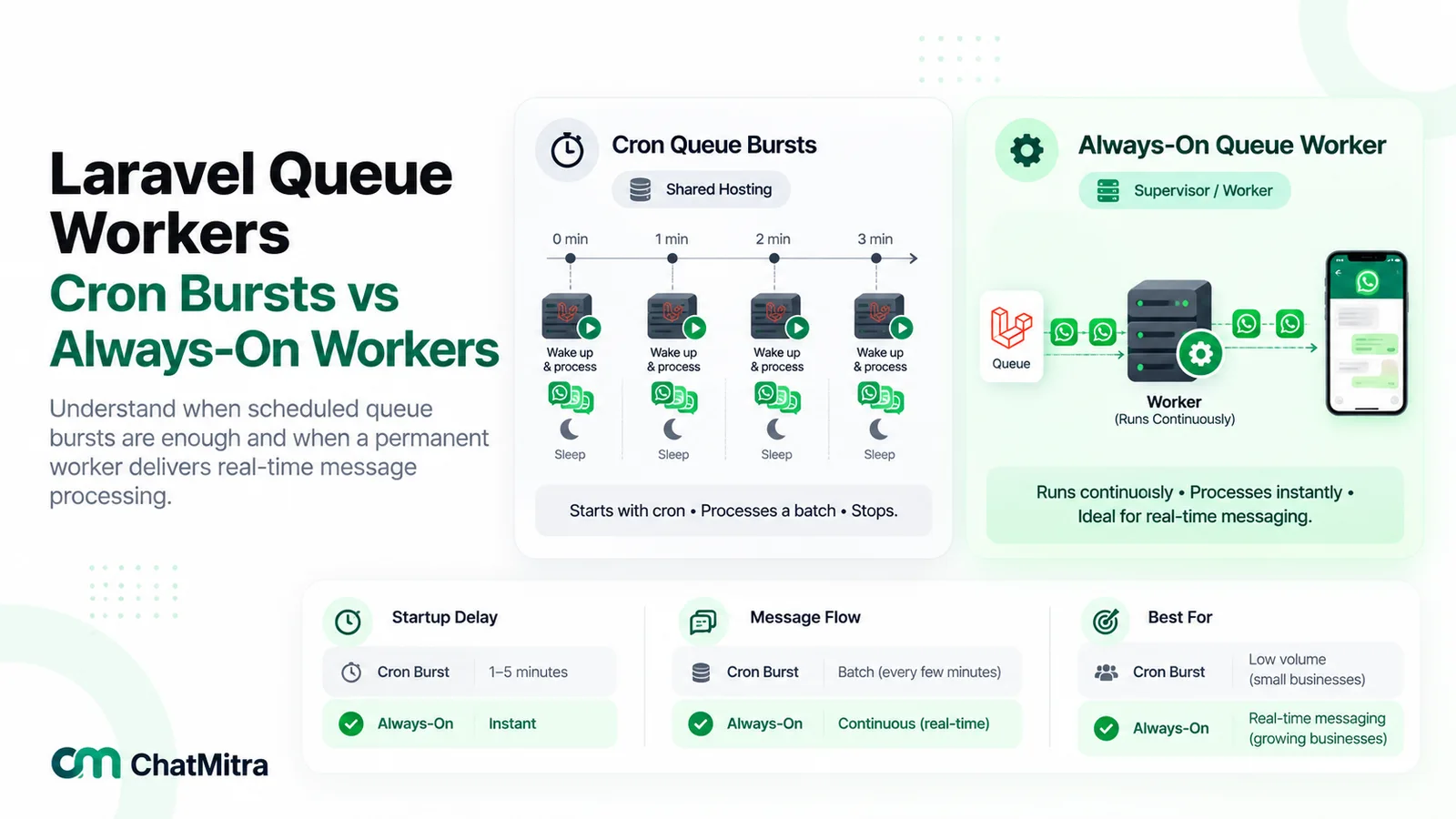
The trade-offs:
- Latency. A queued send waits up to a minute for the next run. That’s fine for shipping updates, but too slow for an OTP, so send OTPs directly with the retry wrapper and a short attempt count.
- Backoff stretches. In our test, a job released with a 10-second backoff made the worker exit because nothing was ready yet. It was sent on the next run, so real delays round up to your cron interval.
- Throughput. Meta’s default ceiling is 80 messages per second for each number, and “Throughput is inclusive of inbound and outbound messages”. A one-minute burst on shared hosting is unlikely to reach that, but a campaign can. Pace large sends and expect 130429 when you don’t.
On a VPS, run php artisan queue:work under Supervisor as the Laravel docs describe, and the latency disappears.
How do you call ChatMitra’s REST API from PHP?
Going direct means you own the token, templates, the webhook server and a place for your team to read replies. If you’d rather keep PHP for the triggers and handle the rest in a dashboard, ChatMitra exposes one send endpoint. The shapes below were checked against ChatMitra’s source code, and this payload passed its request validator.
$response = Http::withToken(config('services.chatmitra.key'))
    ->withHeaders(['Idempotency-Key' => "order-{$orderId}-shipped"])
    ->timeout(40)
    ->post('https://backend.chatmitra.com/developer/api/send_message', [
        'recipient_mobile_number' => '919812345678',
        'messages' => [[
            'kind'     => 'template',
            'template' => [
                'name'       => 'order_shipped',
                'language'   => 'en', // a plain string here, not ['code' => 'en']
                'components' => [[
                    'type'       => 'body',
                    'parameters' => [
                        ['type' => 'text', 'parameter_name' => 'customer_name', 'text' => 'Asha'],
                        ['type' => 'text', 'parameter_name' => 'tracking_id', 'text' => 'DL48213'],
                    ],
                ]],
            ],
        ]],
    ]);

$status = $response->json('send_status'); // completed, partial, failed, pending or scheduled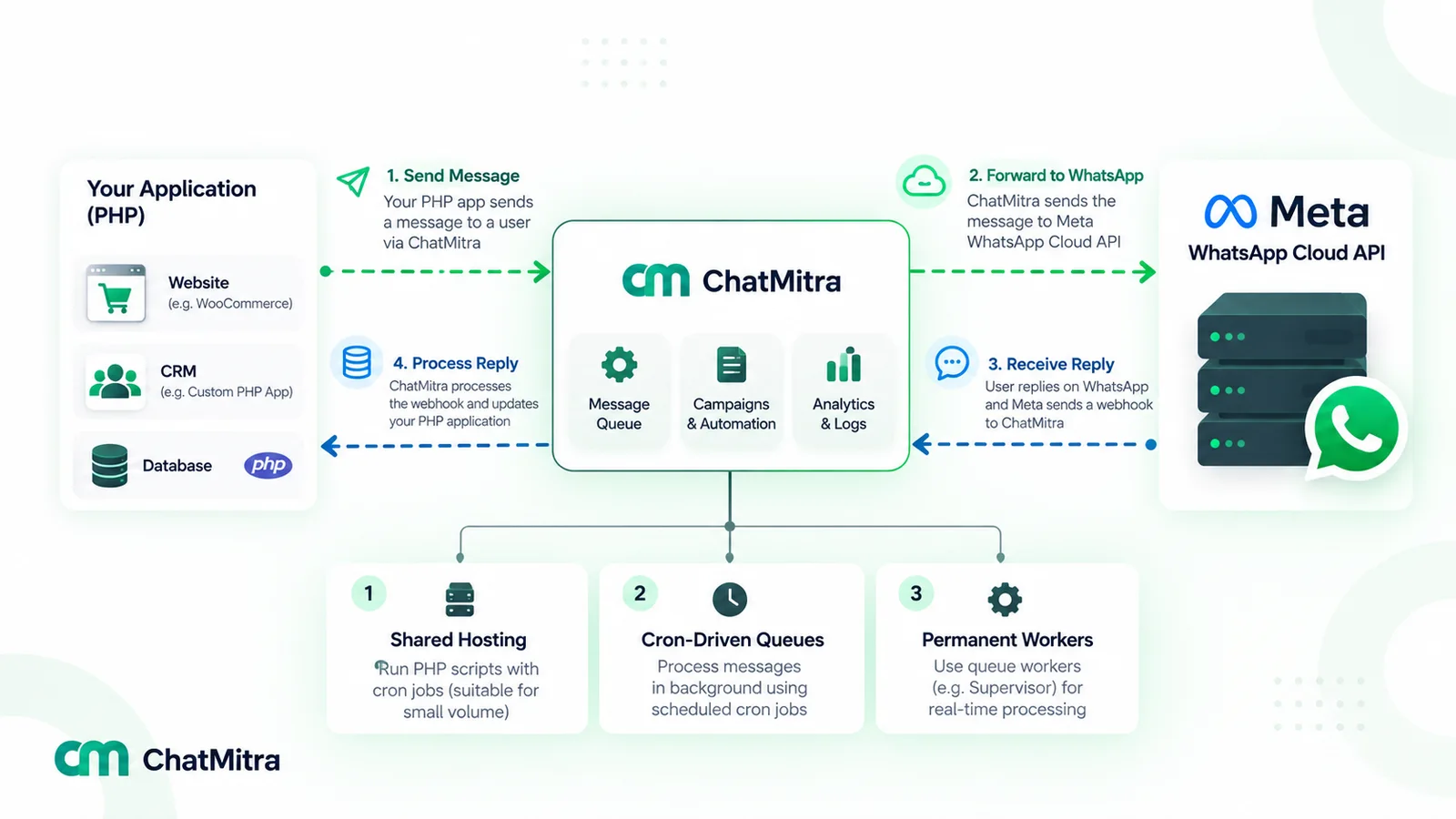
What differs from calling Meta:
- Auth and plan. Create a key in the ChatMitra app under Settings, API Key; a project can hold up to 10. Only paid plans with API access can call it (Pro or Enterprise, per ChatMitra’s pricing page); Starter-plan keys are refused with HTTP 403 and
PLAN_UPGRADE_REQUIRED. - Responses. Valid requests are answered with HTTP 202. If the send hasn’t finished within roughly 30 seconds,
send_statuscomes back aspending, hence the 40-second timeout. A full per-number backlog returns 429 withRATE_LIMITED. - Retries. Repeating a request with the same
Idempotency-Keyand identical body replays the first result for a short period (or reportsprocessingif the original hasn’t finished) instead of sending again. - Text rules. The validator refuses Markdown-style characters in text values, so a tracking ID written “#DL48213” is rejected while “DL48213” passes.
- Cost. On Pro, each 24-hour conversation with a contact costs one ₹0.20 credit on top of Meta’s charge.
ChatMitra also POSTs message.received, message.sent and message.status.updated events to your server. Its signature differs from Meta’s: X-Webhook-Signature carries the HMAC-SHA256 of the body in plain hex, using your webhook secret as the key, and has no sha256= prefix.
$raw      = file_get_contents('php://input');
$expected = hash_hmac('sha256', $raw, (string) getenv('CHATMITRA_WEBHOOK_SECRET')); // plain hex, no "sha256=" prefix

if (!hash_equals($expected, $_SERVER['HTTP_X_WEBHOOK_SIGNATURE'] ?? '')) {
    http_response_code(401);
    exit;
}
We checked it against a body signed by the same Node.js HMAC call ChatMitra’s server uses, including Hindi text and an emoji. ChatMitra waits up to 8 seconds for a 2xx and makes up to 3 attempts, so the store-then-process pattern above applies here too. Field-by-field details are in ChatMitra’s API reference.
On WordPress, the same calls work through wp_remote_post(), WordPress’s own HTTP function, instead of raw cURL. ChatMitra has no WooCommerce integration of its own, so any WooCommerce trigger is code you write.
Common mistakes in PHP WhatsApp integrations
- Passing an array to
CURLOPT_POSTFIELDS. It posts multipart form data. Sendjson_encode()output. - Reading
$_GET[‘hub.mode’]. PHP renamed ithub_mode. - Hashing a re-encoded body. Use
php://inputor$request->getContent(). - Comparing signatures with
==. Usehash_equals(), with both sides cast to strings. - Sending from the page request. Queue it; retries with
sleep()hold up the visitor and a PHP worker. - Forgetting the CSRF exception in Laravel. Meta’s POSTs get 419.
- Calling
env()outside config files. It returns null afterconfig:cache. - Retrying 131047 or 132001. They fail every time. Fix the message or send a template.
- Putting the token in the URL. Keep it in the Authorization header.
Where ChatMitra fits
ChatMitra suits PHP teams that want their code to trigger messages but don’t want to host the rest. Templates are built in the app, replies land in a shared inbox, broadcasts run from the dashboard, and webhooks bring events back to your systems. Meta’s rules still bind: templates need approval, the 24-hour window holds, and Meta bills its own rates. If you’re comfortable running your own webhook server and queue, going straight to Meta costs less per conversation. If you’d rather not, see ChatMitra’s plans; Pro includes API access and webhooks.
Sources: Meta for Developers pages on the Graph API changelog, getting started, access tokens, the account model update, sending messages, text messages, templates, error codes, throughput, pricing (with the INR rate card effective 1 October 2026) and webhook endpoints; WhatsApp Help Center; php.net (curl_setopt, curl_close, hash_equals, variables from external sources, fastcgi_finish_request, runtime configuration); Laravel 13 documentation (release notes, configuration, HTTP client, queues, CSRF, scheduling); WordPress developer reference (wp_remote_post). ChatMitra behaviour verified in ChatMitra’s code on 26 September 2026.
Facts checked against Meta for Developers, php.net and the Laravel documentation on 26 September 2026.