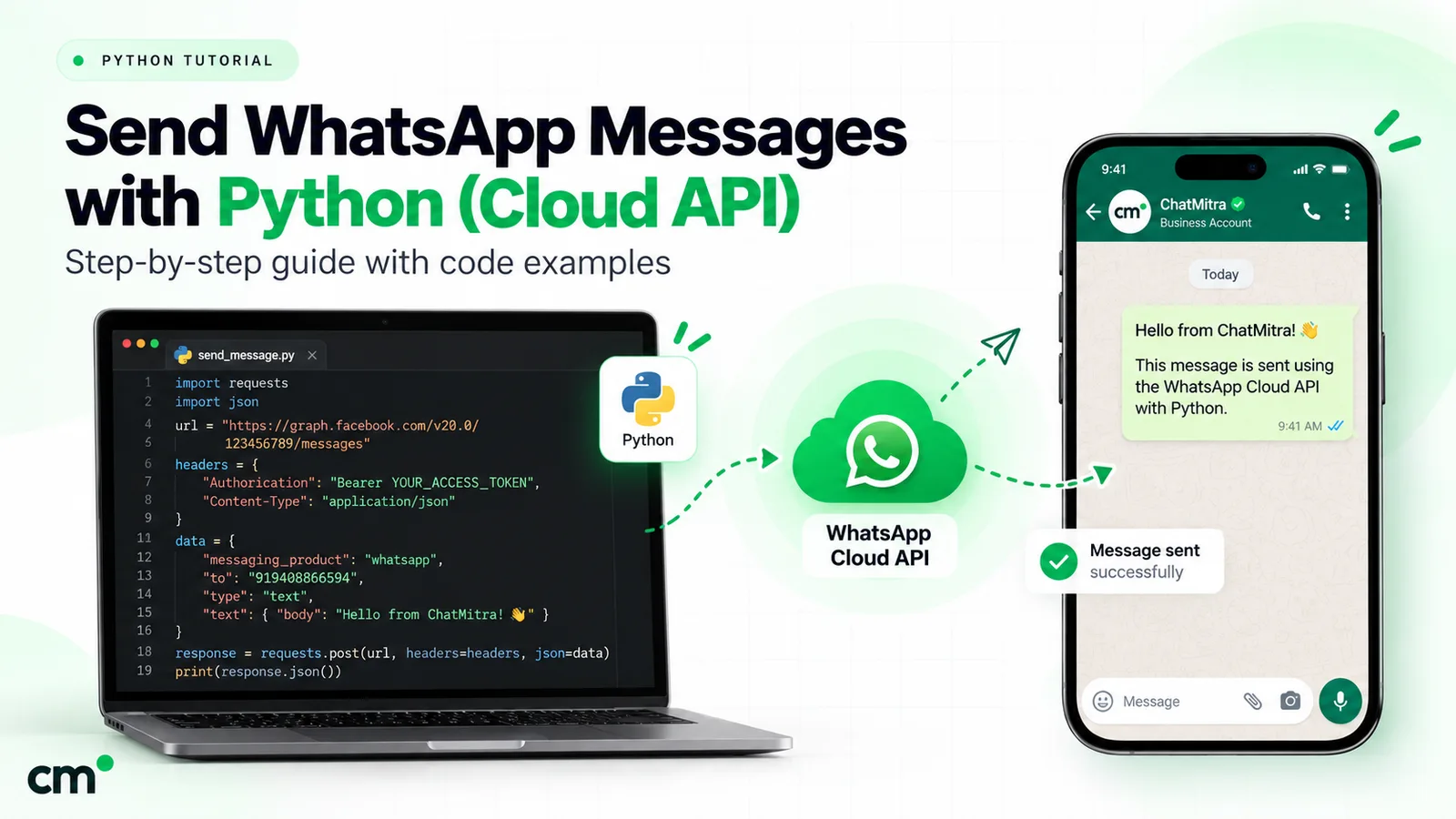
To use the WhatsApp API with Python, call Meta’s Cloud API over HTTPS with the requests library. POST a JSON payload to /<PHONE_NUMBER_ID>/messages on the current Graph API version, with a system user access token in the Authorization header. Templates reach anyone who has opted in. Free-form messages only work within 24 hours of the customer’s last message.
Every request shape below was checked against Meta’s live documentation, and every snippet passed local tests with mocked responses and a locally computed signature; no real message was sent. You’ll send templates, text and media, handle errors, and receive messages on a signed Flask or FastAPI webhook. Then come ChatMitra’s REST API and what the pywhatkit-style shortcuts really do.
Key takeaways
- You need four values before any code runs: a phone number ID, a system user token, your app secret and a verify token you make up.
- Build error handling around Meta's numeric error
code, not the HTTP status, and retry only the codes Meta says to retry. - Verify the webhook signature on the raw request bytes, before you parse any JSON.
Facts checked against Meta's and WhatsApp's documentation on 25 September 2026. Rupee figures are Meta's India rates and exclude tax.
Which way should you send WhatsApp messages from Python?
There are three routes, and most tutorials show only one.
| Route | How it works | What you need | What you get | Main risk |
|---|---|---|---|---|
| Meta's Cloud API, directly | Your code calls graph.facebook.com with a token; Meta hosts the WhatsApp side | Meta app, business portfolio, registered number, payment method for production | Templates, free-form replies, media, buttons, webhooks with delivery and read statuses | You own token handling, the webhook server and error handling |
| A provider's REST API (ChatMitra, for example) | Your code calls the provider, which calls Meta for you | An account with the provider and an API key | The same message types the provider supports, plus its inbox and dashboard | An extra fee and a layer whose limits you must learn |
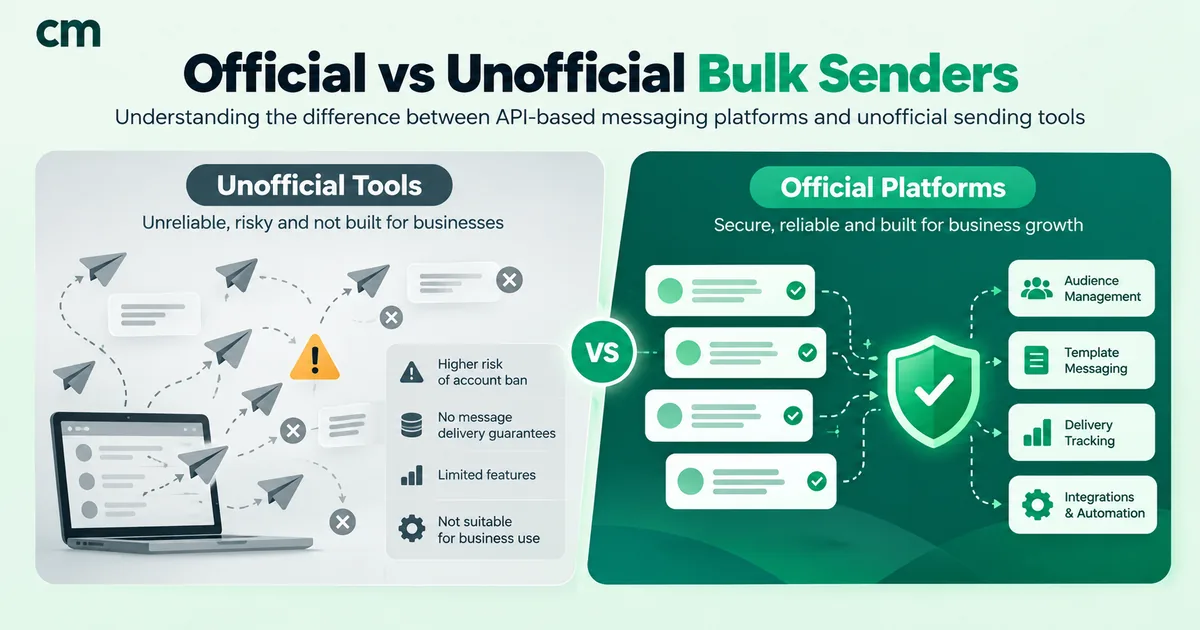
| Unofficial automation (pywhatkit, Selenium, WhatsApp Web wrappers) | A script drives WhatsApp Web on a personal account | A logged-in browser session | Sends from your own number, no templates, no status webhooks | It breaks WhatsApp's Terms; the number can be banned |
If you’re still deciding whether you need the API at all, start with how to get the WhatsApp API. The rest of this article assumes you want code.
What do you need before writing any code?
Meta’s Cloud API get-started guide walks through the dashboard. In outline:
- Register as a Meta developer and open the App Dashboard.
- Create an app with the “Connect with customers through WhatsApp” use case, and select or create a business portfolio.
- Click “Start using the API”. The API Setup panel connects your app to an account, gives you a test business phone number and lets you send a first test message to a number you add.
- Note two IDs from API Setup: the phone number ID (not the phone number itself) and the account ID.
- Add a real business number when you’re ready for production, then set a payment method. Meta’s accounts page covers this, and the guide to creating a WhatsApp Business account explains the business side.
WABA is now two accounts: what changed in September 2026
Older tutorials talk about one “WhatsApp Business Account” (WABA). Meta’s account model update splits it in two. A WhatsApp account (WAAC) holds one business phone number. A Messaging account holds templates, billing and webhook subscriptions. The rollout began on 23 September 2026 and was due to reach all businesses by mid-October 2026.
For a Python integration, very little changes:
- Your old WABA ID now identifies the Messaging account, and the
waba_idfield name is unchanged. - The phone number ID still goes in the path of
POST /<PHONE_NUMBER_ID>/messages. - A new optional
messaging_account_idfield is needed only if your token has messaging access to more than one Messaging account on the same number.
Meta’s timeline makes WAAC IDs mandatory in URL paths in the first half of 2028, so keep the phone number ID in configuration, not in code.
Temporary vs system user access tokens
| Token | Where you get it | Lifetime | Use it for |
|---|---|---|---|
| User access token ("temporary") | App Dashboard > WhatsApp > API Setup, which generates a new one each visit | Meta says these expire quickly, so you'd regenerate "every few hours" | Your first test send only |
| System user access token | Business settings > System users > Add, assign your app, grant access to the WhatsApp and Messaging accounts, then Generate token | Long-lived; you choose an expiration preference when generating it | Any server that sends or receives on its own |
| Business Integration System User token | Embedded Signup, when you onboard other businesses | Scoped to each onboarded customer | Tech Providers and partners only |
Meta’s access token guide lists the permissions a system token needs: business_management, whatsapp_business_management and whatsapp_business_messaging. The system user also needs asset access to both accounts, or calls fail with error code 200 (the error code, not the HTTP status).
Two more values matter once you receive messages:
- The app secret, from your Meta app’s settings in the App Dashboard. Meta signs every webhook with it. It is not the access token.
- A verify token, a string you invent and type into the webhook configuration. Meta sends it to your endpoint during the handshake so you can check the request.
How do you set up the Python project?
Install requests, plus flask or fastapi and uvicorn for the webhook, and keep secrets in environment variables. The snippets below were compiled and tested on Python 3.14 with requests 2.34, Flask 3.1 and FastAPI 0.141.
Pin the Graph API version in one constant. Meta’s Graph API changelog lists v26.0, introduced on 29 July 2026, as the latest version. Versions in the current table stay available for more than two years after release; v25.0, for example, until 29 July 2028.
import os
import random
import time

import requests

GRAPH = "https://graph.facebook.com/v26.0"
PHONE_NUMBER_ID = os.environ["WA_PHONE_NUMBER_ID"]
TOKEN = os.environ["WA_TOKEN"]  # system user token, never hard-coded

session = requests.Session()
session.headers["Authorization"] = f"Bearer {TOKEN}"


class WhatsAppError(Exception):
    def __init__(self, status: int, error: dict):
        self.status = status
        self.code = error.get("code")
        self.details = error.get("error_data", {}).get("details") or error.get("message")
        super().__init__(f"HTTP {status}, code {self.code}: {self.details}")


def send(payload: dict) -> dict:
    body = {"messaging_product": "whatsapp", "recipient_type": "individual", **payload}
    r = session.post(f"{GRAPH}/{PHONE_NUMBER_ID}/messages", json=body, timeout=15)
    try:
        data = r.json()
    except ValueError:  # e.g. an HTML error page from a proxy
        data = {}
    if r.status_code >= 400:
        raise WhatsAppError(r.status_code, data.get("error", {}))
    return data
Every send below goes through send(). It adds the messaging_product and recipient_type fields that open every message body in Meta’s reference, and turns an error response into an exception carrying Meta’s numeric code. The requests.Session reuses connections between calls.
How do you send a WhatsApp template message with Python?
A template is the only message type you can send to someone who hasn’t messaged you in the last 24 hours. Meta must approve it first, and it belongs to a category (marketing, utility or authentication) that sets its price. Test your setup with Meta’s sample hello_world template, then move to your own.
Templates carry variables in one of two formats. Positional variables look like {{1}} and must be sent in order. Named variables look like {{first_name}}, and each value is sent with a parameter_name. Meta’s template overview shows both. This example sends a named-parameter utility template called order_confirmation:
def send_order_confirmation(to: str, name: str, order_no: str) -> str:
    data = send({
        "to": to,  # E.164 with the plus sign, e.g. "+919812345678"
        "type": "template",
        "template": {
            "name": "order_confirmation",
            "language": {"code": "en"},
            "components": [{
                "type": "body",
                "parameters": [
                    {"type": "text", "parameter_name": "first_name", "text": name},
                    {"type": "text", "parameter_name": "order_number", "text": order_no},
                ],
            }],
        },
    })
    return data["messages"][0]["id"]  # the wamid your status webhooks will quote
Three details trip people up:
- The language code must match the approved template exactly.
enanden_USare different templates. A mismatch, or an unapproved template, returns error 132001. - The number of parameters must match the template. Too many or too few returns 132000.
- Always include the plus sign and country code. Meta’s send-messages guide warns that without the plus, your business number’s country code is prepended. An Indian business sending to
(631) 555-1234would reach+916315551234.
The response contains a wamid (WhatsApp message ID); store it against your order. Meta is explicit that a successful response “only indicates that the API successfully accepted your request”. Delivery, reads and failures arrive later on your webhook, quoting the same ID. For what to put in the template itself, see the order confirmation message guide.
How do you send a free-form reply inside the 24-hour window?
When a customer messages or calls you, a 24-hour customer service window opens. Each new message from them resets it to 24 hours. While it is open you can send free-form “service” messages: text, images, documents, audio, video, location, contacts, reactions and interactive buttons or lists. When it closes, only templates are allowed.
def send_text(to: str, body: str) -> str:
    data = send({"to": to, "type": "text", "text": {"body": body, "preview_url": True}})
    return data["messages"][0]["id"]
Text bodies can be up to 4,096 characters. With preview_url set to True, WhatsApp tries to render a preview of the first link, which must start with http:// or https:// (text messages reference). To reply to a specific message as a quoted bubble, add "context": {"message_id": "<wamid>"} to the payload.
After the window closes, free-form sends fail with 131047 (“More than 24 hours have passed since the recipient last replied”). The fix is a template, not a retry. Record each customer’s last inbound message time from your webhook so your code picks the right type up front.
Service messages now cost money past a free tier. Meta’s pricing page gives each business phone number “one shared free tier of 1,000 delivered service messages per month”; after that, India’s service rate is ₹0.1150. Since 1 October 2026, utility templates sent inside an open window are billed too. The WhatsApp cost-per-message guide has the full rate table.
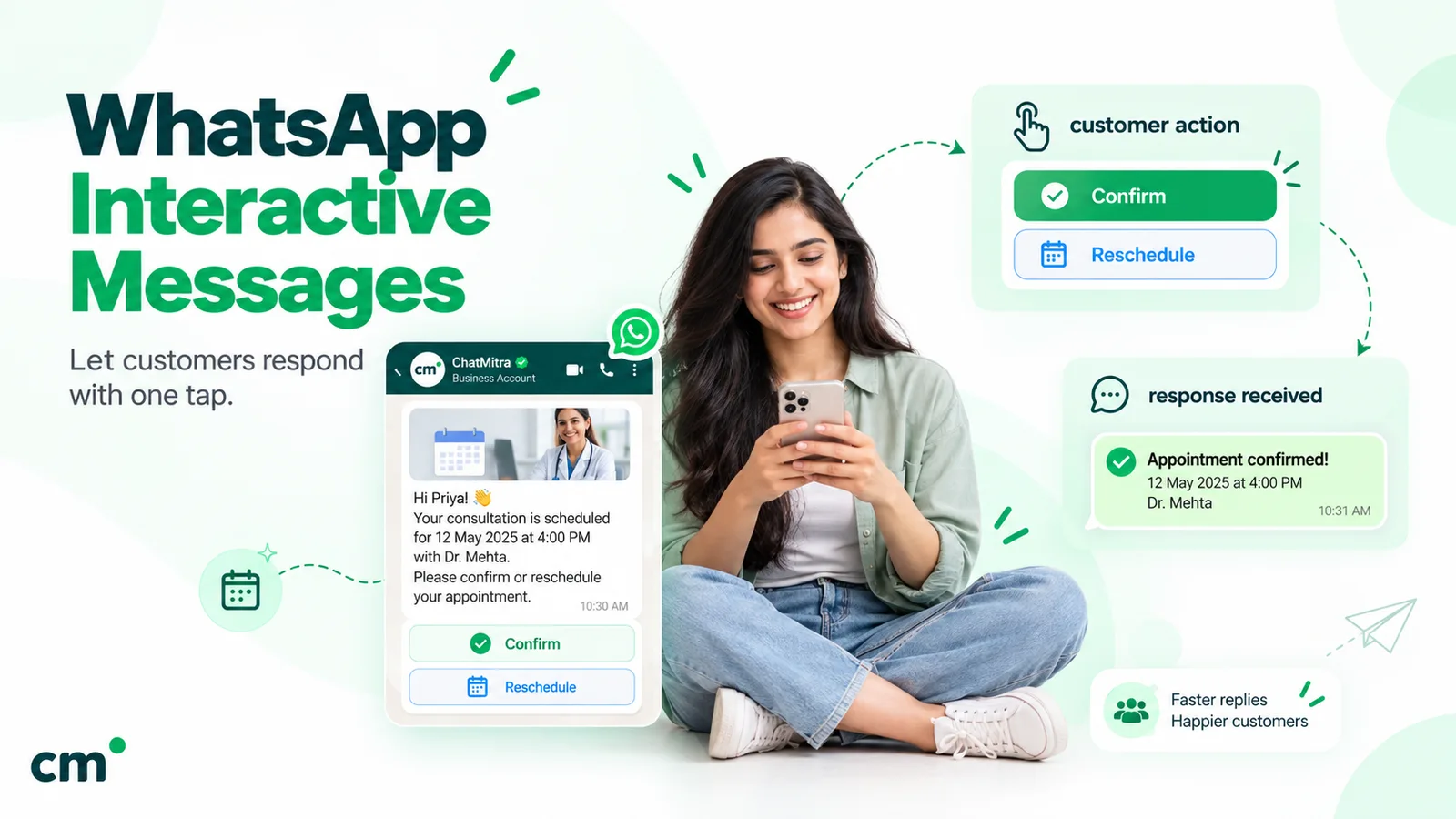
Before you build text menus, look at buttons and lists: reply buttons allow up to three options with 20-character titles, and each tap reaches your webhook with the button’s ID. The guide to WhatsApp interactive messages covers every type.
How do you send images, documents and other media?
Send either a public HTTPS link or the ID of a file you uploaded first. Meta recommends IDs: a link is fetched from your server and cached for only 10 minutes, while an uploaded file sits on Meta’s servers.
def upload_media(path: str, mime: str) -> str:
    with open(path, "rb") as f:
        r = session.post(
            f"{GRAPH}/{PHONE_NUMBER_ID}/media",
            data={"messaging_product": "whatsapp", "type": mime},
            files={"file": (os.path.basename(path), f, mime)},
            timeout=60,
        )
    if r.status_code >= 400:
        raise WhatsAppError(r.status_code, r.json().get("error", {}))
    return r.json()["id"]


def send_invoice(to: str, path: str) -> str:
    media_id = upload_media(path, "application/pdf")
    data = send({"to": to, "type": "document",
                 "document": {"id": media_id, "filename": "invoice.pdf",
                              "caption": "Your invoice"}})
    return data["messages"][0]["id"]
The limits below come from Meta’s media reference:
| Item | Limit |
|---|---|
| JPEG and PNG images | 5 MB; 8-bit RGB or RGBA |
| PDF documents | 100 MB |
| Audio (AAC, AMR, MP3, M4A, OGG with Opus) | 16 MB |
| Media IDs you upload | Expire after 30 days |
| Media IDs in incoming webhooks | Downloadable for 7 days |
| Media download URLs | Valid for 5 minutes; query the ID again for a fresh one |
| Captions | Up to 1,024 characters |
To download a file a customer sends you, call GET /<MEDIA_ID> for a short-lived URL, then fetch it with your access token in the Authorization header. For video, use H.264 Main profile without B-frames, or Baseline; Meta notes that Android WhatsApp clients don’t support “High” profile video with B-frames.
How should your code handle WhatsApp API errors and retries?
Meta’s error codes page gives two rules. Build handling around the numeric code and details, “instead of subcodes or HTTP response status codes”. And watch two places: errors come back in the API response and, later, as a failed status on your webhook.
| Code | Meaning | What your code should do |
|---|---|---|
| 190 | Access token expired | Stop and alert; get a new token. Retrying won't help |
| 200 | No token sent, or a permission or asset-access problem (not HTTP 200) | Check the token is sent, then the system user's permissions and asset access |
| 4 / 80007 | App or account API rate limit reached | Back off and retry later |
| 130429 | Throughput limit reached for the number | Back off and retry |
| 131056 | Too many messages to the same user in a short time | Wait, then retry to that user; other users are unaffected |
| 131000 | Unknown error | Retry; if it persists, open a Meta Direct Support ticket |
| 131047 | Customer service window closed | Send a template instead |
| 131026 | Message undeliverable (not a WhatsApp number, old app version, and other reasons) | Don't retry; flag the number |
| 131049 | Not delivered "to maintain healthy ecosystem engagement" (per-user marketing limit) | Wait at least 24 hours before resending |
| 131048 | Spam-rate restriction on the number | Check the number's quality status in WhatsApp Manager |
| 132000 / 132001 | Parameter count mismatch / template missing or unapproved in that language | Fix the payload or template; don't retry |
That table becomes a small retry wrapper:
RETRY_CODES = {4, 80007, 130429, 131000, 131056}


def send_with_retry(payload: dict, attempts: int = 4) -> dict:
    for n in range(attempts):
        try:
            return send(payload)
        except WhatsAppError as e:
            if e.code not in RETRY_CODES and e.status < 500:
                raise  # 131047, 131026, 132001, 190 ... fix the cause instead
            if n == attempts - 1:
                raise
        except requests.ConnectTimeout:  # never reached Meta, safe to resend
            if n == attempts - 1:
                raise
        time.sleep(2 ** n + random.random())  # 1 s, 2 s, 4 s ... plus jitter
It retries rate limits, the unknown-error code, server errors and connect timeouts with exponential backoff and jitter, and raises everything else at once. It deliberately doesn’t retry a requests.ReadTimeout or a connection dropped mid-request: Meta may already have accepted the message, and a blind retry can deliver an OTP or invoice twice. Check for a status webhook on the original send first.
Pace bulk sends. Meta’s throughput page allows up to 80 messages per second per number by default (up to 1,000 after an automatic upgrade; 20 for numbers shared with the WhatsApp Business app), counting inbound and outbound together. Use a queue rather than a tight loop. Delivery order isn’t guaranteed either, so wait for delivered before sending the next message when order matters.
How do you receive WhatsApp messages in Python with a webhook?
Meta pushes incoming messages and delivery statuses to a URL you choose. Meta’s webhook endpoint guide requires a public server with a valid TLS certificate; self-signed certificates are rejected. Your endpoint has two jobs.
The GET verify-token handshake
When you save a callback URL and verify token under App Dashboard > WhatsApp > Configuration, Meta sends a GET request with three query parameters: hub.mode=subscribe, hub.verify_token and hub.challenge. If the token matches the one you stored, reply with HTTP 200 and the challenge value as the body. Anything else leaves the endpoint unverified, and no webhooks are sent. Apps created with the WhatsApp use case find the panel under Use cases > Customize > Configuration instead.
Validating X-Hub-Signature-256 with your app secret
Every POST carries an X-Hub-Signature-256 header of the form sha256=<hex>. The hex is an HMAC-SHA256 of the request body, keyed with your app secret. Recompute it and compare. If the values differ, reject the request with a 4xx status and do nothing else.
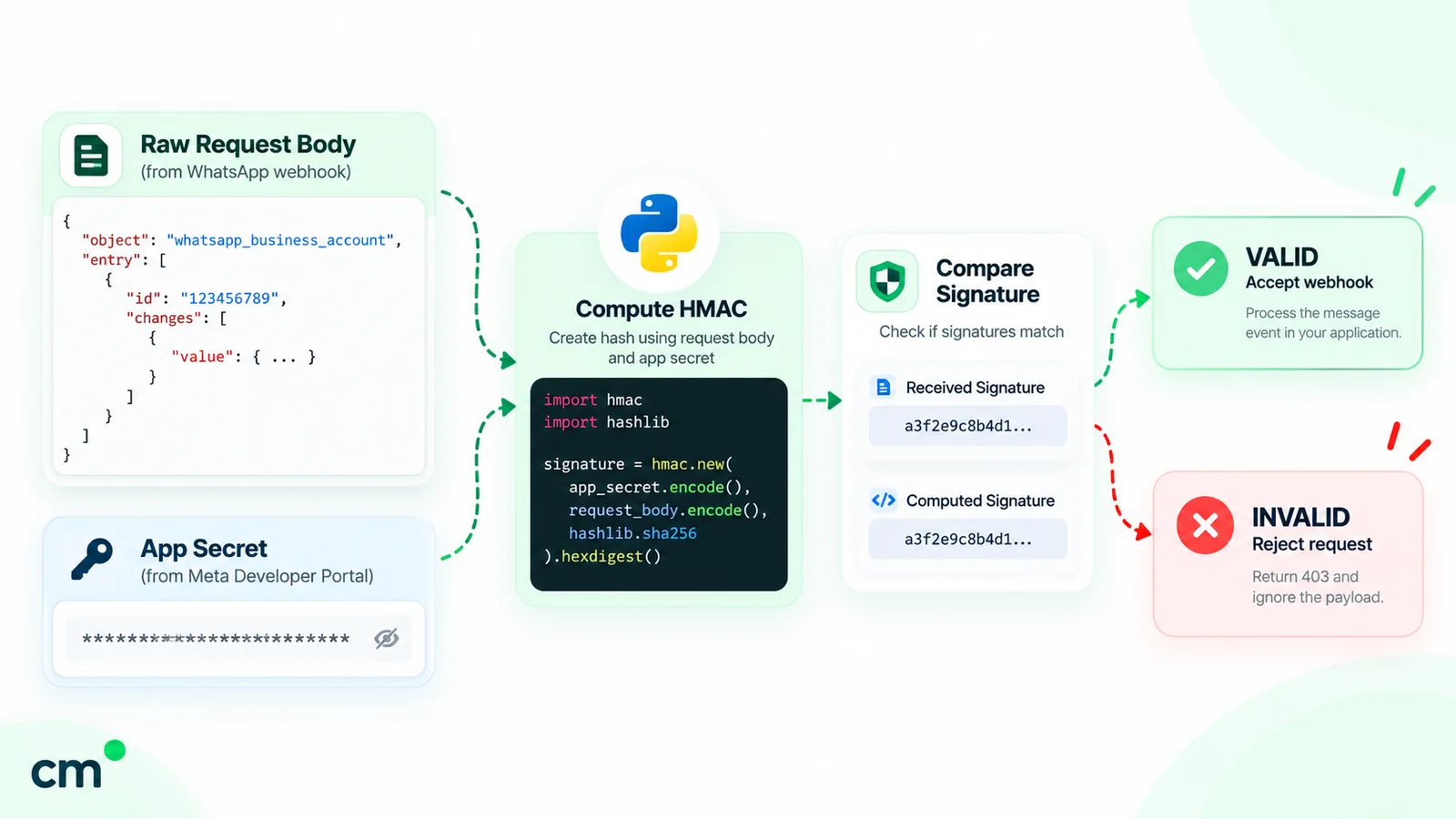
A complete Flask endpoint:
import hashlib
import hmac
import json
import os

from flask import Flask, abort, request

app = Flask(__name__)
VERIFY_TOKEN = os.environ["WA_VERIFY_TOKEN"]
APP_SECRET = os.environ["META_APP_SECRET"].encode()


@app.get("/webhook")
def verify():
    args = request.args
    if args.get("hub.mode") == "subscribe" and args.get("hub.verify_token") == VERIFY_TOKEN:
        return args.get("hub.challenge", ""), 200
    abort(403)


def valid_signature(raw: bytes, header: str) -> bool:
    expected = "sha256=" + hmac.new(APP_SECRET, raw, hashlib.sha256).hexdigest()
    return hmac.compare_digest(expected.encode(), (header or "").encode())


@app.post("/webhook")
def receive():
    raw = request.get_data()  # the exact bytes Meta signed
    if not valid_signature(raw, request.headers.get("X-Hub-Signature-256", "")):
        abort(401)
    for entry in json.loads(raw).get("entry", []):
        for change in entry.get("changes", []):
            value = change.get("value", {})
            for msg in value.get("messages", []):
                handle_message(msg)
            for status in value.get("statuses", []):
                handle_status(status)
    return "", 200
Three choices in that code are deliberate:
- Raw bytes from
request.get_data(). In our test, re-serialising the parsed JSON changed the bytes and a correct signature failed. Hash what arrived. hmac.compare_digeston bytes. Python’s hmac documentation says it is designed “to prevent timing analysis”, and it only accepts ASCII-only strings, so comparing bytes stops a malformed header from raising an exception.- Signature first, parsing second. An unsigned request never reaches your JSON parser.
Reading messages and statuses
Each POST has the same nesting: entry[] → changes[] → value. Inside value you’ll find messages[] for inbound messages, with the sender’s name in contacts[], or statuses[] for updates on messages you sent. Meta’s status webhook reference lists the values sent, delivered, read, failed and played (the first play of a voice message). It adds a caveat: if a message is read the moment it arrives, you may get read without a separate delivered.
seen = set()  # use Redis or your database in production


def handle_message(msg: dict) -> None:
    if msg["id"] in seen:  # Meta retries, so duplicates happen
        return
    seen.add(msg["id"])
    if msg["type"] == "text":
        print("text from", msg["from"], ":", msg["text"]["body"])
    elif msg["type"] == "interactive":
        reply = msg["interactive"].get("button_reply") or msg["interactive"].get("list_reply")
        print("tapped", reply["id"])


def handle_status(st: dict) -> None:
    if st["status"] == "failed":
        for err in st.get("errors", []):
            print("failed", st["id"], err["code"], err.get("title"))
    else:
        print(st["id"], st["status"])  # sent, delivered, read
Button and list taps arrive as type: "interactive", with button_reply or list_reply holding the ID you set when sending. The sent status and one of delivered or read also carry a pricing object with the billing category, which helps when reconciling Meta’s invoice. To show a customer their message was seen, mark it read by POSTing {"messaging_product": "whatsapp", "status": "read", "message_id": "<wamid>"} to the same /messages endpoint.
The same webhook in FastAPI
FastAPI needs two adjustments. Query names such as hub.mode contain a dot, so read them from request.query_params instead of declaring them as function arguments. And await request.body() gives you the raw bytes. Hand the parsed payload to a background task and return 200 straight away:
from fastapi import BackgroundTasks, FastAPI, HTTPException, Request, Response

api = FastAPI()


@api.get("/webhook")
def verify(request: Request):
    q = request.query_params  # "hub.mode" has a dot, so read it from query_params
    if q.get("hub.mode") == "subscribe" and q.get("hub.verify_token") == VERIFY_TOKEN:
        return Response(q.get("hub.challenge", ""), media_type="text/plain")
    raise HTTPException(status_code=403)


@api.post("/webhook")
async def receive(request: Request, tasks: BackgroundTasks):
    raw = await request.body()
    if not valid_signature(raw, request.headers.get("x-hub-signature-256", "")):
        raise HTTPException(status_code=401)
    tasks.add_task(process, json.loads(raw))  # answer 200 first, work after
    return Response(status_code=200)
It reuses hashlib, hmac, json, os, VERIFY_TOKEN, APP_SECRET and valid_signature() from the Flask version, plus a process() function that runs the loops above. Keep the FastAPI import line. On Python 3.14, leaving out Request raises no error; FastAPI reads request as a query parameter instead, and Meta’s handshake gets HTTP 422.
Testing the signature check locally
You don’t need Meta to test this. Sign a sample payload with a test secret and check that a tampered body is refused:
# run with META_APP_SECRET=test-app-secret and any WA_VERIFY_TOKEN set
import hashlib, hmac, json
from webhook_flask import app

raw = json.dumps({"object": "whatsapp_business_account", "entry": []}).encode()
sig = "sha256=" + hmac.new(b"test-app-secret", raw, hashlib.sha256).hexdigest()
client = app.test_client()
assert client.post("/webhook", data=raw, headers={"X-Hub-Signature-256": sig}).status_code == 200
assert client.post("/webhook", data=raw + b" ", headers={"X-Hub-Signature-256": sig}).status_code == 401
Our fuller suite also covered the handshake, a wrong secret, a missing header, a non-ASCII header and a retried delivery, on both Flask and FastAPI. For an end-to-end check, expose the app through an HTTPS tunnel, register it as the callback URL, and reply from your own WhatsApp to the test number, as Meta’s get-started guide does.
Before you go live
- Subscribe to the
messagesfield. It carries both inbound messages and statuses. Some webhooks aren’t sent while the app is in Dev mode, so switch it to Live. - Answer fast. Meta’s standard is a median latency of no more than 250 ms, with fewer than 1% of responses over 1 second. Queue the real work.
- Expect duplicates and batches. Failed deliveries are retried for up to 7 days, and one POST can carry up to 1,000 updates. Deduplicate on message ID.
- Size the server for statuses. Meta suggests handling up to 3 times your outgoing message rate in status webhooks, plus your expected inbound traffic.
- Store what you need. There is no API for fetching past webhook data.
For non-developers on your team, the webhooks and message status explainer covers the ticks in plain English.
How do you send WhatsApp messages through ChatMitra’s REST API instead?
Going direct means you own tokens, templates, the webhook server and a way for people to read replies. If you’d rather keep Python for the triggers and do the rest in a dashboard, a provider API is shorter. ChatMitra’s is described here from its source code, so these are the shapes its server actually validates.
Get an API key
In the ChatMitra app, open Settings > API Key and click Create Key. Give it a label and choose an expiry: never, 30, 60 or 90 days, 1 year, or a custom date. A project can hold up to 10 keys. The key identifies your project, so requests never carry a project ID.
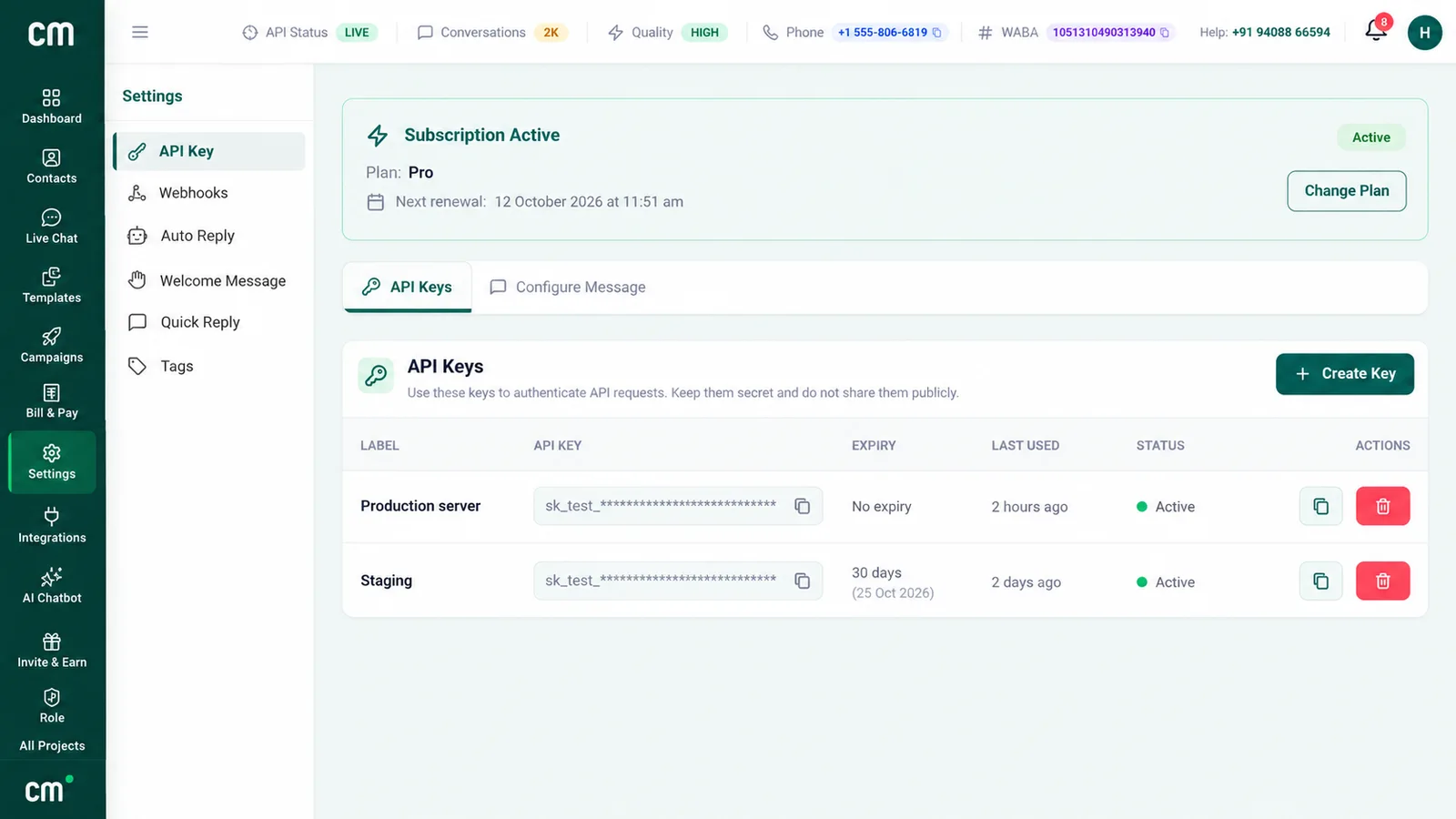
Access depends on your plan. API calls need a paid plan that includes API access, which is the Pro plan on ChatMitra’s pricing page. A key from a project on the free Starter plan gets HTTP 403 with the code PLAN_UPGRADE_REQUIRED. A project with no WhatsApp number connected gets 403 with NO_WHATSAPP_NUMBER.
Send a template
CM_URL = "https://backend.chatmitra.com/developer/api/send_message"
cm = requests.Session()
cm.headers["Authorization"] = f"Bearer {os.environ['CHATMITRA_API_KEY']}"


def cm_send_template(mobile: str, name: str, order_no: str) -> dict:
    r = cm.post(CM_URL, json={
        "recipient_mobile_number": mobile,  # digits with country code, e.g. "919812345678"
        "messages": [{
            "kind": "template",
            "template": {
                "name": "order_confirmation",
                "language": "en",  # a plain string here, not {"code": ...}
                "components": [{"type": "body", "parameters": [
                    {"type": "text", "parameter_name": "first_name", "text": name},
                    {"type": "text", "parameter_name": "order_number", "text": order_no},
                ]}],
            },
        }],
    }, timeout=40)
    return {"http": r.status_code, **r.json()}
The shape differs from Meta’s in a few places:
| Field | Meta Cloud API | ChatMitra REST API |
|---|---|---|
| Recipient | to, with the plus sign recommended | recipient_mobile_number, a string whose non-digits are stripped; 8 to 15 digits |
| Message wrapper | One message per request | A messages array of kind: "template" or kind: "raw" items; one request can't mix the two |
| Template language | {"code": "en"} | "en" |
| Personalisation | You pass every value | You pass values, or $field placeholders filled from the contact's saved and custom fields. Each placeholder needs an altTexts entry or the request is refused, yet a contact missing the field currently gets "N/A", not your fallback |
| Retries by your client | No idempotency key described in the send guide | An Idempotency-Key header, or request_id in the body, makes a repeat of the identical request replay the first result for a short period (or return processing while the first is still running) instead of sending again |
Send raw interactive buttons
Raw messages pass Meta’s own payload through, so the 24-hour window rule still applies. This example sends two reply buttons:
def cm_send_buttons(mobile: str) -> dict:
    r = cm.post(CM_URL, json={
        "recipient_mobile_number": mobile,
        "messages": [{"kind": "raw", "payload": {
            "type": "interactive",
            "interactive": {
                "type": "button",
                "body": {"text": "Shall we confirm your slot for Friday at 11 am?"},
                "action": {"buttons": [
                    {"type": "reply", "reply": {"id": "slot_yes", "title": "Confirm"}},
                    {"type": "reply", "reply": {"id": "slot_move", "title": "Reschedule"}},
                ]},
            },
        }}],
    }, headers={"Idempotency-Key": f"slot-{mobile}-fri"}, timeout=40)
    return {"http": r.status_code, **r.json()}
We ran both payloads through ChatMitra’s request validator and both passed. The same run showed limits worth knowing before you write copy:
- Buttons: at most 3, with titles of up to 20 characters, no emoji in titles and no duplicate titles. Lists allow up to 10 rows with unique IDs.
- Raw text: a body containing Markdown-style characters (
*,_,~,`,>,|,#, square brackets) or HTML-like tags is refused. So is a line mixing Devanagari and Latin script. Template text parameters follow the same rules. - Raw media: it must use a public HTTPS
link; media IDs aren’t accepted.
Read the response
A request that passes validation returns HTTP 202. The body includes send_status:
completed,partialorfailed, with awamidand per-messageresultspending, if the send is still running after about 30 seconds (so set your client timeout above that)scheduled, if ChatMitra’s per-number rate limiter has delayed it
Other outcomes:
- 400 for validation errors and insufficient credits
- 401 for an invalid or expired key
- 429 with
RATE_LIMITEDwhen the per-number send backlog is full
On Pro, ChatMitra charges one credit (₹0.20) per contact per 24-hour conversation, not per message, on top of Meta’s charge; Enterprise has no per-conversation fee. Full request and response details are in ChatMitra’s API reference.
Receive events from ChatMitra
ChatMitra can also POST events to your server: message.received, message.sent and message.status.updated (with a failure reason on failed messages). Each delivery is signed differently from Meta’s. The X-Webhook-Signature header is the plain hex HMAC-SHA256 of the body, keyed with the webhook secret shown when you create the webhook, and has no sha256= prefix. Each event is attempted up to 3 times, with exponential backoff.
CM_WEBHOOK_SECRET = os.environ["CHATMITRA_WEBHOOK_SECRET"].encode()


def valid_chatmitra_signature(raw: bytes, header: str) -> bool:
    expected = hmac.new(CM_WEBHOOK_SECRET, raw, hashlib.sha256).hexdigest()  # no "sha256=" prefix
    return hmac.compare_digest(expected.encode(), (header or "").encode())
We checked this against a signature produced by the same Node.js HMAC call the ChatMitra server uses, including a Hindi message body. The ChatMitra webhook documentation lists the payload fields.
What about pywhatkit, Selenium and WhatsApp Web automation?
Search “send WhatsApp message using Python” and you’ll find pywhatkit, Selenium scripts and WhatsApp Web wrappers; in India, “How to use pywhatkit in Python?” sits in the People Also Ask box. Here is what they actually do.
How pywhatkit works. We read the source of version 5.4, the current release on PyPI (uploaded 27 June 2022; a later 5.4.1 upload was yanked). Its sendwhatmsg_instantly() function opens web.whatsapp.com/send?phone=…&text=… in your default browser. It clicks the middle of the screen after 4 seconds and uses PyAutoGUI to press Enter once the wait time (15 seconds by default) has passed. It needs a desktop that is unlocked and in front of it, a browser logged in to your personal WhatsApp Web session, and nobody touching the mouse.
How Selenium scripts work. They drive the same web page through the browser’s DOM, finding the message box and send button by selectors. When WhatsApp Web’s markup changes, the selectors stop matching and the script fails.
How WhatsApp Web wrapper libraries work. They go a level deeper. Instead of clicking the page, they log in as a linked device of a personal account and call the web client’s own functions, often through a headless browser.
All three automate a consumer account, and WhatsApp’s rules are direct about that:
- The Terms of Service forbid use that involves “sending illegal or impermissible communications such as bulk messaging, auto-messaging, auto-dialing, and the like” or “any non-personal use of our Services unless otherwise authorized by us”.
- WhatsApp’s Help Center says its products “are not intended for bulk or automated messaging, both of which have always been a violation of our Terms of Service”. It bans accounts using machine-learning classifiers and takes legal action against abusers.
- Its page on unofficial apps warns that linking an account to unofficial versions can get it “temporarily or permanently banned”.
| Question | Unofficial automation | Cloud API (direct or via a provider) |
|---|---|---|
| Allowed by WhatsApp? | No: auto-messaging and non-personal use break the Terms | Yes: this is the product WhatsApp built for businesses |
| Messaging people who haven't written first | Anyone in reach, which is exactly what gets numbers banned | Approved templates to people who opted in |
| Delivery, read and failure statuses | None with pywhatkit; wrappers read the web client's ticks | Webhooks for every message |
| Runs on a server | Needs a browser session, and for pywhatkit a visible desktop | Plain HTTPS from anywhere |
| What breaks it | UI changes, logouts, bans | Documented version changes with long deprecation windows |
If a business depends on it, the number at risk is your customer-facing identity. The comparison of official and unofficial bulk senders covers the cost side.
Common mistakes in WhatsApp API Python code
- Putting the phone number in the URL. The path takes the phone number ID, not
+91…. - Shipping the temporary token. It expires within hours; use a system user token.
- Free-form messages to cold contacts. Outside the 24-hour window they fail with 131047.
- Treating a 200 as delivered. Wait for the status webhook.
- Verifying the signature on parsed JSON. Hash the raw bytes.
- Slow work inside the webhook request. Return 200 first.
- Retrying everything. Template, permission and undeliverable errors need a fix.
Where ChatMitra fits
ChatMitra suits teams that want Python to trigger messages and a dashboard for the rest: templates built in the app, a shared inbox for replies, broadcasts, and webhooks back to your systems. It isn’t a way around Meta’s rules; approval, the 24-hour window and Meta’s charges all still apply. If you’re happy running your own webhook server, calling Meta directly is cheaper per conversation. If not, compare ChatMitra’s plans; API access and webhooks come with Pro.
Sources: Meta for Developers (Cloud API get started, access tokens, WhatsApp accounts and the account model update, Graph API changelog, send messages, text, document and interactive messages, templates, media, error codes, throughput, pricing and the 1 October 2026 rate card, webhooks and status reference); WhatsApp Terms of Service and Help Center; Python documentation (hmac); PyPI (pywhatkit 5.4). ChatMitra behaviour verified in ChatMitra’s code on 25 September 2026.
Facts checked against Meta's and WhatsApp's documentation on 25 September 2026.