WhatsApp for coaching institutes means using WhatsApp, usually through the WhatsApp Business Platform, to run the conversations around teaching: answering enquiries, booking and reminding families about demo classes, onboarding new students, announcing schedule changes, alerting parents to absences, collecting fees and sharing results. It works because parents and students already check WhatsApp every day, and because most of these messages are cheap utility templates when they’re set up correctly.
This guide is for any business that teaches in batches: tuition centres, competitive-exam coaching (JEE, NEET, CA, UPSC, IELTS), and hobby or sports academies such as dance, music, art, chess, swimming and cricket. It follows a student through the year, gives each message its correct Meta category and cost, and covers the part most guides skip: the people you’re messaging are often children.
Using ChatMitra?
Keep your students in a Google Sheet (name, parent name, parent number, batch, fee due date, status) and use ChatMitra's Google Sheets automation to send utility templates a set number of days before a date, such as the demo class or fee due date. Batch announcements go out as scheduled campaigns to a tag (for example batch-11-jee-morning). The setup steps are in How to set it up in ChatMitra.
Key takeaways
- Nine moments matter: enquiry, demo booking, post-demo follow-up, admission, schedule changes, attendance, fees, results and re-enrolment.
- Most are utility templates. Anything about a class, fee or test the family signed up for is utility (₹0.115). Demo invitations, new batches and offers are marketing (₹0.8631).
- Message the parent for minors. Get the parent's number and consent at admission. India's DPDP Rules require verifiable parental consent for under-18s.
- Send one-to-one, not to groups, for anything about one student: fees, absences and marks.
- Start with two flows: demo-class reminders and fee reminders. They have the clearest before-and-after numbers.
Why the WhatsApp Business app and batch groups stop working
Most institutes start with a phone at the front desk, the WhatsApp Business app and a group per batch. That works for one teacher and fifty students. It starts to break somewhere between 150 and 300 students, for reasons that have nothing to do with effort:
- Broadcasts don’t reach everyone. A broadcast list holds up to 256 contacts and only reaches people who have saved your number, according to WhatsApp’s Help Center. A parent who never saved the number silently misses the holiday notice. Our guide to WhatsApp broadcast lists covers the limits in detail.
- Groups expose everyone. In an ordinary group, members can usually see each other’s phone numbers, and every reply goes to everyone. That’s awkward for parents and unsuitable for anything about one child.
- Nothing is automatic. The app has no way to send a reminder two days before each student’s fee date. Someone has to remember, every month, for every batch.
- One phone, many staff. The counsellor, the accounts person and the batch coordinator all need the same number. On the app they pass the phone around or share a linked device, and nobody knows who replied to whom.
- No record. When a parent says “nobody told us the test was moved”, you scroll.
The WhatsApp Business Platform (often called the API) fixes these by letting you send approved templates to opted-in contacts at scale, from a shared inbox, with automation. You reach it through a provider such as ChatMitra. If you’re still deciding, the trade-offs are in how to use WhatsApp Business.
9 ways coaching institutes use WhatsApp
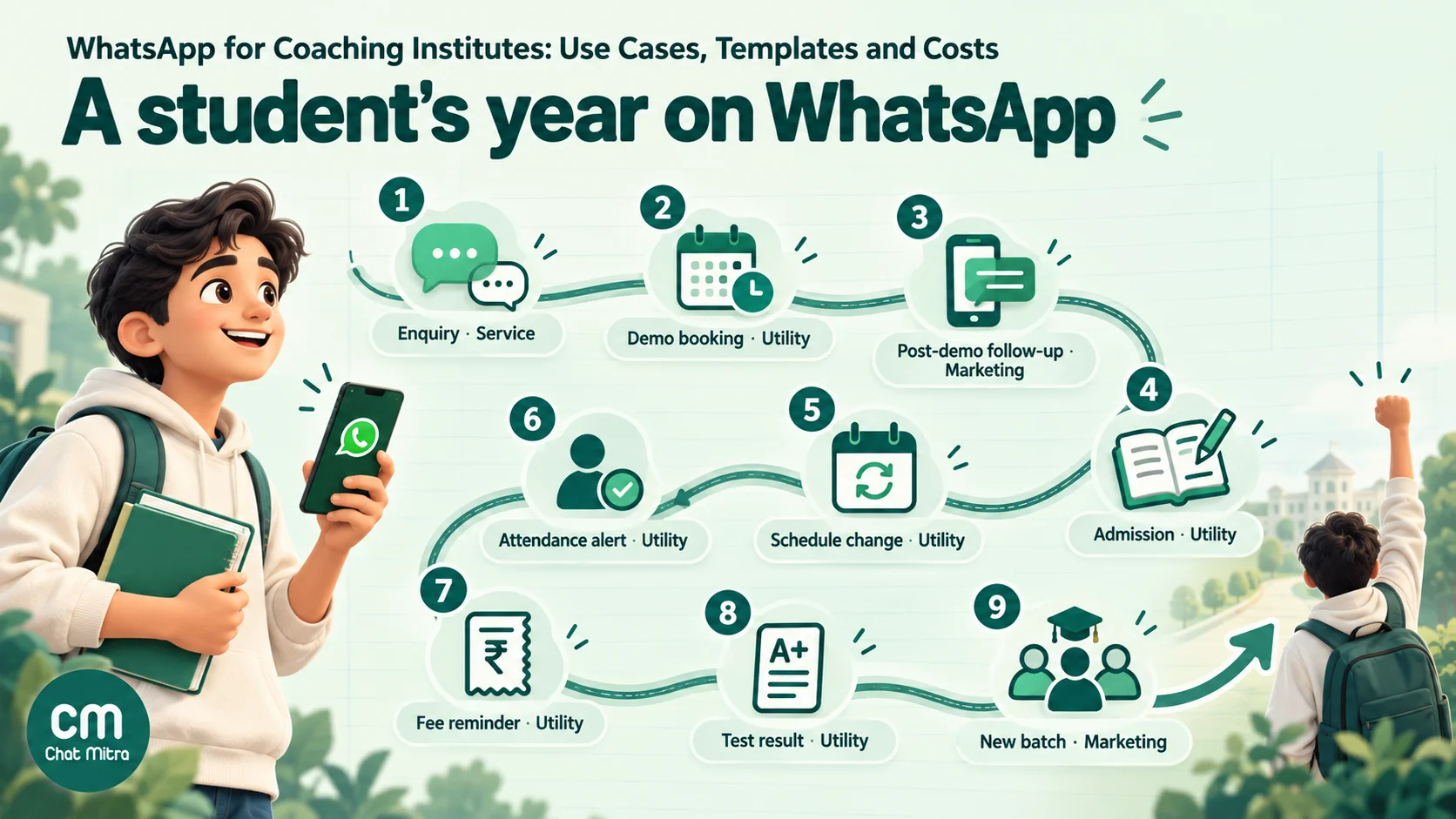
Here’s the full year, in the order a family meets you. The table gives the template category Meta is likely to assign and who should receive each message.
| Moment | Who receives it | Template category | Trigger |
|---|---|---|---|
| 1. Enquiry reply | Whoever messaged | Service (free-form reply) | The family messages you |
| 2. Demo booking and reminders | Parent (or adult student) | Utility | Demo booked; 1 day and 2 hours before |
| 3. Post-demo follow-up | Parent | Marketing if it sells; service if they reply | Day after the demo |
| 4. Admission and welcome | Parent and, with consent, student | Utility | Fee paid or admission confirmed |
| 5. Schedule changes and holidays | Everyone in the batch | Utility | Change decided |
| 6. Attendance alerts | Parent | Utility | Student marked absent |
| 7. Fee reminders and receipts | Parent (payer) | Utility | N days before and after the due date |
| 8. Test results and PTMs | Parent | Utility | Results published; meeting scheduled |
| 9. Re-enrolment, new batches, referrals | Past and current families who opted in | Marketing | Before a new term or batch |
1. Answer enquiries in minutes, not hours
Admission season enquiries arrive at 10 pm, on Sundays and during class. The same five questions repeat: fees, batch timings, which board or exam, location, and whether there’s a demo. A welcome message with a short menu answers most of them before anyone at the desk sees the chat:
- Fees and batches returns a short fee table or a PDF brochure.
- Book a demo collects the student’s class or level and preferred timing.
- Location sends the address and a map link.
- Talk to a counsellor tags the chat for a person.
Because the family started the chat, your replies within the next 24 hours are service messages, not templates. Put the WhatsApp number in places parents already look: your Google Business Profile, admission banners and pamphlets as a QR code, your website and Instagram bio. ChatMitra has a free WhatsApp QR code generator and chat link generator for this.
2. Book the demo or trial class, and cut no-shows
The demo class is where most admissions are won or lost, and an empty seat at a demo is a lead you paid for and wasted. A three-message sequence covers it:
- Confirmation as soon as the demo is booked: student name, batch, date, time, address and what to bring.
- Day-before reminder with two buttons, Confirm and Reschedule.
- Short reminder on the day, a couple of hours before, sent only to families who confirmed.
The Reschedule button is the important one. A parent who can’t make it will tap it rather than simply not turn up, and your counsellor gets a chance to offer another slot. Tag anyone who misses the demo (“demo-missed”) so the counsellor calls them the same evening.
All three are utility templates because they relate to a booking the family made. Our full guide to WhatsApp reminder messages covers timing rules and more wording.
3. Follow up after the demo, without spamming
The day after the demo, families are deciding. A message that asks how the class went and offers to answer questions is reasonable. A message that pushes an early-bird discount is marketing, which costs more and counts against WhatsApp’s per-user limits on marketing messages.
The cleanest pattern is one marketing template the next day (“Would you like to reserve a seat in the 5 pm batch? Seats left: 6”), then a person. If the parent replies, the conversation becomes service and your counsellor can answer freely. Don’t send three reminders to someone who hasn’t replied. Families who ignore you will block you, and blocks lower your number’s quality rating.
4. Admission and onboarding
Once the fee is paid, a welcome template does the work of a printed admission kit:
- batch name, start date and timings;
- the timetable as a PDF in the document header;
- the class rules that matter (late arrival, missed tests, leave);
- the coordinator’s name and the number to message;
- a link to your app or study-material portal, if you have one.
Add the student to a batch tag at the same time. Every later message for that batch is then one click away.
5. Schedule changes, cancellations and holidays
This is where groups and broadcast lists fail most visibly, because the families who most need the message (the ones who didn’t save your number) are the ones who don’t get it. A utility template to the batch tag reaches everyone who opted in, whether or not they saved you.
Keep these factual: what changed, for which batch, and from when. “The Saturday 4 pm Physics class moves to Sunday 10 am this week only” is utility. “The Saturday class moves to Sunday, and don’t miss our weekend crash course” is marketing.
6. Attendance alerts to parents
An absence alert lets parents know the same day, not at the next parent-teacher meeting. The trigger is your attendance record: whoever marks attendance updates a sheet or your software, and an automation sends the alert to the parent of each absent student.
Two rules keep this from backfiring. Send it after the class has started and the register is final, not at the start when a student may be running late. And give the parent a way to reply (“Reply if your child was unwell and we’ll note it”), because a one-way alert that can’t be answered feels like surveillance.
7. Fee reminders that parents don’t ignore
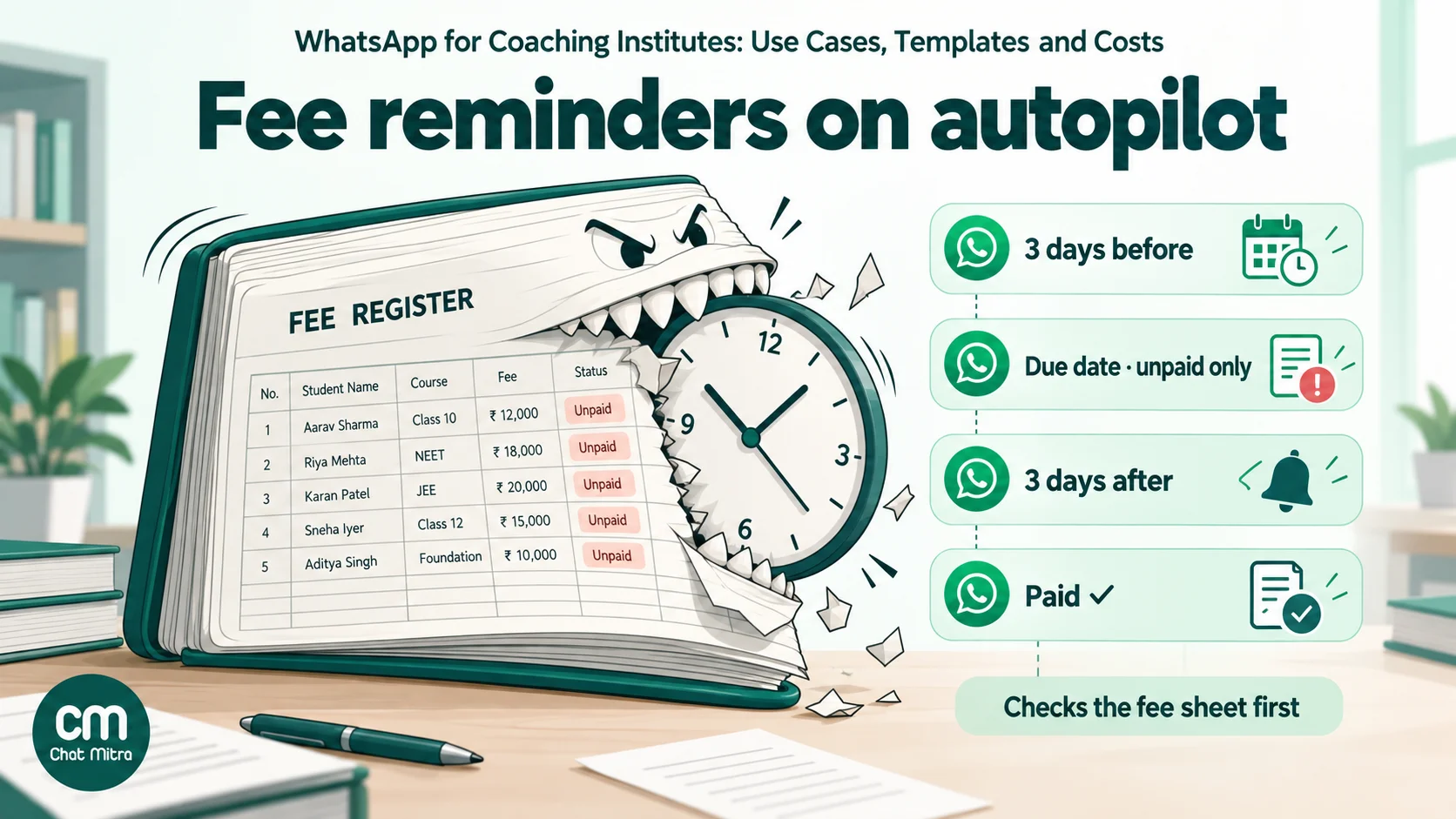
Fee follow-up is the single biggest time sink at most front desks, and it’s also the easiest flow to automate. A typical schedule:
- 3 days before the due date: amount, due date, student name and how to pay.
- On the due date: only to families who haven’t paid.
- 3 to 7 days after: one more reminder, then a person calls.
- Payment received: a receipt or thank-you, which also closes the loop.
Each reminder should check the sheet first and skip anyone already marked paid. Nothing annoys a parent faster than a reminder for a fee they paid yesterday.
ChatMitra doesn’t generate payment links or show payment status, so link to the payment page or UPI link you already use (Razorpay, PhonePe, your bank’s collect page) in a URL button, and update the sheet when the money arrives. The fee-only arithmetic for a 300-student centre is in our reminder guide. WhatsApp payment links covers the payment-link options.
8. Test results and parent-teacher meetings
Weekly or monthly test scores are what parents care about most, and they’re also the most sensitive thing you’ll send. Three options, from most to least private:
- A notification that links to a login. “Riya’s Unit Test 3 result is ready” with a button to your portal. Nothing sensitive sits in the chat.
- A document header with the report card sent to the parent’s number only.
- Marks in the message body. Convenient, but anything in a chat can be forwarded or screenshotted.
Never post individual marks or ranks to a batch group. Ranking children publicly is the fastest way to lose parents’ trust, and it shares one family’s data with every other family in the group.
PTM invitations work as utility templates with the date, time, teacher and a Book a slot or Can’t attend button.
9. Re-enrolment, new batches and referrals
Every year ends with a natural moment to message past families: the next class, the next exam cycle, a summer camp or crash course. These are marketing templates, so send them only to people who agreed to receive promotional messages from you, keep the frequency low, and segment. A family preparing for NEET cares about the NEET crash course, not your CA foundation batch.
Referral messages work the same way. Ask happy families after a good result, not in the middle of fee season.
Hobby, sports and arts classes: what’s different
Dance, music, art, chess, swimming, football and cricket academies use the same nine moments with a different emphasis:
- Trials matter more. Many families try two or three academies before choosing, so demo reminders and a quick follow-up carry more weight than in academic coaching.
- Terms, not years. Enrolment renews every quarter or term, so renewal messages go out four times a year, not once. Meta treats a message that tries to secure a renewal as marketing, even for a current member, so budget for it at the marketing rate and keep the factual part (“Aarav’s term ends on 30 June”) separate from the ask.
- Weather and venue changes. Outdoor sessions get cancelled at short notice. A same-day utility message to the batch tag is the only reliable way to reach every family in time.
- Kit and event logistics. Costume lists for an annual recital, tournament reporting times and exam-board registration dates (music and dance grade exams) are all utility.
- Photos and videos. Parents love performance clips, but they’re photos of other people’s children. Share them only with consent, and never in an open group by default.
Utility or marketing? Getting template categories right
Meta sorts every template into one of three categories (marketing, utility and authentication) and charges each differently. Coaching institutes rarely need authentication templates unless they run their own app with WhatsApp login codes. The line that matters is between utility and marketing.
Meta’s template categorization rules say a utility template “must be non-promotional” and must be “specific to or requested by the user (clearly related to their order, account, services, or transactions)”. Account alerts “should not promote, recommend, upsell, or cross-sell products; include offers; or attempt to secure renewals.” Mixed content, such as an update with a promotion attached, is marketing. If Meta decides a template you submitted as utility is really marketing, it approves it as marketing, and repeated misuse can move all of an account’s utility templates to marketing for 7 days, or 30 days for repeat violations.
For an institute, that gives a simple test: is this message about something this family already signed up for, and does it avoid selling anything? If both answers are yes, it’s utility.
| Message | Likely category | Why |
|---|---|---|
| Demo class confirmation and reminder | Utility | About a booking the family made |
| Invitation to a free demo, sent cold | Marketing | Encourages a new sign-up |
| Welcome kit with timetable | Utility | About a confirmed admission |
| Class rescheduled or cancelled | Utility | About an existing enrolment |
| Absence alert | Utility | About the student's existing enrolment |
| Fee due reminder, factual | Utility | About an existing account and payment |
| Fee reminder plus "upgrade to the crash course" | Marketing | Promotional content added |
| Test result ready | Utility | About the student's own result |
| Topper congratulations sent to all parents | Marketing | Promotes the institute; needs the topper's written consent |
| New batch or summer camp announcement | Marketing | Encourages a new purchase |
| Term-end renewal reminder for current members | Marketing | Meta lists "attempt to secure renewals" as promotional |
| Festival greeting | Marketing | Not tied to a transaction |
These are the likely outcomes, not guarantees. Meta reviews each template and can recategorise it.
Students under 18: parents, consent and privacy
Coaching is one of the few businesses where many of the people you serve are children. In a 2025 government survey, 27.0% of Indian students were taking or had taken private coaching in the current academic year, so this affects a lot of families. Four sets of rules shape how you message them.
WhatsApp’s own rules. WhatsApp’s terms of service say users must be “at least 13 years old” to use WhatsApp on their own, “or such greater age required in your country or territory”. The WhatsApp Business Messaging Policy lets you contact people only if they “have given you their mobile phone number” and you have “received opt-in permission from the recipient”. An admission form that a parent fills in and signs is the natural place to collect both.
India’s DPDP Rules. The Digital Personal Data Protection Rules, 2025 were notified on 13 November 2025. Rule 10 requires “verifiable consent of the parent” before processing “any personal data of a child”, and a child is anyone under 18. The consent and notice rules apply from 13 May 2027, eighteen months after notification. The Rules’ Fourth Schedule exempts an educational institution’s “tracking and behavioural monitoring” for its educational activities or for children’s safety, which may cover attendance-type alerts. It doesn’t cover marketing, so a new-batch announcement still needs consent like any other promotion. Whether your centre counts as an “educational institution” under the Rules is a question for your lawyer.
India’s coaching guidelines. The Ministry of Education’s Guidelines for Registration and Regulation of Coaching Centres (January 2024) say a coaching centre shall not “make misleading promises or guarantee of rank or good marks” and shall not enrol students “below 16 years of age”. They apply to centres with more than 50 students, and they bind through state laws, several of which now exist. Check your state’s rules. Separately, the consumer regulator’s 2024 advertising guidelines bar using a successful student’s name or photo without their written consent.
What this means in practice:
- Make the parent the primary contact for every student under 18. Fees, attendance, results and announcements go to the parent’s number.
- Message a student directly only if the parent agreed, and keep those messages to class logistics.
- Record consent: who gave it, for which number, for what kind of message, and when. A “consent” column in your student sheet is enough to start.
- Keep promotional messages to people who opted in to promotions, and honour STOP replies straight away.
- Keep results one-to-one. Never post marks or ranks to a group, and don’t put a topper’s photo in a campaign without written consent.
- Delete or archive the numbers of families who left, once you no longer need them for fees or records.
General information, not legal advice. Rules differ by country and Indian state.
15 WhatsApp templates for coaching institutes
Copy these and adapt the wording to your institute. {{1}}, {{2}} and so on are template variables that ChatMitra fills from your contact fields or sheet columns. Keep utility templates factual: the moment a sentence sells something, Meta is likely to treat the whole template as marketing.
1. Demo class confirmation (utility)
Hi {{1}}, {{2}}‘s demo class for {{3}} is booked for {{4}} at {{5}}. Address: {{6}}. Please bring a notebook and arrive 10 minutes early. Buttons: Quick reply “Reschedule” · URL “Get directions”
2. Demo reminder, day before (utility)
Hello {{1}}, a reminder that {{2}}‘s demo class for {{3}} is tomorrow, {{4}}, at {{5}}. Tap Confirm if you’re coming, or Reschedule and we’ll find another slot. Buttons: Quick reply “Confirm” · Quick reply “Reschedule”
3. Demo reminder, on the day (utility)
Hi {{1}}, see you at {{2}} today for {{3}}‘s demo class. If you’re running late, reply here and we’ll let the teacher know.
4. Missed demo (utility)
Hi {{1}}, we missed {{2}} at today’s {{3}} demo class. Would you like to book another slot? Buttons: Quick reply “Book another slot” · Quick reply “Not now”
5. Post-demo follow-up (marketing)
Hello {{1}}, thank you for bringing {{2}} to the {{3}} demo. Seats in the {{4}} batch are filling up. Would you like us to hold one while you decide? Buttons: Quick reply “Hold a seat” · Quick reply “I have a question”
6. Admission welcome (utility, document header: timetable PDF)
Welcome to {{1}}, {{2}}! {{3}} is enrolled in the {{4}} batch starting {{5}}. The timetable is attached. Your batch coordinator is {{6}}; message this number with any questions.
7. Class rescheduled (utility)
Hello {{1}}, the {{2}} class for the {{3}} batch on {{4}} is moved to {{5}}. All other classes this week are unchanged.
8. Class cancelled (utility)
Hi {{1}}, today’s {{2}} session for the {{3}} batch is cancelled because of {{4}}. We’ll share the make-up class date soon.
9. Absence alert (utility)
Hello {{1}}, {{2}} was marked absent from the {{3}} class today ({{4}}). If {{2}} was unwell or this is a mistake, please reply and we’ll update our records.
10. Fee due reminder (utility)
Hi {{1}}, {{2}}‘s fee of {{3}} for {{4}} is due on {{5}}. You can pay using the button below. If you’ve already paid, please ignore this message. Buttons: URL “Pay fee”
11. Fee overdue (utility)
Hello {{1}}, our records show {{2}}‘s fee of {{3}} for {{4}} was due on {{5}} and is still pending. Please pay below or reply if you’d like to discuss a payment plan. Buttons: URL “Pay fee” · Quick reply “Talk to accounts”
12. Payment received (utility)
Thank you, {{1}}. We’ve received {{2}} for {{3}}‘s fee for {{4}}. Your receipt number is {{5}}.
13. Test result ready (utility)
Hi {{1}}, {{2}}‘s result for {{3}} is ready. For privacy, it’s available only after you log in. Buttons: URL “View result”
14. Parent-teacher meeting (utility)
Hello {{1}}, the parent-teacher meeting for the {{2}} batch is on {{3}}. Please choose a time slot or let us know if you can’t attend. Buttons: URL “Choose a slot” · Quick reply “Can’t attend”
15. New batch announcement (marketing)
Hi {{1}}, our new {{2}} batch for {{3}} starts on {{4}}, with {{5}} seats. Reply YES for the schedule and fees. Reply STOP to stop receiving updates. Buttons: Quick reply “YES” · Quick reply “STOP”
Templates are approved per language, so if many of your parents prefer Hindi, Marathi, Gujarati or Tamil, submit a separate version in that language rather than mixing scripts in one message.
What WhatsApp costs a coaching institute: a worked month
Here’s a full month for a 300-student tuition centre in India running every flow in this guide. The volumes are assumptions for the arithmetic, not benchmarks: change them to match your institute.
| Flow | Templates sent | Category | Meta charge |
|---|---|---|---|
| Demo confirmations and two reminders (60 demos) | 180 | Utility | ₹20.70 |
| Post-demo follow-up (40 families who didn't enrol yet) | 40 | Marketing | ₹34.52 |
| Admission welcome (25 new students) | 25 | Utility | ₹2.88 |
| Schedule changes (2 notices × 300) | 600 | Utility | ₹69.00 |
| Absence alerts | 400 | Utility | ₹46.00 |
| Fee reminders (3 steps, unpaid only after the first) | 540 | Utility | ₹62.10 |
| Monthly test results | 300 | Utility | ₹34.50 |
| New-batch announcement to 500 opted-in past enquiries | 500 | Marketing | ₹431.55 |
| Total | 2,585 | ₹701.25 |
Meta India rates: utility ₹0.115, marketing ₹0.8631 per delivered template. Replies from your staff are service messages: the first 1,000 a month per number are free, then ₹0.115 each. This centre stays inside the free 1,000.
Now add ChatMitra. On Starter and Pro, ChatMitra charges ₹0.20 per conversation: once per contact per 24 hours, however many messages you exchange in that window. Assume each template above opens its own conversation (the worst case) and parents start another 300 conversations on days with no template, about 2,885 conversations in all.
| Plan | Subscription | ChatMitra conversation fees | Meta charges | Month total |
|---|---|---|---|---|
| Starter | Free | 2,885 × ₹0.20 = ₹577.00 | ₹701.25 | ₹1,278.25 |
| Pro | ₹999 | (2,885 − 1,000 included credits) × ₹0.20 = ₹377.00 | ₹701.25 | ₹2,077.25 |
| Enterprise | ₹2,499 | None | ₹701.25 | ₹3,200.25 |
A few things fall out of this:
- Marketing is most of the Meta bill. One 500-family announcement costs more than every utility message in the month combined. Sending it only to families who opted in and might care is the biggest saving available.
- Starter covers the reminders. Google Sheets automation, scheduled campaigns and templates are on every plan. Pro adds keyword Auto Reply rules, away messages and the AI chatbot, which help most in admission season when enquiries arrive after hours.
- Enterprise only pays off at volume. Compared with Pro, it’s cheaper above about 8,500 conversations a month, roughly a centre three times this size.
- Per student, Starter works out to about ₹4.26 a month and Pro to about ₹6.92, for every flow in this guide.
Rates and plan prices change. Check the current figures on our pricing page and model your own volumes in the WhatsApp pricing calculator.
How to set it up in ChatMitra
- Connect a number. Use a number that isn’t active on the WhatsApp Business app, or move the existing one. A new business portfolio can message only 250 unique people a day outside open chats, so complete business verification and Meta’s scaling path well before admission season, or your first batch announcement will be capped.
- Build the student sheet. One row per student: student name, parent name, parent number with country code, batch, fee amount, fee due date, fee status, demo date and consent (yes/no and date). This sheet is what every automation reads.
- Import contacts. Upload the same columns as a CSV to ChatMitra’s contacts, mapping columns such as batch and parent name to custom fields (a project can hold up to 15 custom fields from imports), and tag each student with their batch. Our guide to sending messages from Excel walks through the import.
- Submit templates. Start with five: demo confirmation, demo reminder, schedule change, fee reminder and result ready. Pick the category honestly; Meta reviews it either way.
- Automate the date-based messages. In Google Sheets automation, use the “N days before a date” trigger on the demo-date and fee-due-date columns, add a condition that skips rows already marked paid or confirmed, and send the template. The sheet-based date trigger matches day and month, so update the due-date column each fee cycle.
- Set up the welcome menu. The welcome message is on every plan; keyword Auto Reply rules and the away message for after-hours enquiries need Pro.
- Give staff access. Add the counsellor, accounts and coordinator as team members on the shared inbox (ChatMitra doesn’t limit team members), and use tags such as “demo-missed” or “fee-query” so each person knows which chats are theirs. ChatMitra doesn’t auto-assign chats, so agree who watches which tag.
- Schedule batch announcements as campaigns to a batch tag, and use retargeting to resend to anyone whose message failed.
How to tell whether it’s working
Pick three numbers before you start and compare the month before with the month after:
- Demo show-up rate: demos attended ÷ demos booked.
- Enquiry-to-admission rate: admissions ÷ new enquiries in the month.
- On-time fee collection: fees paid by the due date ÷ fees due.
Watch two warning signs as well: the read rate on utility messages (if parents stop reading, you’re sending too much), and blocks or quality-rating drops after marketing sends. ChatMitra’s campaign reports show sent, delivered, read and failed for each campaign.
Common mistakes coaching institutes make on WhatsApp
- Messaging the child instead of the parent for a minor, or messaging both without asking.
- Posting marks or ranks in a batch group.
- Hiding a promotion inside a fee reminder, which turns a ₹0.115 message into a ₹0.8631 one and may get the template recategorised.
- Reminding families who’ve already paid because the sheet wasn’t updated.
- Sending absence alerts before the register is final, which tells a parent their child is absent when they were five minutes late.
- Buying or scraping parent numbers from schools or other institutes. These people never opted in to hear from you, and it shows in blocks.
- Advertising guaranteed ranks or marks. It breaks India’s coaching guidelines and damages trust when results disappoint.
- Leaving the desk unstaffed after a broadcast. An announcement creates replies; answer them the same day.
Where ChatMitra fits, and where it doesn’t
| Need | In ChatMitra? | Detail |
|---|---|---|
| Fee and demo reminders from a date | Yes | Google Sheets automation, "N days before/after a date" triggers, on every plan |
| Batch announcements | Yes | Scheduled campaigns to a tag, with retargeting by delivery status |
| Timetable or report-card PDF | Yes | Document header on a template |
| Enquiry menu and after-hours replies | Yes | Welcome message on every plan; keyword Auto Reply and away message on Pro |
| Answers to typed questions | Yes | AI chatbot on Pro, using your own model provider and key |
| Shared inbox for several staff | Yes | Unlimited team members, tags and notes; Android app |
| Regional-language templates | Yes | Hindi, Marathi, Gujarati, Bengali, Tamil, Telugu and more |
| Payment links and payment status | No | Link your existing payment page in a URL button; update the sheet when paid |
| Automatic chat assignment | No | Use tags and agree who watches which |
| Demo-slot calendar or WhatsApp Flows | No | Collect a preferred time in chat or link to your booking page |
| LMS or school-ERP connector | No ready-made connector | Use the API and webhooks on Pro, or a Google Sheet export |
If you also run a school or college, the WhatsApp for education page covers admissions at that scale, and WhatsApp use cases by industry compares education with other sectors. To see the plans side by side, visit pricing, or start on Starter and add Pro when admission season arrives.
Summary
- Coaching institutes, tuition centres and hobby academies use WhatsApp at nine moments: enquiry, demo, follow-up, admission, schedule changes, attendance, fees, results and re-enrolment.
- Anything tied to an enrolment, booking, fee or result is a utility template (₹0.115 in India). Demo invitations, new batches and offers are marketing (₹0.8631).
- For students under 18, message the parent and record verifiable consent; keep marks and ranks out of groups.
- Start with demo reminders and fee reminders driven by a Google Sheet, then add the welcome menu and batch announcements.
- A 300-student centre running every flow pays about ₹700 a month to Meta, plus ChatMitra’s plan and conversation fees.
Sources: Meta template categorization (updated 15 September 2026). Meta pricing on the WhatsApp Business Platform and Meta's INR rate card effective 1 October 2026. Meta messaging limits. WhatsApp Business Messaging Policy. WhatsApp Terms of Service. Digital Personal Data Protection Rules, 2025 (MeitY). Ministry of Education on the coaching centre guidelines (PIB). CCPA guidelines on coaching advertisements (PIB). MoSPI education survey (PIB).
Facts checked against Meta's, WhatsApp's and the Government of India's published documents on 15 October 2026. This article is general information, not legal advice.