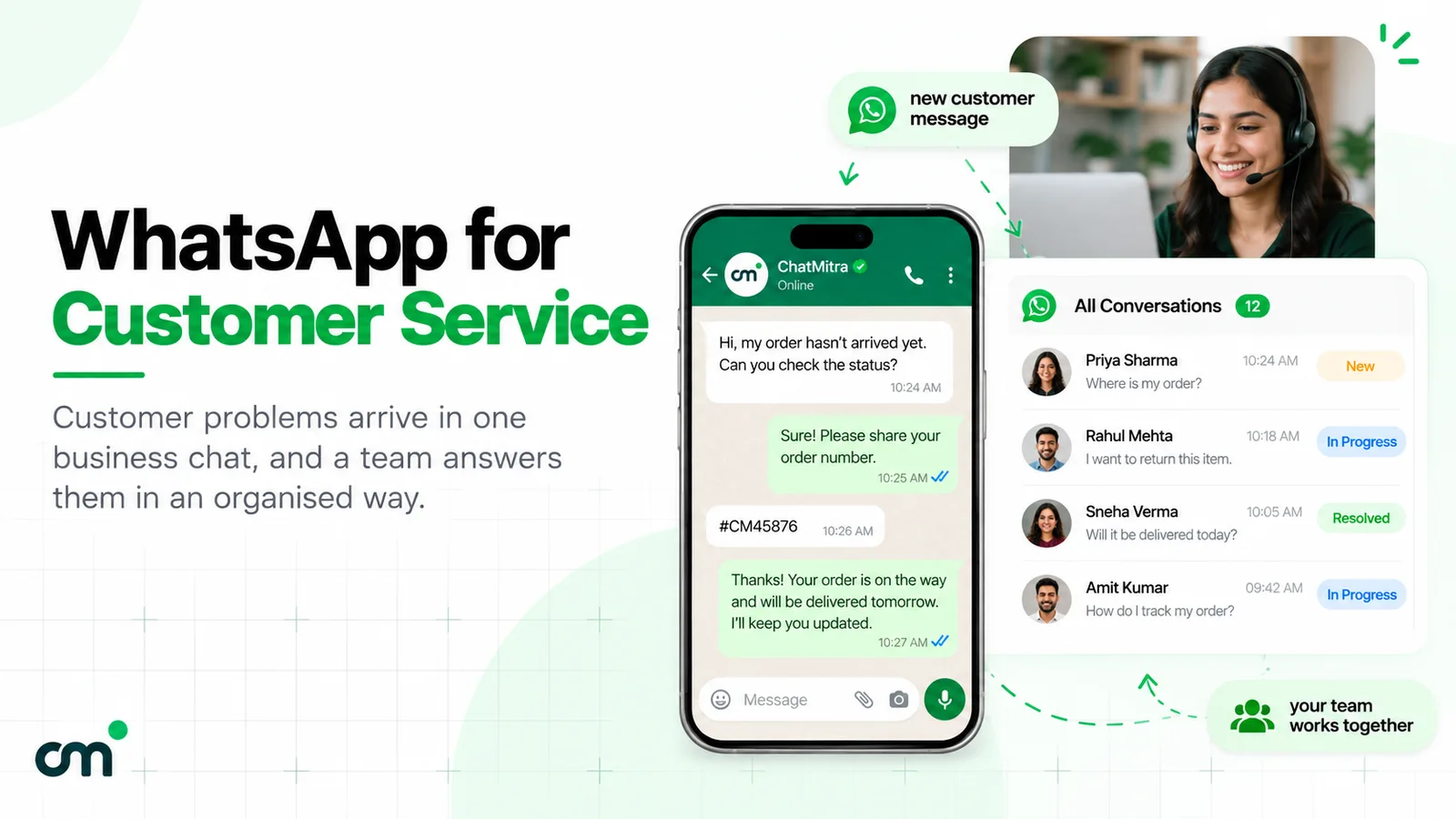
WhatsApp for customer service means answering customers’ questions, order issues and complaints in WhatsApp chats from a business number. Small teams can start on the free WhatsApp Business app. Growing teams use the WhatsApp Business Platform, where replies are free-form for 24 hours after each customer message and service replies are billed after 1,000 free per number each month.
This guide covers the operation behind that answer: which WhatsApp product fits your team, the messaging window and its costs since Meta’s 1 October 2026 pricing change, what to automate, how to escalate, and what to measure.
Looking for WhatsApp's own support?
This article is for businesses that support their customers on WhatsApp. If you need help with your own WhatsApp account, WhatsApp's contact page says to open WhatsApp and go to Settings, Help, Contact Us on your phone, and the WhatsApp Help Center answers common account questions.
Key takeaways
- Customers can't see your queue. Tell them your hours and when to expect a reply.
- On the Platform, split messages cost more since October 2026. One complete reply beats three fragments.
- Every automated flow needs a clear exit to a person. On the Platform, WhatsApp's policy requires it.
Facts checked against Meta's and WhatsApp's documentation on 25 September 2026. Rupee figures are Meta's India rates and exclude tax.
What does customer service on WhatsApp involve?
Support on WhatsApp is written, asynchronous and personal. A customer sends a message when it suits them, often with a photo of a damaged parcel or a screenshot of an error, and expects the reply in the same thread. Nobody is on hold. That’s why it works, and it’s also why queues build quietly: a full inbox makes no noise.
Most support chats fall into a handful of types:
- Where is my order? Status, delivery dates, tracking links.
- Something went wrong. Damaged or wrong items, failed payments, service faults.
- Change or cancel. Rescheduling appointments, editing orders, cancellations.
- Money back. Refunds, returns and exchanges.
- How do I? Product questions, setup help, account access.
- Complaints. Frustrated customers who want a person, not a menu.
Running this well needs three decisions, which the rest of this guide takes in order: the tool (app or Platform), the rules (what you may send and when, and what it costs), and the operation (who answers what, what’s automated, and how you measure it).
Is WhatsApp support the same as live chat? It’s close. Both are text conversations with a business, but a website live chat usually ends when the visitor closes the tab. A WhatsApp chat stays in the customer’s phone, so they can come back tomorrow and pick up where they left off. That continuity helps both sides, and it’s why the history of every chat matters to your team.
WhatsApp Business app or Business Platform: which one fits your support?
WhatsApp offers two ways for a business to talk to customers. WhatsApp’s Help Center describes the WhatsApp Business app as a way to talk to customers “from a single device through a free-to-download app” that “is free to use”, and the WhatsApp Business Platform as a way to “manage high volumes of conversations” (WhatsApp Help Center, business products). For support, the differences look like this:
| What support needs | WhatsApp Business app | WhatsApp Business Platform (through a provider) |
|---|---|---|
| People answering one number | One phone and up to four linked devices at a time; up to 10 devices with the paid multi-agent feature, where available | Set by your provider's inbox; many agents on one number |
| First reply automation | Greeting message, away message, quick replies | Welcome and away messages, keyword replies, chatbots and AI agents you configure |
| Sorting chats | Up to 20 labels (being renamed lists) | Tags, filters, notes and fields, depending on the tool |
| Messaging 24 hours after the customer's last message | The template-only rule is in the policy's Platform-specific terms, not the app's | Approved templates only |
| Connecting other systems | Some integration with other tools, per WhatsApp's Help Center | APIs and webhooks for order systems, CRMs and helpdesks |
| Cost | Free to use | Meta's per-message charges plus your provider's fees |
The app’s limits are specific. WhatsApp says you can use “up to four linked devices and one phone at a time”, and that linked devices “will log out if your phone is unused for over 14 days” (WhatsApp Help Center, linked devices). Its paid multi-agent feature raises that to 10 devices and adds “Assign chats to agents”, but WhatsApp notes that it “may not be available to you yet” and that the device count depends on your Meta Verified or Meta One subscription (WhatsApp Help Center, multi-agent).
Stay on the app while one or two people handle the chats and volume is manageable. Consider the Platform when:
- more people need to reply than the app’s devices allow;
- you want order or booking data to trigger updates without someone typing them;
- you need a bot or AI agent that uses your own systems and rules;
- managers need to see every chat without borrowing someone’s phone.
Our WhatsApp CRM software guide compares the app, WhatsApp-first inboxes and full CRMs in more detail.
What can you send inside and outside the 24-hour window?
On the Platform, one timer governs support. Meta’s documentation puts it this way: “When a WhatsApp user messages you or calls you, a 24-hour timer called a customer service window starts. If the user messages or calls you again before the timer expires, the timer resets to 24 hours.” And: “When the window closes, you can only send pre-approved template messages” (Meta, send messages).
In practice:
- Inside the window you can send free-form replies, images, documents, buttons and templates. Meta calls the free-form replies “service messages”, and they need no pre-approval.
- Outside the window you can send only an approved template. A template about the customer’s own order or request, with no promotion, can qualify as utility. Meta’s categorisation rules say a utility template must be “non-promotional” and “specific to or requested by the user” (Meta, template categorisation). An order update with a discount code is “mixed content” and is categorised as marketing.
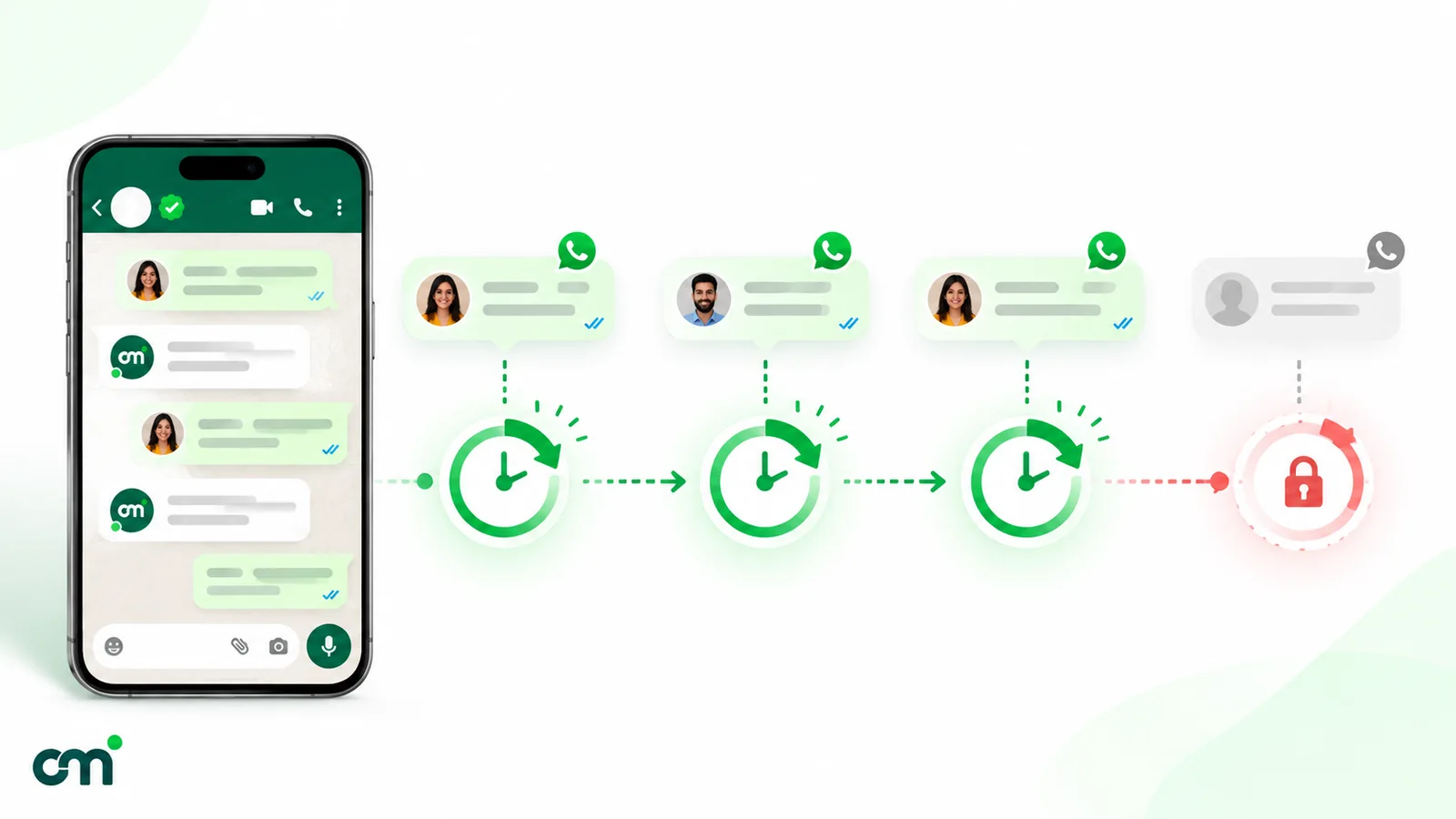
This timer shapes how you run support. Three habits help:
- Resolve inside the window where you can. If an investigation will take two days, say so, and ask the customer to reply “OK”. Their reply resets the window.
- Plan the follow-up template in advance. Keep approved utility templates for common outcomes: “Your refund for order {{1}} has been processed”, “Your replacement has been dispatched”, “We need one more detail about request {{1}}”. Our learn page on sending template messages walks through the flow.
- Keep promotions out of support templates. A “sorry for the trouble, here’s 10% off” line turns a utility template into a marketing one, at a higher price.
What does WhatsApp customer service cost since 1 October 2026?
Two Meta changes took effect on 1 October 2026, and both hit support teams directly (Meta, pricing on the WhatsApp Business Platform):
- Service messages are charged after a free tier. “Each business phone number has one shared free tier of 1,000 delivered service messages per month.” Unused free messages “do not roll over”. Service messages are priced the same as utility, so ₹0.1150 each in India.
- Utility templates inside an open window are charged. Meta now charges “for utility messages sent in an open 24-hour customer service window”. They had been free inside the window since 1 July 2025.
What stays free: “Messages sent from a WhatsApp user to a business are not charged.”
Add a payment method before the free tier runs out
Meta says that without a payment method on your WhatsApp Business account, it "will deliver service messages within the shared free tier but not deliver them after the free tier has been used." For a support desk that means replies stop being delivered once 1,000 have gone out that month. Check your billing set-up now, not when customers start complaining.
A worked month for an online store
A D2C store handles 1,500 support chats a month, each from a different customer. Each chat gets one automated acknowledgement and three replies from the team. The store also sends 400 “return request received” utility templates while chats are open, and 300 “refund processed” utility templates a few days later, after the window has closed. Nothing else on the number sends service messages that month.
| Item | Calculation | Meta charge |
|---|---|---|
| Service messages | 1,500 chats × 4 = 6,000; first 1,000 free; 5,000 × ₹0.1150 | ₹575.00 |
| Utility templates inside the window | 400 × ₹0.1150 | ₹46.00 |
| Utility templates after the window | 300 × ₹0.1150 | ₹34.50 |
| Meta charges this month | ₹655.50 | |
| Same month under the old rules (before 1 October 2026) | Only the 300 post-window templates were charged | ₹34.50 |
The change adds ₹621 a month for this store, about ₹0.41 per chat. Your provider’s fees come on top. As one example, ChatMitra’s Starter plan adds ₹0.20 per contact per 24-hour conversation, per its pricing page, however many messages go out in it. If each chat’s replies and in-window template fit in one such conversation, that is 1,500 conversations, and each of the 300 later refund messages opens a new one: (1,500 + 300) × ₹0.20 = ₹360. That makes ₹1,015.50 in total, or about ₹0.68 per chat. Providers price differently (per seat, per message or per conversation), so compare the full monthly bill.
Meta’s charges follow message counts, not conversations. Every “Hi”, “one moment” and “anything else?” is now a billable message once the free tier is used. Three habits keep the bill down without hurting service:
- Answer in one complete message instead of three short ones.
- Ask for everything you need (order number, photo, preferred slot) in a single request.
- Remember that the free tier is shared by everything on the number. If sales and support share one number, sales replies use up support’s 1,000 too.
For the full rate table and budgets by business size, see our guide to WhatsApp Business cost per message.
How to set up WhatsApp customer service, step by step
- Choose one number and the right tool. Use the app while volume is low and the Platform once several people answer or you need integrations. Customers should never need two support numbers.
- Complete your business profile. WhatsApp’s Business Messaging Policy asks businesses to “Maintain a WhatsApp Business profile with customer support contact information” and at least one of an email address, website or phone number. Add your business hours too. On the app, the away message option “Outside of business hours” only works once hours are set in the profile (WhatsApp Help Center, away messages).
- Put the number where customers look for help. Your contact page, order confirmation emails, invoices, packaging and in-app help screens. A pre-filled link with a short topic, such as “Help with my order”, tells you why they’re writing. Our free WhatsApp chat link generator builds one.
- Set the first reply. On the app, a greeting message goes to new customers and to customers returning “after 14 days of inactivity” (WhatsApp Help Center, greeting messages). Use it to ask for the order number up front. The auto-reply examples for small businesses give wording to adapt.
- Write the after-hours message. State when a person will reply and what to send meanwhile. For wording by situation (nights, weekends, festivals), see our WhatsApp away message examples.
- Build saved replies for your ten most common questions. The app stores up to 50 quick replies, per WhatsApp’s quick replies help page. Keep them accurate and personalise the first line.
- Create a small tag set. Issue type (order, refund, technical, complaint) and a “waiting on us” tag are enough to start. The app allows up to 20 labels (WhatsApp Help Center, labels).
- Write down the escalation path. Who handles refunds above a set amount, legal threats or safety issues, and how the customer reaches them.
- Test it end to end. Message the number from a colleague’s phone at 11 pm and during the day. Read what the customer sees.
What to automate and what to keep human
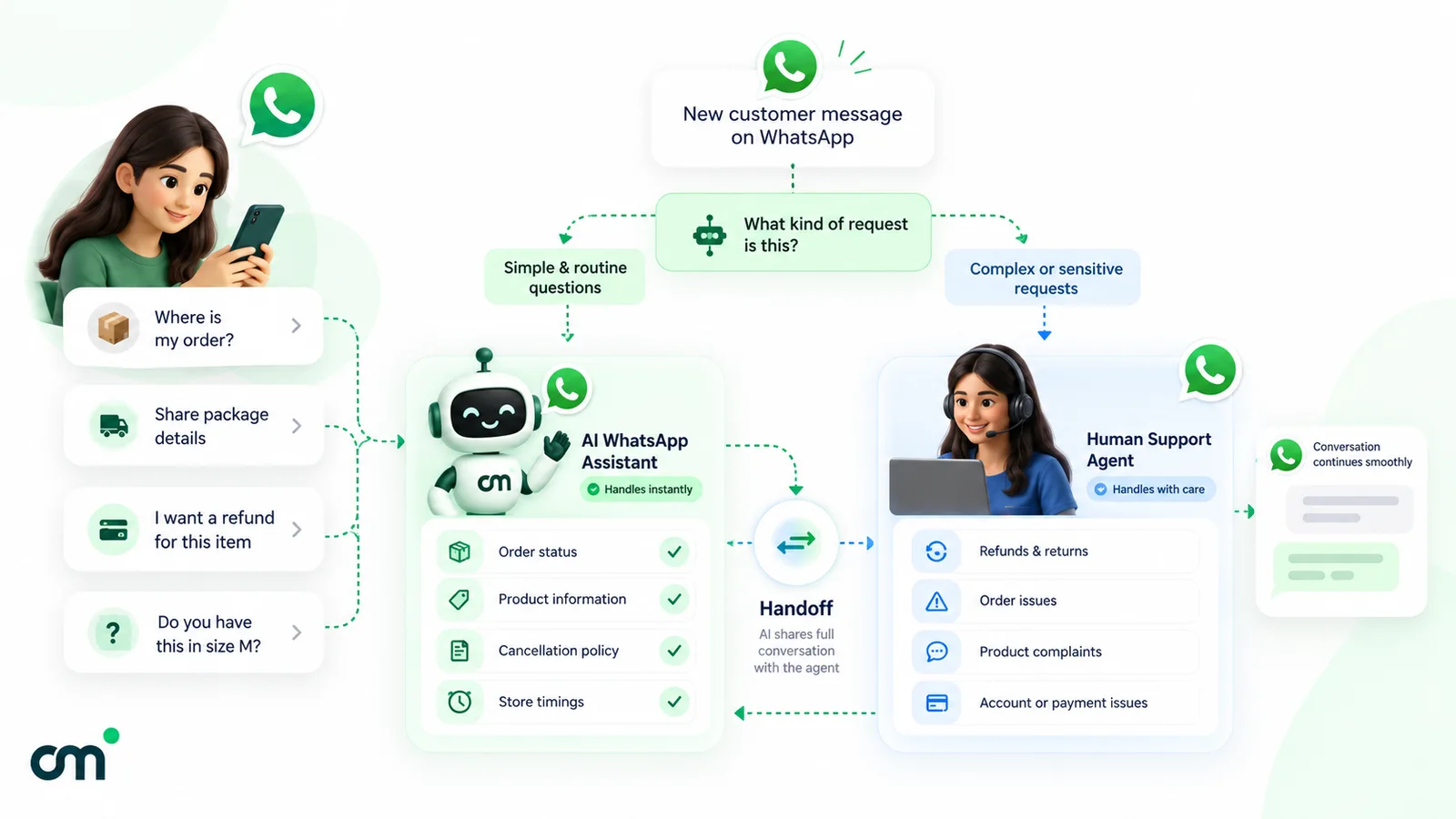
Automation should shorten waits, not stretch them. A useful test: would a customer be happy to get this answer from a machine, and would they notice if it were wrong?
| Support task | Automate? | Why |
|---|---|---|
| Acknowledging a new message and stating hours | Yes | Removes silence at no risk |
| Asking for the order number or booking ID | Yes | Saves every agent one message |
| Common questions (timings, delivery areas, return window) | Yes, with saved or keyword replies or an AI agent | Answers are stable and checkable |
| Order or appointment status | Only if connected to your live data | A bot that guesses a delivery date creates a second complaint |
| Refunds, exceptions and goodwill gestures | No | Needs judgement and authority |
| Angry customers and complaints | No | A menu makes it worse |
| Health, legal or financial advice | No | Risk to the customer and to you |
Escalation: always give people a way out
WhatsApp’s Business Messaging Policy is explicit: “You may use automation when responding during the 24-hour window, but must also have available prompt, clear, and direct escalation paths.” The paths it lists are an in-chat human agent transfer, a phone number, email, web support on your website, in-store visits, or a support form.
In practice, tell the customer how to reach a person in the first automated message, hand over when they ask or when the bot fails twice, and pass the context along so nobody asks for the order number again.
AI agents for support
An AI agent can read free-text questions, answer from your approved information and ask for missing details. Keep it on a short leash: it shouldn’t promise refunds, invent delivery dates or argue with an upset customer. Our WhatsApp AI agent guide covers Meta’s 2026 rules on AI, set-up options and guardrails.
If you use Meta’s own Meta Business Agent on the WhatsApp Business app, note that WhatsApp says greeting messages “are automatically disabled when Meta Business Agent is connected” (WhatsApp Help Center). It is also only available “in limited countries to select businesses” for now (WhatsApp Help Center, Meta Business Agent).
How to run a support team on one WhatsApp number
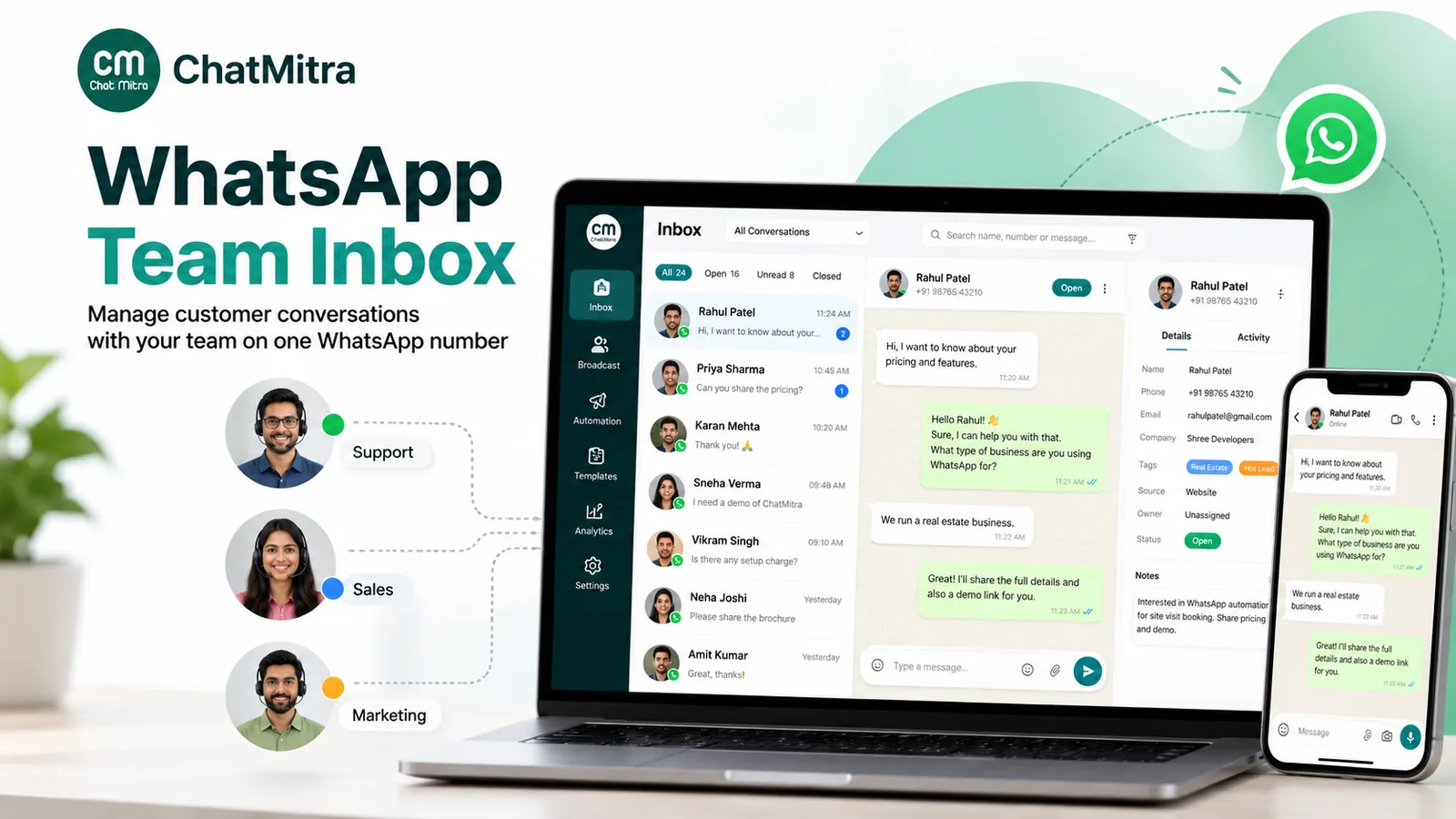
A shared inbox solves visibility, not ownership. When five people can see a chat, each can assume someone else has it. Decide how ownership works before volume grows.
If your tool assigns chats, use assignment rules and check unassigned chats each hour.
If it doesn’t, agree on a simple convention:
- Claim by tag. Whoever replies first adds their tag (for example
agent-priya). Others leave the chat alone. - Use “waiting on us” and “waiting on customer” tags as a manual status, and clear them when the case closes.
- Pin what can’t wait, if your tool supports pinning, so urgent chats stay in view.
- Write a one-line note before a shift ends: “Refund approved, awaiting bank reference, customer told 3–5 days.”
- Review the unread and waiting tags at every shift change. Nothing should carry over without an owner.
Set a response-time target you can keep during your stated hours, publish it in your greeting message, and measure against it. We couldn’t find an industry benchmark for WhatsApp response times from a primary source, so we don’t quote one. Your own history is the better baseline.
Privacy: what not to ask for in chat
Support chats collect personal data by nature. WhatsApp’s Business Messaging Policy says: “Don’t share or ask people to share full length individual payment card numbers, financial account numbers, personal ID card numbers, or other sensitive identifiers.” Train agents to ask for the last four digits or a transaction reference instead, and to move identity checks to a secure channel.
In India, the Digital Personal Data Protection Act, 2023 lets a business process data a person has “voluntarily provided” for a specified purpose, unless they have said they don’t consent, and requires erasure, unless a law requires you to keep it, “as soon as it is reasonable to assume that the specified purpose is no longer being served” (DPDP Act, 2023, sections 7 and 8). Under the commencement notification noted in India Code’s text of the Act, those sections apply from eighteen months after 13 November 2025. Decide now how long you keep support chats and exports, and take legal advice for your case. Our WhatsApp opt-in guide covers consent and the DPDP Act in more depth.
How to measure WhatsApp customer service
Measure what your tools can actually count. A number you can’t reproduce next month isn’t a metric.
| Metric | What it tells you | How to get it |
|---|---|---|
| First response time (in business hours) | Whether customers wait longer than you promised | A helpdesk report, or timestamps from message webhooks compared in a sheet (leave out automated replies, which also arrive as sent messages); sample 30 chats a week by hand if you have neither |
| Chats by issue type | What to fix upstream (packaging, delivery partner, product pages) | Tag counts per week |
| Backlog at shift end | Whether staffing matches demand | Unread and "waiting on us" counts |
| Repeat contacts | Whether first answers actually solved the problem | Customers who wrote again about the same issue within 7 days |
| Customer feedback | How the chat felt to the customer | A short survey template about that specific interaction |
| Service messages used | How close you are to the 1,000 free tier and what the rest costs | Your provider's or Meta's billing view |
For feedback, Meta’s categorisation rules allow utility templates that “Collect feedback on previous orders, transactions, or engagements”, but add that “A general/generic survey or request for feedback will not be approved as utility” (Meta, template categorisation). Name the order or the chat in the survey.
Protect the number your support runs on
Support usually shares a number with order updates and, sometimes, promotions. If customers block or report that number, your support suffers too. Meta says message quality is based on how users received your messages “over the past seven days”, using signals “such as blocks, reports, mutes, archives, and reasons users provide when they block you” (Meta, message quality). The policy adds that WhatsApp may limit your ability to send messages “if you receive significant amounts of negative feedback”.
Send proactive messages only to customers who opted in, keep them useful, and think twice before running heavy promotions from your support number.
Proactive support: messages that prevent tickets
The cheapest support chat is the one that never starts. Order confirmations, dispatch updates with tracking links, appointment reminders and service-outage notices answer the question before it’s asked. Sent as non-promotional utility templates, each costs ₹0.1150 in India, the same as one paid service message and far less than an agent’s time.
Two rules apply. You need the customer’s opt-in for these messages, and each template must stay non-promotional to keep its utility category. For timing and template wording, see our guide to WhatsApp reminder messages.
Common WhatsApp customer service mistakes
- No stated hours. Customers read silence as being ignored.
- Asking for details one message at a time. It slows the fix and, since October 2026, costs more.
- Sending free-form text after the window closed. It won’t send. Use an approved template.
- Promotions inside support templates. They change the category and the price.
- A bot with no exit. It breaks WhatsApp’s policy and annoys the customer.
- Collecting card or ID numbers in chat. The policy forbids asking for them.
- No payment method on the WhatsApp Business account. Replies stop after the free 1,000.
- Nobody owns a chat. Five people can see it, and nobody answers.
Where ChatMitra fits, and where it doesn’t
ChatMitra is a WhatsApp Business Platform inbox and automation tool. Here’s how it maps to the support set-up above. Plan notes follow ChatMitra’s pricing page.
| Support need | ChatMitra |
|---|---|
| Shared team inbox on one number | Yes; the pricing page lists it on the free Starter plan |
| Roles and permissions | Yes, per project and per section (chat, templates, contacts and more) |
| Saved replies | Yes, shared across the team, inserted by typing "/", on web and the Android app |
| Finding chats | Pin, unread and replied filters, tag filters; search by contact name or phone number |
| Context for the next agent | Tags, custom fields and one internal note per contact |
| First reply automation | Welcome message on a contact's first message, with an optional re-welcome after a set number of days; away message for one daily time window and keyword auto-replies (exact, starts-with or regex), both on the Pro plan |
| AI chatbot | Yes, on your own LLM provider key (Pro plan); an agent can take over, and replies can be paused per contact |
| 24-hour window handling | Free-form sending is blocked after 24 hours and a template can be sent from the chat instead |
| Data for your own reporting | Webhooks for received and sent messages, and an API (Pro plan) |
| Chat assignment or round-robin routing | No |
| Open, pending or resolved status | No (use tags as a manual status) |
| SLA, CSAT or response-time reports | No |
| Automatic "talk to a human" handover | No; an agent takes over manually |
| Search inside message text | No |
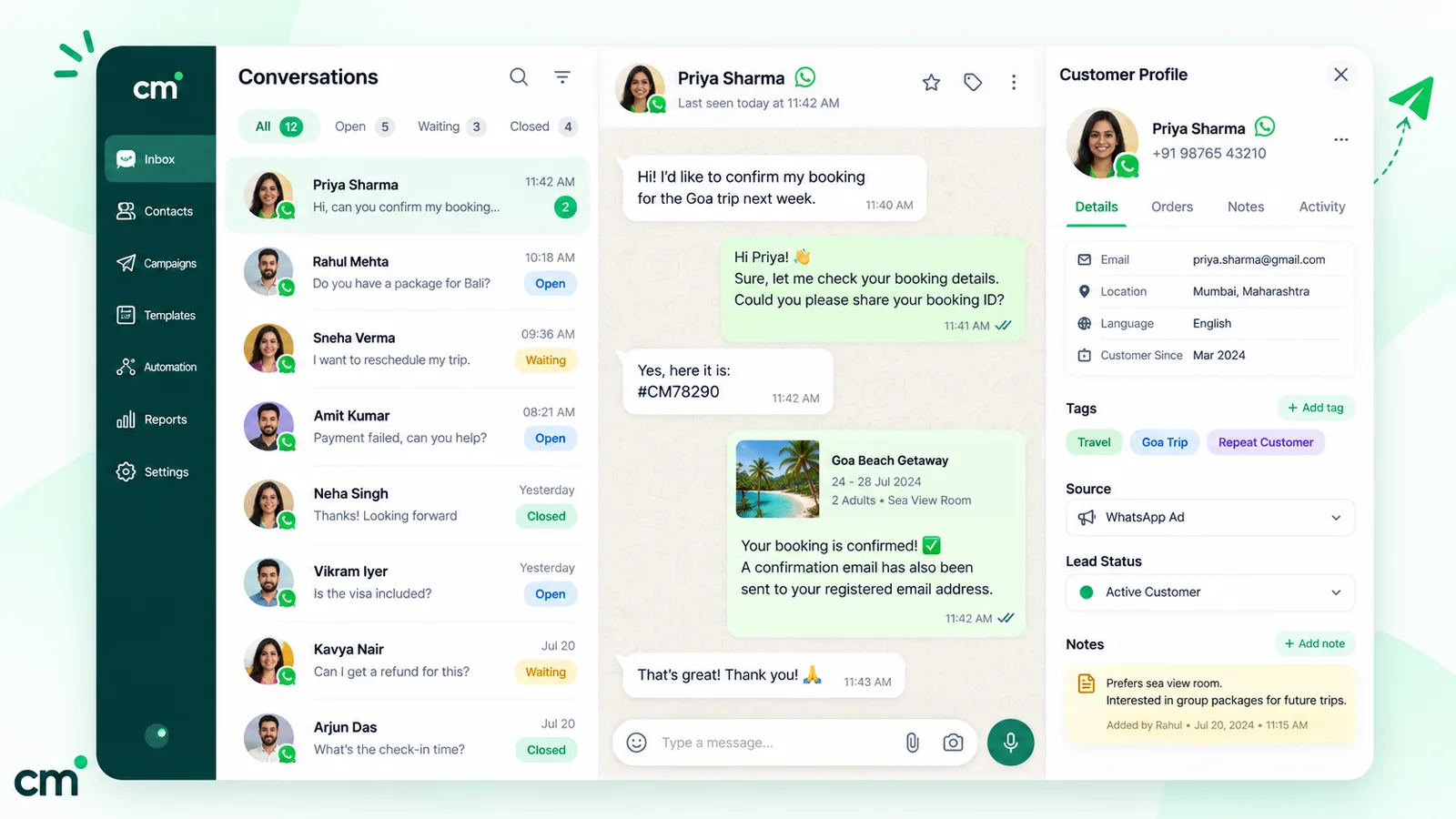
In practice, a small support team on ChatMitra works like this. The welcome message asks for the order number, keyword replies answer delivery and return-window questions, and the AI chatbot handles free-text questions until an agent takes over. Agents answer with saved replies, claim chats with their own tag, and leave a note before handing over. The owner controls who can see templates or contacts through role management.
When you need a different kind of tool: if you need automatic assignment, ticket status, SLA timers or CSAT dashboards, use a helpdesk or CRM that has them and a WhatsApp channel. ChatMitra’s webhooks and API can feed such a system through your developers, but there’s no ready-made helpdesk connector.
Where to start
Start small. Publish one number, set your hours in the greeting and away messages, save replies for your ten most common questions, and agree how chats are claimed. After a month, count chats by tag and fix the top cause upstream. Then add automation where waits are longest. Our WhatsApp automation guide covers the wider set of automation types, and you can compare ChatMitra’s plans when your team outgrows the app.
Sources: Meta for Developers (pricing, send messages, template categorisation), WhatsApp Business Messaging Policy, WhatsApp Help Center (business products, linked devices, multi-agent, greeting messages, away messages, quick replies, labels, Meta Business Agent, contact page) and the Digital Personal Data Protection Act, 2023 (India Code). Facts checked against Meta's and WhatsApp's documentation on 25 September 2026.