WhatsApp for recruitment means using WhatsApp to message candidates through the hiring process: confirming applications, scheduling and reminding them about interviews, sharing outcomes and offers, and welcoming new joiners. It works because candidates read WhatsApp quickly and reply from their phones. It only works well when you do three things that most guides skip: get each candidate’s opt-in, send the right category of message at each stage so costs and approvals stay predictable, and prove you’re a genuine employer in a channel where job scams are common.
This playbook walks through each hiring stage with the message to send, the Meta category it most likely falls into, and what it costs in India. It covers interview reminders that reduce no-shows, consent and data handling under India’s DPDP Act, and how to connect WhatsApp to the tools HR teams already use. It also says plainly what ChatMitra can and can’t do for each step.
Key takeaways
- You need each candidate's opt-in before you message them, and business-started messages must be approved templates sent through the WhatsApp Business Platform.
- Application receipts, interview invites, reminders, status updates and onboarding checklists fit Meta's utility test: ₹0.115 per delivered message in India. Job alerts to a talent pool are marketing at ₹0.8631.
- A month of WhatsApp messages for 400 applicants and 20 hires costs a few hundred rupees in Meta charges, far less than a single job-alert broadcast to a large talent pool.
- Reminders the day before and on the morning of the interview, with a Reschedule option, are the core of no-show reduction. Measure your own before-and-after rate.
- Fight the scam problem directly: one verified business number, a link from your careers page, and a clear "we never charge candidates" line.
Why HR teams move hiring conversations to WhatsApp
Recruitment runs on response time. A candidate who doesn’t see an interview invite for two days may have accepted another offer by the time they do. Email works for formal documents, but many candidates, especially for frontline, retail, logistics and campus roles, check WhatsApp far more often than their inbox.
There’s some evidence for the general preference. In iCIMS’s 2023 Talent Experience Report, 47% of job seekers surveyed said texting was their preferred form of communication. That survey covered US job seekers and text messaging, not WhatsApp specifically, and iCIMS sells recruiting software, so treat it as a direction rather than a benchmark. We haven’t found an independent study with published methods measuring WhatsApp in recruiting, and the “90% open rate” and “50% fewer no-shows” figures common in vendor blogs have no source. Your own numbers, measured before and after you switch, are worth more than any of them.
WhatsApp also fixes a quieter problem: recruiters using personal phones. When candidates have a recruiter’s personal number, the conversation leaves with that recruiter, nobody else can pick it up, and there’s no record of what was promised. A shared business number keeps the history with the company.
WhatsApp Business app or the WhatsApp API?
The free WhatsApp Business app is fine for a solo recruiter or a small agency messaging a handful of candidates a day. You can set a business profile, quick replies and labels, and reply by hand.
The WhatsApp Business Platform (API), used through a provider such as ChatMitra, becomes necessary when:
- several recruiters need to work from the same number and see the same conversations;
- you send the same message, such as an interview invite or a status update, to many candidates;
- you want reminders and confirmations to go out automatically from a spreadsheet, your ATS or a form;
- you need a record of every message, its delivery and read status.
The API comes with rules the app doesn’t enforce as strictly: business-started messages must use templates Meta has approved, and you pay per delivered template. Our WhatsApp Business app vs API comparison covers the switch in detail.
The hiring journey on WhatsApp, stage by stage
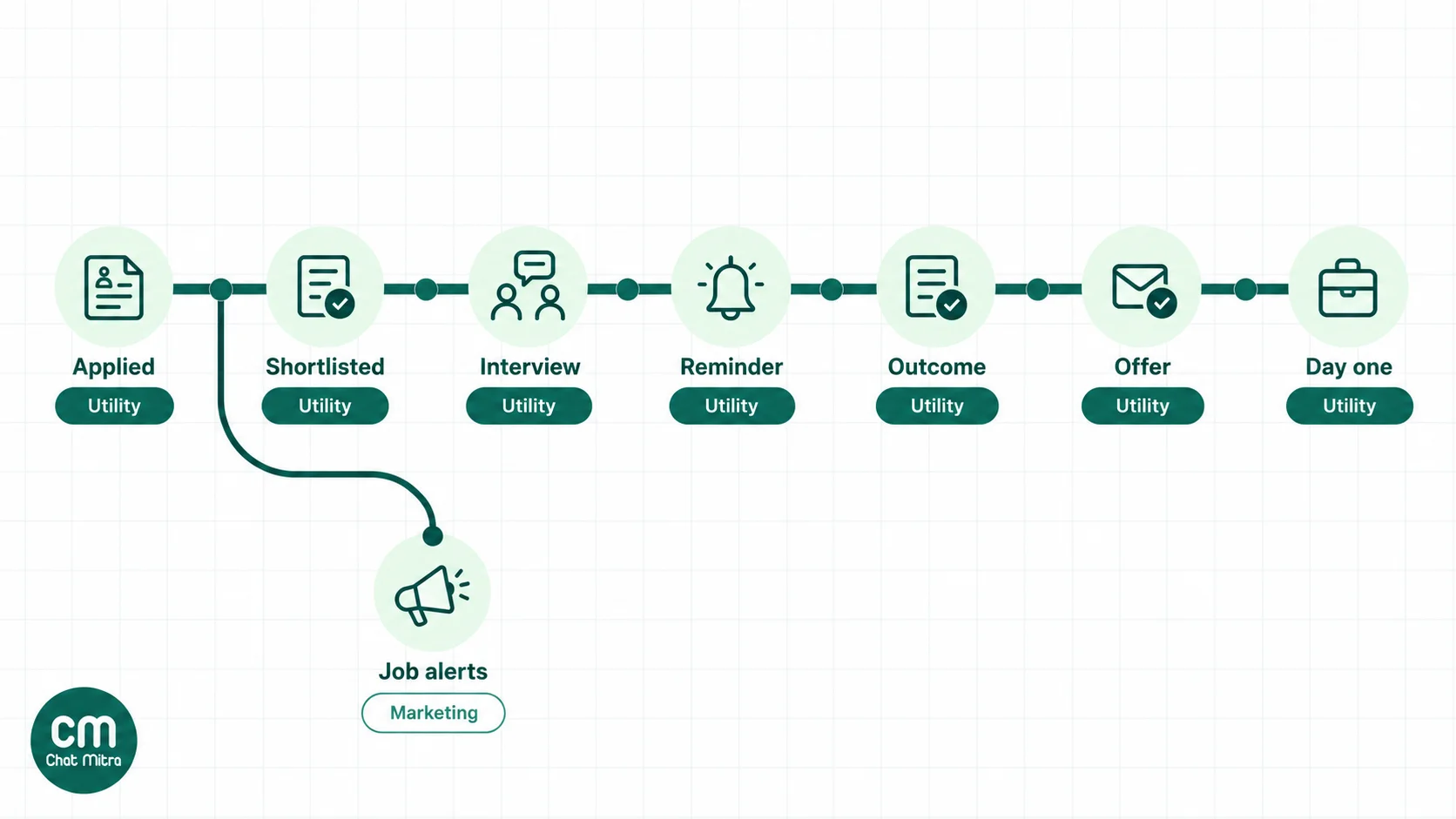
Every message a business starts on the WhatsApp Business Platform is a template, and Meta places each template in a category that decides its price. Meta’s definition of utility is a template that is non-promotional and “specific to or requested by the user”, for example related to their account or services. Marketing covers awareness, offers and promotion, and templates mixing both are treated as marketing.
Meta’s examples don’t mention hiring, so the categories below are our reading of that test, not a list from Meta. Meta makes the final call when it reviews each template, and it can re-categorise approved templates later.
| Stage | Message | Likely category | India cost per delivered message |
|---|---|---|---|
| Application received | Confirms the application and explains next steps | Utility | ₹0.115 |
| Screening | A few questions about availability, location or notice period | Utility as a template; service if you're replying to the candidate's message | ₹0.115, or within the 1,000 free service messages a month |
| Interview invite | Date, time, format, with Confirm and Reschedule buttons | Utility | ₹0.115 |
| Reminders | Day before and morning of, with address or video link | Utility | ₹0.115 each |
| Outcome | Shortlisted, next round, or a respectful regret message | Utility | ₹0.115 |
| Offer | Offer is ready; check email or the HR portal | Utility | ₹0.115 |
| Onboarding | Document checklist, joining-day details, day-one welcome | Utility | ₹0.115 each |
| Job alerts | New openings sent to a talent pool or past applicants | Marketing | ₹0.8631 |
| Referral drives, hiring events | Promoting your employer brand or a walk-in drive | Marketing | ₹0.8631 |
Rates are from Meta’s India rate card effective 1 October 2026. Since that date, Meta also charges for utility templates sent inside an open customer service window (the 24 hours after the candidate last messaged you), which used to be free. Your free replies come from a separate allowance: each business number gets 1,000 free service messages a month. Candidates in other countries are charged at their country’s rates.
Don’t try to pass marketing off as utility. Meta says it watches for businesses “consistently misclassifying marketing templates as utility”, and the penalties escalate from a warning to capped utility volumes and, eventually, having all your utility templates moved to marketing for 7 days or more.
What a month of hiring messages costs
Here’s an illustrative month for a company hiring 20 people from 400 applications, using utility templates throughout:
| Messages | Count | Meta cost at ₹0.115 |
|---|---|---|
| Application confirmations | 400 | ₹46.00 |
| Regret messages to applicants not shortlisted | 320 | ₹36.80 |
| Interview invites | 80 | ₹9.20 |
| Interview reminders (two each) | 160 | ₹18.40 |
| Offer, onboarding checklist and day-one welcome for 20 hires | 60 | ₹6.90 |
| Total | 1,020 | ₹117.30 |
Replies to candidates’ questions within the 24-hour window draw on your 1,000 free service messages. ChatMitra adds ₹0.20 per conversation (once per candidate per 24 hours) on its Starter and Pro plans, which here comes to at most ₹204, and nothing on Enterprise. Compare that with one job-alert broadcast to a 5,000-person talent pool: 5,000 × ₹0.8631 = ₹4,315.50 in Meta charges alone. For your own numbers, use the WhatsApp pricing calculator.
Getting candidate consent right
WhatsApp’s Business Messaging Policy allows a business to contact someone only if they have given you their number and “you have received opt-in permission from the recipient confirming that they wish to receive subsequent messages or calls from you”. The method is up to you, but it has to be clear, and you must respect requests to stop, whether made on WhatsApp or elsewhere.
For hiring, that means:
- Ask on the application form. Add an unticked checkbox: “Send me updates about this application on WhatsApp.” Store the answer with the application.
- Ask separately for job alerts. Agreeing to hear about one application isn’t agreeing to future job promotions. Meta itself recommends separate opt-in by message category.
- Use click-to-WhatsApp job ads carefully. A candidate who messages you from an ad has started the conversation, so you can reply, but ask before adding them to any list.
- Honour opt-outs. When a candidate asks you to stop, tag them and exclude that tag from every campaign. ChatMitra records Meta’s marketing opt-out signal on the contact, but campaigns don’t remove opted-out contacts automatically, so the exclusion tag is your safeguard. Our WhatsApp opt-in guide has wording and examples.
In India, the Digital Personal Data Protection Act, 2023 adds its own duties. Consent must be “free, specific, informed, unconditional and unambiguous”, and come with a notice explaining what personal data you’re collecting and why. Section 7(i) allows processing “for the purposes of employment” without fresh consent, but its examples refer to employees, so don’t rely on it for candidates who haven’t joined. Section 8(7) requires you to erase personal data once the purpose is no longer being served, unless a law requires you to keep it. For recruiting, that means a retention period for rejected candidates’ CVs and chats, and actually deleting them. The DPDP Rules were notified in November 2025 with an 18-month phased timeline. Treat this as general information, not legal advice.
Interview scheduling and reminders that reduce no-shows

No-shows usually have ordinary causes: the candidate forgot, couldn’t find the place, had a clash and felt awkward cancelling, or took another offer and didn’t say so. A good reminder sequence addresses each one.
- Send the invite as soon as the slot is fixed. Include the date, time, format, and the interviewer’s name, with two quick-reply buttons: Confirm and Reschedule. A Reschedule button turns a silent no-show into a message you can act on.
- Remind the day before. Restate the time and add the address with a map link, or the video link. Ask for a confirmation if they haven’t given one.
- Remind on the morning of the interview. Keep it short: time, place, and who to ask for at reception.
- Follow up the same day if they don’t arrive. One polite message offering another slot recovers some candidates and tells you which ones have dropped out.
Before you start, note your current no-show rate: interviews missed ÷ interviews scheduled, over at least a month. Measure the same number for a month after. That’s the only result worth quoting to your leadership.
How to automate reminders in ChatMitra
ChatMitra’s Google Sheets Automation has date-based triggers that suit interview reminders:
- Store the interview date on the contact. Add a custom field such as interview_date to each candidate’s contact record (CSV import turns extra columns into custom fields). Then create a workflow with the N Days Before a Date trigger set to 1 day, reading that contact field, and a Send Template action with your reminder template. A second workflow at 0 days before can send the morning-of reminder.
- Pick the run time. Date triggers run once a day at a time you choose, in Indian Standard Time (9:00 AM by default). They can’t send “two hours before” a specific slot, so the morning-of message is the practical second reminder.
- If you keep dates in a Google Sheet instead, note that the sheet version matches only day and month. A row left in the sheet would fire again on the same date next year, so clear or archive past interview rows.
Message templates for each stage
These examples are written to pass Meta’s utility test: factual, about the candidate’s own application, and with no promotion. Placeholders like {{1}} are filled in for each candidate when you send. Submit each one in WhatsApp Manager or your provider before use. Keep salary and other sensitive figures out of variables; say the offer is ready and send the details by email or your HR portal.
1. Application received
Hi {{1}}, thanks for applying for the {{2}} role at {{3}}. We’ve received your application and will update you here within {{4}} working days. We never charge candidates any fee at any stage.
2. Screening questions
Hi {{1}}, your application for {{2}} has moved to screening. Please reply with: 1) your current notice period, 2) your preferred work location. We’ll get back to you within two working days.
3. Interview invite (buttons: Confirm, Reschedule)
Hi {{1}}, you’re invited to a {{2}} interview for the {{3}} role on {{4}} at {{5}} with {{6}}. Please tap Confirm, or Reschedule if this time doesn’t work.
4. Reminder, the day before
Reminder: your interview for {{1}} is tomorrow, {{2}} at {{3}}. Location: {{4}}. Tap Reschedule if you can no longer make it.
5. Reminder, the morning of
Hi {{1}}, see you today at {{2}} for your interview. Please ask for {{3}} at reception.
6. Not shortlisted
Hi {{1}}, thank you for your time and interest in the {{2}} role. We’ve decided to move forward with other candidates on this occasion. We wish you every success.
7. Offer ready
Hi {{1}}, good news about your application for {{2}}. Your offer letter has been sent to {{3}}. Please review it and reply here if you have any questions.
8. Onboarding checklist
Hi {{1}}, welcome aboard. Before your joining date, {{2}}, please complete your onboarding forms here: {{3}}. Reply if you need help.
9. Day-one welcome
Good morning {{1}}, welcome to {{2}}. Today starts at {{3}} at {{4}}. Please carry your photo ID and ask for {{5}} at reception.
Avoid emojis-only or vague templates such as “Congratulations!” on its own: Meta treats unclear content as marketing. For more on writing approvable utility messages, see our utility templates guide and the reminder messages guide.
Proving you’re a genuine employer
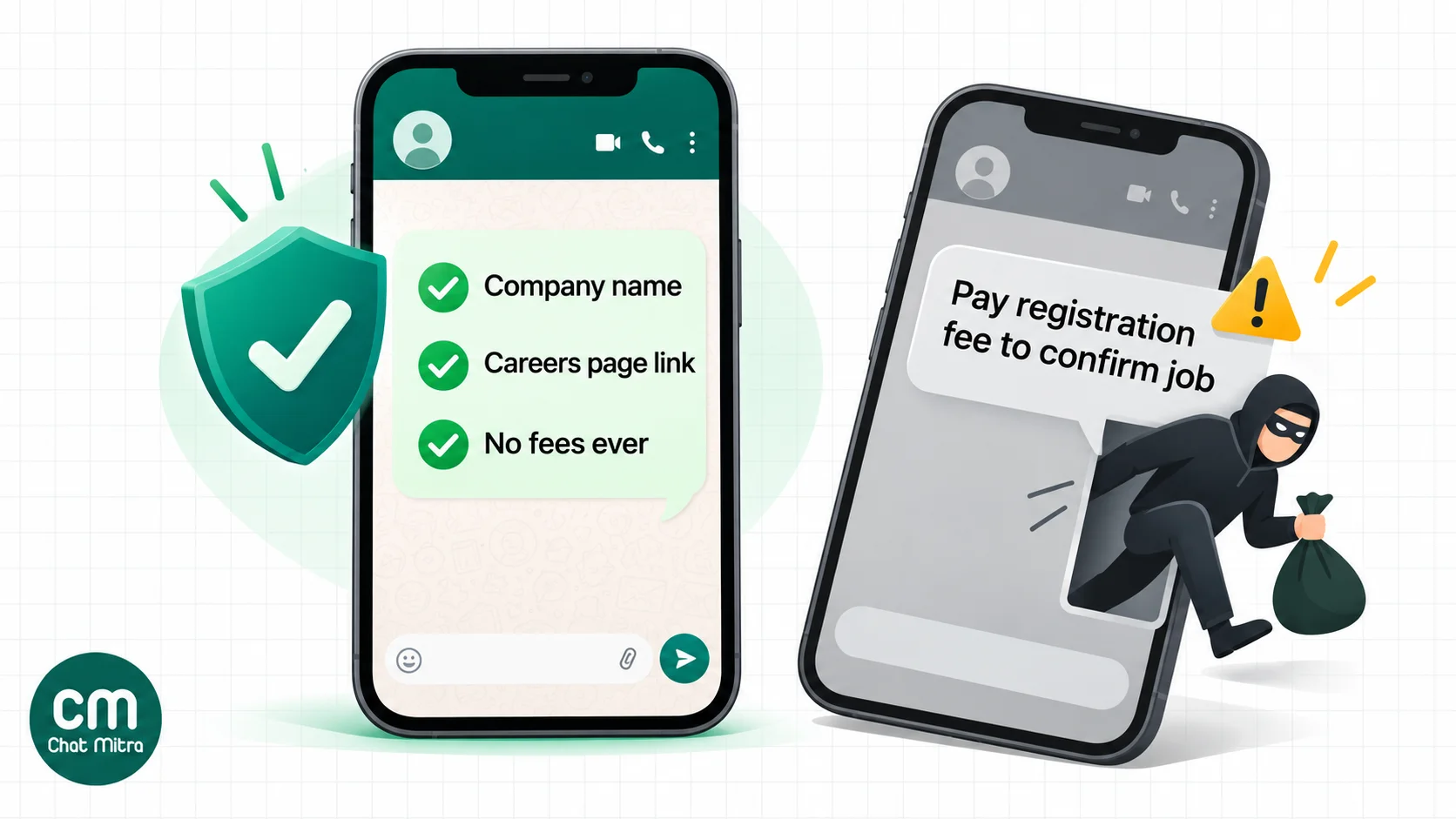
Fake job offers on WhatsApp are a known problem in India. The Ministry of Home Affairs said in December 2023 that its cybercrime centre had identified over 100 websites involved in task-based part-time job frauds, in which “an agent using WhatsApp / Telegram starts conversation with the potential victim”. An April 2025 advisory from the Indian Cyber Crime Coordination Centre (I4C) lists the red flags as “upfront payment, unrealistic earning promises, delayed or denied withdrawals”. Many candidates have learned to distrust job messages from unknown numbers, so a genuine employer has to look different from a scammer.
What helps:
- One business number, in your company’s name. Don’t let recruiters message from personal numbers. Use a display name that matches your brand.
- Link the number from your careers page and job ads, so candidates can check it.
- Say you never charge. The Airports Authority of India’s public notice is a good model: it “does not approach candidates for direct employment through unofficial channels, nor does it request or accept any form of payment”. A line like “We never charge candidates any fee” in your first message costs nothing.
- Apply for an Official Business Account once you’re eligible. Meta shows a blue checkmark beside verified business names; eligibility needs at least 30 days on the platform, a verified business portfolio and an approved display name.
- Never ask for money, OTPs or passwords, and send formal documents such as offer letters from your company email domain as well.
- Keep job messages fair. WhatsApp’s policy says organisations must not “wrongfully discriminate or suggest a preference for or against people” based on characteristics such as religion, age, sex or disability. Write job messages with the same care as a job ad.
Collecting CVs and documents safely
Candidates can send CVs, certificates and photos in the chat, and your recruiters can open and download them from the ChatMitra inbox. Two things to know:
- ChatMitra doesn’t keep its own copy of incoming files. Each download is fetched from Meta’s servers when you open it, so save CVs into your ATS or HR system promptly.
- Ask for sensitive documents through a secure portal. Aadhaar, PAN and bank details are better collected through your HR system or onboarding tool. Use WhatsApp to send the link and the reminder, not to carry the document.
For per-candidate documents going the other way, such as a personalised offer letter as a PDF, a broadcast campaign won’t do, because every recipient gets the same attachment. ChatMitra’s Developer API, available on paid plans, can send a template with a different document to each candidate, which suits an ATS or HR system that generates letters.
Connecting WhatsApp to your ATS or HR system
Most recruiting tools don’t have a native WhatsApp connection, and ChatMitra has no built-in ATS connectors. That’s normal; the connection usually runs one of three ways:
- ATS webhook to an automation. If your ATS can send a webhook when a candidate’s stage changes, point it at the Incoming Webhook trigger in ChatMitra’s Google Sheets Automation and add a Send Template action. Each stage change sends the right message.
- Direct API calls. A developer or your ATS’s integration feature can call ChatMitra’s Developer API to send templates and documents. This needs a paid plan.
- A spreadsheet in the middle. Export or sync candidates to a Google Sheet. A Sheet Row Added or Column Changed trigger sends the message, for example when the status column changes to “Interview”.
If you need meeting links created automatically, WorkflowMitra, our separate automation product, can work with scheduling and meeting tools such as Calendly, Cal.com, Zoom, Google Meet and Microsoft Teams alongside a WhatsApp step.
Running hiring from one number with several recruiters
On ChatMitra, several team members can work from the same WhatsApp number. The owner gives each one access to specific sections, such as chats or contacts, with view, edit, create or delete rights, and the pricing page lists team members as unlimited.
ChatMitra doesn’t assign individual chats to individual recruiters, so agree a simple convention: tag candidates by role or recruiter, and use saved replies for common answers about timings, documents and locations. Our WhatsApp team inbox guide covers how to organise a shared number.
Beyond hiring: everyday HR communication
The same number can carry employee messages once people have joined, with the same opt-in rules. Typical uses are shift changes, payslip-ready notices, holiday lists, policy reminders and training sessions. Keep messages to individuals factual; send announcements that promote events or benefits as marketing, and remember that employee data is personal data under the DPDP Act too.
Metrics worth tracking
- Reply rate to invites: candidates who confirm or reschedule ÷ invites delivered.
- No-show rate: interviews missed ÷ interviews scheduled, compared before and after.
- Time to first response: from application to your first message.
- Offer response time: from offer sent to acceptance or decline.
- Opt-out rate: candidates asking you to stop ÷ candidates messaged.
- Messaging cost per hire: Meta charges plus platform fees ÷ hires from the channel.
ChatMitra’s campaign reports show sent, delivered, read and failed counts for each campaign, so delivery and read rates come straight from there. Replies, no-shows and hires need your ATS or a simple sheet.
Common mistakes to avoid
- Messaging candidates who never opted in, for example everyone on a bought database or an old job portal export.
- Mixing job promotions into utility templates. “Your interview is tomorrow, and check out our other openings!” is marketing, and repeated misuse is penalised.
- Using recruiters’ personal numbers. You lose the history, and candidates can’t tell you from a scammer.
- Sending salary or ID details in chat. Keep sensitive data in your HR system.
- Ghosting rejected candidates. A short, respectful regret message costs ₹0.115 and protects your employer brand.
- Keeping CVs forever. Set a retention period and delete what you no longer need.
Summary
WhatsApp is the fastest way to reach most candidates, and it costs very little when you use it for what it does best: factual, timely messages about each candidate’s own application. Get opt-in on your application form, send utility templates for each stage, use a confirm-or-reschedule invite and two reminders to cut no-shows, and make it obvious that your number belongs to a real employer that never charges fees. Keep job promotions separate, with their own opt-in, and keep sensitive documents out of the chat.
To set up a business number for hiring, see how to get the WhatsApp API, or start free with ChatMitra.
Sources: Meta, template categorization (updated September 2026), pricing (updates effective 1 October 2026) and INR rate card, Official Business Accounts; WhatsApp Business Messaging Policy; Ministry of Home Affairs via PIB, action against task-based job frauds (December 2023); I4C, advisories (TAU/ADV/004, April 2025); Airports Authority of India via PIB, recruitment fraud notice (March 2026); Digital Personal Data Protection Act, 2023; PIB, DPDP Rules, 2025; iCIMS, 2023 Talent Experience Report. ChatMitra product behaviour as verified in ChatMitra's code (October 2026).