WhatsApp for SaaS: Onboarding, Activation and Churn Playbook
How SaaS teams use WhatsApp across onboarding, activation, billing and churn: which messages are utility or marketing, what each costs, and how to trigger them.
Written byNirav Chauhan
Read time 17 min
Posted on
Summarise this post with:
Short on time? Read this first
WhatsApp works for SaaS at the moments that need a quick action: verifying a login, finishing setup, paying an invoice, deciding before a trial ends, or getting unstuck with a human.
Meta's category decides the price. Account alerts, setup steps and payment reminders can be utility (₹0.115 in India). Feature nudges, upgrade pushes and renewal offers are marketing (₹0.8631).
One-time passcodes must use authentication templates, which can't carry URLs, so magic-link logins don't belong in WhatsApp templates.
Trigger each message from a product event in your own backend, through an API or a webhook, and measure it against a holdout group, not by read rates.
On this page 0
SaaS companies use WhatsApp for the handful of lifecycle moments where a fast reply or a single tap changes the outcome: verifying a login, finishing setup, taking the first key action, deciding before a trial ends, paying a failed invoice and getting help. The playbook is to trigger each message from a product event, keep account messages free of selling so they stay in Meta’s cheaper utility category, send few marketing nudges, and let users reply to a human.
This guide maps the SaaS lifecycle stage by stage, with the Meta category and India cost of each message, example templates, how to wire the triggers to your product, and how to measure whether it works.
Key takeaways
WhatsApp is a scalpel, not a firehose: use it where a quick action matters and leave long content to email and in-app.
Account alerts, setup steps and billing reminders can be utility at ₹0.115. Feature nudges, upgrade pushes and renewal offers are marketing at ₹0.8631.
Login codes must use authentication templates, which allow no links.
Trigger messages from your product's events and measure lift against a holdout group.
Why WhatsApp fits SaaS, and where it doesn’t
Most SaaS lifecycle messaging runs on email and in-app prompts. Both have a blind spot: email waits in a crowded inbox, and in-app messages reach only people who are already logged in. The users you most need to reach, the ones who signed up and drifted away, see neither.
WhatsApp reaches the phone itself, it’s conversational, and in markets such as India it’s where many business owners and teams already talk to their vendors. That makes it useful for messages that are:
Time-sensitive: a code, a payment that failed today, a trial that ends tomorrow.
Action-oriented: one tap to finish setup, pay, book a call or reply.
Personal: about this user’s account, not a newsletter.
It’s the wrong channel for long tutorials, release notes, legal notices people need to file, and weekly digests. WhatsApp also costs money per message and limits how many marketing messages a person receives, so a SaaS company that copies its 12-email onboarding drip into WhatsApp will burn budget and goodwill.
The stakes are real. A January 2026 survey of 200 software products by Kyle Poyar with ChartMogul and ProductLed found a median free-to-paid conversion rate of 8%, and found that the most common trial length is 14 days (Growth Unhinged, 2026 free-to-paid conversion report). With a two-week window and single-digit conversion, the few messages that get a stuck user moving are worth getting right.
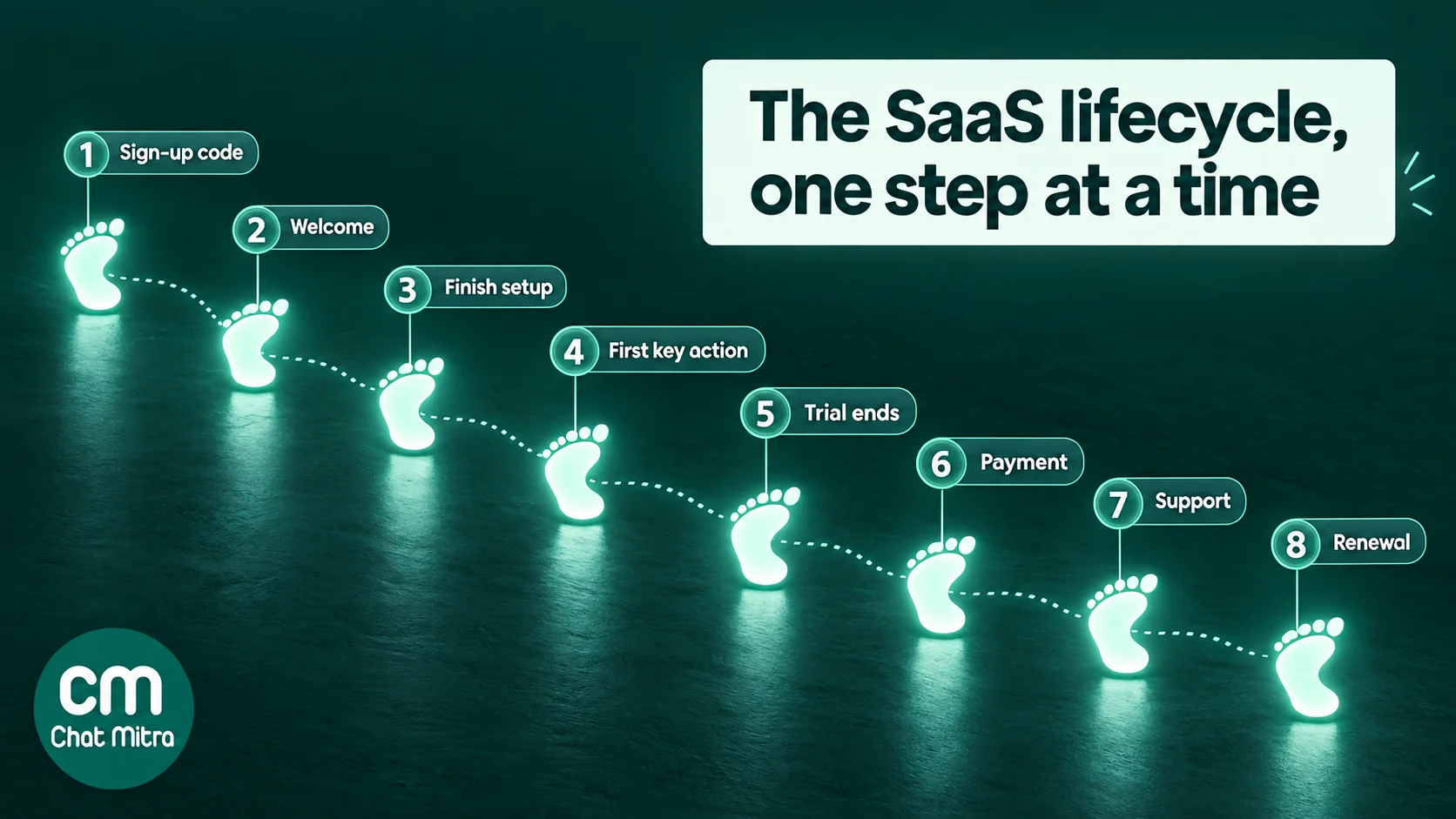
The SaaS lifecycle on WhatsApp at a glance
Here’s the whole lifecycle in one table. The category is our reading of Meta’s guidelines for the wording shown, and the cost is Meta’s India rate per delivered message from 1 October 2026:
Stage
Message
Trigger
Category
Meta cost (India)
Sign-up
Login or phone verification code
User requests a code
Authentication
₹0.115
Sign-up
Welcome and opt-in confirmation
Account created
Utility
₹0.115
Onboarding
"Finish setting up your workspace"
Setup step incomplete after a set time
Utility
₹0.115
Activation
Feature tip or "try this" nudge
Key action not taken
Marketing
₹0.8631
Activation
Offer of a setup call
User stuck or high-value account
Marketing
₹0.8631
Trial end
Neutral "your trial ends on…" notice
A few days before the end date
Utility
₹0.115
Trial end
Upgrade offer or discount
Trial ending, not converted
Marketing
₹0.8631
Billing
Upcoming charge, failed payment, usage limit
Billing or usage event
Utility
₹0.115
Support
Replies to the user's own message
User writes in
Service
First 1,000 a month free, then ₹0.115
Retention
Renewal push, win-back offer
Renewal due, cancelled or inactive
Marketing
₹0.8631
Each step of the lifecycle is a product event. WhatsApp earns its place at the steps where a quick action matters.
The category rule every SaaS team needs to know
Meta sorts every template into marketing, utility or authentication, and bills the category it decides, not the one you pick. For SaaS, three parts of Meta’s template categorization guidelines (updated 15 September 2026) do most of the work.
Account alerts can be utility. Meta’s utility objective for account alerts covers “important or time-sensitive updates or alerts or other information specific to purchased or subscribed products/services”. Its own examples read like SaaS messages: “Your monthly payment for {{service}} will be billed on {{date}} to the {{card}} you have saved on file”, “You only have {{number}} minutes remaining in your plan”, and “To finish setting up your {{new_profile}}, you need to upload a {{photo}}.”
But they must not sell. The same objective says these messages “should not promote, recommend, upsell, or cross-sell products; include offers; or attempt to secure renewals.” Meta’s retargeting example, “Your subscription will expire on {{date}}! Renew today to save {{discount}}”, is marketing.
Feature nudges are marketing. Meta’s App Promotion objective, “request customers to install or take a specific action with your app”, includes this example: “We noticed you have not used our {{latest_feature}}. Click below to learn more about how this benefits you!” That’s a typical SaaS activation nudge, and it’s marketing.
Two more rules matter. Mixed content is marketing: a payment receipt with “upgrade to annual and save 20%” at the bottom is a marketing template. And since April 2025, a template you submit as utility that Meta reads as marketing is simply approved as marketing. Our utility template guide covers the test in depth, and our guide to WhatsApp marketing templates covers the marketing side, including per-user limits.
The price gap is 7.5 times in India (₹0.8631 against ₹0.115), so a clean split between account messages and selling messages is the single biggest cost decision you’ll make.
Stage 1: Sign-up and verification
Verification codes need authentication templates. Meta says “only authentication templates can be used to send a one-time passcode for identity verification.” Those templates use fixed text (”is your verification code”) with a copy-code or one-tap autofill button. They’re ₹0.115 in India for an India-based business, and they’re delivered only to the user’s primary WhatsApp device.
Two consequences for SaaS:
No magic links. Meta’s guidelines say “URLs, media, and emojis are not allowed for authentication template content or parameters.” If your product logs people in with a link, keep that on email or SMS, or offer a WhatsApp code as an alternative.
A phone number isn’t an identity. Meta’s authentication best practices warn that “since phone numbers are recycled by mobile providers… a phone number and the WhatsApp account tied to that phone number should not be treated interchangeably.” For account recovery, add a second check.
Collect opt-in at sign-up. WhatsApp’s Business Messaging Policy (updated 23 September 2026) lets you message only people who gave you their number and opted in. Meta’s opt-in guidance suggests an opt-in “that encompasses the different categories of messages that you will send”, or “separate opt-in by specific message category”. For SaaS, two checkboxes work well: “Send account and billing updates on WhatsApp” and “Send product tips and offers on WhatsApp”. Store which one each user ticked and respect it. Our WhatsApp opt-in guide covers proof and India’s DPDP Act.
Then confirm. Meta’s utility guidelines include “Opt-In Management”: confirming an opt-in collected on another channel, such as your website. A short welcome that confirms the opt-in and the account is a natural first utility message:
Welcome to Acme Books, {{1}}! Your workspace “{{2}}” is ready. We’ll send account and billing updates here. Reply HELP anytime to reach our team.
Onboarding messages work when they’re tied to a setup step the user hasn’t finished, not to a calendar. Meta’s own utility example, “To finish setting up your {{new_profile}}, you need to upload a {{photo}}”, is the model: it names the incomplete step and links to it.
Hi {{1}}, your Acme Books workspace is almost ready. One step is left: connect your bank account to import transactions.
Button: URL “Finish setup”. Category: utility, as long as it doesn’t add “and check out our new reports module”.
Keep the rest of onboarding where it belongs. A seven-part tutorial series is email or in-app content. On WhatsApp, a tutorial message is marketing (App Promotion), costs 7.5 times more, and counts towards per-user limits.
Offer a human early. A quick-reply button such as “Get help with setup” turns the message into a conversation. When the user taps it, WhatsApp sends you their reply, which opens a 24-hour customer service window. Inside it, your team’s free-form replies are service messages: Meta gives each business phone number “one free tier of 1,000 delivered service messages per month” and charges ₹0.115 each after that in India (Meta, pricing). A five-minute chat at this stage often does more than any automated tip.
Stage 3: Activation
Activation is the first moment a user gets real value, such as sending a first invoice, inviting a teammate or publishing a first page. It’s where WhatsApp nudges are most tempting and most expensive, because nearly all of them are marketing.
Rules that keep activation nudges effective:
Trigger on behaviour, not time. “Signed up 2 days ago and hasn’t created an invoice” beats “day 2 message”.
One nudge per missing step, two at most per trial. WhatsApp limits how many marketing messages each person receives from all businesses, based partly on their “recent marketing message read rate”. A user who ignores three nudges may stop receiving your later, more important ones.
Lead with their outcome, not your feature. “Get paid faster: your first invoice takes 2 minutes” beats “Try our invoicing module”.
Make help the call to action. “Book a 15-minute setup call” or a “Show me how” quick reply often converts better than a link to docs, and the reply opens a service window.
{{1}}, you’re one step from your first invoice in Acme Books. Most customers send one in under 2 minutes. Want a hand?
Buttons: URL “Create invoice”, quick reply “Show me how”. Category: marketing. Check the “under 2 minutes” claim against your own data before you use it.
A good activation nudge names the one missing step and helps the user place it.
Stage 4: Trial end and conversion
The trial end is where the category line runs straight through your copy.
A neutral notice can be utility. Meta has no trial example, but a message that states the end date and what happens next reads as an account update:
Hi {{1}}, your Acme Books trial ends on {{2}}. After that your workspace becomes read-only until a plan is chosen. Your data stays safe.
Button: URL “View plans”. Category: likely utility. A “View plans” button is a plain link to the information the notice refers to; if Meta reads it as a sales push, it will approve the template as marketing.
An upgrade push is marketing. Meta’s sales objective covers content “intended to drive sales or renewals”, so a discount, “upgrade today” or “don’t lose your work, upgrade now” is marketing:
{{1}}, your trial ends in 2 days. Upgrade to Pro before {{2}} and get your first 2 months at 20% off.
Category: marketing. Send it once, to users who were active in the trial, not to everyone who signed up.
The Growth Unhinged survey also found that trials requiring a credit card convert at 30% against much lower rates without one, which shows how much the decision moment matters. On WhatsApp, the best move is often to send the neutral notice to all active trial users and the offer only to engaged ones.
Stage 5: Billing and dunning
Billing messages are where WhatsApp is most clearly useful and most clearly utility. Meta’s own example is a SaaS-style payment reminder: “Your monthly payment for {{service}} will be billed on {{date}} to the {{card}} you have saved on file.”
Useful billing messages:
Upcoming charge: amount, date and card, three days before renewal.
Failed payment: what failed, what happens next and a link to update the card.
Usage limit: “You’ve used 90% of your monthly credits”, in the spirit of Meta’s “minutes remaining in your plan” example.
Invoice: a document header carrying the PDF.
Hi {{1}}, we couldn’t charge your card ending {{2}} for your Acme Books plan on {{3}}. Please update your payment method by {{4}} to keep your account active.
Button: URL “Update card”. Category: utility. Leave out “switch to annual and save”, because that makes it marketing.
Failed-payment messages deserve care: be specific, give a deadline, and send one reminder before the deadline. Our payment reminder and payment link guides have more wording, and the price increase letter guide covers notifying customers about plan changes.
Stage 6: Support and success
Support is where WhatsApp’s conversational nature pays off. Once a user writes to you, you have 24 hours to reply freely, and every new message from the user restarts the timer.
Meta’s policy allows automation inside that window but requires “prompt, clear, and direct escalation paths”. These include an in-chat human agent, a phone number, email, web support or a support form. A bot that answers “how do I export my data?” is fine. A bot that traps a user who needs a refund is not.
Good practice for SaaS support on WhatsApp:
Route by intent: quick-reply buttons such as “Billing”, “Technical issue” and “Talk to a person”.
Answer common questions automatically, and hand anything account-specific to a person.
Close the loop: after a ticket is solved, ask for feedback about that ticket. Meta lets a specific feedback survey be utility, but “a general/generic survey… will not be approved as utility.”
Churn rarely starts at cancellation. It starts when usage drops. WhatsApp can help at three points, all of them marketing in Meta’s terms when they try to keep the customer:
Usage dip: “Your team hasn’t logged in for 14 days. Anything blocking you?” with a “Talk to us” quick reply. Asking what’s wrong often beats offering a discount.
Renewal: a reminder with a reason to stay, such as what they achieved this year. A plain notice of the renewal date and amount, with no offer, stays utility.
Win-back: after cancellation, one message with a genuine reason to return, such as a feature they asked for that now exists.
Hi {{1}}, you asked us for {{2}} when you left Acme Books. It’s live now. Want us to restore your old workspace so you can try it?
A cancellation survey about the user’s own subscription can be utility if it’s specific and contains no offer. Keep the offer for a separate message.
Retention is steady care: a question when usage dips is worth more than a discount after cancellation.
How to trigger lifecycle messages from your product
The principle: your product decides who gets which message, and when; your WhatsApp platform sends it. Your app already knows who signed up, who finished setup and whose payment failed. Don’t try to rebuild that logic in a messaging tool.
A typical setup looks like this:
Create and approve templates for each lifecycle message, with the category you expect. Approval can take up to 24 hours.
Store the user’s WhatsApp number and opt-in choices in your database, in international format.
Emit an event from your backend when something happens, such as trial_ending or payment_failed, with the user’s details.
Send the template for that event through your WhatsApp provider’s API.
Record what happened using delivery and reply webhooks, so your product knows a message failed or a user replied.
In ChatMitra there are two ways to do step 4:
Developer API (Pro and Enterprise plans). Your backend calls POST /developer/api/send_message with your API key, the recipient’s number and the template name, language and variables. Header images and documents go in as public HTTPS links. Add an idempotency key so a retried request doesn’t send twice. ChatMitra’s API rejects some characters in template variables, including #, _ and *, so send human-readable values (“Pro annual”, not “pro_annual”). See webhooks and API integration.
Google Sheets automation workflows. A workflow can start from an Incoming Webhook: your backend posts the event to the workflow’s URL with its secret. The workflow can then send a template, add a tag, update a contact field or wait with a Delay step before the next message. See Google Sheets automation.
For step 5, ChatMitra’s outbound webhooks send message.sent, message.failed and message.received events to your server. Quick-reply taps arrive as replies and can trigger ChatMitra keyword rules, which can send a response and add a tag, for example tagging users who tapped “Talk to sales”.
Know the limits before you design the flow:
ChatMitra’s API sends messages; it doesn’t create or update contacts, tags or fields on its own. A contact is created with name and number the first time you message them.
The automation module’s “days before or after a date” triggers match day and month, so they repeat every year. That suits birthdays and anniversaries, not a one-off trial end date. Trigger trial-end messages from your product instead.
ChatMitra’s team inbox supports multiple agents, tags and notes, but not automatic assignment or round-robin routing.
Website chat is through wa.me links and QR codes, not an embedded widget.
What it costs: a worked example
Say an India-based SaaS company gets 1,000 trial sign-ups a month, all opted in to WhatsApp, and sends this sequence. Each message goes out on a different day, nobody replies, and every message is delivered:
Message
Category
Recipients
Meta cost
ChatMitra fee (₹0.20 per conversation)
Welcome and opt-in confirmation
Utility
1,000
₹115.00
₹200
Finish-setup reminder
Utility
500
₹57.50
₹100
Activation nudge
Marketing
600
₹517.86
₹120
Trial-ending notice
Utility
1,000
₹115.00
₹200
Upgrade offer to active, unconverted users
Marketing
400
₹345.24
₹80
Total
3,500 messages
₹1,150.60
₹700
That’s about ₹1,850 a month, or ₹1.85 per trial user, on ChatMitra’s Starter or Pro plan. On Enterprise there’s no ChatMitra fee per conversation (see pricing). Meta’s charges are billed by Meta directly. Two things change the numbers:
The marketing messages are 75% of the Meta bill while being only 29% of the messages. Every nudge you cut or turn into a utility account message saves far more than trimming a utility message.
If the user replies, the follow-up conversation adds service messages (free up to 1,000 a month per number), and messages inside the same 24-hour conversation share one ChatMitra fee.
How to measure whether it works
Read rates tell you little. The question is whether WhatsApp changed what users did.
Use a holdout. Randomly keep 10–20% of eligible users out of a WhatsApp message and compare activation or conversion between the two groups. That’s the only clean way to measure lift.
Track the next action, not the message. For a setup reminder, measure setup completion within 48 hours. For a failed-payment alert, measure recovered payments.
Tag your links. ChatMitra’s campaign reports show sent, delivered, read and failed counts but not button clicks, so add UTM parameters to URL buttons and read them in your product analytics.
Watch the cost side: blocks, 131049 per-user limit failures and opt-outs. If they rise, you’re sending too much marketing. Our WhatsApp API errors guide explains each code.
Common mistakes SaaS teams make on WhatsApp
Porting the email drip. Twelve WhatsApp messages in 14 days is spam, however useful each one is.
Hiding upsells in account messages. It makes them marketing, multiplies the cost by 7.5 and risks Meta restricting your utility templates.
Messaging users who didn’t opt in. Collect a specific WhatsApp opt-in at sign-up and store it.
Treating the phone number as identity. Numbers get recycled, so add a second factor for account recovery.
No way to reach a human. Meta’s policy requires escalation paths, and stuck users churn.
Measuring opens instead of outcomes. Use a holdout group.
Launch checklist
Each message maps to a product event and one next step.
Account, billing and setup templates contain no offers, so they stay utility.
Login codes use authentication templates, with no links.
Activation and upgrade nudges are limited to one or two per trial.
The sign-up form collects WhatsApp opt-in, ideally per message type, and you store it.
Every message offers a reply path to a person.
Templates are approved before launch, with realistic sample values.
Your backend sends with idempotency keys and listens for delivery and reply webhooks.
A holdout group is in place to measure lift.
You’ve estimated monthly cost by category.
WhatsApp won’t fix a product that doesn’t deliver value, but it can get more of your trial users to the moment where they see it. Send a few well-timed, useful messages from real product events, and keep a person within reach.
Clear answers
Frequently Asked Questions
Across the customer lifecycle: login verification codes, a welcome and setup message after sign-up, nudges toward the first key action, a notice before the trial ends, payment reminders and failed-payment alerts, support conversations, and win-back offers after cancellation. Each message should follow an event in your product and give the user one clear next step.
It depends on the wording. Meta doesn't give a trial example, but a neutral notice of the end date and what happens next reads as an account update, which can be utility. As soon as it pushes the user to upgrade, offers a discount or tries to secure the sale, it's marketing, because Meta counts content that drives sales or renewals as marketing.
Not in an authentication template. Meta says only authentication templates may carry one-time passcodes, and that 'URLs, media, and emojis are not allowed' in authentication template content or parameters. Use a numeric code with a copy-code or one-tap button. A login link sent in a utility or marketing template would be the wrong category.
No. Meta lists 'We noticed you have not used our {{latest_feature}}. Click below to learn more' as an example of its App Promotion objective, which is marketing. Feature tips, tutorials and 'try this' nudges are marketing templates and count towards WhatsApp's per-user marketing limits.
Meta charges per delivered template: ₹0.115 for utility and authentication and ₹0.8631 for marketing (rate card from 1 October 2026). Replies inside a 24-hour customer service window are service messages, free for the first 1,000 a month per number and then ₹0.115. ChatMitra adds ₹0.20 per 24-hour conversation on Starter and Pro, and nothing on Enterprise.
Yes. WhatsApp's Business Messaging Policy requires that people gave you their number and opted in to receive your messages. Meta recommends an opt-in that covers the kinds of messages you'll send, such as account updates and offers, or separate opt-ins per category. A WhatsApp checkbox on your sign-up form is the simplest place to collect it.
Yes, in two ways. On the Pro and Enterprise plans, your backend can call ChatMitra's developer API to send an approved template the moment an event happens. Or a ChatMitra Google Sheets automation workflow can start from an Incoming Webhook, wait with a Delay step and send a template. Your product decides who gets which message; ChatMitra sends it.
No. Use WhatsApp for short, time-sensitive messages that need an action, and keep email for long guides, receipts people file, and anything a user may want to search later. A good sequence uses each channel for what it does best, and sends far fewer WhatsApp messages than emails.
Nirav Chauhan
ChatMitra
Nirav Chauhan writes for the ChatMitra blog about the WhatsApp Business API.