WhatsApp Link Generator
Create custom WhatsApp chat links instantly to connect with your audience effortlessly.
Instant Link Creation
Generate shareable WhatsApp links in seconds.
Mobile Optimized
Preview your chat on a realistic mobile interface.
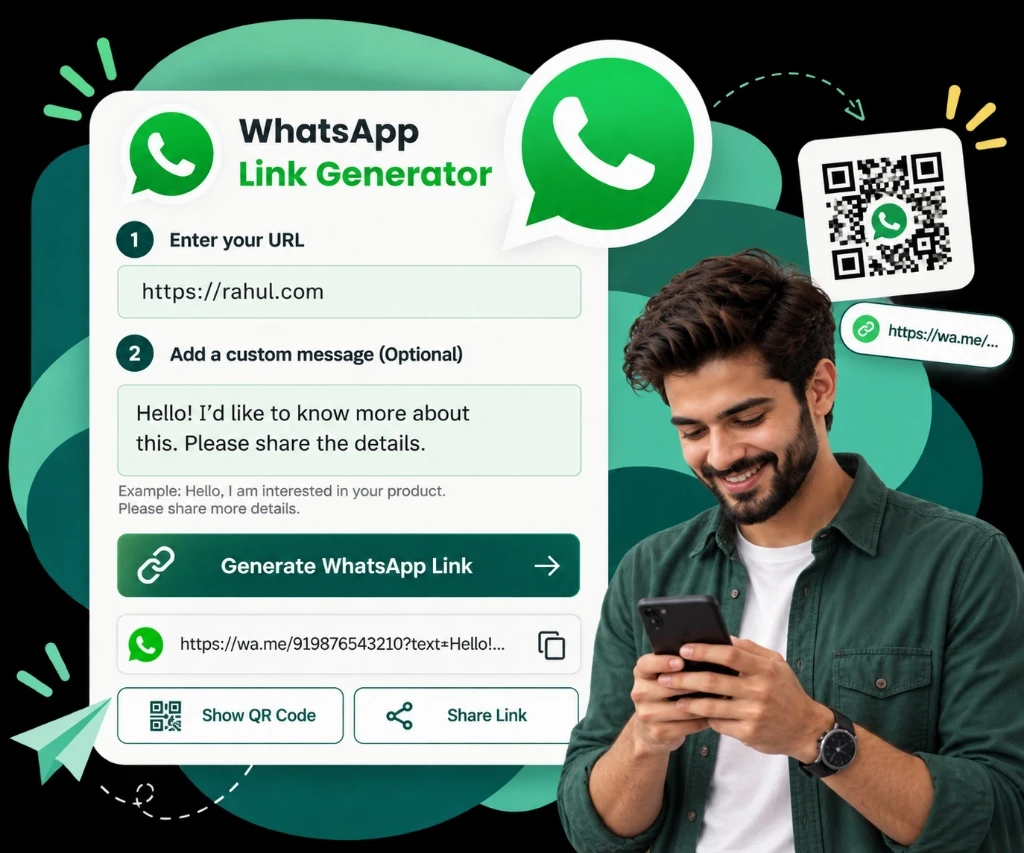
Generate Your WhatsApp Chat Link
Connect with your customers instantly—no contact saving required!
What is a WhatsApp Link?
A WhatsApp link is a clickable URL that lets anyone start a chat with a specific phone number without saving it first. You can even include a pre-filled message to make communication smoother and faster.
Perfect for businesses, influencers, or anyone looking to connect instantly with their audience via WhatsApp.
How a WhatsApp click-to-chat link is built
The generator above writes this for you, but the format is short enough to type by hand once you know the rules. A click-to-chat link is just a URL with your number in it:
https://wa.me/919876543210The number
Use the full international number: country code first, digits only. Drop the +, and drop any spaces, dashes or brackets. A leading zero from the local format is removed too — +91 98765 43210 becomes 919876543210.
The pre-filled message
Add a text parameter and WhatsApp opens with that message already typed, ready for the person to send:
https://wa.me/919876543210?text=Hi%2C%20I%27d%20like%20a%20quoteWhy the message looks like that
Everything after text= has to be URL-encoded, because a URL cannot carry raw spaces or punctuation. A space becomes %20, a comma becomes %2C, and an apostrophe becomes %27. The generator above does this encoding for you.
Putting it in a button
On a web page the link is an ordinary anchor, so it can be styled like any other button:
<a href="https://wa.me/919876543210?text=Hi%2C%20I%27d%20like%20a%20quote">
  Chat with us on WhatsApp
</a>
For the longer reference — including the api.whatsapp.com form and where message links fit alongside QR codes — read the full message-link reference.
Benefits of Using WhatsApp Links
Boost Engagement
Offer a direct line to your customers for quick queries.
Increase Sales
Turn website visitors into leads with a simple click-to-chat option.
Simplify Communication
No need to save contacts—just click and chat.
Enhance Marketing
Add links to social media, emails, or offline materials.
How to Use Your WhatsApp Link?
Once you generate your custom WhatsApp link, here's how you can share it:
A chat button on your website
Wrap the link in a "Chat with us" button so visitors can ask a question without filling in a form.
Your social media bio
Instagram, Facebook, YouTube and X all allow one link in the profile. A chat link turns that slot into a conversation.
Printed and in-store material
Business cards, flyers, packaging inserts and counter signage — anywhere a customer is holding something physical.
Ads and email campaigns
Use the link as the destination of an ad or the call to action in an email, with a pre-filled message naming the offer.
Going on something printed? A link nobody can tap needs a scannable version — make one with the free WhatsApp QR generator.
Put your WhatsApp link on your Google Business Profile
For a lot of local businesses, the Google Business Profile is where people actually arrive — the panel that shows up in Search and Maps, long before anyone reaches the website. A click-to-chat link belongs there.
Sign in to the Google account that manages the listing, then open the profile from Google Search or Maps and choose Edit profile. Three fields are worth your link:
- The bookings or appointments link. This is the closest match to what a chat link does — it gives people a way to start a conversation rather than fill in a form.
- The website field, if you do not have a website. A WhatsApp link is a better destination than nothing, and it goes somewhere you already answer.
- A Google Post. Posts accept a link and a short piece of text, so an offer post can send people straight into a chat about that offer.
Two things to expect. Your business description will not turn a URL into a clickable link, so putting it there does nothing — use the link fields instead. And Google reviews profile edits, so a new link may take a little while to appear publicly.
Your link isn’t working? Five things to check
Almost every broken click-to-chat link comes down to one of these, in roughly this order.
1. The country code is missing
This is the most common one.
wa.me/9876543210is not a valid destination;wa.me/919876543210is. If your local format starts with a zero, that zero is dropped when the country code goes on.2. There are symbols in the number
A
+, a space, a dash or brackets will break the link. Only digits belong afterwa.me/.3. The number is not on WhatsApp
The link only opens a chat with a number that is actually registered on WhatsApp or WhatsApp Business. A correct link to an unregistered number will tell you the number is invalid — the link is fine, the account is missing.
4. The pre-filled message was not encoded
If you typed the
textvalue by hand, characters like&and#cut the message short or break the URL entirely. Generate the link above instead of hand-writing the message.5. You are testing it in the wrong place
Tapping your own link on the phone that owns the number will not open a normal chat with yourself. Links opened inside an app’s built-in browser can also fail to hand over to WhatsApp — choose “Open in browser” and try again. Test from a second device before assuming the link is broken.
Once the chats start arriving
A click-to-chat link is the easy half. The harder half is what happens after someone taps it — replying quickly, following up without doing it by hand, and keeping that up as the volume grows.
- Send the same update to a list of customers instead of one chat at a time with WhatsApp broadcasting.
- Reuse approved copy for order updates, reminders and offers with WhatsApp message templates.
- Answer first messages automatically, even outside working hours, with auto-reply.
All three need the WhatsApp Business API rather than the free app. See Chat Mitra pricing for what that costs, or work out your own numbers with the pricing calculator.
Frequently Asked Questions
What is a WhatsApp Link?
A WhatsApp Link is a clickable URL that lets anyone start a chat with your phone number on WhatsApp without needing to save it first. It's perfect for businesses, influencers, or individuals looking to simplify communication and connect instantly with their audience.
How do I create a WhatsApp Link?
Creating a WhatsApp Link is simple! Use the format 'https://wa.me/{YourPhoneNumber}' or try our Free WhatsApp Link Generator. Just enter your phone number with the country code and an optional message, then click 'Generate'—your link is ready to share!
Can I customize the message in a WhatsApp Link?
Absolutely! You can add a pre-filled message to your WhatsApp Link by including a 'text' parameter, like 'https://wa.me/{YourPhoneNumber}?text=Hi%20I'd%20like%20to%20learn%20more'. Use our generator to customize it easily.
How can I use a WhatsApp Link for marketing?
Embed your WhatsApp Link in social media bios, website buttons, email campaigns, or ads to drive instant engagement. It's a frictionless way to turn curious visitors into leads by letting them message you directly on WhatsApp.
Is the WhatsApp Link Generator free to use?
Yes, our WhatsApp Link Generator is 100% free! There are no hidden fees—just enter your details, generate your link, and start connecting with your audience right away.
How does a WhatsApp Link improve customer support?
A WhatsApp Link lets customers reach you instantly for real time support. Add it to your website or product pages, and you'll reduce response times, increase satisfaction, and build stronger relationships with your audience.
Can I track clicks on my WhatsApp Link?
Yes! Add UTM parameters (e.g., 'https://wa.me/{YourPhoneNumber}?utm_source=website') or use link tracking tools like Bitly to monitor clicks and measure the success of your campaigns.
What's the difference between a WhatsApp Link and a QR code?
A WhatsApp Link is a URL you can share digitally, while a QR code is a scannable image for offline use. Our generator offers both—create a link for online sharing or a QR code for business cards and flyers.
How do I add a WhatsApp Link to social media?
Copy your generated WhatsApp Link and paste it into your Instagram bio, Facebook 'Contact Us' section, or Twitter profile. Pair it with a call-to-action like 'Message us on WhatsApp!' to boost engagement.
Can I change or delete a WhatsApp Link?
You can't 'delete' a WhatsApp Link once shared, but you can stop using it and create a new one with a different message or number. Simply generate a fresh link whenever you need an update.
Why should I use a WhatsApp Link Generator instead of manually creating one?
Our generator saves time, ensures accuracy, and lets you preview your link and message instantly. Plus, it offers extras like QR code generation—features you won't get from manual URL crafting.
How can a WhatsApp Link boost my sales?
By adding a WhatsApp Link to your website or ads, you capture leads faster with a click-to-chat option. It turns browsing visitors into conversations, helping you close sales more effectively than traditional forms.
Does this work with a WhatsApp Business account, or only a personal number?
Both. A click-to-chat link points at a phone number, not at an app, so the format is identical whether that number is registered on WhatsApp, on WhatsApp Business, or on the WhatsApp Business API. Whichever app answers that number is the one the chat opens in — you do not need a different link for a business account.
Is wa.me the official WhatsApp link format?
Yes. wa.me is WhatsApp's own short domain, and click-to-chat is a documented WhatsApp feature described in their Help Centre — it is not a third-party redirect or a workaround. The longer api.whatsapp.com/send form is the same feature written out in full, and both are maintained by WhatsApp.
Book a One-to-One Meeting With Our Product Expert
Have questions? We've got answers. Connect with our product expert for a personalized demo and discover the best WhatsApp Business setup for your business.
Book a Free Demo