Quick Answer: Tags in ChatMitra help you organize and segment contacts for targeted messaging. Create tags in the Manager section, apply them during import or manually, then use Manage Tags to bulk update multiple contacts at once.
What is Tag Management in ChatMitra?
Tag management is the process of organizing and categorizing your contacts using labels or tags. In ChatMitra, these tags act as descriptors that help identify key characteristics such as customer interests, engagement level, and more, allowing you to segment your audience efficiently.
Whether you are handling a small list or a vast customer database, an effective tag management system is essential to ensure your communication is tailored and relevant.
The Importance of a Robust Tag Management System
A powerful tag management system offers several key benefits:
Enhanced Segmentation
Tags allow you to break down your audience into targeted segments based on demographics, interests, and behavior. This segmentation helps in delivering personalized messages.
Improved Personalization
With specific tags, you can craft messages that resonate more closely with each segment, improving engagement and conversion rates.
Efficient Campaign Management
Quickly filter and update large groups of contacts to match your current marketing strategy, saving valuable time and resources.
Data Consistency
Standardized tags ensure that every team member interprets the data similarly, reducing the chance of errors and miscommunication.
Real-Time Updates
When tags are updated, these changes are reflected instantly across all parts of the platform, ensuring that your data is always current.
In today's competitive market, a robust tag management system is crucial for optimizing your CRM and delivering tailored marketing messages that drive results.
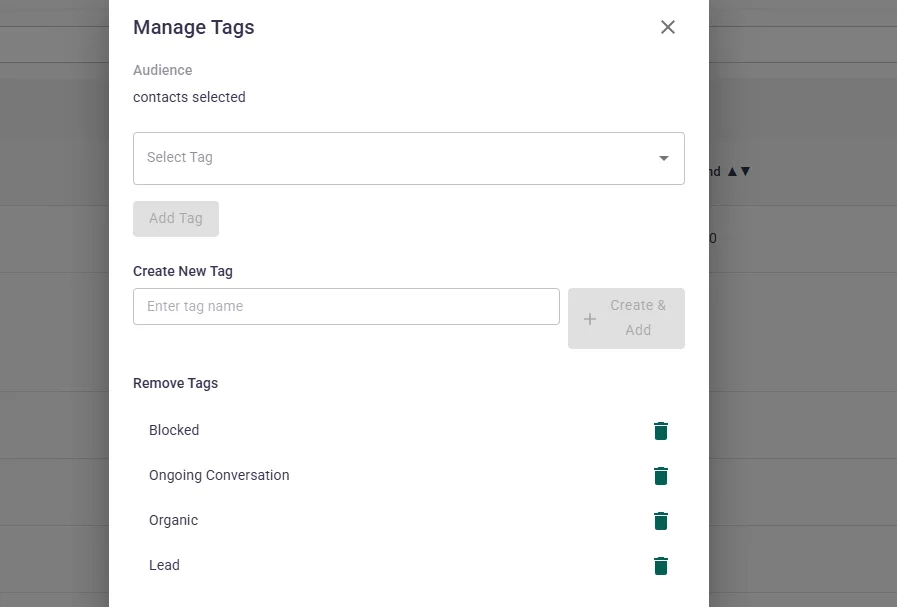
How to Update Tags for Multiple Contacts at Once
ChatMitra's Manage Tags feature simplifies updating tags across groups of contacts. Follow these steps for a seamless process:
Filter Your Contacts
Use the filtering options to segment your contacts by specific parameters such as location, purchase history, or engagement.
Select Contacts
Select the contacts you wish to update using the checkboxes next to each contact.
Open Manage Tags
Click the Manage Tags button to open the management panel where you will see options for both adding and removing tags.
Add or Remove Tags
To add a tag, click Add Tag, choose the appropriate tag from the dropdown menu, and confirm. Similarly, remove tags using the Remove Tag option.
Real-Time Updates: Keeping Your Data Consistent
One of the standout advantages of ChatMitra's tag management system is its ability to update changes instantly. Any tag modifications made via the Manage Tags feature are synchronized in real-time across all associated pages and user profiles.
This immediate update ensures that your entire team has access to the most current and accurate information, which is vital for informed decision-making and targeted marketing.
Benefits of an Efficient Tag Management System
An organized tag management system can transform your business operations. Here are some key benefits:
Targeted Communication
Send personalized messages to segmented groups, ensuring higher engagement and improved ROI.
Streamlined Workflows
Quickly update tags for large groups of contacts, reducing manual errors and saving time.
Enhanced Reporting
Accurate tag data improves segmentation analytics, allowing you to better assess campaign performance.
Flexibility and Adaptability
Easily adjust your tag strategy as your business evolves, keeping your CRM up-to-date with your marketing goals.
Consistency Across Teams
Maintain a standardized tag system so that all departments have a unified approach to customer segmentation.
These benefits not only enhance your marketing efforts but also lead to better customer engagement and long-term business growth.
Take Control of Your Contact Data
Streamline your marketing efforts and improve engagement with ChatMitra's advanced tag management system.
Sign Up Today