Quick Answer: Effective audience segmentation in ChatMitra uses three-tier filtering: Basic (demographics, engagement), Advanced (custom attributes, behavior), and Smart Combinations (time-based, multi-criteria). This precision targeting can increase open rates by 25% and conversions by 40%.
Advanced Audience Segmentation Techniques
Effective audience filtering is crucial for successful WhatsApp marketing campaigns. Our platform offers three-tier segmentation to help you reach the right users with the right message at the right time.
1. Basic Filters
- Demographic data (Name, Phone Number)
- Engagement history (Last Seen, First Interaction)
- System status (Closed Conversations, Pending Requests)
2. Advanced Filters
- Custom attributes (User-generated data points)
- Campaign participation history
- Behavioral tags (Specific user interactions)
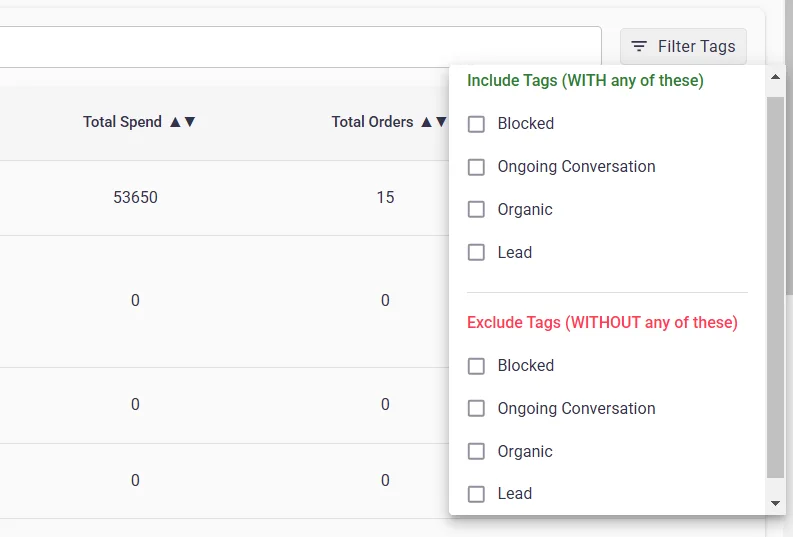
Advanced Filter Combinations Interface
Smart Filter Combinations for Precision Targeting
Combine different filter types to create highly targeted audience segments that drive better campaign results:
| Filter Type | Use Case | Delivery Impact |
|---|---|---|
| Temporal Filters | Time-sensitive offers | +25% Open Rate |
| Behavioral Tags | Cart abandonment | +40% Conversion |
| Demographic Filters | Location-based campaigns | +30% Relevance |
| Custom Attributes | Personalized offers | +35% Engagement |
Rich Media Broadcast Best Practices
Understanding the difference between message types helps you choose the right format for your campaigns:
Template Messages
- Approved by WhatsApp
- Supports CTA buttons
- 24+ hour window
- Ideal for promotions
Regular Messages
- Immediate responses
- Free-form content
- 24-hour window
- Great for support
Broadcast Delivery Optimization
Our delivery system ensures maximum reach through intelligent mechanisms:
- Automatic rate limiting - Prevents overwhelming recipients and maintains quality
- Smart retry mechanisms - Automatically retries failed deliveries with optimized timing
- Real-time delivery analytics - Track success rates and adjust strategies instantly
Pro Tip: Always A/B test your filters with sample groups before full deployment. Use our campaign preview feature to estimate reach and compliance.
Segmentation Best Practices Summary
Start Simple
Begin with basic filters and gradually incorporate advanced segmentation as you understand your audience better.
Test and Iterate
Use A/B testing to compare different segment strategies and refine your approach based on performance data.
Monitor Compliance
Ensure all segments respect user opt-in preferences and WhatsApp's Commerce Policy guidelines.
Document Your Strategy
Save successful filter combinations as profiles for consistent future campaigns.
Ready to Boost Your Engagement?
Start creating targeted campaigns with our advanced filtering system today.
Launch Campaign Now