If a partner has offered to “get you verified faster” for WhatsApp, they’re likely talking about PLBV. The idea is simple once you see who’s driving it: instead of you submitting everything to Meta, ChatMitra reviews your business and submits it for you.
What PLBV checks before we submit
PLBV isn’t a shortcut around the rules — it’s a smoother way to meet them. Before we send your business to Meta, ChatMitra has to confirm four things:
- Your business is a real, legal entity.
- The person asking is genuinely a representative of that business.
- Your business follows WhatsApp’s Business Policy.
- The documents you give us are valid and truly belong to the business.
Only when all four check out do we submit your business to Meta. If anything’s missing, we’ll tell you — and if PLBV is declined, you can still use the classic flow through Meta Business Suite.
Good to know: PLBV is not available for government agencies. You also need a ChatMitra account with a verified email owned by the business, and you can make at most 3 PLBV attempts before you’ll have to switch to classic verification.
Before you start
A few requirements smooth the whole thing out:
- Only business documents are accepted — personal IDs will be rejected.
- Every detail in your documents must exactly match what’s in your Meta Business Portfolio.
- Don’t run two verifications at once. If a classic verification is already in progress, wait at least 3 days — running both together causes delays.
Two ways to start PLBV
You can begin PLBV in one of two ways. Pick whichever fits where you are in setup.
Path 1: PLBV using Embedded Signup
This path fits people setting up their WhatsApp account for the first time.
Launch the Embedded Signup to create your WhatsApp Business Account and register a phone number.
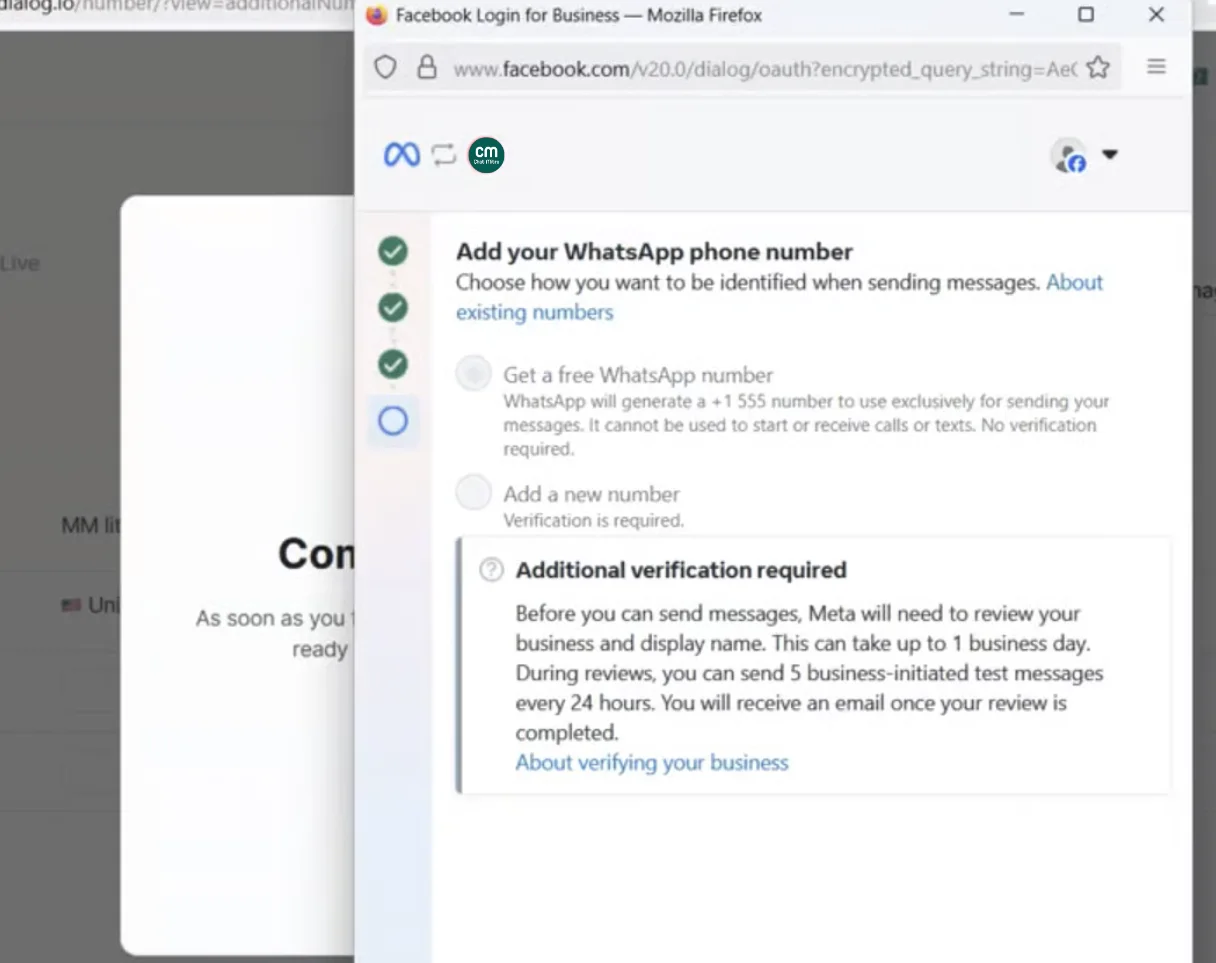
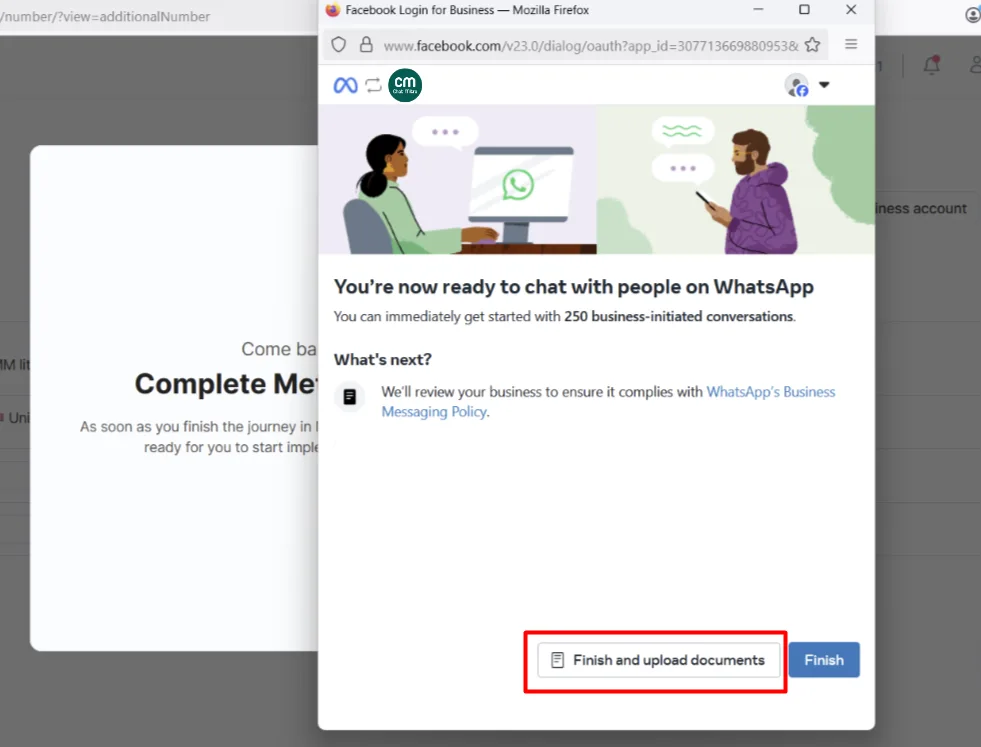
After your number is verified by OTP, click “Finish and upload documents.”
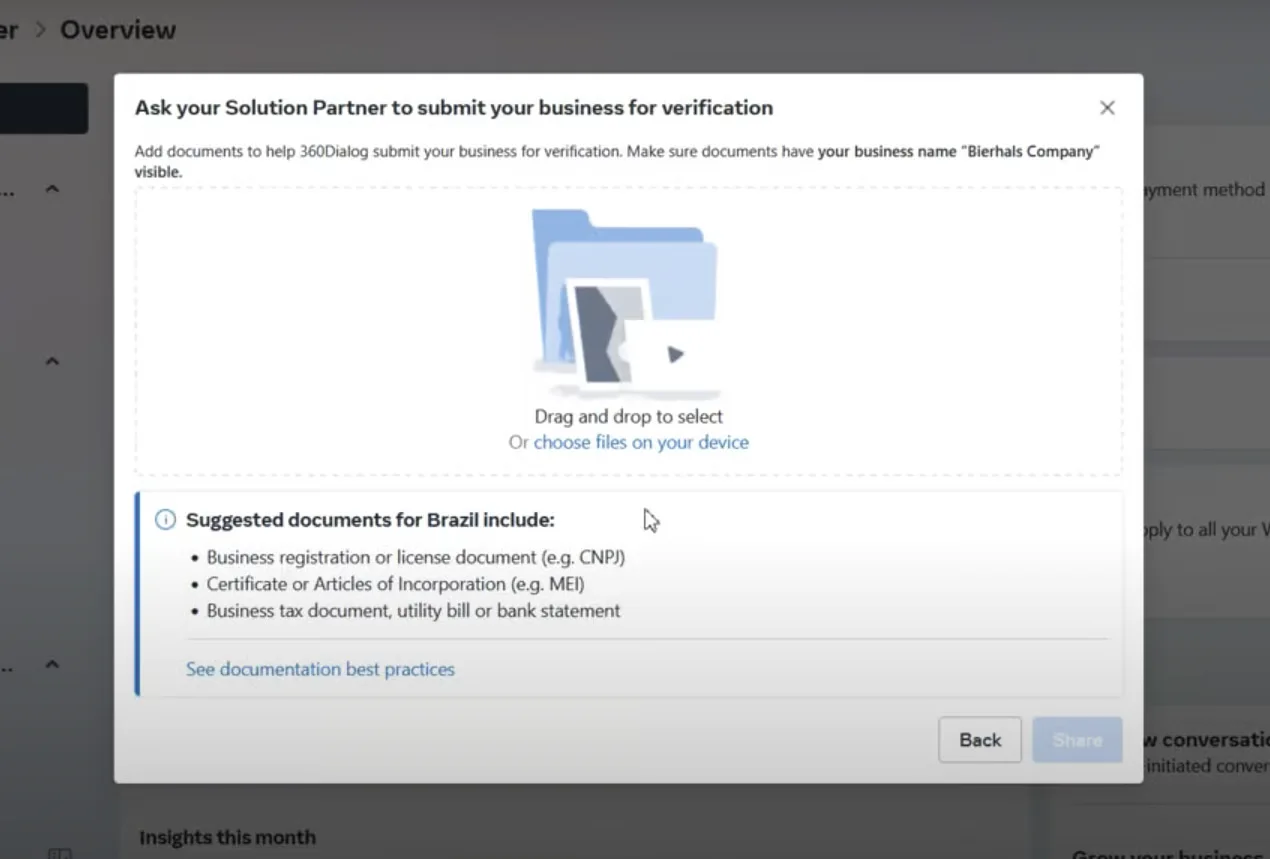
Upload your documents as PDF files.
Message our support team and ask for PLBV. Once your documents are uploaded, start a chat with ChatMitra support, request PLBV, and send us:
- Your Meta Business Portfolio ID, or the phone number you registered.
- Your full company legal name, registered address and company number.
- The account owner’s name and role at the company.
- Confirmation that this person represents the business.
- Confirmation that you follow WhatsApp’s Business Policy.
- A link to your business website.
We review your request. If everything meets the requirements, we submit your business to Meta. If not, the PLBV request is declined and we tell you why.
Meta gives an outcome — usually within 48 hours. Meta reviews your business, your details and the documents you uploaded, then decides.
Path 2: PLBV using support
If you’re already set up, a business admin can simply ask us to start PLBV anytime.
Your WhatsApp Business Account must be active — disabled or blocked accounts aren’t eligible — and you need at least one asset shared with us, such as a registered phone number.
Contact support. A business admin or representative reaches us in one of two ways:
- Chat widget — log in to the ChatMitra Hub and start a new support chat asking for PLBV.
- Email — write to our PLBV support address.
Send us your information. Request PLBV and provide:
- Your Meta Business Portfolio ID, or the registered phone number.
- Your full company legal name, registered address and company number.
- The account owner’s name and role.
- Confirmation that this person represents the business.
- Confirmation that you follow WhatsApp’s Business Policy.
- A link to your business website.
- A PDF proving your business is a valid legal entity, such as a registration or incorporation certificate.
We review your request and, if it meets the requirements, submit your business to Meta. If not, it’s declined.
Meta gives an outcome — usually within 48 hours.
Get your Business Info right first
Most PLBV delays come down to mismatched details. Before you start, open Meta Business Suite → Settings → Business Info and make sure:
- Every field is filled in. Incomplete information leads to rejection or delays.
- Your legal business name matches your documents exactly.
- Your business website is live and working.
If anything looks off, we may ask for a screenshot of your Business Info section to double-check.
What the outcome looks like
Meta usually decides in under 48 hours. Remember that Meta makes the final call — us submitting your business doesn’t guarantee approval. Our support team shares the result in your open support case.
When it’s approved, your webhook gets a phone_number_quality_changed event, and you’ll see:
- Your daily messaging limit raised to 2,000 messages a day.
- Your display name becoming visible after review.
Troubleshooting
A few common snags and how to clear them:
- Mismatch detected / request declined — make sure your Business Manager and account data exactly match your documents (legal name, address, registration or VAT number).
- Account restricted or disabled — fix that status first; restricted accounts aren’t eligible for PLBV.
- Not enough proof of activity — send a recent document, issued within the last 60 days.
- No webhook received — check that your webhook endpoint is reachable and subscribed, then review your delivery logs.
- “Verified” not showing in Business Info — that’s expected. Check the “WhatsApp accounts” section in your Business Portfolio for the accurate status instead.
If something stays stuck, start a support chat and ask for a PLBV specialist.
