Every time an app texts you a code to log in, that’s an OTP — a one-time password. On WhatsApp, codes like these travel as authentication messages: short, time-limited codes that let a customer prove who they are when logging in, signing up, confirming a payment or resetting a password.
These messages are deliberately plain — no offers, no images, no extra text. Just the code and a short safety note.
Requirements
Authentication templates aren’t switched on for brand-new accounts. To unlock them, your business needs to satisfy two conditions:
- Complete a scaling path. You must successfully finish one of Meta’s scaling paths — its process for proving your account is established and trusted.
- Hit the messaging limit. Your WhatsApp Business Accounts (WABAs) need a minimum daily messaging limit of 2,000 business-initiated conversations.
Once both are true, authentication templates become available to you.
Formatting
An authentication template is built from a few fixed parts so the code always looks the same and stays safe:
- A body that carries the verification code.
- An optional security recommendation — the line “For your security, do not share this code.”
- An optional expiry note — “This code expires in N minutes.”
You don’t write free-form text. You fill in the code value and the few options above, and Meta assembles the message.
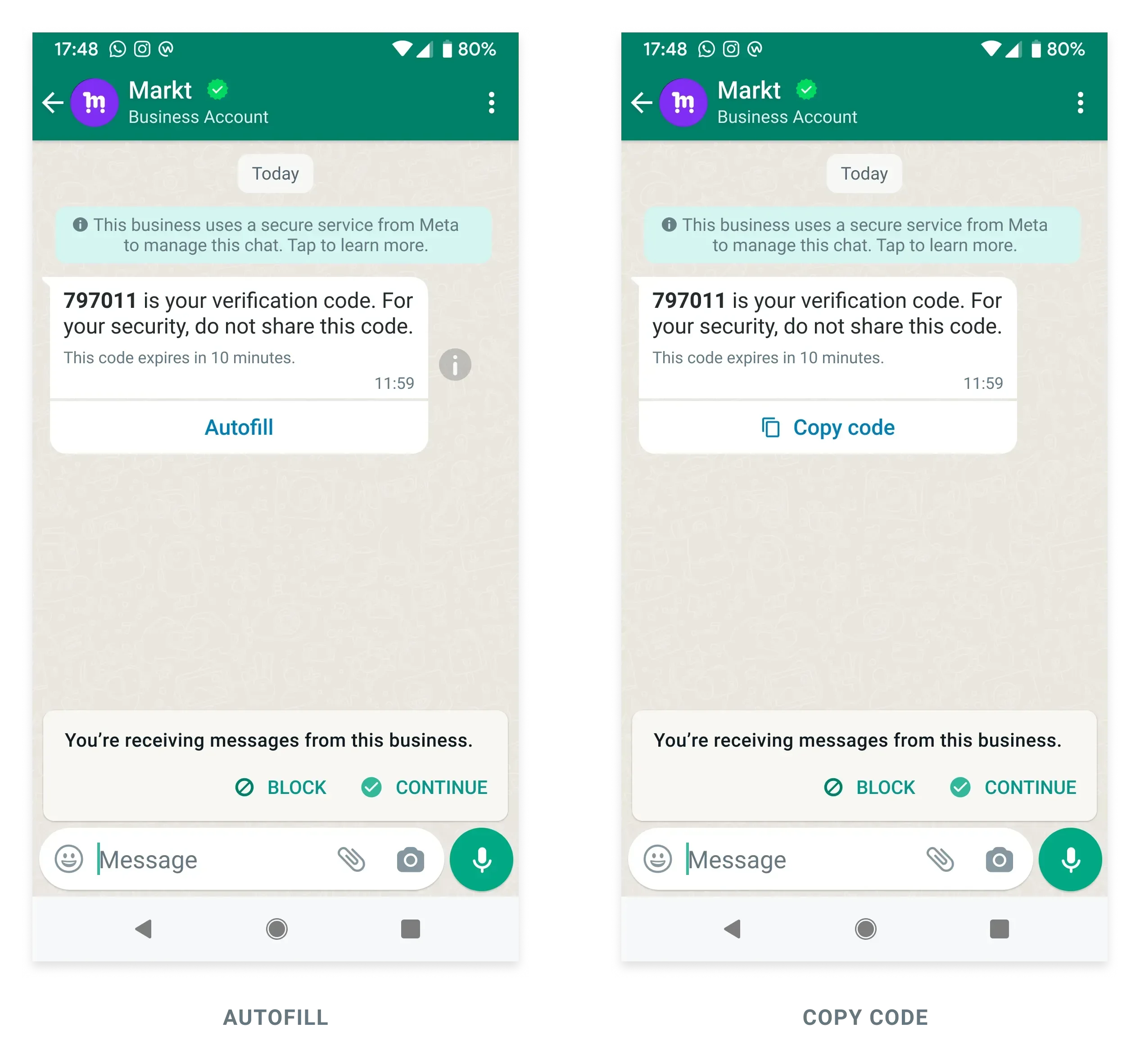
Buttons and the three delivery types
Every authentication template carries a button, and the button decides how the code reaches the user. WhatsApp offers three delivery types, from most manual to most seamless:
| Type | What the user does | Where it works |
|---|---|---|
| Copy-code | Taps “Copy code”, then pastes it | Everywhere |
| One-tap autofill | Taps a button; code fills into the app | Android app users |
| Zero-tap | Nothing — code reaches the app automatically | Android app users |
- Copy-code is the simplest and most universal — the safe default. See Copy Code.
- One-tap autofill uses a button that drops the code straight into your app. See One-Tap Autofill.
- Zero-tap delivers the code with no user action at all — the smoothest experience. See Zero-Tap.
Handshake and app signing hash
One-tap and zero-tap both hand the code straight to your Android app, so WhatsApp has to be sure it’s handing it to the right app. That check is the handshake, and it uses two identifiers:
- Package name — your app’s unique ID, like
com.yourbrand.app. - Signing hash — a short fingerprint generated from the certificate you sign your app with.
You add both to the authentication template. WhatsApp then only delivers the code to an app whose package name and signing hash match. Copy-code doesn’t need any of this — it just copies text — which is why it works everywhere.
Best practices
A few habits keep OTPs safe and reliable:
- Keep it code-only. No promotions in an authentication message, ever.
- Set short validity. A code good for 5 minutes is safer than one good for an hour.
- Always have a fallback. If you use one-tap or zero-tap, keep copy-code as the backup so every user can still get their code.
Time-to-live
New authentication templates use a short time-to-live (TTL) by default: 10 minutes, versus the 24 hours that ordinary messages get. TTL is how long WhatsApp will keep trying to deliver the message before giving up — and for a one-time code, you want it short.
You set this with the message_send_ttl_seconds property. It accepts a value between 60 and 600 seconds (1 to 10 minutes), or -1 to fall back to the standard 24-hour window.
Creating an authentication template
To create one, you send a POST request that describes the template’s components and a few properties:
- name — what you’ll call the template.
- category —
AUTHENTICATION. - language — the language code it’s approved in.
- components — the body, the optional security line, the optional expiry note, and the button (with its delivery type and, for one-tap/zero-tap, the package name and signing hash).
Once submitted, Meta reviews and approves it, and you get back a template ID and status.
Sending an authentication template
With the template approved, sending is a simple POST request: name the approved authentication template, pass the language code, and fill in the verification code value for that user. WhatsApp formats the message and delivers it using whichever button type you chose.
In India, an authentication message costs ₹0.11 per delivered message — the same as utility, and far below the ₹0.86 marketing rate. That makes WhatsApp a fast, low-cost, trusted channel for the codes your customers need to log in.
