Before you can blast out offers and newsletters, there’s a one-time setup: you tell Meta and WhatsApp that you accept the rules for the Marketing Messages (MM) API. After that, sending is just a matter of picking an approved template and posting it. This guide walks you through both, step by step.
There are two ways to switch on Marketing Messages — through your hub, or directly in Meta’s WhatsApp Manager. You only need one of them.
Onboard in your hub
The quickest route is through your account dashboard. The whole thing is two clicks.
- Log in to your client account.
- On the dashboard you’ll see a banner with a button that says “Accept MM API terms”. Click it.
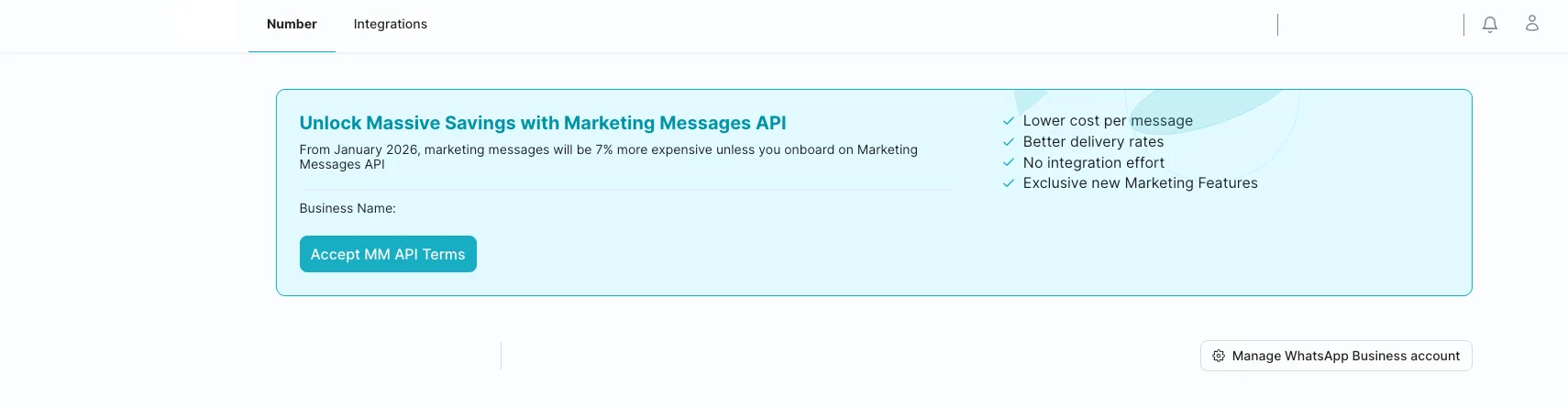
- You’ll be asked to connect your Facebook account. Sign in and follow the prompts to the end.
Once you finish, the Marketing Messages API is live for your account — no waiting.
Heads up: You must be an administrator of the business account to accept these terms. When you accept, they apply to all WhatsApp Business Accounts (WABAs) under the Meta business portfolio you pick — not just one.
Onboard in WhatsApp Manager
Prefer to do it inside Meta’s own tools? You can accept the same terms from WhatsApp Manager.
- Open WhatsApp Manager and go to the Overview page.
- In the Alerts section, find the Marketing Messages API alert and click “Accept terms to get started”.
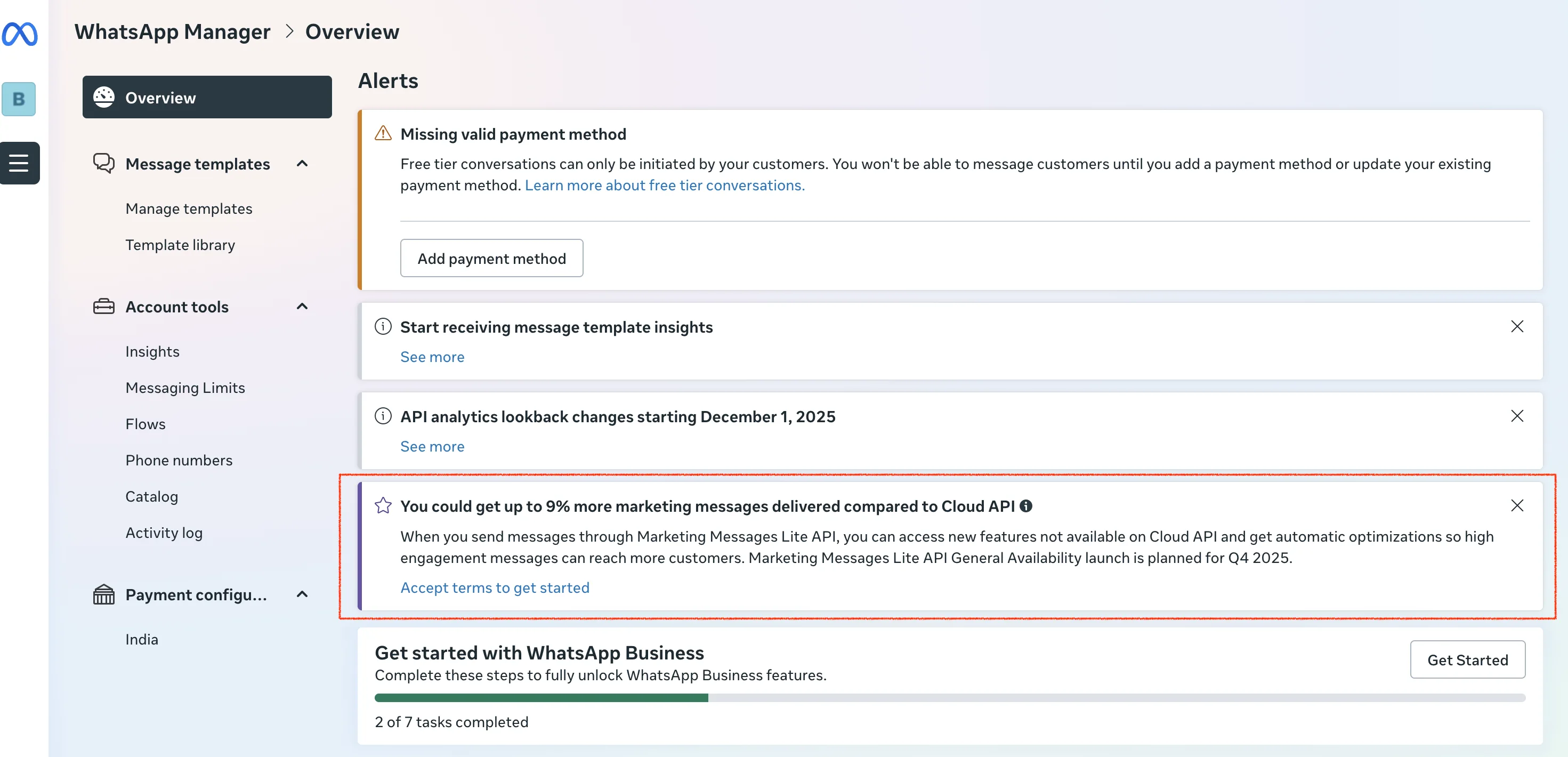
- Follow the on-screen steps to sign the MM API Terms of Service for all eligible WABAs in the account.
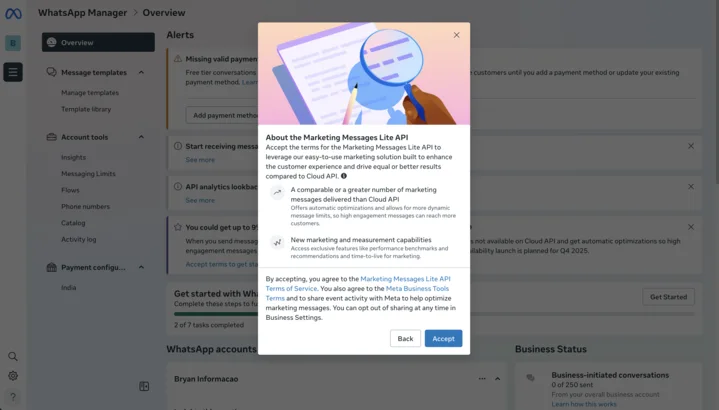
Once you’ve accepted, the MM API turns active for that whole Meta business portfolio. Now you’re ready to send.
Sending messages with the MM API
You can’t just type a fresh promo and fire it off. Every marketing message goes out as an approved template — a message you pre-write and submit to Meta for sign-off. Once it’s approved, you send it with a simple API request.
The request has two parts: the headers (which carry your API key) and the body (which says who to send to and which template to use).
Headers
| Header | What it’s for |
|---|---|
| Content-Type | Tells the API you’re sending JSON (application/json) |
| D360-API-KEY | Your secret key — proves the request is really from you |
Body — the fields you fill in
| Field | Required? | What it means |
|---|---|---|
| messaging_product | Yes | Always whatsapp |
| recipient_type | Yes | Usually individual |
| to | Yes | The customer’s phone number |
| type | Yes | template |
| template.name | Yes | The name of your approved marketing template |
| template.language.code | Yes | The language the template was approved in (like en or hi) |
| template.language.policy | Yes | How WhatsApp picks the language version |
| message_activity_sharing | Optional | Shares activity signals back to Meta |
| product_policy | Optional | Extra product-level setting |
In plain terms: you point the request at a customer’s number, name the approved template, and tell it which language version to send.
Example: a “Diwali Sale” template gets approved on Monday; on Friday you POST it to the 2,000 customers who opted in — one request per number, same template name.
Handling webhooks
The Marketing Messages API is send-only. It pushes promos out, but it cannot receive replies. So when a customer answers your offer, that reply won’t come back through the MM API.
To catch replies and run a two-way conversation, you run the regular WhatsApp Cloud API alongside it and point its webhook at your server. A webhook is just a URL WhatsApp calls whenever something happens — a message delivered, read, or a customer reply. MM API sends; the Cloud API webhook listens.
A note on cost
Marketing is the most expensive of the three categories. In India, Meta charges ₹0.86 per delivered marketing message — compared with ₹0.11 for utility and ₹0.11 for authentication.
| Category | Cost in India |
|---|---|
| Marketing | ₹0.86 |
| Utility | ₹0.11 |
| Authentication | ₹0.11 |
Two habits keep campaigns healthy. First, frequency — WhatsApp limits how many marketing messages a customer gets in a window, and over the cap it simply drops the extras. Second, quality — every block or spam report drags your quality rating down. Send fewer, more relevant messages to people who opted in, and both your rating and your costs stay steady.
