You’ll see lots of different ID numbers across Meta’s setup screens. The Meta Business ID is the most important one to know, and it’s simpler than it looks. This guide explains what it is, walks you through finding it, and answers the questions people ask most.
What a Meta Business ID is
A Meta Business ID is a unique number that tells Meta exactly which business is yours. It belongs to your Meta Business Portfolio — your company’s top-level account on Meta (it used to be called Business Manager). When you create that portfolio, Meta automatically gives it a Business ID.
You may see this same number called by other names. All of these mean the same thing:
- Business Portfolio ID
- Meta Business Manager ID
- Facebook ID or FBM ID
- Business Manager ID
Think of it like a customer number at a bank. Millions of businesses use Meta, and the Business ID is the label that points to your one account and no one else’s.
It is a long string of digits, something like 1234567890123456. You don’t choose it — Meta sets it for you, and it never changes.
Example: a bakery in Pune sets up its Business Portfolio. Meta instantly assigns it a Business ID. That number now represents the bakery’s whole presence on Meta, including its Facebook page, ads account and WhatsApp.
Where to find your Business ID
You find your Business ID inside Meta Business Suite, in the part that holds your business details.
- Log in to Meta Business Suite.
- Open Settings.
- Go to the Business Info section. Your Business portfolio ID is shown right at the top of the Business Info page.
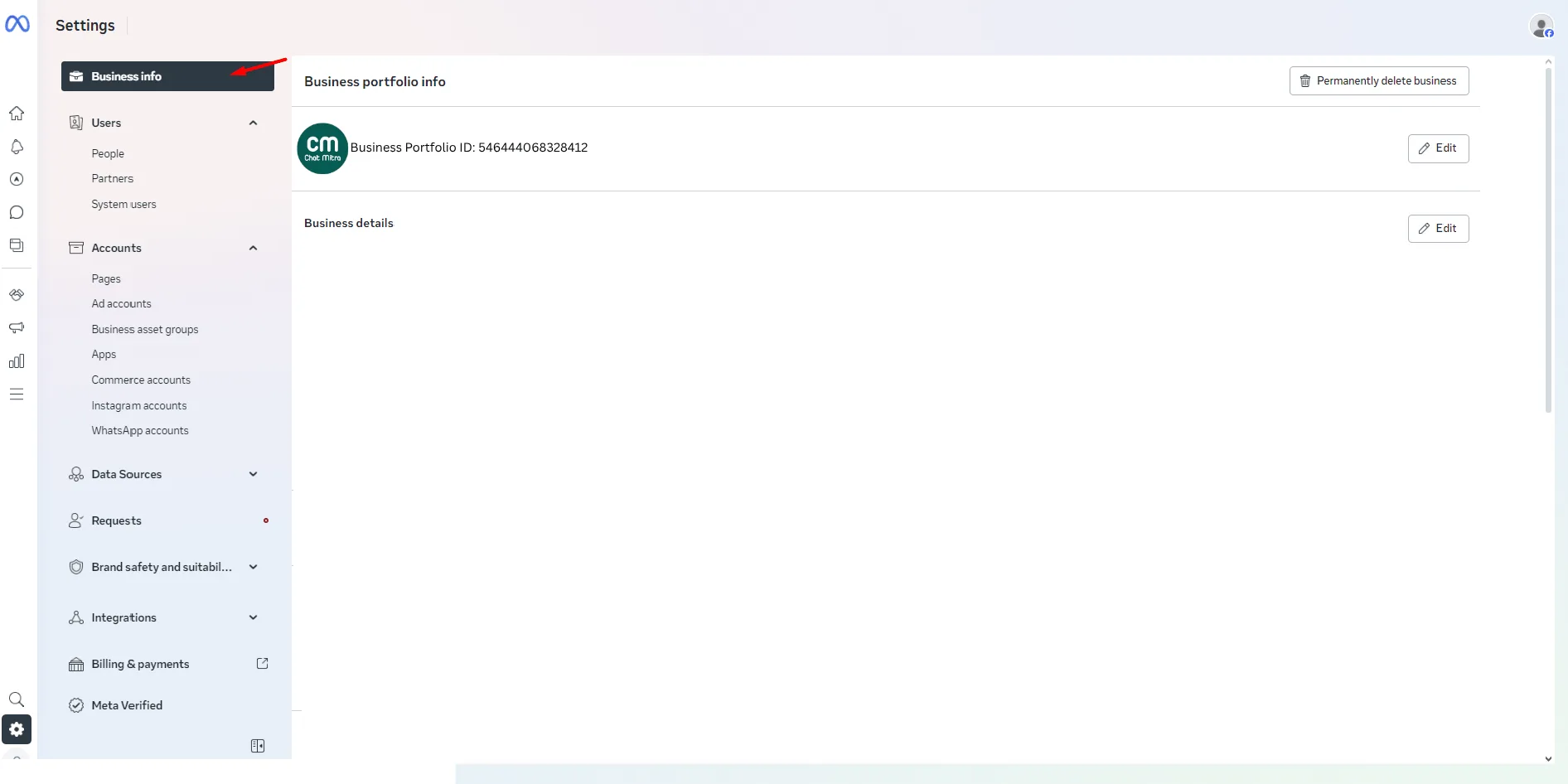
The Business portfolio ID appears at the top of the Business Info page — copy it from there.
You will not find this number inside the WhatsApp app on your phone. It lives only in the business control panel, because it describes your whole company account, not just one chat number.
What the Business ID is used for
The Business ID shows up whenever you need to prove which account is yours:
- Support. When you contact Meta support, this is the first number they ask for. It helps them find your exact account fast.
- WhatsApp API setup. Tools that connect to the WhatsApp Business API often need your Business ID to link to the right portfolio.
- Business verification. During verification (where Meta confirms your business is real), your Business ID ties the documents you submit to your account.
In short, it’s the anchor that connects every part of your Meta setup back to one business.
How it differs from other IDs
This is where people get confused, so let’s lay it out plainly. Meta gives you several IDs, and each points to a different thing.
| ID | What it identifies |
|---|---|
| Business ID | Your whole business portfolio |
| WABA ID | One WhatsApp Business Account inside the portfolio |
| Phone number ID | One specific phone number inside that account |
Think of it like nesting boxes. The Business ID is the big outer box. The WABA ID is a smaller box inside it. The phone number ID is one item inside that smaller box.
Example: a clothing brand has one Business ID for the company, one WABA ID for its WhatsApp account, and a phone number ID for each support number it runs. All different, all needed for different jobs.
Common questions
How do I know which Business Portfolio a WABA belongs to?
Open WhatsApp Manager. It shows the name of the Business Portfolio that owns each WhatsApp Business Account (WABA). One thing to watch out for: the number listed under the WABA name is the WABA ID, not the Business ID — they are different numbers.
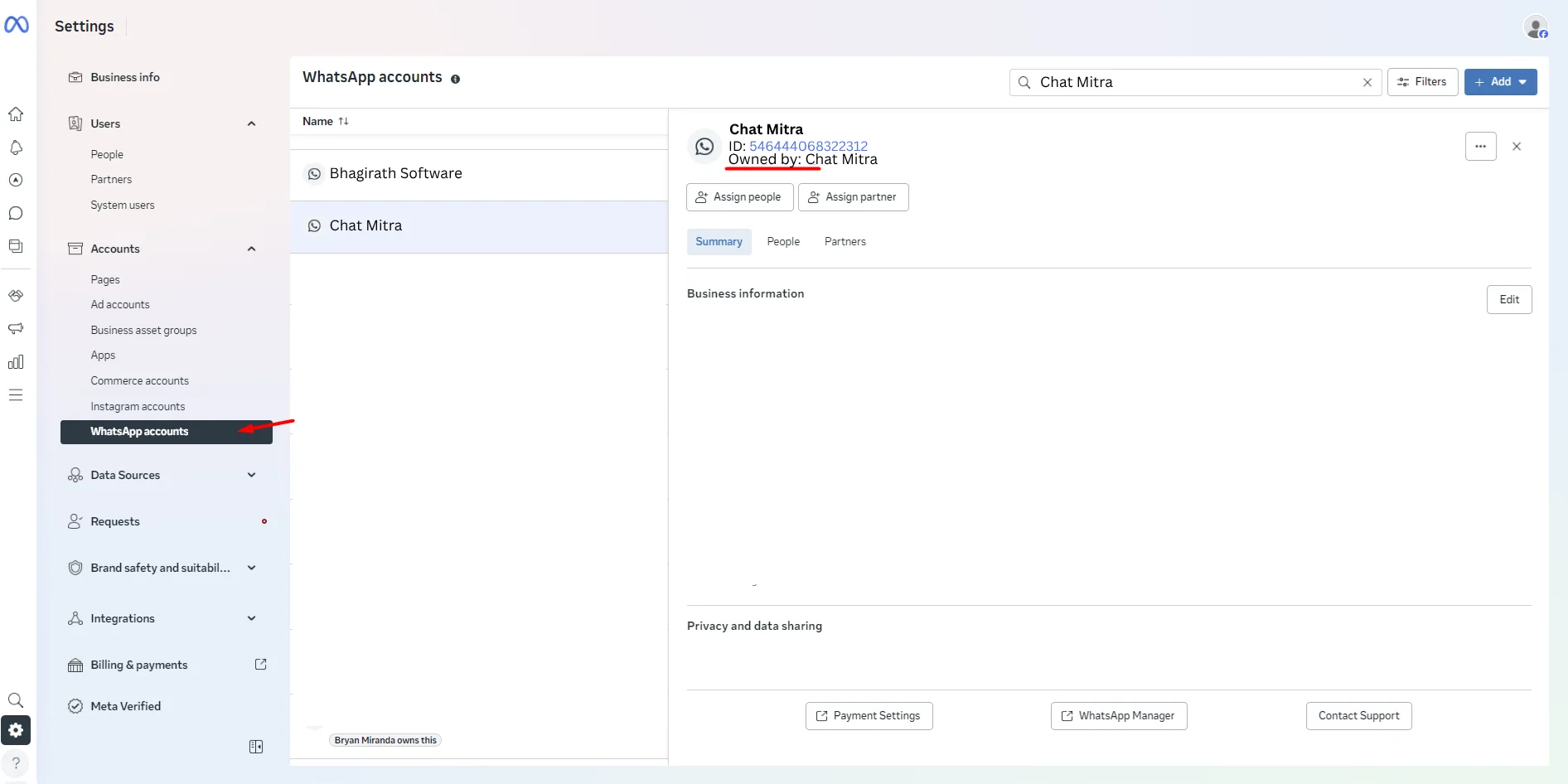
What if I can’t see any WABAs in my Business Portfolio?
A few things can cause this:
- There are no WABAs created in that portfolio yet.
- You’re looking at the wrong portfolio (you may have more than one).
- You don’t have enough permissions on the portfolio to see its assets.
- The WABA exists but hasn’t been shared with this portfolio.
Can I change the Meta Business ID?
No. Meta Business IDs cannot be edited or updated. Meta sets the number once, and it stays the same for the life of the portfolio.
