Typing a discount code by hand is fiddly and error-prone. A coupon code template fixes that by letting the customer copy the code in a single tap — and it’s one of WhatsApp’s marketing template types.
What it is
A coupon code template is a marketing template (the category for promotions and offers) that includes a special “Copy code” button. That button holds a discount code, and tapping it copies the code straight to the customer’s clipboard.
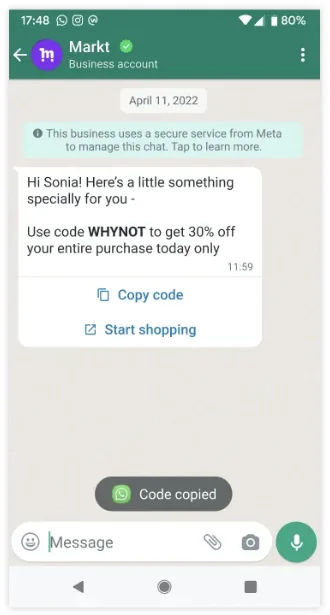
Example: a clothing brand sends “Festive sale is live! Enjoy 20% off” with a Copy code button holding DIWALI20.
Because the code is a button, the customer can’t fat-finger it — no missing letters, no wrong case.
A few limits to know:
- Coupon codes can be at most 15 characters long.
- The button text can’t be customised, and you can have only one copy-code button per template.
- These templates are not supported on the WhatsApp Web client — they’re built for the phone app.
How the code is delivered
The flow is simple:
You send the coupon template
        ↓
Customer sees the message + "Copy code" button
        ↓ taps the button
Code (e.g. DIWALI20) copies to their clipboard
The code lives inside the template’s button, so it travels with the message. The customer doesn’t have to remember it or jot it down — it’s saved to their clipboard the moment they tap.
How customers redeem it
After copying, the customer:
- Goes to your store, website or checkout.
- Finds the coupon / promo code field.
- Pastes the copied code.
- Sees the discount applied.
For this to work, the same code must exist in your store’s system. The template just delivers the code; your checkout has to recognise it and apply the discount. If the code isn’t set up there, the customer gets an “invalid code” error.
When to use it
Coupon code templates suit any promotion built around a code:
- Seasonal sales — Diwali, New Year, end-of-season.
- First-order discounts — welcome offers for new customers.
- Win-back offers — a code to tempt back lapsed buyers.
Example: a food brand sends lapsed customers “We miss you! Here’s ₹100 off” with a Copy code button holding COMEBACK100.
Send coupon templates only to people who opted in to marketing messages, and double-check the code is live in your checkout before a big send — a broken code wastes the whole campaign.
Creating a coupon template
You create the template with a POST request. Notice the BUTTONS block: you can pair a quick-reply (like “Unsubscribe”) with the COPY_CODE button, and the code’s example value can be up to 15 characters.
POST https://backend.chatmitra.com/developer/api/configs/templates{
"name": "coupon_code_fall2023_25off",
"language": "en_US",
"category": "MARKETING",
"components": [
{
"type": "HEADER",
"format": "TEXT",
"text": "Our Fall Sale is on!"
},
{
"type": "BODY",
"text": "Shop now through November and use code {{1}} to get {{2}} off of all merchandise!",
"example": {
"body_text": [["25OFF", "25%"]]
}
},
{
"type": "BUTTONS",
"buttons": [
{ "type": "QUICK_REPLY", "text": "Unsubscribe" },
{ "type": "COPY_CODE", "example": "25OFF" }
]
}
]
}Sending a coupon template
When you send, you fill in the body variables and pass the actual code for the copy button. The button’s index is its position in the buttons list, counting from zero (so the copy button here is index: 1):
POST https://backend.chatmitra.com/developer/api/send_message{
"messaging_product": "whatsapp",
"to": "16505551234",
"type": "template",
"template": {
"name": "coupon_code_fall2023_25off",
"language": { "code": "en_US" },
"components": [
{
"type": "body",
"parameters": [
{ "type": "text", "text": "25OFF" },
{ "type": "text", "text": "25%" }
]
},
{
"type": "button",
"sub_type": "COPY_CODE",
"index": 1,
"parameters": [
{ "type": "coupon_code", "coupon_code": "25OFF" }
]
}
]
}
}Only templates in Active status can be sent, so keep an eye on the status in case it slips to Paused or Disabled. Coupon templates are Marketing templates, so in India each one costs ₹0.86 to send.
