A good offer is more persuasive with a deadline attached. A limited-time offer template builds that deadline right into the message, with a countdown the customer can see ticking down.
What an LTO template is
A limited-time offer (LTO) template is a marketing template that shows a promotion together with an expiration countdown — a visible clock telling the customer how long the deal lasts.
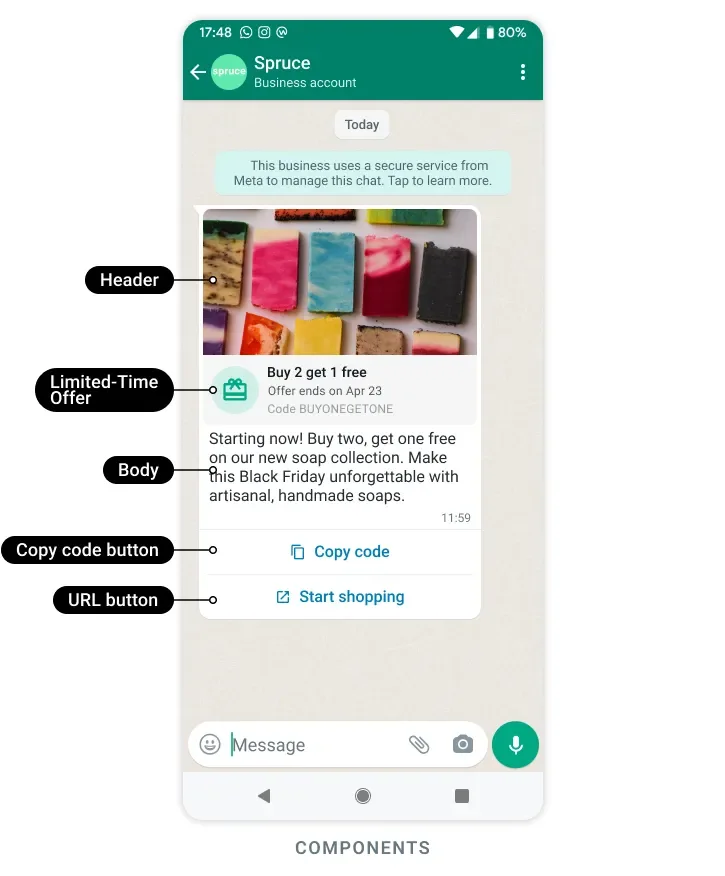
The psychology is simple: people act faster when they might miss out. A plain “20% off” is easy to ignore; “20% off — ends in 6 hours” is not.
Example: a sneaker store sends “Flash sale: 30% off all running shoes” with a countdown showing the offer ends in 5 hours 12 minutes.
A few rules from Meta:
- Only the Marketing category is supported.
- The offer text can be at most 16 characters, and the offer code at most 15.
- No footer is allowed on these templates.
- WhatsApp Web and desktop users see an “unsupported message” note instead of the countdown — it’s built for the phone app.
How the countdown works
The template displays the time remaining until the offer expires, and that number shrinks as the deadline approaches.
Offer: 30% off
Ends in:  05 : 12 : 44
          (hrs   min   sec)
As the customer looks at the message — or comes back to it later — the smaller the remaining time, the stronger the push to act. This is the core of why LTO templates outperform open-ended offers.
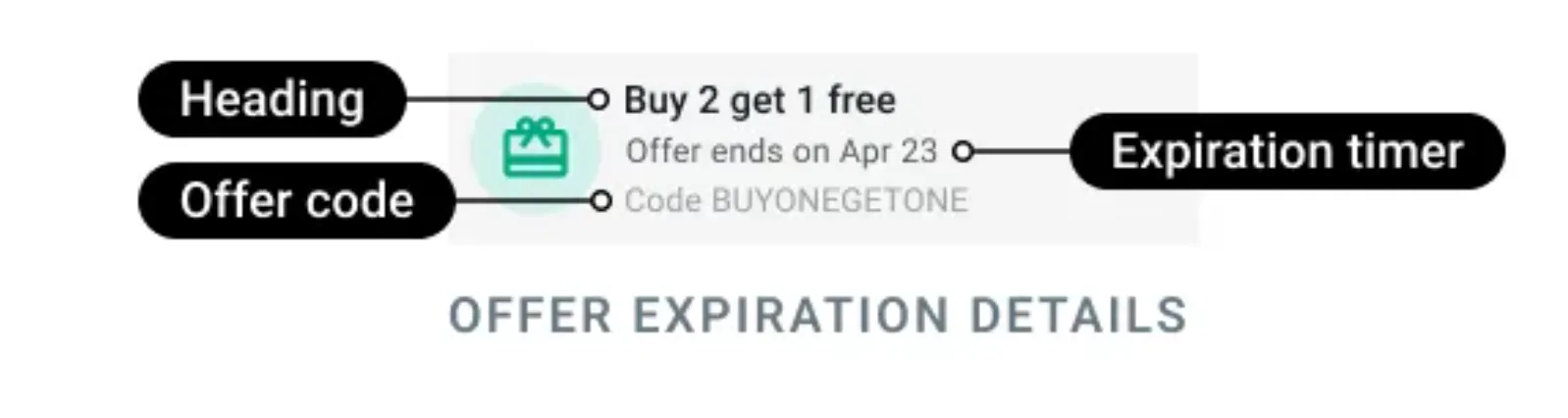
Pairing it with a coupon
LTO templates work especially well alongside a coupon code button. The customer sees the deadline and gets a one-tap way to claim the deal:
- They read the offer and see the countdown.
- They tap Copy code to grab the discount code.
- They paste it at checkout before the timer runs out.
Example: “Festive 48-hour sale — ends soon!” with a countdown and a Copy code button holding FLASH25.
This combination removes both excuses: there’s a clear deadline and a frictionless way to act.
When to use it
Use an LTO template only when the deadline is real:
- Flash sales — a few hours of deep discounts.
- Festive windows — Diwali or New Year deals with a hard end date.
- Stock clearances — “while stocks last” pushes.
The golden rule: honour the deadline. If your countdown hits zero, the offer must genuinely end. Fake urgency works once, then customers learn to ignore your timers entirely.
Creating an LTO template
You create the template with a POST request. It uses an optional image (or video) header, a required limited_time_offer component with has_expiration set to true, your body text, and a copy_code button followed by a url button:
POST https://backend.chatmitra.com/developer/api/configs/templates{
"name": "limited_time_offer_caribbean_pkg_2023",
"language": "en_US",
"category": "marketing",
"components": [
{
"type": "header",
"format": "image",
"example": { "header_handle": ["4::aW..."] }
},
{
"type": "limited_time_offer",
"limited_time_offer": {
"text": "Expiring offer!",
"has_expiration": true
}
},
{
"type": "body",
"text": "Good news, {{1}}! Use code {{2}} to get 25% off all Caribbean Destination packages!",
"example": {
"body_text": [["Pablo", "CARIBE25"]]
}
},
{
"type": "buttons",
"buttons": [
{ "type": "copy_code", "example": "CARIBE25" },
{
"type": "url",
"text": "Book now!",
"url": "https://awesomedestinations.com/offers?code",
"example": ["https://awesomedestinations.com/offers?ref=n3mtql"]
}
]
}
]
}When has_expiration is true, the copy-code button must come first in the buttons array.
Sending an LTO template
When you send, you set the actual expiration time using expiration_time_ms — a Unix timestamp in milliseconds. That value is what drives the on-screen countdown.
POST https://backend.chatmitra.com/developer/api/send_message{
"messaging_product": "whatsapp",
"recipient_type": "individual",
"to": "16505555555",
"type": "template",
"template": {
"name": "limited_time_offer_caribbean_pkg_2023",
"language": { "code": "en_US" },
"components": [
{
"type": "header",
"parameters": [
{ "type": "image", "image": { "id": "1602186516975000" } }
]
},
{
"type": "body",
"parameters": [
{ "type": "text", "text": "Pablo" },
{ "type": "text", "text": "CARIBE25" }
]
},
{
"type": "limited_time_offer",
"parameters": [
{
"type": "limited_time_offer",
"limited_time_offer": { "expiration_time_ms": 1209600000 }
}
]
},
{
"type": "button",
"sub_type": "copy_code",
"index": 0,
"parameters": [
{ "type": "coupon_code", "coupon_code": "CARIBE25" }
]
},
{
"type": "button",
"sub_type": "url",
"index": 1,
"parameters": [
{ "type": "text", "text": "n3mtql" }
]
}
]
}
}LTO templates are Marketing templates, so in India each one costs ₹0.86 to send. Send them only to customers who opted in to marketing messages.
