Between showing one product and showing everything sits a useful middle ground: a multi-product template. It’s how you hand the customer a curated short list instead of the entire catalog.
What it shows
A multi-product message (MPM) template displays up to 30 products from your catalog in one message, organised into up to 10 named sections. Each product still shows its image, name and price — all pulled from Meta Commerce Manager — and the customer can browse, view details, manage cart items and submit an order, all inside the chat.
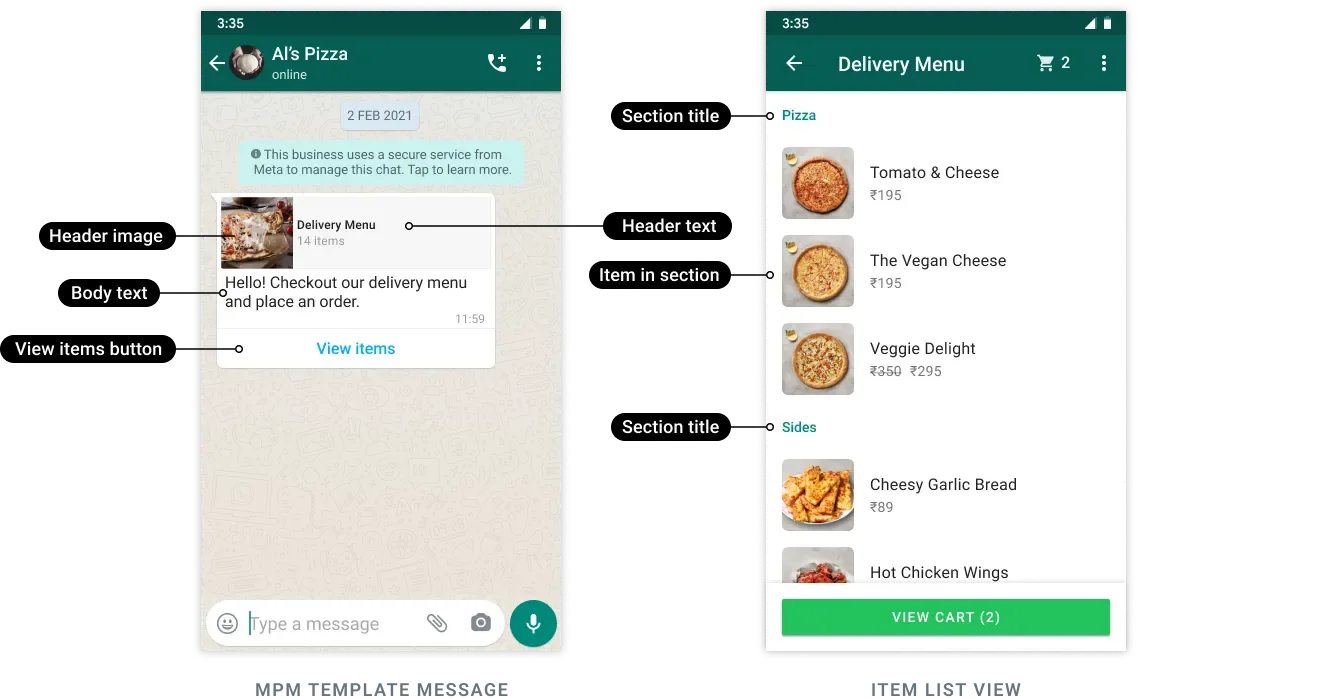
You’ll need an ecommerce catalog, with inventory, connected to your WhatsApp Business Account. Like single-product messages, MPM templates can’t be forwarded to other customers.
Example: a customer asks “What gift options do you have under ₹1,000?” and you reply with a multi-product message showing five gift items, each with photo and price.
Sections explained
The standout feature of a multi-product message is sections: named groups that organise the products. You decide the section names and which products go in each.
Section: Best sellers
   • Cotton kurta — ₹899
   • Silk scarf — ₹650
Section: New arrivals
   • Linen shirt — ₹1,199
   • Denim jacket — ₹1,999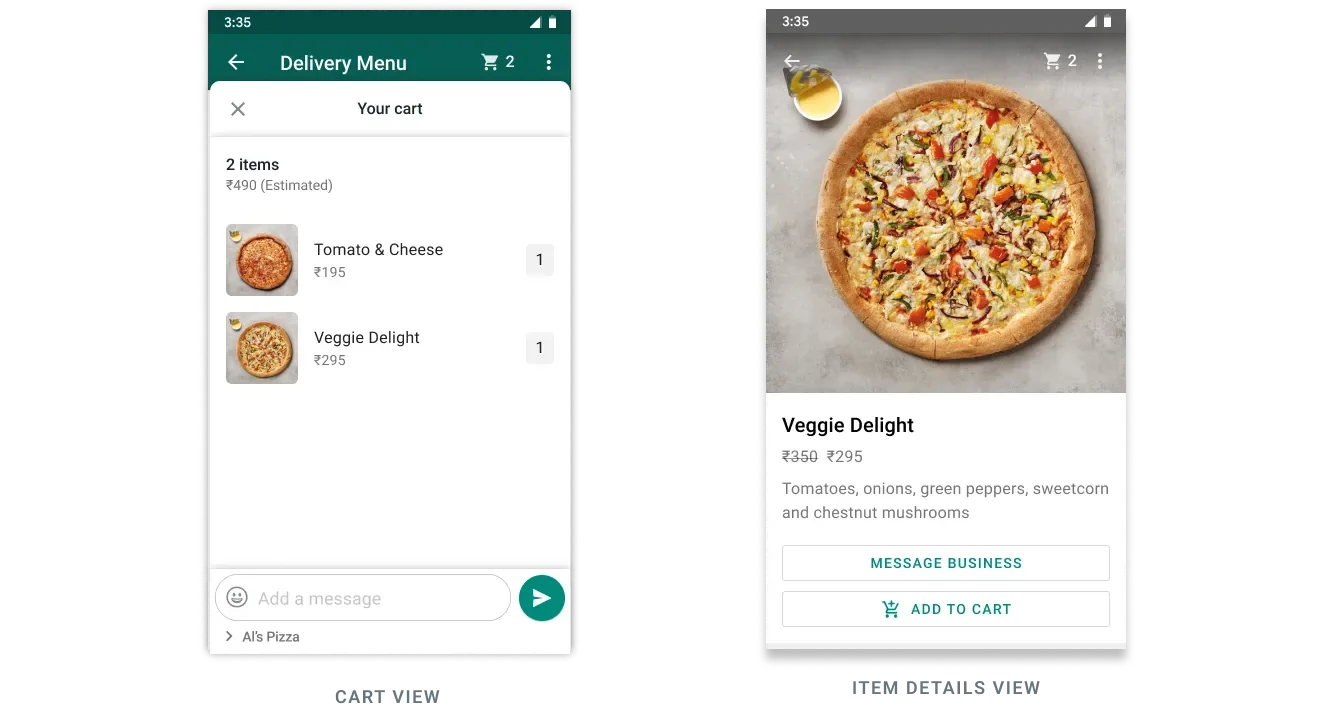
Sections help the customer make sense of the list at a glance. Clear names (“Under ₹500”, “Festive picks”) do the filtering work for them, which makes them more likely to tap.
When to use it
A multi-product template fits when you want to suggest a curated set:
- A customer asks for options in a category (“Show me your phone cases”).
- You’re recommending a small bundle that goes together.
- You want to highlight a seasonal selection without the full catalog.
Example: a sweet shop replies to “What’s good for Diwali?” with a multi-product message split into “Gift boxes” and “Single sweets”.
Creating an MPM template
You create the template with a POST request. It uses a text header (one variable allowed), a body, an optional footer, and a single MPM button. The actual products are chosen later, at send time:
POST https://backend.chatmitra.com/developer/api/configs/templates{
"name": "abandoned_cart",
"language": "en_US",
"category": "MARKETING",
"components": [
{
"type": "HEADER",
"format": "TEXT",
"text": "Forget something, {{1}}?",
"example": { "header_text": ["Pablo"] }
},
{
"type": "BODY",
"text": "Looks like you left these items in your cart, still interested? Use code {{1}} to get 10% off!",
"example": { "body_text": [["10OFF"]] }
},
{
"type": "BUTTONS",
"buttons": [{ "type": "MPM", "text": "View items" }]
}
]
}Sending an MPM template
When you send, the mpm button’s action carries the sections — each with a title and a list of product_items referenced by their catalog product_retailer_id. The thumbnail_product_retailer_id sets the cover image:
POST https://backend.chatmitra.com/developer/api/send_message{
"messaging_product": "whatsapp",
"recipient_type": "individual",
"to": "16505551234",
"type": "template",
"template": {
"name": "abandoned_cart",
"language": { "code": "en_US" },
"components": [
{
"type": "header",
"parameters": [{ "type": "text", "text": "Pablo" }]
},
{
"type": "body",
"parameters": [{ "type": "text", "text": "10OFF" }]
},
{
"type": "button",
"sub_type": "mpm",
"index": 0,
"parameters": [
{
"type": "action",
"action": {
"thumbnail_product_retailer_id": "2lc20305pt",
"sections": [
{
"title": "Popular Bundles",
"product_items": [
{ "product_retailer_id": "2lc20305pt" },
{ "product_retailer_id": "nseiw1x3ch" }
]
},
{
"title": "Premium Packages",
"product_items": [
{ "product_retailer_id": "n6k6x0y7oe" }
]
}
]
}
}
]
}
]
}
}Order webhooks
When a customer submits an order from a multi-product message, you receive an order webhook listing the items they chose, with quantities, prices and currency:
{
  "object": "whatsapp_business_account",
  "entry": [
    {
      "id": "102290129340398",
      "changes": [
        {
          "value": {
            "messaging_product": "whatsapp",
            "contacts": [
              { "profile": { "name": "Pablo Morales" }, "wa_id": "16505551234" }
            ],
            "messages": [
              {
                "from": "16505551234",
                "id": "wamid.HBgLMTY1MDM4Nzk0MzkVAgASGBQzQTMxNzA1QzNENEI4ODY0OTY2MAA=",
                "timestamp": "1683223069",
                "type": "order",
                "order": {
                  "catalog_id": "1537566713439863",
                  "product_items": [
                    {
                      "product_retailer_id": "n6k6x0y7oe",
                      "quantity": 1,
                      "item_price": 99.99,
                      "currency": "USD"
                    }
                  ]
                }
              }
            ]
          },
          "field": "messages"
        }
      ]
    }
  ]
}
MPM templates are Marketing templates, so in India each one costs ₹0.86 to send.
How it compares
Here’s where multi-product sits next to its cousins:
| Template | Products | Feels like |
|---|---|---|
| Single-product | One | A spotlight |
| Multi-product | A few, in sections | A short menu |
| Catalog | All of them | The full shop |
Note: multi-product, single-product and catalog templates are Meta platform commerce features; availability depends on your WhatsApp setup and whether commerce is enabled. Pick multi-product when the customer would benefit from choice, but not from being shown everything at once.
