Most of the time you never need it. But the day your WhatsApp account gets restricted or disabled, Business Support Home is the page you’ll want to know about.
What Business Support Home is
Business Support Home is a section inside the Meta Business Suite — Meta’s control panel for businesses. It pulls together, in one place, anything Meta needs to tell you about your accounts, and any decision it has made.
Instead of hunting through different tools, you get a single hub that answers: Is something wrong with my account, and what can I do about it?
Example: a bakery’s WhatsApp messages suddenly stop. Rather than guessing, the owner opens Business Support Home and finds a clear notice: the account was restricted for a policy issue, with a button to respond.
What you’ll find there
Business Support Home generally shows:
- Account issues — problems affecting your WhatsApp, Facebook or Instagram business assets.
- Policy decisions — what Meta decided (for example, a restriction or disablement) and the reason.
- Appeals — a way to disagree with a decision and ask Meta to review it.
- Status of your requests — whether an appeal is open, under review, or resolved.
Example: a clothing brand sees two entries — one resolved warning from last month, and one open restriction with an “Request review” option it can act on now.
How to appeal an account issue
If your account picks up a policy issue and you think it’s wrong, you can ask Meta to take another look. Here’s the path:
- Open Business Support Home.
- Select the WABA that’s affected.
- From the list of violations, choose the one you’re appealing and click Request Review.
- Enter your supporting details and click Submit.
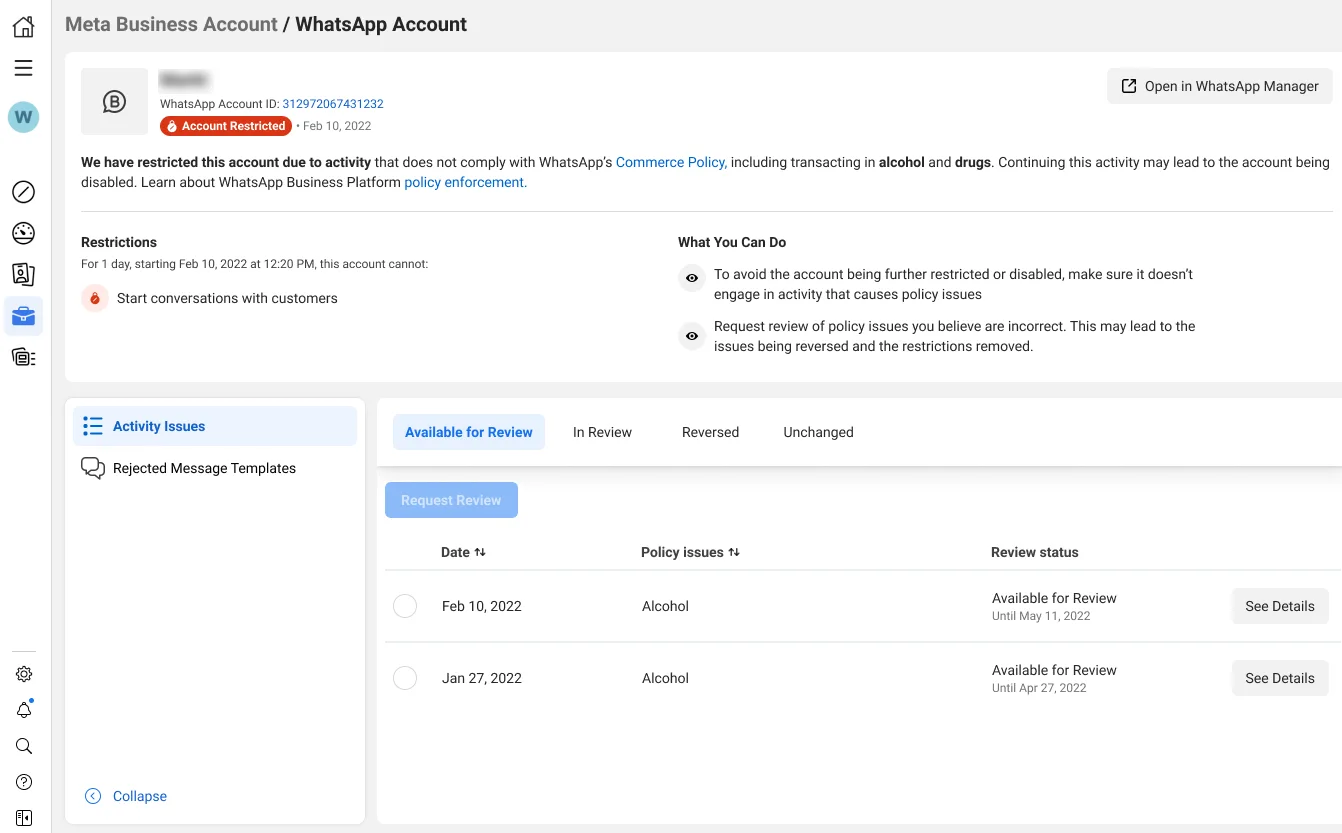
That’s it — your appeal moves into Meta’s review queue. Submit once and wait; firing off the same appeal again and again won’t speed it up.
How to appeal a rejected message template
Templates that get rejected have their own appeal path, started from the Account Quality page:
- On the Account Quality page, click Rejected Message Templates.
- Choose the rejected template you want to challenge and click Request Review.
- Enter your Appeal Reason and click Submit.
- After you submit, the request and the issue move to the In Review tab so you can track it.
- The decision comes back through the Meta Business Suite and usually takes 24 to 48 hours.
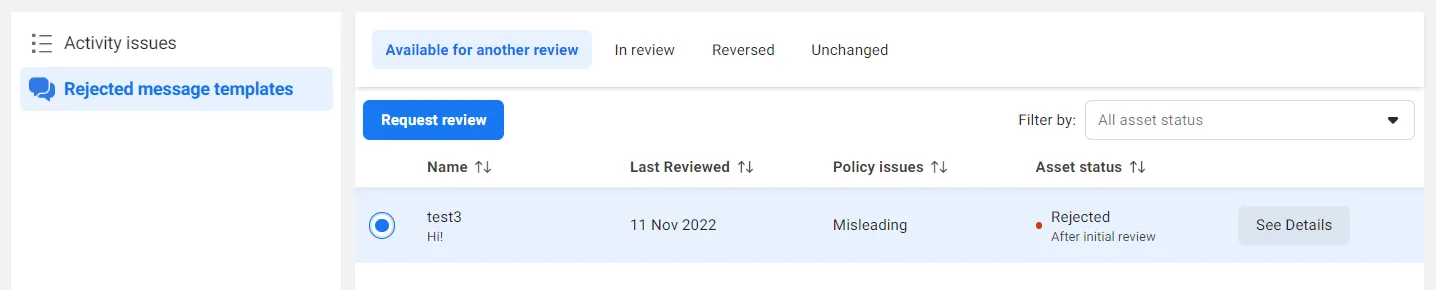
The result of any appeal is one of two outcomes: Unchanged (the decision stands) or Reversed (Meta agreed and undid it).
When to use Business Support Home
Open it when:
- Your WABA status turns to not approved or disabled.
- Messages stop sending and you don’t know why.
- You receive a policy warning and want to understand or respond to it.
- A message template was rejected and you believe it shouldn’t have been.
- You believe a decision was a mistake and want to appeal.
You usually don’t need it when everything’s healthy — it’s a place you visit because something needs attention.
Example: a tuition centre in Delhi gets its account disabled after a misread policy flag. It opens Business Support Home, submits one clear appeal explaining its opt-in process, and waits for the review rather than re-submitting — the cleanest path back to active.
