Automation for Marketing Agencies: 6 Client Workflows Worth Automating First

Quick Summary
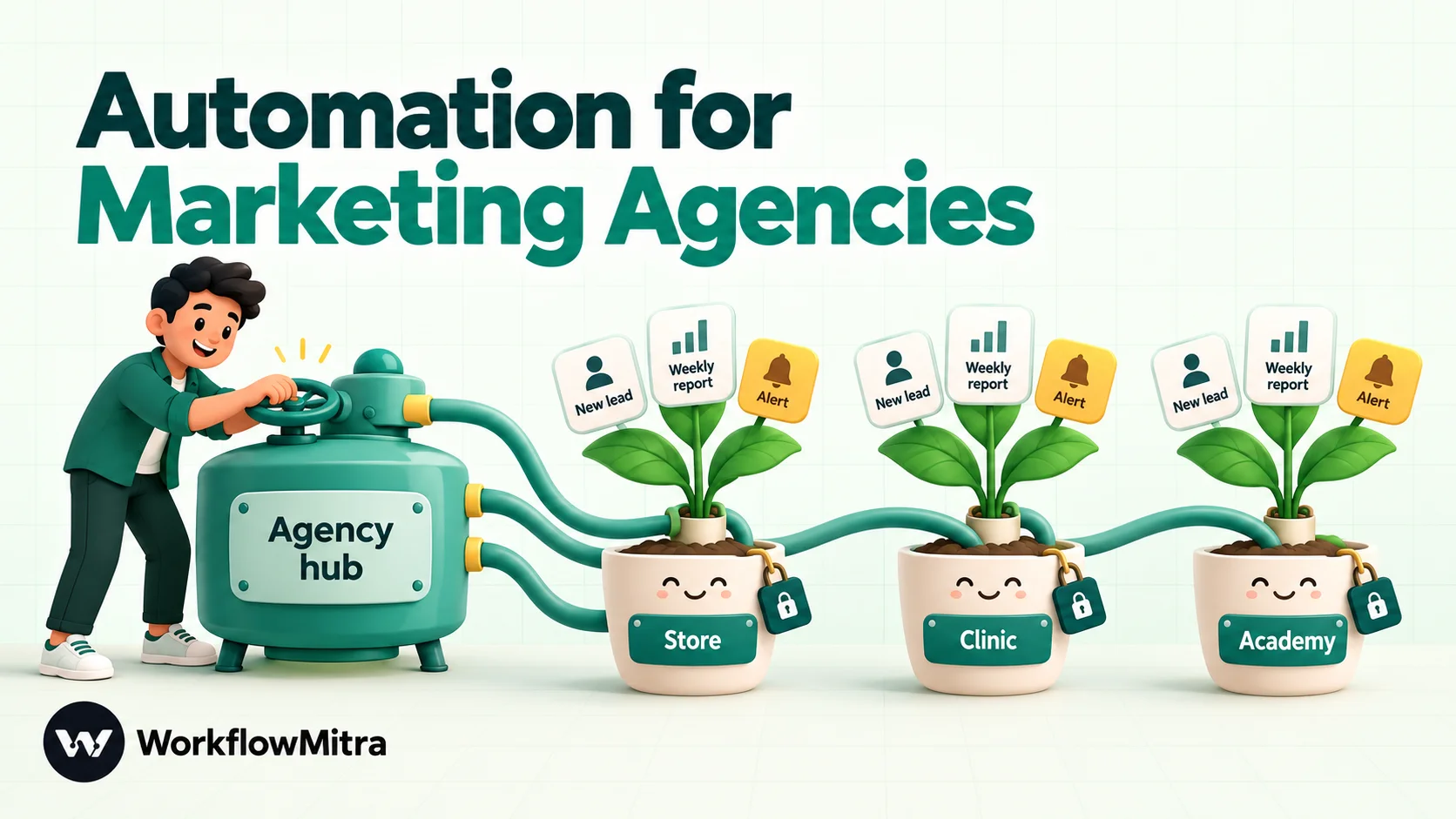
Automation for marketing agencies means automating the operational work around client campaigns, not the campaigns themselves: delivering leads to a client's sales team the moment they arrive, chasing leads nobody has called, sending a checked weekly report, routing work for internal approval, warning when ad spend runs ahead of budget, and onboarding new clients. WorkflowMitra, powered by ChatMitra, lets an agency run each client in its own workspace with its own plan, credits and credentials, from ₹999 a month per workspace, and send alerts to clients' teams on WhatsApp through ChatMitra or Meta's Cloud API.
Most agencies sell strategy and creative, then lose a surprising share of every week to the plumbing around it. Leads sit in an ad platform until someone exports them. A report waits for the one person who knows which spreadsheet tab to copy. A client asks on Friday why their budget ran out on Wednesday.
None of this needs judgement, yet it is the work clients notice first when it slips. In AgencyAnalytics’ 2025 benchmarks survey of more than 220 agency leaders, 70% said client reporting plays a critical role in client retention. The operational layer is part of what clients are paying for.
This guide covers six workflows that take that layer off your team, in the order most agencies should build them. Each comes with the steps to build it in WorkflowMitra, powered by ChatMitra, what it costs in credits, and where its limits are.
Quick answer: Automate the work around your campaigns, not the campaigns. Start with lead delivery to each client's sales team, add a follow-up check for leads nobody called, then a weekly client report that an account manager approves before it goes out. Next come internal approvals, budget pacing alerts and client onboarding. In WorkflowMitra, run each client in its own workspace with its own plan and credits; for a typical client the six workflows fit within the ₹999 plan.
What is automation for marketing agencies?
Automation for marketing agencies is the use of workflows to handle the repeatable operational work around client campaigns: moving leads to the people who will call them, compiling and sending reports, routing work for approval, watching budgets and onboarding new clients.
It is easy to confuse with marketing automation, which sends campaigns to an audience: email nurture sequences, WhatsApp broadcasts, retargeting. Agencies run marketing automation for clients. Agency workflow automation runs the agency itself. A workflow has three parts:
- A trigger: a new lead, a schedule, a payment, a row added to a sheet.
- Logic: checks and branches, such as “is this a test lead?” or “is spend above 80% of budget?”.
- Actions: a sheet row, a WhatsApp message to a sales rep, an email report, a Slack alert.
If your question is about WhatsApp campaigns for clients’ customers, such as click-to-WhatsApp ads, broadcasts and chatbots, ChatMitra’s guide to WhatsApp automation for marketing agencies covers that side. This article is about the operations behind those campaigns.
Which agency tasks are worth automating?
Not every repeated task deserves a workflow. Score each candidate on four questions before building anything:
- How often does it happen? Daily or per-lead tasks repay setup quickly. Quarterly tasks rarely do.
- Does the client see it when it fails? Late leads and late reports damage trust; a messy internal folder does not.
- Is the input structured? A form submission or a spreadsheet row automates cleanly. A rambling email from a client does not.
- Does it need judgement? If yes, automate the preparation and keep a person on the decision, for example with an approval step.
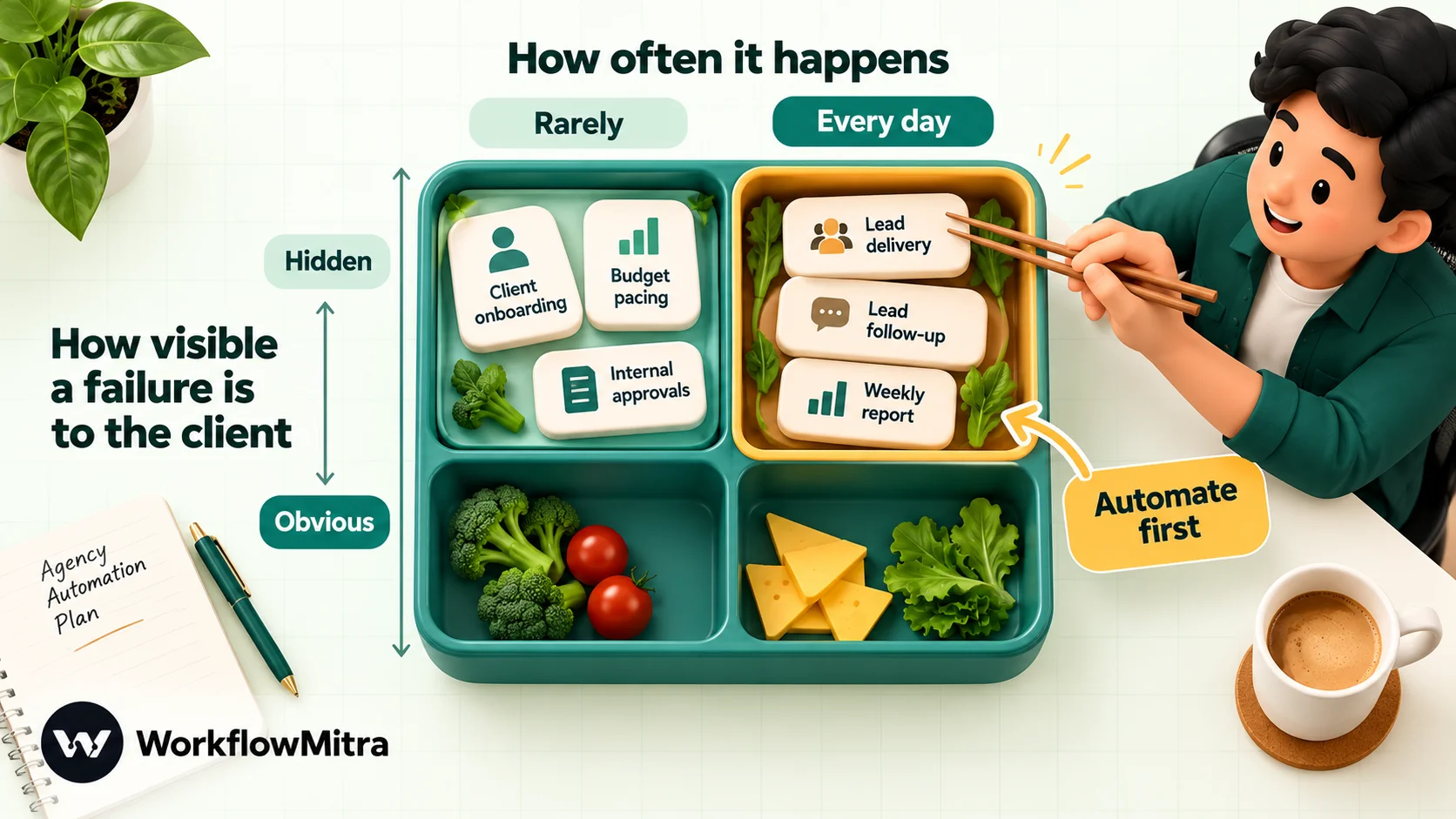
Run that test across a typical performance-marketing agency and the same six workflows rise to the top. Paid advertising is now the most common agency service (89% of agencies in the same AgencyAnalytics survey offer it), and most of the six revolve around ad leads and ad budgets.
| Workflow | Frequency | Client-visible if it fails? | Needs judgement? | Build order |
|---|---|---|---|---|
| Lead delivery to the client's team | Every lead | Immediately | No | 1 |
| Follow-up check on uncalled leads | Every lead | Within days | No | 2 |
| Weekly client report | Weekly | Yes | A quick check | 3 |
| Internal approval before work goes out | Several a week | Yes, if skipped | Yes (kept human) | 4 |
| Budget pacing alert | Daily | Yes, at month end | No | 5 |
| New client onboarding | Per new client | In the first week | Partly | 6 |
How should an agency organise automation across clients?
Decide this before building your first workflow, because it is painful to change later. In WorkflowMitra the natural unit is the workspace: each one has its own plan, credits, team, credentials, Data Store and run history, and one person can own many of them.
- One workspace per client. The client’s Google Sheets connection, WhatsApp sender and Slack webhook stay separate from every other client’s, and a mistake in one cannot touch another. Each workspace’s credit use is that client’s automation cost, which makes it easy to pass on or build into your retainer.
- One workspace for the agency itself. Onboarding, internal approvals and anything that spans clients live here.
- Invite the right people. Admins manage credentials, team and billing; Members build and run workflows and can decide approvals; Viewers can see workflows, runs and approval requests but change nothing. Client staff who only want visibility belong as Viewers. Seats are limited by plan (2 on the entry plan, 5 on the next), and pending invitations count.
- Keep a written spec of each workflow. A workflow can be cloned within its workspace, but there is no copy to another workspace and no saved private templates yet. When client number six needs the same lead-delivery workflow, a one-page spec of the steps and settings makes the rebuild a 20-minute job.
Billing is per workspace, so five client workspaces mean five plans. The 14-day trial with 10,000 credits applies to the first workspace you own; build and test the agency’s standard workflows there before opening client workspaces.
Workflow 1: deliver every new lead to the client’s sales team in minutes
A lead that sits in a dashboard until someone exports it on Monday morning has already cooled. The fix is to push each lead to a named person on the client’s team the moment it arrives, with a copy in the client’s sheet.
This example uses Google Ads lead form assets, which can post each lead to a webhook. Website forms and landing-page builders that send webhooks work the same way from step 2.
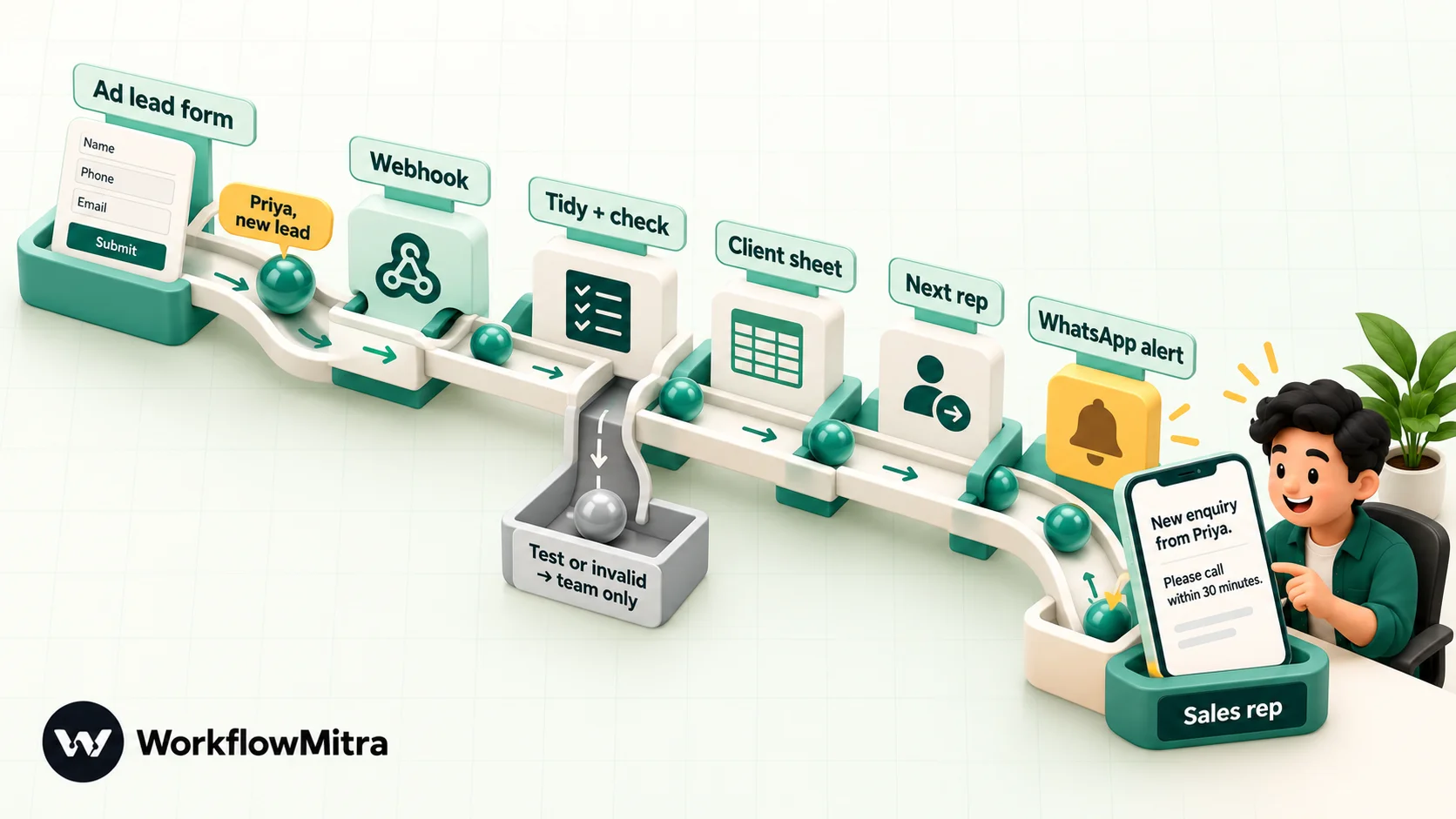
1. Create the webhook trigger in the client’s workspace. Google sends its verification key inside the request body, not in a header, so clear the default Secret field in the webhook’s settings; you will check Google’s key in step 2 instead. Under Advanced settings, set Idempotency key path to lead_id. Google’s documentation says a lead is not guaranteed to arrive exactly once, and this setting skips repeat deliveries of the same lead.
2. Connect Google Ads. In the lead form asset, open the lead delivery options, choose the webhook integration, paste the WorkflowMitra URL and type a long random key. Use the form’s option to send test data and confirm the delivery appears under Recent deliveries in WorkflowMitra. WorkflowMitra acknowledges deliveries with HTTP 202. If Google’s test reports an error, switch on Respond synchronously and end the workflow with a Response step that returns status 200 and the body {}, which is the success reply Google’s documentation describes.
3. Tidy and check the lead with a Code step named “Clean lead”. Google sends answers as a list of column_id and string_value pairs, so this flattens them, checks the key and flags test leads:
const KEY = 'paste-the-same-key-you-set-in-google-ads';

const cols = {};
for (const c of input.user_column_data || []) {
  cols[c.column_id] = String(c.string_value || '').trim();
}

const name = cols.FULL_NAME
  || [cols.FIRST_NAME, cols.LAST_NAME].filter(Boolean).join(' ')
  || 'there';
const phone = (cols.PHONE_NUMBER || cols.WORK_PHONE || '').replace(/\D/g, '');

return {
  valid: input.google_key === KEY,
  isTest: input.is_test === true,
  leadId: String(input.lead_id || ''),
  name,
  phone,                       // digits with country code, e.g. 919876543210
  email: cols.EMAIL || cols.WORK_EMAIL || '',
  city: cols.CITY || '',
  campaignId: String(input.campaign_id || ''),
  receivedAt: new Date().toISOString()
};
We ran it in WorkflowMitra’s code sandbox against a Google-style test payload, a lead with split first and last names, and an empty body. It returned clean fields each time, with valid: false for a wrong key, in about two milliseconds. Anyone in the workspace who can open the workflow can read the key, so treat workspace membership accordingly.
4. Add two IF steps. If valid is false, send a Slack alert to your team (“A lead arrived with the wrong key”) and stop. If isTest is true, send the lead to your own Slack only, so test submissions never reach the client’s sales team.
5. Record it. A Google Sheets step with Add row(s) writes the lead to the client’s lead sheet, with a blank Status column the client’s team fills in. Workflow 2 depends on that column.
6. Pick the salesperson. The Assign to the next person step rotates leads across the client’s reps in turn and outputs assignedTo (the rep’s number or address) and assignedName. Our guide to round-robin lead assignment covers weighting and absences.
7. Alert the rep on WhatsApp. A WhatsApp step sends an approved template to {{ assignedTo }}, for example: “New enquiry from {{1}} ({{2}}) via your Google Ads campaign. Please call within 30 minutes.” Because a plain {{ field }} only reads the previous step’s output, fill the variables with {{ $node["Clean lead"].name }} and {{ $node["Clean lead"].phone }}. Messages to the client’s staff outside a 24-hour customer-service window must use an approved template; Meta assigns the category when it reviews it. Send through ChatMitra or directly through Meta’s Cloud API, using the client’s WhatsApp Business number or your agency’s.
What about messaging the lead? A welcome message to the lead on WhatsApp works well, but only send it if the form asked for permission to contact them on WhatsApp. Add a consent question to the lead form and an IF step on its answer.
Credits: trigger, Sheets row, assignment, WhatsApp alert and an optional email copy to the client’s sales manager come to five credits per lead. The Code and IF steps add almost nothing.
Workflow 2: catch leads nobody has called
Delivering a lead fast is half the job; the other half is knowing whether anyone acted on it. Clients blame the agency for “bad leads” that were never called, and you cannot defend the campaign without evidence.
Extend Workflow 1 instead of building a new one:
- After the WhatsApp alert, add a Delay of 30 minutes (or two hours for clients with slower teams). Delays in WorkflowMitra are durable and free.
- A Google Sheets step with Find row looks up the lead by its ID in the client’s sheet.
- An IF step checks whether Status is still empty.
- If it is, send a WhatsApp template to the client’s sales manager and a Slack message to your account manager, filled from the row the Find step returned, for example: “Lead Priya Mehta, assigned to Arjun at 10:42, has not been updated.”
This adds one or two credits per lead. Over a month it also produces something valuable: a sheet that shows exactly which leads were contacted and how quickly. That is the strongest answer to a “your leads are poor” conversation. For deeper lead routing and status tracking, see lead management automation.
Workflow 3: send a weekly client report your account manager has checked
Reporting is where agencies lose the most hours to copying and pasting, and where clients notice most when it is late. Before building anything, check whether your reporting tool already does the delivery. Looker Studio, for example, can email a report as a PDF on a schedule. A workflow earns its place when you want something a scheduled PDF can’t do: put the headline numbers in WhatsApp, have a person check them first, or combine sources into one message.
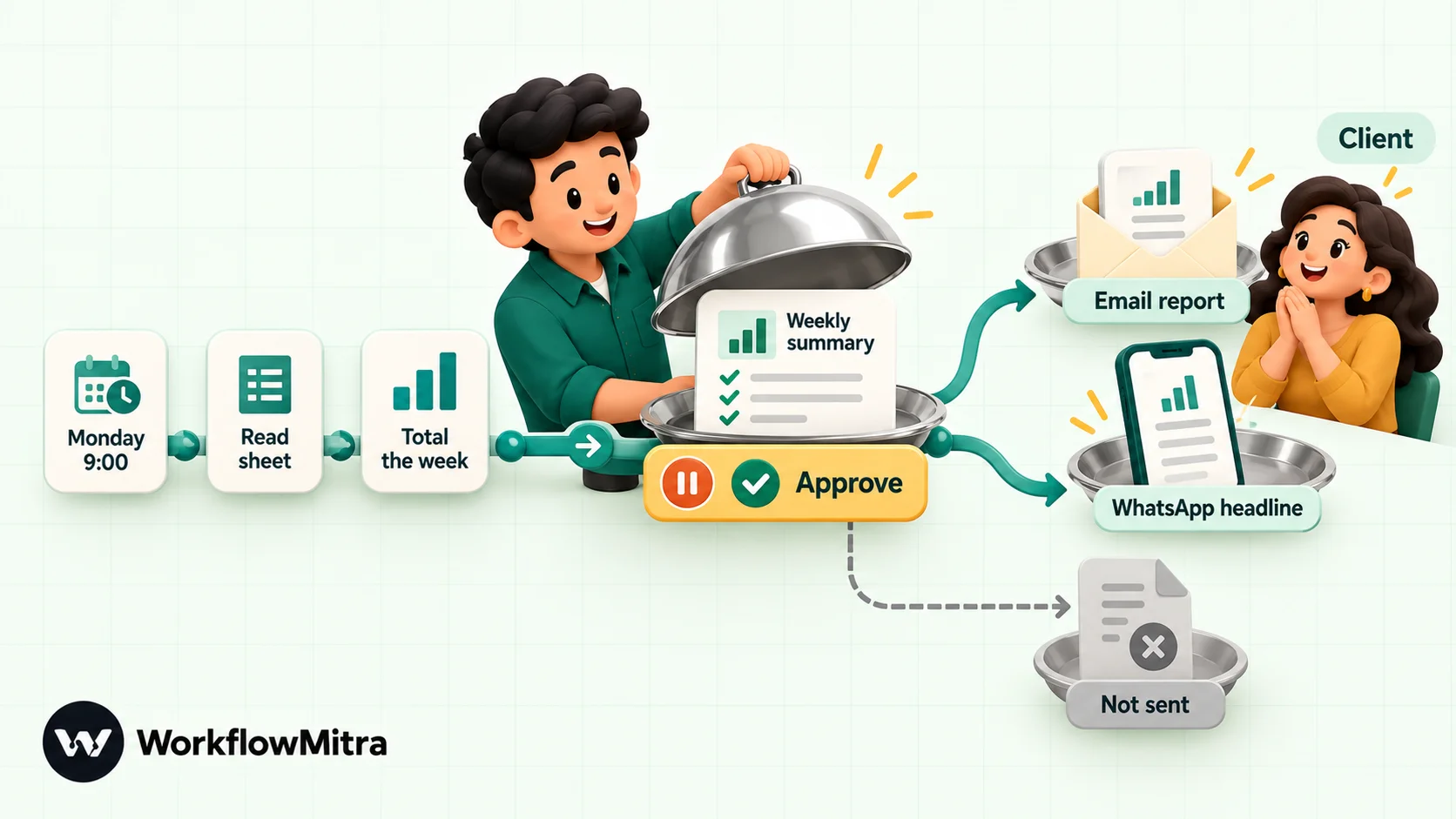
The workflow assumes one row per day in a sheet with Date (YYYY-MM-DD), Spend and Leads columns, filled by your reporting connector, an export or a person. WorkflowMitra has no native Google Ads or Meta Ads reporting connector, so the sheet is the hand-off point.
- Schedule trigger: every week on Monday at 09:00, in the client’s time zone.
- Google Sheets, Read rows: the daily performance tab.
- Code, named “Weekly numbers”, totals this week against last week:
// One row per day, oldest first, with columns Date, Spend, Leads.
const CURRENCY = '₹';
const num = (v) => Number(String(v ?? '').replace(/[^0-9.-]/g, '')) || 0;
const rows = (input.rows || []).filter((r) => r.Date);
const thisWeek = rows.slice(-7);
const lastWeek = rows.slice(-14, -7);
const sum = (list, col) => list.reduce((t, r) => t + num(r[col]), 0);
const change = (now, before) => (before ? Math.round(((now - before) / before) * 100) : null);

const spend = sum(thisWeek, 'Spend');
const leads = sum(thisWeek, 'Leads');
const cpl = leads ? Math.round(spend / leads) : null;
const leadsChange = change(leads, sum(lastWeek, 'Leads'));

return {
  from: thisWeek.length ? thisWeek[0].Date : '',
  to: thisWeek.length ? thisWeek[thisWeek.length - 1].Date : '',
  spend: Math.round(spend),
  leads,
  costPerLead: cpl,
  leadsChange,
  headline: leads + ' leads at ' + (cpl === null ? 'n/a' : CURRENCY + cpl) + ' per lead'
    + (leadsChange === null ? '' : ' (' + (leadsChange >= 0 ? '+' : '') + leadsChange + '% vs last week)')
};
With 14 days of sample data it returned “84 leads at ₹375 per lead (+20% vs last week)”. It handles a short week and an empty sheet without failing, and it strips currency symbols and thousands separators from formatted cells.
- Wait for approval: the question “Send this week’s report to the client?” with the headline as the content, and a 24-hour deadline that counts as “no” if nobody answers. The account manager approves from the Approvals page in the app; the alert reaches the workspace’s alert email or Slack webhook.
- IF approved: an Email step sends an HTML summary to the client’s contacts, with the full report attached or linked, and a WhatsApp template sends the headline to the client’s owner.
This costs about five credits a week per client. The approval step is the part clients never see but always benefit from: a person catches a broken tracking week before the client does. Automated daily reports covers date handling and formatting in more depth.
Workflow 4: route work for internal approval before it reaches a client
Ad copy, landing-page changes, budget increases and refunds of unused retainer all benefit from a second pair of eyes. An approval workflow makes the check happen every time instead of when someone remembers.
The pattern is simple: whatever produces the work (a form your team submits, a sheet row marked “Ready for review”, a webhook from your project tool) starts a workflow; a Wait for approval step pauses it with the details; the run continues down the approved or rejected branch. Deadlines in the editor run from one hour to seven days, and you choose whether silence counts as yes or no.
Three practical points for agencies:
- Approvers must be workspace members with the Member role or higher. A Viewer can see a pending request but not decide it, and there are no public approval links. If a client must sign off inside WorkflowMitra, invite their approver as a Member, knowing Members can also edit workflows in that workspace.
- The approver sees the content read-only. If the copy needs edits, reject it with the reason given elsewhere, fix it, and resubmit.
- Keep your own record. Approval history is deleted along with run history at the end of the plan’s retention period (7 days on the entry plan), so add a Sheets row after each decision if you need an audit trail for a client.
Each approval costs one credit. Our guide to approval workflow automation covers escalation and multi-step approvals.
Workflow 5: warn before an ad budget runs out early
Overspending a monthly budget by the 20th, or underspending and leaving results on the table, are both conversations no account manager wants. A daily pacing check catches either while there is still time to adjust.
The setup again uses a sheet as the hand-off: a tab with each campaign’s monthly budget and month-to-date spend, refreshed by your reporting connector.
- Schedule trigger: every day at 18:00 in the client’s time zone.
- Google Sheets, Read rows: the budget tab.
- Code (or Set Variable for a single campaign) works out pacing: spend so far divided by budget, compared with the share of the month that has passed. A campaign that has used 80% of its budget by the 15th is running hot; one at 30% by the 20th is running cold.
- IF pacing is outside your thresholds, send a Slack message to the account manager and, if you agreed this with the client, a WhatsApp template to their marketing lead.
Checking once a day costs about two credits a day, roughly 60 a month, plus an alert when it fires. Resist the urge to check every hour: 720 runs a month cost more than the problem they catch, and ad platforms usually report spend with a delay anyway.
Workflow 6: onboard each new client the same way
The first week sets the tone of a client relationship, and it is also when agencies most often drop something: an access request never sent, a kickoff call never booked, a tracking audit forgotten.
A simple onboarding workflow lives in the agency’s own workspace:
- Trigger: a webhook from the form or proposal tool your client completes, or a Razorpay payment webhook for the first invoice. If you use Razorpay, give this workflow its own webhook URL subscribed to a single event, because WorkflowMitra’s Razorpay preset can treat a second event for the same payment as a duplicate.
- Google Sheets, Add row(s): the client register, with columns for each onboarding item.
- Email: an HTML welcome with your access checklist (ad accounts, analytics, Meta Business Manager, the client’s WhatsApp Business number) and a kickoff booking link.
- Slack: tell the team who the new client is and who owns the account.
- Delay three days, then Find row and IF any access item is still unticked, send a polite reminder email and alert the account manager.
The client’s own WorkflowMitra workspace is still created by hand; there is no automation for that step. For onboarding your clients’ customers rather than your own clients, see customer onboarding automation. Retainer payment reminders are covered in how to automate payment reminders.
What does all this cost per client?
In WorkflowMitra, a credit is one executed step. The trigger counts, a step that fails still counts, and IF, Switch, Merge, Set Variable, Delay and Response steps are free. Here is a typical client with 400 leads a month:
| Workflow | Credits per run | Runs a month | Credits a month |
|---|---|---|---|
| 1. Lead delivery (with email copy) | 5 | 400 leads | 2,000 |
| 2. Follow-up check (alert on about 1 in 4) | 1, or 3 when it alerts | 400 leads | About 600 |
| 3. Weekly report with approval | 5 | 4–5 | About 25 |
| 4. Internal approvals | 3–4 | About 20 | About 80 |
| 5. Daily budget pacing | 2–3 | 30 | About 70 |
| Test leads, repeat deliveries and margin | — | — | About 700 |
| Total per client workspace | About 3,500 |
That fits within the entry plan’s 10,000 credits at ₹999 a month (₹849 a month billed yearly), with room to double the lead volume. Workflow 6 runs once per new client in the agency’s own workspace and costs a handful of credits each time.
WhatsApp messages carry separate charges whichever automation tool sends them: Meta charges per delivered template by category and the recipient’s country, and the sending provider adds its own fee. On ChatMitra’s Starter plan that fee is ₹0.20 per conversation, counted once per contact in a 24-hour window.
Why use WorkflowMitra for agency operations?
- Client separation built in. Each client’s workspace keeps its own credentials, data, team and bill, so you can price automation into a retainer and never mix two clients’ accounts.
- Rupee pricing per client. Plans start at ₹999 a month for 10,000 credits, billed in rupees, with no per-user charge.
- The steps agencies need are on every plan. Round-robin assignment, approvals, durable delays and a Data Store are standard, not upgrades.
- WhatsApp to clients’ teams. Templates, buttons and lists go out through ChatMitra or Meta’s Cloud API, so alerts reach sales reps on the app they actually check.
- Help when you want it. Agencies that would rather not build alone can plan workflows with WorkflowMitra’s team through its automation help page.
What WorkflowMitra won’t do for an agency
Be clear about the limits before you design your service around them:
- No native ad-platform connectors. There are no Google Ads, Meta Ads or GA4 reporting steps. Reporting and pacing workflows read from a sheet your reporting tool fills.
- No cross-workspace copying or private templates. Workflows clone only within their own workspace; keep specs so rebuilds are quick.
- No white-labelling or client-facing portal. Clients who log in see WorkflowMitra.
- Approvals need a logged-in member. No approval links for people outside the workspace.
- One plan per workspace. Agencies with many tiny clients may prefer one shared workspace for the smallest accounts, accepting shared credentials and a combined bill.
- Run history is short on the entry plan (7 days). If clients may question a delivery weeks later, log key events to a sheet.
How to roll this out in your first 30 days
- Week 1: in the trial workspace, build Workflows 1 and 2 for your highest-volume client using test leads only. Write the one-page spec.
- Week 2: create that client’s workspace, rebuild from the spec, connect the live lead form, and watch every run for a week.
- Week 3: add the weekly report with approval. Send the first two reports to your own team before the client.
- Week 4: roll the lead workflows out to two more clients from the spec, and add budget pacing where clients have tight monthly caps.
Onboarding and internal approvals can follow once the client-facing workflows are stable. If this is your first automation project, our guide to workflow automation for small business covers how to pick and sequence workflows in general.
Common mistakes agencies make with automation
- Automating the report before fixing the data. A beautifully delivered report with broken tracking is worse than a late one. Add the approval step.
- Alerting the whole client team. One named rep per lead, via rotation, gets faster calls than a group message everyone assumes someone else will answer.
- Messaging leads without consent. Ask on the form before you send WhatsApp messages to prospects.
- Sharing one workspace across all clients by default. It is cheaper at first and messy later, when a credential expires or a client leaves.
- Leaving test leads switched on. Route
is_testleads to your own Slack, never the client’s team. - Polling too often. Daily pacing checks catch problems; hourly ones mostly spend credits.
- Not telling the client. Explain what is automated and what a person still checks. Clients value both.
Start with the workflow your clients notice first
If you change one thing this month, make it lead delivery: every lead, to a named person on the client’s team, within a minute, with a record in their sheet and a check that someone called. It is the workflow clients feel immediately, and it gives you the data to defend your campaigns.
WorkflowMitra, powered by ChatMitra, gives each client its own workspace and bill, puts approvals and round-robin assignment on every plan, and sends WhatsApp alerts through ChatMitra or Meta’s Cloud API. Try it free for 14 days with 10,000 credits and no card, build Workflow 1 for one client, and compare a week of lead response times against the week before. Plans are on the pricing page, and supported apps are on the integrations list.
Sources checked on 7 October 2026: AgencyAnalytics 2025 Marketing Agency Benchmarks, Google Ads lead form webhook help and webhook implementation guide, Looker Studio scheduled delivery, Meta's WhatsApp template overview and WorkflowMitra pricing.
Frequently Asked Questions
What agency owners ask before automating client operations.
It is the use of workflows to handle the repeatable operational work around client campaigns: delivering leads, sending reports, collecting approvals, monitoring budgets and onboarding clients. It is different from marketing automation, which sends campaigns to an audience. Agency automation connects your ad platforms, forms, spreadsheets, team chat and client communication so that work moves on its own.
Automate the work between your apps
Build workflows with triggers, conditions and actions, then test them before they go live. Try WorkflowMitra free for 14 days, no card required.
