Customer Success Automation for Small B2B Teams: Onboarding, Health Checks and Renewals

Quick Summary
Customer success automation lets a small B2B team look after more accounts without a dedicated customer success platform. One Google Sheet holds every account and its signals: seats in use, last login, open tickets, NPS, last check-in and renewal date. Six workflows do the routine work: assigning each new customer to a CSM, scoring every account weekly with reasons, reminding CSMs of overdue check-ins, chasing detractors after an NPS survey, flagging renewals that aren't healthy, and drafting a monthly brief for at-risk accounts. The decisions and the conversations stay with people.
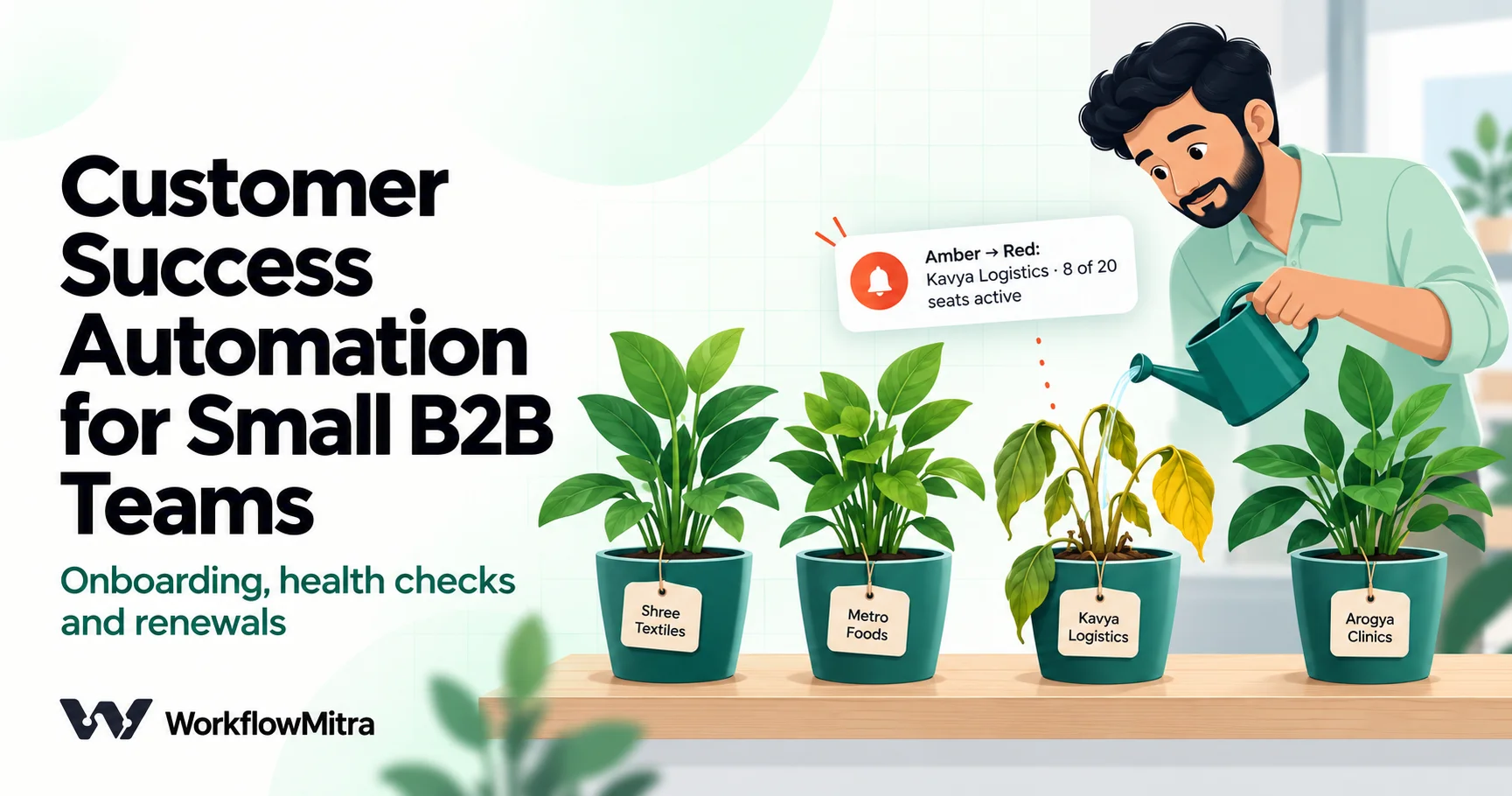
A software company in Bengaluru sells to about 40 business customers. Two account managers look after all of them, alongside sales calls and support escalations. Nobody tracks anything formally. The first sign that Kavya Logistics was unhappy came when its operations head asked for a cancellation quote, 50 days before renewal. Looking back, the signs had been there for weeks: only 8 of its 20 seats in use, four open tickets, an NPS of 6 that nobody replied to, and no call in six weeks.
That’s the usual shape of churn at a small B2B company. The information exists, but it’s scattered across the product, the helpdesk, a survey tool and people’s memories. Nobody joins it up until the account is already leaving.
This guide joins it up with one Google Sheet and six workflows in WorkflowMitra, powered by ChatMitra: handoff from sales, a weekly health score with reasons, check-in reminders, NPS follow-up, a renewal risk list and a monthly brief for accounts that need attention. It’s written for teams without a customer success platform, and it doesn’t cover chasing unpaid invoices. That’s finance’s job, and our guide to automating payment reminders covers it.
Product behaviour described here was checked in WorkflowMitra’s source code, and all four Code steps were run in its sandbox, on 20 October 2026.
What is customer success automation?
Customer success automation means letting workflows do the routine work of looking after existing customers: assigning new accounts, scoring account health from usage, support and survey signals, reminding the team about overdue check-ins, following up on low survey scores and flagging renewals at risk. People keep the conversations and the decisions; the workflows make sure nothing is forgotten.
For a small team, the value isn’t sophistication. It’s that every account gets looked at every week, by a rule that doesn’t get busy.
What a small team should automate, and what it shouldn’t
Customer success is a relationship job. Automating the wrong part makes customers feel processed. A useful dividing line:
| Automate | Keep human |
|---|---|
| Assigning a new account to a CSM and sending the kickoff email | The kickoff call and the onboarding plan for that customer |
| Collecting signals and scoring every account each week | Deciding what a falling score means for this customer |
| Telling each CSM which check-ins are overdue | The check-in itself |
| Alerting the right person about a low NPS score | Calling the customer to find out why |
| Listing renewals that aren't healthy, months ahead | The renewal conversation and any commercial offer |
| Drafting a brief for at-risk accounts | Anything sent to the customer |
Everything in the left column produces an internal message to a named person. None of the six workflows below sends anything to a customer except the kickoff email, which a person writes once.
The six workflows
| # | Workflow | Runs | Output |
|---|---|---|---|
| 1 | Handoff and kickoff | When sales adds a won customer | CSM assigned, account row created, kickoff email sent, CSM told |
| 2 | Weekly health score | Monday morning | Score, band and reasons per account; history logged; changes posted to the team |
| 3 | Check-in reminders | Every working morning | One email per CSM listing overdue and upcoming check-ins |
| 4 | NPS follow-up | When a survey response arrives | Account updated; detractors routed to their CSM within minutes |
| 5 | Renewal risk | Monday morning | Renewals in the next 90 days that aren't Green, soonest first |
| 6 | Monthly account brief | First working day of the month | An AI-drafted internal brief per at-risk account, for the CSM |
They all share one spreadsheet, so start there.
The account sheet
Create a Google Sheet with three tabs.
Accounts, one row per customer, with these columns: Account, CSM, CSM email, Tier, Contact name, Contact email, Seats, Active users, Last login, Open tickets, Last NPS, Last contact, Onboarding done, Start date, Renewal date, Champion left, Score, Band, Reasons.
- Tier is
High,MidorLow: how much personal attention the account gets. It sets the check-in cadence: 30, 60 or 90 days in the examples. - Seats, Active users, Last login and Open tickets come from your product and helpdesk. If your product has a database, a nightly workflow can copy them in with a MySQL or Postgres step; otherwise paste a weekly export. Our guide to moving data from a database to Google Sheets shows the nightly version.
- Last contact is the date of the last real conversation: a call, a meeting or a reply to an email the customer started. CSMs update it themselves. It’s the one manual column, and the check-in reminders depend on it.
- Champion left is
Yeswhen your main contact has moved on. - Score, Band and Reasons are written by workflow 2. Don’t type in them.
Keep dates as real dates in the sheet (format the columns as dates), and Account names unique: several workflows look accounts up by name.
Won deals is where sales adds a row for each new customer: Account, Contact name, Contact email, Seats, Tier, Start date, Renewal date.
Health log gets one row per account per week: Week, Account, Score, Band, Reasons. It’s what lets you check later whether the score predicted anything.
You’ll also need WorkflowMitra’s Google Sheets integration, a Slack incoming webhook for a #customer-success channel (or email, or a Telegram group), and a mailbox WorkflowMitra can send from.
Workflow 1: handoff and kickoff
The riskiest moment in a new account is the gap between “sales closed it” and “someone in CS owns it”. This workflow closes that gap the minute sales adds the row.
- Trigger: Google Sheets, row added, on
Won deals, checking every few minutes. Ask sales to add rows at the bottom and never sort the tab. - Assign to the next person, named Assign. Under Who should this go to?, list your CSMs with their email addresses. Each run picks the next person in the list and starts again at the top, so new accounts are shared evenly. The step outputs
assignedToandassignedName. - Google Sheets, Add row(s), on
Accounts: Account, Contact name, Contact email, Seats, Tier, Start date and Renewal date from{{ $trigger["Account"] }}and the other trigger fields; CSM{{ assignedName }}; CSM email{{ assignedTo }}; Onboarding doneNo; Last contact empty. - Email to
{{ $trigger["Contact email"] }}: a short welcome that names the CSM, says what happens in the first week and offers two times for a kickoff call. Write it once, as the CSM would. - Slack to
#customer-success:New account {{ $trigger["Account"] }} ({{ $trigger["Tier"] }} touch, {{ $trigger["Seats"] }} seats) is yours, {{ $node["Assign"].assignedName }}. Kickoff email sent to {{ $trigger["Contact name"] }}.
The Slack step reads the Assign step by name, because a plain {{ assignedName }} after the Add row(s) and Email steps would read the Email step’s output instead.
Round-robin isn’t always right. If one CSM looks after a vertical or a region, put an IF or Switch before the Assign step that routes those accounts to a fixed person. Note that every run moves the rotation on, test runs included, so a few test rows will skip people in the first real round.
The onboarding sequence itself, with reminders until the customer finishes setup and a handoff when they get stuck, is a workflow of its own. Our guide to customer onboarding automation builds it in detail. When onboarding is complete, set Onboarding done to Yes; the health score below takes points off accounts still onboarding after 30 days.
Workflow 2: a weekly health score with reasons
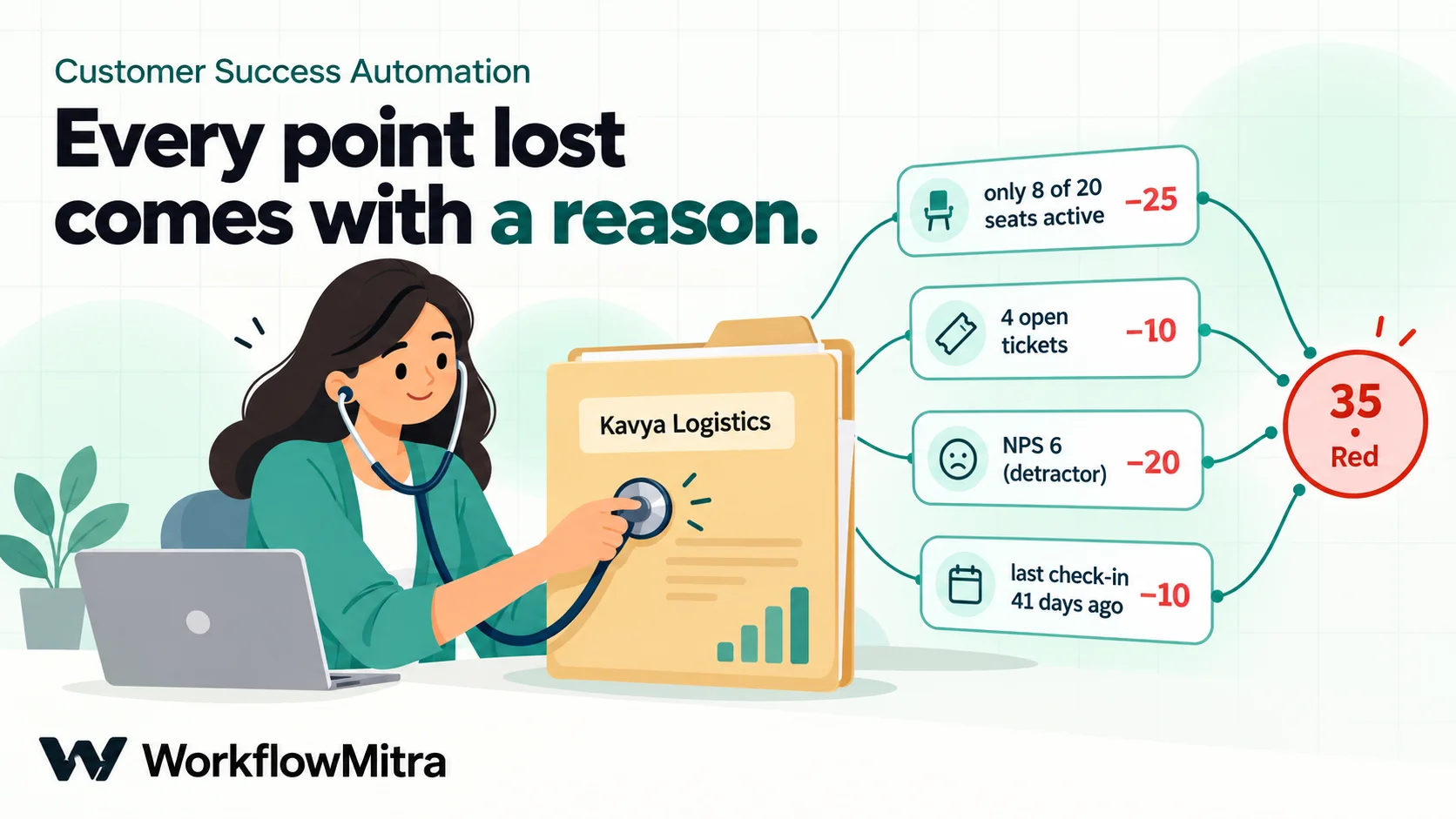
A health score is only useful if a CSM can read it and know what to do. “62” tells them nothing; “62: 12 of 20 seats active; last check-in 41 days ago” tells them to call and ask about adoption. So this score is built from rules you can see, and every point lost comes with a reason.
The scoring rules
| Signal | Rule in the example | Points off |
|---|---|---|
| Seat use | Under 50% of seats active / 50–70% | 25 / 10 |
| Last login | 14 days or more ago | 20 |
| Open tickets | 3 or more | 10 |
| Last NPS | 0–6 (detractor) / 7–8 (passive) | 20 / 5 |
| Last check-in | Older than the tier's cadence, or never | 10 |
| Onboarding | Not done 30 days after the start date | 15 |
| Champion left | Main contact has moved on | 20, and the score can't go above 70 |
Scores of 75 and above are Green, 50 to 74 Amber and below 50 Red. These numbers are a starting point, not a standard. The NPS bands follow Bain’s definition, where promoters score 9 or 10, passives 7 or 8 and detractors 0 to 6; everything else should be tuned to your customers.
Two design choices matter more than the weights:
- A red flag caps the score. In testing, an account whose main contact had left, renewing in 20 days, still scored 75 under plain addition, because everything else looked fine. Losing your champion before a renewal is never “Green”, so that rule limits the score to 70 on its own.
- Missing data isn’t counted as good or bad. A blank NPS or ticket count adds “no data: NPS” to the reasons instead of taking points off. An account with no signals at all shouldn’t look perfectly healthy, and it shouldn’t look broken either; it should look unknown, so someone fills the gap.
Build it
- Trigger: Schedule, Mondays at 9 a.m. (cron
0 9 * * 1), time zone Asia/Kolkata. - Google Sheets, Read rows, on
Accounts. Set Read values to Raw values (numbers stay numbers), so dates arrive as sheet serial numbers that the Code step can subtract. With the default, “As displayed”, they arrive as text in your sheet’s date format. - Code step named Account review:
// Points taken off a score of 100. Tune these to your own churned accounts.
var CONTACT_DAYS = { High: 30, Mid: 60, Low: 90 }; // check-in cadence by tier

var today = Math.floor((Date.now() + 5.5 * 3600000) / 86400000) + 25569; // sheet serial, India time
function num(v) { var n = Number(v); return v === "" || v === null || v === undefined || isNaN(n) ? null : n; }
function yes(v) { return String(v || "").trim().toLowerCase() === "yes"; }

var changed = [], log = [], expansion = [];
var week = new Date((today - 25569) * 86400000).toISOString().slice(0, 10);

(input.rows || []).forEach(function (r) {
  if (!String(r["Account"] || "").trim()) return;
  var score = 100, why = [], gaps = [];
  var seats = num(r["Seats"]), active = num(r["Active users"]);
  var login = num(r["Last login"]), contact = num(r["Last contact"]);
  var tickets = num(r["Open tickets"]), nps = num(r["Last NPS"]);
  var start = num(r["Start date"]);

  if (seats && active !== null) {
    var use = active / seats;
    if (use < 0.5) { score -= 25; why.push("only " + active + " of " + seats + " seats active"); }
    else if (use < 0.7) { score -= 10; why.push(active + " of " + seats + " seats active"); }
    if (use >= 0.9) expansion.push(r["Account"] + " (" + active + " of " + seats + " seats)");
  } else gaps.push("usage");

  if (login !== null) {
    if (today - login >= 14) { score -= 20; why.push("no login for " + (today - login) + " days"); }
  } else gaps.push("last login");

  if (tickets !== null) {
    if (tickets >= 3) { score -= 10; why.push(tickets + " open tickets"); }
  } else gaps.push("tickets");

  if (nps !== null) {
    if (nps <= 6) { score -= 20; why.push("NPS " + nps + " (detractor)"); }
    else if (nps <= 8) { score -= 5; why.push("NPS " + nps + " (passive)"); }
  } else gaps.push("NPS");

  var cadence = CONTACT_DAYS[String(r["Tier"] || "").trim()] || 60;
  if (contact === null || today - contact > cadence) {
    score -= 10; why.push(contact === null ? "no check-in recorded" : "last check-in " + (today - contact) + " days ago");
  }

  if (!yes(r["Onboarding done"]) && start !== null && today - start > 30) {
    score -= 15; why.push("onboarding not finished after " + (today - start) + " days");
  }
  // A red flag caps the score: losing your main contact is never "Green".
  if (yes(r["Champion left"])) { score = Math.min(score - 20, 70); why.push("main contact has left"); }

  score = Math.max(0, score);
  var band = score >= 75 ? "Green" : score >= 50 ? "Amber" : "Red";
  var reasons = why.join("; ") + (gaps.length ? (why.length ? "; " : "") + "no data: " + gaps.join(", ") : "");
  var previous = String(r["Band"] || "").trim();

  log.push({ week: week, account: r["Account"], score: score, band: band, reasons: reasons });
  if (band !== previous) {
    changed.push({ account: r["Account"], score: score, band: band, previous: previous || "new",
      reasons: reasons, csm: r["CSM"] || "" });
  }
});

var order = { Red: 0, Amber: 1, Green: 2 };
changed.sort(function (a, b) { return order[a.band] - order[b.band]; });

return {
  week: week,
  log: log,
  changed: changed,
  changedCount: changed.length,
  expansionCount: expansion.length,
  digest: "Account health, week of " + week + "\n" +
    (changed.length ? changed.map(function (c) {
      return c.previous + " → " + c.band + ": " + c.account + " (" + c.score + ", " + c.csm + ") " + c.reasons;
    }).join("\n") : "No account changed band this week.") +
    (expansion.length ? "\nNearly full, talk about more seats: " + expansion.join(", ") : "")
};- Loop, with List field
log. Inside the loop, add a Google Sheets Update row onAccounts: Key column Account, Key value{{ $trigger.account }}, and set Score to{{ $trigger.score }}, Band to{{ $trigger.band }}and Reasons to{{ $trigger.reasons }}. Inside a loop,$triggeris the current item, not the workflow’s trigger. - On the loop’s done branch, a Google Sheets Add row(s) on
Health login bulk mode: Upstream Array Source{{ $node["Account review"].log }}, mapping week, account, score, band and reasons to the five columns. - Slack to
#customer-successwith{{ $node["Account review"].digest }}.
The step compares each account’s new band with last week’s, still in the Band column when the sheet is read, and reports only the changes, worst first. Against four test accounts, it produced:
Account health, week of 2026-10-20
Amber → Red: Kavya Logistics (35, Neha) only 8 of 20 seats active; 4 open tickets; NPS 6 (detractor); last check-in 41 days ago
new → Red: Arogya Clinics (45, Rahul) 3 of 5 seats active; no login for 16 days; no check-in recorded; onboarding not finished after 45 days; no data: tickets, NPS
Green → Amber: Metro Foods (70, Rahul) NPS 8 (passive); main contact has left
Nearly full, talk about more seats: Shree Textiles (10 of 10 seats)
The last line is the other side of health: accounts using 90% or more of their seats are expansion conversations, and the account owner should hear about them as early as the risks.
Update row stops with an error if no row matches the account name, and by default also if two rows match. Both are signs that the Accounts tab has a typo or a duplicate, and both are worth fixing rather than skipping.
Workflow 3: check-in reminders for every CSM
Workflow 2 tells the team which accounts look unwell. This one makes sure every account gets a conversation on schedule, healthy or not.
- Trigger: Schedule, every working day at 9:30 a.m. (cron
30 9 * * 1-5), Asia/Kolkata. - Google Sheets, Read rows, on
Accounts, with Raw values. - Code step named Check-in gaps:
var CONTACT_DAYS = { High: 30, Mid: 60, Low: 90 }; // same cadence as the health check
var SOON = 7;                                        // warn this many days before a check-in is due

var today = Math.floor((Date.now() + 5.5 * 3600000) / 86400000) + 25569;
var byCsm = {};

(input.rows || []).forEach(function (r) {
  var account = String(r["Account"] || "").trim();
  var email = String(r["CSM email"] || "").trim().toLowerCase();
  if (!account || !email) return;
  var cadence = CONTACT_DAYS[String(r["Tier"] || "").trim()] || 60;
  var last = Number(r["Last contact"]);
  var left = r["Last contact"] === "" || isNaN(last) ? -1 : cadence - (today - last);
  if (left > SOON) return;
  var g = byCsm[email] || (byCsm[email] = { email: email, name: r["CSM"] || email, overdue: [], soon: [] });
  if (left < 0) g.overdue.push(account + (isNaN(last) || r["Last contact"] === "" ? " (never)" : " (" + (today - last) + " days)"));
  else g.soon.push(account + " (due in " + left + " days)");
});

return Object.keys(byCsm).map(function (k) {
  var g = byCsm[k];
  return {
    email: g.email,
    subject: g.overdue.length + " overdue, " + g.soon.length + " due soon: customer check-ins",
    body: "Hi " + g.name + ",\n\nOverdue:\n" + (g.overdue.join("\n") || "none") +
      "\n\nDue in the next " + SOON + " days:\n" + (g.soon.join("\n") || "none") +
      "\n\nLog each call or meeting in the Last contact column so this list stays right."
  };
});- Loop, leaving List field blank so it loops over the step’s list directly. Inside it, an Email step to
{{ $trigger.email }}with subject{{ $trigger.subject }}and body{{ $trigger.body }}.
Each CSM gets one email, and only on days when something is overdue or due within a week. In the test data, Rahul’s email listed Arogya Clinics as overdue (“never”) and Metro Foods as due in 5 days. The step lower-cases email addresses before grouping, so Rahul@ and rahul@ don’t produce two emails.
The reminder is only as good as the Last contact column. Make updating it part of every call; the closing line of the email is there to remind people.
Workflow 4: follow up every low NPS score
A detractor who hears nothing back after a survey has just been told their opinion doesn’t matter. This workflow makes sure the right person hears about every low score within minutes.
- Survey: a Google Form with a dropdown for the company (so names match the
Accountstab exactly), the 0–10 question “How likely are you to recommend us to a friend or colleague?”, and an optional comment. Link it to a sheet, and send it to your contacts from your usual email tool, quarterly or after onboarding. - Trigger: Google Sheets, row added, on the form’s response tab. Choose No for Use column headers as IDs of the columns.
- IF the score field Is not empty, with Else unconnected. A respondent who skipped the question stops here, so a blank never overwrites the account’s previous score.
- Google Sheets, Update row, on
Accounts: Key column Account, Key value{{ $trigger["Company"] }}, Last NPS{{ $trigger["How likely are you to recommend us to a friend or colleague?"] }}. Every score, good or bad, now feeds next Monday’s health check. - IF the score Less than or equal
6, again with Else unconnected. The order matters: in WorkflowMitra a blank value passes “Less than or equal”, so without the empty check in step 3, an unanswered question would count as a detractor. - Google Sheets, Find row, named Find account, on
Accounts, key column Account and key value{{ $trigger["Company"] }}, to get the account’s CSM. - Email to
{{ $node["Find account"].row["CSM email"] }}:{{ $trigger["Company"] }} scored us {{ $trigger["How likely are you to recommend us to a friend or colleague?"] }}. Comment: {{ $trigger["Anything else you'd like to tell us?"] }}. Please call within two working days and note what you learn in Last contact.Copy the question titles exactly from your sheet’s header row.
If you collect many free-text comments, an AI step can sort them by theme before they reach the CSM. Our guide to AI sentiment analysis automation builds that with your own AI provider key. For a handful of responses a quarter, read them yourself.
Bain’s Net Promoter definition counts promoters as 9 to 10 and detractors as 0 to 6, and the score is the percentage of promoters minus the percentage of detractors. Track it per quarter on the form’s response tab, but act on each detractor individually: the follow-up is worth more than the number.
Workflow 5: renewals that aren’t healthy
Renewal reminders tell customers a renewal is coming. Renewal risk tells you which renewals need work first. Run it weekly, after the health score.
- Trigger: Schedule, Mondays at 9:30 a.m. (cron
30 9 * * 1), Asia/Kolkata, so it reads this week’s bands. - Google Sheets, Read rows, on
Accounts, with Raw values. - Code step named Renewal risk:
var WINDOW = 90; // days before renewal to start watching

var today = Math.floor((Date.now() + 5.5 * 3600000) / 86400000) + 25569;
var risky = [], fine = 0;

(input.rows || []).forEach(function (r) {
  var due = Number(r["Renewal date"]);
  if (r["Renewal date"] === "" || isNaN(due)) return;
  var days = due - today;
  if (days < 0 || days > WINDOW) return;
  var band = String(r["Band"] || "").trim();
  if (band === "Green") { fine++; return; }
  risky.push({
    days: days,
    line: r["Account"] + ": renews in " + days + " days, " + (band || "no band yet") +
      " (" + (r["Reasons"] || "no reasons recorded") + "), CSM " + (r["CSM"] || "unassigned")
  });
});

risky.sort(function (a, b) { return a.days - b.days; });
return {
  riskyCount: risky.length,
  message: "Renewals in the next " + WINDOW + " days that aren't Green:\n" +
    (risky.map(function (x) { return x.line; }).join("\n") || "none") +
    "\n(" + fine + " Green renewals in the same window are left to the normal reminders.)"
};- IF
{{ riskyCount }}Greater than0, then Slack to the founder or CS lead with{{ message }}.
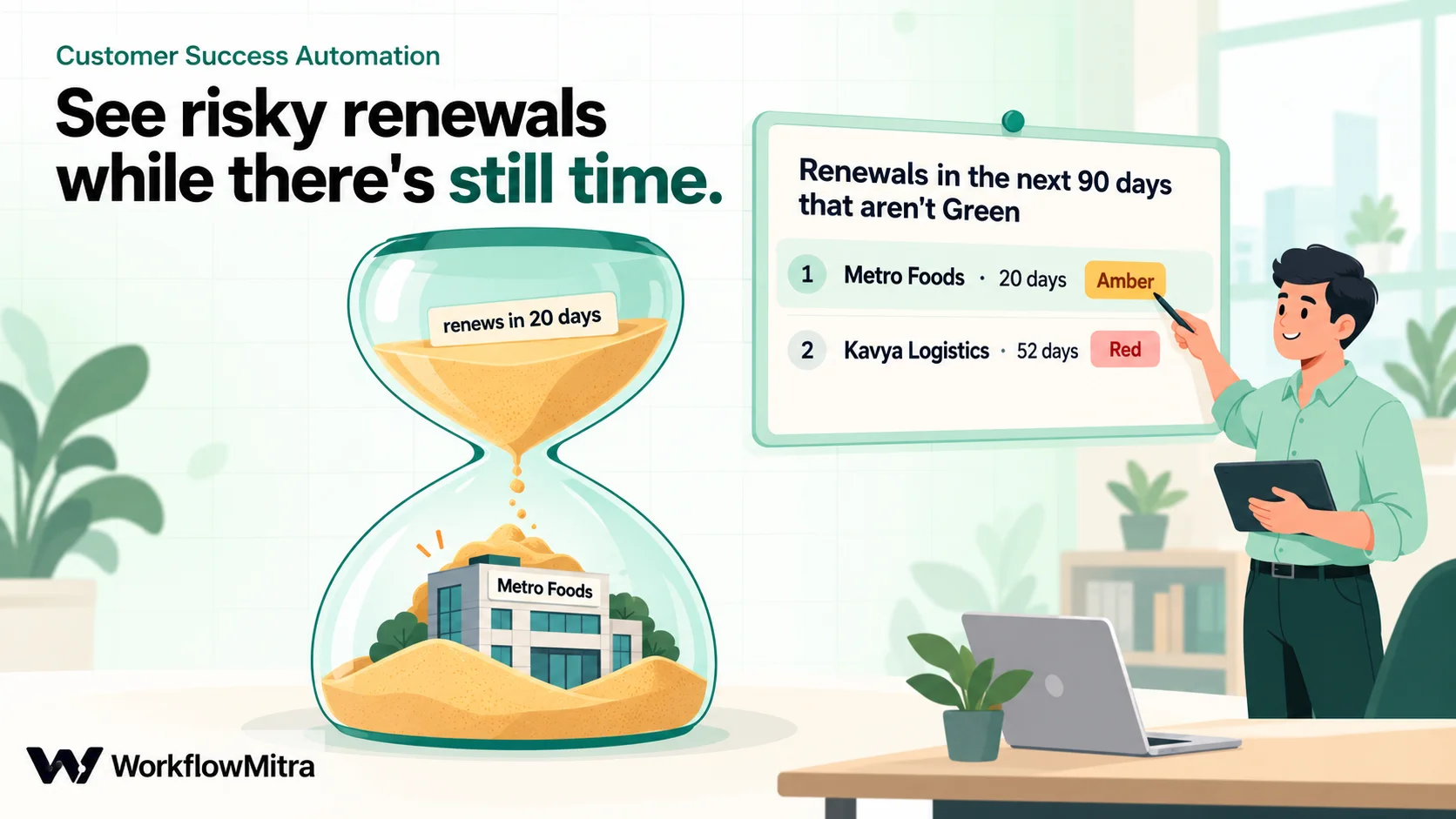
In the test data, it listed Metro Foods (renews in 20 days, Amber, main contact left) above Kavya Logistics (52 days, Red). Soonest comes first, because a Red account renewing in four months still has time for an adoption plan and an Amber one renewing in three weeks doesn’t.
Ninety days is about the shortest window in which a struggling account can be turned around; for annual contracts with a notice period, widen it. The customer-facing reminders, with a renewal quote approved before it’s sent, are covered in our guide to contract renewal reminders. The two workflows read the same Renewal date column.
Workflow 6: a monthly brief for at-risk accounts
Before a review call with a struggling account, a CSM pieces together the same facts every time. An AI step can do the first draft, from the sheet only, using your own AI provider key.
- Trigger: Schedule, on the 1st of the month at 9 a.m. (cron
0 9 1 * *), Asia/Kolkata. - Google Sheets, Read rows, on
Accounts. - Code step named At-risk accounts:
// Keep the accounts that need attention, and write down only facts from the sheet.
return (input.rows || []).filter(function (r) {
  return String(r["Account"] || "").trim() && String(r["CSM email"] || "").trim() &&
    String(r["Band"] || "").trim() !== "Green";
}).map(function (r) {
  return {
    email: String(r["CSM email"]).trim().toLowerCase(),
    account: r["Account"],
    facts: [
      "Account: " + r["Account"] + " (" + (r["Tier"] || "no tier") + " touch)",
      "Health: " + (r["Band"] || "not scored") + ", score " + r["Score"],
      "Reasons: " + (r["Reasons"] || "none recorded"),
      "Seats: " + r["Active users"] + " active of " + r["Seats"],
      "Open tickets: " + (r["Open tickets"] === "" ? "unknown" : r["Open tickets"]) + ", last NPS: " + (r["Last NPS"] === "" ? "none" : r["Last NPS"])
    ].join("\n")
  };
});- Loop over the list (List field blank). Inside it:
- AI step: pick your provider and model, set Max tokens to about 400, and put the rules in System prompt (optional):
You prepare internal notes for a customer success manager. Use only the facts given. Write three short sections: what's going wrong, two questions to ask the customer, and one thing to offer. Don't invent numbers, names or events.Set the Prompt to{{ $trigger.facts }}. - Email to
{{ $trigger.email }}, subjectAccount brief: {{ $trigger.account }}, body{{ text }}, which is the AI step’s reply.
- AI step: pick your provider and model, set Max tokens to about 400, and put the rules in System prompt (optional):
The brief goes only to the CSM, never to the customer. The AI is told to stay within the facts, but it can still phrase things badly, so treat it as a draft for someone who knows the account. Two behaviours to know: a reply cut off by the Max tokens limit still counts as a successful step, so keep the limit comfortable; and if the provider refuses a request, the step fails and the run stops for that account.
What to do when an account turns Red
An alert with no agreed response is just noise. Agree on a short playbook with the team before the first Monday digest goes out, and tie each move to the reason the score gives:
| Reason in the digest | First move, within two working days |
|---|---|
| Few seats active | Ask the main contact who isn't using it and why; offer a 30-minute session for that team |
| No logins for two weeks | Check for a change on their side (new manager, project paused) before assuming dissatisfaction |
| Several open tickets | Read them, chase the oldest with support, and tell the customer who owns each one |
| Detractor score | Call, listen, and write what you learned in the account's notes |
| Onboarding stalled | Find the step they're stuck on and offer to do it with them |
| Main contact has left | Find the new owner, introduce yourself, and re-run a short kickoff |
Whatever the move, it ends with Last contact updated. That’s how the account’s score recovers the following Monday, and how the check-in reminder stops. If an account stays Red for three weeks running, raise it with whoever owns the commercial relationship; by then it’s a renewal risk, not just a support one.
Test before Monday
- Copy the spreadsheet and point every workflow at the copy.
- Add five test accounts that cover the cases: one healthy, one with few seats active, one with no data at all, one whose champion has left, and one renewing in three weeks.
- Run workflow 2 by hand. Check that Score, Band and Reasons are written to every row, that five rows appear in
Health log, and that the Slack digest lists only the accounts whose band changed. Run it again: the second digest should say nothing changed. - Run workflow 3 and check that each test CSM gets one email, and that a CSM with nothing due gets none.
- Submit an NPS response of 4 and one with the score left blank. Only the first should update Last NPS and reach the CSM; the blank one should stop at the first IF.
- Run workflow 5 and check that the account renewing in three weeks is at the top.
The editor’s Run button performs a live run, so these tests really write to the sheet and really send emails and Slack messages. Use test addresses and a private channel, then switch the steps to the real ones.
The numbers to watch
Automation produces activity. These measures tell you whether it’s working. Most can be calculated from the Accounts and Health log tabs plus your billing records.
| Measure | How to calculate it | What it tells you |
|---|---|---|
| Gross revenue retention | Recurring revenue from customers at the start of a period, minus what they cancelled or downgraded, divided by the starting revenue | How much revenue you keep, ignoring growth |
| Net revenue retention | As above, but adding upgrades and extra seats from the same customers | Whether existing customers grow faster than they shrink |
| Logo churn | Customers lost in a period divided by customers at its start | How many relationships end, whatever their size |
| Onboarding completion | Share of accounts with Onboarding done = Yes within 30 days of the start date | Whether new customers reach first value |
| Check-in coverage | Share of accounts whose last contact is within their tier's cadence | Whether the team is keeping up |
| Health distribution | Count of Green, Amber and Red in this week's Health log | The direction of the whole book |
| Score accuracy | Of the accounts that churned, how many were Red or Amber 60–90 days earlier | Whether your weights are right |
| NPS | Percentage of promoters (9–10) minus percentage of detractors (0–6) | Loyalty trend, quarter to quarter |
The last but one is the most useful and the least tracked. Once a quarter, filter the Health log for every account that churned or downgraded, and look at its band two to three months earlier. If most were Green, your score is measuring the wrong things; change the weights in the Code step and keep the log, so you can compare.
What it costs
At the rates checked on 20 October 2026, WorkflowMitra charges 1 credit for each trigger, Google Sheets step, Assign, Email, Slack and AI step; 1 credit per item a Loop processes; nothing for IF steps; and 2 thousandths of a credit per millisecond of Code, a tiny fraction here. For a team with 40 accounts:
| Workflow | How often | Credits a run | Credits a month |
|---|---|---|---|
| 1. Handoff and kickoff | 4 new customers | 5 | 20 |
| 2. Weekly health score | 4–5 Mondays | About 84 (40 loop items and 40 updates) | About 360 |
| 3. Check-in reminders | 22 working days | About 6 | About 130 |
| 4. NPS follow-up | About 15 responses | 2, or 4 for a detractor | About 40 |
| 5. Renewal risk | 4–5 Mondays | 2, or 3 when it posts | About 13 |
| 6. Monthly brief | Once, about 10 accounts | About 32 | About 32 |
That’s roughly 600 credits a month, a small part of the Starter plan’s 10,000 credits for ₹999 a month. The health score is the biggest item because it updates every row; if your book grows to several hundred accounts, the Pro plan’s 20,000 credits for ₹1,499 a month covers it. AI calls are billed separately by your AI provider, because WorkflowMitra uses your own key. CSMs who only receive emails and Slack messages don’t need WorkflowMitra seats; only the people who build and change the workflows do (Starter includes 2 seats, Pro 5).
Using WhatsApp for customer check-ins
Many Indian B2B customers would rather hear from you on WhatsApp than by email, and WorkflowMitra’s WhatsApp step can send through ChatMitra or Meta’s Cloud API. Keep the rules in mind: customers must have opted in, and outside the 24-hour customer service window WhatsApp only delivers approved templates, which Meta charges for per delivered message, by category. A personal check-in is usually better sent by the CSM from their own WhatsApp Business inbox than by a workflow. Automated WhatsApp messages suit operational updates, such as “your onboarding session is confirmed for Thursday at 3 p.m.”. ChatMitra’s guide to WhatsApp utility templates explains which messages qualify, and current rates are on ChatMitra’s pricing page.
Common mistakes
- Scoring without reasons. A number with no explanation gets ignored by week three.
- Treating missing data as healthy. An account with no usage data isn’t Green; it’s unknown.
- Adding points without caps. One serious red flag can hide behind several good signals.
- Never checking the score against churn. The weights in the example are a guess until your own churned accounts confirm or correct them.
- Reading dates “As displayed”. The Code step needs raw serial numbers to subtract.
- Free-text company names on the survey. Update row and Find row need exact matches; use a dropdown.
- Forgetting the blank-score rule. Without “Is not empty” first, an unanswered NPS question looks like a detractor and wipes the last real score.
- Automating the conversation. Workflows should tell a person to call, not replace the call.
- Letting Last contact go stale. If CSMs don’t update it, the check-in reminders become noise and get ignored.
- Mixing in payment chasing. Overdue invoices are a finance workflow with its own tone and rules; keep them out of the health score’s messages.
Where WorkflowMitra fits
WorkflowMitra, powered by ChatMitra, is the layer that turns a sheet of accounts into a routine: it assigns new customers, scores every account with reasons, reminds each CSM what’s overdue, routes detractors, lists risky renewals and drafts briefs, with every run recorded in its execution history.
It isn’t a customer success platform. It has no built-in health score, no product-usage tracking, no customer portal and no CS dashboards; the score here is a Code step you own and can read. If you need in-app usage analytics, automated playbooks across a large team or detailed retention reporting, a dedicated CS platform does that. For a team of one to five people with tens or a few hundred accounts, a sheet and six workflows usually cover the work, and they move with you: the same signals can feed a platform later.
Start with the Monday score
Build the Accounts tab and workflow 2 first, and run it by hand on this week’s data. Read the reasons for every Red and Amber account with your team, and adjust the weights until the list matches your instinct about which customers are struggling. Then add the check-in reminders, and the rest once the sheet is trusted.
You can build all six on a 14-day WorkflowMitra trial with no card required, using the Google Sheets and Slack integrations. For the reporting side of the same data, our guide to KPI alerts automation shows how to send a message when a number crosses a line.
The Net Promoter Score question, scale, categories and calculation come from Bain & Company's Net Promoter System page; the WhatsApp opt-in, customer service window, template and per-message pricing rules from Meta's WhatsApp Business Platform pricing documentation. All were read on 20 October 2026. The retention measures are standard definitions written out in plain terms, not taken from one source. WorkflowMitra behaviour (the Google Sheets trigger and its row tracking, Read rows and its Read values options, Add row(s) in single and bulk mode, Find row and Update row matching and errors, Assign to the next person and its outputs and rotation, Loop and the current item in `$trigger`, the AI step's fields and output, the Email and Slack steps, the IF operators and blank values passing "Less than or equal", the previous-step rule for plain fields, date helpers using the server clock, plan seats and the credit rates per step) was checked in the product's source code, and all four Code steps were run in its sandbox against test accounts on 20 October 2026; plan prices come from WorkflowMitra's live plans the same day. The company, accounts, CSMs, scores and volumes in the examples are illustrations, not customer data or benchmarks. Sources: Bain & Company, measuring your Net Promoter Score; Meta, WhatsApp pricing.
Frequently Asked Questions
Questions small B2B teams ask before automating customer success.
It's using workflows to handle the routine parts of looking after existing customers: assigning new accounts, watching usage and support signals, reminding the team about check-ins, following up on survey scores and flagging renewals at risk. The aim is that people spend their time on conversations, not on checking spreadsheets.
Automate the work between your apps
Build workflows with triggers, conditions and actions, then test them before they go live. Try WorkflowMitra free for 14 days, no card required.
