Database Alerts: Get Notified When a New Row Lands in Postgres or MySQL

Quick Summary
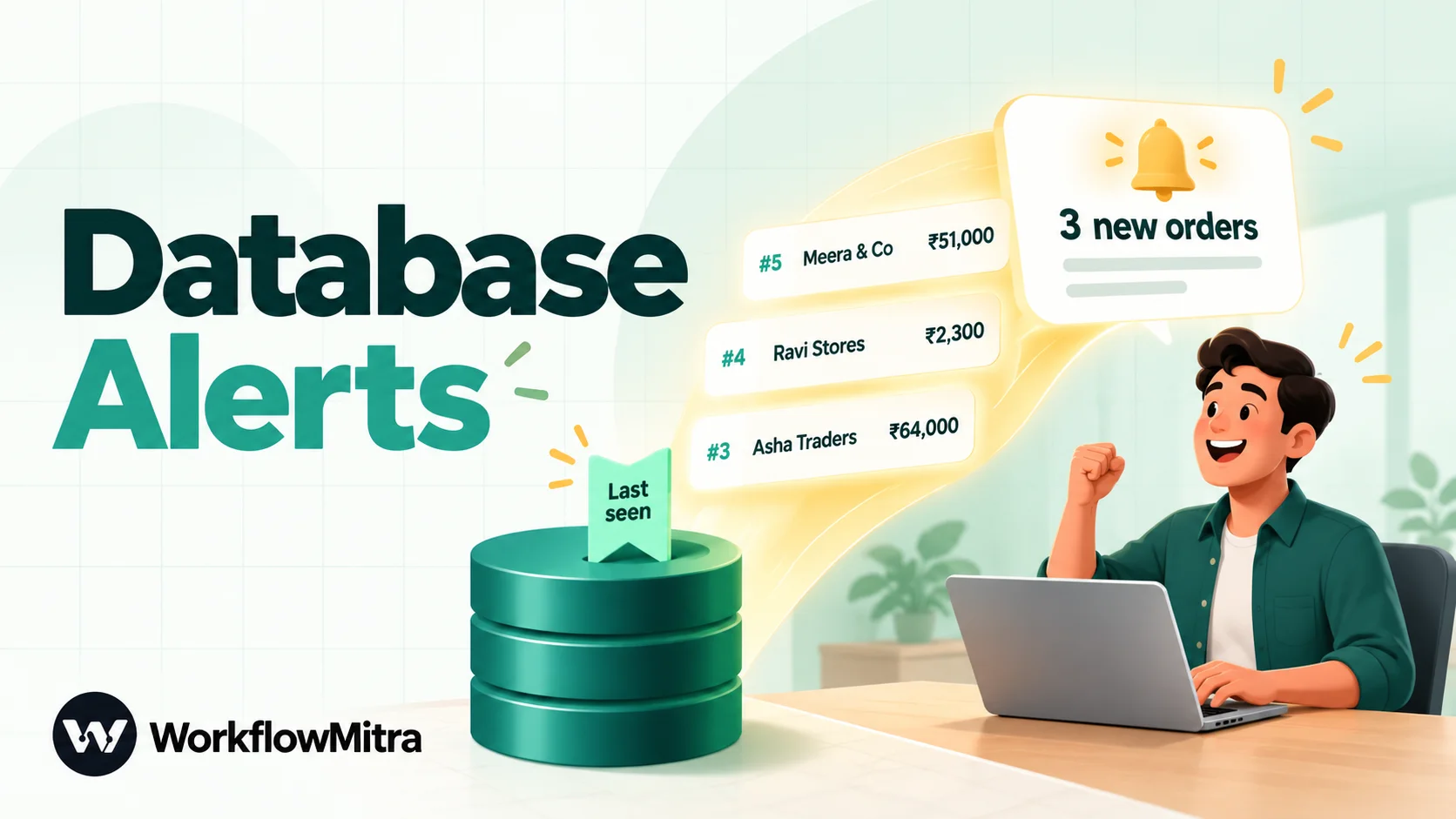
A database change notification tells a person or another system that something happened in a table: a new order, a large payment, a cancelled booking. PostgreSQL and MySQL don't send alerts to Slack or email by themselves, so you need one of three designs: poll on a schedule with a cursor that remembers the last row already reported, let a database trigger write each event into a small outbox table that a workflow reads and marks as sent, or push events out in real time from your application or a hosted feature such as Supabase Database Webhooks. With WorkflowMitra, powered by ChatMitra, a Schedule trigger, one SQL step, a Code step and a Slack, email or WhatsApp step deliver one summary per batch, and the cursor moves only after the alert is sent. A check costs 2 credits whether or not anything new arrived, so the interval drives the cost.
Most events a business cares about end up as a row in a database: a new order, a payment above a limit, a booking marked cancelled. The data is there within milliseconds, yet the people who should act on it often find out hours later.
This guide shows three reliable ways to turn a new or changed row in PostgreSQL or MySQL into a timely alert in Slack, email, Telegram or WhatsApp. It explains why the obvious approach of “select the last five minutes” quietly drops events, shows a cursor-based design that doesn’t, adds a trigger-fed outbox for updates, and covers real-time push for teams that own the application. We executed each SQL statement in this guide on PostgreSQL 18 and on MySQL while writing it.
What is a database change notification?
A database change notification is a message sent automatically when data in a table changes: a row is inserted, a value is updated or a row is deleted. Because PostgreSQL and MySQL don't deliver alerts to people on their own, a change notification is built either by polling the table for rows newer than the last one seen, by recording each event in an outbox table with a database trigger, or by having the application push the event to a webhook as it happens.
Whichever design you choose, the goal is one alert per event, soon enough to act on, with nothing lost when a run fails.
Three ways to get notified about database changes
| Design | How it works | Catches | Delay | Changes to your database |
|---|---|---|---|---|
| Cursor polling | A scheduled workflow selects rows with an ID above the last one reported, then moves the cursor | New rows | Up to one schedule interval | One tiny cursor table; read-only on business tables |
| Trigger + outbox | A database trigger writes an event row; a scheduled workflow sends unsent events and marks them sent | Inserts, updates, deletes, any condition | Up to one schedule interval | A trigger and an outbox table |
| Push | Your application, or a hosted feature such as Supabase Database Webhooks, calls a webhook when the row changes | Whatever the sender sends | Seconds | Application code or a platform setting |
Most teams start with cursor polling, which needs nothing from the application’s developers, add the outbox for updates, and move to push when minutes of delay are too many.
Decide what deserves an alert
Before writing any SQL, write down three things for each alert you plan: who receives it, what they should do when they read it, and how soon they need to know. If you can’t name the action, it’s a report, not an alert, and it belongs in a daily summary or a dashboard instead.
The answers decide the design. “Sales should call any order above ₹50,000 within the hour” needs new rows, a filter on the total and a check every 15 minutes. “Support should contact a customer whose order was cancelled” is an update, so it needs the outbox pattern. “The warehouse must know about express orders within a minute” points at push, because a one-minute poll costs more than it should and still lags.
Write the condition in business language first (“orders of ₹50,000 or more, excluding test orders”), then in SQL. That sentence becomes the alert’s first line and the test of whether the query is right.
Finally, decide where it goes: a shared channel for events anyone can pick up, a named person for events with one owner. Sending everything to everyone is the fastest way to get an alert muted.
Why “rows from the last five minutes” fails
The first version almost everyone writes looks like this: schedule a check every five minutes and select rows whose created_at is within the last five minutes. It works in a demo. In production it leaks.
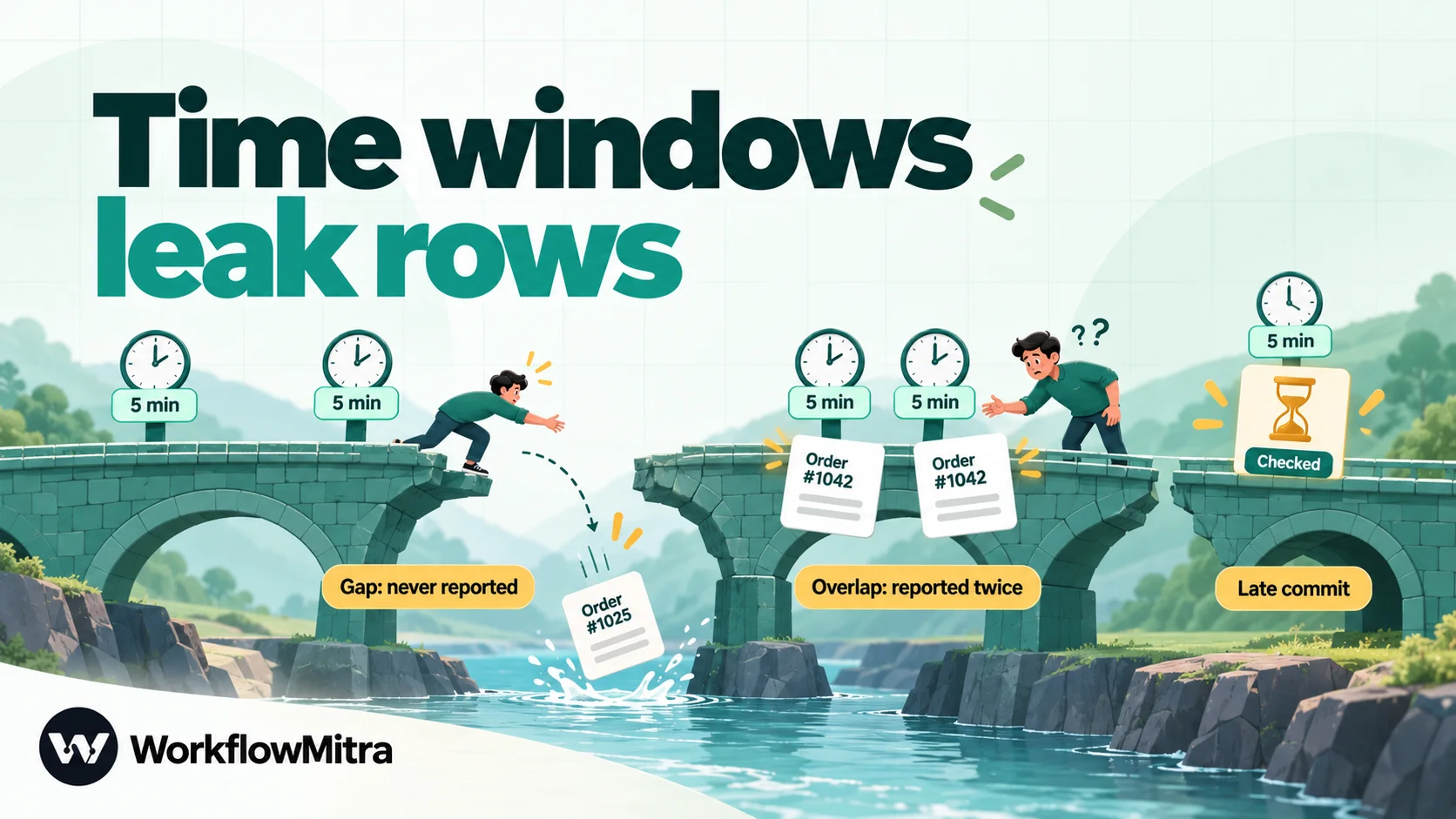
- Runs don’t start exactly on time. If a check starts 20 seconds late, its window is 20 seconds out of step with the previous one. Any row in the gap is never reported; any row in an overlap is reported twice.
- Missed runs leave holes. If one check fails, or is skipped because the workspace had no credits, the rows from that window are gone for good. Nothing goes back for them.
- Clocks disagree.
now()in the database, the workflow platform’s clock and the time zone of aDATETIMEcolumn don’t always agree, and a few seconds of difference is enough. - Commit time is not insert time. A row’s
created_atis usually set when the statement runs. If the transaction commits a minute later, the row becomes visible after its window was already checked.
Remembering “what have I already reported?” instead of asking “what time is it?” removes all four.
Pattern 1: poll with a cursor
A cursor, sometimes called a high-water mark, is a single number: the ID of the last row already reported. Each check asks for rows with a larger ID, sorted by ID, with a limit. After the alert is delivered, the cursor moves to the last ID in that batch.
This works because an auto-increment key only goes up. It doesn’t care when the check runs or how clocks are set; if five checks fail in a row, the sixth reports everything since the last success.
Pick the right column. An auto-increment or identity primary key is ideal. A timestamp can work only if values never repeat and are never back-dated; ties at the same timestamp need the ID as a tie-breaker, which is why an ID is simpler.
Know the one gap. IDs are assigned when a row is inserted, not when its transaction commits. We reproduced the problem on PostgreSQL 18: one session inserted a row (ID 6) and held its transaction open for four seconds; meanwhile a second session inserted and committed ID 7. A check during those four seconds saw only ID 7. A cursor moved to 7 would never report ID 6.
For most tables this needs a long transaction to matter, and you can make it rarer with a lag guard that leaves the newest rows for the next check:
AND o.created_at < now() - interval '30 seconds'If every single event matters, such as payments, use the outbox pattern below. It has no gap.
Prepare the database
Do this once, with an administrator account.
1. Create the cursor table and start it at today’s highest ID. Starting at the current maximum stops the first run from announcing every order in history.
CREATE TABLE alert_cursor (
  name    text PRIMARY KEY,
  last_id bigint NOT NULL
);

INSERT INTO alert_cursor (name, last_id)
SELECT 'new_orders', COALESCE(MAX(id), 0) FROM orders;
For MySQL, use VARCHAR(50) for name and BIGINT UNSIGNED for last_id; the INSERT … SELECT is identical.
2. Give the workflow its own user with the least it needs. It should read the watched table and update only the cursor:
CREATE ROLE wm_alerts LOGIN PASSWORD 'use-a-long-random-password';
GRANT SELECT ON orders TO wm_alerts;
GRANT SELECT, UPDATE ON alert_cursor TO wm_alerts;
ALTER ROLE wm_alerts SET statement_timeout = '20s';
On MySQL the grants are GRANT SELECT ON shop.orders TO 'wm_alerts'@'%' and GRANT SELECT, UPDATE ON shop.alert_cursor TO 'wm_alerts'@'%'. We tested both: the alert user could read new orders and move the cursor, and an attempt to change an order was refused with “permission denied” on PostgreSQL and “UPDATE command denied” on MySQL.
3. Make it reachable, safely. WorkflowMitra, powered by ChatMitra, which runs the build below, connects from the cloud, so the database needs a public endpoint with SSL; managed services such as Amazon RDS, Google Cloud SQL, Azure, DigitalOcean and Supabase all provide one. In the PostgreSQL or MySQL credential, choose the option to verify the server certificate. WorkflowMitra doesn’t publish its outgoing IP addresses or offer an SSH tunnel, so a database that only admits known addresses, or sits on a private office network, needs a conversation with whoever runs the network first. For heavy tables, point the user at a read replica.
Build the alert in WorkflowMitra
It’s built by the ChatMitra team, whose platform handles WhatsApp business messaging, and it runs the whole alert from a schedule. The workflow has seven steps, two of which are free.
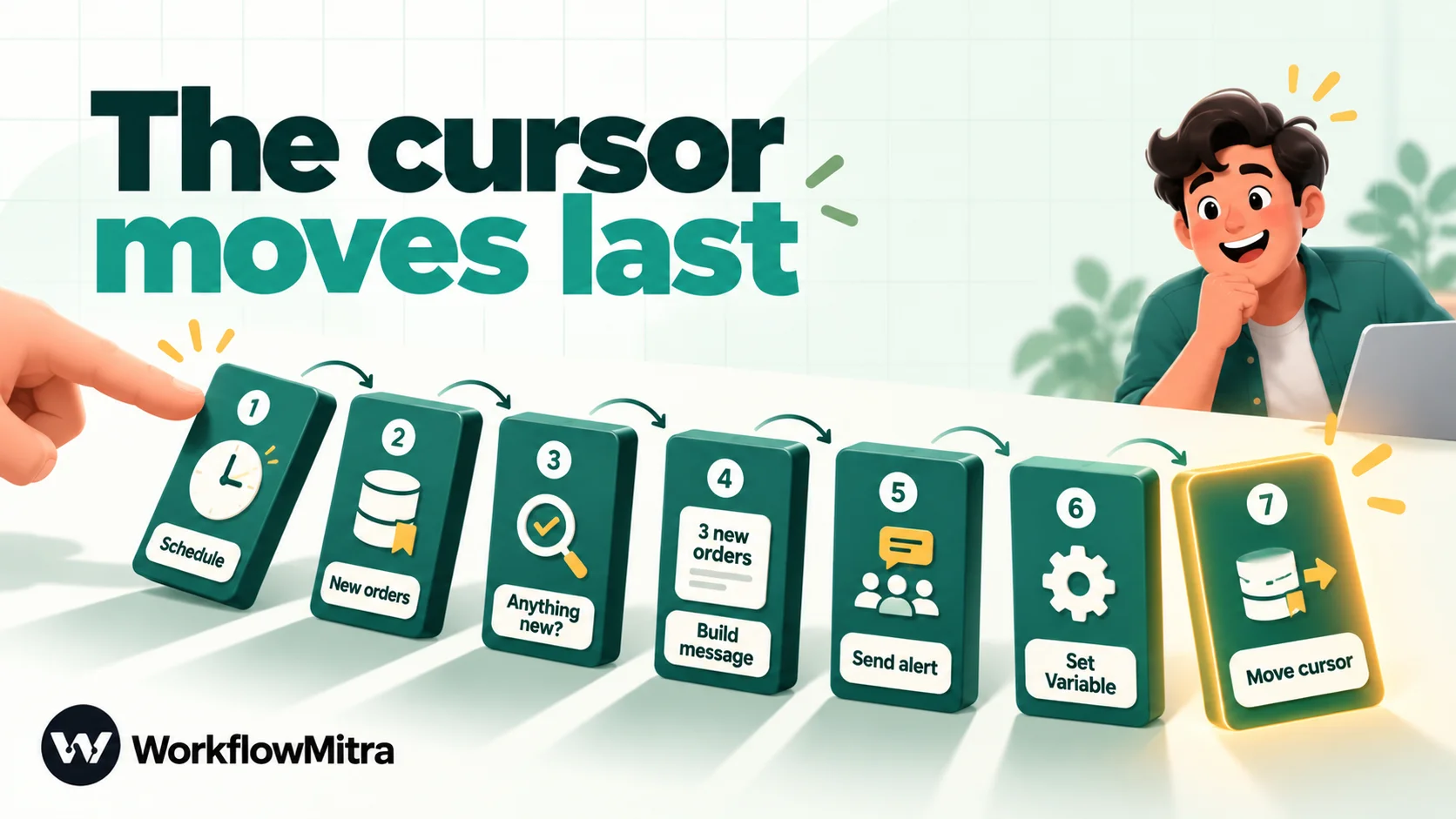
1. Schedule
Add a Schedule trigger. Every 15 minutes is a sensible start; the cost section below explains the trade-off. To check only during working hours, choose Custom schedule (advanced)… with a cron expression such as */10 9-19 * * 1-6 and your time zone. The schedule automations guide explains cron and time zones.
2. Read the new rows
Add a PostgreSQL step, choose your credential and Run SQL Query (advanced), and rename the step “New orders”:
SELECT o.id::text AS id,
       o.customer,
       o.total::float AS total,
       to_char(o.created_at, 'DD Mon HH24:MI') AS placed_at
FROM orders o
WHERE o.id > (SELECT last_id FROM alert_cursor WHERE name = 'new_orders')
ORDER BY o.id
LIMIT 50;
Notice there’s no placeholder at all. The cursor lives in the database, so the query reads it directly. That matters because WorkflowMitra’s SQL placeholders read only the step immediately before them, and here that step is the trigger, which carries no data. The casts are deliberate too: PostgreSQL returns bigint and numeric as text, so ::float gives the Code step a real number, and to_char gives a readable time instead of a raw timestamp. The step returns rows and rowCount.
The LIMIT 50 keeps one alert readable. If 200 orders arrive during a sale, four checks clear the backlog in order.
3. Stop when there’s nothing new
Add an IF step with {{ $node["New orders"].rows[0].id }} Is not empty. Only the Yes branch continues. IF steps cost no credits, and this check works the same for MySQL, which doesn’t return a row count.
4. Build one summary
Add a Code step, rename it “Build message”, and paste:
const rows = input.rows || [];
const lines = rows.map(r =>
  '#' + r.id + ' · ' + r.customer + ' · ₹' + Number(r.total).toLocaleString('en-IN')
);
return {
  count: rows.length,
  maxId: rows.length ? Number(rows[rows.length - 1].id) : null,
  text: rows.length + ' new order' + (rows.length === 1 ? '' : 's') + ':\n' + lines.join('\n')
};
The IF step passes its input through unchanged, so input here is the query result. In our run, three test orders became:
3 new orders:
#3 · Asha Traders · ₹64,000
#4 · Ravi Stores · ₹2,300
#5 · Meera & Co "Wholesale" · ₹51,000
Because the rows are sorted by ID, the last row holds the highest ID, which becomes maxId. The Code step guide covers its limits.
5. Send the alert
Add a Slack step, pick the connection for your alerts channel, and set the Message to {{ $node["Build message"].text }}. The Slack incoming webhooks guide shows how to create the connection. Email, Telegram and Discord steps work the same way; WhatsApp needs a template, covered below.
6. Carry the cursor value forward
Add a Set Variable step with one field: last_id set to {{ $node["Build message"].maxId }}. This looks redundant, but it’s what lets the next SQL step see the value: placeholders in SQL read only the previous step, and the previous step will be this one. Set Variable is free.
7. Move the cursor
Add a second PostgreSQL step, Run SQL Query (advanced), renamed “Move cursor”:
UPDATE alert_cursor
SET last_id = {{ last_id }}
WHERE name = 'new_orders' AND last_id < {{ last_id }};
Write {{ last_id }} without quotes. A quoted placeholder is sent as the literal text $1 rather than the value; our guide to running SQL queries in workflows explains why. The last_id < … condition means the cursor can only move forward, so a stale or repeated run can never wind it back. In our test the first update changed one row and an immediate repeat changed none.
Test it, then switch it on
Point the Slack step at a test channel, insert two or three rows into the table, and press Run. The editor’s Run executes the workflow for real, so the message is sent and the cursor moves. Run it again without inserting anything: the IF should stop it at step 3. Then insert one more row and run once more. When all three behave, point Slack at the real channel and activate the workflow.
Why the cursor moves last
If the Slack message fails, WorkflowMitra fails the step and the run stops before step 7. The cursor stays where it was, and the next check reports the same rows again. That’s at-least-once delivery: you might, rarely, see an alert twice, but you never silently lose one. Moving the cursor before sending would flip that trade-off, which is the wrong one for alerts. For failed runs themselves, set up workflow error handling so someone hears about a broken alert.
The same alert on MySQL
The design is identical; only the SQL dialect changes. Use a MySQL step with Run SQL Query (advanced):
SELECT CAST(o.id AS CHAR) AS id,
       o.customer,
       CAST(o.total AS DOUBLE) AS total,
       DATE_FORMAT(o.created_at, '%d %b %H:%i') AS placed_at
FROM orders o
WHERE o.id > (SELECT last_id FROM alert_cursor WHERE name = 'new_orders')
ORDER BY o.id
LIMIT 50;
The cursor update is the same statement as above. Two differences matter. MySQL returns rows only, with no rowCount, which is why the IF step checks the first row’s ID. And casting the ID to text avoids a precision problem: MySQL BIGINT values above 2^53 can lose digits on their way into a workflow. The lag guard, if you want one, is AND o.created_at < NOW() - INTERVAL 30 SECOND.
Pattern 2: a trigger-fed outbox for updates and conditions
A cursor sees new rows. It can’t tell you that an order was cancelled, a payment was refunded or a stock level dropped, because those are updates to rows it has already passed. For that, let the database record the event when it happens.
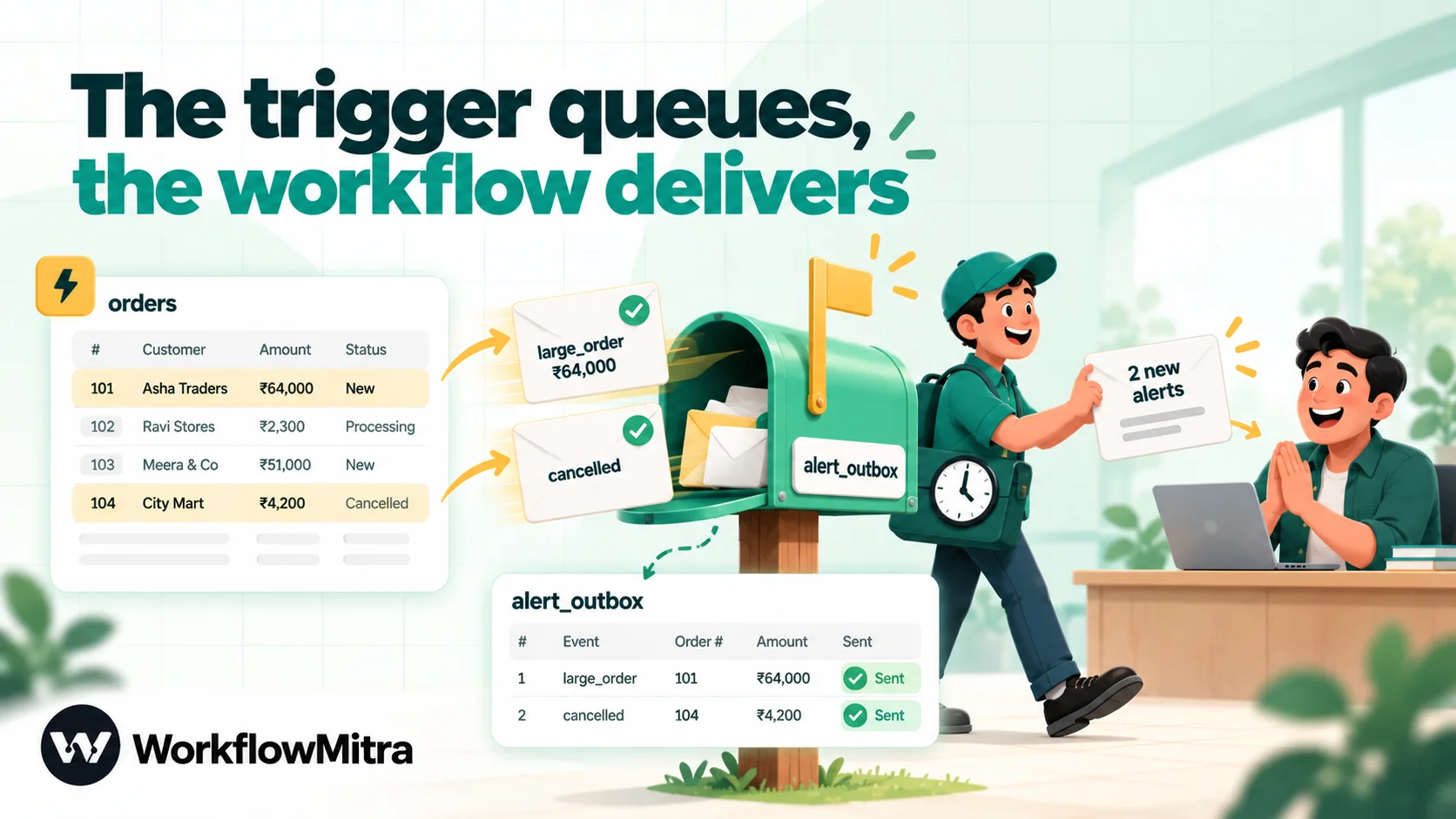
1. Create the outbox and the trigger (PostgreSQL):
CREATE TABLE alert_outbox (
  id         bigserial PRIMARY KEY,
  kind       text NOT NULL,
  order_id   bigint NOT NULL,
  customer   text,
  total      numeric(12,2),
  created_at timestamptz NOT NULL DEFAULT now(),
  sent_at    timestamptz
);

CREATE FUNCTION queue_order_alert() RETURNS trigger
LANGUAGE plpgsql AS $$
BEGIN
  IF TG_OP = 'INSERT' AND NEW.total >= 50000 THEN
    INSERT INTO alert_outbox (kind, order_id, customer, total)
    VALUES ('large_order', NEW.id, NEW.customer, NEW.total);
  ELSIF TG_OP = 'UPDATE' AND NEW.status = 'cancelled'
        AND OLD.status IS DISTINCT FROM 'cancelled' THEN
    INSERT INTO alert_outbox (kind, order_id, customer, total)
    VALUES ('cancelled', NEW.id, NEW.customer, NEW.total);
  END IF;
  RETURN NEW;
END $$;

CREATE TRIGGER orders_alert
AFTER INSERT OR UPDATE OF status ON orders
FOR EACH ROW EXECUTE FUNCTION queue_order_alert();
In our test, two large orders and one cancellation produced exactly three outbox rows. Setting the same order to cancelled a second time produced nothing, because the trigger checks the old value. The event row is written in the same transaction as the change, so it becomes visible exactly when the change does, which is why this pattern has no late-commit gap.
MySQL uses one trigger per event (AFTER INSERT and AFTER UPDATE) with a BEGIN … END body and the same IF logic; write the “was it already cancelled?” check as NOT (OLD.status <=> 'cancelled'), MySQL’s null-safe comparison. We ran both triggers and got the same three events.
Grant the alert user SELECT, UPDATE on alert_outbox, and nothing on the order table if this workflow doesn’t need it.
2. Change the workflow. Keep the Schedule, IF, message and Set Variable steps, and swap the two SQL steps:
SELECT id::text AS alert_id, kind, order_id::text AS order_id,
       customer, total::float AS total
FROM alert_outbox
WHERE sent_at IS NULL
ORDER BY id
LIMIT 50;
In the Code step, also return the list of event IDs, as numbers:
ids: JSON.stringify(rows.map(r => Number(r.alert_id)))Set Variable carries ids forward, and the last step marks them sent:
UPDATE alert_outbox SET sent_at = now()
WHERE id IN (SELECT jsonb_array_elements_text({{ ids }}::jsonb)::bigint);
On MySQL, the last line is WHERE id MEMBER OF (CAST({{ ids }} AS JSON)). Keep the IDs numeric: in our MySQL test, the same list written as strings (["1","2"]) matched nothing and returned no error, so the events would be re-sent forever.
3. Keep the outbox small. Sent rows are history. A monthly job run by an administrator, such as DELETE FROM alert_outbox WHERE sent_at < now() - interval '30 days', keeps the table tiny. Don’t give the alert user DELETE just for this.
The outbox doubles as an audit trail of when each event was queued and sent.
A worked example: one evening at an online store
Here’s how the two patterns behave together on an ordinary evening, with a 15-minute schedule.
At 18:02 a customer places a ₹64,000 order. The cursor workflow’s 18:15 check finds it with two smaller orders, posts one Slack message listing all three, and moves the cursor to the last ID. The order is large, so the outbox trigger also wrote a “large order” event the moment it was saved; the outbox workflow, scheduled a few minutes apart from the first, sends that to the sales channel at 18:20.
At 18:40 the Slack connection fails because someone rotated the channel’s webhook. The 18:45 check finds two new orders, the Slack step fails, and the run stops. The cursor doesn’t move. The error alert reaches the workflow owner, who updates the connection at 19:05. The 19:15 check reports the two orders from 18:45 together with one newer order, nothing lost.
At 21:30 support cancels the ₹64,000 order at the customer’s request. The cursor workflow ignores it, since the row isn’t new. The outbox trigger records a “cancelled” event, and the 21:35 outbox check tells the sales channel, so nobody calls a customer who has already cancelled.
Every event was accounted for, including the ones that arrived while delivery was broken.
Pattern 3: push the change in real time
When minutes matter, push the event instead of polling.
- From your own application. The code that inserts the order can also call a WorkflowMitra webhook URL with the order’s details. This is usually the simplest real-time design when you own the code. Send the webhook after the transaction commits, so you never announce an order that was rolled back.
- From Supabase. Supabase’s Database Webhooks fire after a row is inserted, updated or deleted, are built on its
pg_netextension so they don’t block the write, and send a JSON payload withtype,table,recordandold_record. Point one at a WorkflowMitra webhook trigger and the alert workflow needs no SQL at all. WorkflowMitra webhooks expect a secret header by default, and Supabase’s webhook definition takes a JSON object of headers, so add it there. - LISTEN and NOTIFY. PostgreSQL’s built-in notifications only reach a client that keeps a connection open and listens. A cloud workflow step opens a connection, runs one statement and closes it, so it can’t listen; this route needs a small always-on service of your own that receives notifications and forwards them to a webhook.
- Change data capture. Tools that read the write-ahead or binary log stream every change. Right for high volumes and pipelines; heavy for a few alerts a day.
Pushed events still benefit from a duplicate check. WorkflowMitra’s webhook trigger can skip repeats by an idempotency key such as the order ID; our guide to webhook idempotency covers how.
Other data stores
The same thinking applies beyond PostgreSQL and MySQL. In MongoDB, a cursor on _id or on an indexed createdAt field works the same way; our MongoDB automation guide covers the step’s filters. If the data lives in Redis, you don’t need to poll at all: WorkflowMitra has a native Redis trigger that starts a workflow when a key changes or expires. And if the “database” is really a Google Sheet, the Sheets trigger already fires on new rows.
What each design promises
It helps to be precise about what an alert can guarantee, because “exactly once” isn’t on offer from any design that crosses two systems.
At-least-once means every event is delivered, and occasionally one is delivered twice. The cursor and outbox designs in this guide work this way: the record of what was sent is updated only after the message succeeds. If the database update fails after Slack accepted the message, the next check sends it again. A rare duplicate is the price of never losing one.
At-most-once means nothing is ever sent twice, and occasionally something isn’t sent at all. You get it by marking events as sent before delivering them. That’s the right choice only when a duplicate does real harm, such as a message to a customer, and a missed one can be caught by a daily reconciliation.
Exactly once would need Slack and your database to commit together, which they can’t. Make duplicates harmless instead: put the order number in every line so a repeat is obvious.
Two scheduled runs can overlap if one is slow, because WorkflowMitra doesn’t hold a new run while the previous one is going; both then report the same rows. A fast query and an interval much longer than a run make this rare.
Make the alerts worth reading
An alert channel that pings for every row gets muted within a week. A few habits keep it useful.
- Filter in SQL. Add the condition to the query (
AND o.total >= 50000) rather than alerting on everything and asking people to ignore most of it. - Batch. One message listing five orders is read; five messages are skimmed. The Code step above already batches.
- Route by kind. In the outbox pattern, a Switch step on
kindcan send cancellations to support and large orders to sales. Switch steps are free. - Respect quiet hours. A working-hours cron keeps night-time events for the morning check instead of waking anyone.
- Alert on silence too. No new orders for three hours during business hours is often a bigger problem than any single order. The KPI alerts guide covers thresholds and “no data” alerts.
On WhatsApp. For people who live on their phones, swap the Slack step for a WhatsApp step that sends through ChatMitra or Meta’s Cloud API. Because the workflow starts the conversation, WhatsApp requires a template that Meta has approved, so put the summary into a template variable and keep it short. ChatMitra’s fee is per conversation, counted once per recipient per 24 hours, so a manager receiving ten alerts in a day is one conversation; current rates are on the ChatMitra pricing page.
What does it cost?
The interval is the biggest cost driver, because every check costs 2 credits (the Schedule trigger and the query) even when nothing new is found. IF and Set Variable are free.
| Check interval | Checks per 30 days | Credits for checking alone |
|---|---|---|
| Every hour | 720 | 1,440 |
| Every 10 minutes, 09:00–19:59, Monday–Saturday | about 1,700 | about 3,400 |
| Every 15 minutes | 2,880 | 5,760 |
| Every 5 minutes | 8,640 | 17,280 |
| Every minute | 43,200 | 86,400 |
Each check that finds something adds the message step (1 credit), the cursor update (1 credit) and a fraction of a credit for the Code step, which is billed by running time. So a 15-minute check that sends 200 alerts a month uses about 5,760 + 400 = 6,160 credits, which fits the ₹999 Starter plan and its 10,000 monthly credits (prices from the WorkflowMitra pricing page on 8 October 2026). The 5-minute row explains why “every minute, just in case” is rarely worth it: if an alert must arrive within seconds, push is both faster and cheaper.
Keep the alert healthy
An alert that silently stops is worse than none, because people assume that no message means nothing happened. Three habits catch problems early.
Watch the backlog. This query, which runs on both PostgreSQL and MySQL, shows how many rows are waiting behind the cursor:
SELECT (SELECT COALESCE(MAX(id), 0) FROM orders) - c.last_id AS waiting
FROM alert_cursor c
WHERE c.name = 'new_orders';
A healthy alert shows a small number that drops to zero after each check. A number that only grows means the cursor isn’t moving. A second scheduled workflow can run it every morning and post a warning when waiting passes a few hundred; for the outbox, count rows where sent_at IS NULL instead.
Treat the query as part of the schema. Renaming a column or a table breaks the alert the next time it runs. Note the alert’s queries wherever your team records schema changes, and run the workflow once after any migration that touches the watched tables.
Keep triggers small. A row-level trigger runs inside every qualifying write, so keep its body to a condition and one insert. Anything slow, such as calling another system, belongs in the workflow, not the trigger. On busy tables, test the write speed with the trigger in place before adding it in production.
Review each alert after a month: raise the threshold if nobody acted on most messages, widen it if people asked why they didn’t hear about something.
Troubleshooting
| Symptom | Likely cause | Fix |
|---|---|---|
| First run announces the whole table | Cursor started at 0 | Seed it with MAX(id) before switching on |
| Same rows reported on every check | The cursor update fails or never runs | Check the last step's run log: grants, the unquoted placeholder, the step order |
| Cursor update changes 0 rows | last_id empty because Set Variable is missing or misnamed | Put Set Variable directly before the update and match the step name in $node["…"] |
| "bind message supplies 1 parameters…" (PostgreSQL) | Quotes around a placeholder | Write {{ last_id }}, not '{{ last_id }}' |
| Outbox events re-sent forever (MySQL) | IDs passed as strings to MEMBER OF | Return Number(...) IDs from the Code step |
| Times in the alert are hours off | to_char formats in the database session's time zone | Convert first, for example to_char(o.created_at AT TIME ZONE 'Asia/Kolkata', 'DD Mon HH24:MI') |
| Connection timeout | Database not reachable from the internet, or firewall blocks unknown addresses | Use a public endpoint with SSL; ask your network owner about access |
| A slow run is followed by a duplicate alert | Two scheduled runs overlapped and read the same rows | Lengthen the interval or speed up the query; the forward-only cursor stops it going backwards |
Where WorkflowMitra fits, and when to use something else
WorkflowMitra suits teams that want database alerts without running a server: a schedule, SQL with bound parameters, a little JavaScript where it helps, and delivery to Slack, email, Telegram, Discord or WhatsApp in one place, billed in rupees by the step. It’s also the natural home if the same workflow should do more than notify, such as adding a row to a Google Sheet or assigning the order to someone.
Be clear about the limits. WorkflowMitra has no database trigger of its own, so alerts are only as fresh as your schedule unless the database or application pushes to a webhook. It connects from the cloud without an SSH tunnel or published IP addresses, which rules out databases on closed private networks. For streaming every change at high volume, a change-data-capture tool is the better fit, and for infrastructure metrics such as CPU, replication lag or slow queries, use your database provider’s own monitoring.
Common mistakes
- Polling a time window. Rows fall between windows. Use a cursor or an outbox.
- Forgetting to seed the cursor. The first alert lists everything ever inserted.
- Moving the cursor before sending. A failed message then loses the rows for good.
- One alert per row. People mute the channel. Batch and filter.
- Giving the workflow an admin user. It needs SELECT on the watched table and UPDATE on one small table.
- Quoting placeholders. The query runs, but not with your value.
- Checking every minute by default. It costs 86,400 credits a month before anything is sent.
Start with one table and one alert
Pick the event that most often reaches people too late, usually new orders above a size or new signups from a target segment. Seed a cursor, build the seven steps, and run it every 15 minutes for a week. If people ask for cancellations or refunds next, add the outbox; if they ask for “instantly”, look at push. For the related jobs of copying data into a spreadsheet or watching a number rather than a row, see database to Google Sheets and the KPI alerts guide.
A 14-day WorkflowMitra trial comes with 10,000 credits, no card required. A 15-minute check uses under 3,000 of them in those two weeks, which leaves room to try the outbox and a second alert too.
Frequently Asked Questions
Questions developers and ops teams ask before they wire database events to alerts.
Not to Slack, email or WhatsApp on their own. PostgreSQL has LISTEN and NOTIFY, but that only reaches a program holding an open connection and listening. MySQL has no equivalent. In practice you either poll the table on a schedule, use a trigger to write events into an outbox table that something polls, or have your application or a hosted feature such as Supabase Database Webhooks call a webhook.
Automate the work between your apps
Build workflows with triggers, conditions and actions, then test them before they go live. Try WorkflowMitra free for 14 days, no card required.
