Empty and Missing Values in Workflows: How to Stop Blanks Breaking Your Automations


Quick Summary
An empty value is a field that has nothing useful in it, and automations treat it in three different ways depending on where it came from: the field can be missing (the key isn't there at all), null (the key is there with no value) or an empty string (the key holds blank text). Blanks rarely make a workflow fail. More often they slip through: a message goes out as "Hi ,", a blank amount passes a "less than" rule, a date becomes 1 January 1970, or an update clears a good value in a sheet. The fix is to decide, for every field the workflow relies on, what a blank should do: fill a default, leave the field out, route around the step, wait and look again, or hold the record for a person. In WorkflowMitra, powered by ChatMitra, the tools are a fallback after a vertical bar ({{ field | default }}), the ifempty() function, and IF steps with Is empty and Is not empty checks, which cost no credits.
Most automation failures are loud. An API rejects your key, a step turns red, someone gets an alert. Empty values are different. A customer skips the “city” field on your form, and nothing breaks. The WhatsApp message goes out as “Hi , thanks for your enquiry from .” The order with a blank amount sails through your “under ₹500, auto-approve” rule. A sheet update wipes a phone number someone typed by hand last week. The workflow shows green the whole time.
This guide is about those quiet failures. It explains the three kinds of “nothing” your workflows receive, shows what a blank does at each kind of step (conditions, messages, sheets, databases, APIs, AI prompts), and gives a simple way to decide, field by field, what a blank should do. Examples use WorkflowMitra, powered by ChatMitra, but the thinking applies to any automation tool.
Quick answer: treat a blank as a decision, not an accident. For every field a workflow relies on, choose one of five responses: fill a default (only an honest one, such as "there" or "Not given"), leave the field out so you never overwrite good data, route around the step that needs it, wait and look again when the data is still arriving, or hold the record for a person when a guess would be harmful. Check blanks with Is empty after trimming spaces, never trust number rules on their own (a blank can pass "Less than"), and fill gaps with {{ field | fallback }} or ifempty().
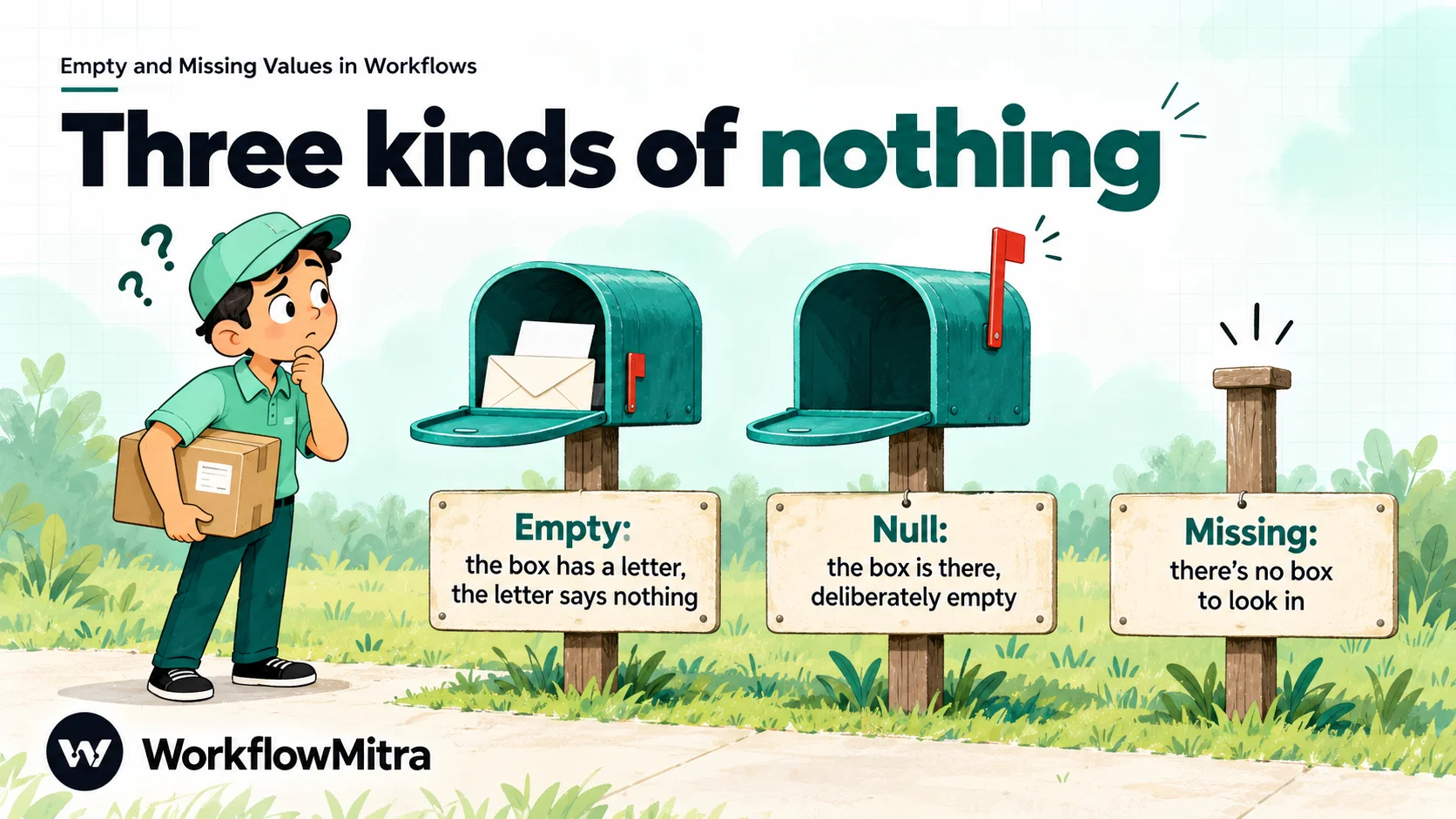
Three kinds of nothing: missing, null and empty
When people say a field is “empty”, they usually mean one of three different things. The difference matters because tools, APIs and databases treat them differently.
| Kind | What it looks like in data | Where it comes from |
|---|---|---|
| Missing | The key isn't there: {"name": "Asha"} has no city | Optional form fields some tools leave out, APIs that drop unset fields, a step that didn't run |
| Null | The key is there with no value: {"city": null} | Databases, APIs that report "unset" explicitly, a lookup that found nothing |
| Empty string | The key holds blank text: {"city": ""} | Blank spreadsheet cells, form fields submitted empty, text boxes cleared by a user |
There are three close relatives worth knowing too. Whitespace (" ") looks empty to a person but isn’t empty to a computer. Zero and false are real values that some tools mistake for blanks, and others create from blanks. An empty list ([]) means “there were no items”, which is usually a perfectly good answer.
The standards treat these differently on purpose. JSON Merge Patch (RFC 7396), a common format for partial updates, gives null a special meaning: a null in an update asks the server to remove that value, while an empty string sets it to blank text and a missing key leaves it alone. Databases disagree among themselves: in PostgreSQL, a comparison with NULL gives “unknown”, not true or false, while Oracle Database treats a zero-length string as null, and recommends you don’t rely on that.
You don’t need to memorise any of this. You need one habit: when a field could be blank, find out which kind of blank it will be at the point where your workflow uses it.
What WorkflowMitra receives
In WorkflowMitra, the shape of a blank depends on the trigger:
- Webhook trigger, JSON body. The data arrives exactly as sent. An absent key stays absent,
""stays"", andnullstaysnull. - Webhook trigger, form body. A form field submitted empty arrives as
"". A field the form didn’t send isn’t there. - Google Sheets trigger and Read rows. A blank cell arrives as
"". Short rows are padded, so every column header is present even when the cell is blank. - A step on a branch that didn’t run. Reading its output with
$node["Step name"]gives nothing at all, which behaves as missing. Our guide to passing data between steps covers that case.
Why blanks break automations quietly
A blank becomes a problem when it reaches a step that needs a value. Some steps notice and stop. Many don’t. Here is what a blank does at each kind of step in WorkflowMitra, which we checked in the product’s code and by running the expression and condition logic on 19 October 2026:
| Where the blank lands | What happens | Loud or quiet? |
|---|---|---|
Text with a placeholder: Hi {{ name }} | The placeholder becomes nothing: "Hi " | Quiet |
| IF rule "Less than 100" on a blank cell | Passes: blank text is read as 0 | Quiet |
| IF rule "Does not contain spam" on a blank message | Passes: nothing contains nothing | Quiet |
toNumber() on a blank | Returns 0 | Quiet |
| Date functions on a blank | Use 1 January 1970: formatDate gives 01/01/1970 | Quiet |
| AI step prompt with a missing variable | The variable becomes nothing; the AI answers anyway | Quiet |
| WhatsApp template variable | Sent as empty text; Meta decides whether to accept it | Depends on Meta |
| Google Sheets Update row, blank mapped column | Clears the cell | Quiet |
| Database insert (visual builder), blank number or date | Fails with a database type error | Loud |
| Email or WhatsApp step, blank recipient | Fails with a clear message | Loud |
| Google Sheets Find row, blank lookup value | Fails: "The value to look up … is empty" | Loud |
The loud cases are the lucky ones: the run stops and you find out. The quiet cases are where the damage happens, because each one turns “we don’t know” into a confident wrong answer: a greeting with a hole in it, an approval nobody meant to give, a date half a century off, a cleared cell. Handling empty values well mostly means turning quiet cases into deliberate ones.
Decide what a blank should do, field by field
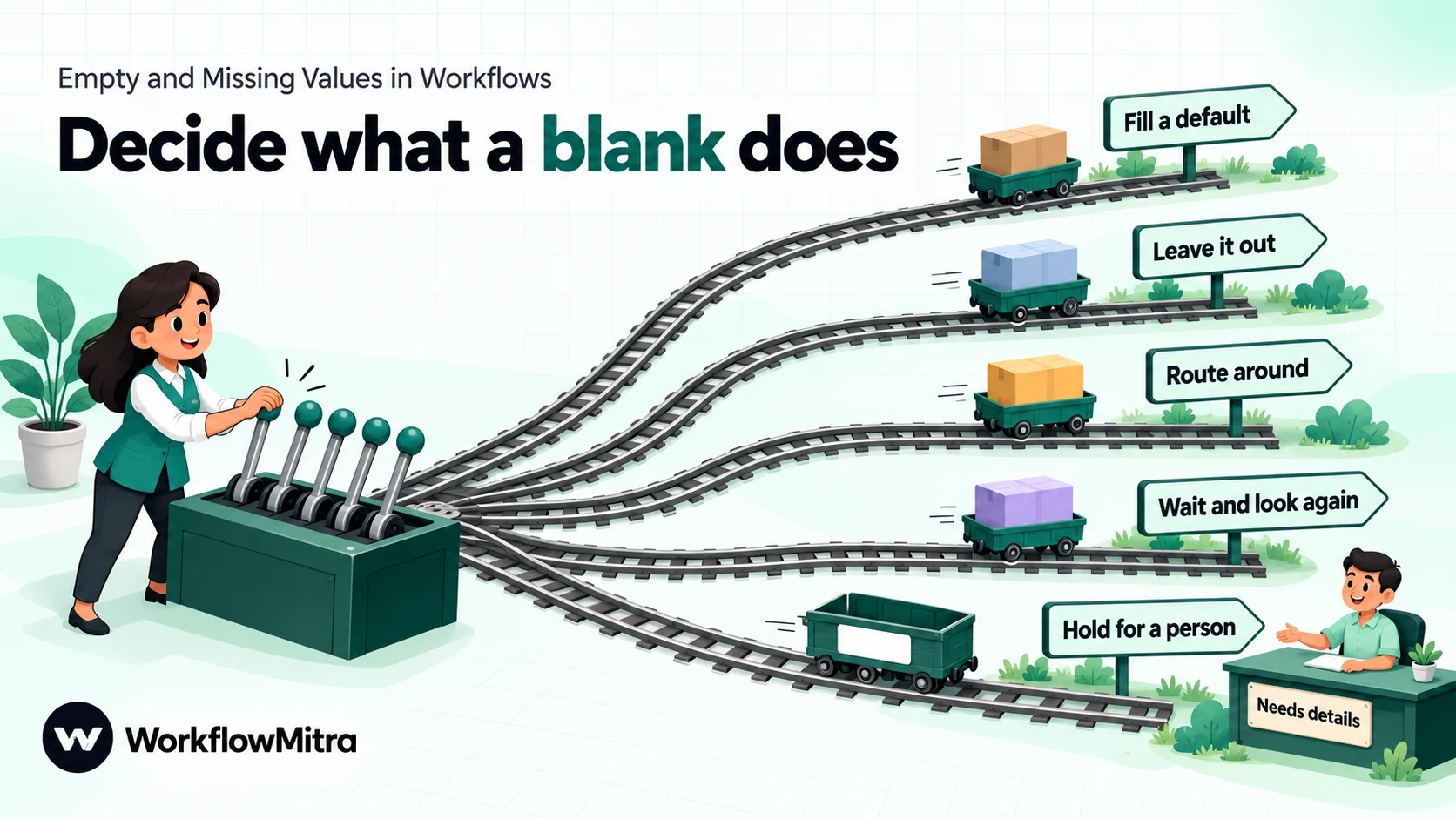
There’s no single right response to a blank. A blank job title and a blank phone number need different treatment, and the same field can need different treatment in different workflows. Instead of one global rule, give each important field one of five responses.
| Response | Use it when | Example |
|---|---|---|
| 1. Fill a default | The field is cosmetic and an honest placeholder reads naturally | "Hi there" instead of "Hi ,"; "Not given" in a report column |
| 2. Leave the field out | You're updating a record and a blank would erase something good | Don't send a blank phone to the CRM; keep the old one |
| 3. Route around the step | One step needs the field but the rest of the workflow doesn't | No email address: skip the email, still send the WhatsApp message |
| 4. Wait and look again | The value is probably still on its way | A sheet row being typed in; an order whose tracking number comes later |
| 5. Hold for a person | A guess could cost money, reach the wrong customer or can't be undone | Blank amount on a refund; blank quantity on an order |
Two questions settle most cases. What does this field control? If it decides who receives something, how much is charged or what gets deleted, a default is almost never safe; hold or route instead. Is a placeholder honest? “Not given” tells the reader the truth. “Mumbai” as a default city, or 0 as a default quantity, invents a fact.
Write the decisions down. A small table with one row per field (field, what it controls, response, where held records go) takes ten minutes, and it’s what the next person editing the workflow will need. The data validation guide shows how to turn rules like these into one gate at the start of a workflow; this article focuses on blanks specifically, which are the most common reason records fail those rules.
Checking for blanks reliably
Before you can decide what a blank does, the workflow has to recognise it. WorkflowMitra’s IF and Switch steps have three operators for this, and they don’t mean the same thing:
| Value | Is empty | Is not empty | Exists |
|---|---|---|---|
| Missing or null | Yes | No | No |
"" (blank text) | Yes | No | Yes |
" " (only spaces) | No | Yes | Yes |
[] (empty list) | Yes | No | Yes |
0 or "0" | No | Yes | Yes |
Three habits follow from that table:
- Use Is empty and Is not empty for presence. Exists only tells you the value isn’t missing or null, so a blank sheet cell “exists”.
- Trim before you check. A field holding only spaces is not empty. Check
{{ trim($trigger.name) }}instead of{{ $trigger.name }}, so spaces alone don’t count as an answer. - Zero is a value. Is empty never treats 0 as blank, which is what you want for stock levels and balances.
Rules that a blank can slip through
Other operators were built for real values and give surprising answers on blanks. We ran each of these on 19 October 2026:
- Less than and Greater than or equal. Blank text is read as 0, so a blank sheet cell passes “Less than 100” and “Greater than or equal 0”. (A field that is missing altogether fails both, because there’s nothing to read.) Pair number rules with Is not empty, or use Is between, which never matches a blank.
- Number “Equal to” and “Not equal to”. A blank is not a number, so both are false, including “Not equal to 0”. A route that relies on “Not equal to” catching blanks will miss them.
- Date rules (Is before, Is after, Is between and the rest) are all false for a blank. That’s safe, but it means a blank date quietly falls through to Else.
- Does not contain passes on a blank. A blank message “does not contain spam”.
- Contains with a blank right side always passes, because every text contains nothing. If the value you’re searching for comes from a placeholder, check that it isn’t empty first.
- Is yes and Is no both fail on a blank, so a blank “consent” field ends up on Else, not on No. Route Else deliberately.
- Equal to treats blank and missing as the same, so two blank fields are “equal”.
When a rule surprises you, open the run in Executions and look at the step’s data. It shows the values each rule compared, so you can see the blank instead of guessing. Our conditional logic guide covers rule order, OR groups and Else in more depth.
IF and Switch steps cost no credits, so there’s no reason to skip a presence check to save money.
Filling a default the safe way
WorkflowMitra gives you two ways to fill a blank inside any field that takes placeholders.
The vertical-bar fallback. Put plain text after a | inside the placeholder:
Hi {{ $trigger.name | there }}gives “Hi there” when the name is missing, null or blank.City: {{ $trigger.city | Not given }}gives “City: Not given”.
The fallback is plain text, with no quotes, and can’t contain a closing curly brace. It doesn’t catch a value made only of spaces: {{ spaces | there }} keeps the spaces.
The ifempty() function (also available as default()). It treats null, missing, "", [] and {} as empty, and takes its arguments separated by commas, with text in double quotes:
{{ ifempty($trigger.city, "Not given") }}{{ ifempty(trim($trigger.name), "there") }}: trimming first means ” ” counts as empty too.{{ ifempty($trigger.alt_phone, $trigger.phone) }}: the fallback can be another field.
Four details trip people up, and we confirmed each by running the expression engine:
- Commas, not semicolons.
ifempty(name; "Customer")comes out empty even though the function catalogue lists the signature with semicolons. - Lower case.
ifEmpty(...)in camel case isn’t recognised when the workflow runs and comes out empty. - There’s no
||or??operator.{{ name || "x" }}is read as a vertical-bar fallback and produces the literal text| "x". ifempty()keeps zero.ifempty(0, "none")gives 0, because zero is a value.
Defaults have one more rule, and it’s about honesty rather than syntax: a default should look like a default. “there”, “Not given”, “Unknown” and ”—” are honest. A made-up city, a made-up date, or a zero standing in for an unknown amount isn’t, and once it’s in your CRM nobody can tell it apart from real data.
Blanks at each kind of destination
Where the value is going decides how careful you need to be. Here’s what to do at the destinations WorkflowMitra workflows most often write to.
Messages: WhatsApp, email, Telegram and Slack
Recipients are checked; content isn’t. A WhatsApp step with a blank recipient fails with The "to" field is empty — check its value or its {{ }} path., and an email step with no To fails with “A recipient (To) is required.” That’s good: nothing goes to the wrong place.
Message text is a different story. A placeholder that resolves to nothing simply disappears, and WhatsApp template variables aren’t checked by the step: a blank variable is sent as empty text, and Meta decides whether to accept the message. ChatMitra’s WhatsApp API error codes page lists 131008 (a required parameter is missing) among the errors you fix and then resend. Use a vertical-bar fallback on every personal detail in a message ({{ $trigger.first_name | there }}), and route records with no usable value for an essential variable (an order number, a delivery date) to a person instead of sending a template with a hole in it. ChatMitra is the sending layer for WhatsApp in these workflows, so a message that does go out is billed as usual; a fallback costs nothing.
Spreadsheets: Google Sheets
Blank cells arrive as "", and blank values are written as "". Two consequences:
- Add row(s) writes a blank cell for every column that resolves to nothing. That’s usually fine.
- Update row clears a cell when its mapped value is blank. If a form resubmission has no phone number, mapping the phone column would erase the one already in the sheet. Map only the columns that should change, or add an IF step: when the phone is empty, use an Update row step that doesn’t touch that column.
Google’s own Sheets API makes the same distinction between “skip” and “clear”: its documentation says null values are skipped on write, while an empty string clears the cell. In a no-code workflow, “skip” means leaving the column out of the mapping.
Lookups are strict, which helps. Find row fails when the lookup value is blank, rather than matching the first blank row, and a lookup that finds nothing returns found: false instead of failing, so follow it with an IF on {{ found }}. Our Google Sheets automation guide covers the full set of Sheets steps.
Databases: MySQL, PostgreSQL and MongoDB
SQL databases are where blanks fail loudly, which is better than failing quietly but still stops the run. In WorkflowMitra’s visual Insert and Update builder, every value is sent as text, so a blank becomes ''. A typed column then refuses it: PostgreSQL reports “invalid input syntax for type numeric”, and MySQL in its default strict mode reports an incorrect value (in MySQL’s documentation, strict mode turns invalid or missing values into errors instead of silently adjusted ones). In a raw SQL query, a placeholder whose value is missing is bound as a real SQL NULL, which a nullable column accepts.
The practical pattern: decide which columns may be NULL, make them nullable in the database, and check required columns with Is empty before the insert. For a column that must accept “no value”, send records with a blank to a raw query or an insert that leaves the column out, rather than inserting '' into a number or date column.
MongoDB needs extra care. When a whole value in a filter is a placeholder that resolves to nothing, it becomes null, and in MongoDB a query for null matches documents where the field is null or doesn’t exist at all. An “Update one” with a blank customer ID can therefore update the first document that lacks the field, and an invalid filter is read as {}, which matches everything. Update many and Delete many refuse an empty filter; Update one and Delete one don’t. Always put an IF with Is not empty on the key before a MongoDB update or delete.
APIs: the HTTP Request step
What you send for a blank tells the other system what to do, so be deliberate:
- In the HTTP Request step’s JSON fields mode, a blank value is sent as
"key": "". - In Raw JSON, a placeholder inside quotes (
"city": "{{ city }}") becomes"", and a bare placeholder ("city": {{ city }}) becomesnull. The JSON stays valid either way.
For a create request, either is usually harmless. For an update, it matters: depending on the API, "" may overwrite a value with blank text and null may delete it, as in JSON Merge Patch. Leaving the key out is the only choice that reliably means “don’t change this”. Read the API’s documentation for its rule, and when in doubt, route blank records to a request that omits the field. The guide to working with JSON in workflows explains Raw JSON bodies in more detail.
AI steps
An AI step fails only if the whole prompt is blank (“A prompt is required.”). A missing variable inside a longer prompt becomes nothing, and the model answers anyway, often by guessing. A prompt such as Write a delivery update for order {{ order_id }} arriving on {{ eta }} with a blank eta invites the model to make up a date. Check the fields the prompt depends on with Is not empty before the AI step, or tell the model what a gap means: Delivery date: {{ $trigger.eta | not known yet }}.
Numbers and dates
Conversions hide blanks. toNumber("") returns 0, so a blank quantity becomes a quantity of zero, and any sum or comparison carries on with it. Date functions treat a blank as 1 January 1970, so formatDate on a blank gives 01/01/1970 and addDays on a blank lands in early 1970. Check presence first, then convert. The data formatting guide covers number and date conversions themselves.
Lists and loops
An empty list is often a legitimate answer (“no new orders today”). The Loop step’s Empty list behavior setting decides what happens: Skip (return empty array), the default, finishes the loop with nothing to do, and Fail (raise error) stops the run. Choose Fail when an empty list means something went wrong upstream, such as a report that should never be empty. A missing list, as opposed to an empty one, fails every list operator in an IF step, including “Number of items is 0”, so check Is empty instead.
Waiting and holding: the two responses people forget
Wait and look again fits blanks that are about timing. A sheet row may be read while someone is still typing it, an order’s tracking number may only exist after dispatch, and an enrichment API may fill a field minutes later. In WorkflowMitra, the Google Sheets trigger can hold rows until two checks agree (the option for rows that arrive from an import or another tool), and it skips rows whose ID column is still blank. For other cases, route the blank to a Delay step, then read the record again and check once more. Delay takes a fixed duration. Limit yourself to one or two attempts; a value that’s still blank after that is a job for a person.
Hold for a person fits blanks where a guess could do harm. Send the record to a “Needs details” tab with the reason in its own column, or to a Wait for approval step when someone should decide before the workflow continues. The key is that the record goes somewhere visible. A blank that ends a run silently is the worst outcome of all, because nobody knows the record exists. Our workflow error handling guide covers alerts, error routes (right-click a step, then Add error handler) and replaying held work.
A worked example: a website enquiry with optional fields
Say a furniture shop’s website form sends enquiries to a WorkflowMitra webhook. The workflow sends a WhatsApp reply through ChatMitra, adds a row to a leads sheet and alerts the sales team. The form has five fields, and only two are required on the website itself. Here’s the field-by-field plan:
| Field | Controls | If blank | How |
|---|---|---|---|
| Phone | Who gets the WhatsApp reply | Hold for a person | IF: trim(phone) Is empty → "Needs details" tab |
| Name | Greeting only | Fill a default | {{ $trigger.name | there }} |
| City | Report column; showroom suggestion | Default in the sheet; route around the showroom line | Sheet: {{ ifempty(trim($trigger.city), "Not given") }}; IF before the showroom message |
| Budget | Priority for sales | Leave out of rules; flag for sales | IF: Is not empty and Is between 50000 and 500000 → "Priority" route; else normal |
| Message | Context for sales | Fill a default | {{ $trigger.message | No message left }} in the alert |
Built as steps, that becomes:
- Webhook trigger receives the enquiry.
- IF “Has phone”:
{{ trim($trigger.phone) }}Is not empty. Else goes to a Google Sheets Add row step on the “Needs details” tab, with the reason “No phone” in its own column. - WhatsApp step on the Yes route: a template greeting with
{{ $trigger.name | there }}as the first variable. The phone needs its country code added first; a 10-digit Indian number on its own isn’t enough. - Google Sheets Add row on the leads tab, with City as
{{ ifempty(trim($trigger.city), "Not given") }}and Budget left as it came, so “blank” stays distinguishable from a real number. - IF “Priority”: Budget Is not empty, and Budget Is between 50000 and 500000. “Less than” alone would have treated a blank budget as zero.
- Slack or email alert to sales, with
{{ $trigger.message | No message left }}.
Notice what didn’t get a default: the phone, because a guessed recipient is the one mistake you can’t take back, and the budget, because “blank” and “₹0” mean different things to a salesperson. Steps 2 and 5 are IF steps, which cost no credits, so the blank handling adds nothing to the cost of a run.
Testing how your workflow handles blanks
Most workflows are tested with one perfect record, which is exactly why blanks surprise people in production. Before you switch a workflow on, send it a small set of awkward records, one field at a time:
| Test record | What you're checking |
|---|---|
| Field left out completely | Missing values take the route you planned |
Field sent as "" | Blank text behaves like missing where it should |
Field sent as " " | Your trim is in place |
Field sent as null (JSON senders only) | Null is handled like missing |
0 in a number field | Zero isn't treated as blank, and blank isn't treated as zero |
| Every optional field blank at once | Messages still read naturally |
For each run, open it in Executions and look at each step’s data: what the blank became, which route each IF took, and exactly what was written or sent. Point the workflow at a test sheet and your own phone number while you do this, so a test run can’t write to real records or message a real customer. The guide to testing automated workflows has a full test plan.
Common mistakes
- One rule for every blank. A default that’s right for a name is wrong for a phone number. Decide per field.
- Trusting “Exists”. It passes blank text. Use Is not empty.
- Forgetting to trim. A field of spaces passes Is not empty and fills a message with nothing.
- Number rules without a presence check. A blank passes “Less than”; use Is between or add Is not empty.
- Converting before checking.
toNumber()turns a blank into 0, and date functions turn it into 1970. - Mapping every column in an update. Blank values clear good ones. Map only what should change.
- Inventing defaults. A placeholder must look like a placeholder.
- Letting blank runs disappear. Every held or skipped record should land somewhere a person will see it.
Troubleshooting blank values
| Symptom | Likely cause | Fix |
|---|---|---|
| Message reads "Hi ," or has a gap | A placeholder resolved to nothing | Add | fallback; if it's empty on every run, check the path (passing data) |
| Fallback ignored | Value is spaces, or ifEmpty/semicolons used | ifempty(trim(x), "…") with commas, lower case |
Text | "x" appears in output | || used as "or" | Use | x or ifempty() |
| Blank amounts pass a limit | "Less than" reads blank as 0 | Add Is not empty, or use Is between |
| Dates show 01/01/1970 | Date function got a blank | Check Is not empty before formatting |
| Sheet cells wiped on update | Blank value mapped to a column | Remove the column from the mapping, or route blanks to a narrower update |
| Database insert fails on a number or date column | Blank sent as '' | Check first; make the column nullable and use a raw query, or leave the column out |
| MongoDB updated the wrong document | Blank key became null and matched documents lacking the field | IF Is not empty on the key before Update one or Delete one |
| Consent records land on Else | Blank fails both Is yes and Is no | Route Else to review instead of ignoring it |
Make blanks a decision, not a surprise
Empty values are normal. Customers skip fields, spreadsheets have gaps, APIs leave things out. What makes a workflow robust isn’t receiving perfect data. It’s knowing, for each field that matters, whether a blank gets a default, gets left out, takes another route, waits, or goes to a person. Write those choices down, check presence with trimmed Is empty rules, fill gaps with fallbacks that look like fallbacks, and test with blank records before you go live. The quiet failures then become ordinary, visible outcomes.
For the bigger picture of how triggers, steps and conditions fit together, start with what workflow automation is. To build these checks on your own data, WorkflowMitra, powered by ChatMitra, gives every new account a free 14-day trial with 10,000 credits and no card required. Browse ready-made workflow templates or see every step in the features overview.
Checked on 19 October 2026. Null removal semantics from RFC 7396 (JSON Merge Patch); NULL comparison from the PostgreSQL documentation; zero-length strings from Oracle Database SQL Reference; strict mode from the MySQL 8.4 manual; null queries from the MongoDB manual; skip versus clear from the Google Sheets API reference. WorkflowMitra behaviour (placeholder fallbacks, ifempty(), IF and Switch operators on blank values, step messages, Sheets, database, MongoDB and HTTP Request handling of blanks) was checked in the product's code and by running its expression and condition logic on the same day.
Frequently Asked Questions
Short answers to common questions about empty, blank, null and missing values in automated workflows.
A missing field isn't in the data at all. A null field is there but explicitly holds no value. An empty string is there and holds text with no characters. Many tools blur the three, but they behave differently in conditions, updates and databases: for example, some APIs treat null as "delete this value" while an empty string sets the value to blank text.
Automate the work between your apps
Build workflows with triggers, conditions and actions, then test them before they go live. Try WorkflowMitra free for 14 days, no card required.
