How to Build a WhatsApp Chatbot for Your Business
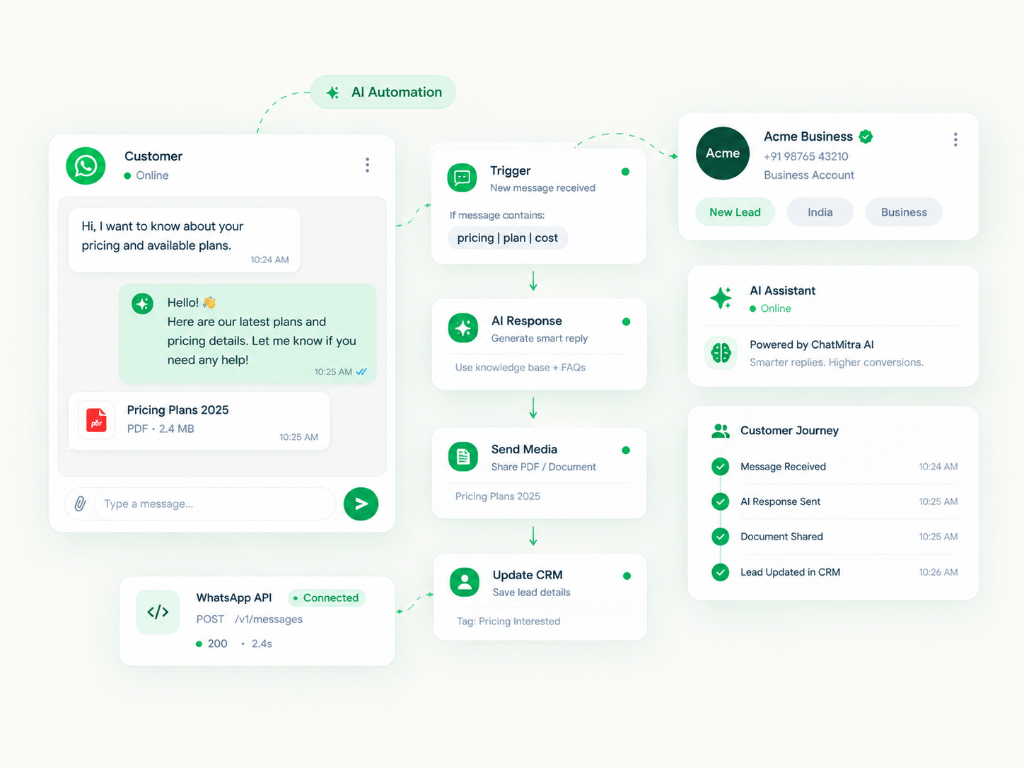
Quick Summary
Customers expect instant answers. A WhatsApp chatbot operates 24/7, answers frequent inquiries in seconds, qualifies inbound sales leads, and seamlessly hands off complex tickets to human agents when required.
01 What is a WhatsApp Business Chatbot?
A WhatsApp chatbot is an automated software application built on top of the official WhatsApp Business API. It handles incoming text, button selections, and media files to guide customers toward an outcome without requiring manual staff intervention.
Whether helping an e-commerce buyer track a delivery or helping a real estate prospect book an on-site visit, a well-built chatbot reduces support team workload by up to 70%.
02 Rule-Based vs AI-Powered Bots
• Rule-Based Bots (Menu & Quick Replies): Follow a predetermined decision tree. Users tap predefined button options (e.g. 'View Pricing', 'Track Order', 'Talk to Sales'). These provide predictable, error-free experiences.
• AI-Powered Bots (LLM / NLP): Understand natural language queries and extract intent from freeform sentences, searching through your company knowledge base to generate intelligent replies.
Modern high-converting workflows combine both: using buttons for structured actions and AI for nuanced questions.
Combining interactive buttons with an AI knowledge base achieves the highest customer satisfaction score while minimizing invalid choices.
03 Prerequisites Before Building
To deploy an official WhatsApp chatbot, you need:
1. A verified Meta Business Manager account.
2. A clean phone number not currently registered on personal WhatsApp.
3. Access to the WhatsApp Cloud API or an official Business Solution Provider (BSP) like ChatMitra / WorkflowMitra.
04 Designing an Effective Flow
Keep introductory greetings short. Acknowledge the user's inquiry, offer 2 to 3 clear menu buttons, and avoid walls of text exceeding 3 sentences.
Always provide an escape hatch—a simple 'Talk to Human' option so frustrated users never get stuck in repetitive loops.
05 Connecting CRM & Payment Gateways
The true power of an automated bot lies in real-time integrations. Connect your chatbot to Google Sheets, HubSpot, Zoho, or Shopify using webhooks.
When a customer books a consultation, WorkflowMitra automatically saves the lead into your CRM and dispatches an instant notification to your sales rep.
06 Seamless Human Handoff Setup
When a lead is qualified or a customer expresses frustration, the bot should instantly pause automation for that user and route the conversation to an active agent's shared team inbox.
Build Automated Workflows on ChatMitra
Connect WhatsApp Business API, auto-reply to queries, qualify leads, and broadcast promotional campaigns in minutes.
