Integrately Alternatives: 7 Tools for When One-Click Automations Aren't Enough

Quick Summary
Integrately is hard to beat for switching on a ready-made automation in a minute, and it never charges for triggers or failed actions. Teams look elsewhere when conditions and inline formatting start eating tasks, when a second person needs access, or when a workflow needs logic no template covers. WorkflowMitra, powered by ChatMitra, suits WhatsApp-led workflows with approvals and free logic steps from ₹999 a month. Pabbly Connect suits high volumes in rupees, Albato is a similar budget builder, Zapier has the most apps, Make handles complex data, n8n suits technical teams and Activepieces offers per-run pricing.
Integrately made automation feel like an app store. You pick a ready-made automation, connect two accounts and it’s live, often in under a minute. For a long list of simple jobs (new form entry to a spreadsheet, new order to an email list, new lead to a CRM), nothing is quicker.
The trouble starts when a job stops being simple. A condition here, a name split there, a second teammate who needs to log in, a workflow with five steps and a branch that no template covers. That’s usually when people search for Integrately alternatives. This guide compares seven of them, starting with WorkflowMitra, powered by ChatMitra, and it’s honest about when staying on Integrately is the cheaper and easier choice.
All prices and plan limits were read on each vendor’s own pricing page on 8 October 2026.
Quick answer: If your workflows need conditions, formatting, approvals or WhatsApp messages without every logic step costing a task, try WorkflowMitra: IF steps and inline expressions are free, plans include 2 to 10 seats and pricing starts at ₹999 a month. Choose Pabbly Connect for many tasks at a flat rupee price, Albato for a similar budget, no-code builder, Zapier for the most apps, Make for complex data handling, n8n for technical teams and self-hosting, and Activepieces for per-run pricing. If your automations are one or two steps and match Integrately's library, stay.
What Integrately does well, and when to stay
Give Integrately its due before you leave. Several things it does are genuinely better than most of the field:
- Triggers are free. Integrately doesn’t charge for checking an app for new data, and its pricing page contrasts this with tools that count every check. If your automations poll often and fire rarely, that saves real money.
- Failed actions are free. A step that fails doesn’t use a task.
- A huge ready-made library. Integrately advertises more than 20 million ready automations across 1,500+ apps. If your use case is common, someone has probably built it already.
- People who build for you. Integrately says its team will create automations for you at no extra cost, which matters to owners who never want to open a builder.
- Nothing is lost when tasks run out. Its FAQ says that when you run out of tasks, actions pause and records collect in Integrately, ready to resume from the History page after you upgrade.
Stay if most of your automations are one or two steps, map onto ready-made templates, and are run by one person. You’d be paying to rebuild things that already work.
Signs you’ve outgrown one-click automation
These are the patterns that push Integrately users to look elsewhere. Each points to a different kind of alternative.
- Logic is eating your tasks. Integrately counts every successful condition, search and data modification as a task, including the ones you add inside an action’s fields. A workflow that looks like “one lead, one action” can use four or five tasks.
- A second person needs access. Starter and Professional include one user. Unlimited users start on Growth.
- The Starter plan is missing what you need. Starter has no branching (Paths), no iterator for lists and no automatic retry, and it limits you to 20 automations and three premium apps.
- No template fits. Ready-made automations cover common pairs of apps. A process with a branch, a delay, a lookup and three different outcomes is custom work, and the builder becomes the product you’re really paying for.
- A person has to approve something. We didn’t find an approval step in Integrately’s app directory. Refunds, discounts and bulk messages often need a human yes before they go out.
- Customers live on WhatsApp. For businesses that rely on WhatsApp automation, this matters. Integrately lists a WhatsApp Cloud API app, but businesses that want WhatsApp messages, approvals and lead rotation in one workflow may want a tool built around messaging.
- Dollar billing. Integrately prices in US dollars with taxes extra, which adds card fees and exchange-rate movement for businesses in India.
How Integrately counts tasks, and why it changes the comparison
Integrately’s pricing FAQ is clear about its rule: every successful execution of an action, a condition or branch, a Modify Data step and a Search step is a task, whether it’s a separate step or used inline while mapping a field. Triggers and failed actions are free.
Its own example is a Facebook lead that checks for an email address, then adds the contact to Mailchimp while splitting the full name into first and last name. That one lead costs four tasks: one for the condition, one for the Mailchimp action and two for the two inline name changes.
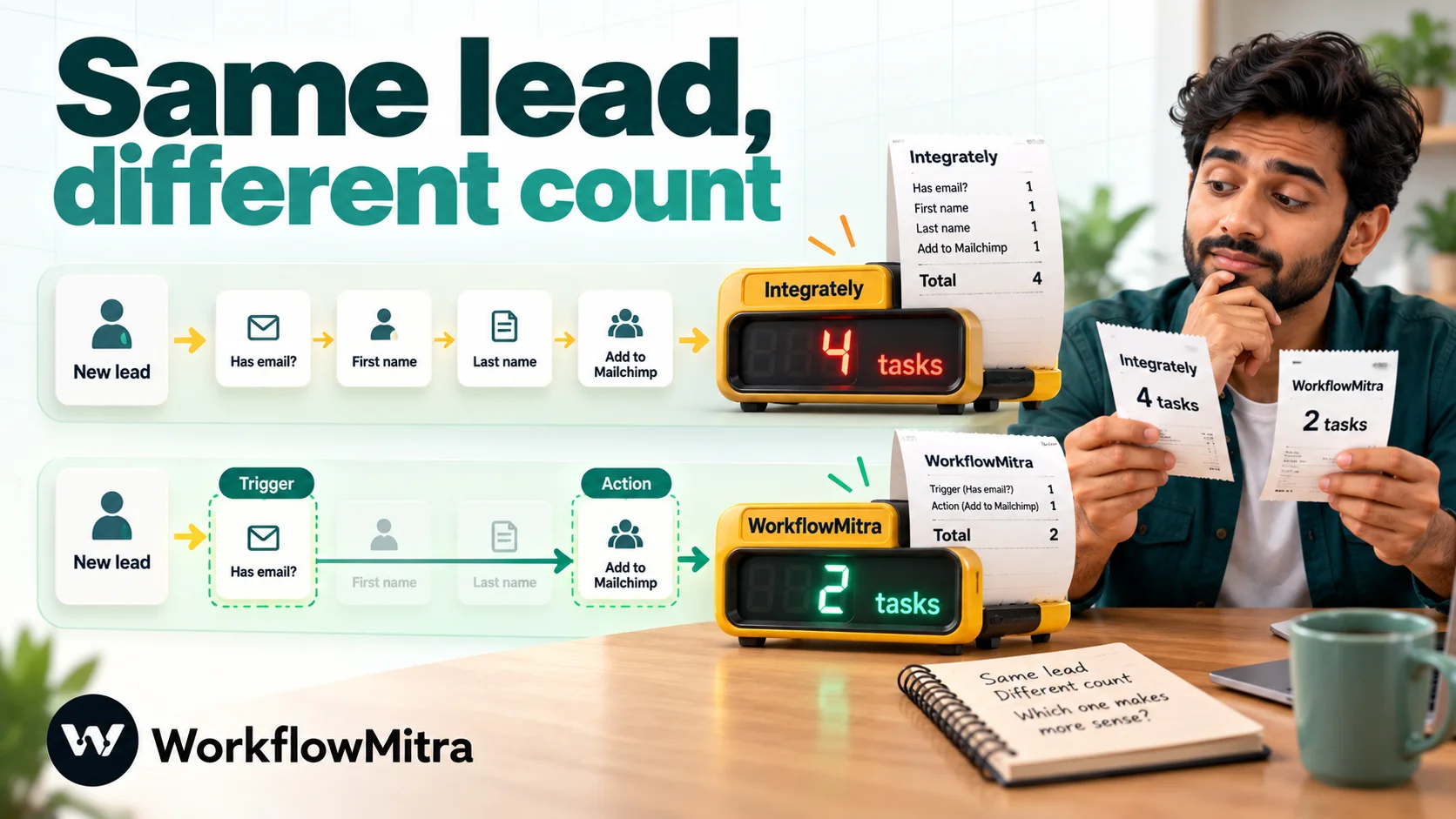
Other tools draw the line in different places. Zapier and Pabbly Connect don’t charge for filters or their formatter tools. Make doesn’t charge for filters or for functions used inside a field, but it does count the trigger module. WorkflowMitra charges the trigger and each action but not IF, Switch or Delay steps, and expressions inside a field (capitalising a name, trimming a phone number, splitting text) run inside the step at no extra cost. n8n and Activepieces count one unit per run. So the same workflow can use six units in one tool and one in another, which is why headline task allowances are a poor guide.
What to look for in an Integrately alternative
- The counting rule for conditions and formatting, since that’s what usually drives Integrately bills up.
- Seats on the plan you’d actually buy, not the top plan.
- Branching, loops and retries on the entry plan.
- Human steps: approvals, assignments to the next person, waits.
- Templates and help: a library to start from, and whether anyone will help you build.
- Currency and whether taxes are added on top.
- Trigger speed: Integrately updates every 5 minutes on Starter and every 2 on Professional, so check that an alternative is at least as fast on the plan you’d buy.
Integrately alternatives at a glance
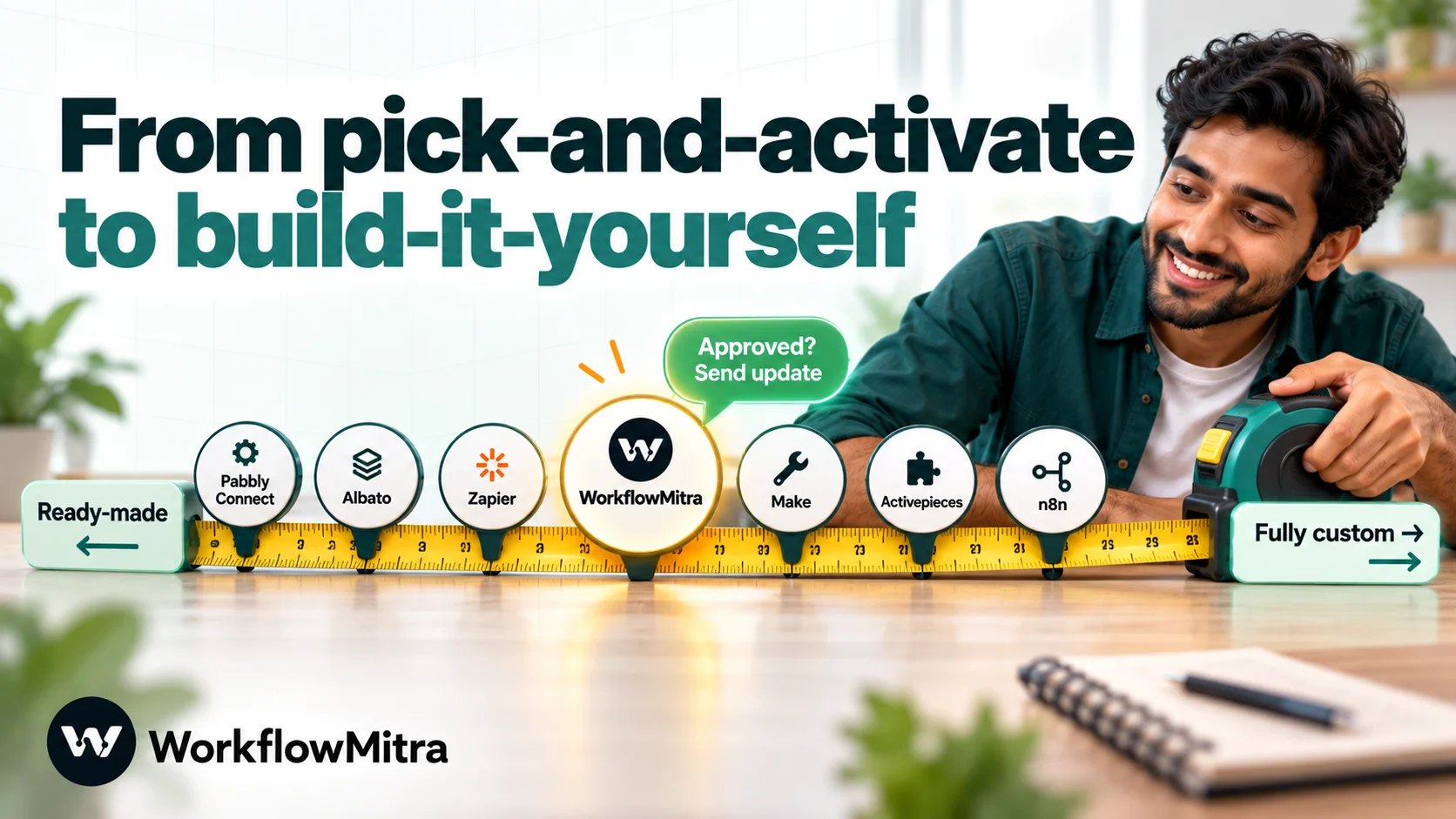
| Tool | Best for | What uses your allowance | Entry paid plan (monthly billing) | Seats on entry plan |
|---|---|---|---|---|
| WorkflowMitra | WhatsApp-led workflows with approvals and free logic steps | Each executed step incl. trigger; IF, Switch, Delay and in-field expressions free | ₹999 for 10,000 credits | 2 |
| Pabbly Connect | Many tasks at a flat rupee price | Actions; triggers, filters and formatters free | ₹1,799 for 10,000 tasks | Unlimited team members |
| Albato | A similar budget, no-code builder | Each step that runs after the trigger | $22 (≈ ₹2,112) for 1,000 transactions | 1 |
| Zapier | The widest app catalogue | Successful actions; filters and formatter free | ₹2,949.88 for 750 tasks | 1 |
| Make | Complex data handling on a canvas | Module operations incl. the trigger; filters and in-field functions free | $10.59 (≈ ₹1,016) for 5,000 credits | Unlimited |
| n8n | Technical teams, long workflows, self-hosting | One execution per run | €24 (≈ ₹2,614) for 2,500 executions | Unlimited |
| Activepieces | Per-run pricing on open-source code | One credit per run; AI steps extra | $20 (≈ ₹1,920) for 10,000 credits | Up to 5 |
| Integrately (baseline) | One-click ready-made automations | Actions, conditions, searches, data changes (inline too); triggers free | $29.99 (≈ ₹2,879) for 2,000 tasks | 1 |
We converted foreign prices to rupees at ₹95.98 to the US dollar and ₹108.94 to the euro, FBIL’s 30 September 2026 reference rates and the newest available to us on 8 October. Expect a slightly different figure on your card statement.
The 7 best Integrately alternatives
1. WorkflowMitra: best when logic, approvals and WhatsApp shouldn’t cost extra
What it is. WorkflowMitra is the workflow automation product from ChatMitra, the WhatsApp Business API platform. Workflows are built on a visual canvas from a trigger (a webhook, a schedule, a Google Sheets row, an incoming email, a chat message or a manual start) and the steps after it. ChatMitra is the sending layer for WhatsApp: WhatsApp messages go out through your ChatMitra account, or through Meta’s WhatsApp Cloud API if you connect it directly.
Why Integrately users pick it. Logic doesn’t drain the allowance. IF, Switch, Merge, Delay and Set Variable steps cost nothing, and expressions inside a field (capitalise, trim, split, replace, format a date or a number) run inside the step that uses them. A Wait for approval step, round-robin assignment, Loop, a JavaScript Code step and a Data Store are on every plan, and so are 2 seats at the entry level.
Pricing. Two weeks free on a trial (10,000 credits, no card required), then ₹999 a month for 10,000 credits (₹849 yearly), ₹1,499 for 20,000 or ₹2,699 for 40,000, with 10, 20 or 50 active workflows, 2, 5 or 10 seats and 7, 15 or 30 days of run history. The listed price is what you pay.
How it counts. One credit for the trigger and one for each action that runs, including actions that fail. Scheduled checks that come back empty are not billed.
What you give up compared with Integrately. The library. WorkflowMitra offers 10 curated templates rather than millions of ready-made pairs, and far fewer native integrations; a missing app usually means an HTTP Request step. Failed steps use credits, which they don’t in Integrately. For help, its automation help page takes a description of your process and its team helps you get started.
Example. A diagnostics lab receives home-collection bookings from a website form. The workflow checks the pin code against the areas it serves, formats the patient’s name and phone inside the fields, sends a WhatsApp confirmation template, assigns the booking to the next phlebotomist in rotation and, if the order is above ₹5,000, waits for the lab manager’s approval before confirming the slot. In Integrately terms that’s several conditions and formatting tasks per booking; in WorkflowMitra the logic and formatting are free.
Choose it if your workflows need conditions, human steps or WhatsApp messages. Look elsewhere if you rely on ready-made templates for dozens of niche apps.
2. Pabbly Connect: best for many tasks at a flat rupee price
Why Integrately users pick it. A similar budget feel, rupee pricing and a more generous counting rule: triggers and internal tools (filters, routers, formatters, iterators) don’t use tasks, so the condition and formatting that cost tasks in Integrately cost nothing here. Every plan has unlimited workflows and team members.
Pricing. The Standard plan gives 10,000 tasks for ₹1,799 on monthly billing or ₹1,301 a month on a yearly plan. The uncapped Unlimited plan costs ₹7,499 monthly, or ₹5,949 a month yearly. One-time lifetime plans start at ₹74,999. The page showed a sale banner when we checked.
What you give up. Approvals, code steps, automatic re-runs, custom variables and the AI Assistant only arrive on Unlimited, so needing any one of them means the ₹7,499 plan. There’s no team that builds automations for you; Pabbly’s answer is a very large tutorial video library.
Choose it if volume is high and your logic is simple. Look elsewhere if you need approvals or code on a small plan. Our WorkflowMitra vs Pabbly Connect comparison goes deeper.
3. Albato: best for a similar budget, no-code builder
Why Integrately users pick it. It feels familiar: a budget, no-code platform with 1,000+ apps and a “Request setup” option to have Albato build an automation or AI agent for you. Pro removes the step and automation limits, adds automatic replay of failed data and 30 days of logs, and updates every 5 minutes.
Pricing. A free plan with 100 transactions, 5 automations of 2 steps each and 15-minute updates. Pro is $22 a month for 1,000 transactions ($15 billed yearly), $62 for 5,000 ($43), $110 for 10,000 ($77) and $155 for 20,000 ($109). If you run out, Albato keeps automations running and charges extra transactions at 50% more. A Teams plan with 5 seats was marked “coming soon”.
How it counts. Albato’s FAQ says a transaction is counted for each automation step that runs after the trigger, and triggers are free. Treat any separate filter or formatting step as a transaction until you’ve tested it.
What you give up. Pro has one seat, and per-transaction prices above 1,000 are higher than Integrately’s at similar volumes.
Choose it if you want a budget no-code builder with unlimited steps on its entry paid plan. Look elsewhere if you need team access now.
4. Zapier: best for the widest app catalogue
Why Integrately users pick it. More than 9,000 apps, so the app or action Integrately lacks probably exists. Filters, paths and Formatter steps don’t count as tasks, unlike Integrately’s conditions and modifications.
Pricing. Free covers 100 tasks a month on two-step Zaps. In Zapier’s rupee pricing, 750 Professional tasks cost ₹2,949.88 monthly (₹1,966.26 a month yearly), with new data picked up every 2 minutes. Team, from ₹10,180.50 a month for 2,000 tasks, adds shared team seats. Bigger allowances rise quickly: 5,000 Professional tasks were $133.50 a month and 10,000 were $193.50.
What you give up. Price per task. At the volumes most Integrately customers run, Zapier usually costs several times more, which is why Integrately itself markets against it.
Choose it if catalogue breadth matters more than cost. Look elsewhere if you left Integrately to save money. Our Zapier alternatives guide covers this trade-off.
5. Make: best for complex data handling on a canvas
Why Integrately users pick it. Real branching, iterators and aggregators on a visual canvas, unlimited users on every plan and a low entry price. Functions used inside a field and filters between modules don’t cost credits.
Pricing. Free gives 1,000 credits a month for two active scenarios with a 15-minute minimum interval. Paying customers start on the Make plan: 5,000 credits for $10.59 monthly or $9 a month yearly (roughly ₹1,016 or ₹864), unlimited scenarios, a 1-minute interval and 30 days of logs. 20,000 credits were $34.12 a month.
How it counts. Every module that runs uses a credit, and that includes the trigger module each time it reads data. Integrately’s pricing page makes exactly this point against Make: a scenario that checks for changes every few minutes uses credits even when nothing is new. Use webhooks where you can.
What you give up. Integrately’s simplicity. Make’s canvas rewards people who enjoy mapping data and punishes those who don’t.
Choose it if your workflows transform data heavily. Look elsewhere if nobody on the team wants to learn a technical builder. See WorkflowMitra vs Make for a direct comparison.
6. n8n: best for technical teams and self-hosting
Why Integrately users pick it. One execution per complete run, however many conditions and transformations it contains, plus unlimited users and workflows on every cloud plan and a free self-hosted Community Edition.
Pricing. On n8n’s cloud, 2,500 executions cost €24 monthly on Starter (€20 a month yearly; roughly ₹2,614 or ₹2,179) with a week of logs, and 10,000 cost €60 on Pro (€50 yearly) with a month of logs. Business starts at €800 a month and runs only on your own servers.
What you give up. Ease. n8n expects comfort with JSON, expressions and, if you self-host, servers. There’s no team that builds for you.
Choose it if you have a technical person and long workflows. Look elsewhere if you chose Integrately precisely to avoid technical work.
7. Activepieces: best for per-run pricing on open-source code
Why Integrately users pick it. Per-run counting removes the task arithmetic entirely, since a run costs the same however long the flow is. Flows are unlimited on every plan, and the core is open source and self-hostable.
Pricing. The free tier includes 1,000 credits for as many as 5 users. Plus costs $20 monthly or $16 a month yearly (roughly ₹1,920 or ₹1,536) for 10,000 credits, and extra credits are $0.007 each. Team is $200 monthly for 50,000 credits and 25 users. An AI step uses 2, 10 or 20 credits by model tier, or just 1 if you bring your own key on Plus or higher.
What you give up. A smaller library and a shorter track record than Integrately, and dollar billing.
Choose it if you want predictable per-run costs. Look elsewhere if you depend on ready-made automations for many niche apps.
The same lead workflow, counted in each tool
Here’s one realistic workflow priced in each tool’s own unit: a website form sends a lead; a condition skips leads with no phone number; two fields are tidied inline (capitalise the name, strip spaces from the phone); then three actions run: add the lead to a Google Sheet, send a WhatsApp welcome, and alert the team in Slack.
| Tool | Units per lead | 1,000 leads a month | 3,000 leads a month |
|---|---|---|---|
| WorkflowMitra | 4 credits (trigger and 3 actions; logic and expressions cost nothing) | 4,000 → ₹999 | 12,000 → ₹1,499 |
| Pabbly Connect | 3 tasks | 3,000 → ₹1,799 | 9,000 → ₹1,799 |
| Albato | 3 to 6 transactions (depends on how the filter and formatting are built) | 3,000–6,000 → $62–$110 (≈ ₹5,951–₹10,558) | 9,000–18,000 → $110–$155 (≈ ₹10,558–₹14,877) |
| Zapier | 3 tasks (filter and Formatter free) | 3,000 → $133.50 (≈ ₹12,814) | 9,000 → $193.50 (≈ ₹18,573) |
| Make | 4 credits (the webhook module plus 3 actions) | 4,000 → $10.59 (≈ ₹1,016) | 12,000 → $34.12 (≈ ₹3,275) |
| n8n (cloud) | 1 execution | 1,000 → €24 (≈ ₹2,614) | 3,000 → €60 (≈ ₹6,536) |
| Activepieces | 1 credit | 1,000 → $20 (≈ ₹1,920) | 3,000 → $20 (≈ ₹1,920) |
| Integrately | 6 tasks (condition + 2 inline changes + 3 actions) | 6,000 → $49 (≈ ₹4,703) | 18,000 → $124 (≈ ₹11,902) |
The table uses monthly billing and the cheapest plan that fits each volume, assumes a webhook trigger, and excludes the cost of WhatsApp messages themselves: Meta charges whichever tool sends, and there’s ChatMitra’s fee per conversation when you send through ChatMitra. It also ignores features. Integrately’s 6,000-task month needs Professional anyway for branching, and Pabbly’s Standard plan has no approvals. Run your own busiest workflow through the same arithmetic before you choose.
Templates and help after you switch
Leaving a library of 20 million ready-made automations is the part Integrately users underestimate. Plan for it:
- Zapier and Make have large template galleries and community forums, so common pairs of apps usually have a starting point.
- Pabbly Connect relies on a large library of setup videos.
- Albato offers a setup request service on its pricing page.
- WorkflowMitra has 10 curated templates, including lead capture to a Google Sheet and a website form to WhatsApp, CRM and sales owner, plus an automation help page staffed by its team.
- n8n and Activepieces have community templates, but expect to build most things yourself.
The practical answer is to treat templates as starting points, not finished automations, whichever tool you pick. Check every field mapping against your own data before going live.
How to move your automations off Integrately
- List what’s live. For each automation, note the trigger app, the actions, any conditions, searches and Modify Data uses, and how many tasks it used last month.
- Start with the costliest. The automation with the most conditions and inline formatting usually saves the most when moved.
- Rebuild, don’t translate. Combine automations that share a trigger into one workflow with a branch, which many alternatives handle better than a set of one-to-one automations.
- Move webhooks last. Create the new workflow, test it with sample data, then change the webhook URL in the sending app.
- Run in parallel briefly. Keep both live for a few days with the new one writing to a test sheet or sending to your own number, compare results, then pause the Integrately version.
- Watch the first week’s usage. Check the new tool’s usage screen daily until you know what a normal day costs.
Example: one Integrately automation rebuilt in WorkflowMitra
Take a typical Integrately setup: a website enquiry form that checks for a phone number, tidies the name, adds the lead to a Google Sheet and alerts the team. Many users run it as two or three separate one-click automations sharing the same trigger. Here’s the same job as a single WorkflowMitra workflow.
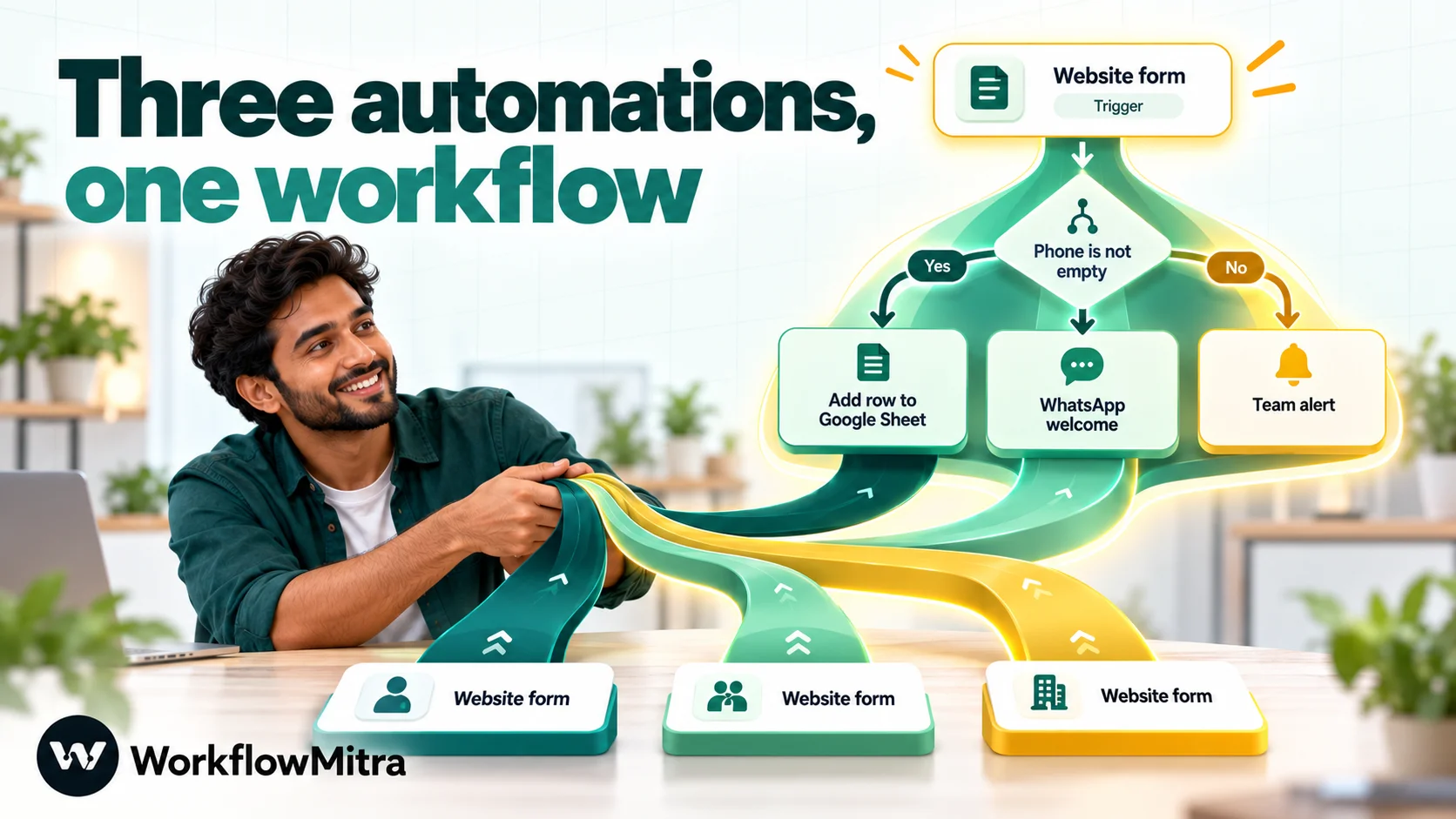
- Trigger. Add a webhook trigger and choose the Website form preset. Copy the URL into your form plugin’s webhook setting and add the shared secret the preset suggests in a custom header, so only your form can start the workflow.
- Condition. Add an IF step with the rule phone Is not empty. Leads without a number follow the other route, where you can still log them or email the team instead of dropping them.
- Sheet. Add a Google Sheets step with Add row(s). In the name column, wrap the form field in the trim and startcase helpers (startcase capitalises each word); in the phone column, use the replace helper to remove every space. These run inside the step, so they add nothing to the bill. Columns are written in order, so match the mapping to your sheet’s column order.
- WhatsApp. Add the WhatsApp step, pick your approved welcome template and map the first name into its variable.
- Team alert. Add a Slack step with a short message that includes the name, phone and source page.
- Test. Send a test submission with and without a phone number and check each route in the run history before switching the form over.
In Integrately, the condition and the two formatted fields alone would use three tasks per lead before any action ran. Here, the whole lead costs four credits: the trigger and three actions.
Common mistakes when switching
- Comparing task allowances instead of workflows. 2,000 Integrately tasks and 2,000 tasks elsewhere aren’t the same amount of work.
- Forgetting seats. A plan with one user is the wrong comparison if two people build automations.
- Moving one-step automations that already work. If an automation is a single ready-made pair, it may cost less to leave it where it is.
- Polling when a webhook exists. In tools that charge for checks, a frequent poll can use more units than the work itself.
- Skipping failure tests. Send a lead with a missing phone number and watch what each tool does before you trust it.
Why use WorkflowMitra after Integrately?
Because the things that cost tasks in Integrately are free or built in. Conditions, branches and delays cost nothing, field formatting happens inside the step, and approvals, round-robin assignment and loops are steps on every plan rather than features on a higher tier. Two seats come with the entry plan, rising to 5 and 10.
It also suits teams that talk to customers mainly on WhatsApp: its WhatsApp step sends templates, media, buttons and lists through ChatMitra, so a lead can be confirmed, assigned and followed up in one workflow.
It isn’t the right home for everyone. If your value from Integrately is the ready-made library across niche apps, WorkflowMitra has far fewer integrations and only 10 curated templates, and failed steps use credits. Those are real trade-offs to weigh against the savings.
Which Integrately alternative should you choose?
| Your situation | Best fit | Why |
|---|---|---|
| Conditions and formatting are driving your task count, and customers are on WhatsApp | WorkflowMitra | Free logic and in-field expressions; native WhatsApp through ChatMitra; approvals on every plan |
| You need many tasks at a flat price in rupees | Pabbly Connect | Triggers and internal tools free; unlimited team members |
| You want a similar budget builder with more steps | Albato | Budget builder; unlimited steps on Pro |
| The app you need isn't on Integrately | Zapier | 9,000+ apps |
| Your workflows reshape a lot of data | Make | Routers, iterators and in-field functions |
| You have a technical team or must self-host | n8n | One execution per run; self-hosted edition |
| You want predictable per-run costs | Activepieces | One credit per run; open-source core |
| Your automations are one or two ready-made steps | Stay on Integrately | Free triggers, a huge library and a team that builds for you |
Next step
Pick the Integrately automation that uses the most tasks and rebuild it in the alternative that fits you best from the table above. If it involves a condition, an approval or a WhatsApp message, try it first in WorkflowMitra: the 14-day trial includes 10,000 credits without a card, enough to run that workflow on real data for two weeks. If you’re also weighing Pabbly, our Pabbly Connect alternatives guide compares that side of the market.
We read every price, plan limit and counting rule on the vendors' own pages on 8 October 2026: Integrately pricing (including its task FAQ) and homepage, WorkflowMitra, Pabbly Connect, Albato, Zapier, Make, n8n and Activepieces. Integrately apps from its WhatsApp and Code by Integrately pages. Conversions use FBIL's 30 September 2026 reference rates. WorkflowMitra's credit rates and step behaviour were checked in the product that day. Vendors change prices often, so confirm them before buying.
Frequently Asked Questions
What Integrately users ask before they move their automations.
It depends on what you've run into. For WhatsApp-led workflows, approvals and free logic steps, WorkflowMitra. For many tasks at a flat rupee price, Pabbly Connect. For a similar budget, no-code builder, Albato. For the most apps, Zapier. For complex data handling, Make. For technical teams and self-hosting, n8n. For per-run pricing on open-source code, Activepieces. If your automations are short and match Integrately's library, staying is often cheapest.
Automate the work between your apps
Build workflows with triggers, conditions and actions, then test them before they go live. Try WorkflowMitra free for 14 days, no card required.
