Make Pricing Explained in Rupees: Plans, Credits and What You'll Really Pay

Quick Summary
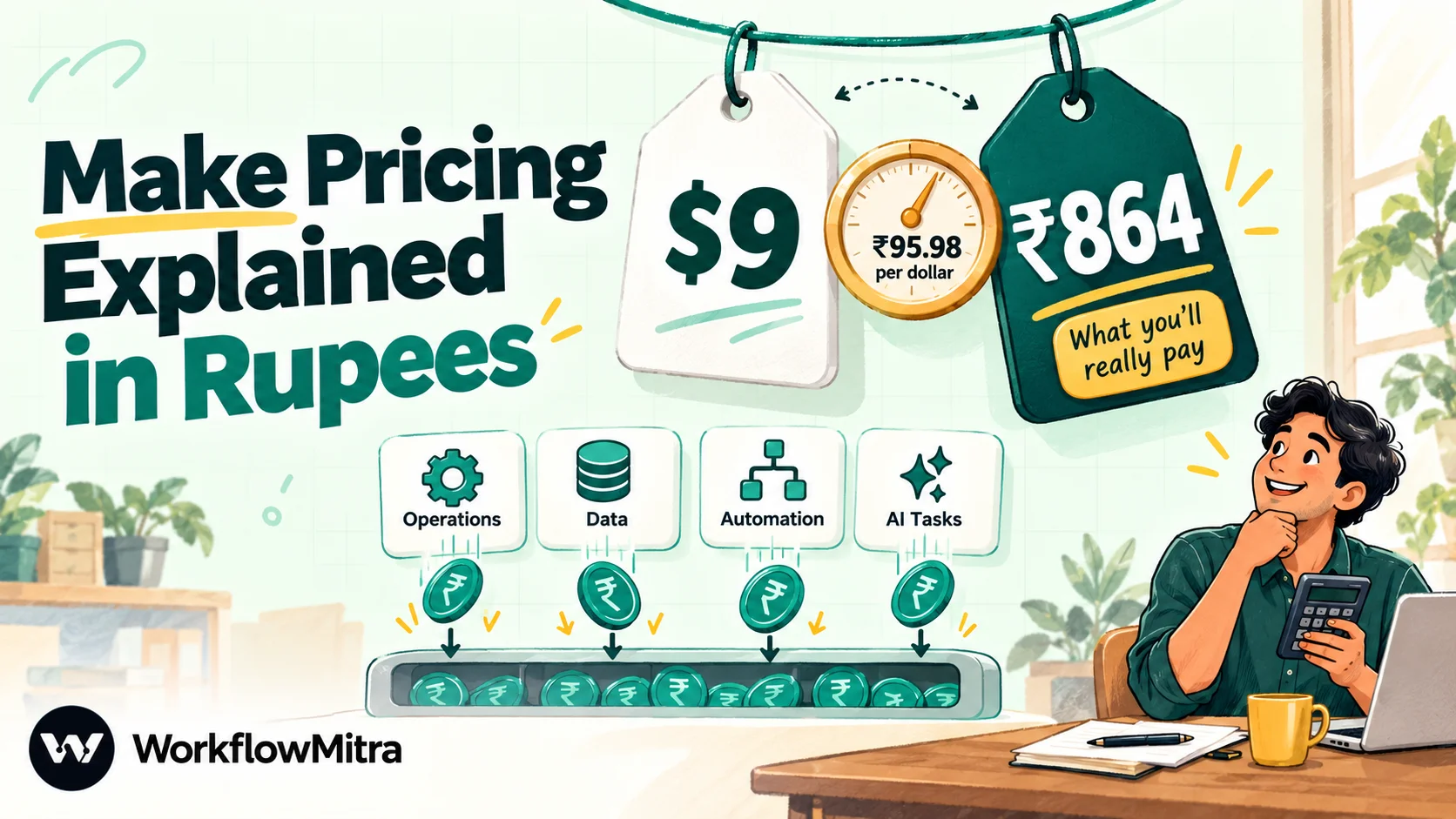
Make charges in US dollars for a monthly pool of credits, where one credit is roughly one module action. On 7 October 2026 its pricing page showed a Free plan (1,000 credits a month), a single Make plan from $9 a month billed yearly for 5,000 credits (about ₹864 at FBIL's 30 September rate of ₹95.98 per dollar), and custom Enterprise pricing, while Make's help centre and its pricing data still described the Core, Pro and Teams plans, where Core starts at $9 a month billed yearly or $10.59 monthly for 10,000 credits. Your real bill depends on how many credits your scenarios use: every trigger check uses a credit even when it finds nothing, each module runs once per bundle, AI modules can add token-based credits, and extra credits cost 25% more than your plan's rate.
Make looks cheap at first glance. A free plan, a paid plan that starts below the price of a lunch, and a credit for each step a workflow takes. The confusion starts later: when a scenario that “only runs a few times a day” turns out to have used thousands of credits, when the slider jumps to a tier you didn’t plan for, or when a card statement in rupees doesn’t match the dollar price on the page.
This guide explains Make’s pricing the way an Indian business pays it: in rupees, with the credit rules that decide the bill, the charges that aren’t on the plan card, and a method for estimating your usage before you commit. Every Make figure here was checked on Make’s own pages on 7 October 2026, and dollar prices are converted at FBIL’s reference rate of ₹95.9832 per dollar for 30 September 2026, the latest published when we checked.
How much does Make cost?
Make starts free, and its paid plans start at about ₹864 a month billed yearly. On 7 October 2026, Make's pricing page showed a Free plan with 1,000 credits a month, a single Make plan from $9 a month billed yearly for 5,000 credits, and custom Enterprise pricing. Make's help centre still describes its Core, Pro and Teams plans, where Core costs $9 a month billed yearly ($10.59 monthly) for 10,000 credits. What you actually pay depends on how many credits your scenarios use, because every scheduled check, every module and every AI token can add to the count.
Before the tables, one warning that changes how you should read any Make price, including ours.
Make’s pricing page is changing: what we saw
Make has been reshaping its plans through 2026, and different visitors see different pages. On 7 October 2026 we saw three versions of Make’s prices:
- The pricing page as we loaded it: Free, a single Make plan with a credit slider ($9 a month for 5,000 credits, billed yearly), and Enterprise. Prices for the larger slider positions only appear when the slider moves, and we couldn’t read them reliably.
- The Core, Pro and Teams ladder: the version Make’s pricing page served by default in archived copies up to 1 October 2026, and the one Make’s help centre still describes. Its full price list sits in the page’s own pricing data, which is how we read the tiers below.
- A higher-priced variant shown to some visitors, including in the US. Zapier’s own Make pricing comparison, dated 16 September 2026, quotes Core from $12 a month billed annually, which matches that variant rather than the $9 one.
So treat every Make price, here or anywhere, as a snapshot. Open Make’s pricing page yourself on the day you buy, note the date, and compare what you see with the tables below. If your page shows different numbers, the method in this guide still works: only the price per credit changes.
Make’s plans at a glance
These are the plans and limits on Make’s live pricing page on 7 October 2026:
| Plan | Credits a month | Price | Main limits |
|---|---|---|---|
| Free | 1,000 | $0 | 2 active scenarios, runs at most every 15 minutes, 5-minute maximum run, 5 MB files, 7-day execution logs, 512 MB data transfer |
| Make plan | From 5,000 (slider up to 8 million) | $9 a month billed yearly for 5,000 credits (≈ ₹864); "save 15% or more" with annual billing | Unlimited active scenarios, 1-minute interval, 40-minute maximum run, 500 MB files, 30-day logs, teams and roles, priority execution |
| Enterprise | Custom | Quote from sales | Custom functions, 1,000 MB files, 60-day logs, single sign-on, credit overage protection |
Every plan, including Free, includes Make’s AI features: its Maia assistant, AI agents (in beta) and the AI toolkit. Using them consumes credits, which is covered below.
The Core, Pro and Teams prices in rupees
Many existing Make customers are on Core, Pro or Teams, Make’s help articles are written around them, and the pricing data behind Make’s default page listed them up to 1 October 2026. Here are the tiers a small or mid-sized business is most likely to buy, with rupee equivalents:
| Credits a month | Core: monthly / yearly (per month) | Pro: monthly / yearly | Teams: monthly / yearly |
|---|---|---|---|
| 10,000 | $10.59 (₹1,016) / $9 (₹864) | $18.82 (₹1,806) / $16 (₹1,536) | $34.12 (₹3,275) / $29 (₹2,784) |
| 20,000 | $18.82 (₹1,806) / $16 (₹1,536) | $34.12 (₹3,275) / $29 (₹2,784) | $62.35 (₹5,985) / $53 (₹5,087) |
| 40,000 | $34.12 (₹3,275) / $29 (₹2,784) | $62.35 (₹5,985) / $53 (₹5,087) | $116.47 (₹11,179) / $99 (₹9,502) |
| 80,000 | $64.71 (₹6,211) / $55 (₹5,279) | $107.06 (₹10,276) / $91 (₹8,734) | $203.41 (₹19,524) / $172.90 (₹16,595) |
| 150,000 | $116.47 (₹11,179) / $99 (₹9,502) | $180.53 (₹17,328) / $153.45 (₹14,729) | $343.01 (₹32,923) / $291.56 (₹27,985) |
Core continues to 300,000 credits ($214.31 monthly or $182.16 a month yearly, about ₹20,570 or ₹17,484); Pro and Teams continue to 8 million. Since November 2025, Core has been capped at 300,000 credits a month, and accounts above that were moved to Pro.
What each step up adds, according to that same pricing data:
- Core: unlimited active scenarios, scheduling down to the minute, higher data transfer limits and access to the Make API.
- Pro: everything in Core, plus priority execution, custom variables and full-text search of execution logs.
- Teams: everything in Pro, plus teams with roles and shared scenario templates.
Two things stand out in the rupee figures. First, the jump between plans at the same credit tier is steep: Teams costs more than three times Core for the same 10,000 credits, so only pay for Pro or Teams if you need those features. Second, the price per credit falls as you buy more. Core’s yearly rate works out at about ₹86 per 1,000 credits at 10,000 credits and about ₹63 per 1,000 at 150,000.
What the new Make plan costs per credit
On the single Make plan, $9 buys 5,000 credits billed yearly: $1.80, or about ₹173, per 1,000 credits. That’s twice Core’s yearly rate at 10,000 credits, because the entry step is half the size for the same price. If you only need a few thousand credits, the smaller step suits you. If you need 10,000 or more, compare the slider’s price at your tier with the Core figure above before you buy.
Converting Make’s dollar prices into rupees
Make shows its prices in dollars, and we found no option to pay in rupees. Its help centre lists cards, several digital wallets and, for US bank accounts, ACH debit, with the note that available methods vary by region. For most Indian businesses, that means a card payment in dollars.
Three things move the rupee cost:
- The exchange rate. We used FBIL’s reference rate, the benchmark published for the Indian market. Your bank uses its own rate on the day the charge posts, which can differ.
- Your card’s foreign-currency markup. Many Indian cards add a percentage on international transactions. Check your card’s schedule of charges; on a yearly plan paid in one go, the markup applies to the whole amount.
- Annual prepayment. An annual plan locks the dollar price for the year, but you pay all twelve months at one exchange rate on one day.
None of these are large on a ₹864 plan. On an 80,000-credit Pro plan billed yearly, about ₹1 lakh up front, they’re worth a line in the budget.
What is a Make credit?
Make bills in credits. Until 27 August 2025 the unit was called an operation; Make then renamed it at a one-to-one rate, so one operation became one credit with no change to plans or prices. Make’s pricing FAQ now puts it simply: most actions consume one credit.
An action is a module doing something with data. Reading a record from a CRM, adding a row to Google Sheets, sending an email, searching a database and transforming data with a built-in tool each count. So does each module that iterates or aggregates data.
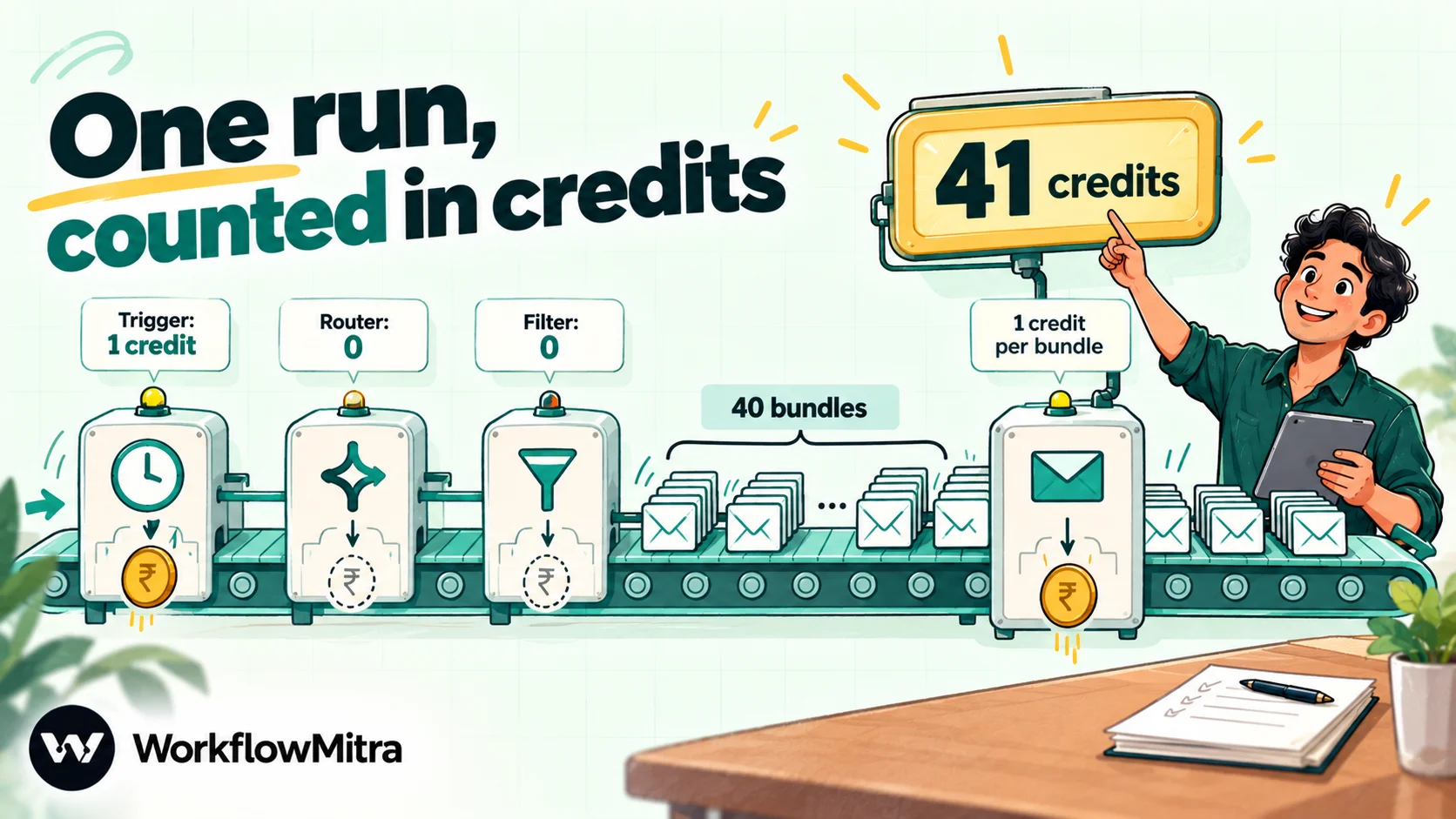
Some things cost nothing. Make’s training course says that routers don’t consume credits and that a bundle passing through a filter doesn’t either. Only features triggered by scenario runs, plus the AI agent chat, use credits at all; building and editing scenarios is free.
The bundle rule that multiplies credits
The rule that surprises most new Make users is about bundles. Make passes data between modules as bundles, and a module runs once for each bundle it receives. Make’s own help centre puts it plainly: bundles in earlier modules have a multiplying effect.
Here’s how it plays out. A scenario searches a sheet and finds 40 matching rows, then sends an email for each one. The search runs once and returns 40 bundles. The email module then runs 40 times. The scenario uses 1 + 40 = 41 credits, not 2.
Add a second action after the email, say, updating each row as “sent”, and it’s 81 credits. Every module you place after a step that returns many bundles costs one credit per bundle. An aggregator that collects the bundles back into one, such as a text aggregator building a single summary, reduces the count for every module after it.
Why a scenario that finds nothing still costs credits
Make’s training course says the trigger module always performs one operation and consumes one credit, regardless of how many items it returns. That includes zero. For scheduled triggers, which check another app for new data on a timer, every check costs a credit:
| Scenario checks every | Credits a month on checks alone (30 days) | Share of a 10,000-credit plan |
|---|---|---|
| Hour | 720 | 7% |
| 15 minutes | 2,880 | 29% |
| 5 minutes | 8,640 | 86% |
| 1 minute | 43,200 | 432% |
That’s per scenario. Three scenarios checking a sheet, a mailbox and a CRM every 15 minutes spend 8,640 credits a month before any of them does useful work.
Instant triggers avoid this. When the other app can send a webhook, a Make scenario runs only when data arrives, so you pay for the run, not for waiting. Make allows up to 300 incoming webhook requests per 10 seconds and holds a queue of up to 667 waiting items per webhook for every 10,000 credits in your plan, capped at 10,000. The cost problem is specific to apps that can’t push events: spreadsheets, many mailboxes, RSS feeds and plenty of APIs.
How AI and code use Make credits
Make’s AI features run on credits too, and they don’t follow the one-credit rule.
- Make’s AI provider. If you use AI modules without your own API key, Make charges credits based on tokens. Since 25 August 2026, input and output tokens have separate rates; for small and medium models, one credit covers about 18,080 input tokens or 2,260 output tokens, and large models cost about five times as much. Make’s own example: a medium-model request with 2,000 input tokens and 100 output tokens fell from about 0.6 credits to about 0.16 under the new rates.
- Your own AI key. Connect your own OpenAI, Anthropic or Google key and the module costs one credit per operation, but the AI provider bills you separately for the tokens, usually in dollars as well.
- AI agents. With Make’s AI provider, an agent costs one credit per operation plus token-based credits. Tools the agent calls add a credit per operation each. Knowledge files are counted by page.
- Code. The Make Code app, available on paid plans, uses two credits per second of execution time, with a 30-second limit on Core, Pro and Teams.
The practical point: an AI step inside a loop is multiplied by the bundle rule like everything else. Fifty emails summarised one by one means fifty AI module runs, each with its own token charge.
Monthly vs yearly billing
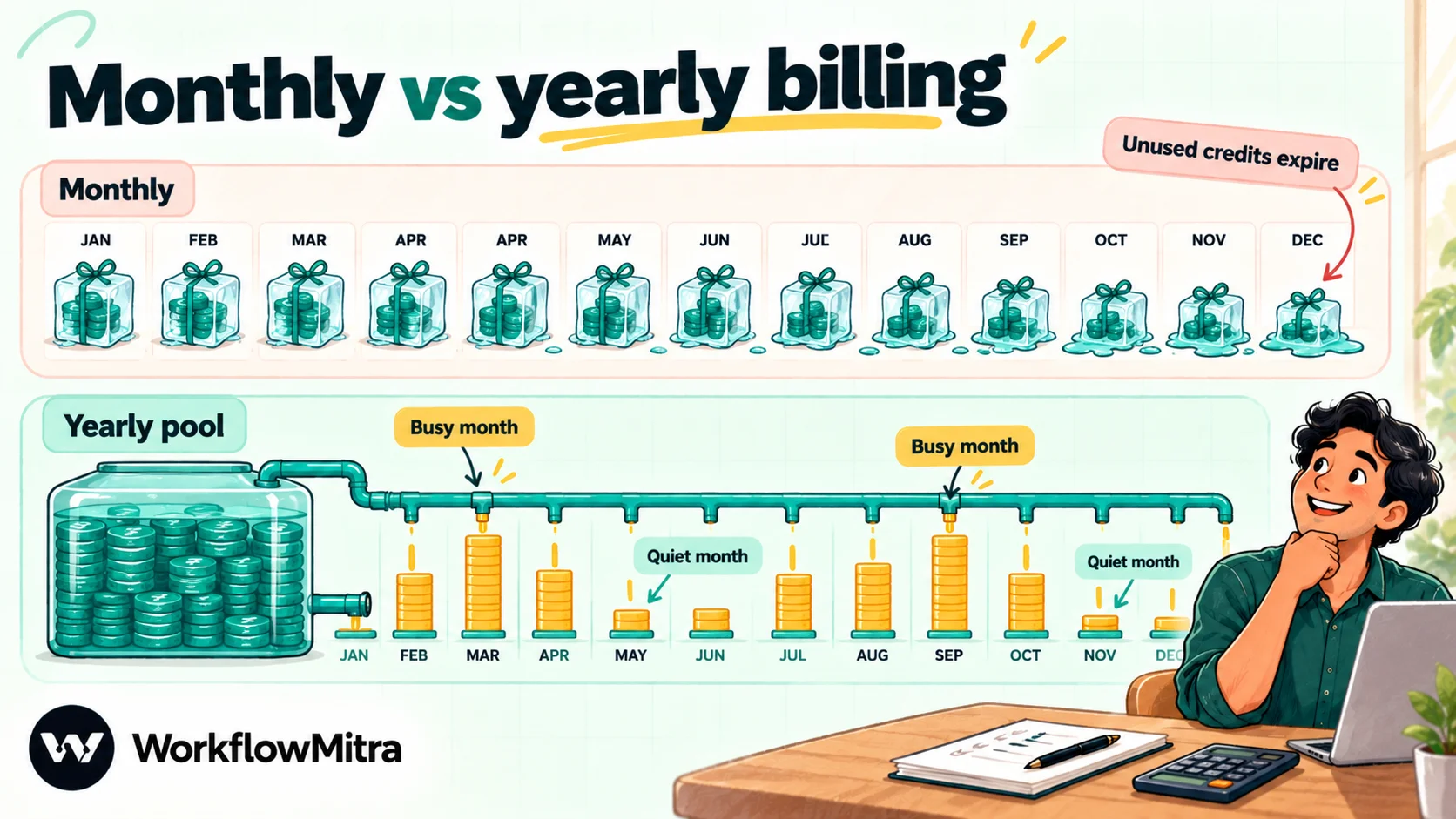
Yearly billing on Make costs about 15% less: $9 instead of $10.59 a month for 10,000 Core credits. The catch is in how credits are handed out and when they expire.
- Credits don’t roll over. Make’s pricing FAQ says credits expire at the end of the term. On monthly billing, unused credits disappear every month.
- Pro and Teams yearly plans get the whole year’s credits up front. Make’s help centre says annual subscriptions receive their full allocation at once, with no monthly allotment. A seasonal business can use more in its busy months and less in quiet ones.
- Core is the exception. Even on yearly billing, Core credits are allocated monthly, so a heavy month can’t borrow from a light one.
- You pay the year in advance. Cancelling stops renewal; a paid plan runs until the end of the current billing cycle.
The help centre describes these rules for Core, Pro and Teams. Make hadn’t published how the new single Make plan allocates yearly credits when we checked, so ask before you rely on it.
What happens when you run out of credits
When your credits are used up, Make stops running your scenarios until credits are added. It warns you at 75% and again at 90% of your allowance. You then have three options on a paid plan:
- Upgrade to a larger tier.
- Buy extra credits in units of 1,000.
- Turn on auto-purchasing, which buys 10,000 extra credits each time your allowance runs out, up to a cap set by your plan size.
Extra credits cost more than the ones in your plan. Since November 2025, Make has charged a 25% markup on every extra credit, whether bought by hand or automatically, and extra credits are valid only for the current billing cycle. Make’s own example: on a $9 plan with 10,000 credits, one credit costs $0.0009, so 1,000 extra credits cost $1.125. On the new Make plan, where $9 buys 5,000 credits, the same arithmetic gives $2.25, about ₹216, per 1,000 extra credits.
Auto-purchasing protects you from stopped scenarios, which matters if a scenario handles orders or leads. But if extra credits are being bought every month, the next tier up is almost always cheaper.
Worked examples: three Make bills
Here’s how three common setups add up. Each counts credits for a 30-day month, then picks the smallest plan that fits.
| Scenario | How credits add up | Credits a month | Smallest fit (yearly) |
|---|---|---|---|
| Website leads by webhook: create the lead in a CRM, add a sheet row, alert sales on Slack | 1,500 leads × (webhook 1 + 3 actions) | 6,000 | Core 10k: $9 (≈ ₹864) |
| Watch a sheet every 15 minutes; for each new row (about 400 a month), send an email and update the row | 2,880 checks + 400 × 2 actions | 3,680 | Make plan 5k: $9 (≈ ₹864), or Core 10k |
| Same sheet watcher, but checking every 5 minutes for faster replies | 8,640 checks + 400 × 2 actions | 9,440 | Core 10k, with almost no headroom |
| Daily: search the inbox for yesterday's 50 support emails, summarise each with AI (own key), post one digest to Slack | 30 × (search 1 + 50 AI runs + aggregator 1 + Slack 1) | 1,590 + the AI provider's own bill | Make plan 5k: $9 (≈ ₹864), with room for one or two more scenarios |
The second and third rows are the same workflow. Checking three times as often nearly triples the credits, though the useful work is identical, because the checks dominate the bill.
The first row is the cheapest kind of Make scenario: webhook-triggered, one bundle per run, no AI. If your scenarios look like that, Make’s per-credit price is what matters. If they look like the second and third rows, the polling rule matters more than the price.
How to estimate your Make credit usage before you buy
Plan cards are easy to compare; usage isn’t. A short estimate before you choose a tier saves an upgrade in month two.
- List each scenario you’ll run. For each, note what starts it: a webhook (instant) or a schedule (polling).
- Count checks for scheduled scenarios. Checks a month = 43,200 ÷ the interval in minutes. Every check costs a credit.
- Count runs that do work, for example new leads or new rows a month.
- Count modules per run, multiplied by bundles. A module after a search that returns 20 results runs 20 times. Routers and filters are free.
- Add AI. With your own key, one credit per AI module run. With Make’s provider, add token-based credits; run a few test executions and read the credits used in the execution history.
- Add 20% headroom for retries, test runs and growth. Running out stops scenarios, and extra credits cost 25% more.
- Check the result against the tiers, then compare Core and the Make plan at that tier.
The most accurate estimate comes from a week on the Free plan or a trial: build one real scenario, let it run, and multiply its credit usage by four.
Costs that aren’t on the plan card
The credit price is the visible part of the bill. Several other costs decide whether Make is cheap for you:
- Polling overhead, as above: often the biggest line on a small account.
- AI tokens, either as Make credits or as a separate bill from your AI provider.
- Forex and card charges on every payment in dollars.
- Data transfer and storage. Make’s FAQ ties allowances to credits: per 10,000 credits you get 5 GB of data transfer and small storage allowances. Scenarios that move large files can reach those limits before they run out of credits.
- Log retention. Free keeps execution logs for 7 days, the Make plan for 30 and Enterprise for 60. If you need to prove what happened to an order three months ago, export what you need.
- Downgrade side effects. Make’s FAQ says that downgrading stops active scenarios that use features of the higher plan, so plan downgrades carefully.
- Your time. Complex scenarios with iterators, aggregators and error handlers are powerful, but someone has to build and maintain them.
How to lower your Make bill
If your Make usage is higher than expected, these changes usually save the most, in order:
- Swap scheduled triggers for instant ones wherever the app supports webhooks.
- Slow down checks that don’t need speed. An hourly check costs a quarter of a 15-minute one. A daily report doesn’t need to poll every minute.
- Filter early. Put filters straight after the trigger or search, so unwanted bundles never reach modules that cost credits.
- Search narrowly. Ask the source app for only the records you need (a date range, a status) instead of fetching everything and filtering later.
- Aggregate before you act. One summary message built from 50 bundles costs one credit to send, not fifty.
- Use your own AI key where token-based credits add up, and compare the provider’s bill.
- Pick the right plan, not just the right tier. Don’t pay for Teams unless you need its roles and shared templates.
- Move to yearly billing once your usage has been steady for a few months.
Is the free plan enough?
For learning Make and running one or two light scenarios, often yes. The Free plan includes 1,000 credits a month, two active scenarios and a 15-minute minimum interval. That’s 2,880 checks a month for a single scenario polling every 15 minutes, nearly three times the free allowance, so free accounts work best with webhook triggers or infrequent schedules. With a 5-minute maximum run and 7-day logs, it isn’t meant for production work.
Make vs WorkflowMitra on price
Make is the tool most often compared with WorkflowMitra, powered by ChatMitra, because both draw workflows on a visual canvas and both bill by the step. The price comparison comes down to how each counts:
| WorkflowMitra | Make | |
|---|---|---|
| Billing currency | Rupees | US dollars |
| Entry paid plan | ₹999 a month (₹849 billed yearly) for 10,000 credits | Make plan: $9 a month billed yearly (≈ ₹864) for 5,000 credits; Core: $9 yearly or $10.59 monthly for 10,000 |
| Scheduled check that finds nothing | Free | 1 credit |
| IF, Switch, Set Variable / routers and filters | Free | Free |
| Extra credits | Top-ups from ₹1,000 at your plan's own rate; purchased credits carry over | 25% above your plan's rate; valid for the current billing cycle |
| Free option | 14-day trial with 10,000 credits, no card | Permanent Free plan, 1,000 credits a month |
On list prices at FBIL’s 30 September rate, WorkflowMitra comes out slightly cheaper than Make Core at 10,000 credits (₹999 against about ₹1,016 monthly, ₹849 against about ₹864 yearly) and further ahead at 20,000 and 40,000 credits (₹1,499 against about ₹1,806, and ₹2,699 against about ₹3,275, monthly). A weaker rupee widens the gap and a stronger one narrows it. For webhook-triggered scenarios, that per-credit price is the whole comparison. For scenarios that poll sheets, inboxes or APIs, WorkflowMitra’s free empty checks usually decide the comparison: the 5-minute sheet watcher above uses about 9,440 Make credits a month but only about 1,200 WorkflowMitra credits, because only the 400 runs that find a row are charged. The WorkflowMitra vs Make comparison goes beyond price, into data tools, WhatsApp and error handling.
Where Make is stronger on price
Make has a permanent free plan, which WorkflowMitra doesn’t; WorkflowMitra offers a trial instead. Make’s smallest paid step is also smaller: 5,000 credits for about ₹864 a month billed yearly suits a business that needs only a few thousand credits, while WorkflowMitra’s smallest plan is 10,000 credits. And Make’s catalogue of more than 3,000 apps means fewer HTTP calls built by hand, which saves building time if not credits.
Why use WorkflowMitra if Make’s bill is the problem?
Most Indian teams that look beyond Make do so for one of three reasons: polling eats their credits, the dollar bill keeps moving, or their workflows end in WhatsApp. WorkflowMitra by ChatMitra answers those specifically:
- Checks that find nothing are free. Google Sheets, email, RSS and other polling triggers only charge when a check starts a run.
- Rupee pricing, with tiers of 10,000 credits for ₹999, 20,000 for ₹1,499 and 40,000 for ₹2,699 a month, and 15% off yearly. No exchange rate or card markup.
- Logic is free. IF, Switch, Merge, Delay and Set Variable steps don’t use credits, so filtering early costs nothing.
- WhatsApp through ChatMitra. Approved WhatsApp templates and messages are a built-in step, sent through ChatMitra or Meta’s Cloud API.
- Top-ups that don’t expire with the billing cycle, at your plan’s own rate.
It isn’t the better choice for everyone. If you need a very large app catalogue, Make’s advanced data tools or a permanent free plan, Make is likely the better fit. If you’re comparing several options, the Make alternatives guide ranks seven, and n8n vs Make compares the two most technical choices.
Which Make plan should you choose?
- Trying Make, or one light scenario: Free.
- A few thousand credits, mostly webhooks: the Make plan’s 5,000-credit step, if that’s what your page shows.
- 10,000 credits or more, one builder: Core yearly, or the Make plan at the same tier if it’s cheaper on the day.
- High-volume or time-sensitive scenarios: Pro, for priority execution and log search.
- Several people building and sharing scenarios: Teams.
- Single sign-on, overage protection or custom functions: Enterprise.
Whichever you pick, estimate credits first, start monthly until usage is steady, and keep an eye on the 75% warning. If your estimate shows polling taking a large share of the bill, or you’d rather pay in rupees, run the same workflow on the 14-day WorkflowMitra trial, which needs no card, and compare the credits used. WorkflowMitra’s current prices are on its pricing page.
Make prices, plans and limits were read on Make's pricing page and its pricing data on 7 October 2026, with the Core, Pro and Teams ladder confirmed in an archived copy of the page from 1 October 2026. Credit rules are from Make's help centre (credits, operations, extra credits, monthly and annual subscriptions, AI agents, webhooks), its credits announcement and the Make Academy. The exchange rate is FBIL's USD/INR reference rate for 30 September 2026. WorkflowMitra prices were checked the same day.
Frequently Asked Questions
Questions Indian buyers ask before paying for Make.
Make has a free plan with 1,000 credits a month. On 7 October 2026 its pricing page showed the paid Make plan from $9 a month billed yearly for 5,000 credits, about ₹864 at ₹95.98 per dollar, with larger credit amounts on a slider. Make's Core plan, still described in its help centre, costs $9 a month billed yearly or $10.59 monthly for 10,000 credits. Prices vary by visitor and change often, so check the page on the day you buy.
Automate the work between your apps
Build workflows with triggers, conditions and actions, then test them before they go live. Try WorkflowMitra free for 14 days, no card required.
