Make vs Zapier: Which Automation Platform Fits Your Business in 2026?

Quick Summary
Choose Zapier if you want the easiest builder and the largest app catalogue (more than 9,000 apps), and you can accept a higher price per action. Choose Make if your workflows branch, loop and reshape data, and you want a much lower entry price (from $9 a month for 5,000 credits, billed yearly). If your workflows mostly end in WhatsApp messages and you want rupee billing, consider WorkflowMitra, powered by ChatMitra, from ₹999 a month.
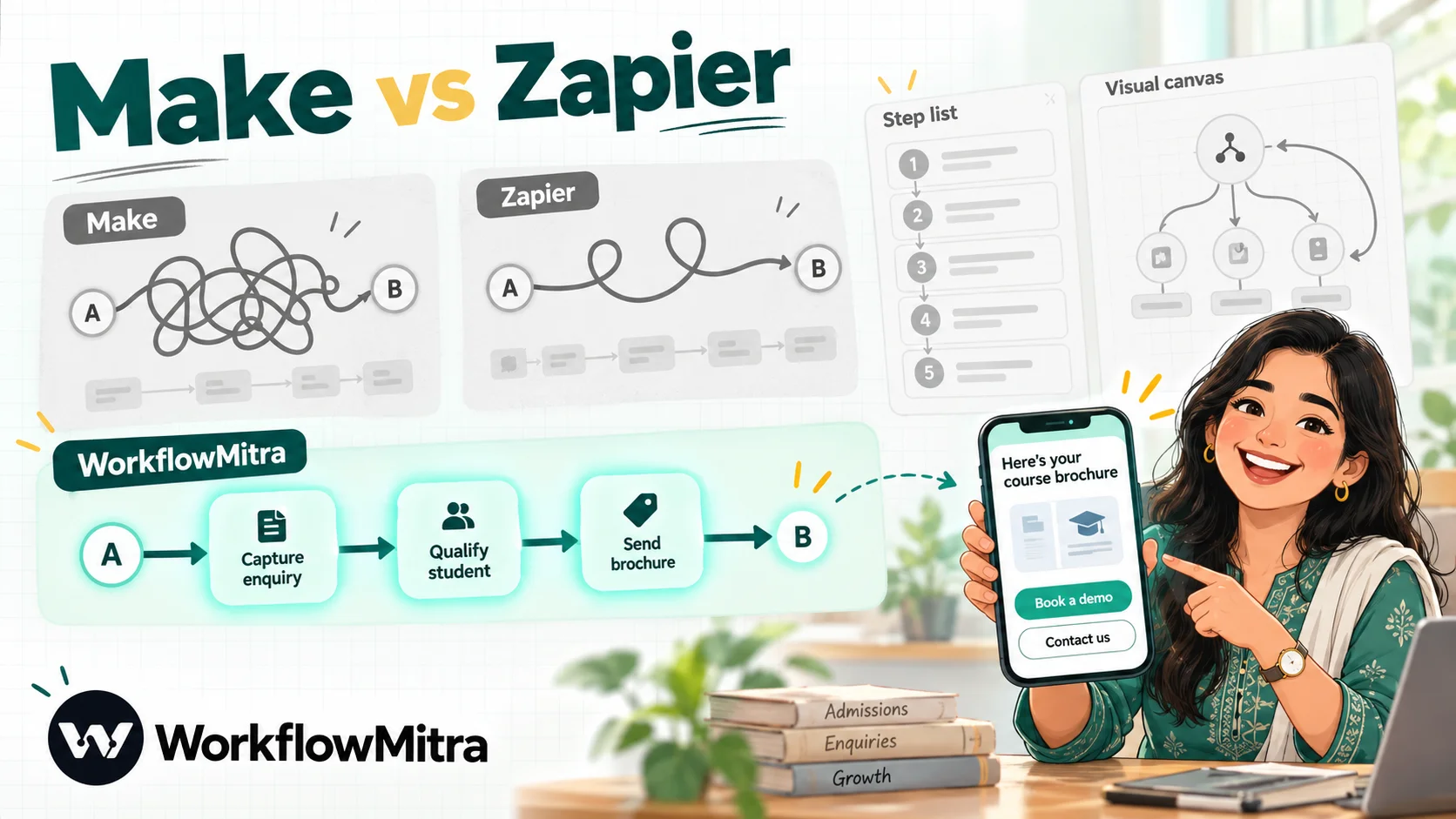
Make and Zapier are the two names that come up first when a business decides to stop copying data between apps by hand. They solve the same problem in noticeably different ways. Zapier is the easy, enormous one: a step-by-step builder and the biggest app catalogue on the market. Make is the visual, economical one: a canvas where complex logic is easy to see, at a fraction of Zapier’s price per action.
This guide compares them on what actually changes your decision: how each one counts usage, what a realistic workflow costs, how hard each is to learn, and where each falls short. We also cover a third option, because for one large group of businesses neither tool is the obvious answer: teams whose workflows end in WhatsApp messages to customers and who would rather pay in rupees.
Make and Zapier facts below come from their own pricing pages, help centres and documentation, read on 7 October 2026.
Quick answer: Pick Zapier if ease of use and app coverage matter most and you can pay more per action. Pick Make if your workflows branch, loop and reshape data, or if price per action matters; it starts at $9 a month for 5,000 credits on yearly billing. If most of your workflows finish with a WhatsApp message to a customer and you want rupee billing, look at WorkflowMitra, powered by ChatMitra, from ₹999 a month.
Where WorkflowMitra fits in this comparison
Before the head-to-head, a word on the third option, because it changes the answer for a specific kind of business.
What is WorkflowMitra? WorkflowMitra is a cloud automation platform with a visual builder, sold in rupees and made for small and growing businesses. It belongs to the ChatMitra family: ChatMitra provides WhatsApp Business messaging, and WorkflowMitra automates the work around it, from capturing a lead to updating a sheet to alerting the right salesperson. Its WhatsApp step sends interactive messages (reply buttons, list menus, catalog items) through ChatMitra or Meta’s Cloud API.
Who is it for? Clinics, coaching institutes, online stores, real-estate teams and agencies whose most important automations notify a customer or a colleague on WhatsApp, and who want approvals and lead rotation as ready-made steps rather than something to assemble.
Why is it here? Because the usual Make-or-Zapier debate assumes your workflows are about moving data between SaaS apps. If they are mostly about messaging customers, the criteria change: WhatsApp message formats and rupee billing start to matter more than app count. If that is not your situation, skip ahead; Make and Zapier are both excellent at what they do.
What is Make?
Make, formerly Integromat, is a visual automation platform. A workflow is called a scenario and is drawn as a canvas of round modules connected by lines. Routers split the flow into branches, filters sit on the connections, and iterators and aggregators split lists into items and combine them again. Make lists more than 3,000 apps, offers HTTP and webhook modules for anything else, and includes data stores, scenario inputs, error-handling routes and AI agents. It is priced in US dollars on a credit system.
What is Zapier?
Zapier has the biggest app catalogue in no-code automation, listing more than 9,000 apps. A workflow is a Zap: a trigger followed by a vertical list of actions, with Paths for branching, Filter steps, Formatter for reshaping data, and Delay and Looping steps. Around Zaps it sells a broader product family: Tables, Forms, Canvas for mapping processes, Agents, Chatbots, AI by Zapier steps, MCP for AI assistants, and Copilot to help build Zaps. It is priced in US dollars, with a currency menu that can show rupees.
Make vs Zapier at a glance
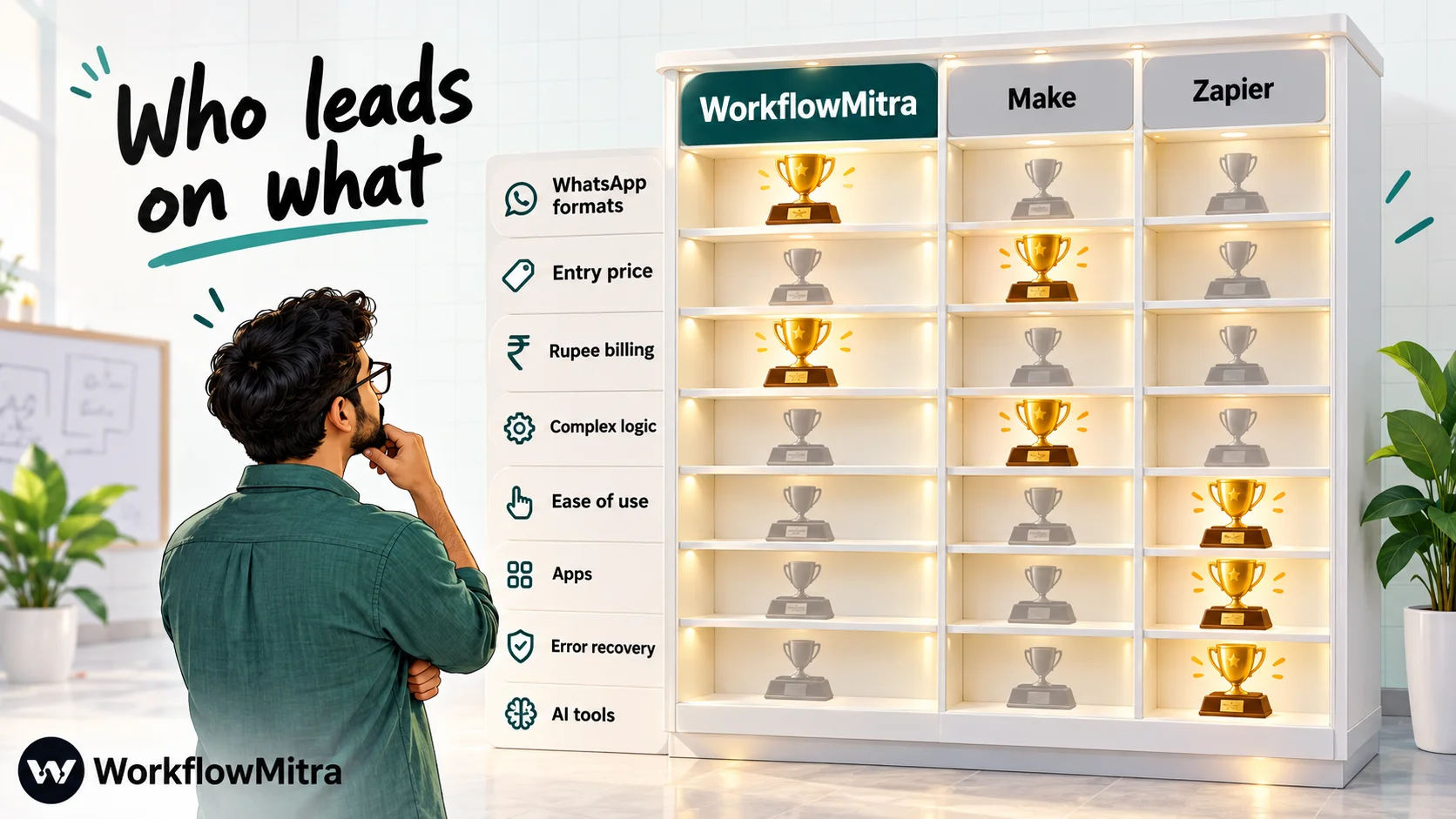
| Criterion | WorkflowMitra | Make | Zapier |
|---|---|---|---|
| Builder style | Visual canvas of steps | Visual canvas of modules | Vertical list of steps |
| Usage unit | Credit per executed step; logic steps free | Credit per module action, trigger included | Task per successful action; trigger free |
| Free use | 14-day trial, 10,000 credits | Free plan: 1,000 credits, 2 active scenarios | Free plan: 100 tasks, two-step Zaps |
| Entry paid plan | ₹999 a month, 10,000 credits | $9 a month billed yearly, 5,000 credits | $19.99 a month billed yearly ($29.99 monthly), 750 tasks |
| Currency | Rupees | US dollars | US dollars; INR shown in currency menu |
| Fastest schedule on entry plan | 1 minute | 1 minute | 2 minutes |
| Apps | Dozens of native integrations, plus API steps | 3,000+ | 9,000+ |
| Version history | No | Up to 60 days | About a month on Professional, six on Team |
| Users on entry plan | 2 seats | Teams and roles included | 1 user (Team plan: 25) |
| WhatsApp reply buttons and lists | Built into the WhatsApp step | Not documented in the WhatsApp app | Not among the WhatsApp app's actions |
How we compared them
We looked at the plans a small or mid-sized business would realistically choose: Make’s Free and Make plans, Zapier’s Free, Professional and Team plans, and WorkflowMitra’s entry tiers. Facts come from each vendor’s pricing page and help documentation. Zapier’s rupee figures use the rupee prices in its own currency menu (₹98.36 per dollar on 7 October 2026). Make’s dollar prices are converted at ₹95.98, the FBIL reference rate for 30 September 2026, the latest available that day.
One limitation: Make had just reorganised its plans when we checked, and its pricing page set larger credit tiers with a slider whose prices we couldn’t read. We price Make’s entry plan exactly and describe larger volumes in credits.
Ease of use: a list or a canvas

This is the difference people feel first.
Zapier reads top to bottom. Each step says in plain words what happens (“When a new row is added… create a contact… send a message”), and most first Zaps work within minutes. Branching is possible with Paths, but a Zap with many branches gets long and harder to review, because you see one path at a time.
Make shows the whole scenario at once. A router fans out into branches, an iterator splits an order into its line items, and an aggregator gathers results back into one bundle. For complex processes this is a real advantage: you can see where data goes. The cost is a steeper start. You need to understand bundles (Make’s word for items passing through a scenario) and how mapping works between modules, and beginners often spend their first hours on that.
A fair rule of thumb: if the person building automations is a busy owner or marketer, Zapier gets them productive fastest. If it’s an operations analyst or someone comfortable with data, Make soon feels more natural.
Pricing: Make credits vs Zapier tasks
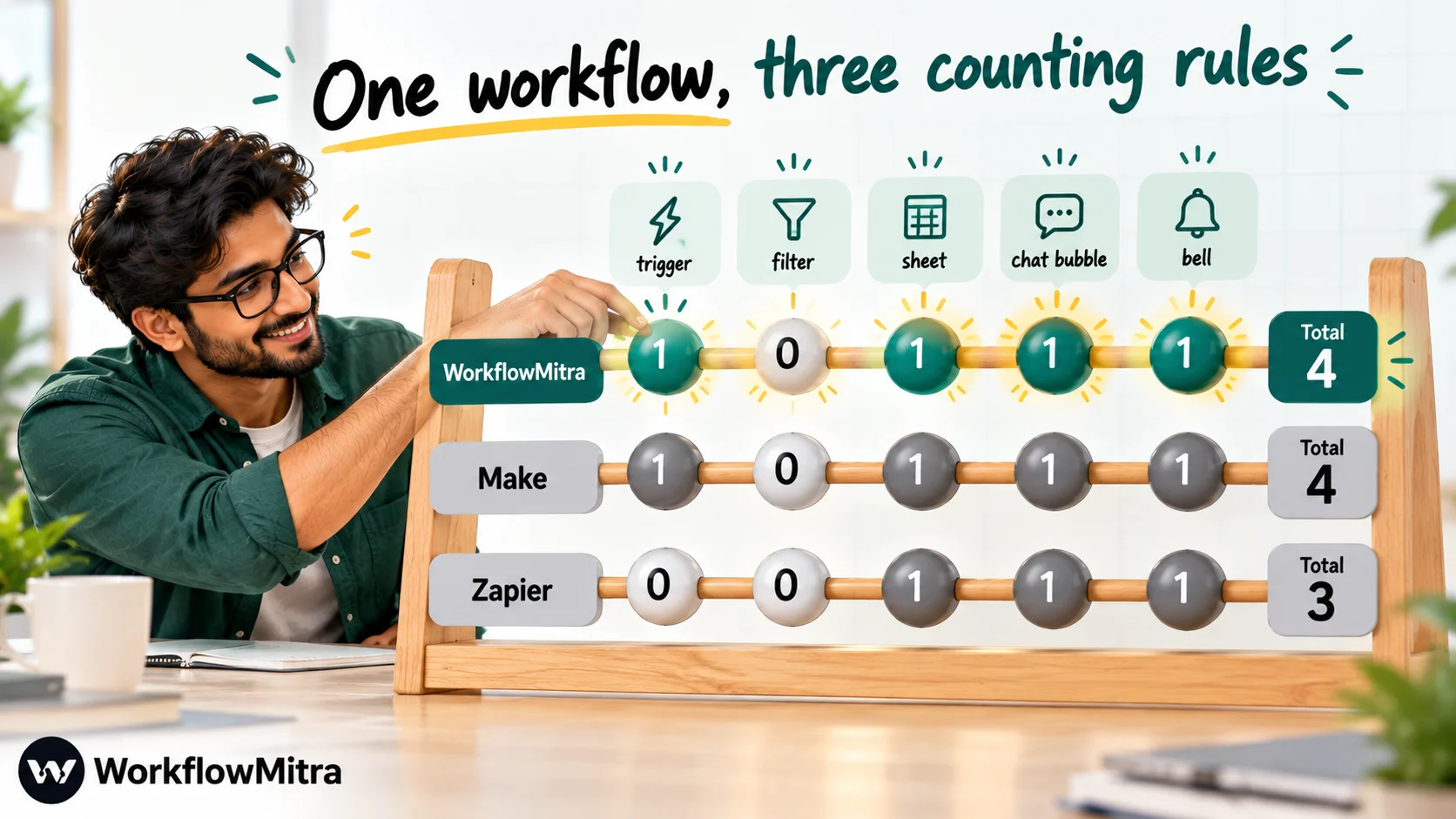
Comparing headline prices without the counting rules is the most common mistake in this comparison, so start with what each tool counts.
What uses a Make credit
Make charges one credit for each module action: reading, searching, creating, updating or deleting data, and transforming, iterating or aggregating it. Routers, filters and error handlers are free. Three details matter for budgeting:
- The trigger always costs a credit. Make’s own training material says the trigger module uses one credit each time it runs, whether it finds fifty new emails or none. A scenario that checks a sheet every 15 minutes therefore uses about 2,880 credits a month (4 checks an hour × 24 hours × 30 days) before it does any work. Instant (webhook) triggers avoid that, because they run only when data arrives.
- Code and AI are metered. Make’s Code app uses 2 credits per second of execution time, and AI modules use a variable number of credits based on tokens.
- Subscenarios are free to call. Logic moved into a subscenario and called through Make’s Scenarios app doesn’t use credits for the call itself.
What uses a Zapier task
Zapier’s unit is the task, and only a successful action creates one. Starting a Zap is free, as are the built-in Filter, Paths, Formatter, Delay and Looping tools, and an action that errors isn’t billed. Some steps cost more than one task: an AI by Zapier step costs 1, 3 or 5 depending on which model tier it uses, and Lead Router costs 5 per lead. Run past your allowance and pay-per-task billing (the default for newer accounts) keeps Zaps running, charging the extra at 1.25× the plan’s per-task rate for yearly subscribers or 2.5× for monthly ones, until usage hits three times the allowance.
Plans and prices
| Plan | Allowance | Price | Key limits |
|---|---|---|---|
| WorkflowMitra 10k | 10,000 credits | ₹999 monthly; ₹849 a month yearly | 10 active workflows, 2 seats, 7-day run history |
| WorkflowMitra 20k | 20,000 credits | ₹1,499 monthly; ₹1,274 a month yearly | 20 workflows, 5 seats, 15-day history |
| Make Free | 1,000 credits | $0 | 2 active scenarios, 15-minute interval, 5-minute runs |
| Make plan | 5,000 credits (more via slider) | $9 a month yearly (≈ ₹864) | Unlimited scenarios, 1-minute interval, 40-minute runs, 30-day logs |
| Zapier Free | 100 tasks | $0 | Two-step Zaps, 15-minute polling, 1 user |
| Zapier Professional | 750 tasks | $29.99 (₹2,949.88) monthly; $19.99 (≈ ₹1,966) a month yearly | Multi-step Zaps, 2-minute polling, 1 user |
| Zapier Professional | 5,000 tasks | $133.50 (≈ ₹13,131) monthly; $89 (≈ ₹8,754) yearly | As above |
| Zapier Team | 2,000 tasks | $103.50 (≈ ₹10,181) monthly; $69 (≈ ₹6,787) yearly | 25 users, SAML single sign-on, 1-minute polling |
Make advertised savings of 15% or more for yearly billing, so its monthly-billed price is higher than $9. Its Enterprise plan adds Make Grid, single sign-on, overage protection and 60-day logs on a custom quote.
Worked example: one lead workflow at three volumes
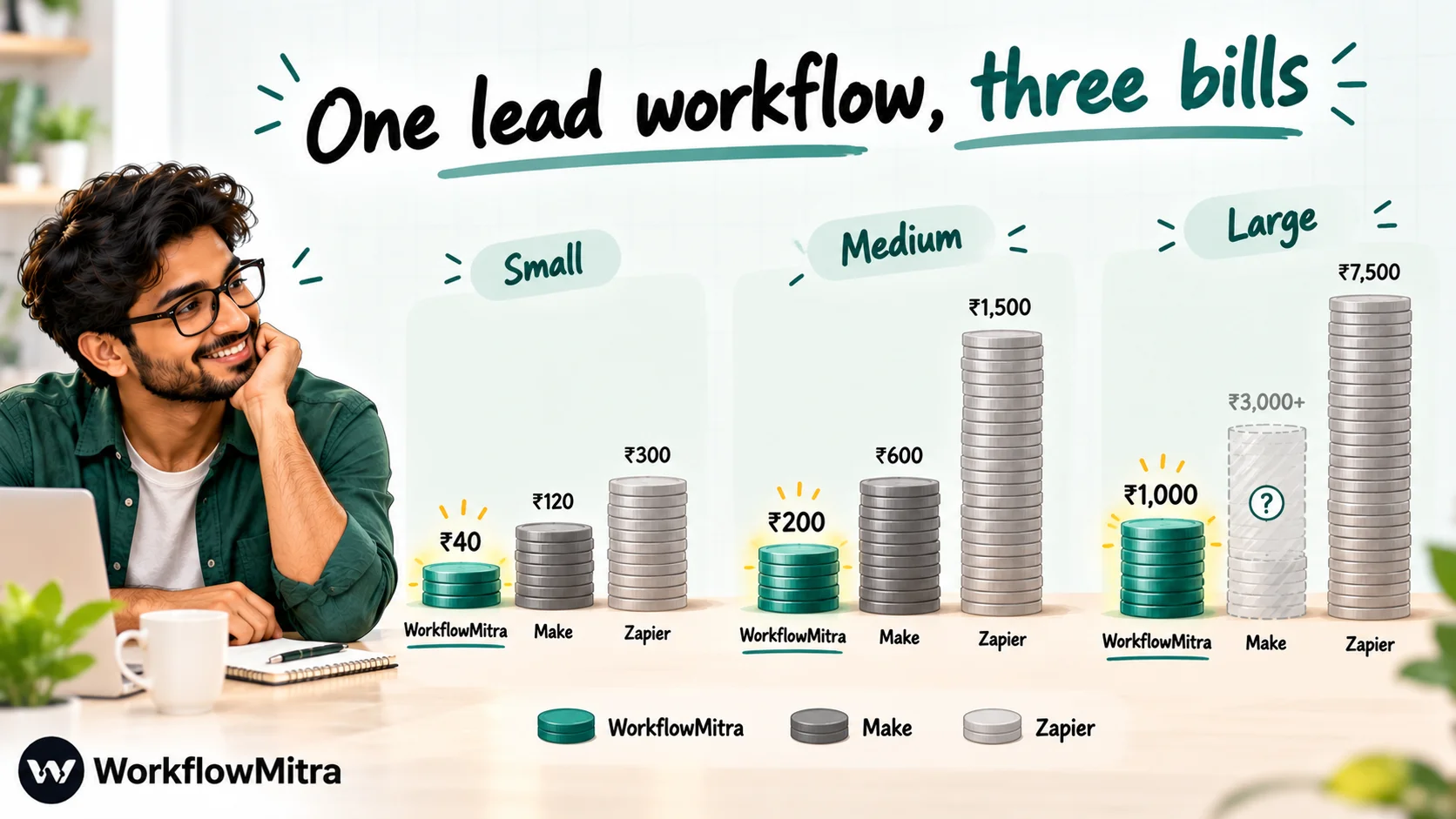
A coaching institute captures enquiries from its website. Each enquiry should:
- arrive by webhook (trigger);
- pass a filter that drops entries without a phone number;
- be added to a Google Sheet;
- receive a WhatsApp template message with the course brochure;
- be posted to the counsellors’ Slack channel.
Usage per enquiry: WorkflowMitra 4 credits (trigger plus three actions; its IF step is free). Make 4 credits (trigger module plus three actions; the filter is free). Zapier 3 tasks (three actions; trigger and filter free).
| Enquiries a month | WorkflowMitra | Make | Zapier |
|---|---|---|---|
| 300 | 1,200 credits: ₹999 (₹849 yearly) | 1,200 credits: Make plan, $9 yearly (≈ ₹864) | 900 tasks: Professional 1,500, ≈ ₹5,754 monthly (≈ ₹3,836 yearly) |
| 1,000 | 4,000 credits: ₹999 (₹849) | 4,000 credits: Make plan, $9 yearly (≈ ₹864) | 3,000 tasks: Professional 5,000, ≈ ₹13,131 (≈ ₹8,754) |
| 3,000 | 12,000 credits: ₹1,499 (₹1,274) | 12,000 credits: a larger tier on Make's slider | 9,000 tasks: Professional 10,000, ≈ ₹19,033 (≈ ₹12,689) |
What the numbers say:
- Make is dramatically cheaper than Zapier for this workflow at every volume we could price, even though it counts one more unit per run.
- WorkflowMitra and Make cost about the same at small volume, and WorkflowMitra’s larger credit allowance per rupee keeps it low as volume grows.
- Switch the trigger to a 15-minute polling check (say, watching a Google Sheet instead of receiving a webhook) and Make adds about 2,880 credits a month for the checks alone, which would push the 1,000-enquiry case past the 5,000-credit plan. Zapier and WorkflowMitra don’t charge for checks that find nothing.
- Zapier’s Team plan is needed as soon as two people must edit Zaps in the same account, which raises its numbers further.
Every tool also leaves WhatsApp’s own costs to you: Meta prices each delivered template message by its category and the recipient’s country. If WorkflowMitra sends through ChatMitra, ChatMitra’s Starter plan adds ₹0.20 per conversation, which covers a customer for 24 hours rather than charging per message. WhatsApp Business cost per message lists Meta’s current rates.
Apps and integrations
Zapier wins this clearly. More than 9,000 apps means almost any SaaS product a business uses already has ready-made Zapier triggers and actions, usually maintained by the app’s own developers. Make’s 3,000+ apps cover the mainstream business tools well. Both have HTTP and webhook modules for anything missing.
WorkflowMitra covers far fewer apps natively, concentrating on what small businesses use most: Google Sheets, email, Slack, Telegram, Zoho CRM, Pipedrive, help desks, databases and signed incoming webhooks from Shopify, WooCommerce, Razorpay and Stripe, among others. Other services are reached through an authenticated App Request step or the HTTP Request step. If an app you depend on isn’t on its integrations page, Make or Zapier is the safer pick.
Logic and data handling
Make is the stronger tool for complex data. Routers create as many branches as you need, each with its own filter. Iterators and aggregators turn lists into items and back, which makes jobs like “for each order line, check stock, then send one summary” natural. Data stores keep values between runs, scenario inputs make a scenario reusable with different parameters, and subscenarios let one scenario call another and get results back.
Zapier handles most business logic comfortably: Paths for branching, Filter to stop a run, Formatter for text, numbers and dates, Looping for lists, Delay for waiting (up to a month), and Tables as a built-in database with views and formulas. Zaps can have up to 100 steps. Code steps run JavaScript or Python and count as one task.
WorkflowMitra keeps logic simple and cheap: IF, Switch, Merge, Loop (up to 1,000 items), Delay (up to 30 days), a Data Store and a JavaScript Code step, with IF, Switch, Merge and Delay costing no credits. It adds two steps the others don’t have as ready-made blocks: Assign to the next person, which rotates leads across up to 200 people, and Wait for approval, which pauses a run until a teammate approves. Zapier offers Lead Router (5 tasks per lead) and Human in the Loop on paid plans for the same jobs; in Make you would build them from data stores and webhooks.
Error handling, history and reliability
Make lets you attach error-handler routes to any module. Ignore carries on past the failure, Resume substitutes a fallback value, Rollback stops the run as an error and tries to undo its changes, Commit stops it as a success, and Break saves the remaining work as an incomplete execution that can be completed automatically or by hand. It keeps previous versions of a scenario for up to 60 days, and the Make plan adds full-text search of execution logs, kept for 30 days.
Zapier makes recovery easier for non-technical teams. On paid plans, errored runs can be replayed automatically, Zaps can carry their own error paths, and earlier versions of a Zap can be restored (roughly 31 days back on Professional, 186 on Team).
WorkflowMitra records each run step by step with every step’s input and output, kept for 7 to 180 days by plan, and sends email or Slack alerts for failed runs, low credits and polling triggers that error or go quiet. It has no version history, and rerunning a failed run isn’t self-serve yet. On recovery tooling, both Make and Zapier are ahead.
AI features
Both platforms have moved quickly on AI. Zapier runs AI by Zapier steps on its own model access, drawing tasks from your plan (1, 3 or 5 per step by model tier), and sells Agents, Chatbots, MCP for AI assistants and Copilot for building Zaps. Make offers AI agents, an AI toolkit and Maia, an assistant for building scenarios; AI modules use credits based on tokens, so cost varies with the size of what you send.
WorkflowMitra takes a bring-your-own-key approach: its AI and AI Agent steps connect to your account with Claude, OpenAI, Gemini, Groq or Ollama. The provider bills the model usage directly, and WorkflowMitra charges one credit per call. If AI agents are central to your plans, Zapier and Make both offer more.
WhatsApp automation
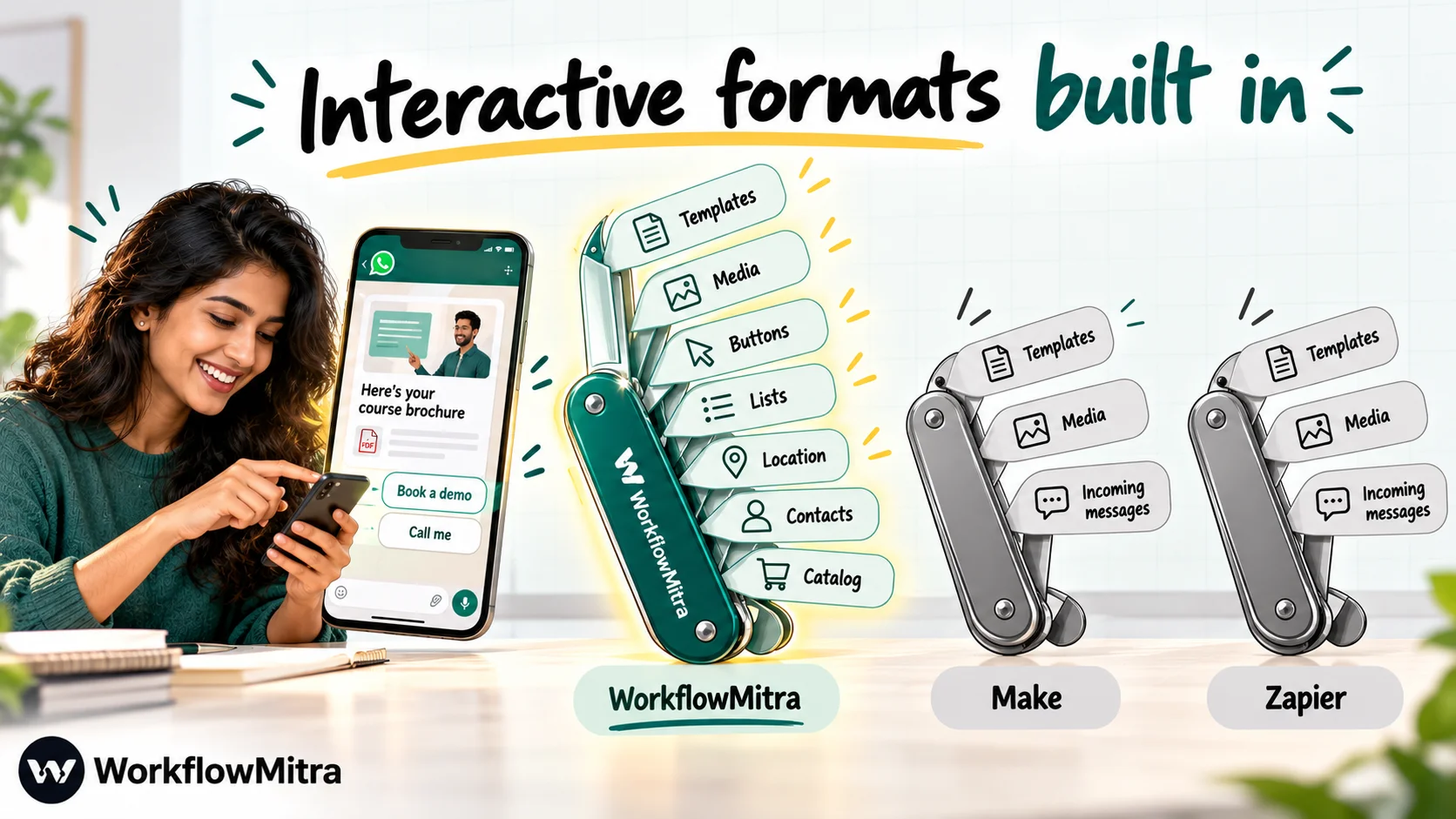
For WhatsApp, Make and Zapier are closer to each other than to a WhatsApp-first tool.
Zapier’s WhatsApp Business app can start a Zap when a message comes in or a message’s status changes. On the sending side it offers template messages, free-form text and media; the free-form and media actions work only while WhatsApp’s 24-hour customer-service window is open.
Make’s WhatsApp Business Cloud app has a Watch Events trigger for incoming messages and actions including Send a Message, Send a Template Message, media upload and download, and business-profile management. Make’s documentation notes that a new conversation must start with a template, and Send a Message is for replies after the customer responds.
WorkflowMitra’s WhatsApp step goes further on formats. Besides text, approved templates and media files, it can send up to three reply buttons, a sectioned list menu, a map location, a contact card, or products from your WhatsApp catalog, delivered through ChatMitra or Meta’s Cloud API. Incoming conversations are best left to ChatMitra, where a shared inbox, chatbots and AI agents for WhatsApp handle replies, while WorkflowMitra sends what other apps trigger.
Teams, security and compliance
Zapier’s Professional plan is for one user; teams need the Team plan (25 users, shared Zaps and SAML single sign-on), and Enterprise adds SCIM provisioning and advanced admin controls. Zapier reports SOC 2 Type II and SOC 3 audit coverage.
Make includes teams and roles on its paid plan and reserves single sign-on and Make Grid for Enterprise. Make states that it has completed SOC 2 Type II and SOC 3 audits, adheres to GDPR, and runs an ISO 27001-certified information security programme.
WorkflowMitra keeps access simple: Owner, Admin, Member and Viewer roles inside a workspace, an audit trail, and encrypted storage for connected-app credentials. The entry plan has 2 seats and larger plans up to 100. There is no single sign-on, and no published third-party security certification. If your customers require SOC 2 reports from every supplier, Make or Zapier will meet that today.
Make vs Zapier by use case
Abstract feature lists only go so far. Here is how the choice usually plays out for workflows small businesses actually build.
Lead capture and follow-up. A form or ad lead goes to a sheet or CRM, the team is alerted, and the lead gets a first message. Zapier is quickest to set up, especially if your form and CRM are niche apps. Make does the same for far less money, and webhooks keep its trigger cost down. If the first message should be a WhatsApp template with buttons, and leads should rotate across salespeople, WorkflowMitra covers both in two steps; the pattern is explained in round-robin lead assignment.
Ecommerce orders. Order data arrives with a list of line items, and you may need to update stock, write each line to a sheet and send one confirmation. That list handling is where Make’s iterators and aggregators shine. Zapier can do it with Looping, but each action inside the loop uses tasks, so a busy store’s bill grows quickly.
Daily and weekly reports. A schedule reads data, summarises it and posts it to Slack or email. All three tools handle this. On Make, a scheduled scenario costs a credit per run plus one per module, which is trivial for a daily report but adds up for frequent checks.
AI drafting and classification. Sorting support emails, drafting replies or summarising feedback. Zapier’s AI by Zapier and Make’s AI modules both work without your own API account; Zapier bills in tasks by model tier, Make in credits by tokens. WorkflowMitra uses your own key, which suits teams that already pay an AI provider.
Approvals. Refunds, discounts or content that needs a manager’s sign-off. Zapier’s Human in the Loop handles this on paid plans; in Make you would design it with webhooks or a second scenario. WorkflowMitra’s Wait for approval step is covered in approval workflow automation.
Syncing many SaaS tools. Marketing, project management, accounting and HR apps exchanging data all day. Zapier’s catalogue makes this the easiest choice, with Make close behind on mainstream apps.
Why use WorkflowMitra instead of Make or Zapier?
Not for app count, AI depth or recovery tooling; on those, the two market leaders are ahead. The case is narrower and practical:
- Your customer channel is WhatsApp. Buttons for “Confirm” and “Reschedule”, a list of open demo slots, a product card from your catalog: these come straight out of WorkflowMitra’s WhatsApp step, with ChatMitra delivering from the number your team already answers.
- You want rupee invoices. WorkflowMitra bills in rupees through Razorpay. Make and Zapier bill in dollars, so the cost moves with the exchange rate and your card’s foreign-transaction fees.
- You need rotation and approvals without assembling them. Both are single steps on every plan.
- You poll a lot. Checks that find nothing are free, and the entry plan allows one-minute polling.
- You want help. WorkflowMitra’s team can design workflows with you through its automation help service.
Where WorkflowMitra is stronger
- WhatsApp formats: reply buttons, list menus, catalog, location and contact messages from one step.
- ChatMitra as the WhatsApp sender, sharing templates and the business number with the team inbox.
- Invoices in rupees, starting at ₹999 a month.
- Lead rotation and human approvals as ready-made steps on every plan.
- Free logic steps and free empty polls.
Where Make and Zapier are stronger
- App catalogues: Zapier 9,000+ and Make 3,000+, against a few dozen native WorkflowMitra integrations.
- Error recovery: Make’s error-handler routes and Zapier’s autoreplay and custom error paths.
- Version history: Make up to 60 days; Zapier about a month on Professional.
- AI: both include broader AI tooling, agents and building assistants.
- Complex data (Make): routers, iterators, aggregators and subscenarios.
- Ease of use and ecosystem (Zapier): the gentlest learning curve and the largest set of ready-made app integrations.
- Free plans: both have permanent free tiers; WorkflowMitra offers a 14-day trial.
- Compliance: both state SOC 2 Type II and SOC 3 audits, and both offer single sign-on.
Which should you choose?
Work down the list; stop at the first clear yes.
- Does a critical workflow depend on an app only Zapier supports? Zapier.
- Will non-technical people build and maintain the automations, and is budget secondary? Zapier.
- Do your workflows branch heavily, process lists or reshape lots of data? Make.
- Is cost per action the deciding factor, in dollars? Make, especially with instant (webhook) triggers.
- Do most workflows end in a WhatsApp message to a customer, with buttons, lists or catalog items? WorkflowMitra.
- Do you want rupee billing, lead rotation and approvals included from the entry plan? WorkflowMitra.
- Still split? Build your busiest workflow on each one’s free plan or trial and compare the effort as well as the bill.
Teams often combine tools: Zapier or Make for SaaS-to-SaaS syncing, WorkflowMitra for customer-facing WhatsApp workflows.
Common mistakes when comparing Make and Zapier
- Comparing $9 with $29.99 and stopping. Count each tool’s units for your actual workflows first.
- Forgetting that Make’s trigger counts on every run, including empty polling checks. Prefer instant triggers where an app supports webhooks.
- Ignoring Zapier’s seat limit. Professional is a single-user plan; a second builder means the Team plan.
- Assuming Make’s lower price means lower total effort. The canvas takes longer to learn; budget that time.
- Overlooking overage rules. Zapier’s pay-per-task rates are 1.25 or 2.5 times the base rate; Make sells extra credits in bundles.
- Choosing on app count alone when your real need is a specific WhatsApp message format or rupee billing.
Moving between Make and Zapier
We found no official converter between the two, so plan on rebuilding each workflow. A careful move goes like this:
- List what you run. Note each workflow’s trigger, apps and monthly usage from the current tool’s history.
- Translate the building blocks. Zapier Paths become Make routers with filters; Looping becomes an iterator, usually followed by an aggregator; Formatter steps become functions inside Make’s mapping. In the other direction, collapse long Make branches into Paths and check that every app module has a Zapier equivalent.
- Re-estimate cost with the new counting rules. Count triggers and polling for Make; count actions and AI tiers for Zapier.
- Run both in parallel for a few days on test data or an internal channel, then switch the trigger and turn the old workflow off.
Choosing between Make, Zapier and WorkflowMitra
Make and Zapier are both strong, mature platforms, and for most SaaS-to-SaaS automation one of them is the right call: Zapier for simplicity and breadth, Make for power and price. The calculation changes when your automations exist to reach customers on WhatsApp. There, the message formats, the sending layer and the currency you pay in matter more than a 9,000-app catalogue.
If that sounds like your business, start a free 14-day WorkflowMitra trial (no card required), build the workflow that sends your most important customer message, and compare it with what you would build in Make or Zapier. Plans are listed on the WorkflowMitra pricing page. For a deeper look at Zapier specifically, read Zapier pricing in India and WorkflowMitra vs Zapier, or browse our wider list of Zapier alternatives.
Make facts were checked on 7 October 2026 on Make's pricing page, Make's help articles on subscenarios, module types and restoring scenarios, its WhatsApp Business Cloud app documentation, its Make Academy unit on credit consumption and its security page. Zapier facts come from Zapier's pricing page, its task rates, its WhatsApp Business app page and its security page, the same day. Exchange rates are from FBIL. WorkflowMitra figures come from its pricing page. Plans change often, so confirm current terms with each vendor.
Frequently Asked Questions
Common questions from teams choosing between Make and Zapier.
Usually, by a wide margin. On 7 October 2026 Make's paid plan started at $9 a month for 5,000 credits on yearly billing, while Zapier's Professional plan started at $19.99 a month for 750 tasks on yearly billing, or $29.99 monthly. Make counts more things than Zapier, including the trigger on every run, so the same workflow uses more Make credits than Zapier tasks, but Make's price per unit is far lower.
Automate the work between your apps
Build workflows with triggers, conditions and actions, then test them before they go live. Try WorkflowMitra free for 14 days, no card required.
