Pipedream Alternatives: Where to Move Before Pipedream Workflows Shuts Down

Quick Summary
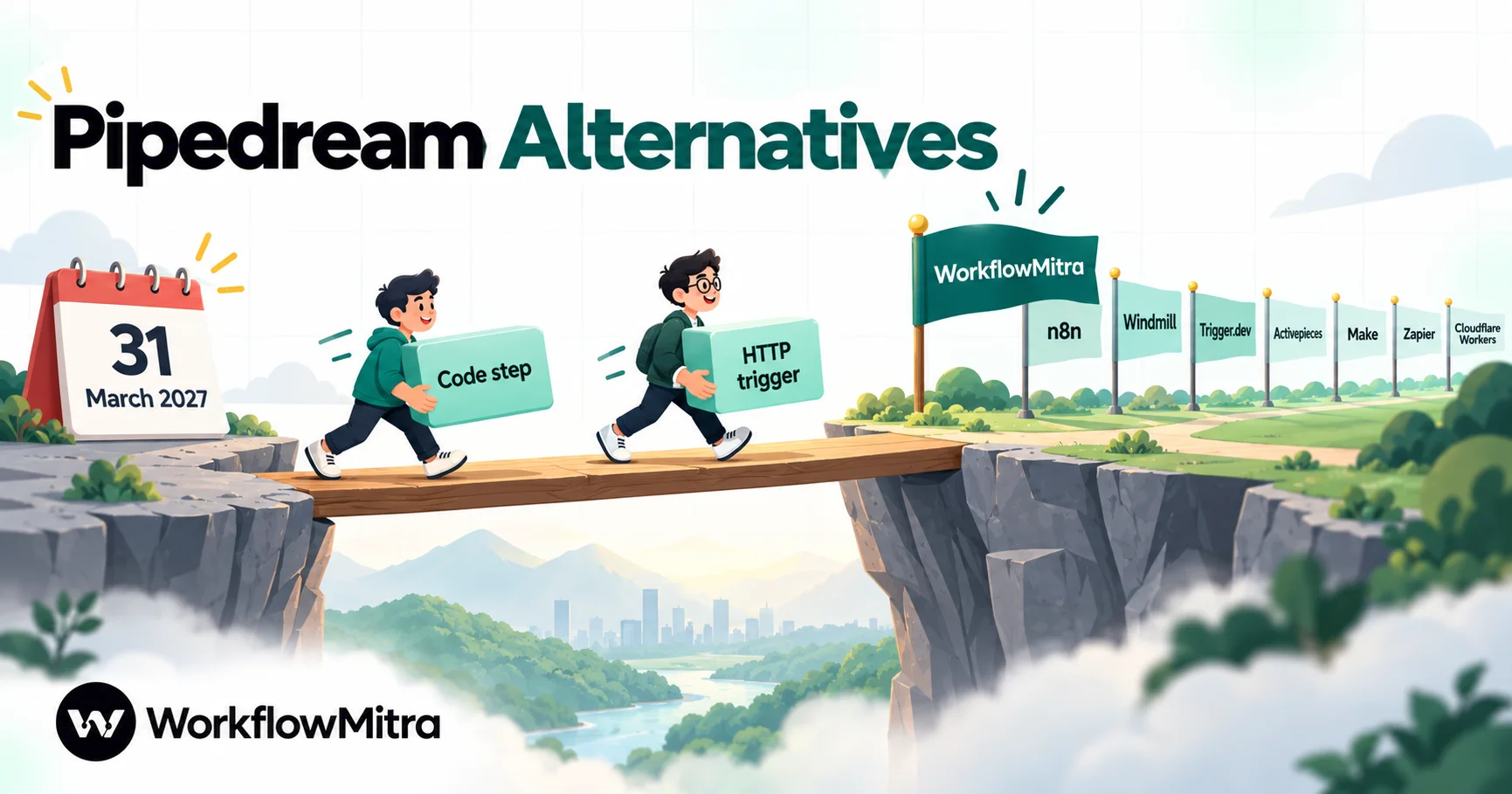
Pipedream Workflows is in maintenance mode, closed to signups, and shuts down on 31 March 2027; workflow data, including connected-account credentials, is deleted by 30 April 2027. Pipedream Connect continues. The right replacement depends on what your workflows do. WorkflowMitra, powered by ChatMitra, suits webhook and app-to-app business workflows that end in a Slack or WhatsApp message, billed in rupees from ₹999 a month. n8n and Windmill suit developers who want to self-host with packages, Trigger.dev suits long-running TypeScript jobs, Activepieces and Make suit per-run or visual building, and Zapier has the largest app catalogue.
Pipedream earned a loyal following among developers for a simple reason: you could paste an npm import into a code step, wire it to an HTTP trigger, and have a working endpoint in minutes, with thousands of app connections waiting behind it. Many teams ended up running their webhooks, Slack alerts, data syncs and small internal APIs on it.
That chapter is closing. Pipedream’s documentation now carries a notice that Pipedream Workflows will shut down on 31 March 2027. Workflows already runs in maintenance mode: no new accounts, no new subscriptions and no new features. All Workflows data, including credentials and OAuth tokens for connected accounts, will be permanently deleted by 30 April 2027.
So “Pipedream alternatives” is no longer a nice-to-have search. If you run workflows there, you need a destination, a migration plan and enough time to test before March. This guide compares eight options against what Pipedream users actually relied on: code steps with packages, HTTP triggers, schedules, app connections and pricing that didn’t punish short workflows. It then lays out a migration plan you can start this week.
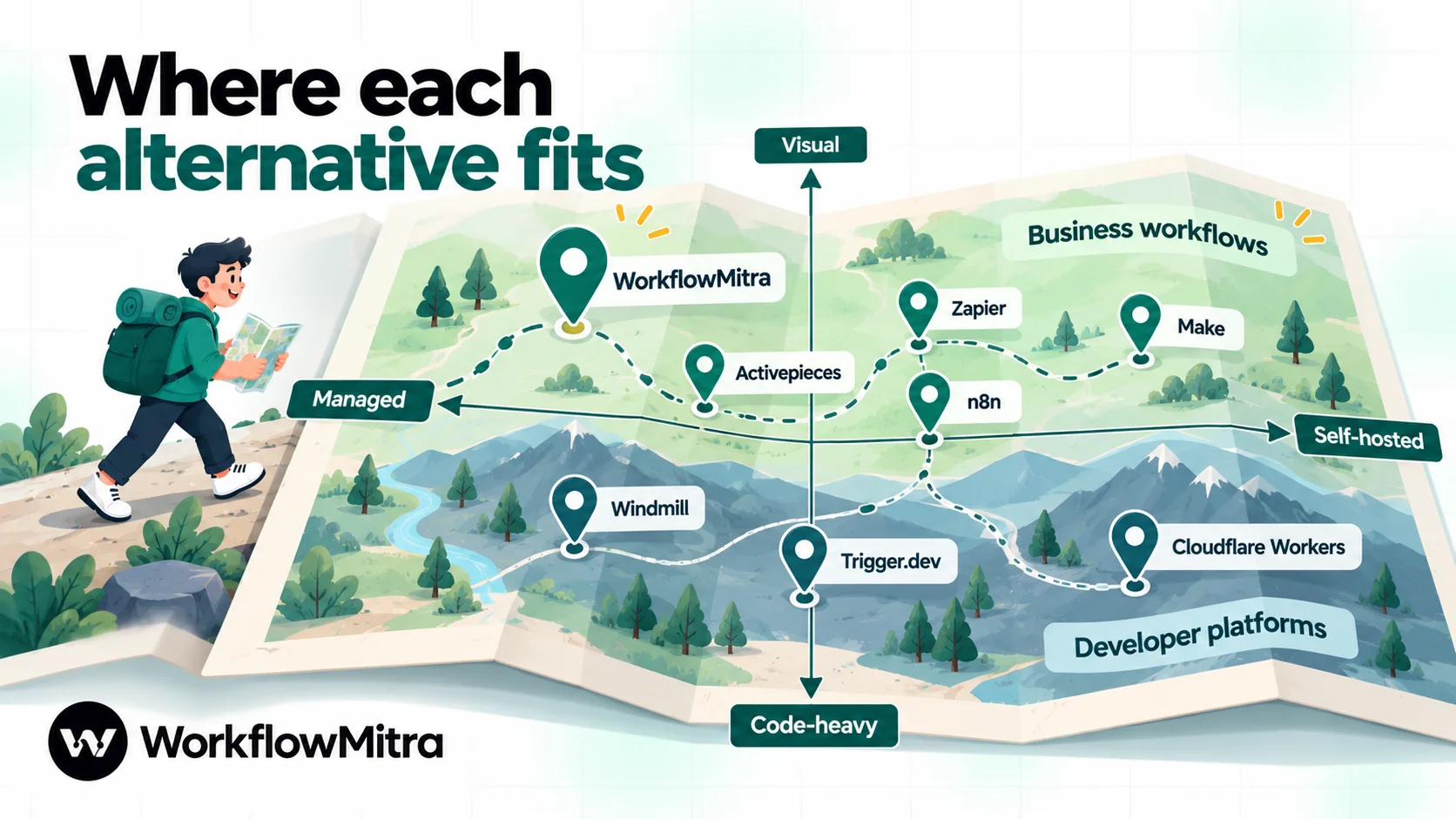
Quick answer: Choose WorkflowMitra (powered by ChatMitra) if your Pipedream workflows are business glue: webhooks, app-to-app syncs, scheduled reports, Slack or WhatsApp messages, billed in rupees from ₹999 a month. Choose n8n or Windmill to self-host with npm or Python packages, Trigger.dev for long-running TypeScript jobs, Activepieces for per-run pricing, Make for visual building, Zapier for the most apps, and serverless functions if you'd rather own the code outright.
What is happening to Pipedream Workflows?
The essentials, from Pipedream’s own documentation as of 7 October 2026:
| What | Detail |
|---|---|
| Status now | Maintenance mode: existing workflows run normally; no new signups, subscriptions or features |
| Shutdown | Workflows and String shut down on 31 March 2027 |
| Data deletion | All Workflows data deleted by 30 April 2027, including connected-account credentials and OAuth tokens |
| Billing | Subscriptions stay active until 31 March 2027, then are cancelled with a prorated refund; monthly subscribers can cancel themselves, annual subscribers contact support |
| What continues | Pipedream Connect (Connect API, MCP servers, API proxy) is not affected |
| Export | Per-project ZIP of workflow JSON files, for reference when rebuilding elsewhere |
The background: Workday announced an agreement to acquire Pipedream on 19 November 2025 and reported the acquisition closed in its fourth fiscal quarter, which ended on 31 January 2026. Pipedream’s notice explains the shutdown as a focus decision: it wants to be “the integration layer companies rely on to connect AI to the outside world”, and Workflows falls outside that.
Two consequences matter for planning. First, Connect is not a replacement for Workflows. It is an API for building integrations into your own product, not a place to host triggers, steps and run history. Second, lists of alternatives published before late 2026 are unreliable. Several still recommend tools that have shut down, such as Relay.app, and at least one popular comparison mentions Pipedream’s acquisition without the shutdown.
What you lose when Pipedream Workflows goes
Before comparing tools, list what your workflows depend on. Pipedream Workflows bundled more than most automation platforms:
- Code steps in Node.js, Python, Go and Bash, with almost any npm or PyPI package available by simply importing it.
- 3,000+ integrated apps with managed OAuth, plus pre-built triggers and actions.
- HTTP triggers that give each workflow a URL, with the ability to return a custom HTTP response, and schedule triggers that work like cron.
- Data stores, Pipedream’s built-in key-value store, for state between runs.
- Credit pricing based on compute time: one credit per 30 seconds of compute at 256 MB per workflow segment, not per step, with no charge for runs during development and testing.
- Generous runtime limits: up to 750 seconds per run and up to 10 GB of memory on paid tiers.
- GitHub sync for teams that kept workflows in version control.
Few platforms match all of that, and none at Pipedream’s price per run for long code-heavy workflows. The practical question is which of these your workflows actually use. A team whose workflows are “webhook in, reformat, post to Slack” has very different needs from one running a 10-minute data pipeline with pandas.
Do you need a workflow platform at all?
Before picking from the list, sort your workflows into three piles, because each pile has a different best answer.
- Business automations. A trigger from an app or form, a few transformations, and actions in other apps: update a sheet, create a CRM record, send a message. These benefit most from a visual platform with ready-made steps, because the people who own the process can then maintain them.
- Developer endpoints and jobs. Code-heavy workflows that call APIs with SDKs, crunch data or run for minutes. These belong on a code-first platform or a serverless runtime, where packages, tests and version control are normal.
- Product integrations. If you were using Pipedream to give your own customers connections to their apps, that is what Pipedream Connect is for, and it isn’t going away. Moving those to a general automation tool would be a step backwards.
Most teams find they have the first two piles. It is perfectly reasonable to move them to two different places.
How to judge a Pipedream alternative
Score each candidate on the criteria that match your workflows, not on catalogue size alone.
- Code step depth. Which languages, which packages, how long can code run, and can it make network calls itself?
- Triggers you rely on. Hosted webhook URLs, signature verification for providers such as Stripe or Shopify, custom HTTP responses, cron schedules with time zones, email triggers.
- App coverage for your actual apps. Check each app you use, and whether the integration has the specific triggers and actions you need, not just a logo.
- Billing unit. Pipedream charged by compute time. Others charge per run, per step, per task or per credit. A five-step workflow can cost five times more on a per-step tool than on a per-run one.
- Hosting. Managed cloud, self-hosted, or both, and under what licence.
- State and data. A key-value store, a database step, or nothing built in.
- Operations. Run history retention, error alerts, replay, version control.
- Time to migrate. No tool imports Pipedream’s export files, so every workflow is a rebuild. Simpler editors shorten that work for non-developers; code-first tools shorten it for developers.
What is WorkflowMitra?
WorkflowMitra, powered by ChatMitra, is a hosted automation platform where small and mid-sized businesses build workflows visually, without code. You build workflows on a visual canvas from triggers (webhooks, schedules, Google Sheets changes, incoming email, RSS, chat messages and more), logic steps (IF, Switch, Loop, Delay, Merge, Code), app steps and messaging steps. ChatMitra, its parent product, provides the WhatsApp Business Platform layer, so workflows can send approved WhatsApp templates and interactive messages through ChatMitra or Meta’s Cloud API.
Who is WorkflowMitra for?
It’s built for business teams and the developers who support them: founders, operations, sales and support teams who want automations they can read and change themselves, and agencies that build workflows for clients. It is a managed service only; there is nothing to self-host.
Why use WorkflowMitra instead of Pipedream?
It’s a good fit for a specific slice of Pipedream workloads:
- Webhook endpoints with real security. The On webhook call trigger has signed presets for Shopify, WooCommerce, Razorpay, Stripe, Typeform and others, plus HMAC signatures, shared secrets, IP allowlists, timestamp tolerance and duplicate skipping. Respond synchronously with a Response step returns a custom status, headers and body, much like Pipedream’s
$.respond(). - Business steps you would otherwise code. Approvals with timeouts, round-robin assignment, durable delays of up to 30 days, Google Sheets, Postgres, MySQL, MongoDB and Redis steps, and an HTTP Request step that turns non-2xx replies into data you can branch on.
- Messaging built in. WhatsApp (via ChatMitra or Meta’s Cloud API), Slack, Telegram, Discord and email steps, with approved-template pickers for WhatsApp.
- Rupee billing. Credits are counted per executed step, logic steps such as IF, Switch and Merge are free, and plans start at ₹999 a month for 10,000 credits.
It is not a like-for-like replacement for a developer platform, and the comparison below says so plainly.
Pipedream alternatives at a glance
| Tool | Best for | Code steps | Hosting | Billing unit | Entry paid price (checked 7 Oct 2026) |
|---|---|---|---|---|---|
| WorkflowMitra | Business webhooks, app syncs, WhatsApp and Slack messages | JavaScript, no packages, 1 s | Managed | One credit per step that runs; IF, Switch and Merge cost nothing | ₹999 a month (10,000 credits); 14-day trial |
| n8n | Self-hosting with code and AI | JavaScript, Python; npm on self-hosted only | Cloud or self-hosted | Execution per run | €24 a month (≈ ₹2,614), €20 yearly, 2,500 executions |
| Windmill | Code-first teams writing scripts in many languages | TypeScript, Python, Go, Bash and more; packages from imports | Self-hosted or cloud | Seats and compute units | Self-hosted community edition free; Enterprise from $120 a month (≈ ₹11,518) |
| Trigger.dev | Long-running TypeScript background jobs | TypeScript with npm; Python via extension | Cloud or self-hosted | Compute seconds plus runs | Hobby $10 a month (≈ ₹960) with $10 usage included |
| Activepieces | Per-run pricing with an MIT core | TypeScript; npm on self-hosted only | Cloud or self-hosted | Credit per run | Plus $20 a month (≈ ₹1,920) for 10,000 credits |
| Make | Visual scenario building | JavaScript, Python (Make Code, paid plans; built-in libraries) | Managed | Credit per module action | $9 a month (≈ ₹864) for 5,000 credits |
| Zapier | The widest app catalogue | JavaScript, Python; npm and PyPI on paid plans | Managed | Task per action | $19.99 a month (≈ ₹1,919) billed yearly, 750 tasks |
| Serverless (Cloudflare Workers) | Full control, lowest running cost | Anything you deploy | Managed runtime | Requests plus CPU time | Free tier; paid from $5 a month (≈ ₹480) |
Rupee figures use FBIL’s reference rates dated 30 September 2026, the newest available on 7 October: $1 = ₹95.98 and €1 = ₹108.94. Your card’s rate and any forex fee will differ.
The 8 best Pipedream alternatives in detail
1. WorkflowMitra: best for business webhooks, app syncs and messaging
WorkflowMitra is the closest fit when your Pipedream workflows were mostly glue between business apps: a Stripe or Razorpay webhook that updates a sheet and messages a customer, a form submission that creates a CRM record and alerts sales, a nightly report posted to Slack. Those workflows usually used Pipedream’s code steps for small reshaping jobs rather than heavy computation, and WorkflowMitra replaces most of that code with named steps.
The webhook trigger is a strength. Signed presets verify Shopify, WooCommerce, Razorpay, Stripe and Typeform requests, duplicate deliveries are skipped by an idempotency key you choose, and synchronous mode lets a workflow answer the caller with its own status and body. The HTTP Request step covers APIs that have no native step, with bearer, basic and API-key authentication. For state, use the Postgres, MySQL, MongoDB or Redis steps against your own database, or a Google Sheet.
Where it falls short for developers: the Code step runs plain JavaScript in a sandbox with a 1-second CPU limit, 128 MB and 10,000 characters, without npm packages, fetch or require. Network calls go through the HTTP Request step instead. There is no Python, no Git sync, no version history and no import or export of workflows, and the native app list is in the dozens, not thousands. Run history is kept for 7 to 180 days depending on the plan. If your Pipedream workflows lean on packages or long-running code, look further down this list.
Pricing: ₹999 a month for 10,000 credits (₹849 a month billed yearly), ₹1,499 for 20,000 and ₹2,699 for 40,000; one credit per executed step; IF, Switch, Merge, Delay and Response steps cost nothing; a Code step costs 2 credits per second of execution, at most 2. A 14-day trial includes 10,000 credits without a card.
2. n8n: best for self-hosting with code and AI
n8n is the most common destination for technical Pipedream users. Its Code node runs JavaScript and Python, its workflows are billed per execution regardless of how many steps they have, and its community edition can be self-hosted. The project lists more than 1,500 integrations.
The package question is where n8n Cloud and self-hosted n8n differ sharply. n8n’s documentation says that on Cloud you can’t import external npm modules (only crypto and moment are provided) and Python can’t import libraries. Self-hosted instances, by contrast, can be configured to load external npm modules. If your Pipedream code imports packages freely, plan on self-hosting.
Pricing: n8n Cloud Starter costs €24 a month, or €20 a month billed yearly, for 2,500 executions; Pro costs €60 (€50 yearly) for 10,000. There’s a trial but no free cloud plan. The self-hosted community edition is free under n8n’s Sustainable Use License, a fair-code licence that isn’t OSI open source.
3. Windmill: best for developers who want packages without friction
Windmill feels the most like Pipedream for code-first teams. Scripts can be TypeScript (Deno, Bun or Node.js), Python, Go, Bash, SQL, PHP, Rust, C# and more, and Windmill resolves and caches dependencies from your import lines, so the “just import it” habit carries over. Scripts can run from schedules, webhooks, email and HTTP routes, and be chained into flows.
It is developer tooling, though. There is no catalogue of thousands of ready-made app actions; you write the API calls, often using shared resources for credentials. Pricing: running Windmill yourself on the community edition costs nothing, with unlimited executions, up to 3 workspaces and 50 users; self-hosted Enterprise starts from $120 a month (≈ ₹11,518). The core is AGPLv3, with some proprietary features in the community binary. Check the cloud plan limits on Windmill’s site; we couldn’t confirm them from the pricing page.
4. Trigger.dev: best for long-running TypeScript jobs
Trigger.dev is a background-jobs platform rather than an automation tool. You write tasks in TypeScript in your own codebase, with any npm package, deploy them, and start them from your application or Trigger.dev’s API. Python can be added through a build extension that installs your requirements. Tasks have no timeouts, which makes it a strong home for the longest-running Pipedream workflows.
The trade-off is that everything is code. There’s no visual editor and no catalogue of app actions, and a Pipedream-style “URL that accepts a webhook” usually means a small route in your own app that hands the event to a task. Pricing: a free plan with $5 of monthly usage, Hobby at $10 a month (≈ ₹960) with $10 of usage included, and Pro at $50 a month. Usage is billed per second of compute plus $0.25 per 10,000 runs. The project is Apache-2.0 licensed and can be self-hosted.
5. Activepieces: best for per-run pricing on an open-source core
Activepieces charges one credit per run regardless of the number of steps, which keeps long workflows cheap, and its community edition is MIT-licensed outside the enterprise folders. It lists more than 760 integrations, called pieces, and has a visual builder with code steps in TypeScript.
As with n8n, packages depend on hosting. Activepieces’ documentation says its cloud runs Code steps in a fresh V8 isolate with no require, no filesystem and no npm; arbitrary npm packages need a self-hosted instance in process sandbox mode. Pricing: a free plan with 1,000 credits, Plus at $20 a month (≈ ₹1,920) for 10,000 credits, then $0.007 per extra credit; AI steps cost more than one credit.
6. Make: best for visual scenario building
Make suits Pipedream users who want a capable visual builder and more than 3,000 apps, and who used code mainly for small transformations. The Make Code app runs JavaScript and Python on paid plans, with built-in libraries such as lodash and moment in JavaScript and requests in Python. Custom libraries are Enterprise-only, and code runs for up to 30 seconds on standard plans.
Billing is per module action: each one counts as a credit, and Make Code costs two credits per second of execution. Make replaced operations with credits in 2025. Pricing: a free plan with 1,000 credits a month, two active scenarios and a 15-minute minimum interval; the Make plan starts at $9 a month (≈ ₹864) for 5,000 credits.
7. Zapier: best for the widest app catalogue
Zapier lists more than 9,000 apps, which matters if your Pipedream workflows touched niche SaaS tools. Code by Zapier runs JavaScript and Python, and Zapier’s help centre now documents npm and PyPI packages in Code steps on Professional, Team and Enterprise plans, with limits: ESM-only JavaScript packages, no native modules, and 512 MB of memory. Code runs for up to 30 seconds per step on Professional and Team.
Zapier bills per task, meaning each action step that runs, and webhooks need a paid plan. Pricing: free for 100 tasks a month with two-step Zaps; Professional from $19.99 a month billed yearly (≈ ₹1,919) for 750 tasks; Team from $69 a month.
8. Serverless functions: best for full control at the lowest cost
Some Pipedream workflows were never really “workflows”: they were a single endpoint with a bit of code. For those, a serverless platform such as Cloudflare Workers, AWS Lambda or Google Cloud Run may be the honest answer. You keep your code and packages, and pay very little.
Cloudflare Workers, for example, has a free tier of 100,000 requests a day with 10 milliseconds of CPU time per invocation and five cron triggers, and a paid plan from $5 a month (≈ ₹480) that includes 10 million requests and 30 million CPU-milliseconds. What you give up is everything around the code: managed OAuth, retries, run history, alerts and a UI for non-developers. You build or buy those yourself.
Also worth a look if it fits your stack: Kestra (open source, YAML flows, 2,100+ plugins, no public cloud price), which publishes its own Pipedream migration notes.
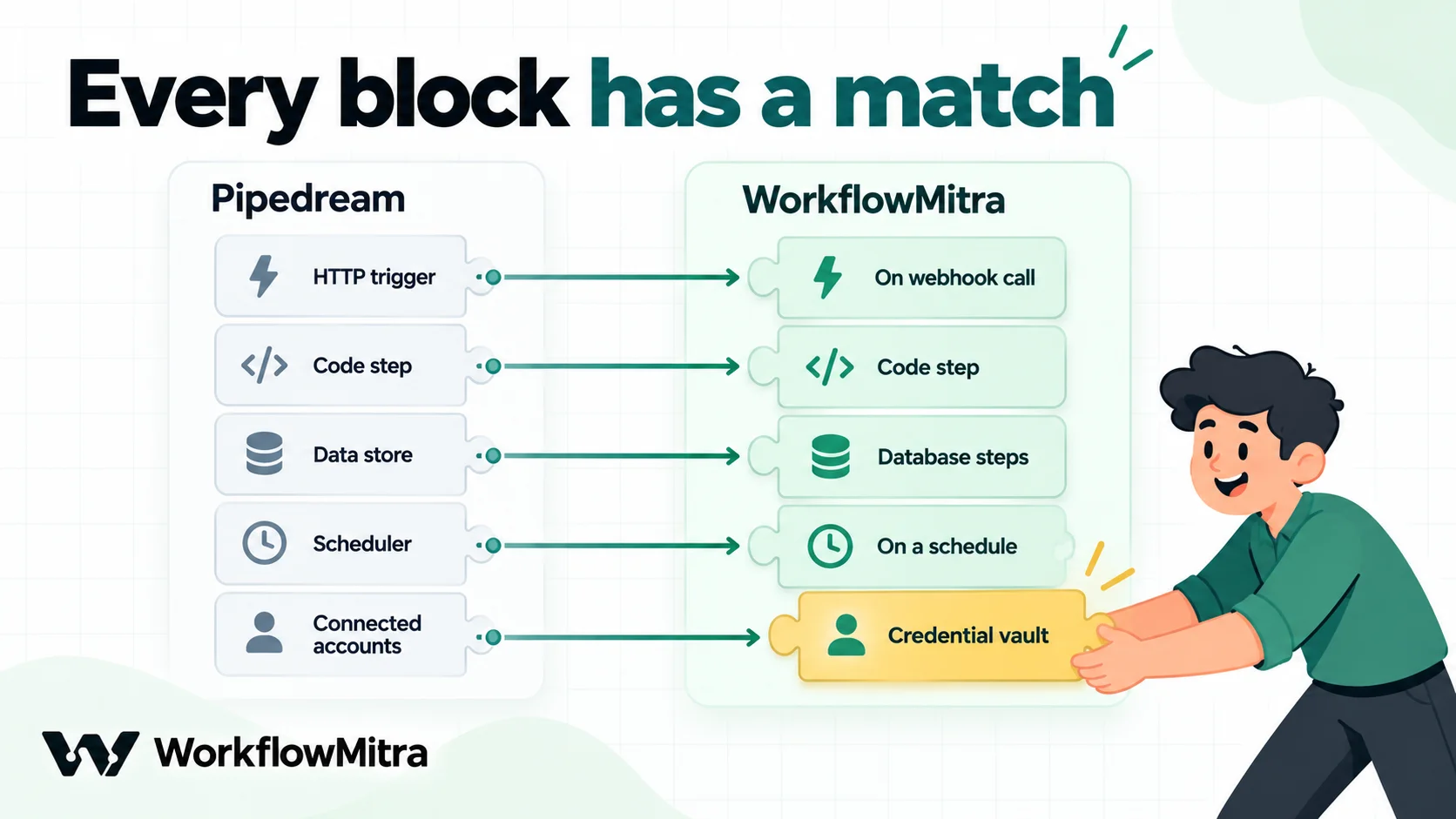
Mapping Pipedream building blocks to WorkflowMitra and others
| Pipedream | WorkflowMitra | Elsewhere |
|---|---|---|
| HTTP / webhook trigger | On webhook call (secrets, HMAC signatures, IP allowlist, duplicate skipping) | n8n Webhook node; Windmill webhooks; Activepieces webhook trigger; Zapier webhooks (paid) |
$.respond() custom response | Respond synchronously + Response step (status, headers, body; 25-second limit) | n8n Respond to Webhook node; Windmill HTTP routes |
| Schedule (cron) | On a schedule (interval or cron, with time zone) | All tools listed; Cloudflare cron triggers |
| Node.js code step with npm | Code step (JavaScript, no packages) plus HTTP Request for network calls | Windmill, Trigger.dev; n8n or Activepieces self-hosted; Zapier paid plans |
| Python code step | Not available | n8n, Windmill, Make Code, Zapier, Trigger.dev extension |
| Data stores | Redis, Postgres, MySQL or MongoDB steps on your own database; Google Sheets | Your own database or Redis, connected from any of the tools |
| Connected accounts (managed OAuth) | Encrypted credential vault; OAuth apps use your own client ID and refresh token | Zapier, Make and n8n Cloud handle the OAuth sign-in for many of their apps |
| Pre-built app actions | Native steps for Google Sheets, WhatsApp, Slack, Telegram, Zoho CRM, Pipedrive, Zendesk and others; App Request for authenticated calls to 14 apps | Zapier 9,000+, Make 3,000+, n8n 1,500+, Activepieces 760+ |
| GitHub sync | Not available | Windmill (Git sync) and Trigger.dev (tasks live in your repository) |
For hands-on help with the WorkflowMitra side, see our guides to Code steps, connecting any API without code and scheduling automations.
Where WorkflowMitra is stronger, and where others are
| WorkflowMitra is stronger at | The alternatives are stronger at |
|---|---|
| Rupee invoices from ₹999 a month, with free logic steps | Free tiers (Zapier, Make, Activepieces, Trigger.dev) and free self-hosting (n8n, Windmill) |
| WhatsApp sending through ChatMitra or Meta's Cloud API, with templates, buttons, lists and media | App catalogues in the thousands (Zapier, Make, n8n) |
| Approvals, round-robin assignment and 30-day durable delays as ready steps | Code with packages, Python and long runtimes (Windmill, Trigger.dev, self-hosted n8n) |
| Webhook security presets and synchronous responses without code | Git-based workflows and code you can export (Windmill, Trigger.dev) |
| A visual editor that non-developers can maintain | Per-run billing that keeps long workflows cheap (n8n, Activepieces, and Pipedream itself) |
The per-step versus per-run point deserves a number. Take a common Pipedream workflow: a webhook arrives, a short code step reshapes the payload, an HTTP request calls an API, and a Slack message goes out, 10,000 times a month. On Pipedream that was typically one credit per run. On WorkflowMitra it’s about three credits per run: one each for the trigger, the HTTP Request and Slack, plus a fraction of a credit for a fast code step. That’s roughly 31,000 credits, which fits the 40,000-credit plan at ₹2,699 a month. Activepieces would bill the same workload as 10,000 credits, its $20 Plus allowance; n8n would need Pro, at €60 a month, for 10,000 executions. For short workflows with a messaging step, WorkflowMitra is competitive; for long multi-step workflows at volume, per-run tools win.
How to migrate from Pipedream before March 2027
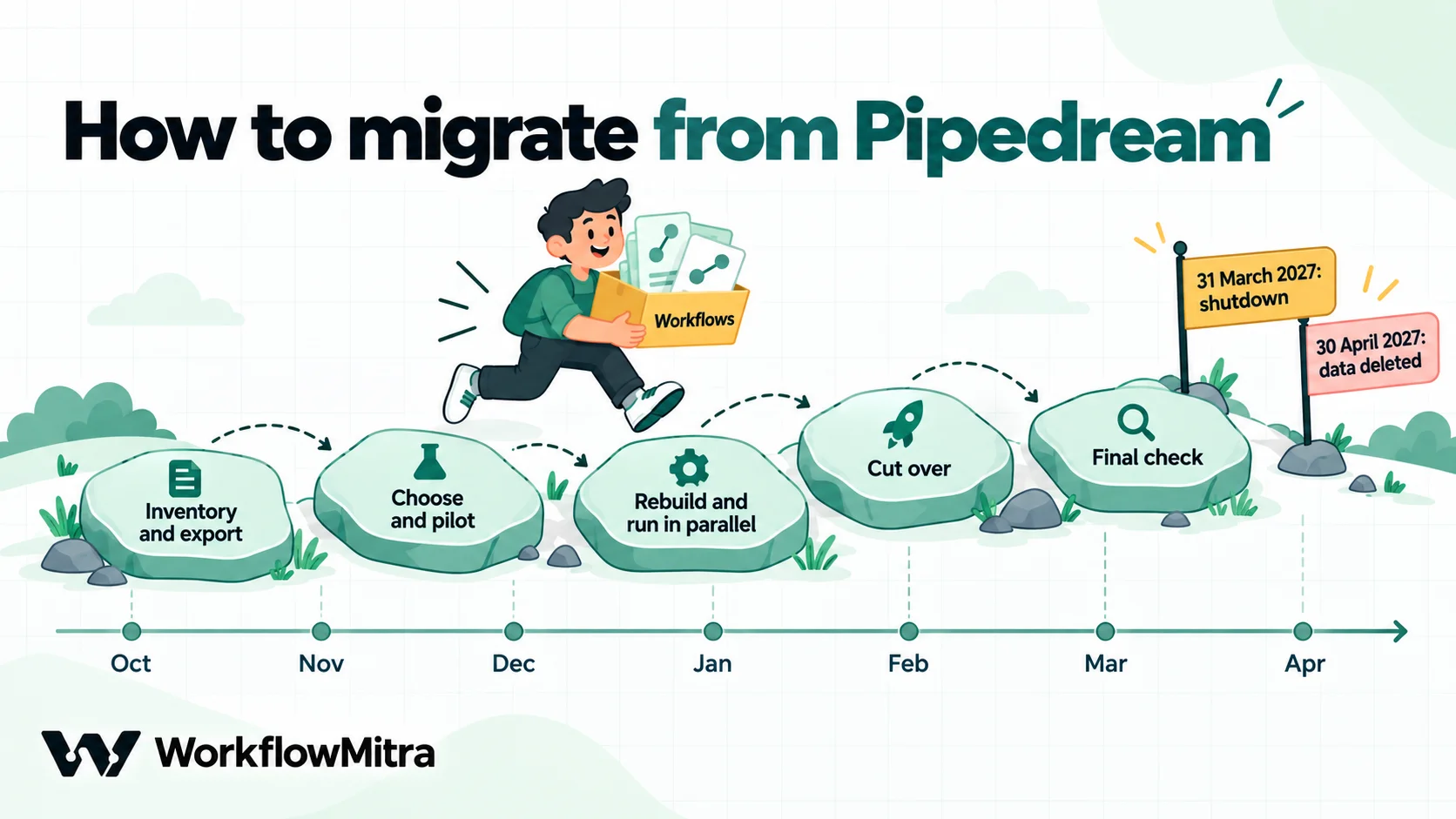
- Inventory everything now. List every workflow with its trigger, apps, code steps, packages, data stores, monthly runs and owner. Note which ones are business-critical and which no one would miss.
- Export before you need it. Use Pipedream’s export to save each project’s workflows as a ZIP of JSON files (it needs a plan with File Stores and handles up to 500 workflows or 256 MB per export). Copy the code from each step too. Secrets, connected accounts, environment variables, event history and data store contents are not exported, so record which credentials each workflow uses and dump data store contents separately.
- Retire what you can. A shutdown is a good moment to delete workflows nobody uses.
- Group workflows by type and pick tools per group. Business glue may suit WorkflowMitra or Make; package-heavy code may suit Windmill or a serverless function. One platform for everything is tidy but not mandatory.
- Pilot the hardest workflow first. Rebuild one representative, difficult workflow on your shortlisted tool before committing.
- Rebuild and run in parallel. Point a copy of the webhook traffic, or a test sender, at the new workflow and compare outputs with Pipedream’s for a week. For webhooks from Stripe, Shopify, Razorpay and similar, add the new URL as a second endpoint first.
- Cut over deliberately. Switch each sender to the new URL, watch the new run history for a day, then turn off the Pipedream workflow. Make sure the new workflow skips duplicates, because senders retry during cutovers.
- Finish early. Aim to be done by February 2027. After 31 March nothing runs, and after 30 April the data and credentials are gone.
If WorkflowMitra is one of your destinations, two habits help: rebuild payload-reshaping code as a Set Variable or Parse JSON step where you can, because named steps are easier for the rest of the team to maintain, and add an error handler with a Slack alert to each critical step, as described in our workflow error handling guide.
Common mistakes when replacing Pipedream
- Assuming Connect covers Workflows. It doesn’t host your workflows; check what you actually use.
- Waiting for an import tool. None of the platforms we checked imports Pipedream’s export files. Treat them as specifications.
- Forgetting OAuth tokens. They are never exported, so every connected account has to be reconnected on the new platform, sometimes with new OAuth app settings.
- Choosing a cloud plan that blocks your packages. n8n Cloud and Activepieces Cloud don’t allow arbitrary npm packages in code steps. Test your heaviest code first.
- Comparing prices per run without counting steps. Per-step and per-task tools can cost several times more than Pipedream did for the same workflow, and per-run tools much less.
- Trusting old comparison lists. Many still recommend Relay.app, which has shut down, or ignore the Pipedream deadline altogether.
Which Pipedream alternative should you choose?
- Your workflows connect business apps, handle webhooks and send Slack, email or WhatsApp messages: WorkflowMitra, or Make if you need its larger app catalogue.
- You need npm or PyPI packages and are happy to run servers: Windmill or self-hosted n8n.
- Your workflows are long-running jobs written as code: Trigger.dev.
- Long multi-step workflows at high volume, priced per run: Activepieces or n8n.
- Niche SaaS apps that nobody else supports: Zapier.
- A handful of endpoints with code you’d like to keep as is: Cloudflare Workers or another serverless platform.
If you’re still unsure, the comparisons of n8n alternatives and Zapier alternatives go deeper into those two families.
Why WorkflowMitra may be the better fit
If your Pipedream account mostly ran business automations, the kind where code was there to reshape a payload rather than do heavy computing, WorkflowMitra, powered by ChatMitra, can replace much of that code with steps your whole team can read. Signed webhooks, synchronous responses, approvals, round-robin assignment, durable delays and WhatsApp messages through ChatMitra are standard features, and the invoice arrives in rupees.
It is not the right home for package-heavy Python or ten-minute data jobs, and we’d rather you move those to Windmill, Trigger.dev or a serverless function than squeeze them into a 1-second code step. Many teams will end up with two homes, and that’s a sensible outcome.
To test the fit, rebuild your busiest webhook workflow in a 14-day WorkflowMitra trial (10,000 credits, no card) and run it alongside Pipedream for a week. Plans are on the pricing page. Whatever you choose, start the inventory this month: the deadline is fixed, and the last few weeks before it will be busy for everyone.
Checked on 7 October 2026 on each vendor's own site: Pipedream Workflows shutdown notice, Pipedream export, Pipedream pricing docs, Workday announcement, n8n pricing, n8n Code node, Windmill, Trigger.dev, Activepieces, Make, Zapier, Cloudflare Workers and WorkflowMitra. Currency conversions use FBIL reference rates for 30 September 2026. Plans and features change often, so recheck them on the day you decide.
Frequently Asked Questions
What Pipedream Workflows users ask before they migrate.
Pipedream Workflows and String are. Pipedream's documentation says Workflows is in maintenance mode, no longer accepts signups or subscriptions, and will shut down on 31 March 2027, with all Workflows data deleted by 30 April 2027. Pipedream Connect, its API for connecting AI agents and apps to third-party accounts, is not affected.
Automate the work between your apps
Build workflows with triggers, conditions and actions, then test them before they go live. Try WorkflowMitra free for 14 days, no card required.