Schedule WhatsApp Broadcasts for Free, Up to 60 Days in Advance
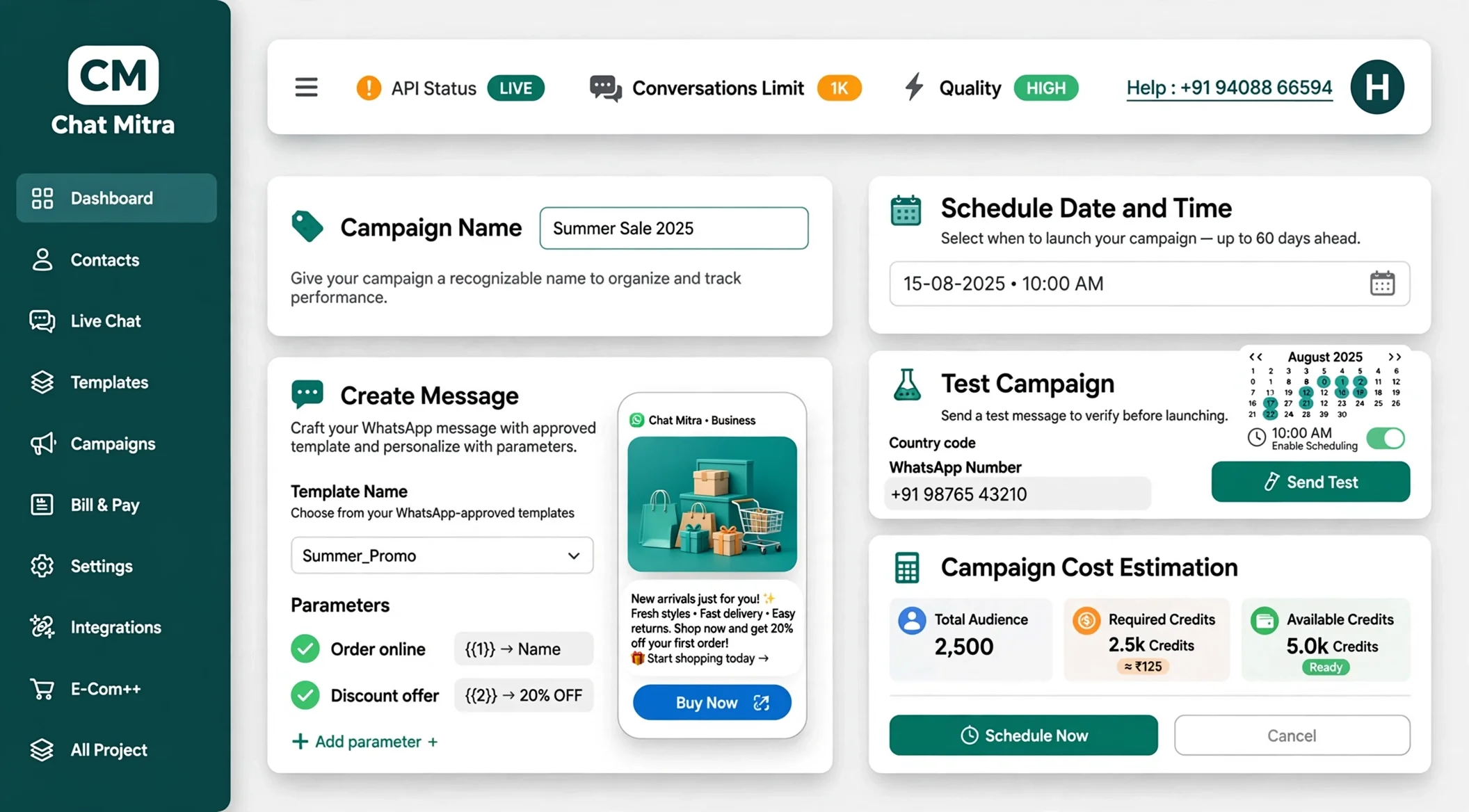
Plan your WhatsApp campaigns weeks in advance with ChatMitra. No scheduling fees. No setup charges. Just send at the right time for maximum engagement.
Schedule broadcasts for optimal times when your customers are most likely to read and respond. Use personalization and targeting to make every message count.
Trusted by Founders and Agencies Worldwide
Loved by 10,000+ big and small brands. World-famous and local across 21+ Countries





















Book a One-to-One Meeting With Our Product Expert
Have questions? We've got answers. Connect with our product expert for a personalized demo and discover the best WhatsApp Business setup for your business.
Book a Free Demo
Perfect Timing: WhatsApp Broadcast Scheduling with Chat Mitra
Timing is everything in customer engagement. With Chat Mitra's advanced broadcast scheduling, you decide when your messages reach your audience—ensuring maximum visibility, higher responses, and effortless campaign control.
Schedule for Maximum Impact
Pick exact dates and times to match customer activity patterns. Send immediately, schedule for later, or automate recurring campaigns like weekly deals or monthly billing reminders. Enjoy full flexibility with options to edit, pause, or cancel even after scheduling—no disruptions, no stress.
Set up campaigns in minutes using an easy-to-follow form. Choose from pre-approved WhatsApp templates for offers, alerts, or updates. Personalize schedules with customer-specific details—so every message feels timely and relevant. Test with sample contacts before scheduling to ensure perfect execution.
Track every scheduled campaign through a live analytics dashboard. Measure delivery rates, reads, clicks, and replies to gauge effectiveness. Spot unresponsive audiences and re-schedule follow-ups automatically. Export detailed reports to fine-tune future campaign timings and ROI.
Try 50 free credits on the free Starter plan—no payment details required
Why Scheduling Messages on WhatsApp Works Better
WhatsApp delivers messages faster and gets higher response rates than email or SMS
98%
Open Rates on WhatsApp
45-60%
Click Through Rates
2.6B+
Active WhatsApp Users Worldwide
70%
Average Engagement Rate
Schedule Broadcasts That Get Results
Complete tools to schedule, personalize, and track WhatsApp campaigns
Free Scheduling up to 60 Days
Plan your campaigns weeks or months in advance with ChatMitra's free scheduling. Schedule as many broadcasts as you need without extra charges. Send on specific dates, at specific times, or on recurring schedules like every Tuesday morning. Your scheduled broadcasts stay active even if you log out, so ChatMitra handles everything automatically.
Real-Time Analytics and Tracking
Monitor your scheduled broadcasts in real time after they send. See delivery rates, open rates, click rates, and customer responses in a live dashboard. Track which customers received, read, or clicked your messages. Export detailed reports for deeper analysis. Use these insights to optimize your next campaign and improve engagement rates.
Send Personalized Messages on Schedule
Add customer names, order details, or custom information to every scheduled message. Personalization increases engagement because customers feel the message was created just for them. You can personalize messages to different segments and schedule them to send at different times. ChatMitra automatically fills in variables when messages send, ensuring accuracy.
Why Schedule Your Broadcasts
Smart scheduling leads to better engagement and stronger customer relationships
Pay Nothing for Scheduling
Scheduling broadcasts is completely free. You only pay ₹0.20 per conversation plus Meta's rates when broadcasts actually send, not when you schedule them. Scheduling sits inside the free Starter plan — no extra subscription, no setup charges, no hidden costs. Schedule as many campaigns as you want.
Reach Customers at Peak Times
Send messages when your audience is most active and likely to engage. Different customer segments check WhatsApp at different times. Scheduling lets you send to each segment at their optimal time. Better timing means higher open rates, more clicks, and more responses.
Create Personalized Experiences
Schedule unique messages for different customer segments with personalized details. Segment A receives a Monday promotion. Segment B receives a Wednesday reminder. Each message includes that customer's name, order number, or relevant details. Personalized scheduled broadcasts get significantly better engagement.
Measure and Improve Results
Track every scheduled broadcast with detailed analytics. See which broadcasts get the highest open rates, clicks, and responses. Compare performance across different campaigns to understand what works. Use these insights to refine your scheduling strategy and continuously improve results.
Scheduling Examples Across Industries
Real scheduling strategies from different business types
E-Commerce Stores
Schedule a weekly Monday morning sale reminder to drive weekend shopping
Schedule an abandoned cart reminder 24 hours after customer stops shopping
Schedule weekly flash sale announcements for Tuesday and Thursday evenings
Schedule order status updates immediately after purchase and again before delivery
Schedule customer feedback requests one week after delivery
Healthcare Providers
Schedule appointment reminders 24 hours before each appointment
Schedule recurring prescription reminders for customers with regular medications
Schedule follow-up care messages one week after treatment
Schedule annual health checkup reminders for all patients
Schedule billing payment reminders on the same date each month
Restaurants and Food Delivery
Schedule happy hour announcements every Friday at 4pm
Schedule weekend brunch promotions on Saturday morning
Schedule loyalty program points reminders once per month
Schedule new menu announcements when items are added
Schedule thank you messages after each delivery
Financial Services
Schedule billing reminders on the same day each month
Schedule quarterly investment statements to customers
Schedule loan payment reminders one week before due date
Schedule tax-related notifications at appropriate times of year
Schedule promotional offers during peak financial periods
Education Institutions
Schedule class start reminders one hour before class begins
Schedule exam schedule announcements two weeks in advance
Schedule result notifications when grades are available
Schedule semester registration reminders at start of term
Schedule monthly academic progress updates to parents
Best Practices for Broadcast Scheduling
Follow these practices to maximize engagement and customer satisfaction
Know Your Customer Activity Patterns
Study when your customers are most active on WhatsApp. Check analytics from past broadcasts to see which times get the best engagement. Different customer segments may be active at different times. Use this data to schedule broadcasts for peak activity times.
Schedule for Business Hours Initially
Start by scheduling broadcasts during standard business hours like 9am to 5pm on weekdays. Most customers check WhatsApp during work breaks. Test different times within business hours to find what works best for your specific audience.
Respect Time Zone Differences
If you have customers across different time zones, schedule separate broadcasts for each zone at their local peak time. Scheduling the same message for 9am works for some customers but might be midnight for others. Segment by time zone and schedule accordingly.
Space Out Your Messages
Do not schedule multiple broadcasts to the same customer within short time periods. Space messages at least one to two days apart. Customers who receive too many messages often unsubscribe. Quality and timing matter more than frequency.
Schedule in Advance
Plan your campaigns at least one to two weeks in advance and schedule them. This gives you time to review content, get approvals, and make changes before broadcasts send. Advance planning also lets you coordinate messaging across different channels.
Review Before Sending
ChatMitra sends you notifications before scheduled broadcasts send. Use this time to review the message, recipient list, and timing one final time. You can edit or cancel if you spot any issues. This safety check prevents mistakes from reaching customers.
Analyze Results After Sending
Review analytics after each scheduled broadcast sends. See which times got the best engagement, which messages drove the most clicks, and which customer segments responded best. Use these insights to optimize your next scheduled campaign.
Test Different Timing
Try scheduling the same message at different times to different customer segments and compare results. See if Tuesday morning performs better than Thursday evening. Let data guide your scheduling decisions rather than assumptions.
Start Scheduling Broadcasts Today
Get 50 free credits and schedule your first WhatsApp campaign. Plan up to 60 days in advance with ChatMitra's free scheduler.
Frequently Asked Questions
What is WhatsApp Broadcast Scheduling?
WhatsApp Broadcast Scheduling allows you to plan and send bulk messages to your customers at a specific date and time in the future instead of sending them immediately. With ChatMitra, you can schedule broadcasts up to 60 days in advance. This helps you reach customers at the perfect time when they are most likely to read and engage with your messages. You can schedule recurring broadcasts for regular campaigns like weekly promotions or monthly bill reminders.
Why should I schedule broadcasts instead of sending immediately?
Timing matters significantly for customer engagement. If you send a message when customers are sleeping or busy, they may miss it or ignore it. By scheduling broadcasts for peak hours when your audience is active, you increase open rates and responses. Scheduling also lets you plan campaigns in advance so you are not creating content at the last minute. You can batch schedule multiple campaigns and let ChatMitra handle the delivery automatically.
How far in advance can I schedule broadcasts with ChatMitra?
ChatMitra allows you to schedule broadcasts up to 60 days in advance. This gives you plenty of time to plan seasonal campaigns, holiday promotions, or regular recurring messages. You can create your entire quarterly marketing calendar in WhatsApp and let the system deliver messages automatically on the dates you choose. This is especially useful for planning campaigns across multiple time zones to reach different customer segments at their optimal times.
Is there an extra cost for scheduling broadcasts?
No, scheduling broadcasts is completely free with ChatMitra. You only pay 0.20 rupees per message when the broadcast is actually sent, plus any applicable Meta charges. Scheduling is included on the free Starter plan — no extra subscription required. If you schedule 10 messages or 10,000 messages, the cost remains the same. This makes it affordable to plan and schedule as many campaigns as you need.
Can I modify a scheduled broadcast before it sends?
Yes, you can edit or cancel scheduled broadcasts before they send. If you notice an error or want to change the content, recipient list, or timing, you can make those changes in ChatMitra before the scheduled time. Once a broadcast has been sent, you cannot modify those messages. However, you can create a follow-up broadcast with corrected information if needed. ChatMitra will alert you via email before scheduled broadcasts send so you have time to review and make changes.
How does scheduling improve my broadcast results?
Scheduling broadcasts for optimal times increases engagement significantly. Customers are more likely to read and respond to messages during business hours than late at night. By analyzing your audience patterns, you can schedule messages for when they are most active. You can also segment your contacts and schedule different messages for different groups at times that match their time zones. Scheduling also lets you space out campaigns so you are not overwhelming customers with too many messages.
Can I personalize messages in scheduled broadcasts?
Yes, you can fully personalize messages in scheduled broadcasts. Use dynamic variables like {1} for customer name, {2} for order number, or {3} for delivery date. When the broadcast sends, these variables automatically fill with each customer's specific information. You can also segment your contact list and schedule different personalized messages for different segments. This makes every scheduled broadcast feel individual and relevant to each customer.
What types of broadcasts can I schedule?
You can schedule any type of broadcast that uses Meta-approved WhatsApp templates. This includes marketing templates for promotional messages, utility templates for transactional messages like order updates, and authentication templates for OTP codes. You can schedule text messages, messages with images or videos, and messages with action buttons. The broadcast must follow WhatsApp compliance rules and use an approved template.
How do I track the performance of scheduled broadcasts?
ChatMitra provides real-time analytics for all scheduled broadcasts. After a broadcast sends, you can see delivery rates showing how many messages were successfully delivered. You can track open rates showing how many customers read the message, click rates showing how many customers clicked buttons or links, and response rates showing how many customers replied. You can also see detailed metrics by time period and compare performance across different broadcasts to identify what messages work best.
Can I schedule recurring broadcasts automatically?
Yes, ChatMitra supports scheduling recurring broadcasts. You can set up daily, weekly, or monthly broadcasts that send automatically on your chosen schedule. For example, you could schedule a weekly Tuesday morning promotion or a monthly payment reminder. Once you set up a recurring broadcast, ChatMitra handles the scheduling automatically. You can pause or cancel recurring broadcasts at any time, and you only pay for messages when they actually send.
What happens if a scheduled broadcast fails to send?
If a scheduled broadcast encounters delivery issues, ChatMitra notifies you immediately with details about what went wrong. Common reasons include invalid phone numbers, customers blocking your number, or network connectivity issues. You can review which contacts failed and retry delivery. ChatMitra also provides detailed error reports so you can identify and fix issues. Our support team can help troubleshoot persistent delivery problems.
Is scheduling broadcasts safe and compliant?
Yes, scheduling broadcasts is completely safe and compliant. ChatMitra uses Meta-approved templates for all scheduled messages, ensuring compliance with WhatsApp policies. Scheduled broadcasts only go to customers who have opted in to receive messages. You can include unsubscribe options for customers who no longer want to receive messages. Scheduling does not change compliance requirements, it just automates the delivery at the time you choose.
Can I schedule broadcasts to specific customer segments?
Yes, you can schedule different broadcasts to different customer segments at different times. Upload your contact list and organize contacts into segments using tags or attributes. Schedule a broadcast to segment A for Tuesday morning and a different broadcast to segment B for Wednesday evening. This ensures each customer group receives relevant messages at their optimal times. Segmented scheduling increases engagement because each message matches what that particular segment cares about.
What do I need to get started with broadcast scheduling?
To start scheduling broadcasts, you need a ChatMitra account, which is free to create. You need a list of customer phone numbers, either in Excel, CSV format, or imported from your CRM. You need to create or select Meta-approved WhatsApp templates for your messages. Once you have these, you can log into ChatMitra, upload your contacts, select a template, write your message, choose your date and time, and schedule. Our guided interface walks you through each step, and our support team is available to help.
How is scheduling better than bulk sending?
Bulk sending sends messages immediately to all contacts at once. Scheduling lets you send at the optimal time when customers are most likely to engage. Bulk sending requires you to be at your computer when you want to send. Scheduling lets you plan campaigns in advance and let ChatMitra handle delivery automatically. Scheduling lets you send at different times to different customer segments in different time zones. Scheduling also gives you time to review and approve messages before they send.
