Send Thousands of WhatsApp Messages for Just 0.20 Rupees Each
Reach your customers instantly on WhatsApp. No subscription required. No message limits. Pay only for what you send and see real results with our powerful broadcasting platform.
Upload your contact list, select a pre-approved template, add your message, and broadcast to thousands of customers in minutes. Track every message with real-time analytics.
Trusted by Founders and Agencies Worldwide
Loved by 10,000+ big and small brands. World-famous and local across 21+ Countries





















How WhatsApp Broadcasting Works with Chat Mitra
Transform your customer communication with our powerful WhatsApp broadcasting platform. Send targeted messages to thousands of customers instantly and track every interaction.
Import Your Contacts Instantly
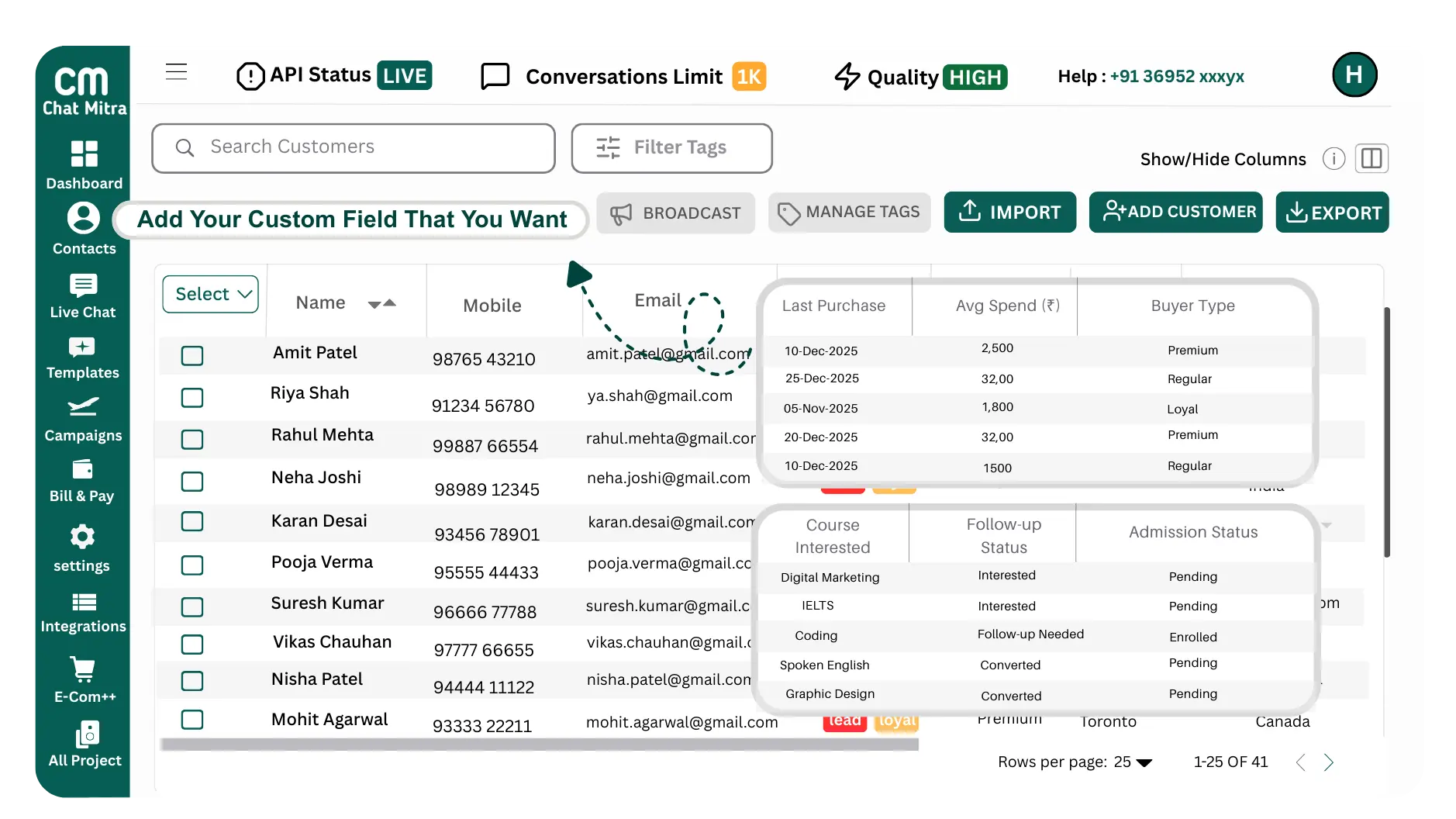
Upload 1 lakh+ contacts in a single click from Excel, CSV, or CRM. Segment contacts with tags, demographics, or opt-ins for laser-focused targeting. Clean, duplicate-free imports so you always reach the right people.
Create Your Campaign Effortlessly
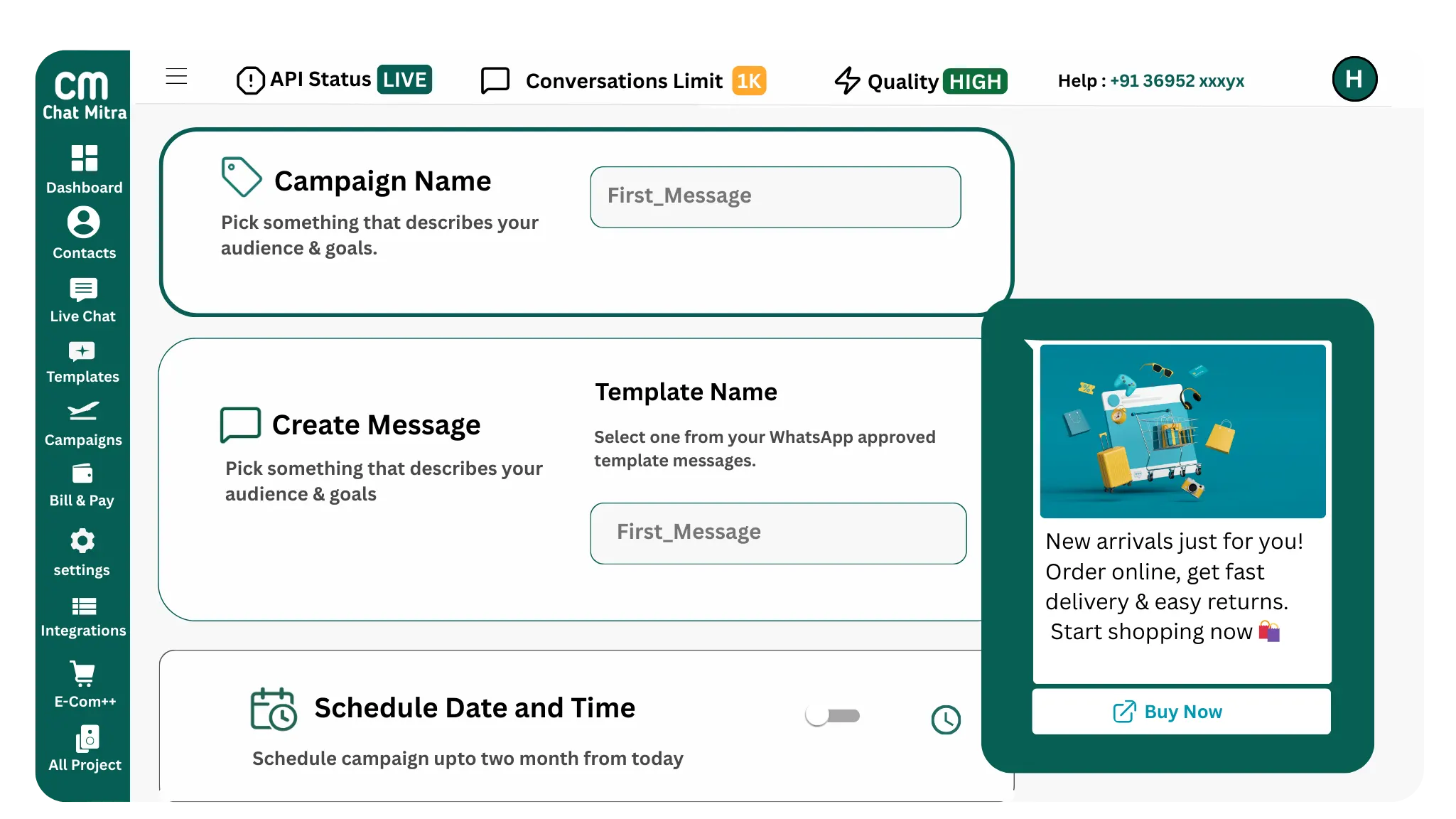
Fill out a simple, guided campaign form in seconds. Choose from Meta-approved WhatsApp templates for promotions, alerts, reminders, or OTPs. Personalize messages with customer names, order IDs, or unique details to boost engagement. Preview your campaign with sample contacts to ensure perfect delivery.
Plan broadcasts for peak customer activity hours. Send instantly or schedule for later — you're always in control. Edit, pause, or cancel campaigns on the go without hassle. Automate recurring campaigns like weekly offers or monthly billing reminders.
Track Powerful Analytics
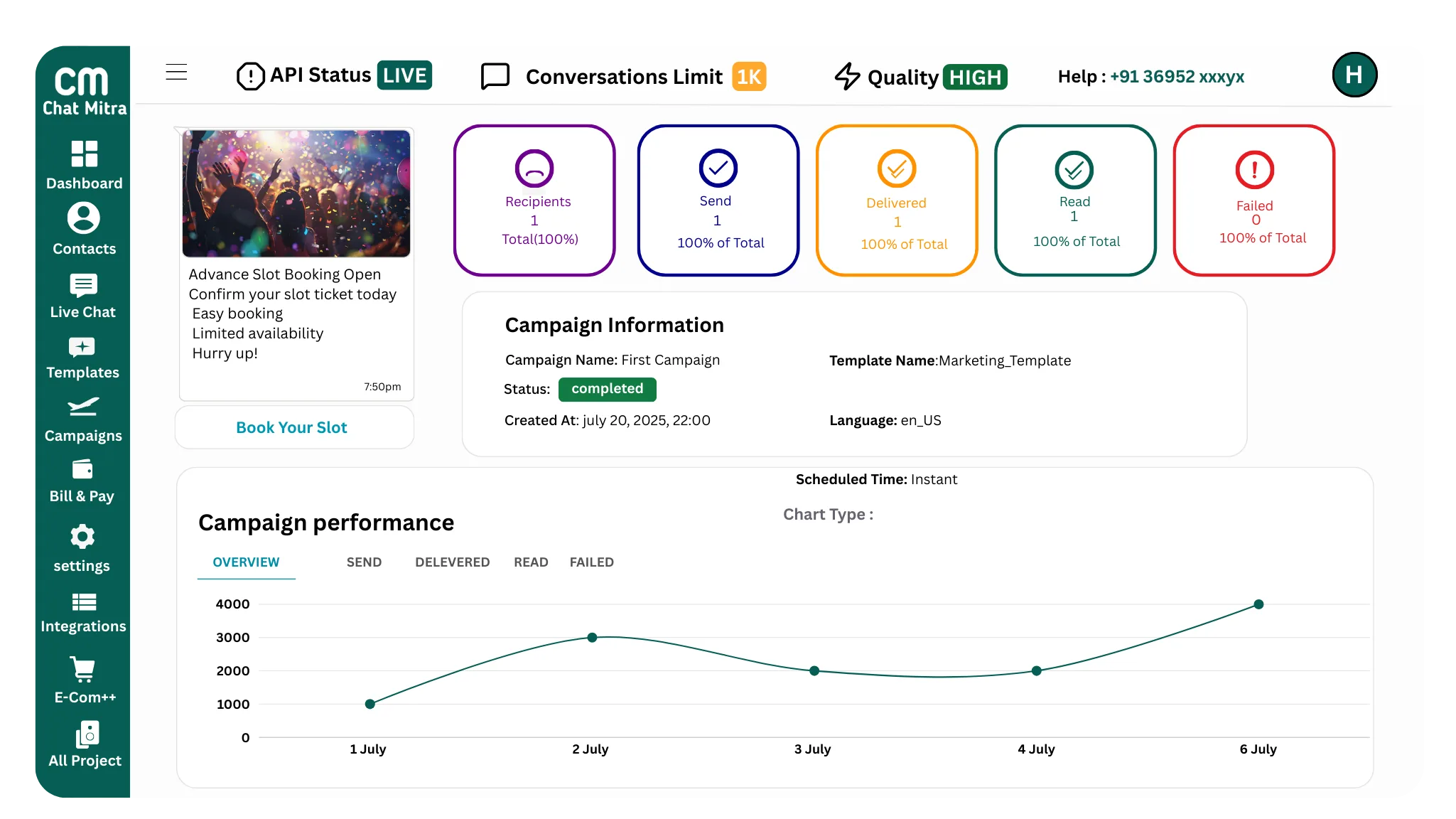
Access a real time analytics dashboard to measure campaign performance. Monitor delivery rates, reads, clicks, and replies with full transparency. Identify drop-offs and re-target unresponsive customers. Export detailed reports to track ROI and optimize future campaigns.
Try 50 free credits—no subscription, no payment details required
Why WhatsApp Broadcasting Works Better
Learn why smart businesses are switching from email and SMS to WhatsApp broadcasting
Higher Engagement Rates Than Email or SMS
WhatsApp messages have a 98 percent open rate compared to email at 20 percent and SMS at 40 percent. Your messages get read and customers respond faster because WhatsApp feels personal and immediate.
Run Campaigns Without the Headache
Upload your contact list, select an approved template, add your message, and broadcast instantly. No complex setup, no technical knowledge required. Everything is built into one simple platform.
Optimize in Real Time
See live statistics for every broadcast showing delivery rates, read rates, clicks, and responses. Adjust your strategy immediately based on what works. Preview messages before sending to catch any issues early.
Send Alerts and Updates Instantly
Send order confirmations, shipment updates, payment reminders, or appointment notifications instantly. Customers see your message immediately and can respond right away, creating real conversations instead of one-way broadcasts.
Real Benefits for Your Business
Reach Customers Instantly
WhatsApp has over two billion users worldwide. Broadcasting lets you reach your customers immediately on their preferred communication channel with high open rates that beat email or SMS every time.
Send at Just 0.20 Rupees Per Message
No hidden fees, no subscription charges. You pay only for what you send. This is the cheapest WhatsApp broadcasting rate available, making it affordable for businesses of any size.
Get Better Customer Responses
Customers respond 45 percent more to WhatsApp messages than email. The instant nature of WhatsApp creates a sense of urgency and personal connection that drives actual responses and conversions.
Keep Your Account Safe
Chat Mitra uses WhatsApp's official business API and follows all guidelines. Your account stays safe with no risk of bans or restrictions. We follow best practices to maintain your deliverability.
Broadcasting Examples Across Industries
See how different businesses use WhatsApp broadcasting to stay connected with customers
E-Commerce and Online Stores
Order Confirmation: Your order {1} has been placed successfully. Total amount: {2}. [Track Order]
Shipping Update: Your order is on the way. Expected delivery {1}. [Track Shipment]
New Product Launch: Check out our new {1} collection. Available now at {2} off. [Shop Now]
Cart Reminder: You left {1} items in your cart. Complete your purchase now. [Continue Shopping]
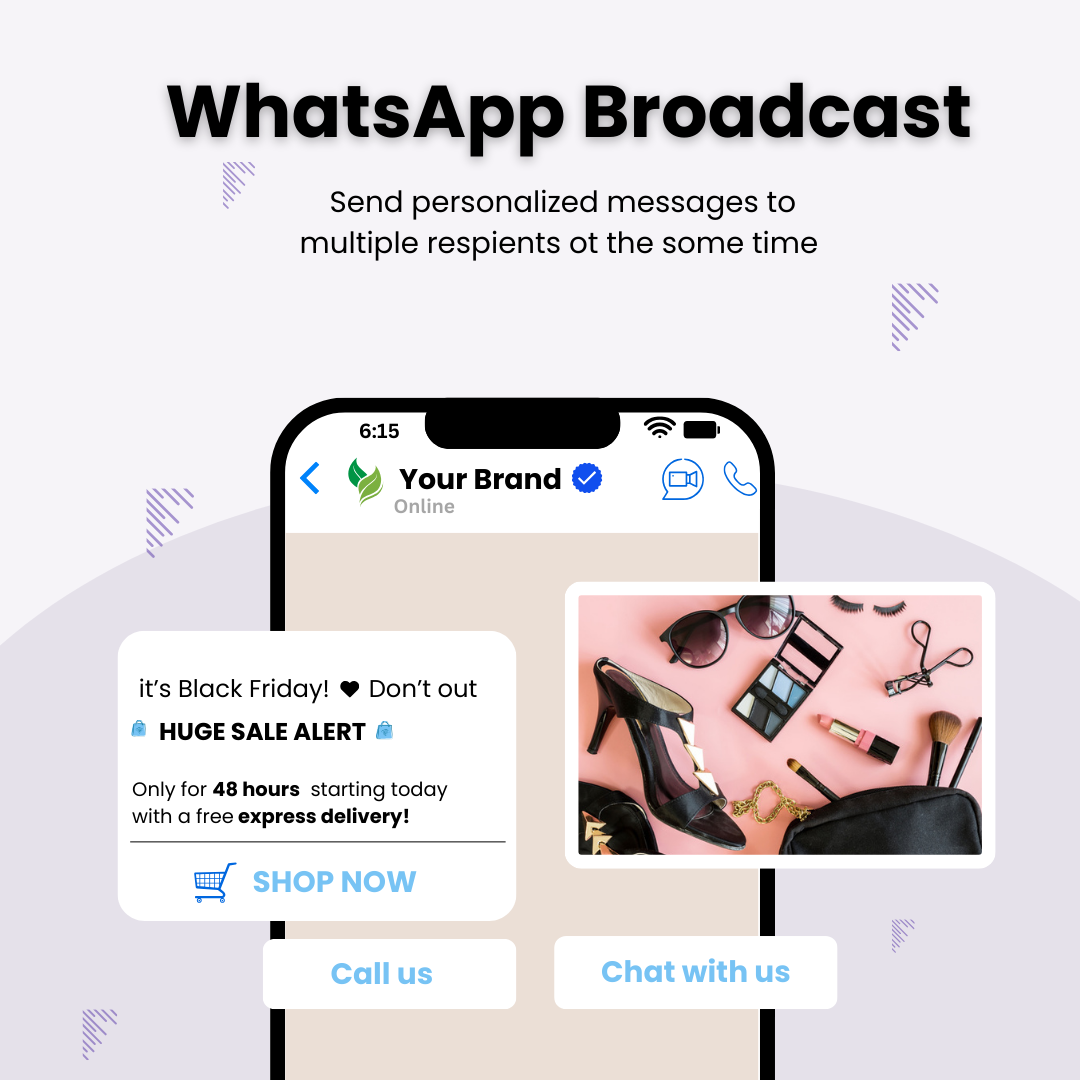
Flash Sale Alert: 48-hour sale starts now. Get {1} off on everything. [Shop Sale]
Healthcare and Appointments
Appointment Reminder: Your appointment with Dr. {1} is tomorrow at {2}. [Confirm Appointment]
Prescription Ready: Your prescription is ready for pickup. [View Details]
Billing Notification: Your medical bill {1} is due on {2}. [Pay Now]
Follow-up Care: How are you feeling after your {1}? Share your experience. [Provide Feedback]
Health Checkup Reminder: Time for your annual checkup. Schedule now. [Book Appointment]
Financial Services and Banks
Transaction Alert: You have received {1} rupees from {2}. Transaction ID: {3}.
Bill Payment Reminder: Your {1} bill of {2} rupees is due on {3}. [Pay Now]
Loan Approval: Congratulations, your loan has been approved. Amount: {1} rupees. [View Details]
Loan EMI Due: Your EMI of {1} rupees is due on {2}. [Pay Now]
New Offer: Get a credit card with zero annual fee. [Apply Now]
Restaurants and Food Delivery
Order Confirmation: Your food order {1} is confirmed. Expected delivery {2}. [Track Order]
Order Status: Your order is being prepared. Ready in {1} minutes. [View Details]
Delivery Update: Your delivery is on the way. Arriving in {1} minutes. [Track Live]
Feedback Request: How was your meal from {1}? Your feedback helps us. [Rate Experience]
Special Offer: Get {1} off on your next order. Use code {2}. [Order Now]
Hotels and Travel
Booking Confirmation: Your stay at {1} from {2} to {3} is confirmed. [View Booking]
Check-in Reminder: Welcome to {1}. Check-in starts at {2}. [View Details]
Special Amenities: Your room includes {1}. [Learn More]
Checkout Reminder: Your checkout time is {1}. Thank you for staying with us. [Checkout]
Guest Review Request: How was your stay at {1}? Share your experience. [Write Review]
Education and Tutoring
Enrollment Confirmation: Welcome to {1}. Your enrollment is confirmed. Classes start {2}. [View Schedule]
Class Reminder: {1} class starts in {2} hours. [Join Class]
Exam Schedule: Your {1} exam is on {2}. [View Details]
Result Notification: Your {1} result is available. Score: {2}. [View Result]
Fee Payment Reminder: Your {1} fee of {2} rupees is due on {3}. [Pay Now]
Broadcasting Best Practices
Follow these practices to maximize engagement and maintain customer relationships
Build an Opt-In Contact List
Only add customers who have explicitly agreed to receive messages from you. Get permission through signup forms, website opt-ins, or SMS confirmations. Never buy contact lists from third parties or add numbers without permission. This protects your reputation and maintains compliance with WhatsApp rules.
Segment Your Audience
Divide your contacts into groups based on customer type, purchase history, interests, or location. Send targeted broadcasts to each segment with relevant content. Segmented campaigns have higher engagement because each message matches what the customer cares about.
Choose the Right Message Type
Use marketing templates for promotions and sales. Use utility templates for transactional messages customers are expecting. Use authentication templates for OTP codes. Each template type has different delivery and approval rules. Matching the right template type to your message ensures faster approval and better delivery.
Write Clear and Compelling Messages
Keep messages short and direct. State what you want immediately. Include a clear call-to-action telling customers what to do next. Avoid excessive punctuation or ALL CAPS. Test messages with a small group before sending to your full list.
Include Personalization
Add customer names and relevant details like order numbers or delivery dates. Personalized messages feel individual rather than broadcast and get higher engagement rates. However, only personalize with data you actually have. Incorrect personalization looks unprofessional.
Monitor Your Analytics
Check delivery and read rates after each broadcast. Track which customers responded and which unsubscribed. Identify patterns in engagement to understand what messages work best. Use these insights to refine future broadcasts.
Respect Unsubscribe Requests
Always include an unsubscribe option in marketing messages. Honor opt-out requests immediately and remove those customers from future broadcasts. Track your unsubscribe rate. A high unsubscribe rate signals your messages are not relevant or too frequent.
Maintain Consistent Branding
Always include your business name so customers know who the message is from. Use consistent messaging and tone across all broadcasts. Build a relationship where customers recognize and trust your communications.
Start Broadcasting to Your Customers Today
Get 50 free credits and send your first broadcast right now. See why thousands of businesses trust Chat Mitra for affordable WhatsApp broadcasting.
Frequently Asked Questions
What is WhatsApp Broadcasting?
WhatsApp Broadcasting is a way to send the same message to multiple customers at once using WhatsApp's official business API. Unlike group chats where everyone sees each other's numbers, broadcasts deliver messages individually and privately to each customer. Each recipient sees the message as if it was sent just to them, making it feel personal rather than like a mass message.
How is broadcasting different from group messages?
Broadcasting is completely private. When you send a broadcast, each customer receives the message individually. They cannot see who else received the message and their replies go only to you, not to other recipients. Group chats, on the other hand, show everyone in the group to all participants and replies are visible to everyone. Broadcasting also has better compliance with WhatsApp rules and Meta guidelines.
What is the cost of WhatsApp Broadcasting with Chat Mitra?
Chat Mitra charges 0.20 rupees per conversation, not per message. A conversation is a 24-hour window where you can send multiple messages to the same customer for one charge. There are no subscription fees, no monthly minimums, and no hidden charges. You pay only for what you send. If Meta has additional charges for certain message types, those are clearly shown before you broadcast.
Do customers need to save my number to receive broadcasts?
No, customers do not need to have your number saved in their contacts. Chat Mitra uses WhatsApp's official business API which allows you to send messages to any phone number regardless of whether it is saved. This means you can reach both existing customers and new prospects without them saving your contact first.
How many contacts can I broadcast to at once?
Chat Mitra supports broadcasting to thousands of contacts at once. You can send to 1000 contacts, 10000 contacts, or even larger lists depending on your needs. There are no hard limits on the number of recipients you can reach in a single broadcast. You simply upload your contact list and Chat Mitra handles the delivery to all contacts.
How do I build and manage my contact list?
You can upload your contacts from Excel spreadsheets, CSV files, or directly from your CRM system. Chat Mitra lets you organize contacts into segments based on tags, demographics, purchase history, or customer type. You can add or remove contacts at any time and clean your list to remove duplicates or unsubscribed customers. Keeping your list organized helps you send targeted broadcasts to specific groups.
Can I personalize messages in broadcasts?
Yes, you can personalize broadcast messages using dynamic variables. Add placeholder variables like {1} for customer name, {2} for order number, or {3} for delivery date. When you send the broadcast, these variables automatically fill with each customer's specific information. Personalization increases engagement because customers feel the message is intended just for them.
What types of messages can I send in broadcasts?
You can send text messages, images, videos, documents, and links in broadcasts. You must use a Meta-approved WhatsApp template for all broadcast messages. Templates come in three types: marketing for promotions, utility for transactional messages, and authentication for OTP codes. Each template type has different delivery rules and approval requirements.
How do I ensure my broadcasts comply with WhatsApp rules?
Always use Meta-approved templates for all broadcasts. Include clear unsubscribe options for marketing messages so customers can opt out. Only send to customers who have opted in to receive messages. Follow messaging frequency recommendations, typically one marketing message per customer per week. Include your business name so customers know who the message is from. Chat Mitra reviews your broadcasts before sending to help catch compliance issues.
What are the best times to send broadcasts?
The best time depends on your audience. Generally, business hours like 9am to 5pm weekdays work well for most businesses. However, some businesses find better engagement in early mornings or evenings. Use Chat Mitra's analytics to see when your customers are most active and responsive. You can schedule broadcasts for specific times to reach customers when they are most likely to engage.
How often should I send broadcasts to avoid spamming customers?
Meta recommends sending no more than one marketing message per customer per week. For transactional messages like order updates or payment reminders, you can send as needed since customers are expecting them. Monitor your opt-out rates, spam complaints, and message response rates. If opt-outs increase or engagement drops, reduce your broadcast frequency. Quality over quantity matters more than sending many broadcasts.
How can I track the performance of my broadcasts?
Chat Mitra provides real-time analytics for every broadcast showing how many messages were delivered, read, clicked, and what responses you received. You can see individual customer interactions and export detailed reports. Track metrics like delivery rate, open rate, click-through rate, and response rate. Use this data to understand what messages work and optimize future broadcasts.
Can I schedule broadcasts for a specific date and time?
Yes, you can schedule broadcasts to send at any future date and time that you choose. This is useful for planning campaigns in advance or sending messages during peak hours when your audience is most active. You can also set up recurring broadcasts for regular messages like weekly offers or monthly billing reminders.
What happens if a broadcast fails to deliver?
Chat Mitra shows you exactly which messages were delivered, failed, or bounced. If a message fails, you can see the reason. Common reasons include invalid phone numbers, customer blocking, or network issues. You can retry failed deliveries or remove those numbers from your list. Chat Mitra's support team can help troubleshoot delivery issues.
Can I edit or resend a broadcast after it is sent?
No, once a broadcast is sent, you cannot edit it or recall the messages that were already delivered. This is a WhatsApp Business API limitation for compliance reasons. However, you can send a follow-up broadcast with corrected information or create a new broadcast with different content for the next campaign.
Is my customer data safe with Chat Mitra?
Yes, Chat Mitra encrypts all data and stores it securely. Your contact lists and customer information are never shared with third parties. Role-based access control ensures only authorized team members can access your data. All data transfers use encrypted HTTPS connections. Chat Mitra complies with data protection standards and regular security audits verify system integrity.